Most ads still ask people to wait. Wait for a page to load. Wait to fill a form. Wait for a follow-up email that may never come. Click-to-message ads flip that on its head.
Instead of pushing people to a landing page and hoping they convert, these ads send prospects straight into a chat. One tap, and they’re already talking to you on WhatsApp, Messenger, or Instagram DMs. No forms. No waiting. Just instant intent.
That’s why these ads convert so well in 2026. People want answers, not funnels. They want to ask a question and get a reply while the interest is still hot.
In this guide, you’ll learn exactly what click-to-message ads are, why they outperform traditional campaigns, and how to run high-converting setups that turn chats into customers, not just clicks.
What Are Click-to-Message Ads, and How Do They Work?
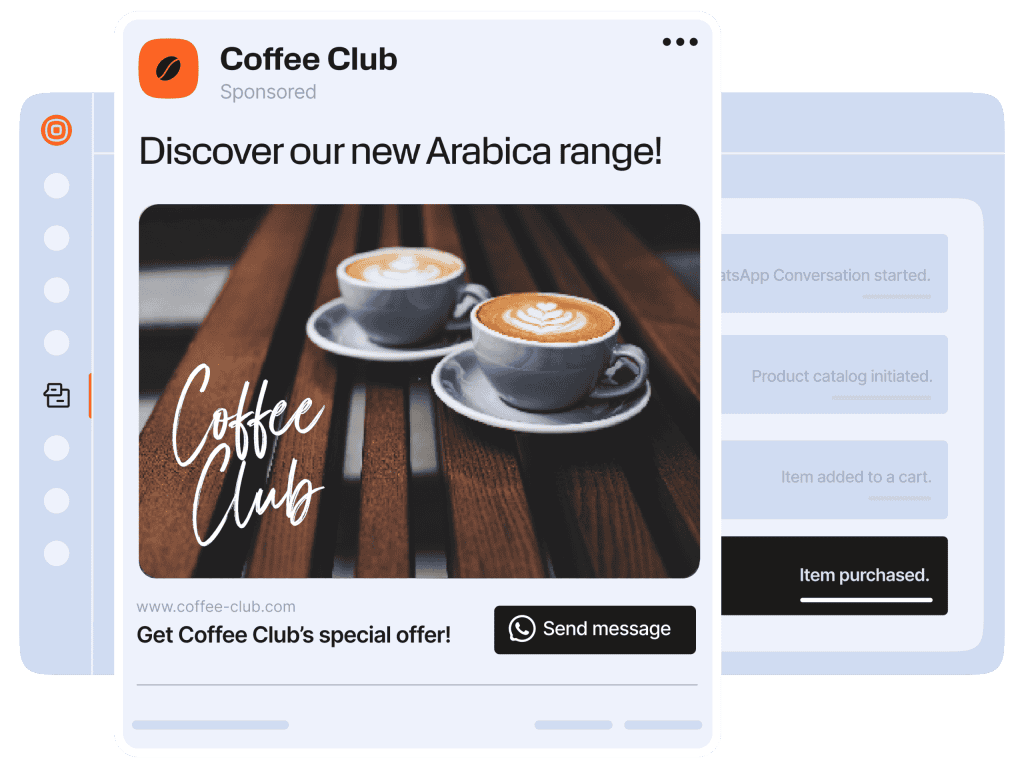
Click-to-message ads are exactly what they sound like. Instead of sending people to a website, these ads send them straight into a conversation. One click, and your potential customer is chatting with you on WhatsApp, Facebook Messenger, or Instagram DMs.
They are more like a shortcut. No landing pages. No forms. No waiting. The ad appears while someone is scrolling, watching stories, or browsing their feed. They tap it, and the chat opens instantly. That’s powerful, because it meets people at the moment they’re curious enough to reach out.
You’ll usually see click-to-message ads across Meta’s most visible placements, including Facebook and Instagram feeds, stories, video feeds, Marketplace, and even the Messenger inbox. These placements matter. People are already engaged there, which makes starting a conversation feel natural instead of forced.
Why Use Click-to-Message Ads?
Click-to-message ads look simple on the surface, but they solve several problems traditional ads struggle with. They replace slow, form-heavy funnels with instant, personal conversations that move leads forward while interest is still high.
Here’s why more brands are leaning into them in 2026.
Higher-Quality Leads
People who click to start a chat are doing more than browsing. They’re raising their hand and saying, “I want to talk.”
Because these ads appear on platforms people already use daily, like Facebook and Instagram, conversations start naturally. Add Meta’s targeting options, and you’re not just getting more leads. You’re getting leads who are more likely to convert.
Faster Lead Conversion
Traditional ads often rely on emails or forms, which slow everything down. Click-to-message ads remove that delay.
When someone clicks, the conversation starts instantly on WhatsApp, Messenger, or Instagram DMs. That way, questions get answered in real time. Objections are handled on the spot. And conversions happen faster because momentum isn’t lost.
Lower Drop-Off Rates
Long forms and slow replies create friction. That’s where many leads disappear. Click-to-message ads reduce drop-off by keeping things simple. One click. One chat. No waiting. No complicated steps. When it’s easy to talk to a brand, more people follow through.
More Accurate Lead Information
Forms often come with bad data. Typos. Fake emails. Incomplete details.
Messaging removes that problem. The conversation itself becomes the lead. You already have a real contact and a live interaction. That makes follow-ups easier and data more reliable.
Click-to-message ads meet customers where they are, remove unnecessary friction, and turn interest into action faster than traditional campaigns. That’s what makes them such a powerful option for modern marketers.
How to Set Up a Click-to-Message Ad Campaign
Setting up a click-to-message ad is simpler than it sounds. The key is choosing the right objective and making sure the conversation that starts after the click is actually worth having.
Here’s how to do it step by step.
Step 1: Create a new campaign in Meta Ads Manager
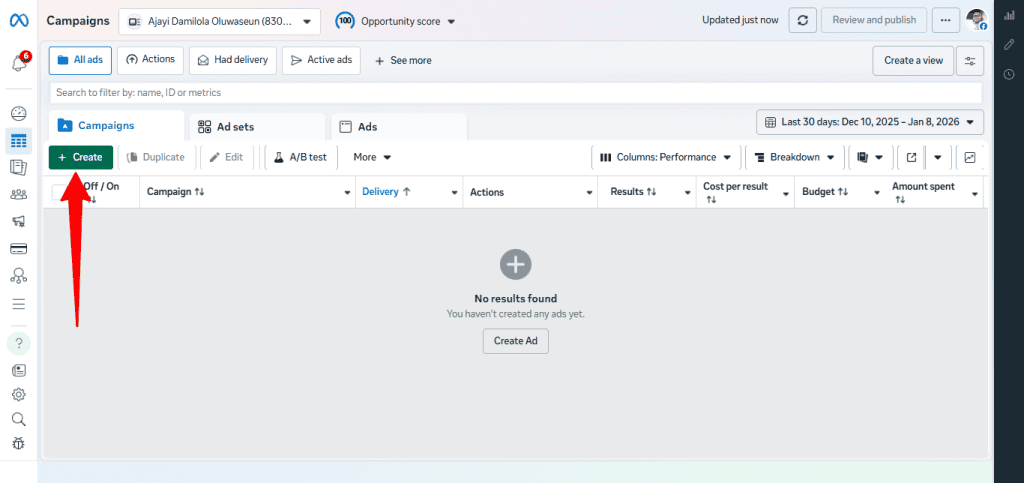
Head to Meta Ads Manager and click Create. This is where everything starts.
Step 2: Choose the right campaign objective
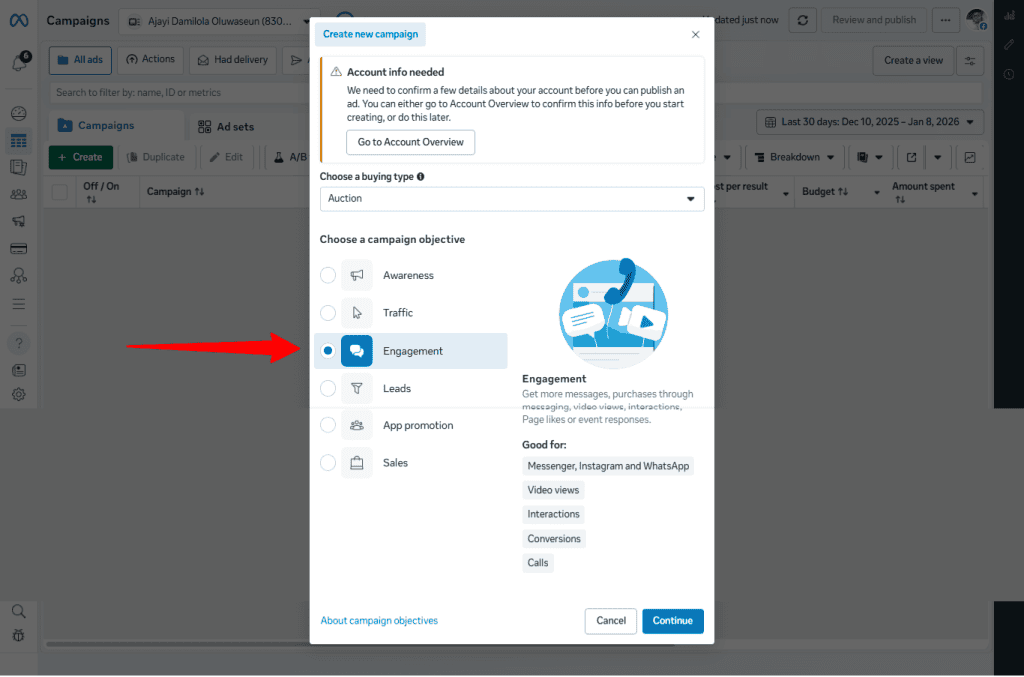
Select the Engagement objective. This is important. Engagement campaigns are optimized to start conversations, not just generate clicks or impressions.
If you plan to qualify leads, automate replies, or route chats into workflows using tools like DMLY, this objective gives you the best results.
Step 3: Name and set up your campaign
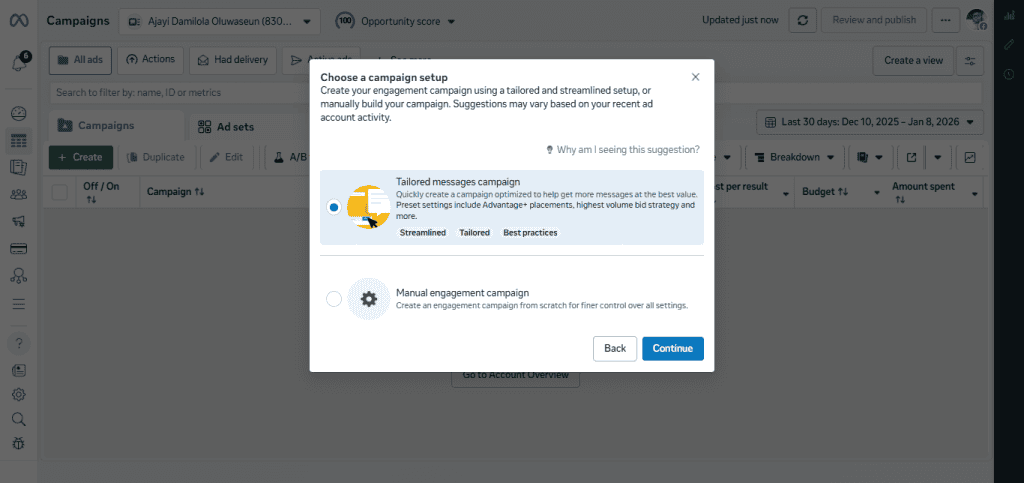
Give your campaign a clear name so it’s easy to track later. This matters more than people think, especially once you start running multiple ads.
Step 4: Configure the ad set
This is where the strategy comes in.
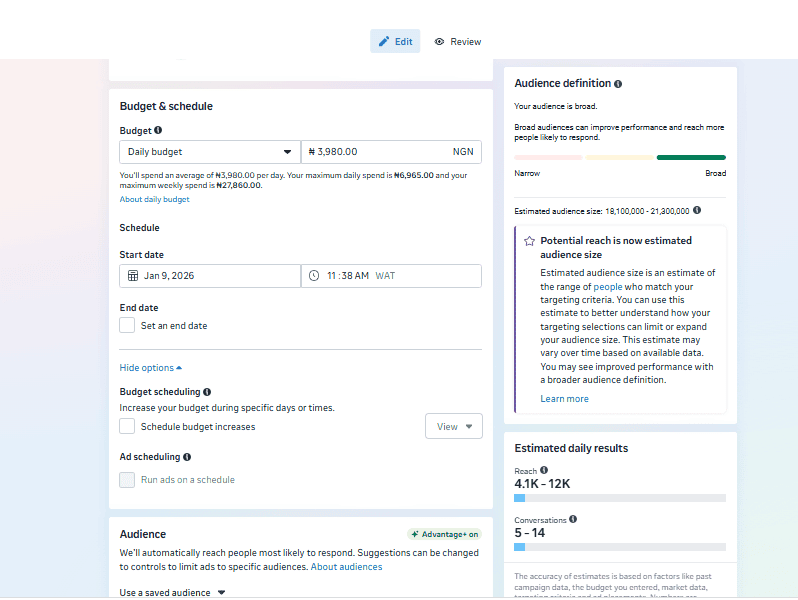
- Choose Click to Message as the ad type
- Select your messaging destination, such as WhatsApp, Messenger, or Instagram DMs
- Set your budget and schedule
- Define your audience using location, interests, behaviors, or custom audiences
- Choose placements (automatic placements usually work well to start)
- Review optimization and delivery settings
The goal here is simple. Put the ad in front of people who are most likely to start a conversation, not just scroll past.
Step 5: Create the ad itself
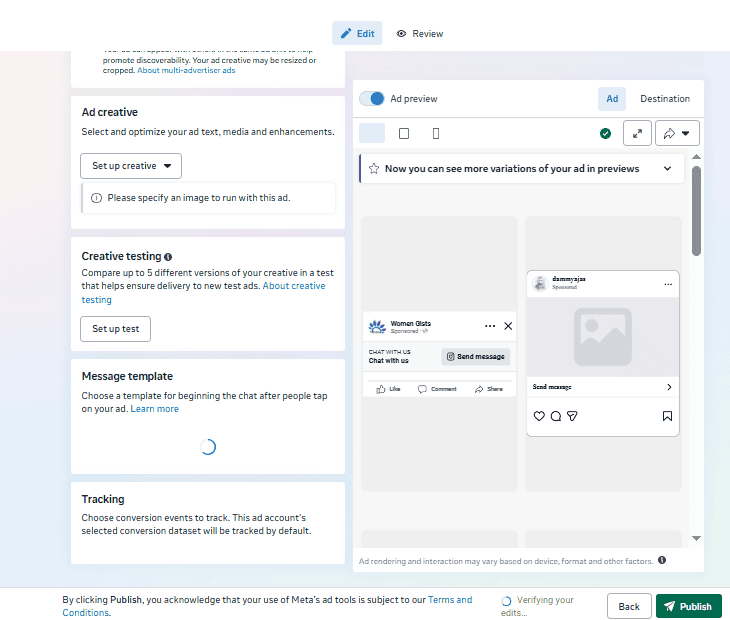
Now you design what people see.
Write copy that invites a conversation, not a click. Phrases like “Chat with us,” “Ask us anything,” or “Get instant answers” set the right expectation. Pair that with a clear visual and a strong call to action.
Once everything looks good, publish the campaign.
From there, the real work begins after the click. That’s where fast replies, automation, and smart conversation flows turn chats into real results.
Integrating Your Ad Campaigns with DMLY
Running click-to-message ads is only half the job. What really determines performance is what happens after someone clicks. This is where DMLY makes a noticeable difference.
DMLY is built to catch, manage, and convert the conversations your ads generate, without overwhelming your team or slowing response times. Try DMly for free now to see all that you can get from it.
Capture and manage every lead automatically
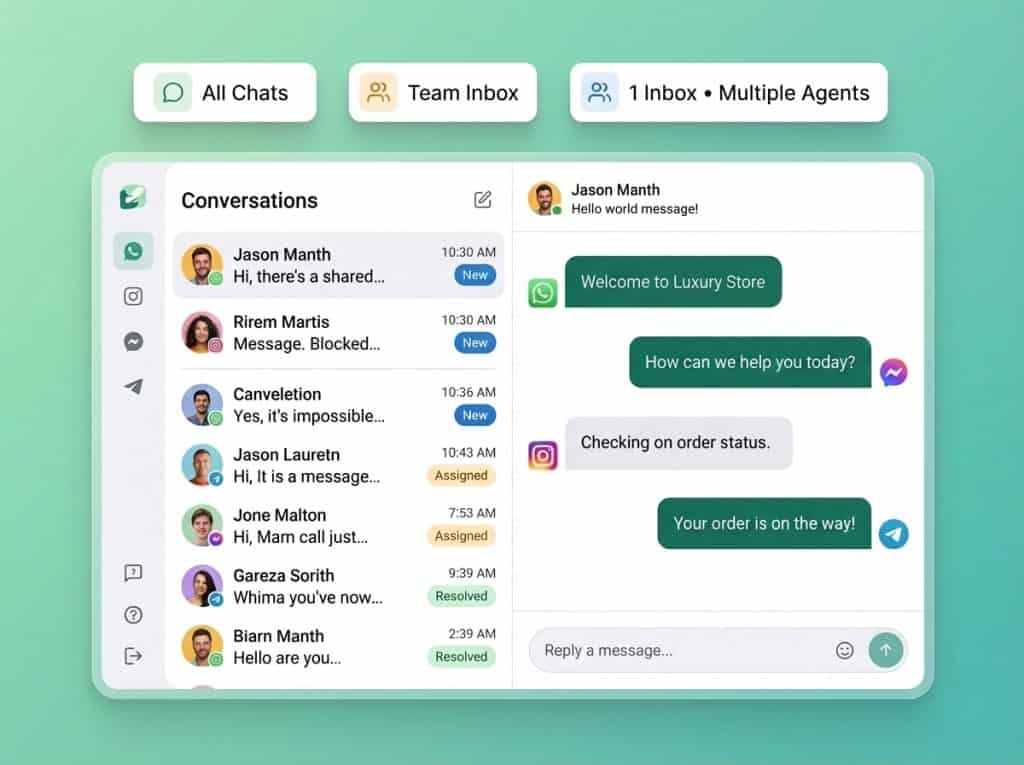
When someone clicks your ad and starts a chat on WhatsApp, Instagram, or Messenger, the conversation flows straight into DMLY’s unified inbox. Nothing gets lost. No switching tools. No guessing which ad the lead came from.
All inbound chats are tagged, logged, and visible to your team in real time, making it easier to prioritize high-intent leads as they come in.
Respond instantly with AI agents
Speed matters with click-to-message ads. You can create and train DMLY’s AI agents to reply instantly to new conversations. It can help handle FAQs, qualify leads, share product details, or guide users to the next step.
When a conversation needs a human touch, the handover is seamless. Your team sees the full context and can pick up the chat without friction. This keeps response times low while maintaining a natural conversation flow.
Qualify leads before your team steps in
Not every click is ready to buy. DMLY’s automation flows help you filter and qualify leads automatically. You can ask smart follow-up questions, tag users based on responses, and route high-value leads directly to sales.
This means your team spends less time on low-intent chats and more time closing real opportunities.
Automate follow-ups and re-engagement
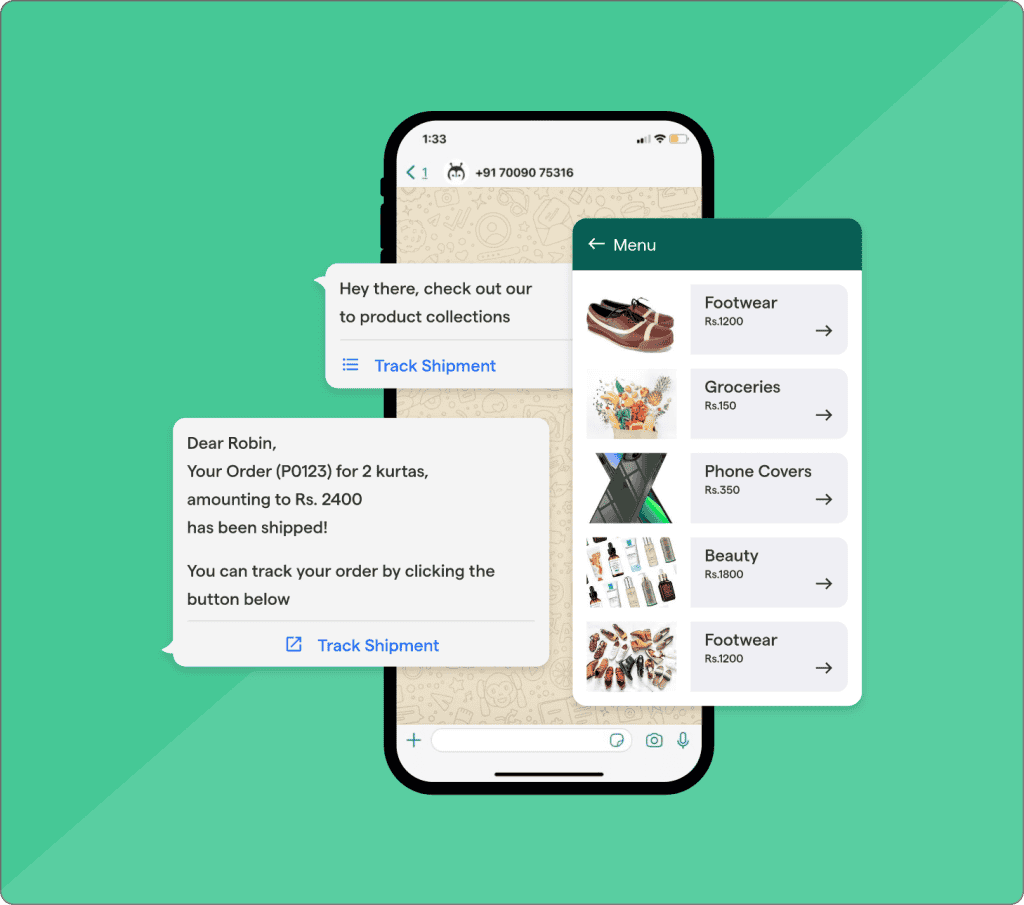
Not every conversation converts on the first interaction. With DMLY, you can follow up using approved WhatsApp templates, automated workflows, or AI-driven nudges, all while staying compliant.
This is ideal for re-engaging stalled conversations, sending reminders, or retargeting leads who didn’t convert right away.
Scale campaigns without losing control
As ad volume grows, manual handling breaks down. DMLY is designed to scale. Team inbox features let you assign conversations, approve replies, and collaborate without chaos. Multi-workspace support makes it easy to manage multiple brands or campaigns from one account.
Connect ads to the rest of your stack
DMLY integrates with ecommerce platforms, CRMs, Zapier, n8n, and APIs, allowing conversation data to flow into your wider marketing and sales systems. This turns chats into usable data, not isolated messages.
The result is simple. Click-to-message ads bring people in. DMLY makes sure those conversations are answered fast, handled smartly, and turned into measurable business results.
Click-to-Message Ad Best Practices
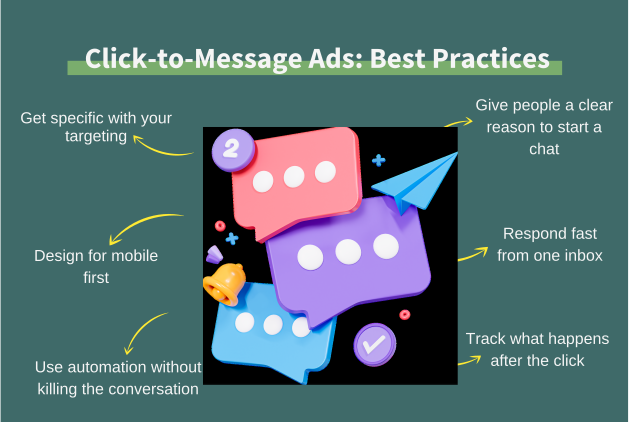
Click-to-message ads work best when they’re intentional. A few smart choices can turn casual clicks into real conversations, and real conversations into customers.
1. Get specific with your targeting
Broad targeting usually means low-quality chats. The best results come from knowing exactly who you want to talk to and building your audience around that.
Use Meta’s targeting options to reach people who actually match your ideal customer profile. Interests, behaviors, location, and even past interactions all help narrow the field. Fewer chats with higher intent will always outperform lots of random ones.
2. Give people a clear reason to start a chat
A chat button alone isn’t enough. Your ad needs to answer one simple question: Why should I message you right now?
Invite conversation around something specific. A limited offer. Help choosing the right plan. A quick quote. A problem you can solve fast. When the reason is clear, people are far more likely to click and engage.
3. Design for mobile first
Most click-to-message ads are seen on phones, so everything should feel effortless on a small screen.
Keep copy short. Make the value obvious within seconds. Use visuals that communicate the message without needing long explanations. Mobile users scroll fast, so clarity beats cleverness every time.
4. Respond fast from one inbox
Speed can make or break these campaigns. When someone clicks to chat, they expect a reply almost immediately.
Managing all conversations from a single inbox helps avoid missed messages and slow responses. Automated replies can handle the first interaction, while available agents step in when needed. Even outside working hours, setting expectations keeps interest alive.
5. Use automation without killing the conversation
Automation should support the chat, not take it over. Use it to answer common questions, qualify leads, or guide people to the next step. Once intent is clear, hand the conversation to a human. This balance keeps things efficient while still feeling personal.
6. Track what happens after the click
Clicks are just the starting point. The real insight comes from what happens inside the conversation.
Pay attention to response times, engagement, and conversions. Look at where chats stall and where they move forward. Re-engaging people who drop off mid-conversation, sometimes with a timely nudge or offer, can unlock extra conversions without increasing ad spend.
Final Thoughts
Click-to-message ads work because they respect how people want to buy in 2026. They remove friction, start conversations instantly, and let prospects engage on their own terms. When done right, they turn ads into real dialogue instead of dead clicks.
However, brands that win with these campaigns don’t stop at the click. They respond fast, automate smartly, and manage conversations in one place.
Tools like DMLY make that possible by connecting ads, messaging, and automation into a single flow, helping you turn every chat into a genuine opportunity.
Frequently Asked Questions
What is the difference between click-to-message and standard Facebook or Instagram ads?
Standard ads usually send people to a website or landing page. Click-to-message ads send people straight into a conversation on WhatsApp, Instagram DMs, or Messenger. Instead of hoping someone converts later, you start talking to them immediately while interest is high.
Can I control where my ads appear?
Yes. You can choose placements across Facebook and Instagram, including feeds, stories, reels, Marketplace, and Messenger. You can also let Meta optimize placements automatically, which often works well once campaigns have enough data.
What do I need to set up click-to-message ads?
You’ll need a Meta Business account, an active ad account, and a connected messaging destination like WhatsApp, Messenger, or Instagram DMs. For WhatsApp, this usually means having access to the WhatsApp Business Platform through an approved provider.
Can I handle click-to-message ad responses automatically?
Yes. You can use automation and AI to reply instantly, answer common questions, qualify leads, and guide users to the next step. This is especially useful outside business hours or during high-volume campaigns.
How can I automate follow-ups and integrate with my click-to-message campaigns?
By using a conversation management platform like DMLY. DMLY lets you automate replies, build follow-up workflows, send approved WhatsApp templates, and connect conversations to your CRM or ecommerce tools, all from one inbox.
What are common mistakes to avoid?
The biggest mistakes are slow responses, unclear ad messaging, over-automation, and poor targeting. Sending people into a chat without a clear reason, or failing to reply quickly, kills momentum. The best campaigns combine strong targeting, clear intent, fast replies, and smart automation.