
Messaging automation promises a lot of goodies, including faster replies, fewer manual tasks, and more conversations at scale. And when it’s implemented, those wins often show up quickly.
Messages go out on time. Chatbots handle routine questions. Leads start flowing in.
But here’s the problem: once automation is live, many teams stop asking the most important question – is it actually working?
Without the right metrics, automation simply becomes a black box. You might see more messages sent, but fewer real conversations. Faster responses, but no lift in conversions. Or worse, customers dropping off without anyone noticing.
That’s why tracking the right metrics after implementing messaging automation isn’t optional. It’s how you turn automated conversations into measurable business growth.
In this guide, we’ll break down the key metrics that truly matter after messaging automation. You’ll also learn how to interpret these numbers and use them to optimize performance, not just report on it.
Why Tracking Metrics After Messaging Automation Is Critical
Implementing messaging automation is only half the job. What really determines success is what you do after it goes live. This is where metrics come in.
When automation is first switched on, results can look positive on the surface. Messages are being sent automatically. Response times drop. Support teams feel lighter.
But those early signals don’t always tell the full story. Without tracking the right metrics, it’s easy to mistake activity for impact.
Metrics help you answer the questions that actually matter:
- Are customers engaging with automated messages, or ignoring them?
- Are conversations moving forward, or stalling after the first reply?
- Is automation helping conversions and revenue, or just reducing workload?
- Are customers happier, or more frustrated?
Just as importantly, metrics help you catch problems early. A sudden drop in replies could signal poor message timing. A spike in handovers to human agents might mean your bot flows need refinement. And rising opt-outs could indicate that your messaging feels too frequent or irrelevant.
Set Clear Goals Before You Measure Anything

Before you start tracking dashboards and reports, you need to be clear on why you implemented messaging automation in the first place.
Metrics only make sense when they’re tied to specific business goals. Otherwise, you’ll end up drowning in numbers that don’t actually tell you whether automation is working.
Start by identifying what success looks like for your business. Messaging automation can serve very different purposes depending on the team using it:
- Marketing teams may want more qualified conversations, higher campaign engagement, or lower cost per lead.
- Sales teams often focus on faster lead response times, higher conversion rates, and shorter sales cycles.
- Support teams usually care about faster resolutions, lower ticket volume, and improved customer satisfaction.
- Leadership wants clear ROI: reduced costs, increased revenue, or improved retention.
Each of these goals requires tracking different metrics. For example, measuring reply rates makes sense for marketing, but it won’t tell you much about customer satisfaction.
Likewise, reduced response time looks great for support, but it doesn’t automatically mean issues are being resolved properly.
Next, define primary vs secondary goals.
Your primary goal is the main reason automation exists (e.g. “reduce first response time” or “increase inbound conversions”). Secondary goals support that outcome (e.g. “reduce agent workload” or “increase self-serve resolutions”).
Once goals are clear, you can:
- Decide which metrics matter most
- Avoid vanity metrics that look good but don’t drive outcomes
- Benchmark performance before and after automation
- Spot whether automation is improving results or just shifting effort elsewhere
Think of this step as setting your compass. Without it, even the most detailed analytics won’t tell you if you’re moving in the right direction.
With goals in place, the next step is understanding how metrics should be grouped, because not all messaging automation metrics measure the same kind of performance.
Group Your Metrics by Function (Not Just by Channel)
One of the biggest mistakes teams make after launching messaging automation is tracking metrics in isolation – by channel, by bot, or by campaign – instead of grouping them by what they actually measure. When you organize metrics by function, patterns become clearer, and insights become actionable.
Instead of asking “How is WhatsApp performing?”, the better question is:
“What part of the business is this metric telling me about?”
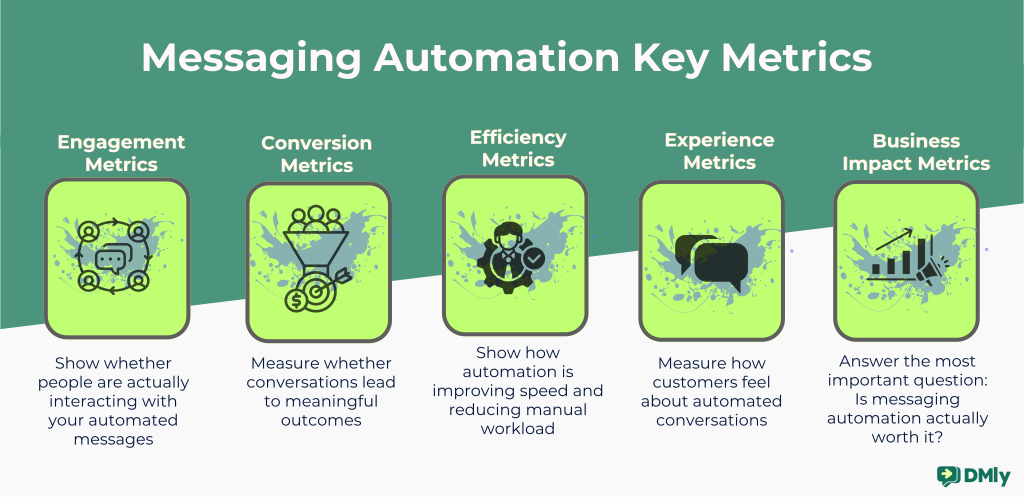
A clean way to think about messaging automation metrics is to group them into five functional categories:
1. Engagement Metrics
These show whether people are actually interacting with your automated messages.
Engagement metrics help answer questions like:
- Are customers opening messages?
- Are they replying or taking action?
- Do automated conversations feel relevant?
Typical engagement metrics include open rates, reply rates, click-through rates, and button interactions. These metrics are especially important for marketing and prospecting use cases, where the goal is to start conversations, not just send messages.
2. Conversion Metrics
These measure whether conversations lead to meaningful outcomes. Conversion metrics help you understand:
- Are chats turning into leads, bookings, or purchases?
- Which automated flows drive the most revenue?
- Where prospects drop off in the conversation journey?
Examples include lead qualification rate, demo bookings, purchases completed in chat, or conversion rate per workflow. These metrics are crucial for sales and revenue-focused teams.
We are going to go into the details of each of these metrics in the next section. Just keep reading!
3. Efficiency Metrics
These show how automation is improving speed and reducing manual workload. Efficiency metrics answer questions like: “Are customers getting faster responses?” “Is automation reducing agent effort?”
Metrics like first response time, automation resolution rate, and conversations handled per agent fall into this group. These are especially valuable for support and operations teams trying to scale without hiring aggressively.
4. Experience Metrics
These measure how customers feel about automated conversations. Experience metrics help answer:
- Are customers satisfied with automated interactions?
- Do they feel understood or frustrated?
Common experience metrics include customer satisfaction (CSAT), sentiment scores, or post-chat feedback. These metrics often get overlooked, but they’re critical for long-term retention and trust.
5. Business Impact Metrics
These tie everything back to real business outcomes. Business impact metrics answer the most important question: Is messaging automation actually worth it?
Examples include revenue attributed to messaging, cost savings from automation, customer retention rate, or lifetime value influenced by conversational engagement. These metrics matter most to leadership and finance teams.
Now that we know how to organize metrics, the next step is diving into the most important engagement metrics you should track right after implementing messaging automation.
#1: Engagement Metrics
Engagement metrics are the first signals you should look at after implementing messaging automation. Before revenue, before efficiency gains, before ROI calculations, engagement tells you one simple truth: do people care enough to interact with your messages?
If engagement is weak, everything else downstream will suffer. Strong engagement, on the other hand, gives automation room to do its job.
Here are the key engagement metrics that matter most, and how to interpret them properly.
Message Open Rate
This metric shows the percentage of recipients who open your automated messages.
In messaging channels like WhatsApp, open rates are naturally high compared to email. That’s both a blessing and a trap. High open rates don’t automatically mean success, but low open rates are a clear warning sign.
If your open rate is lower than expected, it often means:
- Messages are sent at the wrong time
- The sender identity isn’t trusted or recognizable
- Users didn’t fully understand what they opted in for
Open rate is best used as a health check, not a performance trophy.
Reply Rate
Reply rate measures how many recipients actually respond to your message.
This is one of the most important engagement metrics for messaging automation because it shows whether your messages feel conversational – not broadcast-like.
A strong reply rate usually means:
- The message asked a clear, relevant question
- The tone felt human and natural
- The message was triggered by real user intent or behavior
Low reply rates often point to messages that feel too promotional, too generic, or too one-sided.

Click-Through Rate (CTR)
CTR tracks how often users tap links, buttons, or CTAs inside automated messages. This metric is especially important for:
- Click-to-message ad flows
- Product recommendations
- Appointment booking
- Content or offer distribution
A low CTR doesn’t always mean bad messaging. It could mean:
- Too many choices were presented at once
- The CTA wasn’t clear enough
- The value of clicking wasn’t obvious
Button and Quick-Reply Interaction Rate
Modern messaging automation relies heavily on buttons and quick replies to guide users.
This metric shows how often users engage with those options instead of typing manually. High interaction rates here usually indicate: Clear decision paths, low friction conversations, and well-designed flows.
If users ignore buttons and type custom responses instead, it may signal confusion or missing options in your automation logic.
Conversation Start Rate
This metric measures how many delivered messages turn into actual conversations.
It’s especially useful for prospecting and outbound campaigns. A high conversation start rate tells you your message succeeded at one thing: opening the door.
If this number is low, revisit:
- The first line of your message
- The context of the trigger
- Whether the outreach feels expected or intrusive
Time to First Interaction
This tracks how quickly users engage after receiving a message.
Fast responses usually indicate high relevance and strong timing. Slow responses often suggest poor send timing, low urgency, or message overload.
This metric helps you fine-tune when automation should trigger; not just what it says.
#2: Conversion Metrics
Engagement is great, but conversions are where messaging automation proves its value. Conversion metrics help you understand whether automated conversations are driving meaningful actions, not just replies and clicks.
These metrics connect your messaging efforts directly to business outcomes like leads, bookings, sales, and revenue.
Conversation-to-Conversion Rate
This metric measures the percentage of conversations that result in a desired action. That action depends on your goal. It could be:
- A qualified lead
- A booked demo or appointment
- A completed purchase
- A signup or form submission
A strong conversation-to-conversion rate tells you that your automation flows are doing more than chatting. They’re guiding users forward with purpose.
If this metric is low, it usually means:
- Conversations are stalling without a clear next step
- CTAs are weak or poorly timed
- Users are being handed off too late (or too early)
Lead Qualification Rate
For sales and prospecting teams, not every conversation is equal. This metric shows how many conversations turn into qualified leads.
Messaging automation excels here because it can ask smart questions early:
- Budget range
- Use case
- Timeline
- Location or company size
A healthy qualification rate means your automation is filtering effectively, saving your team time and energy.
If qualification rates are low, review: your qualifying questions, the order they’re asked, or whether they feel natural or interrogative.
Appointment or Booking Rate
If your automation supports demos, consultations, or meetings, this metric is critical. It tracks how many conversations lead to a confirmed booking – not just interest.
Low booking rates often point to:
- Too many steps in the booking flow
- Poor calendar availability
- Lack of urgency or clarity around value
Automation works best when booking feels like the next obvious step, not a commitment leap.
Purchase Conversion Rate
For commerce-focused messaging, this metric shows how many conversations turn into completed purchases.
It’s especially important for:
- WhatsApp commerce
- Abandoned cart recovery
- Product recommendation flows
- Limited-time offers
A strong purchase conversion rate signals that your messaging:
- Reaches users at the right moment
- Removes friction from the buying process
- Builds enough trust to close
Drop-Off Rate Within Flows
This tracks where users abandon an automated conversation.
Common drop-off points include:
- After a pricing message
- During qualification
- Before checkout
- During handoff to a human agent
Drop-off analysis helps you spot friction fast. Small tweaks, like rephrasing a question or adding reassurance, can unlock big gains.
#3: Efficiency & Operational Metrics
One of the biggest reasons businesses invest in messaging automation isn’t just growth. It’s efficiency. These metrics help you understand how well automation is reducing manual work, speeding up responses, and allowing your team to scale without burning out.
If conversion metrics show what automation is achieving, efficiency metrics show how well it’s doing it behind the scenes.
Automation Resolution Rate
This metric measures how many conversations are fully handled by automation without needing a human agent. For example:
- FAQs answered end-to-end
- Order status requests resolved automatically
- Lead qualification completed without handoff
A high automation resolution rate means your workflows are well-designed and your bots are genuinely helpful, not just glorified autoresponders.
If this number is low, it often signals:
- Automation flows are too shallow
- Users hit dead ends
- Bots escalate too early (or too often)
Agent Handoff Rate
This tracks how frequently conversations are transferred from automation to a human agent.
Handoffs are not bad. They’re necessary for complex, high-value, or sensitive cases. The goal is balance.
A healthy handoff rate means automation handles routine work and humans focus on high-impact conversations.
If handoff rates are too high, your team may still be doing work automation should handle.
If they’re too low, customers may feel trapped talking to a bot when they need a person.
Average Handling Time (AHT)
This metric shows how long it takes to resolve a conversation, from first message to closure.
Messaging automation should shorten AHT by:
- Providing instant answers
- Pre-qualifying users
- Surfacing context before agents step in
When AHT drops without harming customer satisfaction, it’s a strong sign that automation is working efficiently.
First Response Time (FRT)
Customers expect speed on messaging channels, especially WhatsApp and live chat.
First response time tracks how quickly a user receives an initial reply after messaging your business. With automation, this should approach zero.
If your FRT is still high after automation:
- Your triggers may be misconfigured
- Messages may not route correctly
- Bots may not activate outside business hours
Fast first responses don’t just feel good. They directly impact engagement and conversion rates.
Conversations Per Agent
This measures how many conversations each agent can handle in a given period.
Before automation, this number is limited by human speed and attention. After automation, agents should be able to manage far more conversations because they’re only stepping in when it matters.
If conversations per agent aren’t increasing, automation may not be filtering effectively or agents may still be doing repetitive work. It could also mean than routing rules may need refinement.
#4: Customer Experience Metrics
Messaging automation isn’t just about speed and scale. If customers feel ignored, confused, or trapped in rigid flows, even the most efficient system will fail long term. That’s why customer experience metrics are just as important as performance and efficiency metrics.
These KPIs help you answer one simple question: Do customers actually enjoy interacting with your automated messaging?
Customer Satisfaction Score (CSAT)
CSAT is one of the most direct ways to measure how customers feel after a conversation.
It’s usually captured with a simple question like: “How satisfied were you with this interaction?” Customers respond on a scale (for example, 1-5 or 1-10).
A strong CSAT score after automation tells you:
- Your bot responses are helpful
- Handoffs to humans feel smooth
- Customers are getting what they came for
If CSAT drops after introducing automation, it’s a clear signal that: flows are too rigid, responses feel generic, or customers are being blocked instead of helped.
Net Promoter Score (NPS)
NPS measures long-term sentiment and loyalty, not just satisfaction in a single interaction.
Customers are asked: “How likely are you to recommend our brand to a friend or colleague?”
While NPS isn’t automation-specific by default, messaging automation can strongly influence it, especially for support, onboarding, and post-purchase experiences.
Automation that solves issues quickly, remembers context, or feels consistent across channels tends to lift NPS over time.
On the other hand, poorly designed bots can quietly damage brand perception even if short-term metrics look fine.
Repeat Contact Rate
This metric tracks how often customers come back with the same issue.
A high repeat contact rate usually means:
- The original issue wasn’t fully resolved
- Automation gave partial or unclear answers
- Customers didn’t trust the solution they received
Good automation should reduce repeat contacts by:
- Providing clear, complete responses
- Offering next steps proactively
- Escalating correctly when needed
When this number drops, it’s a strong indicator that your automation is doing its job well.
Sentiment Trends Over Time
Some platforms analyze message tone to detect positive, neutral, or negative sentiment.
While sentiment analysis isn’t perfect, trends matter:
- Are conversations becoming more positive after automation?
- Are complaints decreasing?
- Are frustration signals appearing earlier?
Rising negative sentiment is an early warning sign that something needs attention, even before CSAT scores drop.
#5: Revenue & ROI Metrics
At some point, every automation initiative gets the same question: “Is this actually making us money?”
Revenue and ROI metrics are how you answer that question with confidence.
These metrics connect conversations to outcomes. They show whether messaging automation is just reducing workload or actively driving growth.
Conversion Rate from Messaging Conversations
This metric tracks how many conversations turn into a desired action. That action could be:
- A purchase
- A booked demo
- A qualified lead
- An upgrade or renewal
Messaging automation often outperforms traditional channels because conversations happen in real time. When automation is doing its job well, conversion rates should increase because leads get instant responses, objections are handled faster, and friction is removed from the buying process.
If conversion rates stay flat, it’s usually a sign that automation is answering questions but not guiding decisions.
Revenue per Conversation
This tells you how much revenue, on average, each messaging interaction generates.
It’s especially useful for sales-led businesses, e-commerce brands, and subscription companies with upsells.
Automation can lift this metric by:
- Suggesting relevant add-ons
- Recovering abandoned carts
- Personalizing offers based on behavior
If conversation volume increases but revenue per conversation drops, it may mean automation is handling too many low-intent interactions without proper qualification.
Cost per Lead (CPL)
Messaging automation often reduces CPL dramatically.
Why?
- Fewer manual touchpoints
- Faster qualification
- Less reliance on long email sequences or calls
By comparing CPL before and after automation, you can see whether bots are filtering leads effectively and if sales teams are spending time on higher-quality prospects. It also shows you how messaging compares to paid ads or email funnels.
Lower CPL with stable or higher conversion rates is a strong signal that automation is working.
Sales Cycle Length
This metric measures how long it takes to move someone from first contact to conversion.
Messaging automation shortens sales cycles by:
- Answering questions instantly
- Scheduling demos automatically
- Sending follow-ups at the right time
Even shaving a few days off the cycle can have a huge impact on monthly revenue, especially for high-volume teams.
If sales cycles aren’t shrinking, check whether:
- Automation is too passive
- Handoffs to sales are delayed
- Follow-ups are spaced too far apart
Retention and Repeat Purchase Rate
Automation doesn’t stop at acquisition. Post-purchase messaging, onboarding flows, and proactive support all influence whether customers come back.
Track:
- Repeat purchases triggered by messaging
- Renewal rates for subscription products
- Engagement with loyalty or upsell flows
Strong retention metrics show that automation isn’t just closing deals. It’s strengthening relationships.
Return on Automation Investment (RAI)
This is your big-picture metric.
To calculate it, compare the total revenue influenced by messaging automation
against platform costs + implementation effort + maintenance.
The goal isn’t just positive ROI. It’s scalable ROI.
Good automation continues to deliver returns as conversation volume grows, without requiring proportional increases in headcount.
#6: Engagement & Behavior Metrics
Not every interaction leads straight to a sale or resolution. That doesn’t mean it failed. Engagement and behavior metrics help you understand how people are using your automated messaging, what’s catching their attention, and where interest starts to fade.
These metrics are especially useful for marketing, growth, and product teams.
Message Open Rate
This tracks how many users open your automated messages. For channels like WhatsApp or SMS, open rates are naturally high. Still, changes over time matter. A drop in open rates can signal: Message fatigue, poor timing, or overuse of broadcasts.
Healthy automation respects attention. When messages are relevant, open rates stay consistently strong.
Reply Rate
Reply rate shows how many users respond to your messages.
This is a key signal of conversational quality. High reply rates usually mean:
- Messages feel personal
- Questions are clear
- The value is obvious
If reply rates fall, it’s often because messages sound generic or ask too much too soon.
Click-Through Rate (CTR)
CTR measures how often users click links, buttons, or quick replies inside messages.
This helps you evaluate CTA clarity, button placement, and offer relevance. Low CTR doesn’t always mean bad content. Sometimes it means the next step isn’t compelling enough or feels risky.
Time to First Response (User Side)
This tracks how long it takes users to reply after receiving a message.
Fast responses suggest:
- Strong intent
- Good timing
- Clear messaging
Long delays can indicate uncertainty or low urgency. This metric is especially useful for optimizing follow-ups and nudges.
Opt-Out and Mute Rates
These metrics track when users choose to stop receiving messages.
Rising opt-outs are a warning sign that your messages might be coming too frequently or content isn’t relevant. It could also mean that expectations weren’t set properly. But you need to look into all of these because healthy automation is expected to grow engagement without increasing opt-outs.
How to Prioritize the Right Metrics
By now, you’ve seen how many metrics messaging automation can generate. And this is where many teams get stuck. They try to track everything and end up acting on nothing.
The real skill isn’t measurement. It’s prioritization.
1. Start with One Primary Outcome
Every automation initiative should have one main goal. so, ask yourself:
- Is this automation meant to increase revenue?
- Reduce support workload?
- Improve customer experience?
- Speed up lead qualification?
Once you pick a primary outcome, choose 2-3 core metrics that directly reflect it.
Examples:
- Revenue-focused → conversion rate, revenue per conversation
- Support-focused → first response time, first contact resolution
- CX-focused → CSAT, customer effort score
Everything else becomes secondary.
2. Match Metrics to the Customer Journey Stage
Different stages require different measurements.
- Top of funnel: open rates, reply rates, cost per lead
- Mid-funnel: response time, engagement depth, handoff success
- Bottom of funnel: conversion rate, sales cycle length
- Post-conversion: repeat contact rate, retention, NPS
Tracking the wrong metric at the wrong stage leads to bad decisions.
3. Separate Health Metrics from Outcome Metrics
Outcome metrics tell you what happened while health metrics tell you why it happened.
Always track:
- A few outcome metrics (revenue, CSAT, conversions)
- A few health metrics (fallback rate, drop-offs, handoffs)
When outcomes drop, health metrics help you fix the real issue instead of guessing.
4. Create a Simple Metrics Hierarchy
A practical structure looks like this:
- Executive view: 3-5 high-level metrics (ROI, revenue impact, CSAT)
- Team view: operational metrics tied to daily work
- Optimization view: automation health and experimentation metrics
5. Revisit Metrics as Automation Matures
What matters in month one won’t matter in month six.
At the early stage, what you should likely be concerned about are response time, resolution rate, and drop-offs. But at the later stage, you should focus on revenue per conversation, retention, and automation coverage.
Your metric stack should evolve as confidence grows.
Final Thoughts
Messaging automation only delivers real value when you know what to measure and why it matters. Speed, engagement, customer experience, revenue, and team efficiency all tell different parts of the story.
When you track the right mix of metrics, you stop guessing and start making confident decisions backed by data.
The key is focus. Define clear goals, choose metrics that align with those goals, and review trends regularly. Treat automation as a living system that improves over time, not a one-off setup.
When metrics guide your next move, messaging automation stops being a cost-saving tool and becomes a predictable driver of growth.
Frequently Asked Questions
What are messaging automation metrics?
Messaging automation metrics are data points that help you measure how automated conversations perform across customer experience, revenue, engagement, and operational efficiency. They show what’s working, what’s breaking, and where to optimize.
How many metrics should I track after implementing messaging automation?
Focus on quality over quantity. Start with 5-8 core metrics tied directly to your primary goal (revenue, support efficiency, or CX). Add supporting metrics only when you need deeper insights.
Which metrics matter most in the first 30 days?
Early on, prioritize:
- First response time
- Automation resolution rate
- Drop-off points
- CSAT or customer effort score
These tell you whether automation is usable and trusted.
How do I measure ROI from messaging automation?
Track revenue influenced by messaging (conversions, revenue per conversation) against total automation costs, including platform fees and operational effort. Compare performance before and after automation to see the lift.
What’s the difference between automation health metrics and outcome metrics?
Outcome metrics measure results (sales, CSAT, retention). Health metrics diagnose the system (fallback rate, handoffs, drop-offs). You need both to improve performance without guesswork.
How often should I review messaging automation metrics?
Review operational and health metrics weekly. Review revenue and CX metrics monthly. Look at trends over time rather than reacting to daily fluctuations.
Can messaging automation hurt customer experience if measured incorrectly?
Yes. Over-optimizing for speed or deflection alone can frustrate users. Balance efficiency metrics with experience metrics like CSAT and repeat contact rate to avoid creating friction.