
Kommo Review 2026: Real Pricing, and Six Alternatives Re-Checked

Number three on this list is not on it any more. Not downgraded, dropped: the product we recommended no longer publishes a price.
Flowcart’s pricing page no longer carries any numbers. The plan tiers that used to be priced now read “Get a Quote”. We told readers it cost about $69 a month, and there is nothing on the page to check that against, so it comes off a comparison built on published prices.
That is one of the things this Kommo review got wrong, and it was not the only one. We re-read all eight rate cards on this page against the vendors’ own sites on 6 September 2026. Five of them were wrong, one vendor no longer publishes prices at all, and two were right. Kommo’s own entry price had risen by 67 per cent while our number sat still.
So this is a rebuilt page rather than a refreshed one. Every figure below carries the date it was read and the page it came from. We have not run any of these products on a paid plan this month, so you will not find grades for how they feel to use. You will find what they cost, what the price is attached to, and how short a term each one will sell.
Every Price in This Kommo Review, Re-Read
| Vendor | What this page said | What their own page says on 6 September 2026 |
|---|---|---|
| Kommo | Base $15, Advanced $25, Enterprise $45 per user a month | Base $25, Advanced $35, Pro $45 per user a month, plus a separate unpriced Enterprise tier |
| Flowcart | “starts at around $69/month” | No published price. The plan tiers now read “Get a Quote” |
| Gallabox | “starts at around $25/month” | $150 a month billed quarterly, with a three-user hard cap. Six times what we said |
| DoubleTick | “starts at around $141.58/month” | $170 a month, or $2,039 billed yearly, and the entry plan has no AI agents |
| Interakt | “starts at around $12/month” | $12 a month is the Instagram-only plan. The WhatsApp plans are $69, $149 and $189 a quarter |
| Trengo | “around $408/month for 10 users” | 299 euros a month billed annually, 349 month to month, for up to 10 users. They bill in euros |
| WhatChimp | “starts at around $40/month” | Correct for monthly billing, and $24 a month if you pay annually |
| DMly | $29, $65 and $149 a month billed yearly | Unchanged, and $39, $79 and $199 billed monthly |
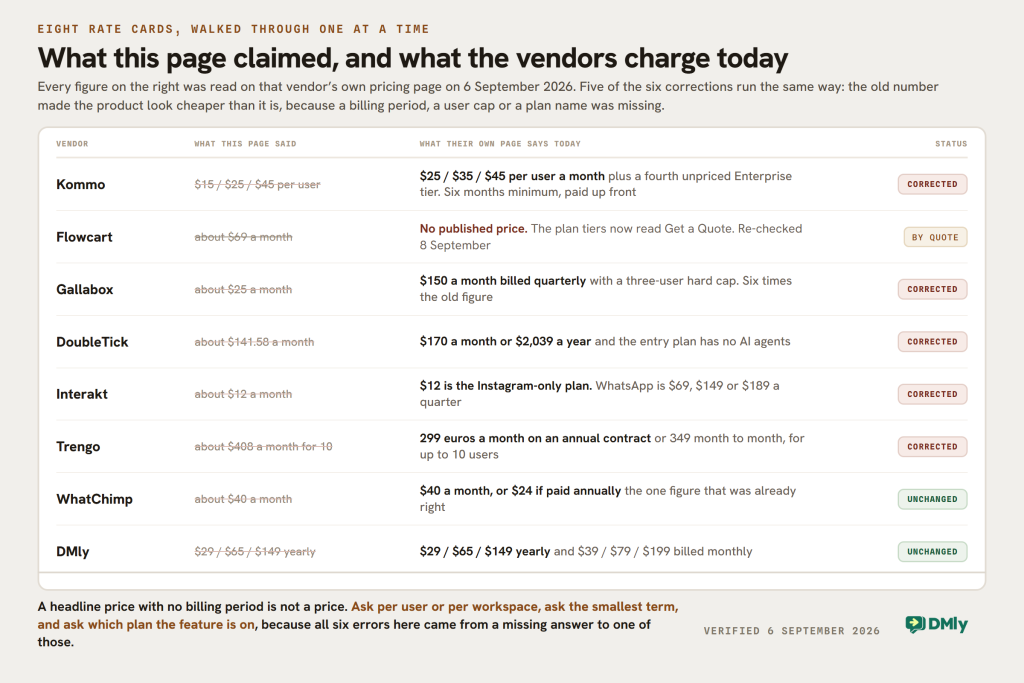
The pattern in that table is worth more than any single row. Five of the six wrong figures were wrong in the same direction: they made the product look cheaper than it is, because a headline number was quoted without the billing period, the user cap or the plan it belongs to. That is how nearly every price on nearly every comparison page in this market goes stale, ours included.
Kommo Pricing in 2026, and What the Price Is Attached To
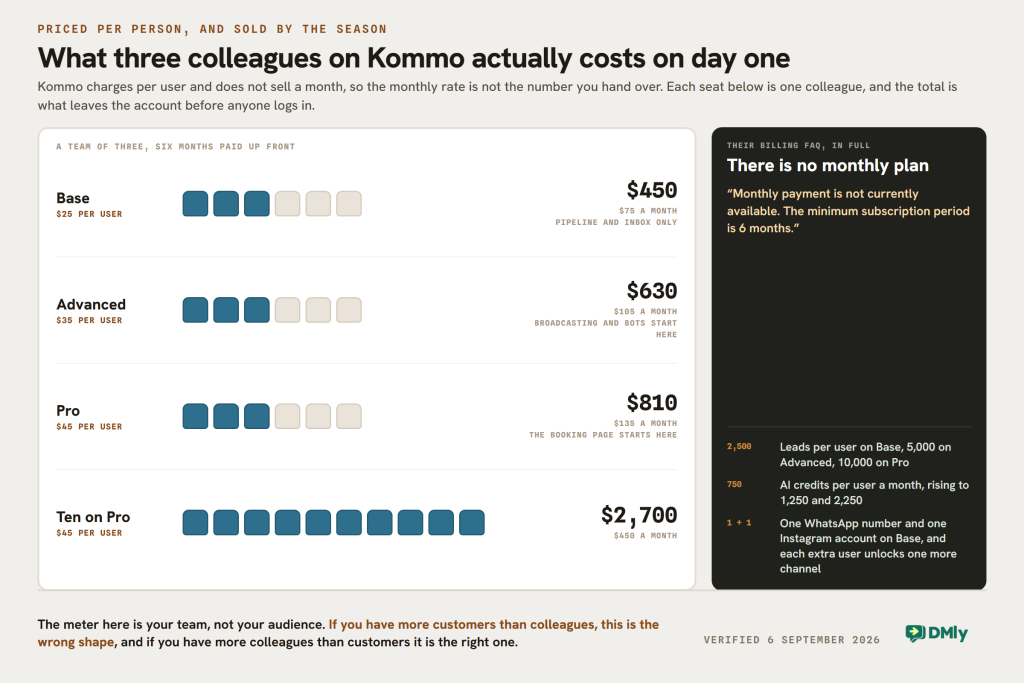
Kommo charges per user, and it does not sell a month. Their own billing FAQ says so in one line: “Monthly payment is not currently available. The minimum subscription period is 6 months.” The billing choices are six months, nine months, one year or two years, in US dollars only.
| Plan | Per user a month | Per user for six months | Leads per user | AI credits per user a month | Channels |
|---|---|---|---|---|---|
| Base | $25 | $150 | 2,500 | 750 | 1 WhatsApp number and 1 Instagram account. Each extra user unlocks one more channel |
| Advanced | $35 | $210 | 5,000 | 1,250 | 3 WhatsApp numbers and 3 Instagram accounts |
| Pro | $45 | $270 | 10,000 | 2,250 | Unlimited |
| Enterprise | Custom | Custom | Beyond standard limits | Beyond standard limits | Unlimited |
Two things in that table were wrong on this page for months and both matter more than the price.
- We said the top self-serve plan was called Enterprise. It is called Pro. Enterprise is a fourth tier with no price on it, holding single sign-on, enterprise security, an SLA, scheduled backups and a dedicated account manager.
- We said the plans carry 12,500, 25,000 and 50,000 contacts per user. Kommo publishes 2,500, 5,000 and 10,000 leads per user. That is a fifth of the number we printed, and it is the row a growing list will hit first.
What per user actually costs, on their own arithmetic
Per-user pricing is easy to read and hard to feel. Because the minimum term is six months and it is billed up front, the number you actually hand over is the one nobody quotes.
- One person on Base: $25 a month, so $150 up front.
- Three people on Advanced: $105 a month, so $630 up front. This is where broadcasting and no-code bots start.
- Three people on Pro: $135 a month, so $810 up front. This is where the booking page starts.
- Ten people on Pro: $450 a month, so $2,700 up front.
None of that includes WhatsApp. Meta bills your message volume separately whichever platform you use, and Kommo says so.
The gate that catches people, and the one nobody expects
Broadcasting and no-code bots start on Advanced. The booking page starts on Pro. If you came to Kommo to send campaigns and let a bot qualify leads, your entry price is $35 a user and not $25. If you also want customers to book a slot, it is $45.
The unexpected one is the channel rule. On Base you get one WhatsApp number and one Instagram account, and each additional user unlocks one more channel. Channels are tied to seats rather than sold separately, which is unusual and cuts both ways: a five-person team on Base has five channels, and a one-person business with two shopfronts has one.
AI is on every plan and the allowance is what scales: 750, 1,250 and 2,250 AI credits per user a month, with AI reply, task and summary suggestions on Base, up to three AI agents on Advanced and up to fifty on Pro.
What Kommo Is Genuinely Good At
The old version of this page ran a pros and cons list built on adjectives. We have not run Kommo on a paid plan this month, so that has gone. What can be said is what they publish.
It is a real CRM, not a messaging tool with a contacts list
Sales pipelines, task management, a calendar, a dashboard and lead records are the centre of the product, and messaging arrives into them. If your business runs on a pipeline with stages and owners, that is a different shape from a shared inbox with tags, and it is the right shape for a sales team. Most WhatsApp platforms, DMly included, put the conversation at the centre and the pipeline beside it.
The AI allowance is per user, which is the fair way to do it
Credits scale with the team rather than with the workspace, so a company of ten on Pro has 22,500 AI credits a month between them rather than a flat pool that the busiest person exhausts. It is a small design decision and a good one.
Fourteen days, no card, and the price of a longer term is published
The trial does not ask for payment details, and the six, nine, twelve and twenty-four month totals are all on the page rather than in a quote. The six-month minimum is stated plainly rather than hidden in terms, which is more than several of the platforms compared below manage.
Where it will not fit
Two situations, both structural rather than a matter of taste. A business with more customers than colleagues pays for the wrong thing here, because the meter is your team and not your audience. And a business that cannot commit six months up front cannot buy it at all, which rules Kommo out for anyone testing an idea a month at a time.
Six Kommo Alternatives With Published Prices
Every price below was read on the vendor’s own pricing page on 6 September 2026, with the billing period stated because in this market the billing period is half the price.
1. DMly
We make DMly, so weigh this accordingly. The structural difference is that nothing here is priced per user: the plans meter contacts, messages and channels, and seats are included rather than charged for.
- Starter, $29 a month billed yearly or $39 billed monthly. 3 team seats, 3,000 active contacts, 10,000 broadcast or template messages, one profile per channel, 10 active bots per profile with unlimited flows, 500 AI replies a month.
- Growth, $65 yearly or $79 monthly. 6 seats, 10,000 contacts, 50,000 messages, three profiles per channel, unlimited active bots, 5,000 AI replies.
- Premium, $149 yearly or $199 monthly. 15 seats, unlimited contacts, 300,000 messages, five profiles per channel, 20,000 AI replies, and the option of your own OpenAI, Claude, Gemini or DeepSeek key, which makes replies unlimited.
Extra seats are $10 a month each, so three people cost nothing extra and the tenth costs $10. Against Kommo, three people on Advanced is $105 a month and $630 up front; three people on DMly Growth is $65 a month with the seats included. The comparison flips the moment your team is large and your list is small, which is the whole point of the section below on which to buy.
Channels are WhatsApp, Instagram, Messenger, TikTok, Telegram, Google Business and a website Live Chat widget, plus SMS, and the subscription also carries the CRM and pipelines, comment automation, bookings and classes, invoices and payments, and Google review requests. WhatsApp messages are billed by Meta directly with no markup added. Our guide to running an omnichannel inbox is the long version of what that looks like day to day.
2. Interakt
The $12 figure everyone quotes, this page included, is the Instagram-only plan. If you want WhatsApp, Interakt sells by the quarter: Starter $69, Growth $149 and Advanced $189 a quarter, with an Enterprise tier on request. Their toggle offers monthly, quarterly at 8 per cent off and yearly at 20 per cent off.
Two details worth knowing before you compare that with anything. Starter is one channel of your choosing, not all of them. And the WhatsApp AI agents are an add-on rather than a feature: $74.99 on Growth and Advanced, or a separate $224.99 a quarter subscription that includes 100 AI messages and then charges $0.011 each.
Buy it if you want a straightforward WhatsApp and Instagram tool with unlimited agent seats and you are comfortable paying quarterly.
3. DoubleTick
We had this at $141.58 a month, which was wrong and is the kind of over-precise figure that should have been a warning in itself. Starter is $170 a month, or $2,039 billed yearly, and their own card says it plainly: “Does not include AI agents”. Pro is $308 a month or $3,694 yearly and adds up to ten AI agents, 3,500 AI credits a month, a developer API, roles and permissions and number masking. Enterprise is custom, with up to fifty AI agents. Turn the page’s AI switch off and Pro still reads $308 a month, but the yearly figure changes to $2,614, which is exactly twelve months of the $90 a month AI add-on less. Their comparison table lists that add-on as starting at Pro. Our DoubleTick review works through which figure is which and what to ask before you sign.
Starter includes a team inbox with five agents free and Pro with ten, which is generous next to Kommo’s per-user pricing. What DoubleTick no longer publishes is what a seat costs once you pass those counts: its card carried “USD 20 per additional agent/month” until late 2025, and today the only seat reference left is “Custom pricing per agent” on the Enterprise tier. There is also no free trial, which their pricing FAQ states outright.
Buy it if you are a larger WhatsApp operation that wants AI agents and analytics and the annual figure is inside your budget. It is the most expensive entry point on this page.
4. WhatChimp
The one figure on this page that was already right. Basic is $40 a month, or $24 a month if you pay annually, which is a 40 per cent discount they advertise on the page. Pro is $100 a month or $60 annually. There is a separate Enterprise range for multiple numbers and larger teams.
Basic carries two team members, 5,000 subscribers, an AI agent with 100,000 AI message tokens a month, and number coexistence, which lets you keep using the WhatsApp Business app on the same number. Pro raises that to five members and 15,000 subscribers and adds an omnichannel inbox with Instagram and Facebook.
Their pricing page also carries a claim worth reading beside the Gallabox and Trengo rows: “0% Markup Fees. Pay only Meta’s official conversation charges. Unlike others who add 20 to 25% markup, we don’t add a single extra cost.” We verified this week that at least one platform in this market does publish a 20 per cent markup on its own comparison grid, in our Woztell review, so the comparison WhatChimp is drawing is a real one.
Buy it if you want the cheapest credible WhatsApp automation on this page and two seats is enough.
5. Gallabox
Our $25 was wrong by six times, and this is the third page on this blog to carry that error. Basic is 2,999 rupees or $150 per month, billed quarterly, which is $450 a quarter, and it has a three-user hard cap. Essential is $331 a month billed quarterly with six users and $18 per extra user. Advanced is $632 a month billed quarterly with ten users and $24 per extra user. Enterprise is custom.
AI credits are 500, 2,000 and 8,000 a month by tier, and Basic includes one channel each of WhatsApp, Instagram and a web widget.
Buy it if you are an established team that wants AI qualification across channels and the quarterly commitment suits you. Do not buy it expecting a $25 tool.
6. Trengo
Trengo prices in euros, which is why the dollar figure on this page had drifted. Boost is 299 euros a month on an annual contract, or 349 month to month, for up to 10 users. Pro is 499 euros annually or 599 month to month for up to 20 users, and there is a custom Enterprise plan. Conversation allowances are 500 and 1,500 a month.
That makes Trengo the only platform here priced by conversations as well as by users, which is worth modelling rather than assuming. Our full Trengo review works through what that allowance covers.
Buy it if your problem is customer support at volume across many channels and you have a team of ten or more to justify the entry price.
The one we cannot compare: Flowcart
Flowcart is trading. What it no longer does is publish its prices. Its pricing page is intact, and carries a free trial and a demo booking, but the plan tiers that used to show figures now read “Get a Quote”. Our $69 came from the figures it used to publish, and there is nothing on the page to check it against today, which is why it is not in the six above: this page compares platforms on published prices.
Correction, 8 September 2026. An earlier version of this page said Flowcart had stopped trading. That was wrong, and we apologise for it. We had checked flowcart.io and flowcart.com, neither of which is the company: flowcart.io is an unrelated holding page and flowcart.com redirects to an events business. Flowcart’s own site is flowcart.ai, and it was up and serving a full pricing page when we re-checked on 8 September 2026.
Kommo Alternatives: The Comparison, With Billing Periods
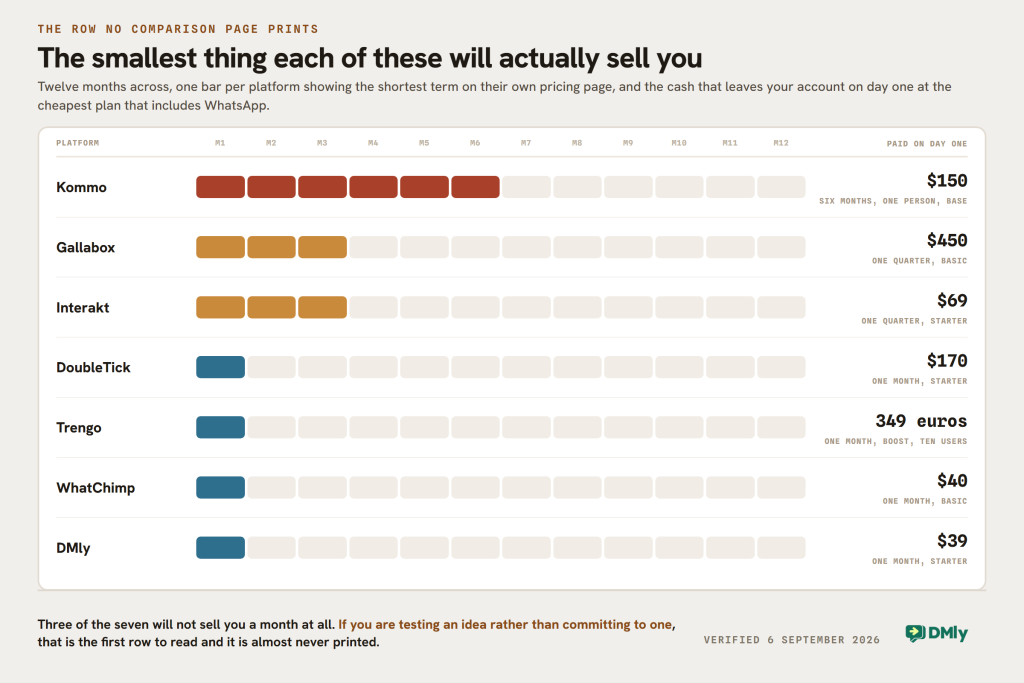
The column that matters most is the third one. In this market a headline price without a billing period is not a price.
| Platform | Entry price | How it is billed | What the price is attached to | Smallest commitment |
|---|---|---|---|---|
| Kommo | $25 per user a month | 6, 9, 12 or 24 months, up front | Users, plus leads and AI credits per user | $150 per person |
| DMly | $29 a month | Yearly, or $39 monthly | Contacts, messages, profiles. Seats included | $39 for a month |
| WhatChimp | $24 a month | Annually, or $40 monthly | Subscribers and team members | $40 for a month |
| Interakt | $69 a quarter for WhatsApp | Monthly, quarterly at 8% off, yearly at 20% off | Channels and features. Agent seats unlimited | $69 for a quarter |
| Gallabox | $150 a month | Quarterly | Users, capped at 3 on entry, plus AI credits | $450 for a quarter |
| DoubleTick | $170 a month | Monthly, or $2,039 yearly | Features. 5 agents free on entry | $170 for a month |
| Trengo | 299 euros a month | Annual contract, or 349 month to month | Users, up to 10, and conversations | 349 euros for a month |
| Flowcart | Not compared: it no longer publishes plan prices, so there is no figure to put in these columns | |||
Which One to Buy, by Situation
You have a sales team working a pipeline
Kommo, and it is the reason the product exists. Stages, owners, tasks and a calendar are the centre of it rather than an add-on. Budget $35 a user if you need broadcasting and bots, $45 if you need the booking page, and remember the six months is paid on day one.
You have more customers than colleagues
Almost anything here except Kommo. Per-user pricing punishes exactly this shape. A two-person shop with 8,000 customers pays Kommo $50 a month and immediately hits the 2,500 leads per user ceiling on Base, while the same shop on DMly Starter is $29 with 3,000 contacts, or Growth at $65 with 10,000.
You want to spend as little as possible this month
WhatChimp at $40, or $24 if you can pay for a year. Two seats and 5,000 subscribers is a real product, not a stub, and it includes an AI agent and number coexistence. If two seats is not enough, DMly’s $39 monthly plan carries three.
You cannot commit beyond a month
This rules out three of the seven and it is the most under-reported line on any comparison page. Kommo needs six months up front, Gallabox needs a quarter, Interakt’s cheapest WhatsApp plan is quarterly. DMly, WhatChimp, DoubleTick and Trengo will all sell you a single month.
You run a salon, clinic, studio or garage
DMly. Your day is appointments with a price on them, people who do not turn up, and customers who come back. Kommo will sell you a booking page on Pro at $45 a user, and it is built for booking a sales call rather than a service with a price, a duration and the payment taken before the slot.
You are a support desk rather than a sales desk
Trengo, if you have the team to justify it. Ten users at 299 euros a month is 30 euros a head, which is competitive once you are at that size, and their conversation allowance is a fairer meter for support than a lead count is.
Somebody has told you a price and you are about to sign
Ask three questions first, because they are what went wrong on this page. Is that price per user or per workspace? What billing period does it assume, and what is the smallest term you will sell me? And which plan is the feature I came for actually on? Five of the eight rate cards here were wrong, and every one of them was wrong because one of those three answers was missing.
The Verdict
Kommo is a good CRM that charges for the wrong thing if you are a small business with a big list, and the right thing if you are a sales team. The price has gone up, the top self-serve plan has been renamed, the lead limits are a fifth of what this page used to claim, and none of that changes the shape of the product. It is a pipeline tool with messaging in it.
What this Kommo review would say to anyone reading a comparison page in this market, including this one: treat every headline price as a claim with a date on it. Five of the eight prices we published were wrong within a few months, and one of the vendors has stopped publishing prices altogether. None of that was deliberate. It is what happens when a page is written once and left.
If your business has more customers than colleagues, wants bookings, invoices and reviews in the same subscription as the conversation, or simply cannot pay six months up front, DMly’s plans are built for that shape, and the trial is seven days with no card.
Kommo Review FAQs
How much does Kommo cost in 2026?
Base is $25 per user a month, Advanced $35 and Pro $45, read from Kommo’s own plan page on 6 September 2026. There is a fourth Enterprise tier priced on application. Kommo does not sell a month: their billing FAQ says “monthly payment is not currently available” and the minimum term is six months, so the smallest purchase is $150 for one person on Base.
Does Kommo have a free plan?
No. There is a 14-day free trial that does not ask for a credit card, and after that the minimum commitment is six months paid up front. Kommo bills in US dollars only, though the pricing page will show local currencies for comparison.
Which Kommo plan do I need for WhatsApp broadcasting?
Advanced, at $35 per user a month. Broadcasting and no-code bots both start there, along with pipeline automation and up to three AI agents. The booking page and scheduling link start one tier higher on Pro at $45. Base gives you the pipeline, the unified inbox and AI reply, task and summary suggestions.
How many contacts does Kommo allow?
Kommo publishes leads per user rather than a workspace total: 2,500 on Base, 5,000 on Advanced and 10,000 on Pro. An earlier version of this page said 12,500, 25,000 and 50,000, which was wrong by a factor of five and has been corrected. Channels are tied to seats as well, with one WhatsApp number and one Instagram account on Base and one more channel unlocked per additional user.
What are the best Kommo alternatives in 2026?
Six of the seven we previously listed still publish their prices: DMly, Interakt, DoubleTick, WhatChimp, Gallabox and Trengo. Flowcart has been dropped from this list because it no longer publishes plan prices: its tiers now read “Get a Quote”, so there is no figure to compare. Which of the six suits you depends less on features than on whether you are paying for people or for customers, which is the point the comparison table above is built around.
Is Kommo good for a small team on WhatsApp?
It depends on the ratio between your team and your list. Two people on Base is $50 a month, which is competitive, but it is 5,000 leads between them and one WhatsApp number plus one Instagram account. If your list is larger than that or you need a second number, the per-user model starts working against you, and a platform that meters contacts rather than colleagues will cost less.
Do you need the WhatsApp API to use Kommo?
Yes for business messaging at any scale, and the same is true of every platform on this page. The API is how a business sends template messages, runs automations and puts a team into one number. Meta bills those messages separately from your subscription, so any comparison of platform prices leaves the message bill out on both sides. Our walk-through of the 1 October pricing change covers what Meta starts charging for next month.
Is this Kommo review based on hands-on testing?
No, and we would rather say so. Every price, cap and quotation here was read on the vendor’s own pricing page on 6 September 2026, and every DMly figure came from our own published pricing the same day. We have not run these products on paid plans this month, which is why the earlier version’s judgements about how each one feels to use have been removed rather than rewritten. Prices in this market move fast enough that five of the eight on this page went stale in months: check the vendor’s page before you buy, and tell us if you find something here that has changed.
Writing about WhatsApp automation, bookings and growth for local business.
Turn WhatsApp into your busiest channel.
Start free and run message, bookings, payments and reviews in one place.
