
WotNot Review 2026: Pricing, the Chat Meter, and the Alternative
Here is the cheapest way to spend money on WotNot. Someone lands on your website. The chat bubble in the corner opens. They read the greeting, realise they came for something else, and close the tab without typing a single word.
That just spent one of your chats.
It is not a criticism, and it is not our inference. It is how WotNot defines the unit you are buying, on their own pricing page: “When a visitor sends a message or opens the chat widget a conversation is set to have begun.” Opening the widget counts. So this WotNot review starts where your bill starts, with the meter, rather than with a feature list that would be true of any chatbot tool on the market.
Everything below was read on WotNot’s own pages and help centre on 6 September 2026, with the price, the plan and the source named each time. We have not run WotNot on a paid plan this month, so you will not find us grading how the builder “feels”. What you will find is what each plan counts, what happens when you go over, and an honest account of where DMly is the better buy and where it plainly is not.
What WotNot Is, and Who Buys It
WotNot sells a no-code chatbot builder with an AI layer on top, aimed squarely at companies with a sales or support team. You drag blocks around a canvas to build a conversation, or you point an AI agent at your website and documents and let it answer in its own words. Both are real, and the second one is the reason most people arrive.
An earlier version of this WotNot review said WotNot deploys to “your website, WhatsApp, and Facebook Messenger”. That undersold them. Their help centre documents publishing an agent to a website widget, WhatsApp, Instagram, Facebook Messenger, SMS, email, voice, a mobile app through Android and iOS SDKs, and a plain API. WhatsApp itself can be connected through Meta directly or through 360dialog, Twilio, Gupshup or TechAlpha, which matters for your message bill and we come back to it.
Two things about the company are worth knowing before you read the prices. Their own footer says Made in India, and the product is built for buyers who have a procurement process. Their security page publishes SOC 2 Type 2, ISO 27001, HIPAA, GDPR and CCPA positions, names Oracle Cloud Infrastructure as the host, and offers public cloud, private cloud or on-premise deployment. That is not decoration. If you run a clinic, an insurer or a bank, it is very likely the thing that decides this for you, and we will say so again plainly further down.
Why This WotNot Review Starts With the Meter
Every chatbot platform sells you a number, and the number is never the price. It is the unit the price is attached to. Get the unit wrong and a $29 plan turns into a $29 plan plus an overage line you did not plan for, which is the most common unpleasant surprise in this category.
WotNot counts two things: chats and AI credits. Both are published, both are metered monthly, and neither means quite what a first reading suggests.
What actually spends a chat
Their pricing FAQ is unusually clear, and it is worth reading slowly because four different events are hiding in it.
“When a visitor sends a message or opens the chat widget a conversation is set to have begun. This conversation remains open for as long as the visitor interacts with the chatbot/agent, it only ends the conversation when the flow reaches the end of the chatbot tree or inactivity from the visitor after 30 minutes. Post this, if a message is sent, a new conversation will be started. Outbound campaigns are not considered as conversations until there is an incoming response received by the chatbot.”
WotNot, pricing FAQ, read 6 September 2026
Unpacked, that means:
- A widget that opens counts, even in silence. Nobody has to ask you anything. If your bubble auto-opens on a busy page, your traffic is your meter.
- A long conversation is still one chat. Fifty messages back and forth inside one session is one unit, which is generous.
- A pause of half an hour starts a second one. Someone who asks a question, goes to lunch and comes back to answer costs you two.
- Outbound campaigns are free until somebody replies. You can send as many WhatsApp campaign messages as you like without touching the chat meter. Meta still charges you for those, but WotNot does not.
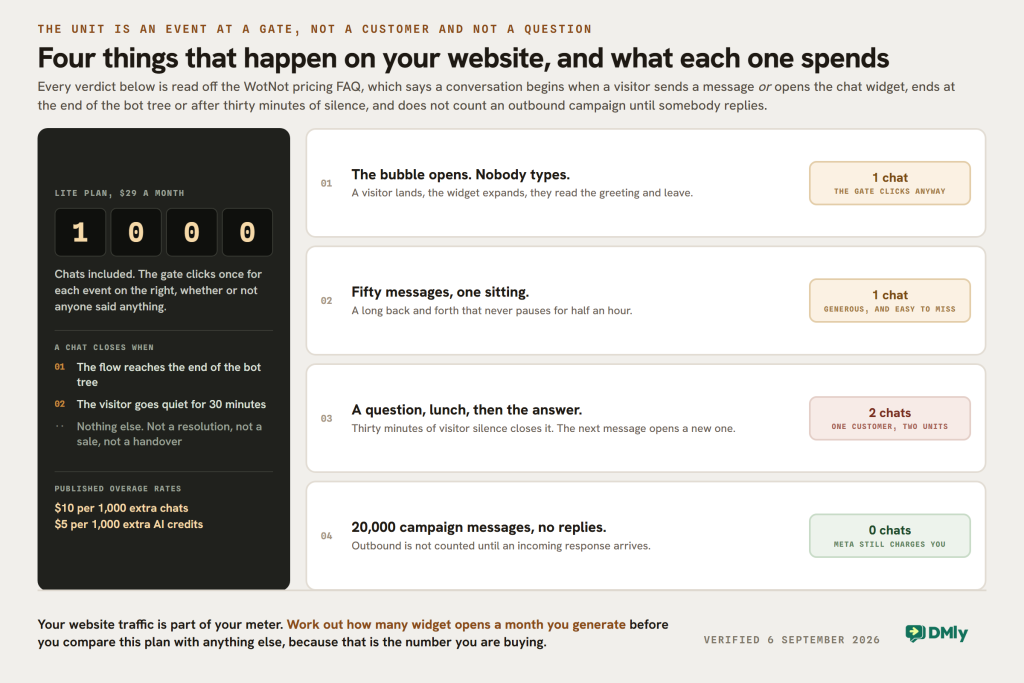
That last one is genuinely in WotNot’s favour and almost nobody writing about them mentions it. If your business is broadcast-heavy and reply-light, the chat meter barely moves.
The published overage rate is $10 per 1,000 extra chats. So the Lite plan’s 1,000 chats are worth $10 of overage on a $29 subscription, which tells you how the pricing is really shaped: the subscription buys the platform, and the volume is sold separately whether you notice or not.
What an AI credit is, and why the model you pick matters more than the plan you buy
This is the part that will decide your bill, and it is not on the pricing page at all. It is in the help centre, and it changes the arithmetic completely.
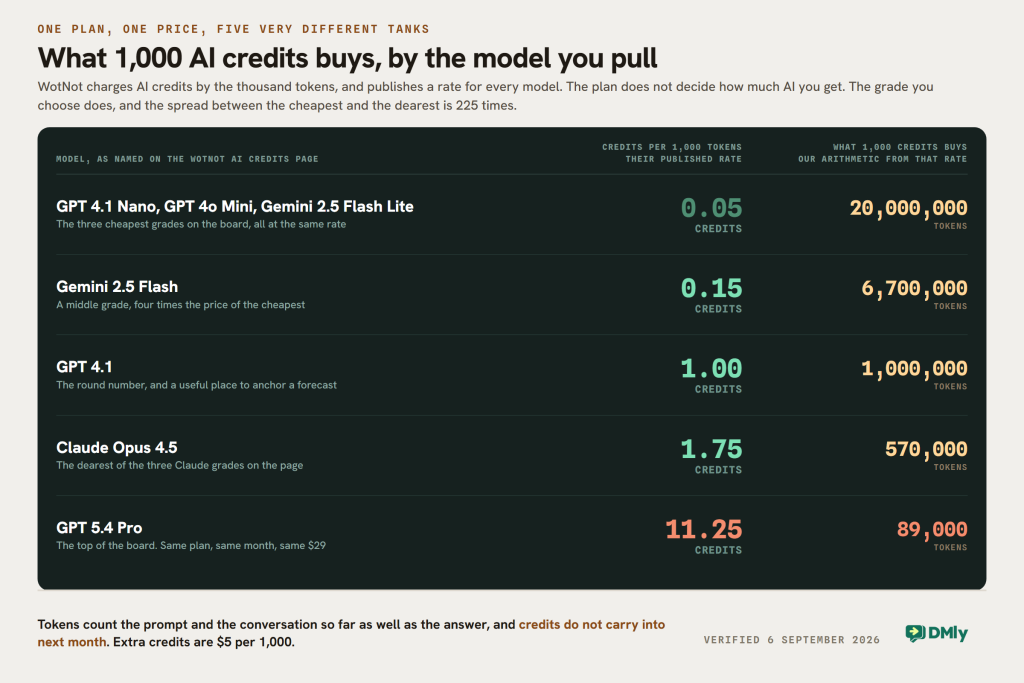
An AI credit is not one answer. WotNot charges credits by the thousand tokens, counting both what goes in (your prompt plus the conversation so far) and what comes out. Every model has its own rate, and the spread between them is enormous. From their published table:
- 0.05 credits per 1,000 tokens on GPT 4.1 Nano, GPT 4o Mini and Gemini 2.5 Flash Lite
- 0.15 to 0.55 across the rest of the Gemini 2.5 and Gemini 3 range
- 0.35 to 1.75 across Claude Haiku, Sonnet and Opus 4.5
- 11.25 credits per 1,000 tokens on GPT 5.4 Pro
That top rate is 225 times the bottom one. The 1,000 credits on the Lite plan are worth twenty million tokens on the cheapest model and about eighty-nine thousand on the most expensive. Same plan, same price, same month.
So the honest answer to “how many AI conversations do I get for $29” is that WotNot cannot tell you, and neither can we, because you have not chosen a model yet. What you can do is the sum in the other direction: pick your model, estimate the tokens in a typical exchange, and divide. Two more published facts belong in that sum. Extra credits are $5 per 1,000, and credits do not carry forward: whatever you have not used at the end of the cycle is gone.
None of this is hidden. It is documented, in a table, with every rate named. It is simply on a different page from the one you buy on, which is why so many reviews of this product quote three prices and stop.
WotNot Pricing in 2026, Read Off Their Own Page
WotNot publishes its prices openly, which is more than half this market manages. There is no login, no quote form and no slider. What there is, and what most write-ups miss, is a second tab.
The pricing page carries a Do It Yourself and a Done For You toggle. Almost every published comparison of WotNot describes only the first one.
The four self-serve plans
| Plan | Price | Chats | AI credits | Users | Support reply time |
|---|---|---|---|---|---|
| Lite | $29 a month | 1,000 | 1,000 | 1 | Under 16 hours |
| Starter | $99 a month | 5,000 | 5,000 | Unlimited | Under 8 hours |
| Premium | $299 a month | 10,000 | 10,000 | Unlimited | Under 4 hours |
| Enterprise | Custom, by email | Unlimited | Unlimited | Unlimited | A few minutes |
Three details that the price cards alone will not tell you:
- The 20 per cent annual discount is real, and you cannot pay for it by card. WotNot’s own billing help page says monthly subscriptions take credit or debit cards and annual subscriptions are paid by wire transfer, with the details supplied by email on request. If your finance process cannot raise a wire, the annual price is not available to you.
- The trial is 14 days. There is no free plan behind it.
- There is effectively no refund. Their policy page says WotNot “does not explicitly offer refunds on invoices that are once processed”, that you may appeal by email, and that “sending an email request does not guarantee a refund”. Cancelling keeps your plan and credits until the end of the cycle, and unused credits are not refunded.
The fifth price nobody quotes: $12,000 a year
Switch the pricing page to Done For You and the four tiers vanish, replaced by a single card marked NEW: Subscription plus Managed Setup, $12,000 per year onwards. It carries 20,000 chats, 20,000 AI credits, a dedicated account manager, 60 hours of managed services and a quarterly performance report, and the button says Talk to Sales.
That is not a hidden price and it is not a trick. It is a consulting engagement with software attached, and for a company that has budget but no one to build the bot, it is arguably the most honest thing on the page. But it means WotNot’s published range runs from $29 a month to $1,000 a month, and a review that quotes only the first figure is describing a quarter of the product.
What the $29 Plan Actually Includes
The Lite plan is a single-seat plan with one integration. That is the sentence the old version of this WotNot review needed and did not have. It said WotNot’s integration depth was “limited” and that connecting some tools “may not be as seamless as expected”, which is an adjective standing where a fact should be.
Here is the fact, from WotNot’s own plan comparison grid. On Lite you get Zapier. That is the complete list. Google Sheets, Google Calendar, Outlook Calendar, Calendly, Airtable, Salesforce, HubSpot, Zoho CRM, Freshdesk, Zendesk and Slack all start on Starter, at $99. HTTP requests and the API start on Premium, at $299. Custom integrations are Enterprise only.
The same grid puts four more things above Lite that people assume are in the box:
- AI Studio and the choice of models start at $99. The AI half of the product, which is the reason most people are looking, is not on the entry plan at all.
- Live Chat starts at $299. The handover to a human being, which every chatbot article including our own older one describes as a headline feature, is on the third tier. Outbound bots, by contrast, start at $99.
- Removing WotNot’s branding starts at $299, along with custom CSS, webhooks, functions and the Copilot.
- Users: one. Lite is a solo plan. Unlimited users begin at $99, which is unusually generous once you are there, and unusually strict before.
None of that makes $29 bad value. It makes it a different product from the one the marketing describes, and the gap between “WotNot costs $29” and “the WotNot most people are shopping for costs $99 or $299” is where buyers get caught. If you want the AI agent, a colleague and your calendar connected, your entry price is $99 and not $29.
One correction that runs the other way, because it should. WotNot puts its reporting on every plan. The chatbot report, the AI report, the human agent report, the outbound report and the email report are all ticked on Lite. Only the reporting API and custom reports are held back for Enterprise. Plenty of platforms at this price hold analytics hostage to the middle tier, and WotNot does not.
Where WotNot Is Genuinely Strong
A review that only finds problems is a sales page wearing a lab coat. Four things here are real strengths, and two of them are things DMly cannot match.
The compliance paperwork, which is not a feature until it is the only feature
WotNot publishes SOC 2 Type 2, ISO 27001, HIPAA, GDPR and CCPA positions on a public security page, with a Trust Center and downloadable reports. It names its host (Oracle Cloud Infrastructure), documents penetration testing, two-factor authentication, static IPs and single sign-on, and offers public cloud, private cloud or on-premise deployment.
If you are a dental group handling patient records, an insurer, a lender or anyone whose legal team asks for a SOC 2 report before the pilot starts, this is not a tie-breaker. It is the whole decision, and you should buy WotNot. We say the same thing about DMly’s own gap further down, in plain words, because pretending otherwise would waste your afternoon.
Model choice, priced per token
The credit table that makes budgeting awkward is also a genuine advantage. You can run a support bot on a nano model at 0.05 credits per 1,000 tokens and spend almost nothing, then point a harder job at Claude Opus or GPT 5.4 Pro for the cases that deserve it. Very few tools in this bracket let you choose the model per job and see the rate before you commit.
A real channel spread, including the ones nobody advertises
Website, WhatsApp, Instagram, Messenger, SMS, email, voice, mobile SDKs and an API is a wider surface than most of the WhatsApp-first tools this page used to be compared against. The mobile SDKs in particular are rare: if you have an app, you can put the same agent inside it.
Round-robin demo booking that works the way sales teams work
WotNot’s appointment booking is built for B2B: the bot qualifies the lead, then books into a rep’s Google Calendar or Calendly, distributing meetings round-robin across the team. It is a meeting booker, not a service booker. There is no price on the slot, no deposit, no class list and no no-show handling, because that is not the job it was built for. If you are selling demos, that is exactly right. If you are selling haircuts, it is not the tool, and our guide to appointment platforms that take the payment as well as the slot covers what changes.
Two Things on WotNot’s Own Pages to Check Before You Budget
Neither of these is a criticism of the product. Both are things that will change the number at the bottom of your spreadsheet, and both are on pages you would only reach by looking.
The WhatsApp cost page describes a pricing model Meta retired
WotNot’s help centre has a page called Cost, under WhatsApp Business API. It explains that “Meta charges for WhatsApp API usage based on sessions”, walks through marketing, utility, authentication and service conversations, and finishes with this line:
“By default, every WhatsApp API gets 1,000 free sessions each month.”
WotNot help centre, WhatsApp Business API cost page, marked last updated two years ago
Set that beside Meta’s own documentation, which says in as many words that its “July 1, 2025 update to our pricing model” moved WhatsApp from conversation-based pricing to per-message pricing. Meta’s docs now file conversation-based pricing under a heading marked Deprecated. The likeliest explanation is simply the date stamp on the page: it was written when sessions were how WhatsApp worked, and it has not been revisited since the model changed.
There is a twist worth knowing, because it will make the old page look briefly right. On 1 October 2026 Meta introduces a free monthly tier of 1,000 service messages for every business phone number, charging only from the 1,001st, with no roll-over. So a number very like the one on WotNot’s page is coming back, and it means something different: messages rather than sessions, per phone number rather than per WhatsApp Business Account, and only in the service category. Our walk-through of the 1 October pricing change covers what becomes billable and how to size it.
We are in no position to be smug about this. DMly’s own documentation page on WhatsApp limits still shows a “1,000 customers / 24h” step in the messaging tier ladder, and Meta’s current ladder is 250, then 2,000, 10,000, 100,000 and unlimited. That row is wrong on our own site as this is published, we have said so in public before, and it is being corrected. Stale WhatsApp documentation is not a WotNot problem, it is an industry one, and the reader’s defence is the same either way: get the number from Meta, not from a platform’s help page.
WhatsApp is not in the subscription, on either side
WotNot connects WhatsApp through Meta directly or through 360dialog, Twilio, Gupshup or TechAlpha. Whichever you pick, the messages are billed outside your WotNot plan, and if you go through a reseller there may be a margin on top of Meta’s rate. That is normal in this market and worth one email before you sign: ask which provider you will be on, and whether the per-message price you are quoted is Meta’s published rate or Meta’s rate plus a markup.
DMly’s position on the same question is published on our pricing page: you connect through the official WhatsApp Business API and pay Meta’s per-message rates directly, with no fee added by us. Compare like with like, and remember that neither subscription includes the message bill.
DMly as a WotNot Alternative
We make DMly, so read this section knowing that. The useful thing we can offer is not a verdict, it is the same treatment applied to our own rate card, so you can put the two meters side by side.
DMly does not count conversations at all. There is no chat meter, no session, no thirty-minute rule and no per-conversation overage. Someone can open your website widget forty times in a morning and nothing on your bill moves.
What DMly counts instead, on the plans published at dmly.io/pricing and read the same morning as everything else here:
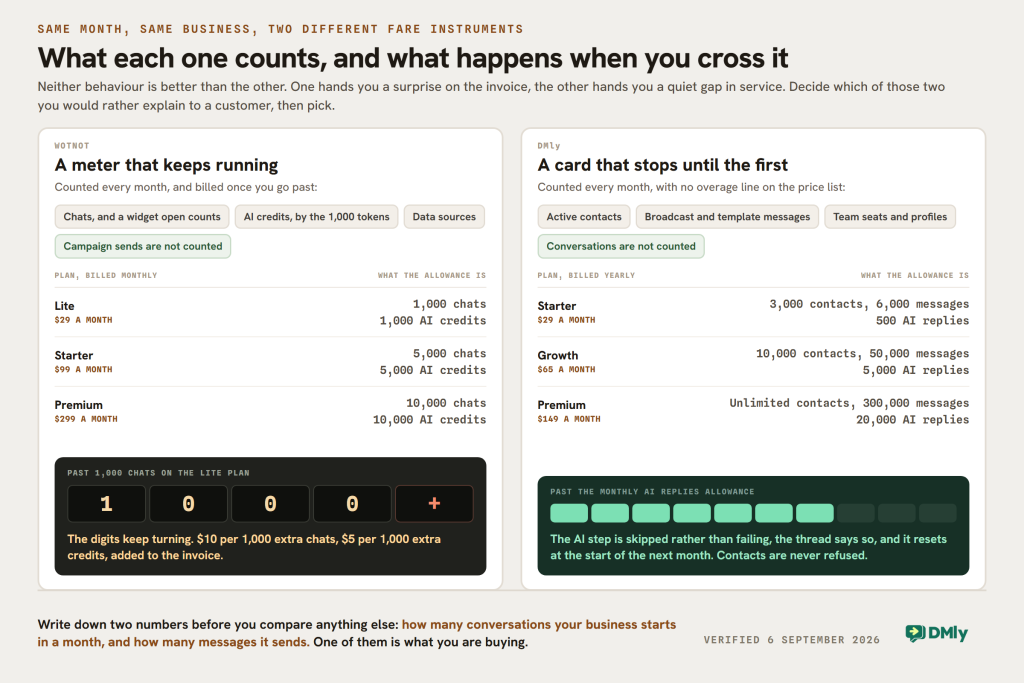
- Active contacts: 3,000 on Starter at $29 a month billed yearly, 10,000 on Growth at $65, unlimited on Premium at $149.
- Broadcast and template messages: 10,000, 50,000 and 300,000 a month. This is the one WotNot does not meter at all, and it is the number to check first if you send campaigns.
- Team seats: 3, 6 and 15, with extra seats at $10 a month each. Nobody is on a one-seat plan.
- Profiles per channel: 1, 3 and 5. A second shop with its own WhatsApp number needs a second profile, and an extra profile set is $15 a month.
- AI replies: 500, 5,000 and 20,000 a month on DMly’s shared AI, counted as replies rather than tokens. On Premium you can connect your own OpenAI, Claude, Gemini or DeepSeek key instead, and replies on your own key are never counted.
The difference that matters most is what happens when you cross a line. WotNot bills you: $10 per extra 1,000 chats, $5 per extra 1,000 AI credits. DMly stops instead. Run out of AI replies and the AI step is skipped rather than failing, the conversation carries a note reading “AI reply limit reached for this month, it resets at the start of next month”, and the allowance resets on the first. Go past your active contacts and nothing is refused at all: DMly does not turn away a new contact or an inbound message over it, it just turns the usage gauge amber at 90 per cent and red at 100.
Neither behaviour is better. One gives you a surprise on the invoice, the other gives you a quiet gap in service. Pick the failure you would rather explain.
What you get in the DMly box that WotNot does not sell
DMly is not a chatbot builder with commerce bolted on. The same subscription carries the shared inbox, the CRM and pipelines, comment automation on Instagram and Facebook, bookings, invoices and payments, and Google review requests and replies. A customer can ask a question, be qualified by the AI, book a slot, pay for it and be asked for a review afterwards, and every one of those steps sits in the one system with one contact record.
The channel list is WhatsApp, Instagram, Messenger, TikTok, Telegram, Google Business and a website Live Chat widget, plus SMS. If you have wondered what that looks like when all of it lands in one place, our guide to running an omnichannel inbox is the long version.
Four things DMly does not do, stated plainly
These are the reasons to buy WotNot instead, and we would rather you found them here than three weeks into a trial.
- No published SOC 2, ISO 27001 or HIPAA. A search of all 375 pages of DMly’s documentation returns none of those three, and there is no security or trust page on the marketing site. What DMly does publish is a description of its practices: hosted in enterprise-grade data centres in Europe and the United States, encrypted in transit and at rest, with regular backups, and its own page says in as many words that this is “not legal advice or a formal contract”. If your buyer needs a certificate, WotNot has one and we do not.
- No on-premise or private-cloud option. DMly is a managed hosted platform with nothing to install. WotNot will deploy into your own infrastructure.
- No per-model token economics. DMly gives you an allowance of replies on its shared AI and, on Premium, the option of your own provider key. You cannot pick a cheap nano model for one flow and an expensive reasoning model for another and see the credit rate for each, which is exactly what WotNot’s AI Studio lets you do.
- The website widget is the narrowest channel we have. DMly’s Live Chat widget runs flows, bookings and payments like any other channel, but its own documentation is clear about the limits: you cannot broadcast on it, growth tools such as QR codes and referral links do not apply to it, and a picture or video a visitor sends is recorded for a person to answer rather than advancing a flow. WotNot is a website-first product and its widget is the centre of the thing.
One more, in fairness to both: DMly’s AI can search your own material. You build collections of files, web pages, FAQs and pasted text under Settings, and an AI Reply step points at the collection. But the documentation is equally clear that Claude and DeepSeek cannot search documents on it, so a step that needs to read your price list has to be on OpenAI or Gemini. Worth knowing before you connect a key.
The Meter Is the Decision
Put the two rate cards next to each other and the feature lists stop being the interesting part. Each platform is free with the thing the other one charges for.
| Question | WotNot | DMly |
|---|---|---|
| Entry price | $29 a month, billed monthly | $29 a month, billed yearly |
| Users on the entry plan | 1 | 3 |
| Integrations on the entry plan | Zapier only | API, webhooks and integrations |
| AI on the entry plan | No, AI Studio starts at $99 | Yes, 500 AI replies a month |
| Human handover on the entry plan | No, Live Chat starts at $299 | Yes, shared inbox on every plan |
| Are conversations counted? | Yes, and a widget that opens counts | No |
| Are campaign sends counted? | No, until someone replies | Yes, 10,000 to 300,000 a month |
| How is AI metered? | Credits, by the 1,000 tokens, rate per model | Replies, on a monthly allowance |
| When you go over | Billed: $10 per 1,000 chats, $5 per 1,000 credits | AI step is skipped until the reset; contacts are never refused |
| Free trial | 14 days | 7 days, no card |
| Bookings | Demo booking into Google Calendar or Calendly, round robin | Services and classes with prices, pay before or pay after |
| Certifications published | SOC 2 Type 2, ISO 27001, HIPAA, GDPR, CCPA | No certification published; a documented privacy and data security position |
| Hosting | Public cloud, private cloud or on premise | Managed hosting only, EU and US |
| WhatsApp message cost | Outside the plan, via Meta or four named resellers | Outside the plan, paid to Meta directly with no markup |
The row to argue with is the one about campaign sends. A business that broadcasts heavily and gets few replies is cheap on WotNot’s meter and expensive on ours. A business with a busy website and a chat bubble that opens on every page is the other way round. Work out which of those two you are before you compare anything else, because it is worth more than every feature row put together.
Which One to Buy, by Situation
You are one person and you want a bot on your website this week
WotNot Lite, at $29, if you accept what it is. One seat, Zapier, a rule-based bot and no AI Studio. If the AI agent is the point, your real price is $99 and you should compare that against DMly’s $65 Growth plan rather than against $29.
You run a salon, clinic, studio or garage
DMly, and it is not close. Your bookings have a price attached, customers who do not turn up, and people who come back every six weeks. WotNot’s booking is designed to put a sales rep in front of a lead. You also want WhatsApp and Instagram to be first-class rather than deployment targets, because that is where your customers already message you.
You handle health, financial or legal data
WotNot. They publish SOC 2 Type 2, ISO 27001 and a HIPAA position, run a Trust Center and will deploy on your own infrastructure. DMly publishes none of those, and no amount of feature comparison changes that. Ask WotNot for the reports before you sign, and ask what changes when the deployment is on premise.
Most of your traffic is a website with a chat bubble
WotNot, with one sum done first. Take your monthly sessions, work out roughly how many will open the widget, and check it against 1,000, 5,000 or 10,000. Then add $10 for every extra thousand. If your site does 40,000 sessions a month and the bubble opens on a tenth of them, you are on Premium plus overage, not on Lite.
You send campaigns and follow-ups more than you answer questions
It depends on the volume, and the two meters point in opposite directions. WotNot does not count campaign sends until someone replies. DMly counts broadcast and template messages, from 10,000 a month on Starter to 300,000 on Premium. If you send 20,000 marketing messages a month and get 300 replies, WotNot’s chat meter barely notices while ours needs the Growth plan. Meta charges you for those messages either way.
You want one system rather than a chatbot plus five other subscriptions
DMly. The inbox, the CRM, comment automation, bookings, invoices, payments and Google reviews are the same subscription and the same contact record. With WotNot you would be adding a CRM, a scheduler, an invoicing tool and a review tool around it, and connecting them, and the connectors start at $99.
You have budget but nobody to build it
WotNot’s Done For You tier, at $12,000 a year onwards. Sixty hours of managed services and an account manager is a real answer to a real problem, and there is nothing equivalent on our published price list. If that number is out of range, the honest alternative is a cheaper platform plus a freelancer for a fortnight.
The Verdict
WotNot is a good product with a price card that rewards reading twice. The builder is genuinely no-code, the model choice in AI Studio is better than most tools at this size offer, the reporting is on every plan when it did not have to be, and the compliance paperwork is real and published. If your bot lives on a website and your legal team asks hard questions, it is a sensible buy.
What we would push back on is the shape of the entry plan. At $29 you get one seat, one integration, no AI Studio and no human handover, and the product most people are shopping for begins at $99. That is worth knowing on day one rather than in week three.
DMly is a different shape. It does not count conversations, it puts the inbox, CRM, bookings, payments and reviews in the same subscription, and its AI is on every plan with the allowance rather than the access being what scales. It also has no certifications to hand you and no on-premise option, and if that is your requirement then this comparison ends there.
Whichever way you go, do the one sum this WotNot review keeps coming back to. Write down how many conversations your business starts in a month, and how many messages it sends. One of those two numbers is what you are actually buying, and it is not the same number on both platforms.
If the second number is the bigger one, DMly’s plans are built around it, and the 7-day trial does not ask for a card.
WotNot Review FAQs
How much does WotNot cost in 2026?
WotNot publishes four self-serve plans: Lite at $29 a month, Starter at $99, Premium at $299 and Enterprise on request, all quoted as billed monthly with a 20 per cent discount for paying annually. A fifth, managed option called Done For You is published separately at $12,000 per year onwards. Extra usage is charged at $10 per 1,000 chats and $5 per 1,000 AI credits.
What counts as a chat on WotNot?
WotNot’s pricing FAQ says a conversation begins when a visitor sends a message or opens the chat widget, and ends either when the flow reaches the end of the bot tree or after 30 minutes of visitor inactivity. A message after that starts a new one. Outbound campaigns are not counted until somebody replies. In practice that means a widget that opens and is ignored still spends a chat, and a customer who wanders off for lunch and comes back spends two.
Does the $29 WotNot plan include the AI agent?
No. WotNot’s own plan comparison grid puts AI Studio, all LLM models and outbound bots on Starter at $99 and above. The Lite plan at $29 carries the no-code bot builder, the Zapier integration, 1,000 chats, 1,000 AI credits and a single user. Live Chat, which is the handover to a human agent, starts on Premium at $299.
How many AI conversations do 1,000 AI credits buy?
There is no single answer, because WotNot charges credits by the thousand tokens at a rate that depends on the model. Their published table runs from 0.05 credits per 1,000 tokens on GPT 4.1 Nano, GPT 4o Mini and Gemini 2.5 Flash Lite up to 11.25 on GPT 5.4 Pro, a spread of 225 times. Credits cover both the prompt and the answer, and do not carry over to the next month.
Which channels does WotNot support?
Their help centre documents publishing an agent to a website widget, WhatsApp, Instagram, Facebook Messenger, SMS, email, voice, mobile apps through Android and iOS SDKs, and a direct API. WhatsApp is connected through Meta or through 360dialog, Twilio, Gupshup or TechAlpha, and those messages are billed outside your subscription.
Can I get a refund if WotNot is not right for us?
Their published policy says WotNot does not explicitly offer refunds on invoices once processed, that you can appeal by email, and that an email request does not guarantee one. Cancelling leaves your subscription and credits running to the end of the cycle, and unused credits are not refunded. Use the 14-day trial properly, and if you need the annual discount, note that annual subscriptions are paid by wire transfer rather than card.
What is the best WotNot alternative for a small local business?
If your customers reach you on WhatsApp and Instagram rather than through a website chat bubble, and you sell appointments or products rather than demos, DMly is the closer fit: no conversation meter, three seats on the entry plan, the AI agent on every plan, and bookings, invoices, payments and Google reviews in the same subscription. If you are comparing bot builders specifically, our Botpress review and its two corrected prices and our Trengo review cover the two nearest neighbours.
Is this WotNot review based on hands-on testing?
No, and we would rather say so than imply otherwise. Every figure and limit here was read on WotNot’s own pricing page, plan comparison grid, help centre and security page on 6 September 2026, and every DMly figure came from our own published pricing and documentation on the same day. We have not run WotNot on a paid plan this month, so you will not find us rating how the builder feels to use. Prices in this market move: check both rate cards before you buy, and if you find something here that has changed, tell us.
Writing about WhatsApp automation, bookings and growth for local business.
Turn WhatsApp into your busiest channel.
Start free and run message, bookings, payments and reviews in one place.
