
Looking for a Wati Alternative? DMly vs Wati Compared (2026)
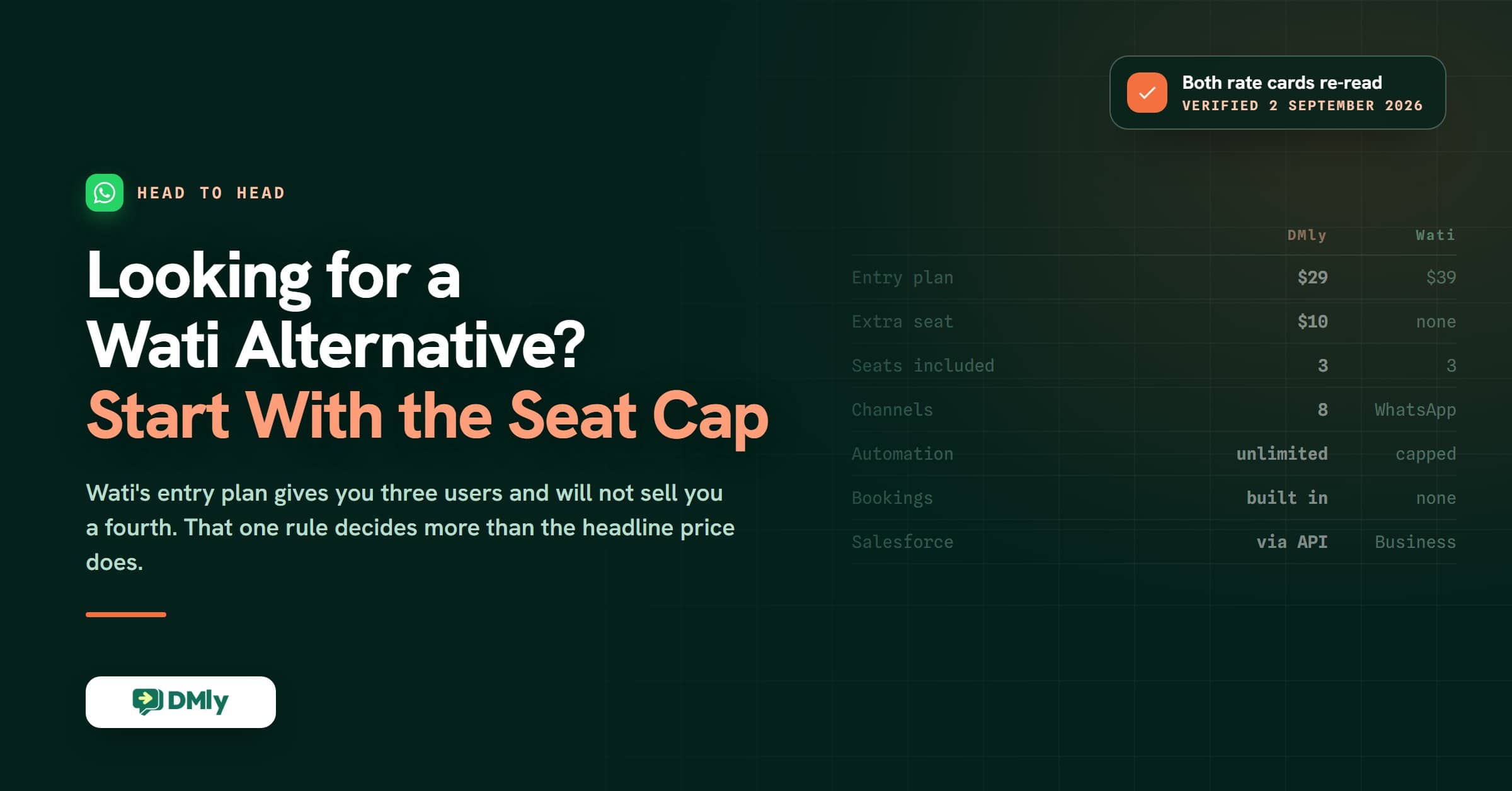
If your business relies on WhatsApp to communicate with customers, chances are you’ve come across Wati at some point. The platform has become one of the more recognizable tools in the WhatsApp marketing space, helping businesses run campaigns, automate conversations, and manage customer messages from a shared team inbox.
For many companies, it’s a straightforward way to turn WhatsApp into a scalable customer engagement channel.
But choosing a messaging platform isn’t only about features. Pricing structure, automation flexibility, integration options, and long-term scalability all start to matter as message volume grows.
In this guide, we’ll take a close look at Wati, considering its capabilities, pricing, and where it works well. We will them compare it with DMly to help you decide which platform is the better fit for your team.
What Is Wati?

Wati is a WhatsApp Business API platform designed to help companies manage customer conversations, automate responses, and run marketing campaigns directly through WhatsApp. The platform is particularly popular among small and mid-sized businesses that want to turn WhatsApp into a central communication channel for sales, support, and customer engagement.
Instead of managing conversations from a single phone, companies can connect their WhatsApp number to the platform and allow multiple team members to respond through a shared workspace. This setup makes it easier for sales and support teams to collaborate while maintaining fast response times.
One of Wati’s core strengths is its focus on simplicity and ease of use. The platform provides a visual interface where teams can manage conversations, create automation workflows, and launch broadcast campaigns without requiring technical expertise.
Businesses can also integrate their WhatsApp communication with tools such as Shopify, WooCommerce, and HubSpot to connect messaging with e-commerce and CRM systems.
Key Features of Wati
Wati offers a range of tools designed to help businesses manage conversations and run marketing campaigns through WhatsApp. The platform combines messaging, automation, and analytics features so teams can handle customer engagement from a single dashboard.
Here are some of the main capabilities businesses use when working with Wati.
Shared Team Inbox
Wati provides a centralized inbox where multiple team members can manage conversations from the same WhatsApp number. Agents can assign chats, add notes, and collaborate to ensure customers receive timely responses.
No-Code Chatbot and Workflow Builder
The platform includes a visual builder that allows businesses to automate replies and create simple workflows without coding. These chatbots can answer common questions, collect customer details, or route conversations to the right agent.

Broadcast Campaigns
Businesses can send bulk WhatsApp messages to segmented contact lists. This feature is often used for promotions, product announcements, and customer updates.
Click-to-WhatsApp Ads Integration
Wati integrates with Click-to-WhatsApp ads, allowing businesses to drive customers directly from Facebook or Instagram ads into WhatsApp conversations.
AI-Powered Support Agent
The platform includes AI-assisted features that help teams respond to inquiries faster by suggesting replies and handling frequently asked questions automatically.

CRM and E-commerce Integrations
Wati connects with tools such as Shopify, WooCommerce, and HubSpot, making it easier to synchronize customer data, orders, and messaging campaigns.
WhatsApp Flows
Businesses can use WhatsApp Flows to create interactive forms and surveys inside conversations, helping capture customer interests or collect feedback.
Analytics and Reporting
The platform provides reporting dashboards that show message performance, campaign engagement, and agent activity, helping businesses track how their WhatsApp communication is performing.
Wati Pricing Breakdown

Wati runs three published tiers, and the limits on users, automation triggers, integrations and analytics widen as you climb. The figures below are the rates Wati shows by default, which are the annual-billing ones, checked on 2 September 2026. Paying monthly costs up to about 25 per cent more. Wati has also raised its prices at least once during 2026, so treat any figure in any comparison article, this one included, as accurate on the date it names.
It’s also important to note that WhatsApp messaging costs from Meta are not included in these plans. Businesses still pay Meta’s conversation-based messaging fees separately when sending messages.
Below is a breakdown of the main plans.
Growth: $39 a Month, Billed Annually
Growth is Wati’s entry tier, meant for a small team getting started. The catch is the seats: three users are included and you cannot buy a fourth. Outgrowing it means jumping a whole plan rather than adding a seat, which is the single thing to check before you commit. Growth also connects one channel only.
This plan includes:
- Three user seats, with no option to add more
- 15,000 broadcast messages per month
- 1,000 free automation triggers per month
- Two selected commerce or CRM integrations, such as Shopify or WooCommerce
Other features include Click-to-WhatsApp ads support, campaign analytics with open and read rates, and up to 10,000 API calls per month. The Growth plan also includes 250 AI Copilot credits monthly, which can assist with automated responses and customer support.
Pro: $79 a Month, Billed Annually
Pro is where most growing teams land. It opens up the seat count and the automation limits, and it is the first tier where you can add users at all.
This plan includes
- Five users included, with extra users at $24 each a month
- Broadcast campaigns become unlimited (though Meta messaging costs still apply).
- 2,000 free automation triggers per month.
- Five integrations, including HubSpot
- 200,000 API calls per month
- AI Copilot credits increase to 500 per month.
Business: $199 a Month, Billed Annually
The Business plan is designed for larger teams that need advanced automation, higher messaging capacity, and enterprise-level features.
Business also includes five users, with extra users at $59 each a month. It adds the team management a bigger operation needs: multiple WhatsApp numbers, round-robin chat assignment, phone number masking, IP whitelisting and a dedicated customer success manager.
Automation rises to 5,000 free automation triggers a month and integrations become unlimited, including Salesforce. API capacity goes to 20 million calls a month with extensive webhooks. Broadcasts are unlimited on both Pro and Business, and Business adds volume discounts on messaging.
Pros and Cons of Wati
Like most WhatsApp marketing platforms, Wati comes with a mix of strengths and limitations. It can be a solid option for businesses that want to build marketing and support workflows around WhatsApp, but there are also areas where teams may encounter constraints as their messaging operations grow.
Pros
- Designed specifically for WhatsApp marketing
Wati focuses heavily on WhatsApp as a customer engagement channel, making it suitable for businesses that want to run campaigns, support conversations, and lead generation directly through the platform. - Ease of use
Wati is designed with a clean interface that makes it easy for teams to start managing WhatsApp conversations and campaigns without a steep learning curve. - No-code automation builder
Businesses can create chatbots and automated workflows using a visual builder, allowing non-technical users to set up automation without writing code. - Easy setup and onboarding
The platform offers guided onboarding and support for setting up the WhatsApp Business API, helping businesses get started quickly. - Mobile app access
Wati provides a mobile app that allows teams to manage conversations, campaigns, and customer messages on the go. - Strong integrations with popular tools
The platform connects with e-commerce and CRM tools like Shopify, WooCommerce, and HubSpot, helping businesses sync customer data and messaging workflows. - Click-to-WhatsApp ads support
Businesses running Facebook or Instagram ads can easily direct prospects into WhatsApp conversations, making it easier to capture and engage leads. - Campaign analytics and reporting tools
The platform includes dashboards that help teams monitor campaign engagement, message performance, and agent activity.
Cons
- Automation triggers limited by plan tiers
Each pricing plan includes a capped number of automation triggers per month, which can restrict automation workflows for high-volume messaging operations. - Additional users increase costs quickly
While plans include a small number of users, adding more agents requires additional per-user fees that can increase the total platform cost. - Meta messaging fees are charged separately
Businesses still need to pay WhatsApp’s official messaging charges on top of the platform subscription. - Primarily focused on WhatsApp
Although some omnichannel features exist, Wati’s core design revolves around WhatsApp rather than broader multi-channel messaging ecosystems. - Advanced features require higher-tier plans
Many of the more powerful capabilities, such as deeper automation, integrations, and analytics, are available only in the higher pricing tiers.
Meet DMly; A Reliable Wati Alternative
While platforms like Wati focus mainly on WhatsApp marketing and conversation management, DMly takes a broader approach to customer engagement. The platform is designed to help businesses automate conversations, run targeted messaging campaigns, and manage customer relationships across multiple channels from a single system.
Instead of treating messaging as just a support tool, DMly positions it as part of a larger automation and customer engagement strategy. Businesses can use the platform to capture leads, nurture prospects, manage customer conversations, and track engagement performance without switching between multiple tools.
Below are some of the capabilities that define how DMly works and make it a reliable Wati alternative.
AI Agents Across Multiple Channels
DMly includes AI agents that answer common questions, guide customers through product information and qualify leads on their own. They work across every connected channel: WhatsApp, Facebook Messenger, Instagram, Telegram, SMS, TikTok and the website chat widget, with Google Business Profile reviews arriving in the same inbox.
When a conversation requires human assistance, the system transfers the chat to a team member while preserving the context of the interaction. This allows businesses to automate routine conversations while keeping the experience personal when needed.
Unified Team Inbox
All conversations from connected channels land in one shared inbox that spans every channel rather than one per app. Sales, support and marketing work in the same place instead of switching between platforms or devices.
Agents can assign chats, leave internal notes, and track conversation history, making it easier to manage large volumes of customer interactions.

WhatsApp Broadcast Campaigns
DMly supports broadcasts to segmented audiences: promotions, product updates, announcements or follow-ups. Outside the 24-hour reply window those go out as templates Meta has approved in advance, which is the rule that decides what a campaign can say, and there is more on doing it at volume without risking the number in our guide to sending bulk WhatsApp messages safely.
Campaigns can also be scheduled and monitored through built-in analytics, helping marketing teams evaluate engagement and refine their messaging strategies.
Behavioral Segmentation
The platform allows contacts to be grouped based on attributes, behavior, and engagement patterns. Instead of sending the same message to everyone, businesses can create targeted campaigns based on customer activity or lifecycle stage.
This type of segmentation helps improve campaign relevance and customer engagement over time.
Advanced Automation Builder
DMly provides a visual automation builder that allows teams to create workflows triggered by events such as new leads, customer responses, or campaign interactions. These workflows can automatically send messages, assign conversations, apply tags, or trigger follow-up campaigns without manual intervention.

Deep Integrations with Business Tools
DMly connects to Shopify and WooCommerce for orders, HubSpot and Mailchimp for contacts, Google Sheets, Google Calendar and Zoom, and Stripe, PayPal, Paystack, Razorpay, MyFatoorah and Mercado Pago for payments. Zapier, n8n, webhooks and a REST API cover the rest. There is no native Salesforce connector, which matters if Salesforce is your system of record: you would bridge it through Zapier or the API rather than a first-party integration. Wati reaches Salesforce on its Business tier.
Real-Time Analytics and Reporting
DMly includes reporting dashboards that help businesses track campaign performance, conversation activity, and engagement metrics. Teams can monitor how customers interact with messages and use those insights to optimize their automation workflows and campaigns.
Multi-Workspace Support
Businesses managing multiple brands or clients can create separate workspaces within the same account. Each workspace maintains its own contacts, automation flows, and campaigns while remaining easy to manage from one platform.
Wati vs DMly: Quick Comparison
| Feature | DMly | Wati |
|---|---|---|
| Starting price | $29 a month, billed yearly (Starter) | $39 a month, billed annually (Growth) |
| Seats on the entry plan | 3, and you can add more at $10 each | 3, and no extra seats can be bought |
| Messaging channels | WhatsApp, Facebook Messenger, Instagram, Telegram, SMS, TikTok, Live Chat widget, plus Google Business Profile reviews | WhatsApp first, with limited omnichannel options |
| Team inbox | One shared inbox spanning every connected channel | Shared inbox, mainly WhatsApp conversations |
| Automation workflows | Unlimited flows and triggers on every plan | Free automation triggers capped by plan: 1,000, 2,000 or 5,000 a month |
| AI automation | AI agents for qualification, support and booking, on your own provider key if you prefer | AI Copilot credits and chatbot workflows |
| Broadcast campaigns | Segmented broadcasts and retargeting, allowance by plan | 15,000 a month on Growth, unlimited on Pro and Business |
| Customer segmentation | Behavioural segments on spend, orders, loyalty and activity | Tags and attributes |
| CRM | Built in: lifecycle stages, tags, notes and custom fields | Largely relies on integrating an external CRM |
| Salesforce | No native connector. Bridge it through Zapier, n8n or the REST API | Yes, on the Business tier |
| Meta messaging fees | Paid to Meta directly, no markup added | Charged separately, on top of the plan |
| Bookings and appointments | Native calendar with services, staff and classes. Payment is all or nothing: no deposit or part-payment setting on a service. Take a deposit by sending an invoice instead | Not available |
| Invoices and payments | Branded invoices that can sit partly paid, expenses and a revenue dashboard | Not available |
| Reviews and reputation | Google review requests and a reputation inbox | Not available |
| Loyalty | Points on paid invoices, with an automatic coupon once a client crosses your threshold | Not available |
| White label | Full white label with a custom domain, through the agency product | Not available |
| More than one workspace | Yes, kept separate | Limited |
From a high level, Wati works well if you want a WhatsApp-focused platform for managing conversations and running campaigns. DMly is built for teams that want the messaging, the CRM and the campaigns in one system across several channels. This page is the head-to-head. If you would rather see Wati weighed against nine other platforms with their current prices, that is our ten-way roundup of Wati alternatives and what each one charges.
Automation Capabilities of the Two Platforms
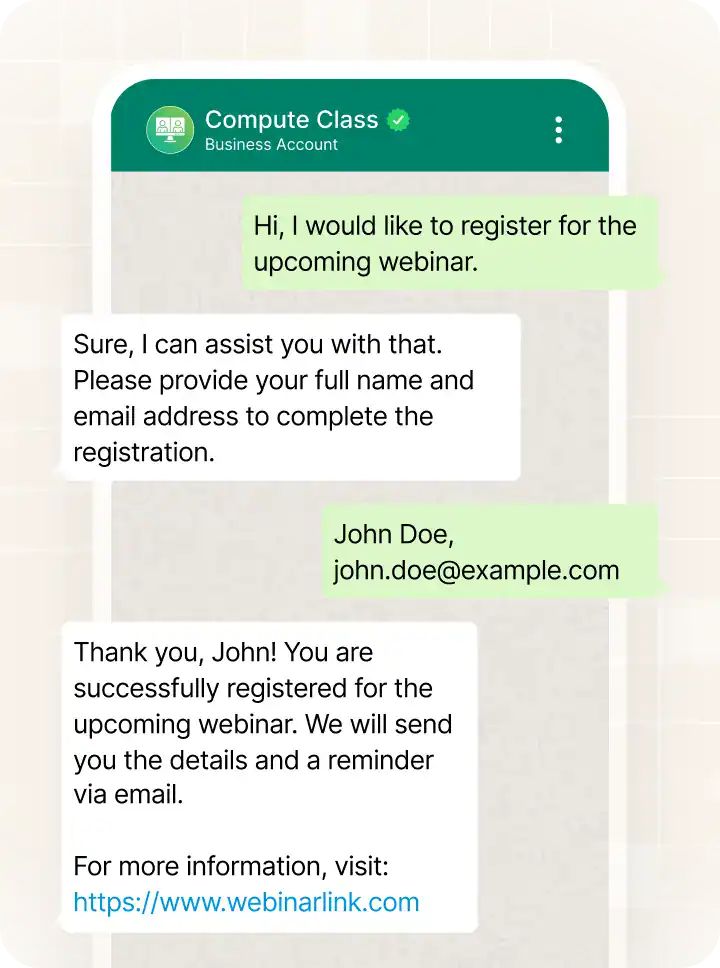
Automation is one of the most important factors businesses consider when choosing a messaging platform. The ability to automatically respond to customers, qualify leads, and trigger follow-up messages can significantly reduce manual work while improving response speed and engagement.
Both Wati and DMly provide automation tools, but they approach automation in slightly different ways.
Automation in Wati
Wati provides automation primarily through its no-code chatbot and workflow builder. Businesses can create automated responses that trigger when customers send certain messages or interact with campaigns.
These workflows are often used to greet customers, answer common questions, collect contact information, or route conversations to the appropriate team member.
The platform also includes automation for tasks such as follow-up reminders, lead capture through Click-to-WhatsApp ads, and simple customer journeys using WhatsApp Flows.
However, automation triggers are limited based on the pricing plan, which means businesses running large numbers of automated interactions may need to upgrade to higher tiers as their messaging volume increases.
Automation in DMly
DMly approaches automation with a stronger focus on event-driven workflows and AI-powered engagement. Instead of only responding to incoming messages, businesses can design automation sequences triggered by customer behavior, CRM updates, or campaign interactions.
For example, when a new lead enters the system, DMly can automatically send a welcome message, assign the lead to a sales representative, apply segmentation tags, and launch follow-up campaigns if the lead becomes inactive. These workflows can run continuously without manual intervention.
The platform also includes AI agents that can answer questions, guide customers through product information, and qualify leads across multiple messaging channels. When human intervention is required, the conversation can be handed over to an agent without losing context.
Because automation workflows, segmentation rules, and customer data operate within the same system, DMly allows businesses to build complete customer engagement journeys rather than simple message-based responses.
CRM and Customer Data Management
Beyond sending messages and running campaigns, businesses also need a reliable way to organize customer information and track interactions over time. This is where CRM and contact management features become essential.
They allow teams to store customer details, monitor conversation history, and use that data to personalize future communication.
CRM Capabilities in Wati
Wati provides basic contact management features that help businesses keep track of customers interacting through WhatsApp. Each contact can be tagged and assigned attributes, allowing teams to categorize leads and customers for messaging campaigns or automation workflows.
Wati also supports integrations with external CRM platforms such as HubSpot and other business tools. This means companies that already rely on a dedicated CRM can sync messaging data with their existing customer database. In many cases, Wati acts as the messaging layer while the CRM system stores deeper customer records, sales pipelines, and lifecycle information.
For businesses already using established CRM tools, this approach works well because messaging conversations can be linked to existing customer profiles.
CRM Capabilities in DMly
DMly takes a more integrated approach by including CRM functionality directly within the platform. Instead of relying entirely on external systems, businesses can manage customer data, track interactions, and organize leads within the same environment where messaging and automation workflows operate.
Contacts can be tagged, assigned custom attributes, and organized into different stages of a sales or engagement pipeline. Teams can also add notes, view full conversation histories, and use segmentation rules to create targeted campaigns based on customer behavior.
Because the CRM layer is tightly connected with automation and messaging features, businesses can trigger campaigns or follow-up actions when customer data changes, for example when a lead becomes qualified or when a customer interacts with a previous campaign. This integrated setup allows teams to build more personalized and efficient messaging strategies.
Messaging Campaigns and Broadcasts

Messaging campaigns are one of the main reasons businesses adopt platforms like Wati and DMly. Whether it’s promoting a new product, sending order updates, or re-engaging inactive customers, the ability to deliver messages at scale plays a key role in modern customer communication strategies.
Messaging Campaigns in Wati
Wati provides robust tools for running WhatsApp broadcast campaigns. Businesses can send messages to large groups of contacts simultaneously, making it easier to promote offers, announce product launches, or share important updates.
The platform allows contacts to be segmented using tags and attributes so campaigns can target specific audiences instead of the entire contact list. Businesses can also integrate Click-to-WhatsApp ads, which allow customers to start conversations directly from Facebook or Instagram advertisements.
Messaging Campaigns in DMly
DMly approaches campaigns with a stronger focus on segmentation and automation-driven messaging. Instead of relying primarily on one-time broadcasts, the platform allows businesses to design messaging strategies that evolve based on customer behavior and engagement patterns.
Contacts can be grouped according to factors such as previous interactions, campaign responses, or lifecycle stage. This allows marketing teams to send more relevant messages rather than generic campaigns to large audiences.
DMly also supports scheduling campaigns, triggering follow-ups automatically, and launching retargeting messages when customers interact with earlier campaigns. By combining segmentation with automation workflows, businesses can create more structured messaging programs that nurture leads and maintain ongoing engagement with customers.
Analytics and Reporting
Understanding how messaging campaigns and conversations perform is essential for improving customer engagement strategies. Reporting tools help businesses track campaign effectiveness, measure team productivity, and identify opportunities to improve automation workflows.
Wati provides analytics primarily focused on campaign performance and team activity. Businesses can monitor metrics such as message delivery rates, open and read rates for broadcast campaigns, and conversation activity handled by agents.
These insights help teams understand how customers interact with their WhatsApp messages and whether campaigns are reaching the intended audience.
The platform also includes reporting tools that allow managers to evaluate team performance, track response times, and monitor conversation volumes. For businesses that rely heavily on WhatsApp for customer support or marketing campaigns, these metrics provide a helpful overview of how the messaging operation is performing.
DMly extends reporting beyond operational metrics by providing deeper insights into campaign engagement, automation performance, and customer interactions. Businesses can analyze how contacts respond to campaigns, track how leads move through automation workflows, and measure engagement across multiple messaging channels.
Because DMly connects messaging data with automation workflows and customer segmentation, its reporting tools can reveal how conversational campaigns influence lead generation, conversions, and customer retention. These insights help teams refine their messaging strategies and continuously improve campaign performance.
Pricing Comparison: Wati vs DMly
Pricing is another important factor businesses consider when comparing messaging platforms. So, let’s talk about it.
At first glance, both Wati and DMly provide tools for managing conversations, running campaigns, and automating customer engagement. However, their pricing structures are quite different once you look beyond the basic subscription cost.
Wati starts at $39 a month billed annually for Growth, which carries three users, one channel and limits on automation triggers. Teams that outgrow it move to Pro at $79 or Business at $199, both billed annually, for higher automation limits, more integrations and deeper analytics. Monthly billing costs up to about 25 per cent more on every tier.
Seats are where the real cost lives. Pro includes five users and charges $24 a month for each one after that; Business includes five and charges $59. Growth allows no extra users at all, so a fourth person means moving to Pro rather than paying for a seat. For a ten-person team the seat cost can outweigh the plan.
It’s also important to remember that Meta’s WhatsApp messaging fees are charged separately. Businesses pay these conversation-based fees on top of the Wati subscription when sending messages.
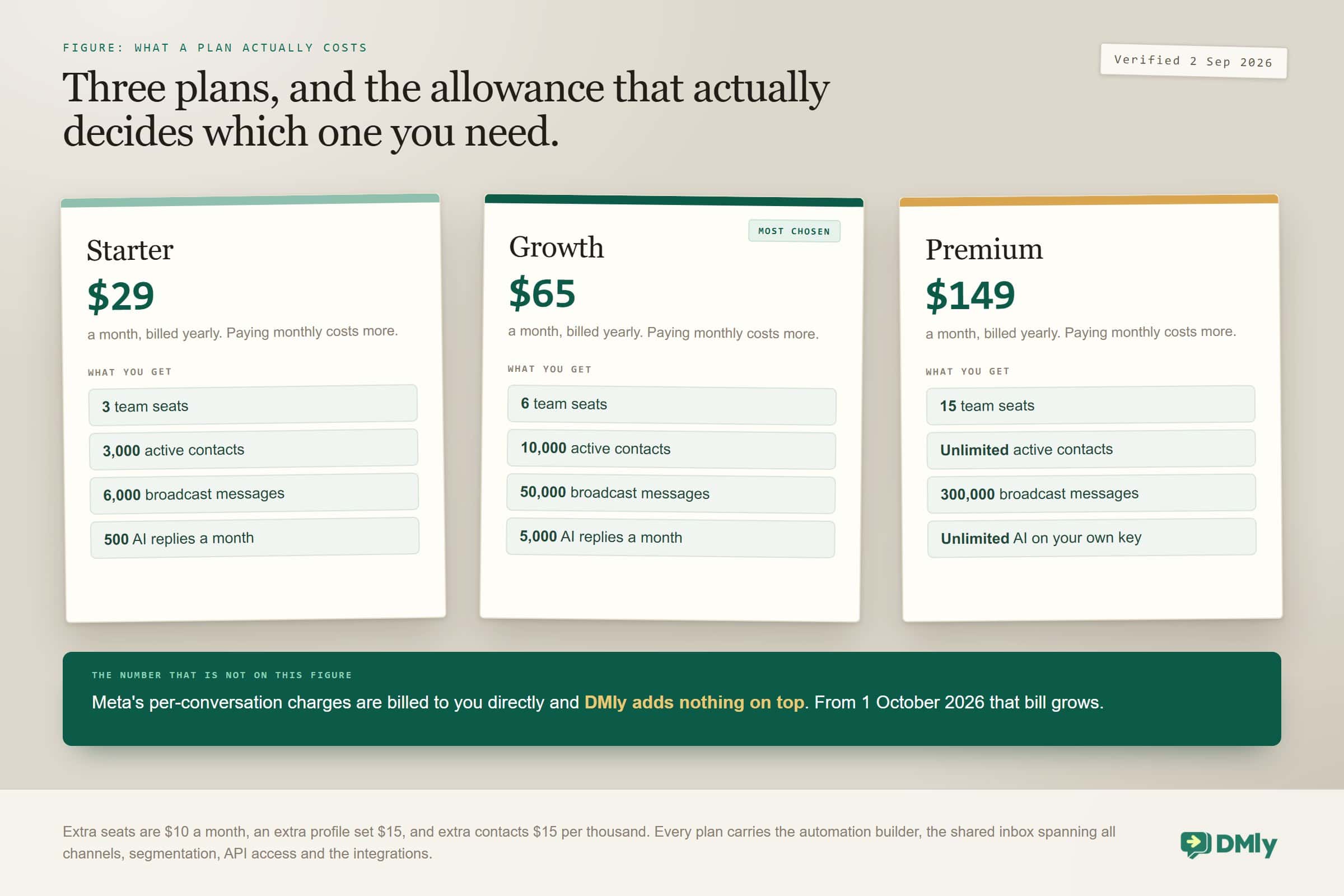
DMly prices lower at the entry and puts more in each plan. Starter is $29 a month billed yearly, with 3,000 active contacts, three team seats, 10,000 broadcast messages and 500 AI replies a month. Checked against the live pricing page on 2 September 2026.
Growth is $65 a month, raising that to 10,000 active contacts, six team seats, 50,000 broadcast messages, unlimited bots and 5,000 AI replies. Extra seats are $10 each and extra contacts $15 per thousand, so the plan grows in small steps rather than jumps.
For larger teams, Premium at $149 a month carries unlimited active contacts, fifteen team seats, 300,000 broadcast messages and unlimited AI replies on your own provider key. Every plan includes the automation builder, segmentation and the shared inbox across all channels.
Another difference is how messaging fees are handled. DMly has you pay Meta’s own WhatsApp charges directly, with nothing added on top, which keeps the cost predictable as campaigns scale. That part of the bill is about to grow for everyone: from 1 October 2026 Meta starts charging for service messages and for utility templates sent inside an open 24-hour window, both free today. Our guide to the October 2026 WhatsApp pricing change sets out what to budget for, and the conversation cost calculator works it out for your volume.
Why Many Teams Choose DMly Over Wati
Both Wati and DMly are designed to help businesses scale customer conversations and marketing campaigns through messaging. However, as companies compare the two platforms closely, many end up choosing DMly because of some perks it has over Wati.
Lower entry price
DMly’s entry plan is $29 a month against Wati’s $39, both on their cheapest billing. The gap that matters more is what happens next: Wati’s Growth tier caps you at three users with no way to buy a fourth, so the fourth person costs a whole plan upgrade, while DMly sells a seat for $10. For a startup, an agency or a small business, that is the difference between growing in steps and growing in jumps.
Unlimited automation
Another key advantage is automation flexibility. DMly allows businesses to create unlimited automation workflows across all plans, enabling teams to build sophisticated messaging sequences triggered by customer behavior, campaign interactions, or CRM updates. In contrast, Wati limits the number of automation triggers based on the plan tier, which can restrict how extensively businesses automate their messaging workflows.
Multi-channel messaging
Many teams also choose DMly because of its multi-channel communication capabilities. While Wati is primarily designed around WhatsApp messaging, DMly supports conversations across multiple channels such as WhatsApp, Instagram, Messenger, Telegram, and web chat. This allows businesses to manage all customer interactions from a single inbox rather than switching between separate tools.
Built-in CRM
Another differentiator is built-in CRM functionality. DMly allows businesses to track contacts using tags, custom attributes, notes, and pipeline stages directly within the platform. Because messaging, automation, and customer data management are integrated, teams can run more personalized campaigns and manage the entire customer journey without relying heavily on external CRM systems.
No markup on Meta messaging
Also, many organizations appreciate DMly’s transparent messaging cost structure. Businesses using DMly pay Meta’s official WhatsApp messaging fees directly without platform markup. For companies sending large volumes of messages, this approach helps keep operational costs predictable as their messaging strategy expands.
FAQs
What is Wati?
Wati is a WhatsApp Business API platform that helps companies manage customer conversations, run broadcast campaigns, and automate messaging workflows through WhatsApp. Businesses use it to handle support queries, send marketing messages, capture leads from ads, and manage conversations through a shared team inbox.
Why should I look for a Wati alternative?
Some businesses start exploring Wati alternatives when they need deeper automation, broader messaging channels, or more flexible pricing as their operations grow. Others may want stronger CRM capabilities, advanced segmentation, or fewer limits on automation workflows.
Is Wati good for WhatsApp marketing?
Yes. Wati includes tools designed specifically for WhatsApp marketing, such as broadcast campaigns, chatbot automation, Click-to-WhatsApp ads integration, and campaign analytics. These features help businesses run promotions, engage customers, and capture leads through WhatsApp conversations.
What is the best Wati alternative?
The best Wati alternative depends on your messaging strategy. Platforms like DMly are often chosen by businesses that want stronger automation capabilities, multi-channel messaging support, built-in CRM functionality, and transparent messaging costs.
Can I migrate from Wati without losing my data?
Yes. Many messaging platforms provide migration support that allows businesses to move their contact lists, message templates, and automation workflows from one system to another. The exact process depends on the platform and how the WhatsApp Business API is configured, but most migrations can be completed without losing essential customer data.
Writing about WhatsApp automation, bookings and growth for local business.
Turn WhatsApp into your busiest channel.
Start free and run message, bookings, payments and reviews in one place.
