
Best Practices for Messaging-Based Customer Support in 2026

Think about the last time you needed help from a brand. Did you want to wait on hold? Draft a long email? Or did you prefer sending a quick message and getting an answer right away?
That shift in behavior is redefining customer support in 2026. Messaging has become the new frontline of customer experience.
Customers expect real-time responses, personalized conversations, and seamless transitions between channels – all without friction. Businesses that get this right are seeing faster resolutions, higher customer satisfaction, and stronger loyalty.
In this guide, we’ll break down the best practices for building a modern messaging support strategy that turns support conversations into long-term customer relationships.
What Is Messaging-Based Customer Support?
Messaging-based customer support is a modern approach to helping customers through real-time chat platforms instead of traditional channels like phone or email.
It allows customers to reach a business through apps they already use, such as WhatsApp, Facebook Messenger, Instagram DMs, web chat, SMS, or in-app messaging, and receive assistance in a conversational format.
But it’s more than just “live chat.”
Messaging-based support is built around asynchronous, ongoing conversations. That means customers don’t have to stay glued to the screen waiting for a response. They can send a message, step away, and continue the conversation later, without losing context.
This flexibility is one of the biggest reasons messaging has become the preferred support channel for modern consumers.
How It Differs from Traditional Support
Traditional support channels are typically linear and session-based:
- Phone calls end when the call ends.
- Emails create long, fragmented threads.
- Tickets often disconnect context between departments.
Messaging support, on the other hand, is continuous and contextual. Every interaction lives inside a unified conversation thread. Customers can scroll back, reference previous messages, and pick up where they left off, creating a smoother, more human experience.
Core Characteristics of Messaging-Based Support
Here’s what defines true messaging-driven support in 2026:
- Real-Time Responses: Customers expect fast replies. Even if the answer takes time, acknowledgment should be immediate.
- Conversational Tone: Messaging feels informal and personal. Support interactions feel more like helpful chats than rigid service scripts.
- Omnichannel Continuity: Customers can move between channels (for example, from Instagram DM to WhatsApp) without repeating information.
- Automation + Human Collaboration: AI chatbots handle common questions instantly, while human agents step in for complex or sensitive cases.
- Persistent Context: Every conversation is stored and accessible, allowing agents to see full history before responding.
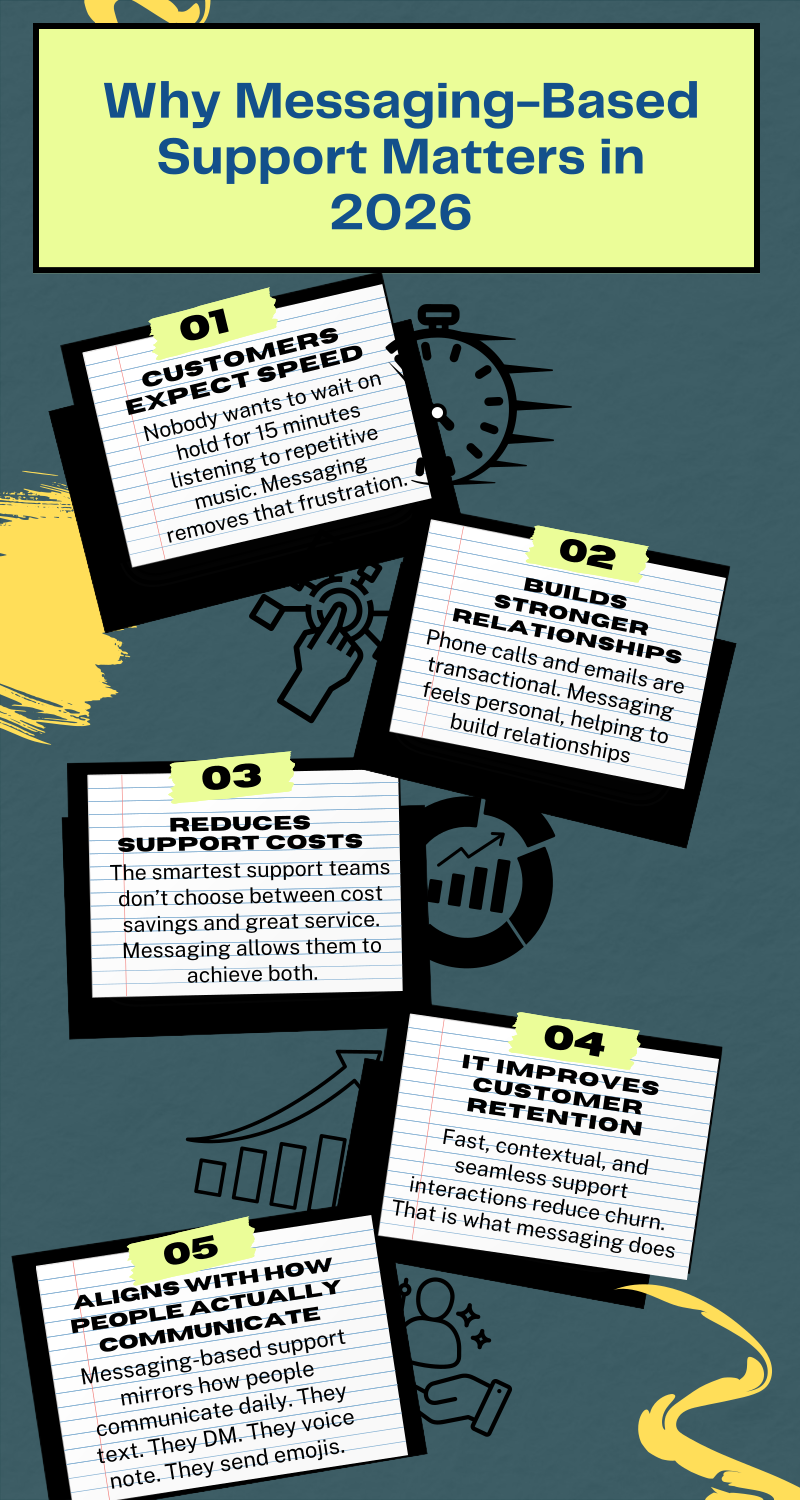
Best Practices for Messaging-Based Customer Support in 2026
Messaging support in 2026 isn’t just about being available on WhatsApp, Instagram, or live chat. It’s about delivering support that feels effortless, intelligent, and human, even when automation is involved.
The brands that stand out aren’t the ones with the most channels, but the ones that execute messaging support with intention.
So, let’s talk about how to do it right.
1. Make Responsiveness a Standard, Not a Goal
Customers don’t open a messaging app expecting to wait. The very nature of chat implies immediacy. While not every issue can be resolved instantly, every message should be acknowledged quickly.
An immediate confirmation, even if automated, reassures customers that they’ve been heard. From there, clear expectations matter. Let them know when they’ll receive a full response.
2. Blend Automation with Human Empathy
Automation is essential in 2026. It handles repetitive queries, routes conversations intelligently, and provides instant answers outside business hours. But automation should never feel like a barrier.
The best messaging support systems use bots to accelerate conversations, not block them. Routine tasks like order tracking, FAQs, and booking confirmations are handled instantly. And complex, emotional, or sensitive issues are smoothly transferred to a human agent with full context.
Customers shouldn’t have to fight to “reach a real person.” The transition should feel natural, not escalated.
3. Preserve Context Across Every Conversation
Few things damage customer experience faster than being asked to repeat yourself. Messaging-based support should be continuous, even when it moves across channels.
If a customer starts on Instagram and follows up via WhatsApp, your team should see the entire history. If they contacted support last week about a billing issue, that detail should be visible before the agent responds.
Context does not only reduce friction; it also shortens resolution time. Most importantly, it shows respect for the customer’s time.
4. Communicate Like a Human – Not a Script
Messaging is conversational by design. That means tone matters more than ever.
Support responses should feel clear, warm, and direct. Avoid overly formal phrasing or long, dense paragraphs that overwhelm mobile users.
Break explanations into short, readable messages. Use natural language. Adapt your tone based on the situation.
If a customer is frustrated, empathy should lead. If they’re asking a simple question, clarity and brevity should guide the response. Remember that the goal isn’t to sound robotic or rehearsed. It’s to sound competent and human.
5. Personalize the Experience Without Overcomplicating It
Customers expect brands to recognize them. That doesn’t mean hyper-detailed profiling in every message. It means using available information intelligently.
If a customer has an active order, reference it. If they’ve been with your brand for years, acknowledge that loyalty. If their issue relates to a recent purchase, address it directly.
Personalization in messaging support doesn’t require dramatic customization. It requires awareness. When agents can see relevant data at a glance, they can tailor their responses naturally.
6. Design for Scalability from the Start
Messaging volume grows quickly. What works for a team of two can collapse under higher traffic if there’s no structure behind it.
Clear routing systems, workload balancing, and defined escalation paths are essential. Assign conversations based on expertise. Monitor peak hours. Ensure no message sits unnoticed in a shared inbox.
Customers may never see your internal workflows, but they will absolutely feel the impact of disorganization.
7. Focus on Resolution Quality, Not Just Speed
Speed is important, but resolution quality is what determines whether customers return.
Instead of measuring success solely by response time, pay attention to first-contact resolution rates and customer satisfaction. Did the issue get fully solved? Did the customer need to follow up again? Did they leave the conversation feeling confident?
Messaging allows for richer, more interactive support experiences. Use that advantage to provide complete answers, not rushed ones.
8. Continuously Refine Based on Real Conversations
Every messaging interaction is data. Over time, patterns will emerge. Certain questions repeat. Certain workflows cause confusion. Certain messages drive satisfaction.
Review conversations regularly. Identify friction points. Improve automated flows. Update canned responses. Train agents based on real-world chat scenarios.
Tools That Power Messaging-Based Support
Great messaging support doesn’t happen by accident. It’s powered by the right platform – one that brings conversations, automation, customer data, and performance insights into one place.
Right now, support teams don’t just need chat tools. They need systems designed for speed, personalization, and scale.
So, let’s take a quick look at some platforms built specifically for this new era of support.
#1: DMly
DMly is designed for businesses that want messaging to be more than a support add-on. It’s built to centralize conversations, automate intelligently, and help teams respond faster without losing the human touch.
Here’s what makes it especially strong for modern support teams:
Omnichannel Inbox
DMly pulls conversations from channels like WhatsApp, Instagram, web chat, and other messaging platforms into one unified dashboard. Agents don’t need to jump between tabs or tools.
More importantly, the entire conversation history stays intact. If a customer starts on Instagram and continues on WhatsApp, the context follows them. That means fewer repeated questions and smoother handoffs.
AI Automation
DMly’s AI capabilities allow teams to automate common queries, qualify conversations, and route chats intelligently.
Instead of agents manually responding to repetitive questions like “Where’s my order?” or “What are your opening hours?”, AI handles them instantly. More complex cases are escalated seamlessly, with full conversation context passed to the human agent.
This balance between automation and human support is what modern customers expect.
CRM Integration
One of the biggest challenges in messaging support is fragmented customer data.
DMly integrates with CRM systems so every conversation connects to a full customer profile. Agents can see purchase history, previous support tickets, and engagement behavior before replying.
That visibility changes everything. Responses become more personalized. Issues get resolved faster. Customers feel known, not anonymous.
Workflow Builder
Support processes shouldn’t live in scattered documents. DMly’s workflow builder allows businesses to create structured support journeys directly inside the platform.
You can design flows for:
- Returns and refunds
- Appointment confirmations
- Escalations to specific teams
- Post-resolution follow-ups
You do all these without heavy technical setup. This keeps support consistent, even as teams grow.
Analytics and Performance Insights
Messaging support should be measurable. DMly provides clear performance tracking, including response times, resolution rates, conversation volumes, and engagement trends.
This allows support leaders to identify bottlenecks, optimize staffing, and continuously improve workflows.
Other Popular Messaging Support Tools
While DMly is built with modern messaging-first support in mind, there are other platforms that businesses often consider as well.
#2: Zendesk
Zendesk is widely known for its robust ticketing system and enterprise-grade customer support capabilities. It supports messaging integrations and offers powerful reporting features. It’s particularly strong for large organizations that need structured support environments and extensive customization.
#3: Intercom
Intercom blends messaging, chatbots, and customer engagement tools into one platform. It’s popular among SaaS businesses that want proactive in-app messaging and automated onboarding flows alongside support capabilities.
#4: Freshchat
Freshchat, part of the Freshworks ecosystem, offers conversational support tools with chatbot automation and CRM integration. It’s often chosen by mid-sized businesses looking for a balance between functionality and cost-effectiveness.
The tool you choose ultimately depends on your business size, support volume, and how deeply messaging sits within your customer experience strategy.
In 2026, however, one thing is clear: messaging-based support requires a platform built for conversation, automation, and scale – not just basic chat functionality.
How to Implement Messaging Support in Your Business (Step-by-Step Framework)
Rolling out messaging support isn’t something you “switch on” and hope for the best. The best implementations follow a simple framework: get clarity first, build the right system, then improve it based on what customers actually do.
Here’s a step-by-step approach that works in 2026.
Step 1: Audit Current Support Channels
Start by getting brutally clear on what your support setup looks like right now.
Look at where customers are contacting you today (email, phone, WhatsApp, Instagram, live chat, etc.) and what’s working or breaking across those channels. Pay attention to repeated complaints, slow response points, and where customers drop off.
This step is also where you spot the “hidden problems” – for example, customers DM’ing your Instagram page because email replies take too long, or your team missing WhatsApp messages because there’s no shared inbox.
The point is to understand your current reality before adding new layers.
Step 2: Define KPIs and SLAs
Messaging support gets messy when success isn’t clearly defined.
KPIs tell you what you’re tracking. SLAs tell your team what “good” looks like day to day.
In simple terms: how fast should you respond? How quickly should issues be resolved? What counts as a successful support conversation?
Even if your numbers evolve later, setting an initial benchmark is critical. Otherwise, you can’t manage performance or improve consistently.
Step 3: Choose the Right Platform
Now that you know what you need, pick a tool that fits the job.
This is where businesses often make mistakes by choosing a platform based on brand popularity instead of fit. The right platform should match your channel needs, volume, team structure, and automation goals.
If you expect customers to contact you across multiple channels, you’ll want a unified inbox. If your team handles a high volume of repetitive questions, AI automation and workflows will matter more. If personalization is key, CRM integration becomes non-negotiable.
Pick the tool that supports your support strategy, not the other way around.
Step 4: Design Automation Flows
Automation is what makes messaging support scalable in 2026.
But don’t try to automate everything at once. Start with the high-frequency, low-complexity conversations – the questions your agents answer repeatedly.
Things like order tracking, booking confirmations, delivery updates, refund policy questions, and basic troubleshooting are perfect first workflows.
Your goal here is simple: reduce repetitive workload while keeping the experience smooth for customers. Every automation should feel like a shortcut to help, not a dead end.
Step 5: Train Agents
Messaging support is its own skill set. Agents need to know how to communicate clearly in short messages, keep tone human, and manage multiple conversations without sounding rushed.
They also need to understand how automation works, when to step in, and how to take over a conversation gracefully.
This is also where you build internal consistency – things like tone guidelines, escalation rules, and how to handle sensitive situations.
Your tool can’t fix poor communication. Training does.
Step 6: Launch and Optimize
Once you launch, treat the first few weeks as a learning phase, not a final rollout.
Watch where customers get stuck. See where automation fails. Identify peak messaging hours. Monitor response times and customer satisfaction. Review real conversations weekly and refine your workflows and agent playbooks.
Messaging support improves quickly when it’s treated as a living system. The best teams in 2026 don’t “set it up.” They tune it.
Final Note
Messaging-based customer support is no longer a nice addition to your service strategy. In 2026, it’s the standard. Customers expect fast, convenient, and conversational support on the same channels they use every day. If your business isn’t meeting them there, someone else will.
The real advantage isn’t just speed. It’s the combination of automation and human connection. AI handles the repetitive work. Agents handle empathy, nuance, and complex problem-solving.
Together, they create support that feels both efficient and personal. Brands that invest in this balance early won’t just keep up. They’ll set the bar for customer experience in their industry.
FAQs
What is messaging-based customer support?
Messaging-based customer support allows customers to contact a business through chat platforms like WhatsApp, Instagram, web chat, or SMS instead of calling or emailing.
Is messaging better than phone support?
It depends on the situation. Messaging is often better for convenience, multitasking, and simple or moderately complex issues. Customers can send a message and continue with their day. Phone support still has value for highly emotional or urgent situations. In 2026, the strongest support strategies combine both, but messaging usually handles the majority of everyday inquiries.
How fast should support respond in chat?
Ideally, customers should receive an immediate acknowledgment within seconds, even if it’s automated. For human responses, many modern support teams aim for under 5 minutes during business hours.
Can AI fully replace human agents?
No – and it shouldn’t. AI is excellent for handling repetitive questions, routing conversations, and speeding up processes. But complex, emotional, or high-stakes interactions still require human judgment and empathy.
Which industries benefit most from messaging support?
Almost every industry can benefit, but it’s especially powerful for e-commerce, SaaS, fintech, healthcare, travel, education, and local services.
Any business that handles frequent customer questions, appointment bookings, order updates, or account management can dramatically improve efficiency and customer satisfaction through messaging-based support.
Writing about WhatsApp automation, bookings and growth for local business.
Turn WhatsApp into your busiest channel.
Start free and run message, bookings, payments and reviews in one place.
