
Whaticket Review 2026: The $49 Plan Is for Three People
There is a sentence on Whaticket’s pricing page that no other platform we have checked this week has bothered to write, and it is why this Whaticket review opens with credit rather than a complaint.
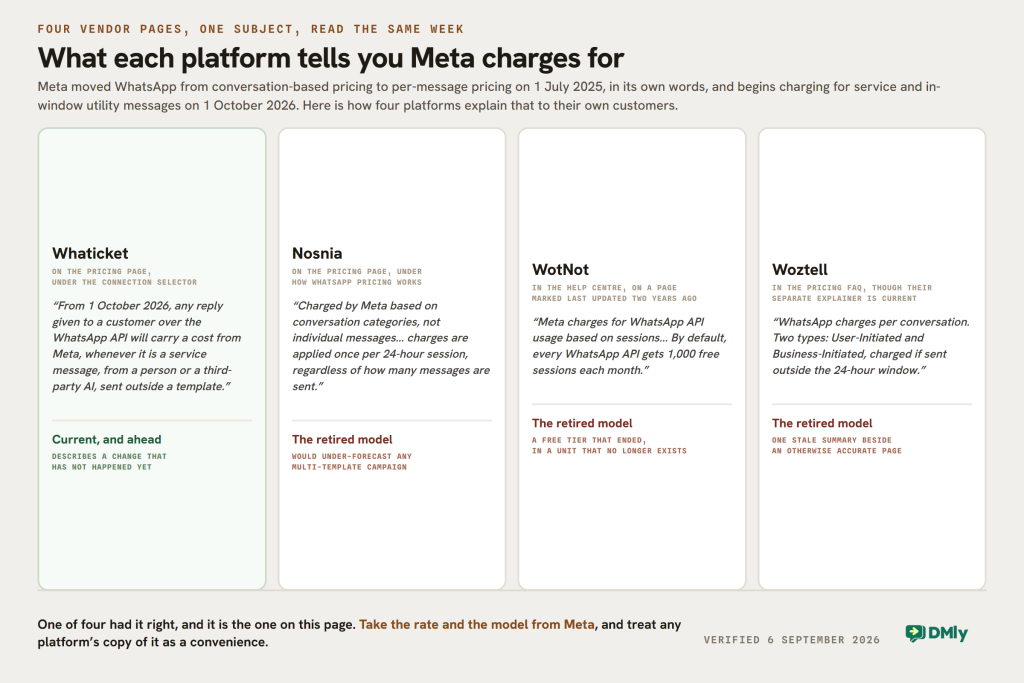
It sits under the connection selector, translated from their Spanish: “From 1 October 2026, any reply given to a customer over the WhatsApp API will carry a cost from Meta, whenever it is a service message, from a person or a third-party AI, sent outside a template.”
That is correct, it is dated, and it is ahead of the market. Three other WhatsApp platforms we re-checked in the same week still explain Meta’s costs using conversation-based pricing, which Meta retired on 1 July 2025. Whaticket has not only caught up, it has told its customers about a change that has not happened yet. Credit where it is due.
While they were rewriting that page they also did something else: they removed their plans. The Basic, Pro and Custom tiers this page was built on no longer exist. What replaced them is one plan you assemble yourself, and it changes the entry price in a way nobody has written down.
Everything below was read on their own pricing page on 6 September 2026, with the Spanish translated by us and the original quoted where it matters. We have not run Whaticket on a paid plan this month, so there is no verdict here on how it feels to use.
Whaticket Pricing in 2026: One Plan You Build
Their page says it plainly: “At Whaticket we do not have fixed plans, you can adjust them however you like and choose what best suits your business.” Underneath is a builder with two controls.
| Control | Minimum | What it costs |
|---|---|---|
| Number of users | 3, and the page says so | Included in the base price at the minimum |
| WhatsApp connections | 1, as QR or as API and coexistence | Additional connections from $20 a month |
| Base configuration | 3 users, 1 connection | US$49.00 a month, billed monthly |
| Annual billing | 20 per cent off | |
| Trial | 14 days free |
The three-user minimum is the fact this page most needed and did not have. $49 is not the price of a Whaticket seat, it is the price of three of them. That makes it good value for a small team and unavailable to a sole trader, and it is a different comparison from the one every review of this product prints.
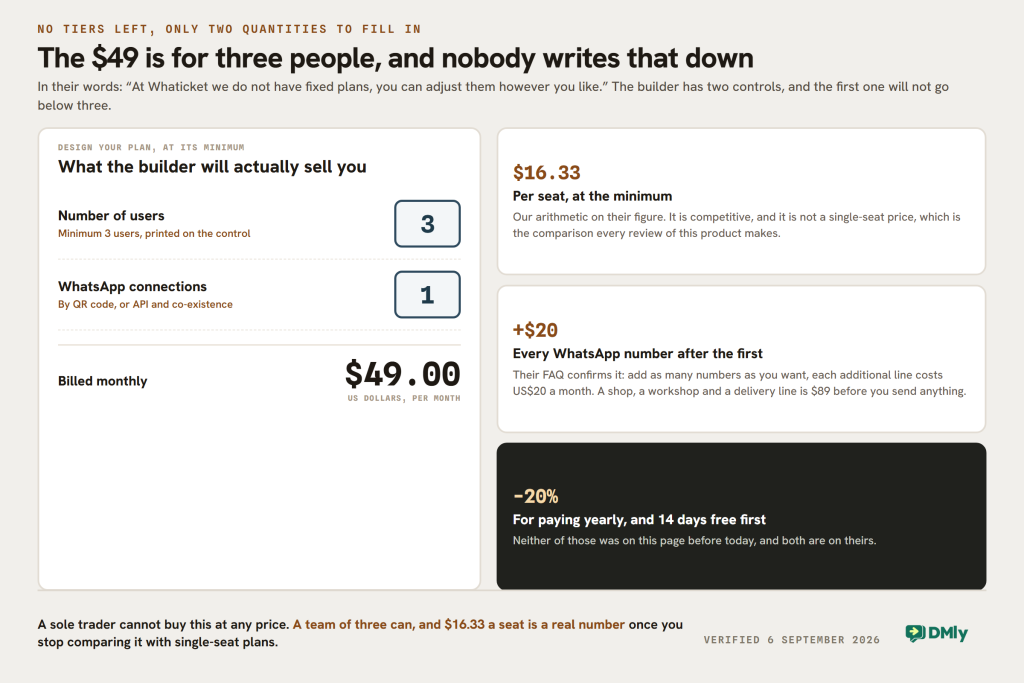
The second control is worth thinking about before you buy rather than after. Every WhatsApp number you connect after the first is another $20 a month, and their FAQ confirms it: you can add as many numbers as you want, each additional line costs US$20. A business with a shop, a workshop and a delivery line is paying $89 before it has sent anything.
What Changed Since This Whaticket Review Was Published
| What this page said | What their page says on 6 September 2026 |
|---|---|
| Basic $49, Pro $109, Custom from $49 | None of those exist. One configurable plan from $49 |
| No mention of a user minimum | Minimum 3 users, stated on the builder |
| Unlimited chat history is the Pro upgrade at $109 | Unlimited chat history and unlimited contacts are included, so the upgrade has no purpose |
| Facebook and Instagram in beta | Both listed as ordinary channels, and TikTok has been added |
| No mention of annual billing | 20 per cent off for paying yearly |
| Extra connections around $20, credits at $25 to $105, AI needs your own OpenAI tokens | All three still correct |
Two of those corrections run in Whaticket’s favour and should be said clearly. The paywall on chat history is gone, so the thing our page described as the reason to spend $109 is now included at $49. And the channels have grown: WhatsApp by QR, Business or API, plus web chat, Instagram DMs, Facebook and TikTok, with Facebook and Instagram no longer labelled beta.
We also ran a section headed “Where Whaticket Starts to Struggle” built on adjectives. We have not run the product this month, so that was not ours to write, and it has gone. What follows instead is the small print they publish themselves, which is more useful than any opinion we could offer.
The Two Footnotes Under the Campaign Credits
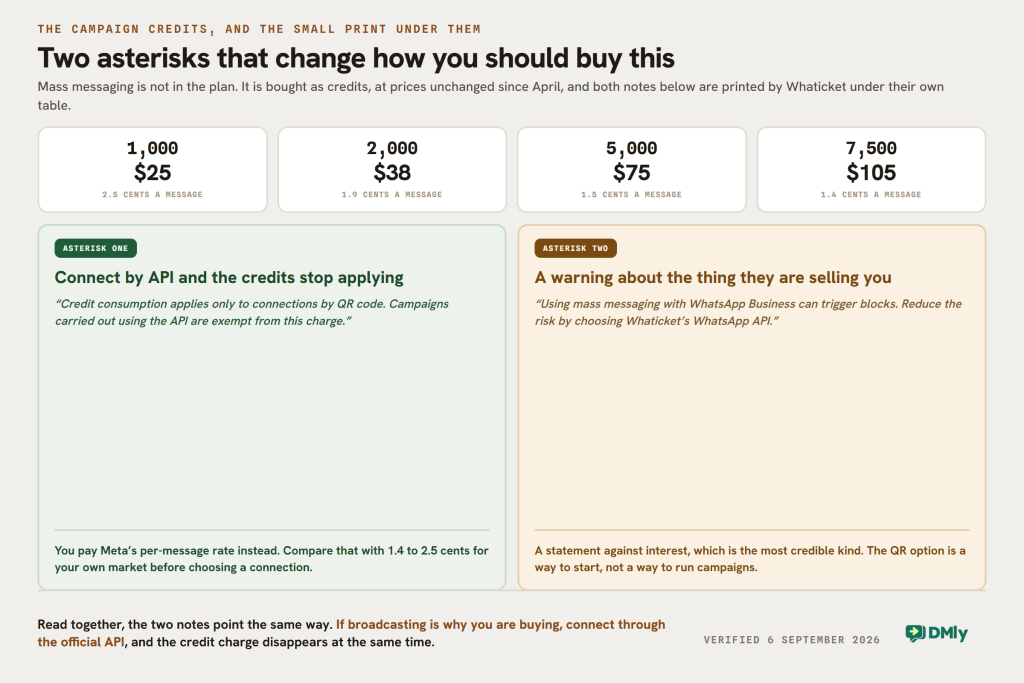
Mass messaging is not in the plan. It is bought separately as credits, at prices unchanged since we last looked:
| Bundle | Price | Per message |
|---|---|---|
| 1,000 mass messages | $25 | 2.5 cents |
| 2,000 | $38 | 1.9 cents |
| 5,000 | $75 | 1.5 cents |
| 7,500 | $105 | 1.4 cents |
Underneath that table are two asterisks, and they are the most useful thing on the page. Translated from their Spanish:
“Credit consumption applies only to connections by QR code. Campaigns carried out using the API are exempt from this charge.”
“Using mass messaging with WhatsApp Business can trigger blocks. Reduce the risk by choosing Whaticket’s WhatsApp API.”
Whaticket pricing page, read 6 September 2026
Take those one at a time, because together they change how you should buy this product.
The credit charge disappears if you connect by API
If your WhatsApp number is connected through the official API rather than by scanning a QR code, campaigns do not consume Whaticket credits at all. You pay Meta for the template messages instead, at Meta’s published rates for your market.
Whether that is cheaper depends entirely on where your customers are, and it is a real sum rather than a rhetorical one. A Whaticket credit costs between 1.4 and 2.5 cents. Meta’s marketing rate is a different number in every market and in some of them it is considerably higher. Do that comparison for your own country before you decide which connection to use, because it is the largest cost in either model.
The block warning, published by the vendor selling the thing
The second footnote is unusual enough to stop at. Whaticket sells QR connections, sells campaign credits for use on them, and then warns on the same page that using mass messaging over a WhatsApp Business connection can get your number blocked.
That is a statement against interest, which is the most credible kind. It is also correct: automating bulk sends over a phone-app connection is the behaviour that gets numbers restricted, and the official API exists precisely so that a business can send at volume within rules Meta recognises. Their recommendation, in their own words, is to reduce the risk by choosing their WhatsApp API.
The practical reading for a buyer is that the QR option is a way to start, not a way to run campaigns. If broadcasting is why you are buying, connect through the API, and the credits stop being a cost at the same time.
What Meta Will Bill You From 1 October, Underneath Either Choice
Whaticket’s notice is right and it is early, but it stops at the word cost. Here is the figure it points at, read from Meta’s own documentation rather than anyone’s summary of it.
Two categories that are free today become chargeable on 1 October 2026: service messages, meaning the free-form replies your team types inside the 24-hour customer service window, and utility messages sent in reply inside an open window, which have been free since July 2025. Meta published the rates on 1 September, so there is now a number rather than a warning. A service message costs whatever your market already pays for a utility or authentication message, and the first 1,000 service messages a month on each business phone number are free.
Two details decide whether any of that reaches your bill.
- Service messages have no volume tiers. Utility and authentication keep theirs, so the two categories now scale differently. Service cost is strictly linear: every reply past the thousandth costs the same as the one before it. A desk that resolves a question in six messages where a rival resolves it in two is paying three times as much for the same outcome, and no amount of volume will discount that.
- There is a deadline before the change, on 30 September. Every account on the WhatsApp Business Platform needs a payment method on file by then, and from 1 October Meta stops delivering service messages for accounts that do not have one. This is reported consistently and dated, though it does not appear on Meta’s pricing pages, so treat it as a diary entry rather than a citation. The businesses most likely to be caught are the ones whose replies have always been free and who therefore never added billing details.
There is one more consequence, and it changes how the two asterisks above should be read together. None of this touches a number connected by QR code, because that is the WhatsApp Business app rather than the Business Platform, and Meta does not meter it. So the QR route pays Whaticket credits and no Meta per-message charge, and the API route pays Meta and no credits.
That looks like a cost decision and it is not, because Whaticket’s own block warning sits on the cheaper side of it. The route with no Meta meter is the route with the number that can be restricted, and a restricted number costs more than any rate card. Price the API side properly for your market, then choose it anyway if you are sending campaigns.
What Whaticket Is Genuinely Good At
You pay for the shape of your team, not a tier
Two controls, users and connections, and the price follows. There is no feature cliff to climb and nothing held back for a sales call: the same list of capabilities appears whatever you build, including unlimited chat history, unlimited contacts, departments, internal team chat, profile-based access control and real-time supervision. Most platforms in this market ration at least three of those.
The reporting is better than the price suggests
Chat statistics, time metrics including average resolution and first contact, per-agent and per-department performance, and CSAT. A customer satisfaction score at this price point is uncommon, and it is the metric most likely to change how a support team actually behaves.
The integrations list is unusually specific
Named rather than implied: Gmail, Google Calendar, Gemini and Google Sheets; Typeform and Tally; Slack, Twilio and Telegram; n8n, Make and Zapier; Mercado Libre and Shopify; and a developer API. Mercado Libre in particular tells you who this product is built for, and if you sell there it is a shortlist of one.
Where it will not fit
Three things, all structural. A sole trader cannot buy it, because the minimum is three users. The AI needs your own OpenAI tokens, which is honest but means the AI chatbot, the Wäbot agent and the suggested replies all carry a bill Whaticket does not quote. And there are no bookings, invoices, payments or reviews, because it is a conversation platform rather than a way to run a service business.
DMly as a Whaticket Alternative
We make DMly, so weigh this accordingly. The two products are closer than most pairs in this market, and the differences are in the meter and in what the subscription covers.
From our own pricing page, read the same morning: Starter $29 a month billed yearly or $39 monthly with 3 team seats, 3,000 active contacts, 10,000 broadcast or template messages, one profile per channel, 10 active bots per profile and 500 AI replies a month. Growth $65 or $79 with 6 seats, 10,000 contacts, 50,000 messages and three profiles per channel. Premium $149 or $199 with 15 seats, unlimited contacts, 300,000 messages and five profiles per channel.
Three seats for $39 a month against three seats for $49. That is the honest head-to-head at the bottom of both price lists, and it is closer than the headline figures suggest because Whaticket’s $49 was never a single-seat price.
Where the two genuinely diverge:
- The AI bill. Whaticket’s AI needs your own OpenAI tokens, which they say plainly. DMly includes 500, 5,000 or 20,000 AI replies a month by plan, with your own provider key an option on Premium. One is pay-as-you-go, the other is an allowance, and the allowance is easier to forecast.
- Campaign messages. Whaticket sells credits at 1.4 to 2.5 cents for QR connections and exempts API campaigns. DMly includes 10,000 to 300,000 broadcast and template messages in the plan and you pay Meta directly with no markup added.
- What else is in the box. DMly’s subscription also carries the CRM and pipelines, comment automation on Instagram and Facebook, bookings and classes, invoices and payments, and Google review requests, against the same contact record. Whaticket does none of those and does not claim to.
- Extra numbers. Whaticket charges $20 a month for each connection after the first. DMly sells a profile set, one more number or profile on every channel at once, for $15 a month.
Three reasons to buy Whaticket instead
- You want to pay for exactly the shape of your team. Two controls and no tiers, so a team of six with one number pays for six seats and one number rather than climbing to a plan that also carries things they will not use.
- Mercado Libre. If you sell there, an integration that exists beats one that does not.
- You want to start on a QR connection. Whaticket will connect a WhatsApp Business number by QR code today. DMly’s default connection takes the number over on the official API, with co-existence as a deliberate choice at signup, and there is no QR-only tier.
Whaticket and DMly, Side by Side
| Question | Whaticket | DMly |
|---|---|---|
| Entry price | $49 a month for 3 users | $39 monthly or $29 billed yearly, for 3 seats |
| Can one person buy it? | No, the minimum is 3 users | Yes |
| Plans | One, built from users and connections | Three fixed tiers |
| Extra WhatsApp number | From $20 a month each | $15 a month for a profile set across every channel |
| Campaign messages | Credits at 1.4 to 2.5 cents on QR, exempt on API | 10,000 to 300,000 in the plan, Meta billed directly with no markup |
| AI | Chatbot, Wäbot agent and suggested replies, needs your own OpenAI tokens | 500, 5,000 or 20,000 AI replies included, own key on Premium |
| Channels | WhatsApp, web chat, Instagram, Facebook, TikTok | 7 plus SMS, adding Telegram and Google Business |
| CSAT | Yes, listed among their reporting metrics | Yes, a CSAT Survey node inside a flow with a different branch per score, plus a CSAT report |
| Bookings, invoices, payments, reviews | Not part of the product | In every plan |
| Trial | 14 days | 7 days, no card |
| Is Meta’s 1 October change on the pricing page? | Yes, dated and correct | Covered on the blog rather than the pricing page |
Which One to Buy, by Situation
You are one person
Not Whaticket. The builder will not go below three users. That is not a criticism, it is a product decision about who they sell to, and it rules them out for a sole trader at any price.
You are three or four people answering messages
This is the fair fight, and it comes down to what else you need. Whaticket at $49 gives three seats and a specific integration list. DMly at $39 gives three seats plus bookings, invoices, payments and reviews. If your business only answers messages, Whaticket is competitive. If it also takes appointments and money, we are the cheaper way to do both.
You run campaigns every week
Connect through the API, whoever you buy from. On Whaticket that removes the credit charge entirely and follows their own warning about blocks. Then compare Meta’s rate for your market against 1.4 to 2.5 cents a credit and see which shape suits your volume.
You need several WhatsApp numbers
Count them and multiply before you compare anything. Three numbers on Whaticket is $49 plus two connections at $20, so $89. On DMly, Growth carries three profiles per channel at $65, or Starter plus two profile sets is $59 a month billed yearly. The answer changes with the number.
You run a support desk and measure it
Both will measure it, and the difference is where the score comes from. Whaticket lists CSAT alongside average resolution time, first contact time and per-agent and per-department performance, all on the one $49 plan, which is a good deal for a team whose job is answering rather than selling. DMly asks for the score inside the conversation: a CSAT Survey node in the flow, a different branch for each rating so an unhappy answer can escalate itself, and happy responders routed straight to a Google review. If you want the number, take Whaticket’s price. If you want the number to do something, take the node.
The Verdict
Whaticket has done the two things this batch of reviews has been asking vendors to do, and it did them without being asked. It removed the artificial tier that put chat history behind a $109 plan, and it updated its own pricing page for a Meta change that is still three weeks away. Both are unusual and both are worth saying.
What was wrong was on our side. This Whaticket review described three plans that no longer exist and never mentioned the three-user minimum, which is the single most important number on their page. A $49 plan for three people is a different product from a $49 plan for one, and every comparison built on the second one is wrong.
Buy Whaticket if you are a team of three or more whose work is answering messages, you want to pay for seats and numbers rather than tiers, you sell on Mercado Libre, or you want to start on a QR connection. Buy DMly if you are one person, if bookings and payments belong in the same subscription as the conversation, or if you would rather have an AI allowance than an OpenAI bill.
Whichever way it goes, take the advice Whaticket prints on its own page: if you are sending campaigns, connect through the official API. That is right whoever you buy from, and it is the difference between a number that scales and a number that gets restricted.
If one seat is what you need, or bookings and payments belong beside the messages, DMly’s plans start at $29 a month billed yearly and the trial does not ask for a card.
Whaticket Review FAQs
How much does Whaticket cost in 2026?
US$49 a month at the minimum configuration, which is three users and one WhatsApp connection, read from their plan builder on 6 September 2026. There are no fixed tiers any more: you choose users and connections and the price follows. Additional WhatsApp connections are from $20 a month each, annual billing takes 20 per cent off, and there is a 14-day free trial.
Does Whaticket still have Basic and Pro plans?
No. Their pricing page now says “at Whaticket we do not have fixed plans”, and the Basic, Pro and Custom tiers described in earlier versions of this review are gone. The practical effect is good for buyers: unlimited chat history and unlimited contacts, which used to be the reason to move to the $109 plan, are included in the single plan at $49.
Can one person use Whaticket?
No. The builder states a minimum of three users, so the $49 entry price is for three seats rather than one. That makes it competitive for a small team and unavailable to a sole trader. For comparison, DMly’s entry plan is $39 a month billed monthly or $29 billed yearly and also carries three seats, with no minimum.
How much do Whaticket campaign credits cost?
They are bought separately from the plan: $25 for 1,000 mass messages, $38 for 2,000, $75 for 5,000 and $105 for 7,500, which works out between 1.4 and 2.5 cents a message. Their own footnote says credits are consumed only on QR code connections and that campaigns sent through the API are exempt from the charge, in which case you pay Meta’s rates instead.
Is Whaticket’s AI included in the price?
No, and they say so on the page. The rule-based chatbot is included, but the AI chatbot, the Wäbot AI agent and AI suggested replies all require your own OpenAI tokens, which are not part of the plan. That is honest and it means the AI carries a bill Whaticket does not quote, because it depends on your usage and OpenAI’s rates rather than theirs.
Which channels does Whaticket support?
WhatsApp, connected by QR code, WhatsApp Business or the official API with co-existence, plus a web chat widget and button, Instagram DMs, Facebook and TikTok. Facebook and Instagram are no longer labelled beta as they were when this page was written, and TikTok is new.
Is this Whaticket review based on hands-on testing?
No, and we would rather say so. Every price, minimum, limit and quotation here was read on Whaticket’s own pricing page on 6 September 2026, with the Spanish translated by us and the original wording quoted where it carries the argument. We have not run Whaticket on a paid plan this month, which is why the earlier version’s judgements about where it struggles have been removed rather than rewritten. If something here has changed, tell us.
Writing about WhatsApp automation, bookings and growth for local business.
Turn WhatsApp into your busiest channel.
Start free and run message, bookings, payments and reviews in one place.
