
Leadsales Review 2026: Which Plan Is on the Official WhatsApp API
If you are on the Leadsales Basic plan, you have already answered a question you were probably never asked.
Their own plan comparison has a row headed Canal WhatsApp. Against Profesional and Avanzado it reads API oficial. Against Basico it reads Messenger / Web. The line above the plans says the same thing in a sentence: “Los planes Profesional y Avanzado funcionan sobre WhatsApp API oficial.” The Professional and Advanced plans run on the official WhatsApp API.
By choosing the $97 plan you chose a different way of connecting WhatsApp, and this Leadsales review did not tell you that. It is the most important thing on their pricing page and it was missing from ours, along with four other things that cost money.
Everything below was read on Leadsales’s own pricing page and plan comparison on 6 September 2026. The good news first, because it is unusual in this market: all three headline prices are exactly what we published in April. $97, $133 and $247 are still correct. What has changed is everything around them.
What the Basic Plan Actually Connects To
Read the comparison table across, one row at a time, and the three plans separate into two products.
| Row | Basico, $97 | Profesional, $133 | Avanzado, $247 |
|---|---|---|---|
| Canal WhatsApp | Messenger / Web | API oficial | API oficial |
| Mass WhatsApp campaigns | No | Yes | Yes |
| AI agent for WhatsApp (Lead Agent) | No | Yes | Yes |
| Facebook Messenger and Instagram DM | Yes | Yes | Yes |
| Users included | 3 | 4 | 5 |
| Funnels | 5 | 10 | Unlimited |
| Active conversations in funnels | 5,000 | 20,000 | 50,000 |
| File storage | 15GB | 30GB | 100GB |
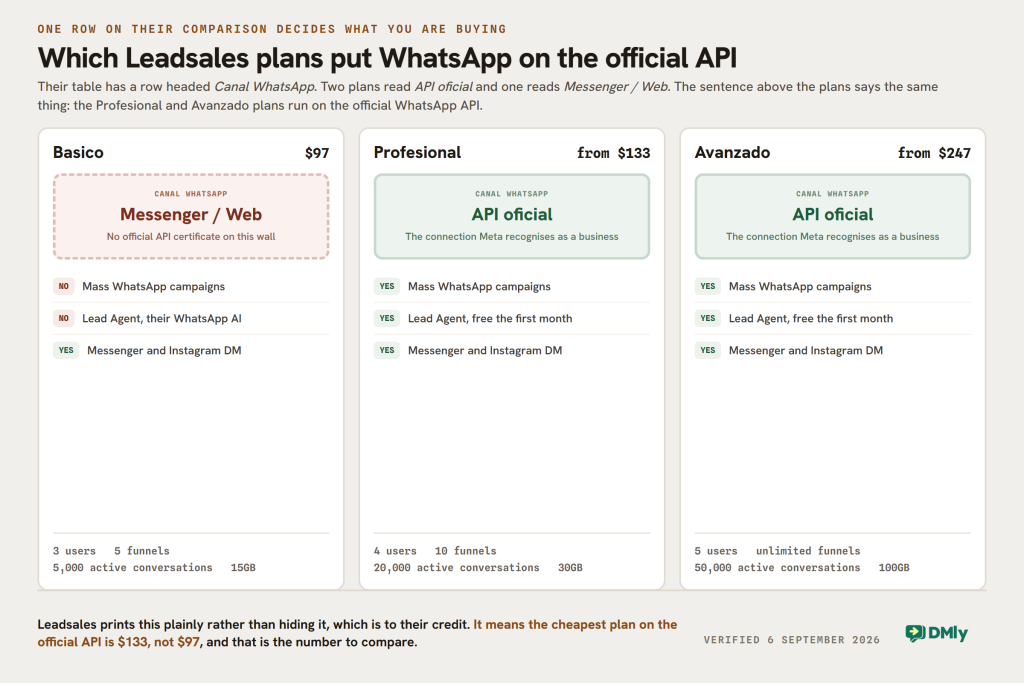
Three of those rows matter more than the price.
- Basico does not put WhatsApp on the official API. Their table says Messenger and Web. That is not a criticism of Leadsales, who state it plainly on the page rather than hiding it, but it is the difference between a number Meta recognises as a business and a number that is being automated another way. If you want the certainty, you are buying Profesional, and your entry price is $133 rather than $97.
- You cannot send a WhatsApp campaign on Basico at all. Mass messaging is Profesional and above, which follows from the row above it.
- The AI agent is not on Basico either. Lead Agent, which Leadsales describes as your best salesperson cloned, answering and qualifying around the clock, starts on Profesional and is free for the first month.
So the honest summary of the $97 plan is a shared inbox with sales funnels for three people. That is a real product and for some businesses it is the right one. It is not the WhatsApp automation platform the price sits next to.
One correction of our own while we are here: we listed 100GB of storage on the Professional plan. It is 30GB. The 100GB belongs to Advanced.
Leadsales Pricing in 2026: the Number on the Card Is the Cheapest of Five
$133 is not the price of the Professional plan. It is the price of the Professional plan at 250 credits.
Above the price sits a selector labelled Créditos mensuales on their pricing page, and moving it changes what you pay. Both paid plans have five published prices, read directly from the selector on their pricing page:
| Monthly credits | Profesional | Monthly credits | Avanzado |
|---|---|---|---|
| 250 | $133 | 500 | $247 |
| 1,250 | $272.20 | 1,500 | $386.20 |
| 3,250 | $522.76 | 3,500 | $636.76 |
| 5,250 | $736.20 | 5,500 | $850.20 |
| 10,250 | $1,153.80 | 10,500 | $1,267.80 |
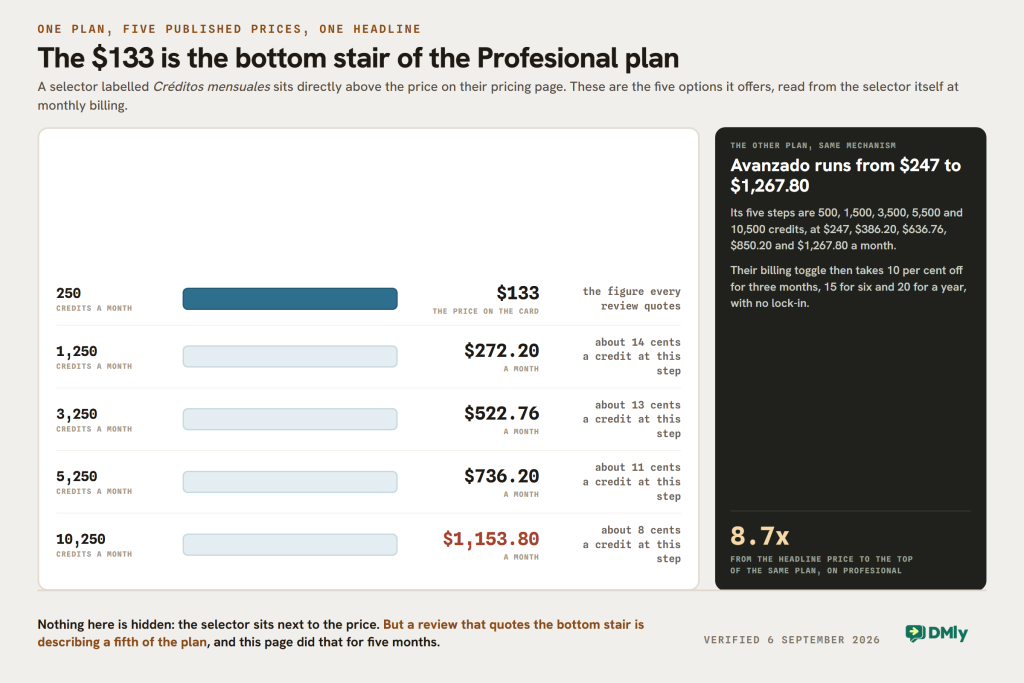
This is the same shape as a slider we found on another platform earlier this year, and it is not dishonest: every one of those numbers is on their page and the selector is right next to the price. But a review that quotes $133 and stops is describing a fifth of the product, and this page did exactly that.
The marginal cost falls as you buy more, which is worth knowing if you are choosing a step: going from 250 to 1,250 credits costs about 14 cents each, and going from 5,250 to 10,250 costs about 8 cents each. That is our arithmetic on their published figures, and it is the sum to do before you pick a tier.
What one credit actually buys
Their own definition, from the note beside the selector:
“You need 1 credit every time you start a WhatsApp conversation. That credit lets you talk to the customer for 24 hours without consuming additional credits. If the customer starts the conversation, you can reply without spending credits for 24 hours.”
Leadsales pricing page, translated from the Spanish, read 6 September 2026
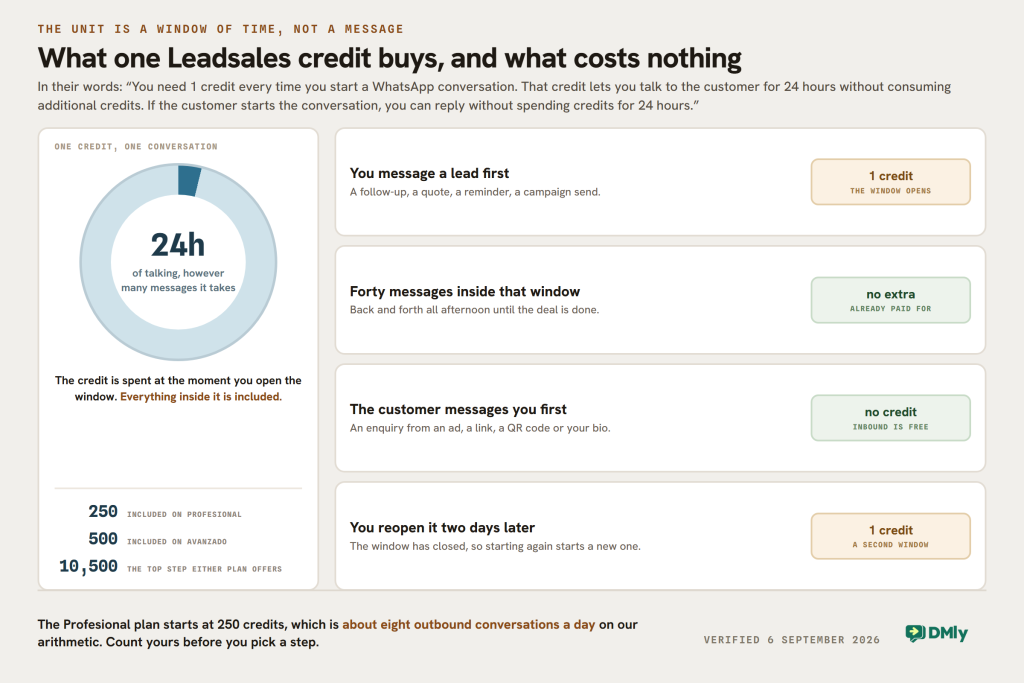
So a credit is an outbound conversation, not a message, and inbound conversations are free. That is a genuinely different bargain from most of this market, and for a business whose customers usually message first it is a good one: you could handle a thousand inbound enquiries a month on the 250-credit plan without touching the meter.
The number to hold on to is what 250 credits is in a working week. It is about eight outbound conversations a day. If your team starts more conversations than that, you are on a higher step and the price on the card is not your price.
There is one thing their pricing page does not say, and it decides the whole comparison. Meta charges businesses per message for WhatsApp, and the Leadsales page describes credits without mentioning that charge anywhere. Their own summary of extras reads: “You only pay separately for additional users, extra bundles for mass WhatsApp campaigns, and optional add-ons.” Meta’s fees are not on that list. The likely reading is that the credit covers them, which would make budgeting genuinely simple, but we are not going to assert it from an absence. Ask them directly whether Meta’s per-message charges are inside the credit or billed to you separately, because a platform that includes them and one that passes them through cannot be compared on subscription price at all.
Five Things This Leadsales Review Now Says That It Did Not
- The Basic plan is not on the official WhatsApp API. Their table says Messenger and Web. Ours said nothing.
- $133 and $247 are the cheapest of five prices each, set by a credit selector that runs to $1,153.80 and $1,267.80 a month.
- A credit is an outbound conversation covering 24 hours, and inbound conversations cost nothing. We wrote that “campaign usage may depend on credits or messaging volume”, which is a shrug where a definition should be.
- Lead Agent exists. Leadsales now sells an AI agent for WhatsApp on both paid plans, free for the first month. Our page did not mention it because it did not exist when we wrote.
- You do not have to pay monthly. Three months takes 10 per cent off, six months 15 per cent and a year 20 per cent, and their own FAQ says there are no forced contracts and you can change it yourself in settings.
We also ran a section on where Leadsales “falls short” built on adjectives. We have not run it on a paid plan this month, so that was not ours to say, and it has gone. What replaces it is the table above and the selector below.
What Leadsales Is Genuinely Good At
The funnel is the product, and that is rarer than it sounds
Most WhatsApp tools give you an inbox and bolt a pipeline on the side. Leadsales starts from the funnel: a conversation is a card in a stage, and their own definition is that a funnel is your commercial process split into stages, with a different one for sales, support and after-sales if you want. Five of those on Basic, ten on Profesional, unlimited on Avanzado.
If your team already thinks in stages and owners, that is the right shape and it will feel obvious from the first hour.
Inbound conversations are free of the meter
This is the best thing about their pricing and almost nobody says it. If a customer messages you first, replying for the next 24 hours costs no credits at all. A business that mostly answers rather than chases can run a very busy month on 250 credits, and that is a genuinely good deal that the headline price hides in the other direction for once.
The billing is honest about itself
Four terms published with the discount on each, a 14-day trial on the entry plan, and their own FAQ saying there is no lock-in and you can change the term yourself from settings. Three of the platforms we have re-checked this week will not sell a single month at all. Leadsales will, and says so.
Where it will not fit
Two things, both structural. Users are counted tightly, at three, four and five, with extras charged separately, so a team of eight is paying for additions on every plan. And it is a sales tool: there are no bookings, no invoices, no payments and no reviews, because that is not what it is for.
One Dated Thing to Raise Before You Sign
On 1 October 2026 Meta changes what it charges businesses for, and a credit priced by the conversation sits directly in the path of that change.
Two things become billable that are free today: service messages, which is what a reply to a customer inside the open 24-hour window is, and utility messages sent in reply to a customer inside that same window. Both are priced at each market’s utility and authentication rate, and every business phone number gets the first 1,000 service messages of a month free. Our walk-through of the 1 October change sets out what moves and what does not.
Here is why it matters more on a credit model than on a pass-through one. A Leadsales credit buys 24 hours of talking however many messages that takes. Today most of those messages cost Meta nothing. From October, the ones that fall in the service and in-window utility categories will. Nobody outside Leadsales can say whether that changes the price of a credit, and we are not going to predict it.
What we can tell you is the question to ask, and to ask it in writing: does the price of a credit change on 1 October, and are Meta’s per-message charges included in a credit or billed to me separately? Those two answers together are the whole cost of the platform, and they are worth having before a twelve-month term rather than after one.
The same question is worth putting to any vendor selling bundled messaging this quarter, ourselves included. DMly’s answer is on our pricing page and does not change in October: you pay Meta directly at Meta’s rates and we add nothing, so whatever Meta charges from 1 October is what you pay, with no bundle in between.
How the Funnel Model Actually Works
Leadsales defines a funnel as your commercial process split into stages, and says you can build a different one for each area of the business: sales, support, after-sales. That is a more specific claim than most CRMs make and it explains the shape of the plans.
Every conversation from WhatsApp, Messenger or Instagram lands as a card in one of those funnels. Your team moves it along the stages rather than triaging an inbox, so the question “where is this deal” has an answer without anyone reading the thread. The plan tiers follow from that: 5 funnels on Basico, 10 on Profesional, unlimited on Avanzado.
The other number in that row is the one people miss. Active conversations in funnels is a ceiling on how many contacts can sit in your funnels at once, in their words, at 5,000, 20,000 and 50,000. It is not a monthly allowance that resets, it is a capacity limit, so a business that never archives will reach it whatever its message volume looks like.
If you already run a pipeline with stages and owners, this will feel obvious within an hour. If your team works from an inbox and tags, it will feel like extra ceremony, and the products that put the conversation first will suit you better.
DMly as a Leadsales Alternative
We make DMly, so read this knowing that. The useful comparison is not feature against feature, it is meter against meter, because the two products count completely different things.
DMly counts contacts, messages and seats. Leadsales counts conversations you start. From our own pricing page, read the same morning:
- Starter, $29 a month billed yearly or $39 monthly: 3 team seats, 3,000 active contacts, 10,000 broadcast or template messages, one profile per channel, 10 active bots per profile with unlimited flows, 500 AI replies a month.
- Growth, $65 or $79: 6 seats, 10,000 contacts, 50,000 messages, three profiles per channel, unlimited active bots, 5,000 AI replies.
- Premium, $149 or $199: 15 seats, unlimited contacts, 300,000 messages, five profiles per channel, 20,000 AI replies, and the option of your own AI provider key.
Three differences are worth stating plainly.
Every DMly plan is on the official WhatsApp Business API. There is no cheaper tier that connects some other way. That is the sharpest difference between the two entry plans: $97 on Leadsales is Messenger and Web, $29 on DMly is the official API.
You pay Meta directly and we add no markup. There is no credit to buy and no bundle to size. That makes the message bill variable rather than predictable, which is the trade: Leadsales gives you a fixed number to budget, and we give you the wholesale rate.
The subscription covers more than conversations. The CRM and pipelines are there, but so are bookings and classes, invoices and payments, comment automation on Instagram and Facebook, and Google review requests, against the same contact record. Channels are WhatsApp, Instagram, Messenger, TikTok, Telegram, Google Business and a website Live Chat widget, plus SMS. Our guide to the omnichannel inbox is the long version.
Three reasons to buy Leadsales instead
- Your business is a funnel. If stages and owners are how your team already works, Leadsales is built for that and DMly puts the conversation first.
- You want one predictable number. A credit bundle is a budget. Paying Meta directly is cheaper and less certain, and some businesses would rather have the certainty.
- You operate in Spanish-speaking Latin America. Leadsales is built for that market, the site and support are in Spanish, and that matters more day to day than any feature row on this page.
Leadsales and DMly, Side by Side
| Question | Leadsales | DMly |
|---|---|---|
| Cheapest plan | $97 a month | $29 a month billed yearly, $39 monthly |
| Is the cheapest plan on the official WhatsApp API? | No. Messenger and Web | Yes, on every plan |
| Cheapest plan that is | $133 | $29 |
| What the price is attached to | Users, funnels, active conversations and credits | Contacts, messages, seats and profiles |
| WhatsApp message cost | Bought as credits. One credit starts a 24-hour conversation | Paid to Meta directly, no markup added |
| Inbound conversations | Free of credits | Not counted at all |
| Users included | 3, 4 or 5, extras charged | 3, 6 or 15, extras $10 a month |
| Highest published price | $1,267.80 a month on Avanzado at 10,500 credits | $199 a month on Premium billed monthly |
| Channels | WhatsApp, Messenger, Instagram. TikTok coming soon | 7 plus SMS, including TikTok, Telegram and Google Business |
| AI | Lead Agent on both paid plans, free the first month | 500, 5,000 or 20,000 AI replies a month, or your own key |
| Bookings, invoices, payments, reviews | Not part of the product | Included in every plan |
| Trial and terms | 14 days on Basic. Monthly, 3, 6 or 12 months with discounts, no lock-in | 7 days, no card. Monthly or yearly |
The row to argue with is the credit row. Everything else is a preference. Whether a bundled credit is better value than Meta’s own rate depends on how many conversations you start and what your market’s message prices are, and that is a sum only you can do.
Which One to Buy, by Situation
Your customers almost always message you first
Leadsales, and the credit meter barely moves. Inbound conversations cost nothing and you can reply for 24 hours free. A busy inbound business on Profesional at 250 credits is paying $133 for a funnel-shaped CRM and effectively unlimited replying.
You start most of the conversations
Do the credit arithmetic before anything else. Two hundred and fifty credits is about eight outbound conversations a day. A sales team of four working a list will pass that in a week, and the next step up is $272.20. Compare that with a platform where you pay Meta’s per-message rate directly and see which is cheaper at your volume.
You need the official API and you are watching the price
This is the clearest gap on the page. The cheapest official-API plan on Leadsales is $133. The cheapest on DMly is $29 billed yearly or $39 monthly, with three seats and the API, webhooks and integrations included. If the official API is your requirement, those are the two numbers to put side by side, not $97 and $29.
You run a salon, clinic, studio or garage
DMly. Your day is appointments with a price and a duration, people who do not turn up, and customers who come back every few weeks. Leadsales is a sales funnel, and a funnel is the wrong object for a diary.
Your team is bigger than five
Price the extra users on both sides. Leadsales includes three, four and five by plan and charges for more. DMly includes three, six and fifteen and charges $10 a month each after that. At eight people the answer is usually DMly; at four it is usually a wash, and the funnel may decide it.
You sell in Spanish-speaking Latin America
Leadsales deserves a serious look. The product, the site, the academy and the support are built for that market, and buying software in your own language from a company that understands your market is worth more than most feature comparisons admit.
The Verdict
Leadsales is a funnel-first CRM with an unusually generous inbound meter and an entry plan that is not what it looks like. The prices have not moved in five months, which in this market is close to remarkable, and the page states its own structure honestly: the API row is right there in the comparison and the credit selector is right next to the price.
What went wrong was on our side. This Leadsales review quoted three prices, missed the channel row, missed the selector, missed the credit definition and missed the AI agent. A price is not a review, and a $97 plan that connects WhatsApp through Messenger and Web is a materially different purchase from a $133 plan that connects through the official API.
Buy Leadsales if your business is a funnel, your customers message you first, and you sell in Spanish. Buy DMly if you want the official API at the bottom of the price list, bookings and payments in the same subscription, or Meta’s own rate rather than a credit.
Either way, ask the two questions this page now leads with. Is this plan on the official WhatsApp API? And what is the price at the number of credits I will actually use?
If the answers point our way, DMly’s plans put the API on every tier and the trial does not ask for a card.
Leadsales Review FAQs
How much does Leadsales cost in 2026?
Basico is $97 a month, Profesional starts at $133 and Avanzado starts at $247, read from their own pricing page on 6 September 2026. The word starts is doing work: both paid plans carry a credit selector with five published prices each, running to $1,153.80 on Profesional and $1,267.80 on Avanzado. Paying for three months takes 10 per cent off, six months 15 per cent and a year 20 per cent.
Is the Leadsales Basic plan on the official WhatsApp API?
No. Their plan comparison has a row headed Canal WhatsApp, and against Basico it reads “Messenger / Web” while Profesional and Avanzado read “API oficial”. The line above the plans says the same thing: the Professional and Advanced plans run on the official WhatsApp API. It follows that mass WhatsApp campaigns and the Lead Agent AI are also unavailable on Basico.
What is a Leadsales credit?
In their own words, one credit is spent every time you start a WhatsApp conversation, and that credit covers the next 24 hours of talking to that customer without spending more. If the customer starts the conversation, you can reply for 24 hours without spending a credit at all. So a credit is an outbound conversation rather than a message, and inbound is free. Two hundred and fifty credits a month is roughly eight outbound conversations a day.
How many users does Leadsales include?
Three on Basico, four on Profesional and five on Avanzado, with the option to add more at extra cost. Funnels are 5, 10 and unlimited; active conversations in funnels are 5,000, 20,000 and 50,000; storage is 15GB, 30GB and 100GB. An earlier version of this page put 100GB on Profesional, which was wrong.
Does Leadsales have an AI agent?
Yes, and it is new since this page was first written. Lead Agent is an AI agent for WhatsApp on the Profesional and Avanzado plans, free for the first month, which Leadsales describes as your best salesperson cloned, answering, qualifying and following up around the clock. It is not available on Basico.
What is the best Leadsales alternative?
It depends which half you were buying. If you wanted the funnel, Leadsales is already that and most alternatives are inbox-first. If you wanted WhatsApp automation on the official API at the bottom of a price list, with bookings, invoices, payments and reviews in the same subscription, DMly starts at $29 a month billed yearly with three seats. Our Kommo review covers the other funnel-first CRM in this market and its per-user model.
Is this Leadsales review based on hands-on testing?
No, and we would rather say so. Every price, cap and quotation here was read on Leadsales’s own pricing page and plan comparison on 6 September 2026, with the Spanish translated by us and the original wording quoted where it matters. We have not run Leadsales on a paid plan this month, which is why the earlier version’s judgements about where it falls short have been removed rather than rewritten. If you find something here that has changed, tell us.
Writing about WhatsApp automation, bookings and growth for local business.
Turn WhatsApp into your busiest channel.
Start free and run message, bookings, payments and reviews in one place.
