
Draw an automated review funnel on a whiteboard and you will almost certainly draw the same thing everybody else does. Ask the customer to rate you. If they say four or five, send them to Google. If they say one to three, send them to a member of staff instead.
That middle arrow, the one that only shows the review link to the happy half, is against Google’s rules. Their policy for merchants lists it directly among the things you must not do: “Discourage or prohibit negative reviews, or selectively solicit positive reviews from customers.”
Which is inconvenient, because that design is what most people mean by a review funnel, and it is what a lot of software encourages you to build. It is worth knowing before you build it rather than afterwards, and it is worth knowing that the compliant version is not much harder and works better anyway.
So this guide covers what the funnel is actually made of, the gating question answered from Google’s own policy, how the CSAT node routes scores and where it silently loses them, the messaging-window rule that breaks the survey most people would pick, a design that holds up, and the honest limits on what any of it can tell you. Timing and channel choice are a separate subject, covered in our complete guide to Google review automation.
What an Automated Review Funnel Actually Is
Two mechanisms joined by a branch, and they are far less alike than the diagram suggests.
The first half is a satisfaction survey. A CSAT Survey node goes into a flow after the thing being rated, asks a question, and waits for a tap. This half is measurable, lives entirely inside DMly, and tells you things about your business you did not know.
The second half is a review request: a tracked link to your Google profile. This half is not really measurable at all, lives on Google’s side, and is governed by Google’s rules rather than yours.
Almost everything that goes wrong with a review funnel comes from treating those two halves as one machine. They have different constraints, different failure modes and different reporting, and the branch between them is a policy decision rather than a technical one.
Is Filtering Unhappy Customers Allowed?
No, and it is worth being direct about it, because a great deal of published advice says otherwise.
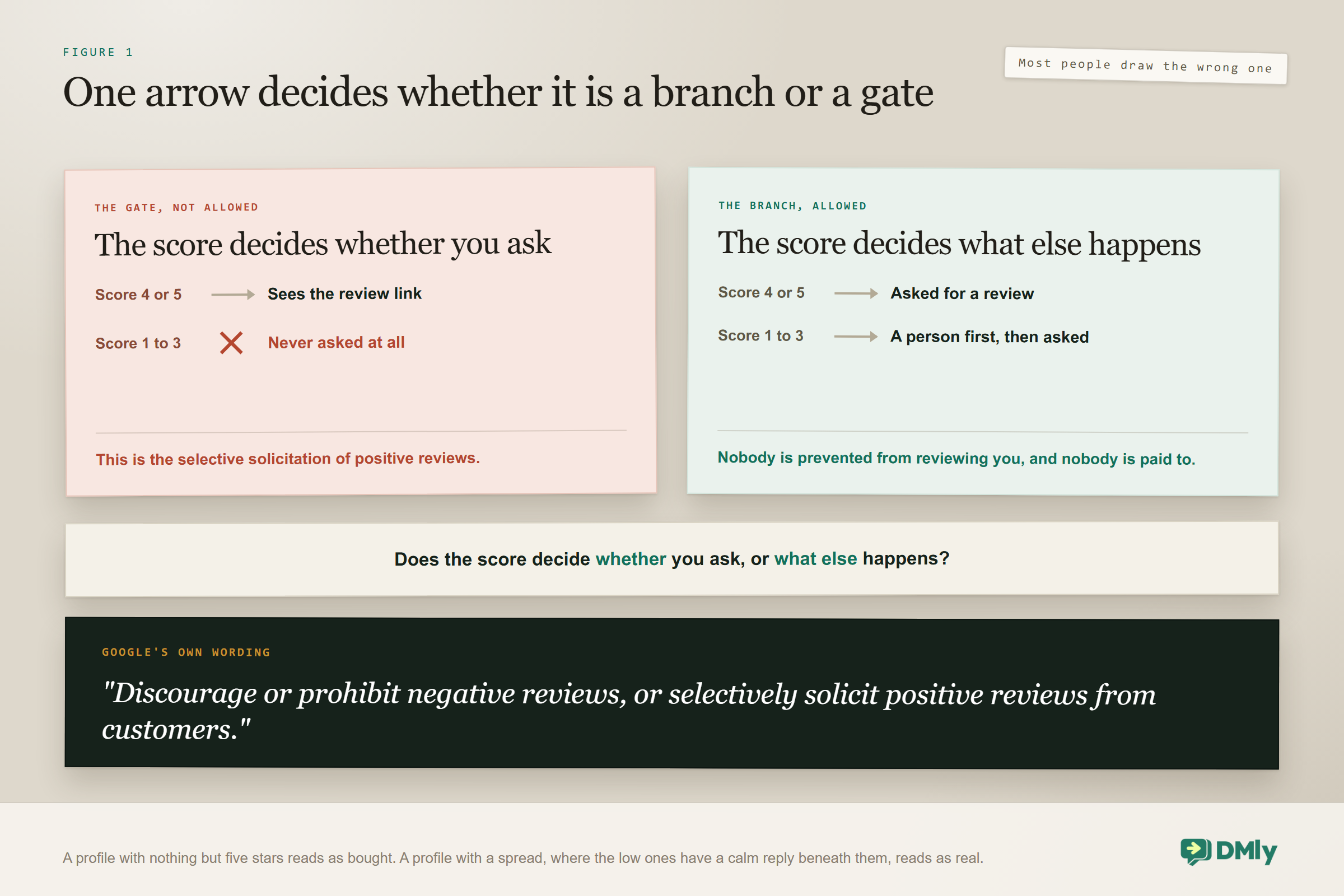
Google’s prohibited-content policy for merchants names the practice specifically. Among the things you must not do: “Discourage or prohibit negative reviews, or selectively solicit positive reviews from customers.” Showing the review link only to people who rated you four or five is selective solicitation of positive reviews. That is the whole of it, and no amount of flow design makes it something else.
What the same policy permits is broader than people expect: you may “Solicit or encourage the posting of content that does represent a genuine experience, without offering incentives to do so or attempting to influence the rating or the contents of the review.” So asking is fine. Asking everybody is fine. What is not fine is deciding who gets asked on the basis of what they are likely to say.
The line, as clearly as it can be drawn: Not allowed: the review link appears only if the score was high. An unhappy customer never sees it.
Allowed: everybody is asked for a review. An unhappy answer also triggers a conversation with a person, and it happens first. Nobody is prevented from reviewing you, and nobody is offered anything to change what they write.
The difference is whether the score decides whether you ask, or decides what else happens. Only the second one is a branch. The first one is a gate.
One neighbouring rule is worth knowing while you are here, because it catches people who have carefully avoided the first one. The same policy prohibits offering “incentives, such as payment, discounts, free goods and/or services, in exchange for posting any review”. So the discount code some businesses attach to a review request is not a clever growth tactic, it is the same category of problem as gating, and it applies to a review revision or the removal of a negative one as well. If you want to thank somebody for a review, thank them. Do not pay them.
There is a commercial argument too, and it is stronger than the compliance one. A profile with nothing but five-star reviews reads as bought, and shoppers have learned to distrust it. A profile with a spread, where the occasional low rating has a calm and specific reply beneath it, reads as real. Gating optimises for a number that has stopped persuading anybody.
The CSAT Survey Node, and the Choice That Matters
The survey is a single node, and the only decision in it with consequences is three points or five.
It goes into a flow after the thing being rated, with a deliberate delay so it does not interrupt the conversation it is asking about. The question is yours to write and defaults to asking how the customer would rate your support. The scale shows as stars with end labels you can change, defaulting to Poor and Excellent.
| 3-point | 5-point | |
| How it appears | Tappable buttons | An openable list |
| Effort for the customer | The fastest to answer | One extra tap |
| Detail you get back | Coarse | Finer, and enough for a top-two satisfaction figure |
| Outside the 24-hour window | Cannot be sent at all | Falls back to the dmly_csat template |
That last row is the one that decides it, and it is covered properly in the next section. In every other respect the three-point survey is the better instrument: it is faster to answer, so more people answer it, and for the purpose of a review funnel you only really need to know whether somebody is happy, unhappy, or in between.
The mechanic to understand before you build anything is the routing. Every score gets its own output port, so you decide branch by branch what a one means and what a five means. That is more control than most survey tools give you, and it is also where the funnel usually breaks.
The Window Constraint
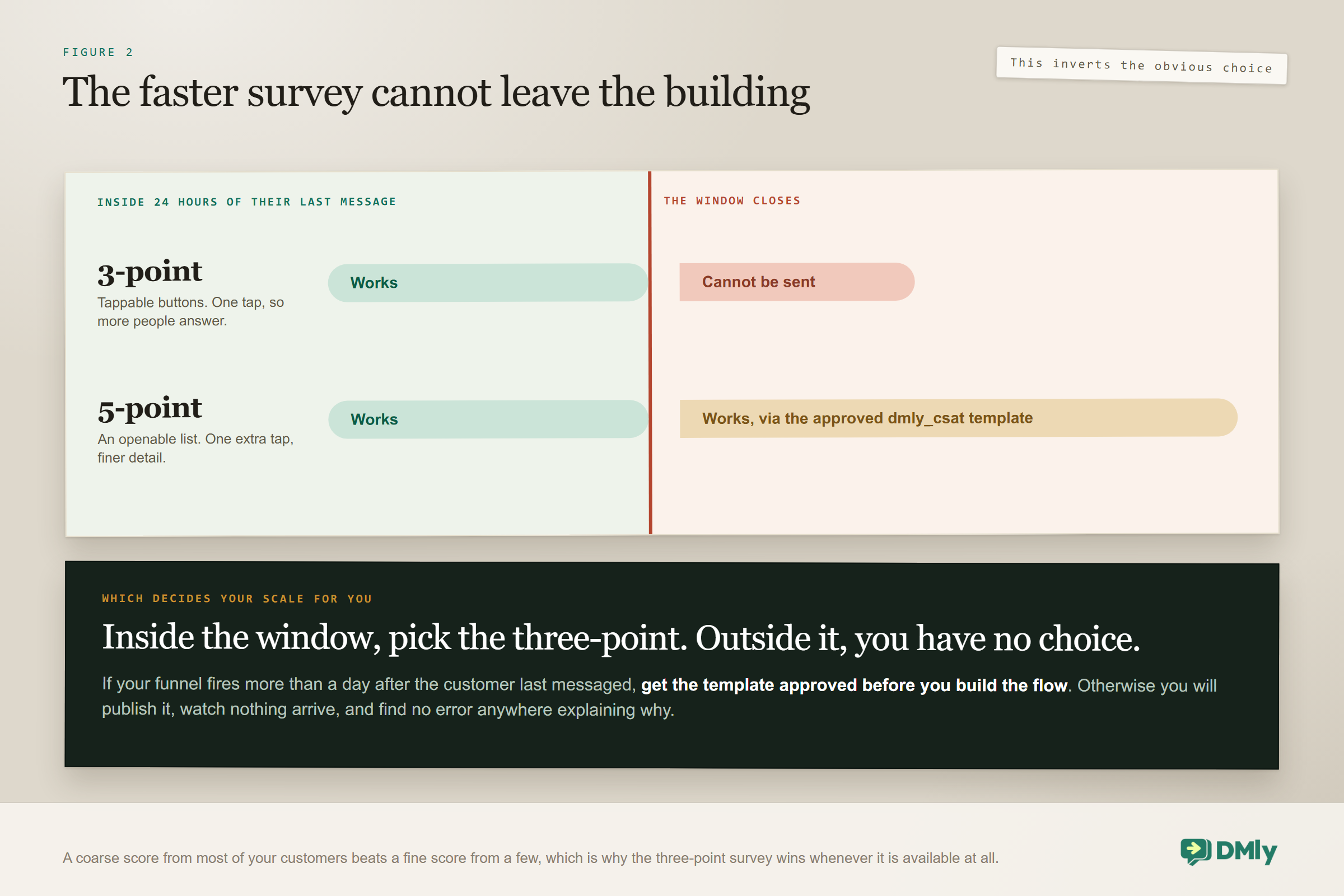
A three-point survey cannot be sent outside the 24-hour messaging window at all. A five-point one can, by falling back to an approved template.
This is the sharpest constraint on the page, because it inverts the choice you would otherwise make. WhatsApp only lets you message somebody freely for 24 hours after their last message to you (Meta calls it the customer service window). Beyond that you need a template Meta has approved. The five-point survey has one, dmly_csat. The three-point survey does not, so beyond the window it simply cannot go.
What that means in practice depends entirely on when your survey fires.
- Inside 24 hours of the customer’s last message, which covers most support conversations and any appointment where they messaged you that day, either survey works. Use the three-point one, because more people will answer it.
- Outside the window, which covers most appointment follow-ups the next morning and anything with a delay measured in days, only the five-point survey is available, and only once its template is approved.
The order to do this in: If your funnel fires more than a day after the customer last messaged you, get the dmly_csat template approved before you build the flow. Otherwise you will build it, publish it, and watch nothing arrive, with no error to explain why. Template approval is not instant and it is not something you can hurry on the afternoon you need it.
It is worth seeing why this inverts the obvious choice. Left to themselves, most people pick the five-point survey, because more detail sounds better and a satisfaction figure needs it. But if your funnel fires inside the window, the three-point survey will be answered by noticeably more people for the simple reason that it is one tap rather than two, and a coarse score from most of your customers beats a fine score from a few. The window is the only thing that should override that, and it overrides it completely, because outside the window the three-point survey is not a worse option, it is not an option.
The Trap That Loses Responses
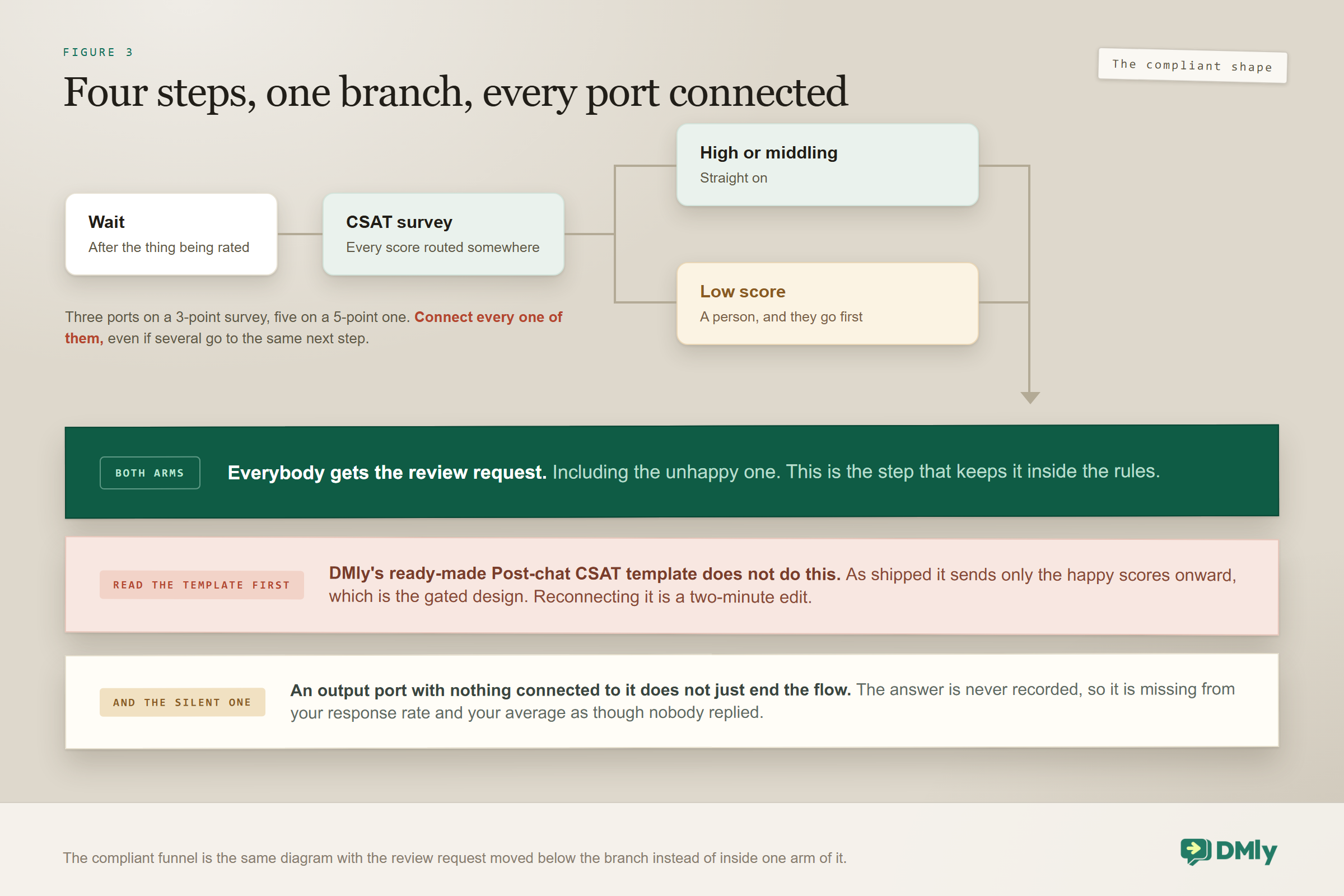
An output port with nothing connected to it does not just end the flow. The answer is never recorded at all.
This is the single most expensive mistake in a review funnel and it is completely silent. You wire up the ports you care about, usually the top two and the bottom one, and leave the middle unconnected because you had not decided what to do with a three. Every customer who taps three then vanishes: no record, no score, nothing in the report.
Two consequences follow, and the second is worse than the first.
- Your response rate is wrong, and wrong in the flattering direction. Those people did answer. You just did not keep it.
- Your average score is wrong, and wrong in the flattering direction again, because the scores you dropped are the middling ones. A business quietly deleting every three will believe it is doing better than it is.
The fix takes a minute: connect every port to something, even if several of them go to the same next step. A port that leads to a tag and nothing else is still a port that records the answer.
A Review Funnel Design That Holds Up
Four steps, one branch, and every port connected. This shape is compliant, it survives the window constraint, and it does not throw away half your data.
- Wait, then survey. The delay belongs to the trade rather than to the software, and it is the subject of its own guide. Whatever you choose, place the survey after the thing being rated rather than during it.
- Route every score. High scores and low scores go to different next steps. Middling scores go somewhere too, even if that somewhere is just a tag.
- Everybody gets the review request. This is the step that keeps you inside Google’s rules. The unhappy customer gets it as well, and there is no version of the flow where somebody is excluded because of what they said.
- A low score also opens a conversation, and it goes first. Route detractors straight to a human. The person hears from you before they hear the review request, which is both better service and the reason the design does not feel cynical.
If you install DMly’s ready-made Post-chat CSAT to Google review template, read what it actually does before you publish it. As shipped it sends the happy scores to the review node, which is the gated design. Reconnecting it so every branch reaches the review request is a two-minute edit and it is the difference between a funnel you can defend and one you cannot.
What the Unhappy Branch Should Actually Do
Hand it to a person, quickly, and do not automate the recovery. The value of knowing somebody is unhappy is entirely in what a human does next, and a sequence of automated apology messages is worse than nothing.
Three things make that branch work.
- Speed. A low score answered within the hour is a rescued customer. The same conversation two days later is an autopsy. If your team works in shifts, route it to whoever is on rather than to whoever owns the account.
- An open question, not a form. “What went wrong?” gets a useful answer. “We are sorry to hear that, please rate the following aspects of your visit” gets silence.
- A tag on the contact. Otherwise the score lives only in a workspace-wide report and you will never see it again on that person’s record. Tagging is the only way to filter by score later, which matters more than it sounds.
The tone of that first message decides whether you get a conversation or a closed door, and the principles are the same ones that govern any support thread; our guide to messaging-based customer support covers them. Where the history sits afterwards, so the next person to speak to that customer knows what happened, is the contact record.
Reading the CSAT Half
This half genuinely reports, and the report is under Configurations and then Reports. It is worth knowing exactly what it shows before you draw conclusions from it.
| What it shows | What it means |
| Response rate | Answered divided by sent plus answered, with failed sends excluded |
| Average score | Across answered surveys only |
| Satisfaction | The share landing on the top two points of your scale |
| Answered and Awaiting reply | Unanswered surveys sit in Awaiting reply and stay there |
| Distribution, trend, last ten | The shape over time, and the most recent individual responses |
Two limits are worth stating. The report is workspace-wide and not filtered by channel, so if you run the same survey on WhatsApp and SMS you cannot split them here. And it carries no contact-level score history, so you cannot open a customer and see what they have rated you over two years. Tagging the scores as they come in is the only way to get that, which is the second reason to tag and the one people regret skipping.
The response rate is also worth reading with its formula in mind. Because it is answered divided by sent plus answered, and because failed sends are excluded, it measures how persuasive the survey was among people it actually reached rather than how well the whole funnel is working. A survey that reaches almost nobody can post an excellent response rate, which is why the Answered count matters alongside it.
The Awaiting reply column deserves a glance rather than a stare. Unanswered surveys do not expire and do not take an alternative path, so a large and growing number there usually means the survey is arriving at the wrong moment rather than that people dislike you.
Why the Review Half Cannot Be Measured
You can see that somebody opened the link. You cannot see whether they wrote anything, and nothing connects the two.
Requests carry a tracked link shaped /r/<token>, which redirects to your Google page and records the first open. That is the end of the trail. There is no link between a request you sent and a review you received, and the Responses figure is never filled in, so it sits at zero however many reviews arrive.
This is not a gap you can close with better configuration, and it is worth accepting early. Google does not tell anybody which of their reviewers arrived from which link, so no tool can honestly report it. Any product that claims to has inferred it from timing.
What that leaves you with is a two-part measurement, and the halves do not join.
- Inside DMly: how many surveys went out, how many were answered, the score distribution, and how many tracked links were opened. All real, all countable.
- On Google: your review count and rating, moving slowly over months. Also real, and the actual objective.
Judge the funnel on the second while you tune it using the first. A month where opens rose and the review count did not is telling you the request or the landing experience is weak. A month where neither moved is telling you the survey is not reaching anybody. The profile side of that picture, and what else you can do to it, is covered in our guide to automating your Google Business Profile.
Testing the Funnel
Run yourself through it three times, once for each branch, and do it before anybody real sees it.
- A high score. Confirm the survey arrives, that tapping it is as easy as you assumed, and that the review request follows.
- A low score. Confirm a person is notified quickly, that the tag lands on the contact, and that the review request still goes out afterwards. That last one is the compliance check, and it is the one people forget.
- A middling score. This is the test that catches the unconnected port. If nothing at all is recorded, you have found the trap before it ate a month of data.
Then do one thing that is not a test of the flow. Wait until you are outside the 24-hour window from your own last message and trigger it again. If you are on a three-point survey, nothing will arrive, and it is far better to learn that on yourself.
Mistakes Worth Avoiding
- Gating the review link on the score. Google names it directly. Branch instead.
- Publishing the ready-made template unchanged. As shipped it routes only happy scores onward.
- Leaving an output port unconnected. Those answers are not recorded at all, and they flatter both your numbers.
- Choosing a three-point survey for a flow that fires the next day. It cannot be sent outside the window.
- Building the flow before the template is approved. Nothing arrives and nothing explains why.
- Automating the unhappy branch. Its entire value is a person answering quickly.
- Not tagging the scores. The report has no contact-level history, so untagged scores are gone from that customer’s record forever.
- Expecting to attribute reviews to requests. Nothing links them, and the Responses figure stays at zero.
- Reading the response rate without checking Awaiting reply. A growing pile there usually means bad timing rather than indifference.
Frequently Asked Questions
How do I build an automated review funnel?
Put a CSAT Survey node in a flow after the thing being rated, connect every score’s output port to something, send the review request to everybody regardless of score, and additionally route low scores to a person so they hear from you first. Four steps and one branch.
Is it against the rules to only ask happy customers for reviews?
Yes. Google’s policy for merchants lists “selectively solicit positive reviews from customers” among the things you must not do. Asking everybody is fine. Deciding who gets asked based on what they are likely to say is not.
Should I use a three-point or five-point survey?
Three-point if the survey fires inside 24 hours of the customer’s last message, because it is a single tap and more people answer it. Five-point if it fires later, because a three-point survey cannot be sent outside the window at all, while the five-point one falls back to an approved template.
Why are some of my survey answers missing?
Almost certainly an unconnected output port. Every score has its own port, and if one is left unwired the answer is never recorded, so it is missing from your response rate and your average as though the customer had ignored you.
What should happen when somebody gives a low score?
A person should reach them quickly, with an open question rather than a form, and the contact should be tagged so the score is visible on their record later. Do not automate the recovery, and do not stop the review request from going out.
Can I see which reviews came from my funnel?
No. The tracked link records the first open and nothing more. Nothing connects a request to a review that follows it, and the Responses figure is never filled in. Judge the funnel on your rating and review count over months.
Does the CSAT report show a customer’s past scores?
No. It is workspace-wide, not filtered by channel, and carries no contact-level history. Tag each score as it arrives if you want to filter by it later, because there is no way to recover it afterwards.
Build the Branch, Not the Gate
The difference between a review funnel you can defend and one you cannot is a single connection in a flow. Move the review request below the branch so everybody reaches it, and the design stops being selective solicitation and starts being good service with a survey attached.
Then do the two unglamorous things around it. Connect every output port on the survey, including the middling ones you have not decided about, because an unconnected port silently discards the answer and flatters your numbers. And check the window before you choose your scale, because the faster survey is the one that cannot leave the building after 24 hours.
After that, the honest expectation. The survey half will tell you a great deal, and the review half will tell you almost nothing except your rating over months, which is the number that mattered anyway. For what the request itself should say, and everything else in this subject, our guide to automating Google review requests, replies and reporting is the place to go next.
Writing about WhatsApp automation, bookings and growth for local business.
Turn WhatsApp into your busiest channel.
Start free and run message, bookings, payments and reviews in one place.
