
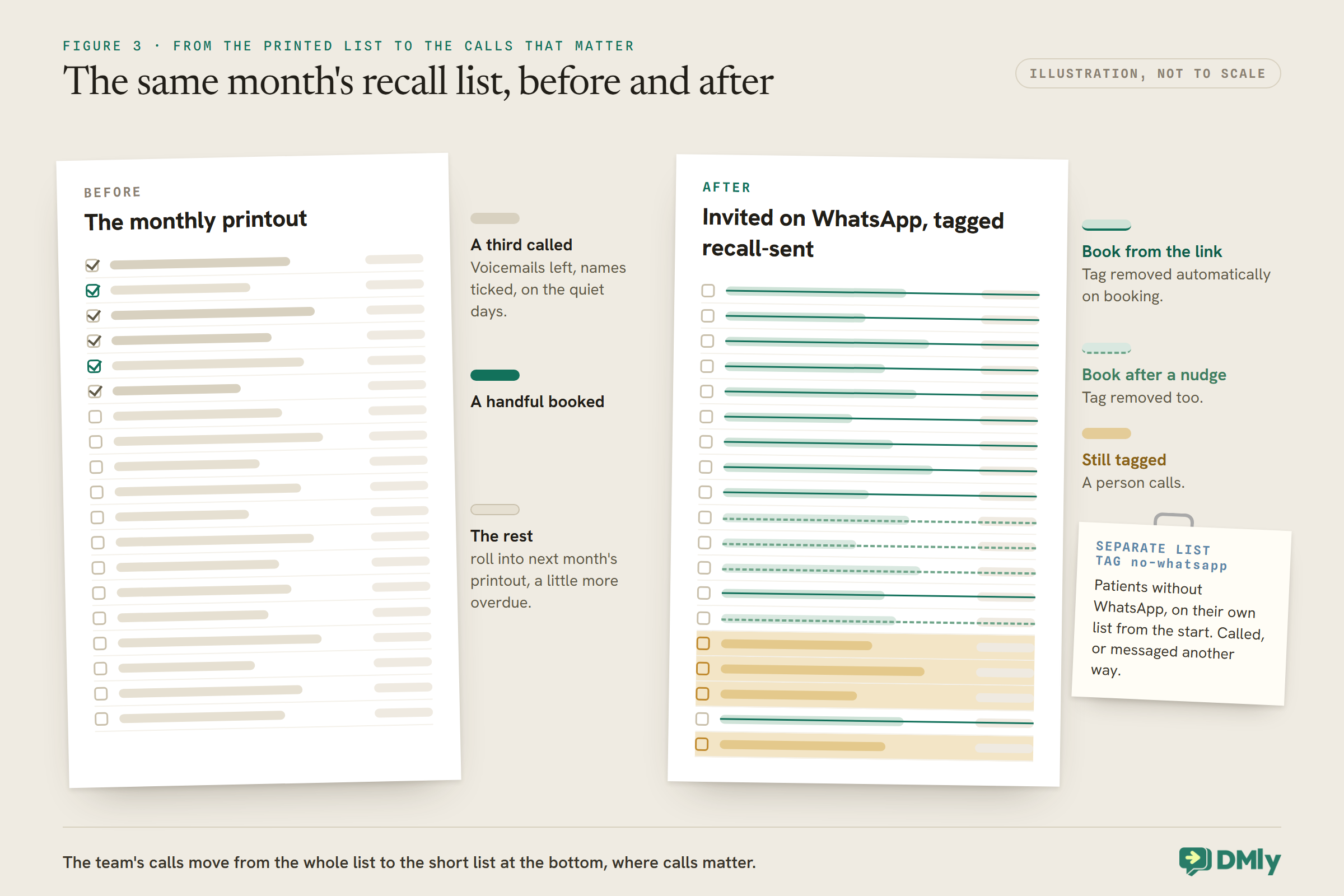
At the start of every month, the practice manager prints the recall list: everyone due a review. It goes on the reception desk in a folder. On a quiet day, someone works through a page of it, leaving voicemails and ticking names. On a busy day, nobody touches it. By the end of the month, a third of the list has been called, a handful have booked, and the rest roll into next month’s printout, a little more overdue than before.
Every clinic that runs recalls on a list knows the pattern. The list is not the problem; the work of getting through it is. Patient recall messages sent automatically on WhatsApp take that work off the desk: every patient is invited on time, most book themselves from a link, and the people who work the list are left with the short, genuinely hard part, the patients who did not respond.
This guide builds that in DMly for any clinic that recalls patients: how to hold the recall date, the flow that sends the invitation, follow-up nudges, the exit when a patient books, finding who has not responded, and measuring whether it works. It sits alongside our guide to WhatsApp automation for clinics. Recall intervals are clinical decisions; nothing here is clinical advice.
What a Recall Is, and What It Is Not
A reminder protects an appointment that exists. A recall creates one that does not.
Recalls are for patients who are due to come back, such as for a routine review, a check-up or a follow-up after a course of care, but who have not yet booked. That makes them different from appointment reminders in two ways that shape the build. There is no booking to hang the message from, so the timing has to come from a date on the patient’s record. And the patient has usually not messaged you for months, so the message travels on an approved WhatsApp template.
The interval behind each recall is a clinical decision. In UK dentistry, for example, NICE’s guidance says the interval between check-ups “should be determined specifically for each patient”. Other specialties have their own guidance. Whatever the specialty, the automation’s job is to follow the date the clinician set, not to decide it.
Step 1: Hold One Date per Recall Type
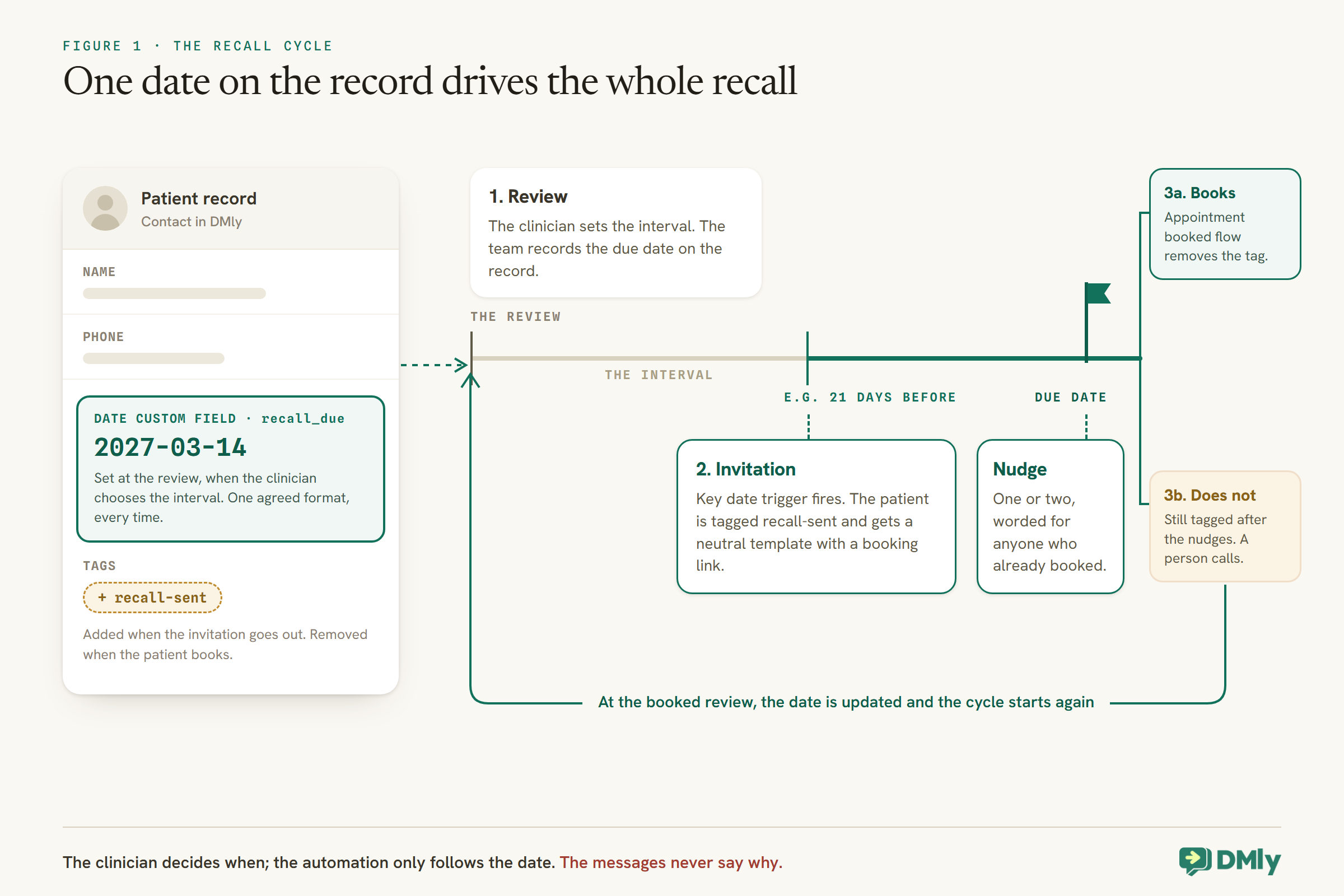
The whole system runs on a date field. Get its name, format and upkeep right, and the rest follows.
In DMly, create a date custom field for each kind of recall your clinic runs, under Settings, then Custom fields. A single-service clinic may need one, recall_due. A clinic with several recall types needs one per type, such as review_due and hygiene_due, because a patient can be due for two different things at different times.
Three rules keep the dates useful:
- Name fields for the recall type, never the reason. A field called
diabetes_review_dueputs a condition into a record that feeds segments, exports and an AI assistant’s view of the patient.annual_review_duesays what you need and nothing more. - Agree one date format and use it every time. DMly’s docs note that a date field accepts anything typed into it, but the trigger that reads it skips any value it cannot read as a date, silently, with no error.
- Update it at the moment the clinician chooses the interval, usually at the end of each review or when a course of care finishes. A recall system is only as current as its dates.
Step 2: Build the Flow That Sends Patient Recall Messages
A flow on the key date trigger sends one neutral invitation, a set number of days before the patient is due.
DMly’s Birthday / key date trigger can fire on a date custom field, not only on a birthday, and can fire a set number of days before the date. Build a flow on your WhatsApp channel:
- Trigger: Birthday / key date, on your recall field, firing, for example, 21 days before. Choose the lead time from how far ahead your diary books up; a clinic that is full three weeks out needs a longer lead than one with same-week availability.
- Tag: add a tag that marks this round, such as
recall-sent. It is what lets you find non-responders later. - Send the invitation as an approved template with a link to book.
The trigger only reaches patients who have the date filled in, and only those with a WhatsApp identity can receive a WhatsApp message, so the flow quietly skips everyone else. That makes the list of patients without WhatsApp, covered below, part of the design rather than an afterthought.
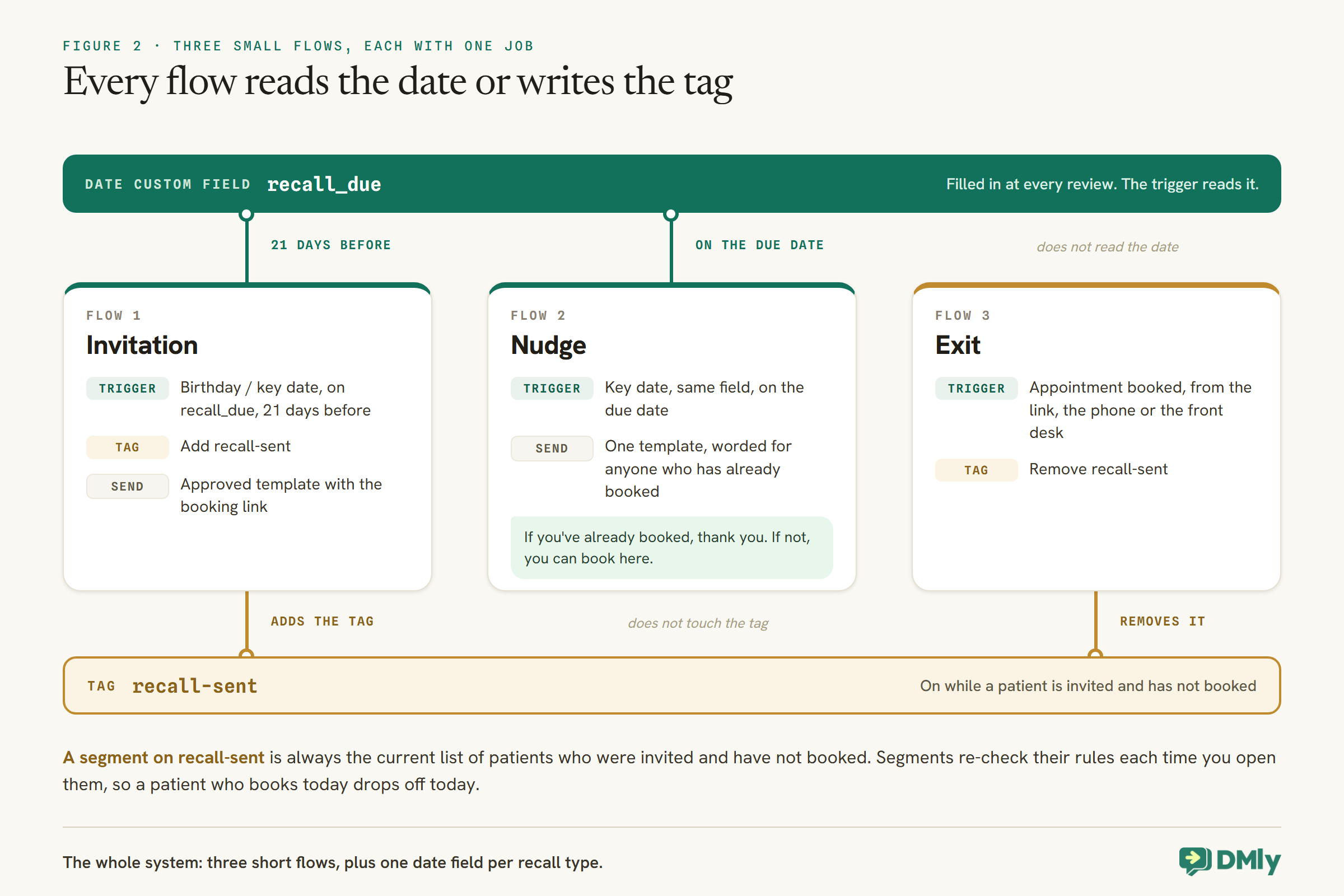
The three small flows, together
The whole system is three short flows on your WhatsApp channel, plus one date field per recall type. It helps to see them side by side before building.
Check how the trigger treats the year before you rely on it. DMly’s docs describe the Birthday / key date trigger firing on the day of a date field, or a set number of days before it, and give anniversary as an example of such a field. They do not say whether the year is part of the match. If the trigger behaves like a birthday and repeats every year on the same day and month, a date more than about a year away could fire a year early. Test it before going live: set a test contact’s date 13 months ahead and check nothing fires this year. Until you have confirmed the behaviour, only enter dates that fall within the next 12 months, keeping later ones in a note, and clear or update each date once the recall has done its job.
What the invitation says
The message should work on a lock screen and never state the reason for the recall. WhatsApp’s Business Messaging Policy warns against using WhatsApp to send or request health-related information where your regulations prohibit it on systems without heightened protections, and a recall reason is exactly that. Keep it to the clinic, the fact that the patient is due, and a link:
Hi {{1}}, it’s time to book your next appointment at {{2}}. You can choose a time that suits you here: {{3}}. If you’d rather we called you, just reply.
For the link, use your booking page, or the specific service’s own booking link from Get booking link on the service, so the patient lands on the right appointment type. Meta decides each template’s category, so submit the template and let it be approved before switching the flow on.
Step 3: Nudge, Then Hand to a Person
One invitation will not bring everyone back. One or two nudges will bring more; after that, people do it better.
A second flow on the same date field, firing on the due date itself, can send a nudge; a third, firing after it, is possible if your clinic wants one. DMly’s docs do not describe a flow condition that checks whether a patient has already booked, so word each nudge to read well either way: “If you’ve already booked, thank you. If not, you can book here.” Then stop. After two messages, a phone call from a person who knows the clinic is worth far more than a third automated message.
Step 4: Take Patients Off the List When They Book
A patient who books should stop appearing as “not responded”. A tag makes that automatic.
Build a small flow on the Appointment booked trigger with a Tag step set to remove recall-sent. The moment a patient books anything, whether from the link, the phone or the front desk, the tag comes off. Anyone who still carries the tag a few weeks after the invitation has not booked, which is the list your team needs.
This also answers the question the nudges cannot: while DMly cannot check for an upcoming appointment inside a flow, the tag tells a person, at a glance, who has and has not booked since the recall went out.
Step 5: Work the Short List
The automation shrinks the printed list to the patients who genuinely need a person.
Build a segment of contacts tagged recall-sent. A few weeks after each round, that segment is your non-responder list: patients who were invited, nudged, and have still not booked. It is usually far shorter than the old printout, and it is the right work for your team: a friendly call to check the patient is still with the clinic, still needs the appointment, and can find a time.
Two practical notes. DMly’s segments do not compare dates, so “overdue by four weeks” is not a filter you can build directly; the tag, and when you added it, is what gives you the timing. And segments re-check their rules every time you open them, so a patient who books today drops off the list today, which is exactly what you want. When a round is finished, remove the tag from anyone left, noting the outcome, so the next round starts clean.
Several Recall Types for One Patient
Some patients are due for more than one thing. Keep each on its own date, and avoid sending two invitations in a week.
With one date field per recall type, each has its own flow on the key date trigger, and they run independently. That is right when the dates are months apart. When two fall close together, a patient can receive two invitations within days, which feels disorganised. Two ways to handle it: align the dates at the review, so a patient’s routine appointments fall together where clinically appropriate, or have your team book both at once when the first invitation brings the patient in, then update both dates. Whichever you choose, write the invitations so they are general enough that a second one does not contradict the first.
Other Kinds of Recall
Not every recall is a routine review on a fixed interval. The same tools handle the others.
One-off follow-ups set at discharge
Some recalls are single events: a follow-up a set time after a course of care ends. Treat them exactly like routine recalls, with a date field such as followup_due set when the course finishes, and the same three flows. When the follow-up happens, clear the date rather than rolling it forward, so the trigger does not fire again.
Clinic-wide seasonal invitations
A clinic sometimes invites a whole group at once, such as when seasonal appointments open. That is not a date-driven recall; it is a broadcast to a segment. In DMly, broadcasts go to one saved segment, so build the segment from administrative tags and your consent record, never from anything that describes a condition, and keep the message neutral: “Our autumn appointments are now open for booking.” Invitations like this can be treated by Meta as marketing, which needs the patient’s permission for that kind of message and is billed at the marketing rate. Our guide to sending bulk messages on WhatsApp covers broadcasts safely.
Booking the Recall When a Patient Replies
Some patients will reply rather than tap the link. Make that just as easy.
A reply opens the 24-hour window, so a person, a booking flow or an AI assistant can offer times in the chat. DMly’s Book Meeting step shows tappable times on WhatsApp for free appointment types, and sends a booking link, with the patient already identified, for paid ones. An AI assistant with DMly’s booking tools can check real availability and book the recall appointment in the conversation, and its Get contact info tool can read the recall date to confirm what the patient is due for. Instruct any assistant to book recall appointments only, and to hand over any question about whether the patient needs one.
Bringing Recall Dates In From Your Old System
If your recall dates live in another system today, bring them across once, in the right format.
DMly’s contacts import takes a CSV with a custom_fields column holding a small piece of JSON per row, so a recall date can travel in as {"recall_due":"2027-03-14"}, in the format you agreed. Every row needs a name and phone number, the WhatsApp channel must be selected before importing, and existing contacts are matched by phone or email, with custom fields merged and the file’s values winning. Import a handful of patients first, set one of their dates close to today, and check the invitation fires, before bringing the whole list across. Tags are replaced on re-import, so carry existing tags in the file if you import twice.
Who Owns the Recall System
An automated recall system still needs an owner. Give it one, with a short monthly routine.
- At every review: clinicians choose the interval; reception records the date in the agreed format.
- Daily: someone answers recall replies the same day, and books or hands over.
- Monthly: the owner opens the non-responder segment, shares out the calls, and clears the tag from anyone reached.
- Monthly: the owner checks the recall rate by type, and the list of patients without WhatsApp.
- Quarterly: check that no date field or tag has drifted into clinical territory, and that patients who left have had their dates cleared.
Written down, that is a page. Without it, the automation works for a few months and then quietly stops being trusted.
Children, Carers and Patients Who Leave
A recall that goes to the wrong record, or to someone who has left, is worse than no recall.
- Children. A record without a phone number cannot receive a WhatsApp message, so a child’s recall date needs to sit on a record the parent or guardian can receive, or the child’s record needs the parent’s number. DMly’s Linked contacts shows Parent, Child and Guardian relationships between records.
- Carers. For patients whose appointments are arranged by someone else, make sure the recall reaches the person who books, with the patient’s agreement where your rules require it.
- Patients who leave. When a patient moves away or registers elsewhere, clear their recall dates, so the trigger has nothing to fire on, and add a tag such as
left-practice. A recall to someone who told you they have left is a small but real breach of trust. - Patients who say no. A patient who opts out with a stop word stops receiving automated messages. One who tells reception they do not want recalls on WhatsApp should have that recorded and respected the same day, as WhatsApp’s policy requires requests to stop made on or off WhatsApp to be honoured.
Patients Who Are Not on WhatsApp
A recall system that only works on WhatsApp quietly abandons everyone else.
The key date flow skips patients with no WhatsApp identity, without telling anyone. Keep a separate list of them from the start: a tag such as no-whatsapp, applied when a patient registers without WhatsApp, and a segment on it combined with your recall schedule. For those patients, the old method still applies: a call, a letter, or an SMS if your clinic has an SMS provider connected. The automation’s benefit is that this list is now short enough to work properly.
Consent, Wording and Cost
Three rules sit over every recall message.
- Permission. WhatsApp’s policy lets businesses message people who gave their number and opted in to messages from you. Ask at registration whether patients want recalls on WhatsApp, and record the answer; DMly records opt-outs but not how someone opted in.
- Neutral wording. Never the reason for the recall, never a treatment, never a condition. The clinic, the fact that they are due, and a link.
- Cost. Recall invitations are template messages, charged by Meta per delivered message at a rate that depends on the category Meta assigns and the patient’s country. DMly adds no markup. From 1 October 2026, replies a patient exchanges with you inside the 24-hour window count against a free allowance of 1,000 service messages per business phone number each month. Our guide to the October WhatsApp pricing change covers the details.
When Patients Reply
A reply to a recall is a patient raising their hand. Answer it the same day.
A reply opens a 24-hour window in which your team, or a booking flow, can talk normally, offer times and book. Recall replies often ask questions the link cannot answer: “Do I really need it this year?” or “Can I see someone else?”. The first is a clinical question and goes to a clinician; the second is administrative and reception can handle it. If you run an AI receptionist, instruct it to book recall appointments but hand over any question about whether the patient needs one. Our guide to automatic WhatsApp appointment reminders covers the reminders that follow once the patient books.
Measure the Recall Rate
One number tells you whether the system works: of the patients invited, how many booked?
Because every invited patient is tagged when the invitation goes out, and the tag comes off when they book, the arithmetic is simple. At the end of each month, the number invited is the number the flow tagged; the number who booked is those whose tag the booking flow removed, so count them before the end-of-round clean-up, or have the booking flow add a second tag such as recall-booked and count that. DMly’s Appointment report, under Configurations, then Reports, then Appointments, with its CSV of every booking, lets you confirm the bookings by appointment type and see which recall types convert well. Track the rate month by month, and change one thing at a time: the lead time, the wording, or the number of nudges.
Test It on Yourself First
- Set a test record’s recall date to 22 days from today, in your agreed format, and check the invitation arrives tomorrow with the tag applied.
- Book an appointment for the test record and check the tag comes off.
- Enter a date in the wrong format on another test record, and confirm nothing fires, so the team sees why the format matters.
- Read the invitation on a locked phone. Does it reveal anything a colleague should not see?
- Check a test record without WhatsApp appears on your no-WhatsApp list.
Mistakes to Avoid
- A field name that states a condition. Name the recall type, not the reason.
- Dates in different formats. The trigger skips what it cannot read, silently.
- No tag on sending. Without it, you cannot find who has not responded.
- No exit on booking. Patients who booked stay on the call list.
- More than two automated messages. After that, a person calls.
- Forgetting patients without WhatsApp. The flow skips them without a word.
- Recalling patients who have left. Clear their dates.
- Letting the automation decide intervals. Clinicians set them; the flow only follows.
Frequently Asked Questions
How do I automate patient recalls on WhatsApp?
Store each patient’s recall due date in a date custom field, and use DMly’s Birthday / key date trigger to send an approved template with a booking link a set number of days before it. Tag patients when invited and remove the tag when they book.
What should a recall message say?
That the patient is due to book, the clinic’s name, and a link. Never the reason for the recall, because messages appear on lock screens and health information should not travel over WhatsApp where your rules prohibit it.
How many recall messages should we send?
An invitation and one or two nudges, worded for patients who may already have booked. After that, a person should call.
How do we find patients who have not responded?
Tag each patient when the invitation is sent and remove the tag when they book. Anyone still tagged a few weeks later has not booked; a segment on the tag is your call list.
Can one patient have several recalls?
Yes. Use one date field and one flow per recall type, and align dates where appropriate so a patient is not invited twice in the same week.
Does the key date trigger fire every year?
DMly’s docs do not say whether the year is part of the match. Test it with a date 13 months ahead before relying on it, and until you know, only enter recall dates within the next 12 months.
Who decides when a patient is recalled?
The clinician, based on the patient’s needs and your professional guidance. The automation follows the date recorded; it never sets it.
The List, Worked
The printed list on the reception desk was never short of effort. It was short of time. Patient recall messages sent automatically change where that time goes: every patient invited on the day they should be, most booking from a link, and the team’s calls saved for the few who need a person.
Create one date field per recall type, agree the format, update it at every review, and build the three small flows: the invitation, the nudge and the exit. Then print a much shorter list, and work all of it.
Writing about WhatsApp automation, bookings and growth for local business.
Turn WhatsApp into your busiest channel.
Start free and run message, bookings, payments and reviews in one place.
