
Try a one-minute audit. Think of last month: every table you served, every takeaway you bagged. Now ask how many of those guests you could send a message to today, with their permission, about next Thursday’s tasting menu. For most restaurants the honest answer is a small fraction, scattered across a booking app, a delivery platform, a notebook by the till and a phone full of numbers nobody saved. The guests were real. The list is not.
A restaurant customer database built from WhatsApp fixes that almost as a side effect. Every guest who messages you, scans a code on the table, books through a link or sends a cart becomes a contact on one record, with where they came from and what they agreed to receive. Add a welcome message that asks one good question and a few well-chosen tags, and within a season you have a list of real guests you can actually talk to.
This guide builds it in DMly: where contacts come from on their own, the doors to add, a welcome flow that asks permission, what to record and what to leave out, consent and opt-outs, segments, bringing in your existing lists, keeping the data clean, who on your team sees what, and how to measure growth. It sits under our guide to WhatsApp automation for restaurants.
What a Restaurant Customer Database Is For
Four things, and every design choice below serves one of them.
- Knowing who your guests are: one record per person, whether they booked, ordered or just asked a question.
- Knowing how to reach them: which channel, which number, and whether they are reachable on WhatsApp at all.
- Knowing what they like: lunch or dinner, dine-in or delivery, vegan or not, which of your locations.
- Knowing what they agreed to: the permission that decides whether you may send them specials, or only replies and booking messages.
The last one matters most. A database of people who agreed to hear from you is an asset; a list of numbers you collected without asking is a liability.
Where Contacts Come From on Their Own
You do not have to type anyone in. WhatsApp creates the record the moment a guest writes.
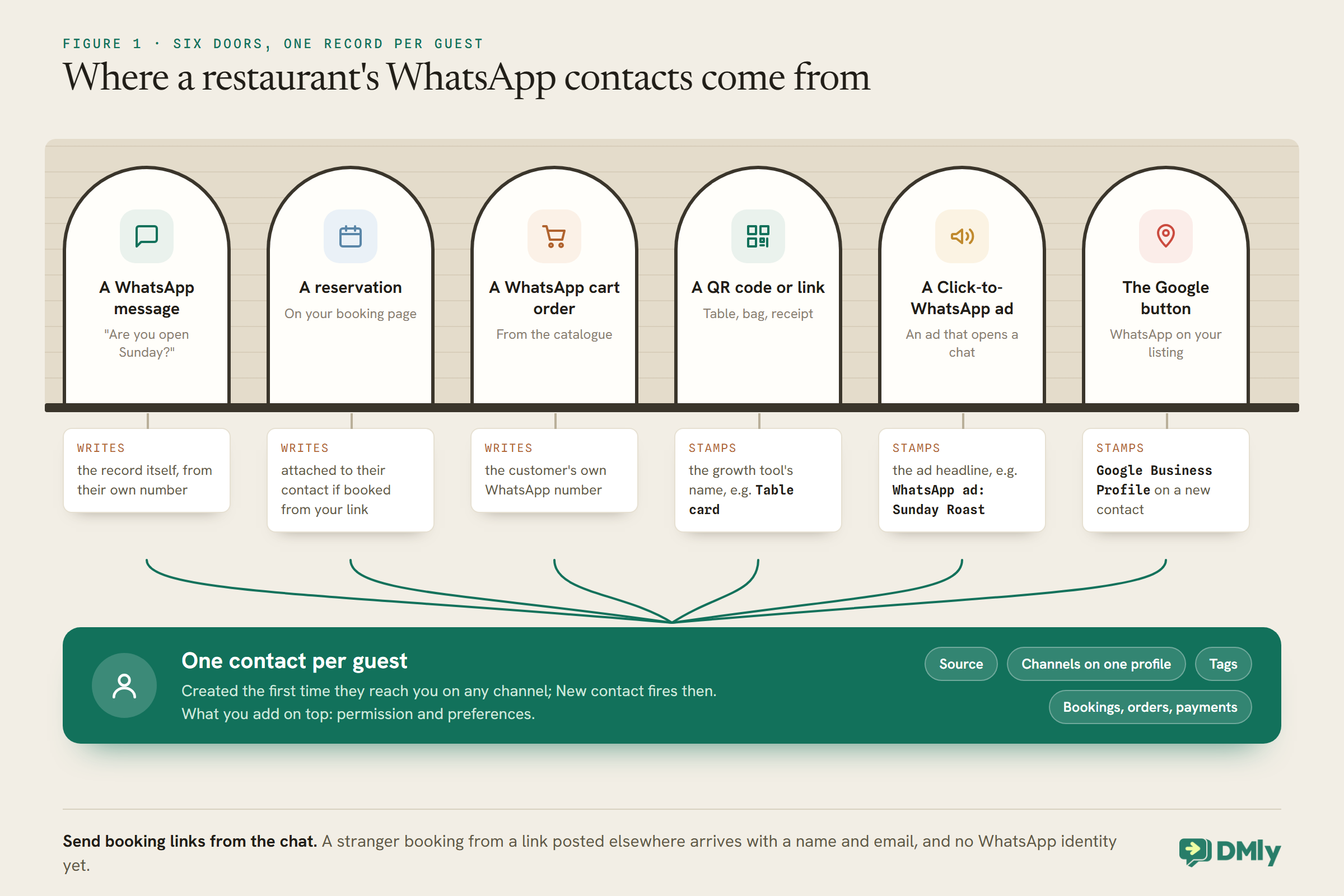
In DMly, a contact is created the first time someone reaches you on any channel, and the New contact trigger fires when it happens. A guest who messages you on WhatsApp and then books from a link you sent them is one record, and a profile can hold several channel identities with a shared history once they are connected, for example by merging (more on Instagram contacts below). The main ways a restaurant’s contacts arrive:
- WhatsApp messages: “are you open Sunday?” is also the start of a record.
- Reservations through your booking page. A guest who books from a link DMly sent them is attached to their existing contact. A stranger who books from a link posted elsewhere is created from the name and email they typed, with no WhatsApp identity yet, which is one reason to send booking links from the chat.
- WhatsApp cart orders, which arrive from the customer’s own WhatsApp number.
- QR codes and links made with DMly’s growth tools, which stamp their own name on every contact they bring in.
- Click-to-WhatsApp ads, which stamp the contact’s source with the ad’s headline, such as “WhatsApp ad: Sunday Roast”.
- The WhatsApp button on your Google listing, which attributes a brand-new contact’s first message to Google Business Profile.
Guests who never message you
Plenty of diners pay at the table and leave without scanning anything. You can still invite them: a line on the bill (“Get birthday treats on WhatsApp: scan the code on your table”) is the lightest touch. If a guest gives you their number in person, for example for a large booking taken at the counter, your team can add them by hand when booking from the calendar, which creates the contact with the phone number so confirmations reach them on WhatsApp. Record in whatsapp_consent what they agreed to, because a number given for a booking is not permission for specials.
Guests who find you on Instagram or Facebook
A guest who messages your Instagram account arrives as a contact on that channel, often with no phone number. If they later message on WhatsApp too, DMly suggests merging only when the two records share a phone number or email; otherwise you can merge them from the contacts list by ticking both. Until they are merged, their Instagram and WhatsApp conversations live on separate records. For marketing, remember that segments are channel-scoped: an Instagram-only contact will not appear in a WhatsApp segment, and cannot receive a WhatsApp template at all.
Step 1: Add Doors Where Guests Already Are
The more natural the door, the more guests walk through it. Put one everywhere they pause.
A DMly growth tool is a link or QR code that opens a WhatsApp chat with you. In Messaging → Growth Tools, with your WhatsApp profile selected, create one per place you want to measure:
- Table card: “Scan for the menu and tomorrow’s specials.”
- Takeaway bag sticker: “Order direct next time, on WhatsApp.”
- Receipt or bill folder: “Join our WhatsApp for birthday treats.”
- Door or window: “Book a table in one message.”
- Instagram bio and website: the same link, named for where it lives.
Each tool’s name is stamped on every contact it brings in and is the row label in your reports, so name them by place: Table card, Bag sticker, Window. On WhatsApp, the tool’s ref is the prefilled message in the guest’s text box, and it doubles as a keyword, so a code that prefills JOIN can start your welcome flow directly. Under Starts flow, pick the flow that should greet whoever arrives; only flows active on the same channel are listed. Choose refs nobody would type by accident, so a normal message cannot trip them.
If Google offers it for your category and region, turn on WhatsApp on Google under Reputation, Business info, to put a chat button on your listing in Search and Maps.
Step 2: A Welcome Flow That Asks Permission
The first message decides whether a new contact becomes a guest you can talk to again.
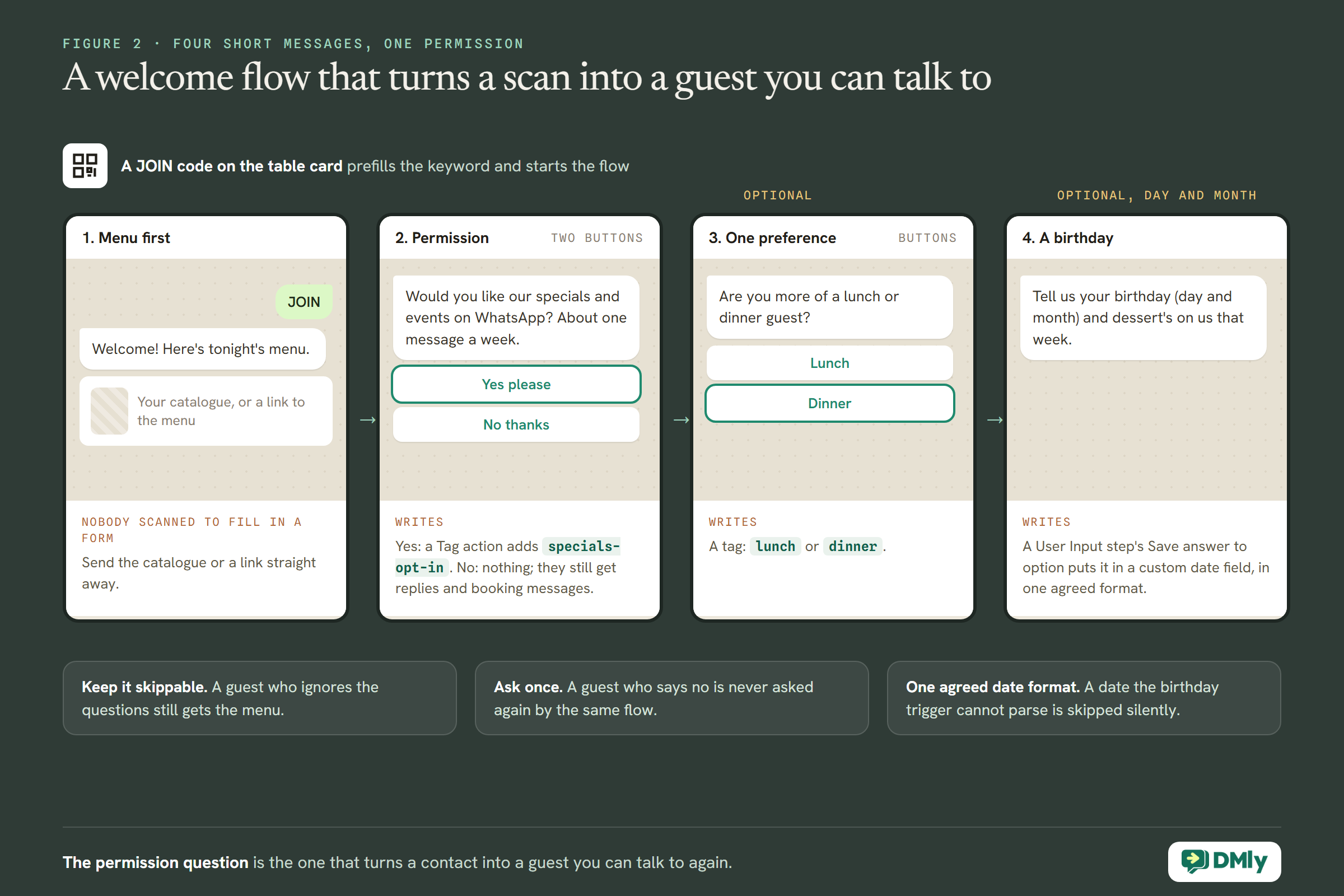
A good welcome does three things in four short messages: says hello and answers what they came for, asks one question about permission, and optionally asks one about preference. Build it as a flow started by your JOIN code, and offer the same questions in your chatbot’s replies.
- Hello and the thing they wanted. “Welcome to Rosa’s! Here’s tonight’s menu.” Send the catalogue or a link straight away; nobody scanned a code to answer a survey.
- The permission question, with two buttons: “Would you like our specials and events on WhatsApp? About one message a week.” Yes please / No thanks. A question step captures the reply and can be branched on. On Yes, a Tag action adds
specials-opt-in; on No, nothing, and the contact still gets replies and booking messages. - One preference question, optional: “Are you more of a lunch or dinner guest?” with buttons, tagged
lunchordinner. - A birthday, if they want to share it: “Tell us your birthday (day and month) and dessert’s on us that week.” Save the answer to a custom date field with a User Input step’s Save answer to option, in one agreed format.
Keep the whole thing skippable. A guest who ignores the questions should still get their menu, and a guest who says no should never be asked again by the same flow.
Step 3: Decide What to Record, and What Not To
Record what helps you serve and invite guests. Leave out what could hurt someone if it were wrong.
| Record | As | Why |
| Permission for specials | Tag specials-opt-in | Decides who may receive promotions |
| Lunch, dinner, weekend | Tags | Send the right special to the right people |
| Dine-in, collection, delivery | Tags, added by booking and cart flows | Delivery offers only reach people who order |
| Vegetarian or vegan preference | Tag, if the guest offers it | A new vegan dish goes to people who care |
| Home location | Custom field home_location | Multi-site restaurants invite guests to the right one |
| Birthday | The contact’s Birthday or a custom date field | Birthday treats |
| What they agreed to, and when | Custom field whatsapp_consent | Your record if anyone asks |
Allergies: ask every time, do not rely on a record
It is tempting to tag a guest nut-allergy so staff are forewarned. Resist it. A stored allergy can be out of date, can be missed, and can make someone think a question has already been asked when it has not. It is also information about a person’s health, and WhatsApp’s Business Messaging Policy says not to use WhatsApp to “send or request any health related information, if applicable regulations prohibit” it on systems without heightened protections. The safer habit is the one good restaurants already have: ask about allergies with every booking and order, and keep your allergen information on the menu. Whether your local rules say more about holding such data is a question for your own advisers.
Birthdays: store the date so the trigger can read it
DMly’s Birthday / key date trigger reads either the contact’s own Birthday field, which your booking form’s Date of Birth question fills, or a custom date field you name. A date it cannot parse is skipped silently, so agree one format and stick to it. DMly’s docs do not say whether the trigger matches the year as well as the day, so test it with a staff contact before relying on it for birthday treats, and ask guests only for the day and month if that is all you need. Birthday messages are marketing under Meta’s template guidelines, so send them only to guests who agreed.
Let Behaviour Fill In the Tags
Guests tell you most of what you need by what they do. Let flows write it down.
Asking questions is one way to learn about guests. Watching what they do is another, and it needs no questions at all. Small flows with a Tag action can record it:
- Appointment booked: add
dine-in. A guest who books a table is a dine-in guest. - Cart order received: add
orders-online. If your cart flow asks “delivery or collection?” with two buttons, adddeliveryorcollectionon each branch. - Class booked, if you run tasting evenings or cookery classes as classes: add
events. - Growth tool flows: the
JOINflow from your table card can addmet-at-table, and the bag sticker’s flowmet-via-delivery, alongside the source DMly stamps anyway.
Two cautions. Tag actions inside flows fire the Tag applied trigger, and that trigger cannot be narrowed to one tag, so avoid building flows on Tag applied at all unless you have thought through every tag that could start them. And keep behaviour tags factual: orders-online describes what happened; big-spender is a judgement nobody should see in a guest’s record.
Consent, Opt-Outs and Staying Welcome
Permission is not a checkbox you tick once. It is something you keep earning.
WhatsApp’s Business Messaging Policy says businesses may contact people who have given their number and agreed to be contacted, and must respect requests to stop, whether they are made on WhatsApp or elsewhere. In practice, for a restaurant:
- Replies and booking messages go to anyone who writes to you or books, because they asked.
- Specials, events, birthdays and offers are marketing messages under Meta’s template guidelines, and go only to contacts tagged
specials-opt-in. - Opting out: a guest who replies STOP or another opt-out keyword is added to your suppression list, and DMly’s broadcasts, sequences and automations skip them automatically. DMly mirrors the opt-out with an Unsubscribe tag, but putting that tag on someone by hand does not opt them out; it is a label, not the switch.
- “Please stop sending me specials” typed as a sentence rather than a keyword: remove
specials-opt-instraight away, and reply to confirm.
Record how and when each guest agreed, in whatsapp_consent or a note, so you can answer the question if it is ever asked. Our guide to WhatsApp opt-in and consent goes deeper.
Step 4: Turn the List Into Segments
A segment is a saved question. Once built, it answers itself every time you use it.
DMly segments combine tags with other rules and are re-checked every time they are used, so the list is always current. Restaurant segments worth building early:
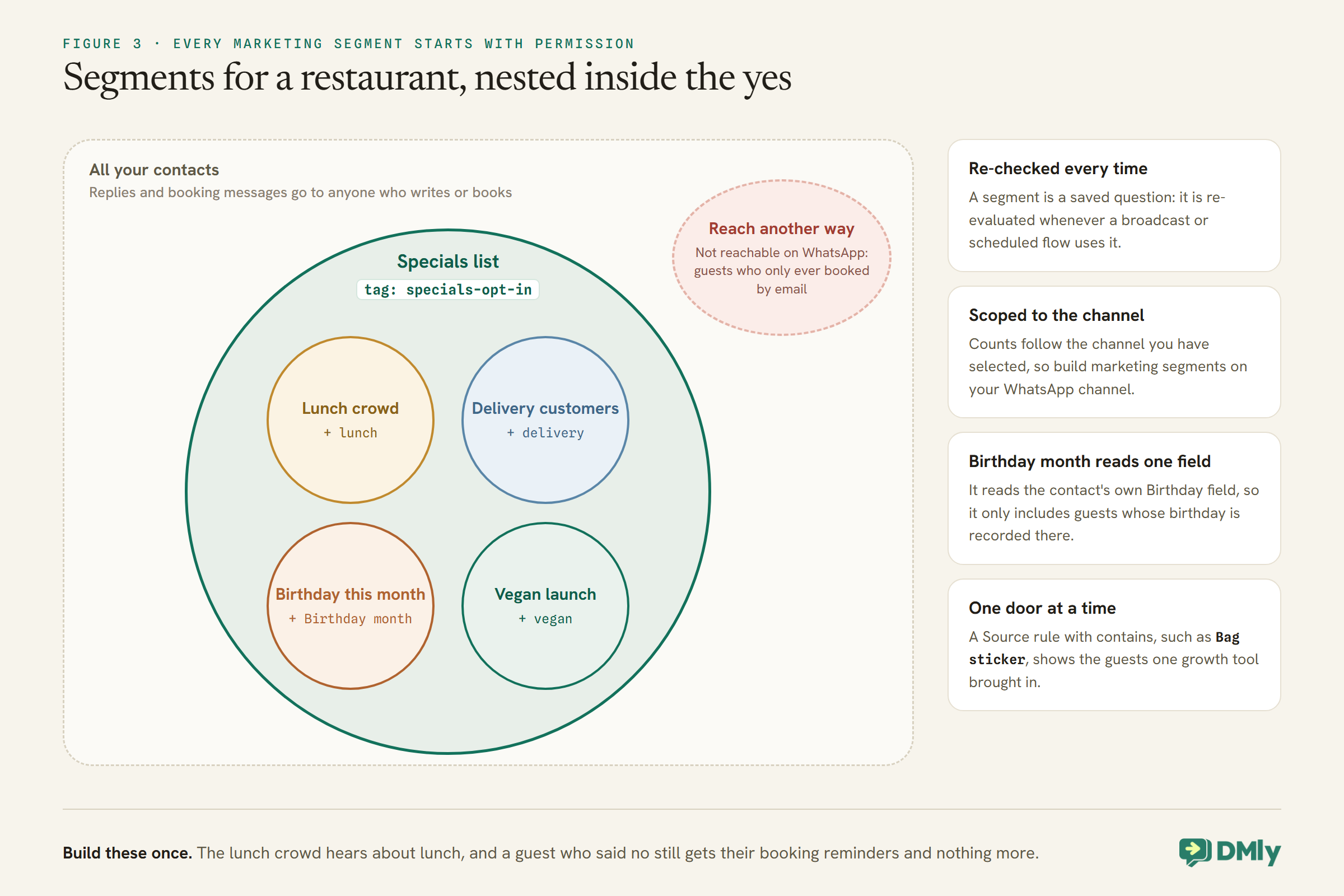
Three details. The Birthday month rule reads the contact’s own Birthday field, so it only includes guests whose birthday is recorded there. A segment’s count is scoped to the channel you have selected, so build marketing segments on your WhatsApp channel. And the Reachable on channel rule with not reachable on WhatsApp lists guests who only ever booked by email, who need a different way to be reached. A Source rule with contains lets you look at guests from one door, for example everyone whose source contains “Bag sticker”.
Step 5: Bring In the Lists You Already Have
Your old lists can move in. Their permissions cannot be assumed.
DMly’s contacts import takes a CSV with a name and phone number on every row, imported into the channel you have selected, with columns for tags and a custom_fields column holding a small piece of JSON per row. Existing contacts are matched by phone or email, and their custom fields are merged with the file’s values winning. Four things to plan for:
- Tags are replaced on import, and a blank tags column removes existing tags. Carry every tag you want to keep in the file.
- An import starts automations row by row. It fires New contact for each contact created, Tag applied for each tag in the tags column and Field changed for each row that updates custom fields, with no batching. Pause your welcome flow and anything else on those triggers before a big import, or hundreds of guests may get a welcome at once.
- A list is not permission. Only tag someone
specials-opt-inif they actually agreed to receive specials by WhatsApp. A booking app export or a delivery platform list usually says nothing about that. - Test with a handful of rows first, and check the result on a few profiles before importing the rest.
Keeping the Database Clean
A list is only useful while it is accurate. A few habits keep it that way.
- Merge duplicates when you see them. A guest who booked with an email and later messaged from their phone can end up as two contacts; the profile offers Possible duplicates when they share a phone number or email. Merging is permanent and keeps every protection: if either record had opted out, the merged one stays opted out.
- One tag list, written down.
vegan,Veganandvegan-guestare three different tags and three different segments. - Name custom fields exactly. The custom fields editor on a profile is free-form, and a misspelled field name silently creates a one-off field no segment can select.
- Remember that bulk tagging is quiet. Add tag and Remove tag from the contacts list apply to many contacts at once and never fire automations, which is useful for tidying up and a surprise if you expected a flow to run.
- Delete with care. Deleting a contact is a hard delete that also removes their messages, notes, documents, invoices, payments and bookings, and cannot be undone.
Decide, too, how long you keep guests who have not been in for a long time. DMly’s docs describe no automatic clean-up of old contacts, so a yearly look at long-silent records, agreed with whoever advises you on data protection, keeps the list honest and the segments meaningful.
If a guest asks what data you hold about them, know that DMly’s contacts export is not a subject-access export: it is a round-trip file for the importer and leaves out much of the record, including message history. Assemble the answer from the guest’s profile, or through DMly’s API.
Who on Your Team Sees the List
A server does not need every guest’s phone number. Give each role what it needs.
When you add a teammate without a custom role, DMly offers per-member controls, including masking contact phone numbers and email addresses and removing whole areas such as broadcasts. A reasonable split for a restaurant: the manager and whoever runs WhatsApp see everything; servers and kitchen staff, if they use DMly at all, see conversations and bookings with numbers masked. Internal notes are shared with the whole team, so write them as notes any colleague could read.
Using the Database Without Wearing It Out
The list is valuable because people agreed to be on it. Every message should respect that.
- Specials: one message a week to the relevant segment, not everyone, every day. Our guide to sending bulk messages on WhatsApp covers broadcasts safely.
- Birthdays: a recurring treat, sent from a flow on the Birthday / key date trigger.
- Loyalty: the database is also where a loyalty program keeps its points.
- Recurring sends: DMly’s Scheduled date trigger runs a flow for an audience you choose on a recurring date, which its docs recommend over a broadcast when a send repeats, such as a Thursday specials message.
Marketing messages outside the 24-hour window go on approved templates, billed at your market’s marketing rate and counted against your DMly plan’s broadcast and template allowance, so a smaller, better-targeted segment also costs less.
Step 6: Measure How the List Grows
- Scans and clicks per door: each growth tool’s card shows its count, so you can see whether the table card or the bag sticker brings more guests.
- New contacts by source: a segment on Source contains a growth tool’s name or “WhatsApp ad” shows who came from where.
- Permission rate: the specials-opt-in segment’s count against your total WhatsApp contacts tells you whether the welcome question is working.
- Opt-outs: a rising number after a campaign is a sign you are sending too much or to the wrong segment.
Restaurant Customer Database Mistakes to Avoid
- Treating every number as permission. Only opted-in guests get specials.
- Storing allergies as tags. Ask at every booking and order instead.
- Importing without pausing automations. Every row can start a welcome.
- A blank tags column on re-import. It wipes existing tags.
- Putting the Unsubscribe tag on by hand and assuming it opted someone out.
- Too many questions in the welcome. Menu first, one permission question, done.
- Sending everything to everyone. Segments exist so the lunch crowd hears about lunch.
Frequently Asked Questions
How do we collect restaurant customers’ WhatsApp numbers?
Mostly by letting them message you: QR codes on tables, bags and receipts, a WhatsApp button on your Google listing, and booking and ordering in the chat. Each creates a contact with its source recorded.
Can we send specials to everyone in our WhatsApp contacts?
Only to guests who agreed to receive them. Specials are marketing messages; ask permission in your welcome flow and send only to the opted-in segment.
Should we record customers’ allergies?
We recommend asking at every booking and order rather than relying on a stored tag, which can be out of date. Allergy information is also health information; check your local data rules.
Can we import our existing customer list?
Yes, from a CSV with a name and phone number per row. Pause automations first, carry existing tags in the file, and do not assume anyone on an old list agreed to WhatsApp marketing.
What happens when a guest replies STOP?
They are added to your suppression list and DMly’s broadcasts, sequences and automations skip them automatically. A request made in other words should be honoured too.
How do we know which QR code works best?
Each growth tool counts its scans and stamps its name on every contact it brings in, so you can compare doors directly.
The Audit, a Season Later
Run the one-minute audit again after a season of the setup above. Every guest who scanned a table card, booked from a link or ordered through a cart is a contact on one record, with where they came from and what they agreed to. The ones who said yes to specials are a segment you can message on Thursday about the tasting menu, and the ones who said no still get their booking reminders and nothing more.
That is what a restaurant customer database built from WhatsApp gives you: not just more numbers, but guests you know, reachable in the way they chose, and a list that stays welcome because you asked first.
Writing about WhatsApp automation, bookings and growth for local business.
Turn WhatsApp into your busiest channel.
Start free and run message, bookings, payments and reviews in one place.
