
A receptionist adds a tag to a patient’s record to save time: diabetic-nervous. It helps the next person who answers a message. Six months later, that tag is in the contacts export someone downloaded for a mailing, in the segment used to send a practice newsletter, in the details an AI assistant reads before replying, and visible to every team member who can open the record. A shortcut on a busy morning has turned into a diagnosis stored in a marketing tool.
That is the one idea to hold on to when you set up a WhatsApp CRM for clinics. A CRM, customer relationship management, is the record kept beside your conversations: who the patient is, how to reach them, when they are due, who looks after their appointments. For a clinic it is enormously useful for all of that. It is not where clinical information belongs, because everything in it travels further than it looks.
This guide explains how a clinic’s CRM works in DMly: what the record holds, what to add and what to keep out, where the information comes from, recalls and guardians, who sees what, and how to handle a patient’s request for their data. It is the clinic companion to our guide to WhatsApp CRM for small businesses, and part of our series on WhatsApp automation for clinics. Nothing here is legal advice; your own obligations for patient data decide how you run it.
What a Clinic’s CRM Is For, and What It Is Not
The CRM holds administrative data. Your clinical system holds clinical data. Keep the line sharp.
| Belongs in the CRM | Belongs in the clinical system |
| Name, phone, preferred name, language | Diagnoses and conditions |
| Appointments and their status | Clinical notes and examination findings |
| Preferred practitioner and contact times | Medications and allergies |
| Recall due date (not the reason for it) | Results, images and letters about care |
| Consent to WhatsApp messages, and how given | Treatment plans and their rationale |
| Guardian or carer links | Safeguarding records |
WhatsApp’s own Business Messaging Policy points the same way: it says not to use WhatsApp to send or request health-related information where your regulations prohibit it on systems without heightened protections. Your CRM sits beside WhatsApp conversations, so treat it with the same line. The rest of this guide is about making the left-hand column as useful as possible.
One Patient, One Record, Every Channel
A patient who messages on WhatsApp, books online and writes on Facebook is still one person.
In DMly, a contact is one person, owned by your workspace, across every channel they use. Their record lists each identity, one marked primary, and replies, history and CRM data are shared across them. When the same patient ends up as two contacts, which happens when someone books with an email and later messages from their phone, DMly can merge them, and the profile flags likely duplicates. For a clinic, merging carefully matters: two patients with the same name are not the same person, so check a phone number or date of birth before merging.
What the Record Already Holds
Before adding anything, know what DMly shows by default.
- The basics: name, phone, email, birthday, language, timezone, and where the contact came from.
- The conversation: the last message, a timeline of activity, and answers to questions your automations asked.
- Internal notes: private to your team; the patient never sees them.
- Appointments: for a patient with commercial history, a records tab lists every booking in order, alongside invoices and payments for private clinics.
Once a contact has commercial history, the profile adds tiles for credits, amount due, loyalty points and lifetime value. Many clinics will use only some of these; a clinic providing publicly funded care may use none of the money features at all.
Custom Fields for a WhatsApp CRM for Clinics
Custom fields hold the administrative details your clinic needs that no general CRM would include.
Define them once under Settings, then Custom fields. Each has a name and a type (text, number, email, phone or date), and DMly’s docs note that the type is only a label: a date field will accept anything typed into it. So agree formats before the team starts filling them in. A starting set for a clinic:
| Field | Type | What it is for |
preferred_practitioner | text | Who the patient usually sees, for booking |
recall_due | date | When the next routine review is due, set from the clinician’s chosen interval |
whatsapp_consent | text | That the patient agreed to WhatsApp messages, when and how |
contact_preference | text | Best times to contact, or “phone only” |
registration_status | text | Where a new patient is in registration |
Notice what is missing: no condition, no medication, no allergy, no reason for the recall. The recall date is administrative; the clinical reason for its interval stays in the clinical record.
Why Clinical Details Must Stay Out
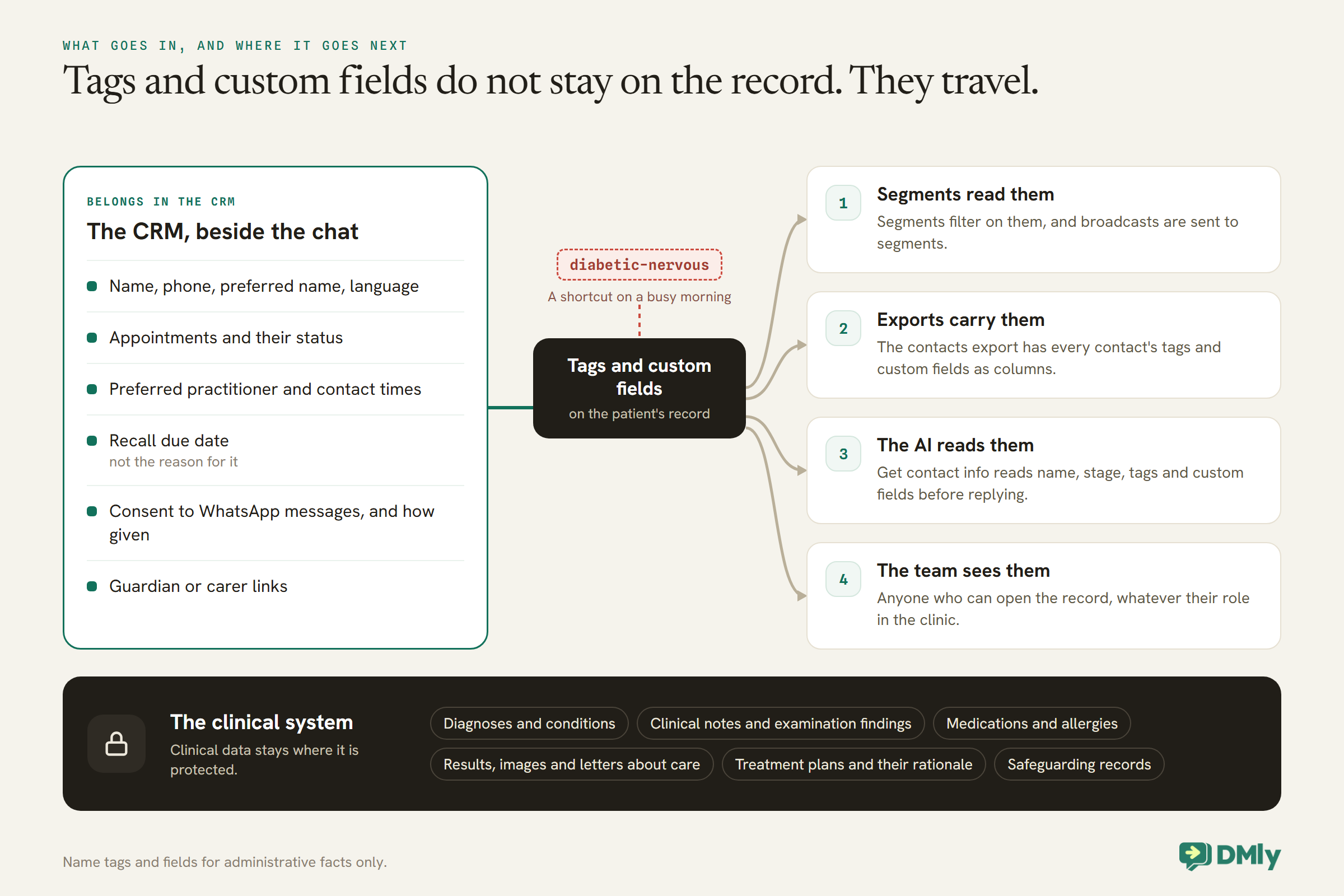
In a CRM, tags and custom fields do not stay on the record. They travel.
This is the practical reason behind the line in Figure 1. In DMly:
- Segments read them. Tags and custom fields are what segments filter on, and segments are what broadcasts are sent to. A condition in a tag is one filter away from a mailing list.
- Exports carry them. The contacts export includes every contact’s tags and custom fields as columns. Anyone with export permission can download them.
- The AI reads them. DMly’s AI assistant tool Get contact info reads a contact’s name, stage, tags and custom fields before replying. A clinical detail in a tag becomes something an automated assistant knows and could repeat.
- The team sees them. Anyone who can open the record sees its tags and fields, whatever their role in the clinic.
The rule that follows is simple: name tags and fields for administrative facts only. wants-earlier-appointment is fine. phone-only is fine. Anything that describes a patient’s health is not, however convenient it would be.
Where the Information Comes From
Most of the administrative record fills itself. The rest is a minute of reception time.
- Messages. A new person who messages the clinic becomes a contact with their number.
- Bookings. Every appointment lands in the patient’s record. DMly’s booking form can ask a fixed set of questions, and four save to custom fields: preferred name, identification number, address and referral source. Think carefully before switching on identification number; WhatsApp’s policy says not to ask for ID card numbers or other sensitive identifiers in messages, and a clinic should collect one only if it needs it and has a lawful basis to hold it there.
- Flows. A question step can save an answer to a custom field, such as a preferred practitioner.
- An AI assistant. Its Set custom fields and Add a note tools can record administrative details a patient mentions, such as a preferred day. Instruct it never to record anything clinical.
- A spreadsheet, once. The contacts CSV import brings in an existing patient list, including custom fields as a JSON column.
Leads, Patients and a Catch
DMly calls contacts leads or clients. For a clinic, that distinction may not fit, and it does not fill in on its own.
DMly promotes a lead to a client automatically only when an invoice or an order is created for them, a payment is recorded, or a subscription starts. A booking alone does not do it. A private clinic that bills through DMly will see patients become clients as they are invoiced. A clinic providing publicly funded care, or taking payment elsewhere, may find every patient listed as a lead forever. That is harmless, as long as you do not build segments or reports that assume “client” means “patient”. Use tags, such as registered-patient, or appointment history instead.
What the Record Can Do
An administrative record earns its place when it drives the right messages at the right time.
Recalls from a date
DMly’s Birthday / key date trigger can fire on a date custom field, a set number of days before the date. With recall_due filled in at each review, a flow can send a neutral invitation to book a set number of days before the patient is due. The trigger only reaches contacts with the date filled in, and a value it cannot read as a date is skipped silently, which is why the date format matters.
Check how the trigger treats the year before you rely on it. DMly’s docs describe the Birthday / key date trigger firing on the day of a date field, or a set number of days before it, and give anniversary as an example of such a field. They do not say whether the year is part of the match. If the trigger behaves like a birthday and repeats every year on the same day and month, a date more than about a year away could fire a year early. Test it before going live: set a test contact’s date 13 months ahead and check nothing fires this year. Until you have confirmed the behaviour, only enter dates that fall within the next 12 months, keeping later ones in a note, and clear or update each date once the recall has done its job.
Branching on what you know
A flow’s Condition step can test a custom field: whether it is a value, contains something, or has any value. A booking flow can check preferred_practitioner and offer that clinician first, or respect contact_preference before sending anything optional.
Everything else reads the same record
Reminders go to the patient’s channel. The Appointment report counts their attendance. The client portal, if you switch it on, lets them see their own booking history after signing in with a one-time code on WhatsApp. The record is the thing all of these share.
Conversations: Getting Each Message to the Right Person
A clinic’s inbox has different kinds of message for different people. The CRM and the inbox work together to route them.
In a clinic, an appointment change is a receptionist’s job, a billing question is the practice manager’s, and anything touching care goes to a clinician. DMly’s inbox lets conversations be assigned to a named teammate or left in an unassigned queue, and a flow can assign a conversation as one of its steps. A booking flow that hands over “something’s bothering me” messages can assign them to whoever handles clinical queries that day, while routine questions stay with reception. The patient’s record then shows the whole history in one place, whoever answered.
Keep assignments simple. A small practice may need only two routes: reception, and a clinician on duty. What matters is that a message about care never waits in a queue that everyone assumes someone else is watching.
A Pipeline for Private Treatment Enquiries
Most clinic work does not need a sales pipeline. Private treatment enquiries that take weeks to decide sometimes do.
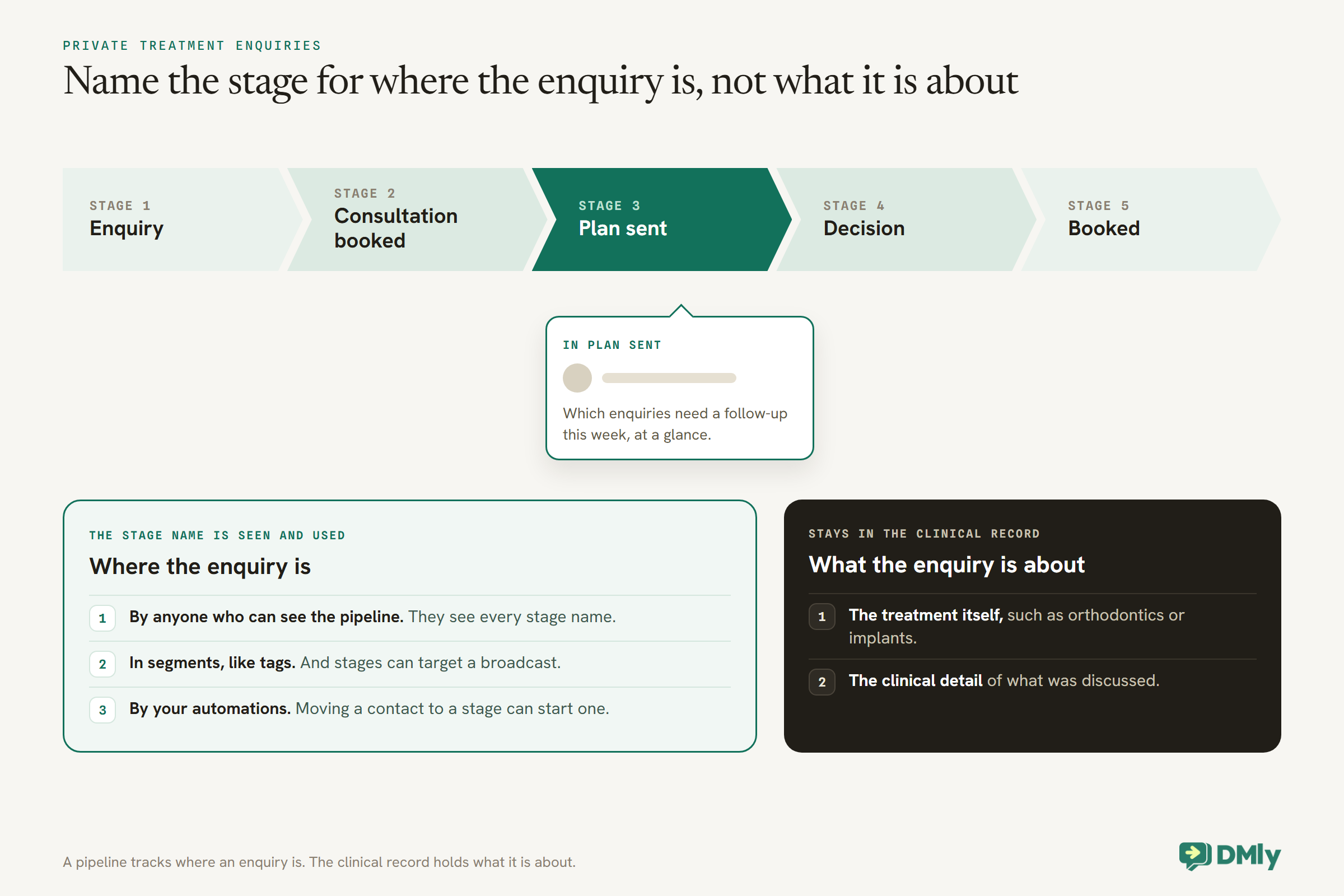
DMly’s pipeline stages are your own columns for tracking enquiries through to a booking. For a clinic offering private treatments with a consultation and a considered decision, such as orthodontics or implants, a pipeline shows which enquiries need a follow-up this week. Moving a contact to a stage can start an automation, and stages can target a broadcast.
The confidentiality rule applies to stage names too. Stage names are visible to anyone who can see the pipeline and travel into segments like tags do, so name them for where the enquiry is, not what it is about: Enquiry, Consultation booked, Plan sent, Decision, Booked. The clinical detail of what was discussed stays in the clinical record. Our guide to building a WhatsApp sales pipeline covers the setup.
Practice Notices and Newsletters
A clinic sometimes needs to tell every patient something: a closure, new opening hours, a new site. The CRM makes it possible; consent makes it allowed.
Broadcasts in DMly go to one saved segment. For practice-wide notices, build a segment of patients who agreed to WhatsApp messages, using your consent field or tag, and exclude anyone who has opted out. Keep notices administrative and neutral, and remember that outside the 24-hour window they travel as approved templates, billed by Meta according to the category it assigns. A practice newsletter or an offer is marketing, needs the patient’s permission for that kind of message, and is billed at the marketing rate. Our guide to sending bulk messages on WhatsApp covers broadcasts safely, and our guide to WhatsApp opt-in covers asking for permission.
Families, Guardians and Carers
Many patients do not manage their own appointments. The record should show who does.
DMly’s Linked contacts links two records with a relationship: Parent, Child, Spouse, Guardian, Sibling or Other, read correctly from each side. For a clinic, that shows the receptionist that a child’s 4pm appointment belongs to the parent who books it, or that an older patient’s appointments are arranged by a carer. Remember that WhatsApp reminders go to the contact the booking is for, and a record without a phone number cannot receive one; put bookings where the responsible adult’s number is. And link a carer only with the patient’s agreement, where your rules require it.
Who Sees What
Give each person the access their role needs, and no more.
- Per-member restrictions. When you add someone to the team, you can mask patients’ phone numbers and email addresses for them, and remove whole areas such as the inbox, appointments, broadcasts, automations or reports.
- Documents. Files attached to a contact can be seen and downloaded by anyone who can open the profile; uploading and deleting need a separate permission that owners and admins have by default. Keep clinical documents out of the CRM entirely.
- Notes. Internal notes are shared across the team. Write them as administrative notes that any colleague could read.
- Reports. A team member without permission to view the team’s appointments only sees reports on their own bookings.
Documents and Letters
DMly can produce branded PDF letters from a template. Keep them administrative.
Client letters are templates with merge tokens for the patient’s name, custom fields and a reference number, generated one patient at a time from their record as a PDF with your practice details and a verification QR code. For a clinic, they suit administrative letters: a registration confirmation, an appointment letter, a note of your practice policies. They are not the place for clinical correspondence, which belongs in your clinical system. Note that a generated letter always shows the patient’s real phone number and email, even for a team member whose view of contact details is masked, because it is the patient’s own document.
Patient Data Requests and Deletion
When a patient asks for their data, or asks to be removed, know exactly what DMly can and cannot give you.
DMly’s docs are clear that the contacts export “is not a subject-access or data-portability export”. It is a round-trip file for the importer, and it leaves out, among other things, the contact’s email address, birthday, language, channel identities and their entire message history. To answer a patient’s request for the data you hold about them in DMly, you need to assemble it from the contact’s page (profile, custom fields, activity timeline, channels, internal notes and the conversation) or pull it through DMly’s API, which exposes more of the record.
Deletion is a hard delete, and it reaches further than it looks. Deleting a contact removes their channel identities, their whole message history including files exchanged, their notes, client profile, tags and documents, and their invoices, payments and bookings too. It cannot be undone. Clinics often have record-keeping obligations that require certain records to be kept for a set period; those obligations usually apply to your clinical record, but check before deleting anything in DMly that you may be required to keep, such as appointment or payment history.
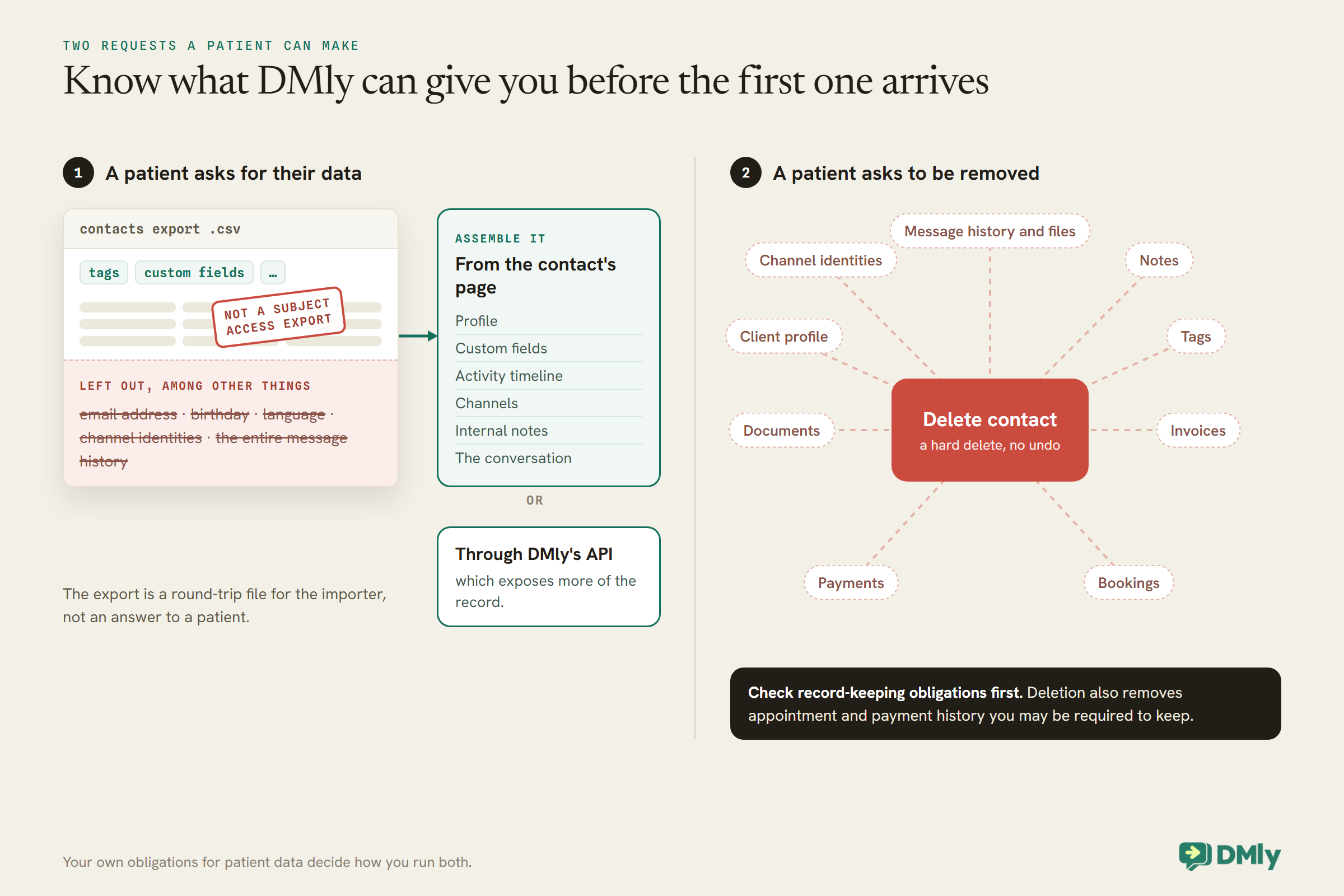
How the Front Desk Uses It
The value of the record shows up in the thirty seconds after a message arrives.
A patient writes “can I move my appointment to next week?”. With the record open beside the chat, the receptionist can see at a glance who usually sees them, when their next appointment is, whether a parent or carer manages their bookings, whether they prefer calls to messages, and whether they agreed to WhatsApp messages in the first place. None of that needs a clinical detail, and all of it makes the reply faster and more personal.
That is also the test for anything you are tempted to add to the record: would it help the front desk answer an administrative message? If the answer involves the patient’s health, it belongs in the clinical system, where the people who need it can see it and the protections that apply to it are in place.
Recording Consent to WhatsApp Messages
DMly records when a patient opts out. It does not record how they opted in. That part is yours.
WhatsApp’s policy lets businesses contact people only with their number and their permission, and requires you to honour requests to stop “either on or off WhatsApp”. DMly’s docs note that it records the date a contact opts out, by sending a stop word, but has no record of how or when they opted in. Keep that in the whatsapp_consent field: the date, and how it was given, such as “registration form” or “verbal, reception”. When a patient tells reception they no longer want messages, record it the same day, and ask them to reply STOP, or block the conversation if they must not be messaged at all, which also stops manual replies.
Moving In From Another System
Bring the administrative list in once, and leave the clinical record where it is.
DMly’s contacts import takes a CSV with a name and phone number on every row, attached to the channel you have selected, with tags and custom fields as columns. Import only administrative columns: name, phone, preferred practitioner, recall date in your agreed format, consent. Tags are replaced on re-import, and a blank tags column removes existing tags, so carry them in the file if you import twice. And importing a patient list is not the same as each patient agreeing to WhatsApp messages; only message imported patients who have given that permission.
Habits That Keep the Record Clean
- Update the recall date at every review, in the agreed format.
- Write tags and notes as if the patient will read them. Administrative facts only.
- Merge duplicates carefully, checking identity first.
- Review who has access when someone joins or leaves the team.
- Audit tags quarterly. Remove anything that drifted into clinical territory.
Mistakes to Avoid
- Tags that name conditions. They travel into segments, exports and the AI.
- Clinical documents on the contact. Anyone who can open the profile can download them.
- Using the export to answer a data request. It leaves out most of the record.
- Deleting without checking retention duties. Deletion also removes bookings and payments.
- No record of consent. DMly records opt-outs, not opt-ins.
- Merging two patients with the same name. Check identity first.
- Assuming “client” means “patient”. A booking alone never makes one.
- Stage names that describe a treatment. They travel into segments like tags.
- Letting the AI record anything clinical. Its Set custom fields and Add a note tools should be told explicitly not to.
Frequently Asked Questions
What is a WhatsApp CRM for a clinic?
It is the administrative record kept beside your WhatsApp conversations with patients: contact details, appointments, preferred practitioner, recall date, consent and guardian links. Clinical information stays in your clinical record system.
Can we store medical details in the CRM?
They should stay in your clinical system. In DMly, tags and custom fields feed segments, exports, broadcasts and the AI assistant’s view of the patient, so clinical details there travel much further than they would in a clinical record.
How do we answer a patient’s request for their data?
Not with the contacts export, which DMly’s docs say is not a subject-access export. Assemble the answer from the contact’s page, or pull it through the API, and follow your own legal obligations.
What happens if we delete a patient?
DMly hard-deletes the contact, their messages and files, notes, documents, tags, invoices, payments and bookings, with no undo. Check any record-keeping duties before deleting.
Can the CRM send recall reminders?
Yes. Store the recall due date in a date custom field and a flow on the Birthday / key date trigger can send a neutral invitation a set number of days before it.
Can we send marketing to patients from the CRM?
Only to patients who agreed to that kind of message, and with care about what you say. Offers and newsletters are marketing templates, billed at Meta’s marketing rate. Never build a marketing segment from anything that reveals a patient’s health.
Can staff see patients’ phone numbers?
You decide per team member. DMly can mask phone numbers and email addresses for individual members, and restrict which areas they can open.
The Tag, Removed
The diabetic-nervous tag at the top of this guide was written with good intentions and ended up everywhere. The fix was never to stop using the CRM. It was to use it for what it is good at: knowing who the patient is, when they are due, who books for them and how they want to be contacted, while the clinical record stays where it is protected.
Set up that way, a WhatsApp CRM for clinics makes the front desk faster and the patient experience smoother, without creating a second medical record nobody meant to keep. Define your administrative fields, agree your tag rules, write down your data-request and deletion process, and audit the tags once a quarter.
Writing about WhatsApp automation, bookings and growth for local business.
Turn WhatsApp into your busiest channel.
Start free and run message, bookings, payments and reviews in one place.
