
Best CRMs With WhatsApp Integration in 2026: HubSpot, Zoho, Pipedrive and More
Follow the trail on one salesperson’s laptop. A lead messages on WhatsApp. The message is copied from WhatsApp Web and pasted into a note in the CRM. The quote is written in the CRM, downloaded, and sent back on WhatsApp. The customer replies with a question, which is copied into the CRM again, and the deal stage is updated by hand. By the end of the week half the conversation lives in each tab, and nobody is sure which half is complete.
A CRM with WhatsApp integration is supposed to end that trail by putting the conversation on the customer record where the deal already lives. Every major CRM now says it can. What they do not say on the feature page is which plan you need, whether you can send images or buttons, how many messages you are allowed, who you pay for the messages, and whether your existing WhatsApp number can be used. This guide answers those questions for HubSpot, Zoho CRM, Pipedrive and Freshsales from their own help and pricing pages, read on 25 September 2026, and compares them with the other two ways to get the same result.
A disclosure, up front: DMly publishes this blog and is one of the options compared, as a WhatsApp-native alternative. We have described every tool from its own pages and said where another is the better choice. For what a WhatsApp CRM is and how to set one up, see our guide to WhatsApp CRM for small businesses.
Three Ways to Get WhatsApp Into a CRM
There are three architectures, and choosing between them matters more than choosing a brand.
1. The CRM’s own WhatsApp integration. HubSpot, Zoho CRM, Pipedrive and Freshworks each connect a WhatsApp Business number directly. Conversations appear in the CRM’s inbox and on the contact or deal. This is the simplest to run, because there is one system, but each CRM’s WhatsApp features are only as deep as that vendor has built them.
2. A WhatsApp platform plus a connector. A dedicated WhatsApp tool such as Wati, SleekFlow or Respond.io runs the conversations, bots and broadcasts, and syncs contacts and activity to your CRM. You get deeper WhatsApp features, at the cost of two subscriptions and a sync to maintain.
3. A WhatsApp-native CRM. A CRM built around messaging from the start, such as DMly, where the customer record, the pipeline, and in DMly’s case bookings and payments, sit in the same place as the WhatsApp conversation. You give up the depth of a big sales CRM in exchange for one system built for the channel.
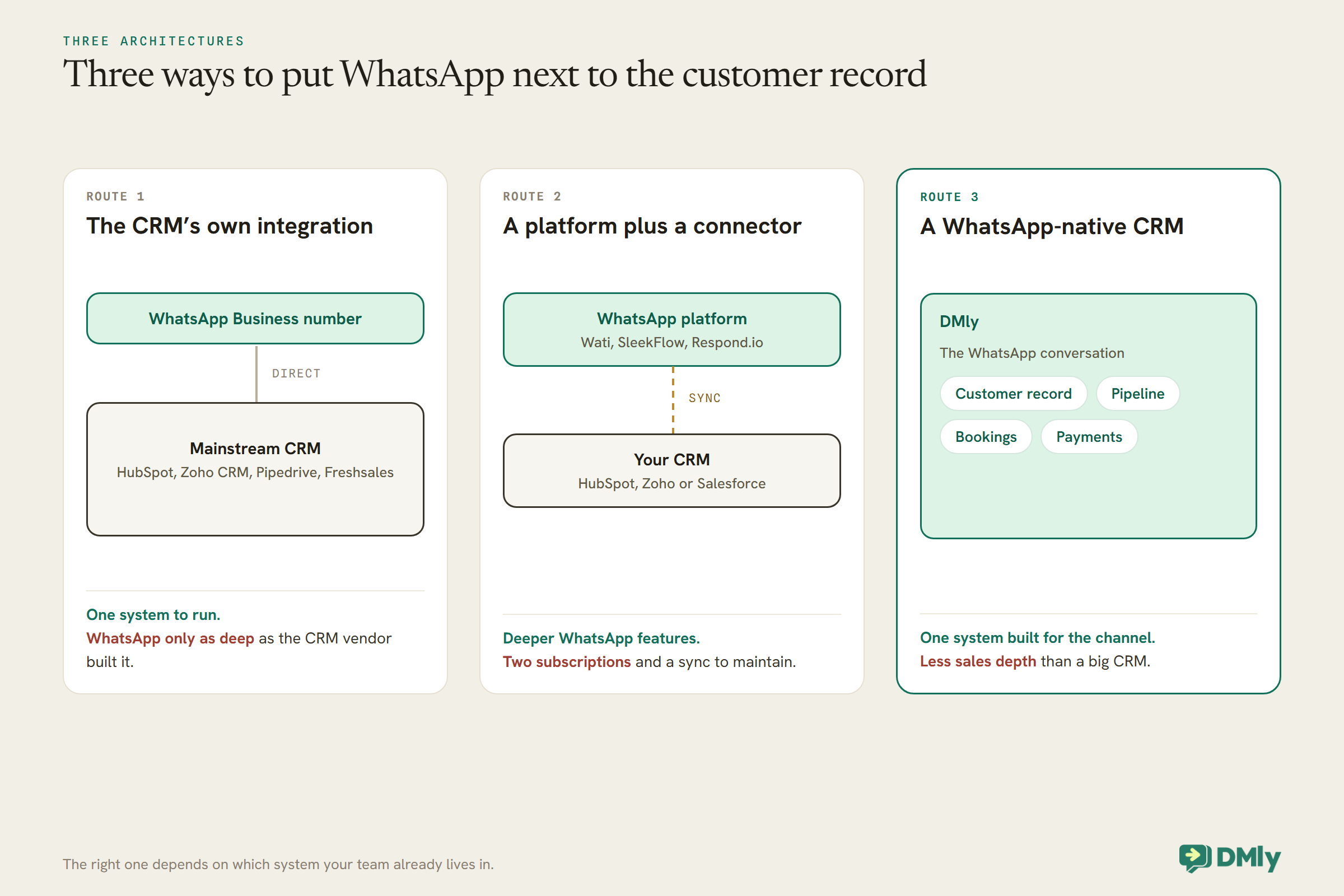
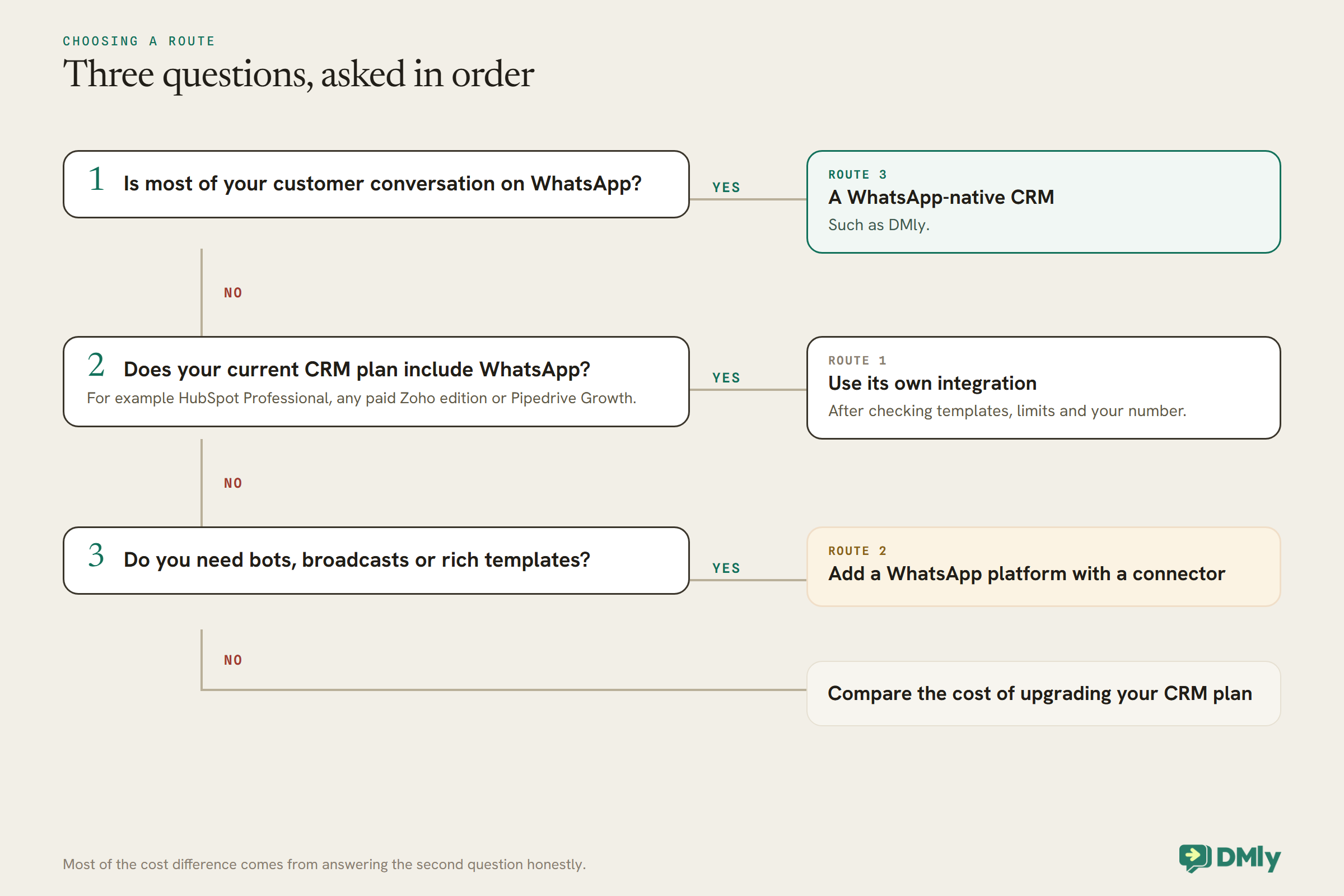
The rest of this guide looks at the first route in detail, then the other two. The short version: if your team already lives in a big CRM and WhatsApp is one channel among several, use that CRM’s integration or a connector. If WhatsApp is where most of your customers talk to you, a WhatsApp-native tool usually fits better.
What to Check in Any WhatsApp Integration
Every CRM with WhatsApp integration works within the same Meta rules. They differ in six practical ways.
The plan it needs. Some CRMs include WhatsApp on every paid plan; others only on higher tiers. This alone can multiply the cost.
Your existing number. Whether you can bring the number your customers already have, or must use a new one.
What you can send. Outside WhatsApp’s 24-hour window, you can only send approved templates. Some integrations support images, documents and buttons in templates; some support plain text only.
Limits. Some CRMs cap the number of template messages you can send a month through their integration, separately from anything Meta imposes.
Who you pay for messages. Meta charges for template messages. Some CRMs pass the charge through Meta directly; others sell you credits.
Automation. Whether WhatsApp messages can be sent from the CRM’s workflows, and whether there is a chatbot for the first reply.
The Quick Answer: Best by Situation
| If you are… | Look first at | Why |
| A local business where WhatsApp is the main channel | DMly | Customer record, pipeline, bookings and payments built around the chat |
| Already on HubSpot Professional | HubSpot’s WhatsApp channel | Conversations inbox and records you already use; check the monthly template limit |
| A small team wanting WhatsApp on a low-cost CRM | Zoho CRM | WhatsApp on the trial and every paid edition, usable in workflows |
| A sales team working a deal pipeline | Pipedrive | WhatsApp from the Growth plan, linked to deals, though still in beta and text-only |
| A team wanting bots and catalogs with the CRM | Freshsales Suite | WhatsApp through Freshworks’ own business platform, with bots and media templates |
| A team needing deep WhatsApp features plus an existing CRM | Wati, SleekFlow or Respond.io with a connector | Full WhatsApp tooling, synced to HubSpot, Zoho or Salesforce |
The Best CRMs With WhatsApp Integration, Reviewed
1. DMly: best overall WhatsApp-native CRM
What it is. DMly is not a mainstream CRM with a WhatsApp add-on. It is a messaging platform with its own CRM: each contact’s record holds their conversations across channels, tags, custom fields and pipeline stage, and, once they are a client, their bookings, invoices, subscriptions, credits and loyalty points. Segments and automations work on that record.
Working with another CRM. DMly’s integrations list HubSpot and Mailchimp under Sales and CRM, and its flow builder includes a HubSpot step. The docs do not describe exactly what that step syncs, so test it with your own records before relying on it. DMly also pushes events out through Zapier, webhooks and n8n, and has a REST API.
Cost. Plans are $29, $65 and $149 a month billed yearly, with 3, 6 and 15 seats.
Watch out for. DMly’s pipelines suit enquiries and local-business sales more than large, multi-stage B2B deal books, and it lacks the forecasting, territory and sales-sequence depth of HubSpot, Zoho or Pipedrive.
Best for: local and service businesses where WhatsApp is the main channel and the customer record needs bookings and payments on it.
2. HubSpot: best if you are already on a Professional plan
What you need. HubSpot’s WhatsApp channel connects to its conversations inbox and is available with Marketing Hub or Service Hub on the Professional or Enterprise plans. You need admin access to your company’s Meta Business Manager, and you must connect a WhatsApp Business account, not a personal one. HubSpot’s help page notes that a verified Meta Business Manager is needed for more than 50 business-initiated conversations a day.
What it does. WhatsApp conversations appear in the shared inbox and on the contact record. Outside the 24-hour window you send a template, which you create and sync from your WhatsApp Business account and personalise in HubSpot. Professional and Enterprise users can build custom inbox views containing only WhatsApp messages.
Limits and cost. HubSpot applies a limit of 1,000 template messages a month, shared across all connected WhatsApp accounts, resetting on the day your Professional or Enterprise subscription began. On the pricing page, Service Hub Professional is $90 or $100 a seat a month depending on billing, plus a required one-time Professional Onboarding fee of $1,500. Enterprise is $150 a seat with a $3,500 onboarding fee.
Watch out for. The Professional requirement is the big cost. A team on HubSpot’s free or Starter tools does not get the native WhatsApp channel. The 1,000-template monthly limit also matters if you plan reminders or campaigns at volume. Some message types are not supported by the API and will not show in the inbox.
Best for: businesses already paying for Marketing Hub or Service Hub Professional who want WhatsApp in the same inbox.
3. Zoho CRM: best value route to WhatsApp in a full CRM
What you need. Zoho’s help page says the WhatsApp Business integration is supported on the trial and on all paid editions of Zoho CRM. You need a Meta Business account, a verified business, a WhatsApp Business account and a phone number that meets WhatsApp’s requirements.
What it does. You create WhatsApp templates inside Zoho CRM, tied to a module so they can pull in record data, and submit them to Meta for review. Approved templates can be sent from a record or added as actions in Zoho’s automations: Workflow Rules, Blueprint, Journey Builder and Wizards. Messages can be sent to leads and contacts.
Limits and cost. Business messages are paid for with credits bought inside Zoho, with an auto-recharge option. Zoho CRM has a free edition for up to three users, and Standard, Professional, Enterprise and Ultimate editions priced per user; the pricing page showed us local-currency prices, so check yours.
Watch out for. Zoho’s help page says only unused phone numbers can be connected and that migrating existing numbers is not supported yet, so you may not be able to bring the number your customers already use. Templates cannot be edited while in review or after approval; you create a new one instead.
Best for: small and mid-sized teams wanting a full CRM with WhatsApp in workflows, without a top-tier plan.
4. Pipedrive: best for deal-focused sales teams, with caveats
What you need. Pipedrive’s WhatsApp integration is available on the Growth plan and above. Its help page says it is still a beta feature, not yet available to all customers, and switched on from the beta program page. You need a Meta Business Portfolio, a WhatsApp Business account, a business phone number and global admin permissions.
What it does. WhatsApp conversations appear in Pipedrive’s Sales Inbox and can be started from a person, deal or organisation, linking the chat to the pipeline. You can create templates in Pipedrive, as marketing or utility, and Meta’s approval can take up to 48 hours.
Limits and cost. Growth is $39 a seat a month billed annually, Premium $59 and Ultimate $79, with a 14-day trial. Meta charges for WhatsApp messages directly, per delivered message, at rates that vary by market and category.
Watch out for. Pipedrive supports templates with a text body and optional text header only: no image, video or document headers, no footers and no buttons. Template variables must be typed by hand each time you send. There is no chatbot in the integration. For a sales team sending personal follow-ups that is workable; for reminders or campaigns at scale it is limiting.
Best for: sales teams that live in Pipedrive’s pipeline and want WhatsApp chats attached to deals.
5. Freshsales: best for bots and catalogs alongside the CRM
What you need. Freshworks connects WhatsApp through its own business platform access; its help page describes Freshworks as an official WhatsApp Business Solution Provider. The WhatsApp integration is listed for Freshsales Suite plans from Free to Enterprise and for Freshchat.
What it does. Agents read and reply to WhatsApp conversations in one workspace. You can send templates with images, videos and documents, run marketing templates to opted-in customers, share catalogs, and deploy Freshchat bots to answer common questions or route chats.
Cost. Freshsales is $9, $39 or $59 a user a month billed annually for Growth, Pro and Enterprise, with a 21-day trial and a Freddy AI Agent add-on at $49 per 100 sessions. Check which Suite plan you need for the WhatsApp features you want, since the Suite combines Freshsales with Freshchat.
Watch out for. WhatsApp in Freshworks is built on its chat product, so the setup and plan choice are more involved than a single CRM toggle. Read Freshworks’ plan pages for the exact bot and campaign limits before you buy.
Best for: teams wanting a CRM plus bots, catalogs and media-rich templates from one vendor.
6. A WhatsApp platform with a CRM connector
What it looks like. Instead of using your CRM’s WhatsApp integration, you run WhatsApp in a dedicated platform and sync it to the CRM. Pricing pages we read the same day show how this is packaged: Wati includes two integrations on Growth, five including HubSpot on Pro, and unlimited including Salesforce on Business; SleekFlow adds HubSpot and Zoho integrations on Premium and Salesforce on Enterprise; Respond.io lists HubSpot and Salesforce integrations.
Why choose it. Dedicated WhatsApp platforms tend to have richer bots, broadcasts, AI agents and shared inbox features than a CRM’s add-on channel, and you keep your CRM as the system of record.
Watch out for. Two subscriptions, two sets of users, and a sync that can fail or duplicate records. Decide which system owns each field before you connect them.
Best for: teams committed to a big CRM who need WhatsApp features their CRM does not offer.
Comparison at a Glance
| CRM | Plan needed for WhatsApp | Existing number | Template types | Monthly cap in CRM | Bots |
| DMly | Every plan | Yes, with a co-existence option for the phone app | Text and media templates | Plan broadcast allowance | Yes, flows and AI agents |
| HubSpot | Marketing or Service Hub Professional or Enterprise | Business account required | Synced from WhatsApp Business account | 1,000 templates a month | Not assessed |
| Zoho CRM | Trial and all paid editions | Unused numbers only; migration not yet supported | Created in Zoho | Credits you buy | Not assessed |
| Pipedrive | Growth and above (beta) | Business number required | Text only, no media or buttons | None stated | No |
| Freshsales Suite | Listed from Free to Enterprise | Not assessed | Images, video, documents | Not assessed | Yes, Freshchat bots |
“Not assessed” means the vendor’s help or pricing page did not state it clearly enough for us to repeat. Check it in a trial.
What It Really Costs for a Three-Person Team
When you price a CRM with WhatsApp integration, the plan that unlocks WhatsApp is the number to compare, not the CRM’s entry price.
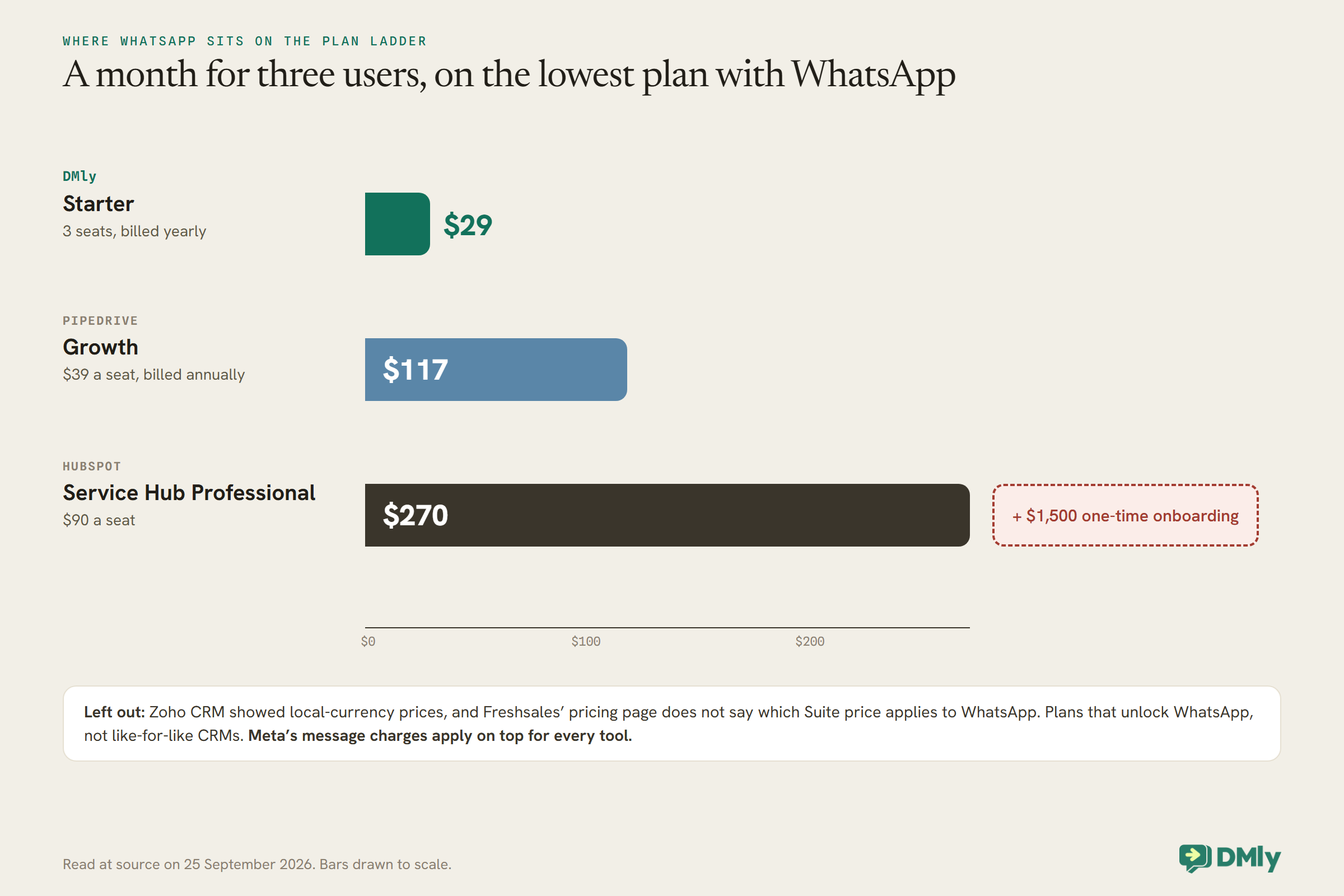
Zoho and Freshsales are left out: Zoho showed us local-currency prices, and Freshworks lists WhatsApp on Freshsales Suite plans without the pricing page saying which price applies. The chart compares the plans that unlock WhatsApp, not like-for-like CRMs. HubSpot Service Hub Professional is a full service platform with far more than WhatsApp; DMly Starter includes bookings and payments but is a lighter sales CRM. The point is where WhatsApp sits in each vendor’s plan ladder. If you already pay for HubSpot Professional, its WhatsApp channel is effectively included. If you do not, getting WhatsApp through HubSpot means a large jump in cost, and a connector or a different tool may be cheaper.
Your Existing WhatsApp Number
The number your customers already save is valuable. Check what each route does with it before you connect anything.
Every integration here runs on WhatsApp’s business platform, not the free WhatsApp Business app. Moving a number onto the platform generally means it stops working in the phone app, unless the provider supports co-existence, where the app and the platform share the number. Zoho’s help page says only unused numbers can be connected and that migrating existing numbers is not supported yet. HubSpot and Pipedrive require a WhatsApp Business account and walk you through Meta’s setup. DMly’s documentation describes both options: by default, connecting a number takes it over, and a co-existence mode, chosen at sign-up, keeps the WhatsApp Business app working on the same number with messages mirrored into DMly.
If keeping your number matters, ask the vendor directly, in writing, before you start: can I bring my current number, will my phone app keep working, and what happens to my existing chat history?
Templates, the 24-Hour Window and Message Costs
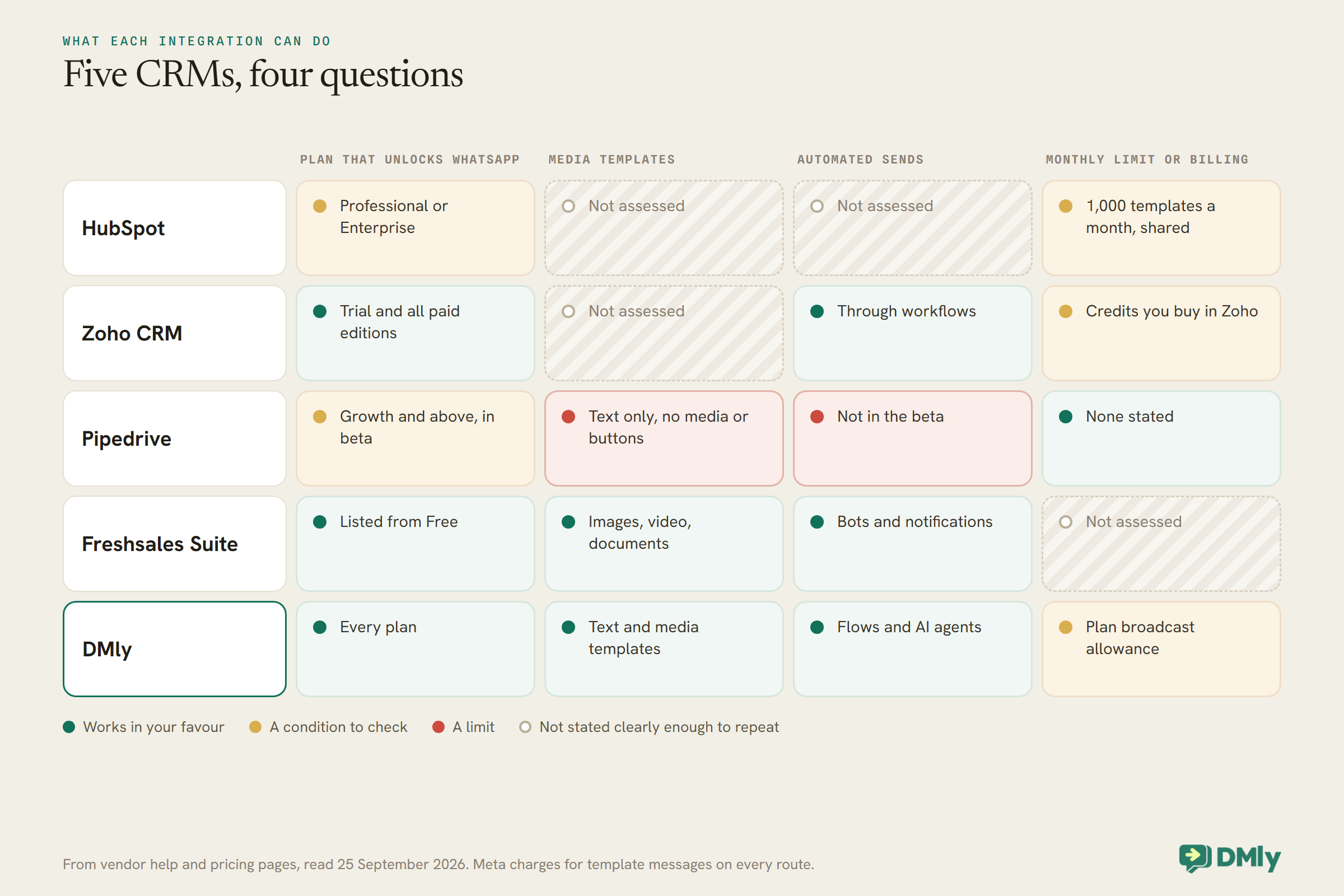
Every CRM here works within the same WhatsApp rules. What differs is how much of WhatsApp’s template toolkit each one supports.
WhatsApp lets a business reply freely for 24 hours after the customer’s last message. Outside that window, and to start any new conversation, you must use a template that Meta has approved. Meta charges for template messages by category, such as marketing or utility, and by the customer’s country, and it decides the category when it reviews the template. HubSpot, Zoho and Pipedrive all describe this rule on their help pages.
Where the integrations differ is in what a template can contain and how it is paid for. Pipedrive’s templates are text only, with no images, documents or buttons, and variables typed by hand each time. Freshworks supports images, videos and documents. Zoho ties templates to a CRM module so they fill from record data and can be sent from workflows. HubSpot syncs templates from your WhatsApp Business account and lets you personalise them, within its 1,000-a-month limit. On cost, Pipedrive notes that Meta charges you directly; Zoho sells credits that are drawn down as you send. Check how your chosen CRM bills before your first campaign, and see our guide to WhatsApp’s pricing changes for the current rules.
Automation and Chatbots
An integration that only lets you type messages by hand is an inbox, not automation.
For many businesses, the value of WhatsApp in a CRM is sending the right message automatically: a follow-up when a deal moves stage, a reminder before a meeting, a thank-you after a purchase. Zoho lets you add WhatsApp templates to Workflow Rules, Blueprint, Journey Builder and Wizards. Freshworks offers bots and template notifications. Pipedrive’s integration, in its current beta, is built for conversations from the Sales Inbox and records. HubSpot’s help page for the channel describes sending templates from the inbox; check whether the workflows in your HubSpot plan can send WhatsApp messages before relying on it.
Chatbots for the first reply are a separate question. Freshchat’s bots and DMly’s flows and AI agents answer customers automatically; with Pipedrive you would need a third-party tool. If customers message you outside working hours, decide what they should get before you choose.
Keeping the Record Clean
WhatsApp identifies people by phone number. CRMs often identify them by email. That mismatch causes most duplicate records.
When a WhatsApp message arrives from a number the CRM does not recognise, most integrations create a new contact. If the same person is already in the CRM under their email address, or with a number saved without the country code, you get a duplicate. Pipedrive’s help page is explicit that numbers must include a country code. Before connecting WhatsApp, clean your existing phone numbers into international format, decide which field holds the WhatsApp number, and agree who merges duplicates. With a connector, also decide which system owns each field, so a sync does not overwrite good data with old data.
How to Test a CRM With WhatsApp Integration
A trial week with your real number and a few real customers tells you more about a CRM with WhatsApp integration than any feature page.
Before connecting, confirm what happens to your current number. Then connect a number and run six checks. Message the business from your own phone and see where the conversation lands and which record it attaches to. Reply within the window, then wait a day and send a template. Try a template with an image or a button, if you need them. Trigger a workflow that should send a WhatsApp message. Message from a number already in the CRM without a country code and see whether it creates a duplicate. Finally, find where message charges or credits appear in billing.
Mistakes Buyers Make
- Assuming WhatsApp is on the plan you have. Check the tier; for HubSpot it is Professional or above.
- Connecting the main business number without checking. You may lose the phone app, or be unable to use that number at all.
- Planning campaigns around a text-only integration. Check template support before building rich messages.
- Ignoring monthly caps. HubSpot’s 1,000 templates a month is shared across accounts.
- Forgetting Meta’s charges. Template messages cost money on every route.
- Skipping data clean-up. Phone numbers without country codes create duplicates.
Frequently Asked Questions
What is the best CRM with WhatsApp integration?
DMly is our top pick when WhatsApp is how your customers reach you: the customer record, pipeline, bookings and payments are built around the chat. If you are already on HubSpot Professional, its WhatsApp channel; for a lower-cost CRM, Zoho CRM; for pipelines, Pipedrive, bearing in mind its integration is in beta and text-only; for bots and catalogs, Freshsales Suite.
Does HubSpot have a free WhatsApp integration?
HubSpot’s native WhatsApp channel needs Marketing Hub or Service Hub on the Professional or Enterprise plan. On lower plans, a third-party connector is the usual route.
Can I use my existing WhatsApp number with a CRM?
It depends on the route. Zoho’s help page says only unused numbers can be connected for now. Other tools require moving the number onto WhatsApp’s business platform, which usually stops it working in the phone app unless co-existence is supported, as it is in DMly.
Do I pay extra for WhatsApp messages in a CRM?
Yes. Meta charges for template messages by category and country. Some CRMs pass that charge through Meta, others sell credits, and some add their own monthly limits.
Can a CRM send WhatsApp messages automatically?
Some can. Zoho lets you add WhatsApp templates to its workflows, and Freshworks offers bots and notifications. Pipedrive’s integration currently focuses on conversations from the inbox and records.
Is a WhatsApp-native CRM better than HubSpot or Zoho?
For businesses where WhatsApp is the main channel, often yes, because it is built around the conversation. For complex sales processes across email, phone and WhatsApp, a mainstream CRM with a WhatsApp integration is usually the better fit.
One Tab, Not Two
The copy-paste trail at the top of this page ends when you choose a CRM with WhatsApp integration and the conversation and the customer record finally live in the same place. Every route here can do that. Choose by where your team already works: if it is a big CRM, use its integration or a connector, after checking the plan, the number and the template limits; if it is WhatsApp, choose a tool built for it. If your business runs on WhatsApp conversations that turn into bookings and payments, DMly’s plans are worth comparing.
Writing about WhatsApp automation, bookings and growth for local business.
Turn WhatsApp into your busiest channel.
Start free and run message, bookings, payments and reviews in one place.
