

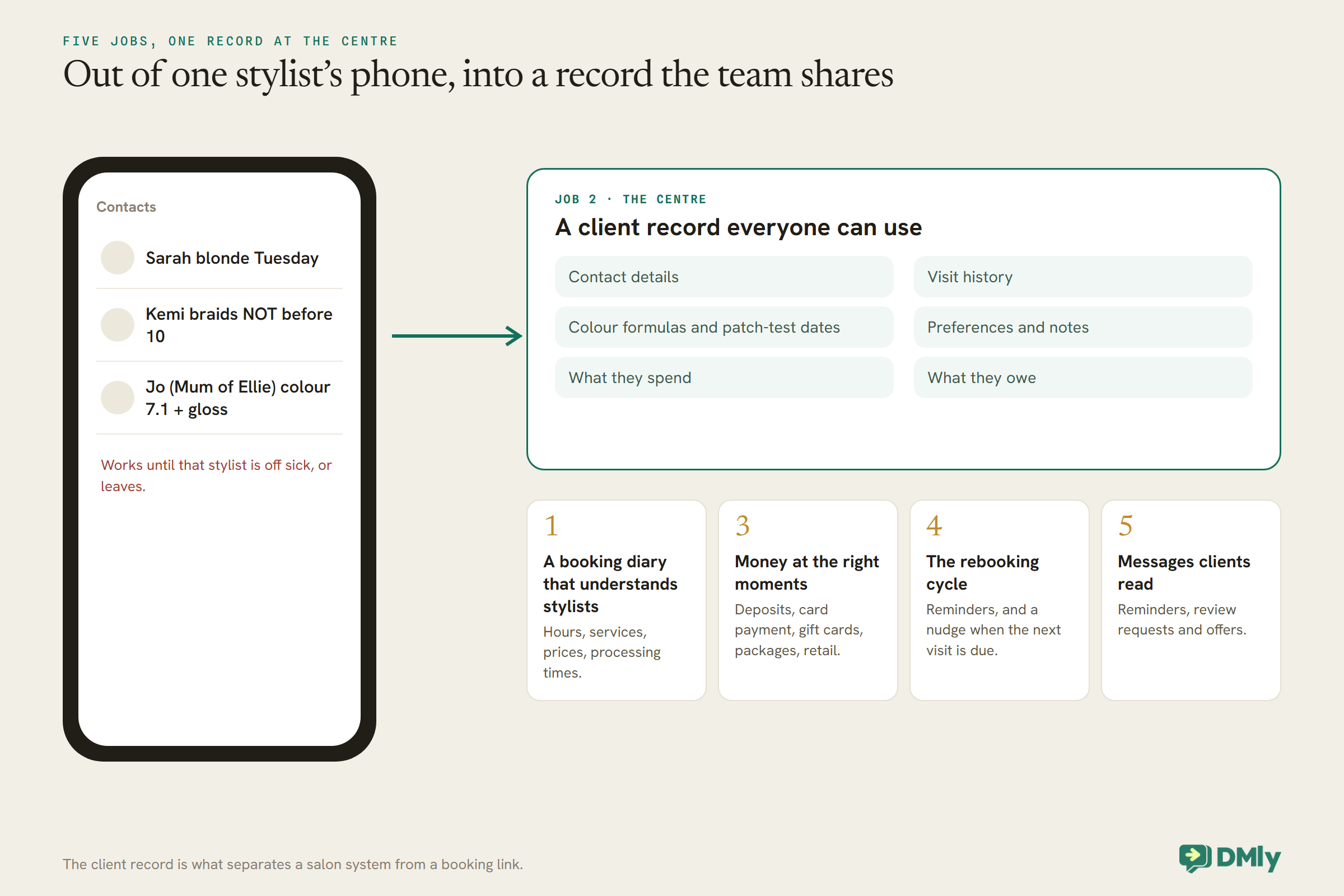
Scroll through a stylist’s phone and you will find the salon’s real client list. “Sarah blonde Tuesday.” “Kemi braids NOT before 10.” “Jo (Mum of Ellie) colour 7.1 + gloss.” Each one is a client record in miniature: a name, a service, a formula, a preference, sometimes a warning. It works beautifully until that stylist is off sick, or leaves, and the salon discovers that its most valuable information lived in one person’s contacts.
Good salon CRM and booking software moves that knowledge somewhere everyone can use it: a client record with the history, formulas, preferences and spending on it, attached to a booking system that knows each stylist’s hours and services. The best systems then use that record to do the work salons struggle to find time for, reminding, rebooking, thanking and winning back. This guide compares eight options salons use, with prices read on each vendor’s own page, most on 27 September 2026.
A disclosure, up front: DMly publishes this blog and is one of the tools compared. We have described every tool from its own pages and documentation, and said plainly where another is the better choice. For how to put a salon’s messaging on autopilot once you have chosen, see our guide to WhatsApp automation for salons.
What a Salon Needs From Its System
A salon system has five jobs. Most salons buy for the first two and discover the others later.
1. A booking diary that understands stylists. Each stylist has their own hours, their own services and their own prices, and some services, like colour with a processing time, need the chair in two parts. The booking page should only offer what can really be done.
2. A client record everyone can use. Contact details, visit history, colour formulas and patch-test dates, preferences, notes, what they spend and what they owe. It should be the same record whoever is on reception.
3. Money at the right moments. Deposits for long appointments, card payment at the till, gift cards, packages and memberships, retail products and stock.
4. The rebooking cycle. Most salon revenue is repeat visits. A system that reminds clients before appointments and nudges them when the next one is due earns its fee on that alone.
5. Messages clients read. Reminders, confirmations, review requests and offers, on the channel your clients actually use.
How We Compared Them
Vendors’ own pricing pages, read in a browser, judged on the five salon jobs.
We read GlossGenius, Phorest and Boulevard on 27 September 2026, and Fresha, Timely and Square Appointments on 25 September. Vagaro’s pricing page would not display in our browser on 27 September, so we quote only the single-person price read at source on 9 September, and say so. Phorest publishes its plans but not its prices. Where a pricing page marks features with icons in a grid without making the plan clear, we say the feature is listed rather than guess the plan. For DMly we used its documentation, which also describes what it does not do. Card processing, text credits beyond the allowance and taxes are extra unless we say otherwise.
The Quick Answer: Best by Situation
| If your salon is… | Look first at | Why |
| Busy on WhatsApp, with clients who message to book | DMly | Booking, the client record, deposits, reminders and win-back in the same place as the chat |
| A small to mid-sized salon wanting flat pricing | GlossGenius | A flat monthly plan for up to 9 staff, with processing at one flat rate |
| A hair or beauty salon wanting texts included | Timely | A monthly SMS allowance per stylist and rebooking reminders on the top plan |
| Keen to attract new clients | Fresha | A marketplace where new clients find salons |
| An established salon wanting a full-service partner | Phorest | Salon-specific plans from three staff, with success managers and a branded app on higher tiers |
| A premium salon or spa with complex scheduling | Boulevard | Precision scheduling, memberships and two-way texting, at a higher price |
| Already taking cards with Square | Square Appointments | A free plan with unlimited staff calendars, payments and point of sale together |
The Best Salon CRM and Booking Software, Reviewed
1. DMly: best for salons that run on WhatsApp
Booking. Each stylist has their own working hours in their own timezone and the services they offer; the booking page offers only genuinely free times, after buffers, time off and a connected Google Calendar. Clients can book on the page, in the chat through tappable times, or with an AI agent that checks real availability. A service set to pay before booking can take a deposit, a percentage from 1 to 99 of the price, with the balance collected in the salon, and any service can carry a no-show fee, charged when the booking is marked as a no-show.
Client record. Each client has one record across channels with conversations, notes, tags and custom fields, which is where a colour formula or patch-test date can live. Once they are a client, a Finance tab shows credits, amount due, loyalty points and lifetime value, with tabs for invoices, payments, subscriptions, appointments and classes. Segments can pick out, for example, clients tagged for colour who have not visited recently.
Money and retail. Invoices, payment links, gift cards, plans and credits for packages and memberships, a loyalty programme, and products with stock tracking and low-stock alerts. Payments go through a gateway you connect, such as Stripe or Paystack.
Messaging. WhatsApp, Instagram, Messenger and more in one shared inbox, with reminders per service, review requests and win-back flows. Plans are $29, $65 and $149 a month billed yearly.
Watch out for. DMly does not document a card reader or till hardware, payroll, or commission tracking, which dedicated salon systems include. The no-show fee charges a saved card only for clients who pay a subscription automatically; for others it is a payment link. Calendar sync is Google only.
Best for: salons whose clients book and chat on WhatsApp or Instagram, and who want the client relationship, not just the diary, in one place.
2. GlossGenius: best flat pricing for small and mid-sized salons
What it offers. GlossGenius is built for beauty and wellness businesses. Its compare grid lists a booking website, calendar, waitlist, point of sale, card readers, gift cards, invoices, memberships, packages, inventory, staff management, reports, email and text marketing, review management, client profiles, rebooking reminders and forms, with some features on higher plans only. Card processing is a flat 2.6%, with no extra fees for tap to pay, card on file or manual entry.
Pricing. Standard is $28 a month, or $24 billed annually. Gold, for businesses up to 9 staff, is $56 or $48. Platinum, for teams of 10 or more, is $168 or $148. Each extra location costs the plan price less 15%. There is a free trial and free data transfer. Payroll is an add-on at $40 a month plus $6 a seat.
Watch out for. Text marketing comes with a set number of credits on the higher plans (500 and 2,500 are listed). GlossGenius lists a phone and text reception assistant as coming soon, so it is not something to buy on today.
Best for: independent salons and small teams who want a polished all-in-one system at a predictable price.
3. Timely: best for salons wanting texts included per stylist
What it offers. Timely is built for hair and beauty. Every plan sends automated SMS and email reminders, with a monthly SMS allowance per bookable staff member: 100 on Build, 200 on Elevate and 350 on Innovate. Elevate adds digital consultation forms, client photos, add-on services, a waitlist and pricing tiers by stylist seniority; Innovate adds automated rebooking reminders, staff targets and VIP services.
Pricing. Priced per bookable staff member and billed monthly, on Timely’s Rest of World pricing in US dollars: three staff cost $74 a month on Build, $97 on Elevate and $119 on Innovate. Timely says there are no new-client fees.
Watch out for. SMS is not included in a few countries (Timely names the UAE, Ghana, Saudi Arabia and Qatar). Rebooking reminders, one of the most valuable salon features, are only on the top plan.
Best for: hair and beauty salons that want reminders by text included and pricing tiers by stylist level.
4. Fresha: best for attracting new clients
What it offers. Fresha lists waitlists, point of sale, client management, consultation forms, patch tests, retail and inventory, gift cards, packages, memberships, group bookings, and processing and finishing times, plus online bookings through your own link, Facebook, Instagram and the Fresha marketplace.
Pricing. A flat monthly price for a one-person business or a price per bookable team member for teams, shown in local currency. There are no per-booking fees; a one-time fee applies only to brand-new clients who find you through the marketplace. Text and WhatsApp notifications come with a small monthly allowance per team member, then are charged per message. Payments through Fresha are optional and add deposits and no-show protection.
Watch out for. Client loyalty and Google review prompts are paid add-ons charged per location each month.
Best for: salons that want deep salon features and would welcome new clients from a marketplace.
5. Phorest: best full-service salon partner
What it offers. Phorest is salon and clinic software for teams of three or more staff. Every plan includes unlimited devices and staff. Starter lists online booking with deposits, automated email and SMS reminders, client cards, a loyalty programme, staff rostering, point of sale, cardless checkout with stored cards, payment links and stock management. Grow adds reconnect texts to bring clients back, an online reputation manager for reviews, consultation forms and a dedicated success manager. Ultimate adds a branded booking app and Reserve with Google. Elite adds two-way SMS, memberships and lead management.
Pricing. Phorest’s pricing page asks you to request a quote for every plan, so we cannot give a price.
Watch out for. Quote-based pricing makes comparison harder; get quotes for the plan you actually need, including SMS costs, before deciding. Two-way SMS and memberships sit on the top plan.
Best for: established salons of three or more staff who want a salon-specialist system with hands-on support.
6. Boulevard: best for premium salons and spas
What it offers. Boulevard focuses on precision scheduling for self-care businesses. Its plans list online booking, email and text reminders, a waitlist, processing and finishing times, multi-staff appointments, booking deposits, group booking, resource scheduling, two-way texting, memberships and autopay, series and packages, inventory, commission tracking, and a loyalty programme.
Pricing. On the monthly view for salons and spas, Essentials is $143 a month for up to five providers. Premier is $234 a month per location, shown against a normal price of $293, and Prestige $328, normally $410, which suggests a current promotion. Two-way texting includes 250 free texts a month, or 2,500 on Prestige. Card processing starts at 2.65%. Automated campaigns cost $2 per completed appointment.
Watch out for. Boulevard is the most expensive system here for a small team, and its pricing asks you to book a demo.
Best for: premium salons, spas and med spas with complex scheduling and a focus on client experience.
7. Square Appointments: best if you already use Square
What it offers. A free plan per location with a booking site, appointment reminders and unlimited staff calendars, alongside Square’s payments and point of sale. Plus, at $49 a month per location in the US, adds cancellation and no-show fees and a waitlist; Premium, at $149, adds resource management and more.
Watch out for. Square is a general appointments system rather than a salon specialist, so check how it would hold salon-specific details such as colour formulas and patch tests. Card processing fees apply on every plan.
Best for: salons already on Square for payments who want booking in the same account.
8. Vagaro: a long-standing salon marketplace and system
What we could confirm. Vagaro is priced per bookable person. When we read its US pricing page at source on 9 September 2026, one person on one location showed a list price of $30 a month, struck through against a promoted $23.99 for the first six months. On 27 September the page would not display in our browser, so we could not recheck it or read the multi-staff prices.
Best for: salons wanting a long-established salon marketplace and system; check the current price for your team size directly.
Comparison at a Glance
| System | How the price scales | Entry price read | Deposits | Card reader or till | Chat booking on WhatsApp |
| DMly | Per plan | $29 a month billed yearly | Yes, 1 to 99 per cent | Not documented | Yes |
| GlossGenius | Per plan, by team size | $24 a month billed annually | Not assessed | Yes | Not listed |
| Timely | Per bookable staff | $26 a month for one, monthly | Listed | Listed | Not listed |
| Fresha | Per bookable team member | Local currency | With Fresha payments | Point of sale listed | Not listed |
| Phorest | Quote | Quote | Yes | Yes | Not listed |
| Boulevard | Per location, providers on Essentials | $143 a month | Yes | Yes | Not listed |
| Square Appointments | Per location | Free; Plus $49 | No-show fees on Plus | Yes | Not listed |
| Vagaro | Per bookable person | $30 list, one person (9 Sep) | Not assessed | Not assessed | Not listed |
“Not listed” means the pricing page we read did not list booking inside a WhatsApp conversation; “not assessed” means the page did not make the feature clear enough to state. Several of these tools send notifications on WhatsApp or let clients book from an Instagram button, which is different from booking in the chat.
What Three Stylists Pay
Price salon CRM and booking software for the team you have, not the team on the pricing page.
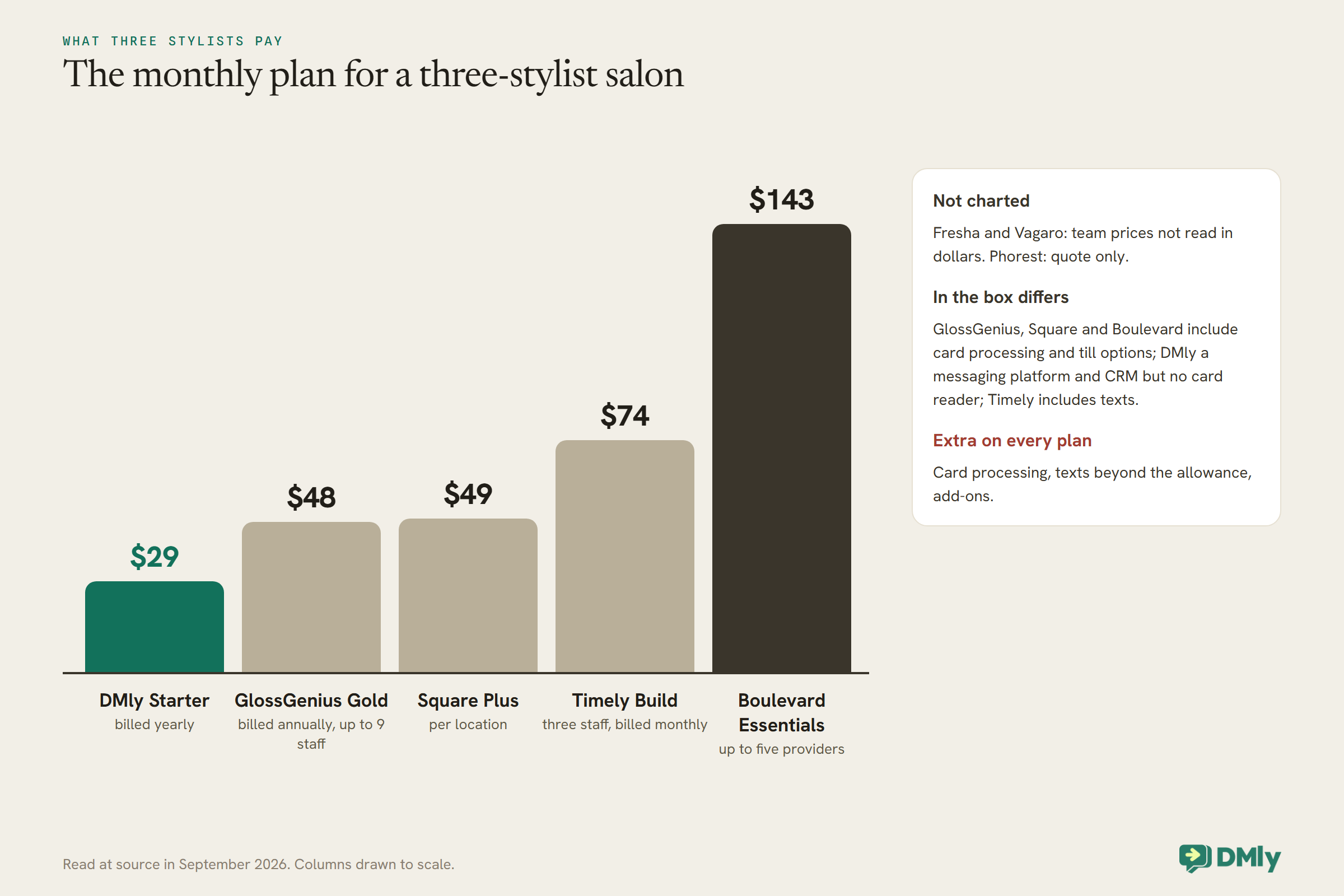
Two cautions. First, what is in the box differs: GlossGenius, Square and Boulevard include card processing and till hardware options, DMly includes a messaging platform and CRM but no card reader, and Timely includes texts. Second, the extras decide the real bill: card processing on every payment, texts beyond the allowance, and add-ons such as payroll or loyalty. Price the plan that does what your salon needs, then add a month of your real card takings and messages.
The Client Record: What to Look For
In any salon CRM and booking software, this is the part that replaces the stylist’s phone, so look at it closely in a trial.
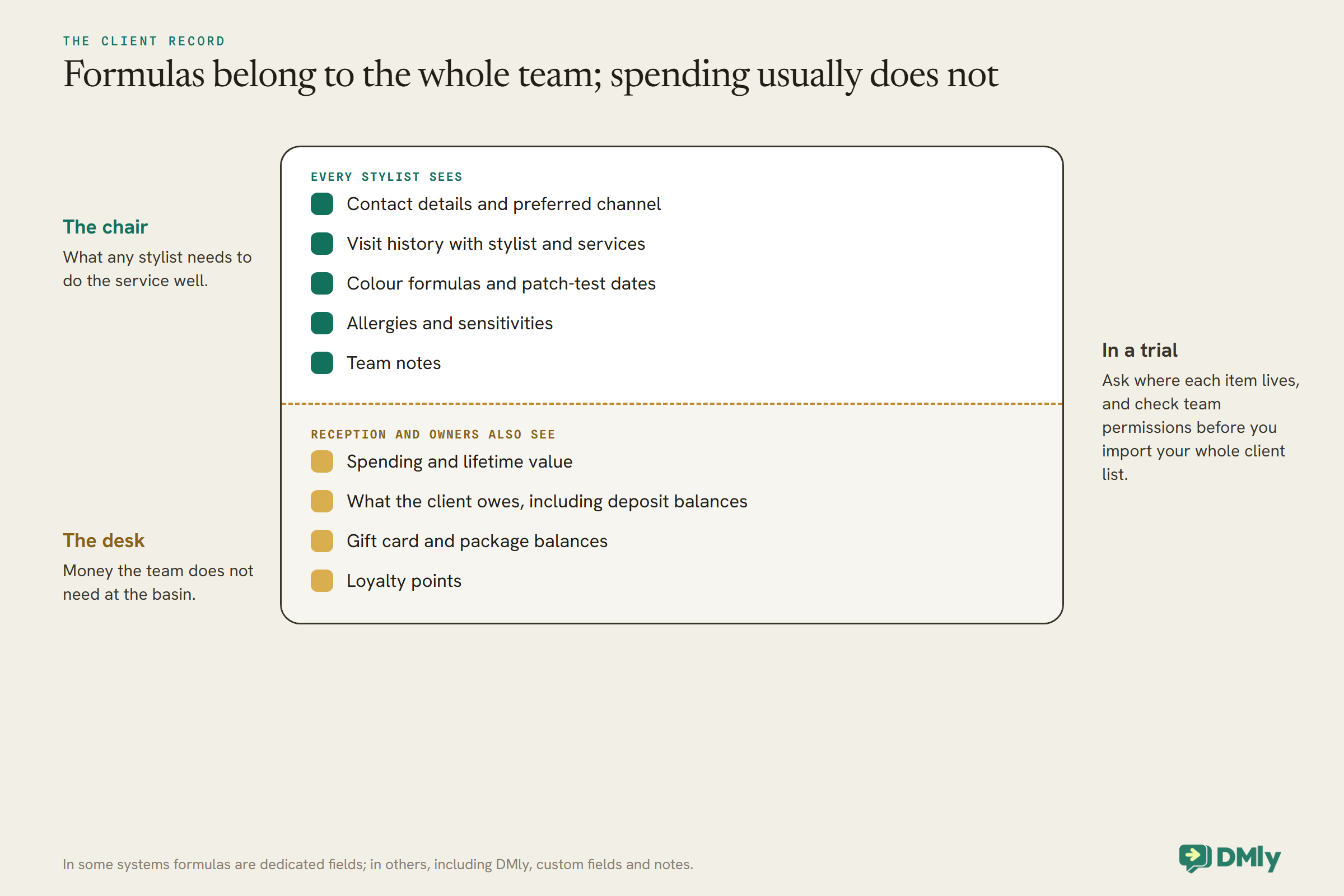
A good salon client record holds, at minimum: contact details and how they prefer to be contacted, visit history with the stylist and services, a place for colour formulas and patch-test dates, allergies or sensitivities, notes the whole team can read, what they have bought and what they owe. Ask in a trial where each of those lives. In some systems formulas and consultation forms are dedicated fields or forms; in others, including DMly, they are custom fields and notes you set up yourself. Both work; the difference is how much setting up you do and how easy the information is to find on a busy Saturday.
Then check who sees what. A salon usually wants every stylist to see a client’s formula and notes, but not necessarily their spending. Look at the permission settings for team members before you import your whole client list.
The Rebooking Cycle
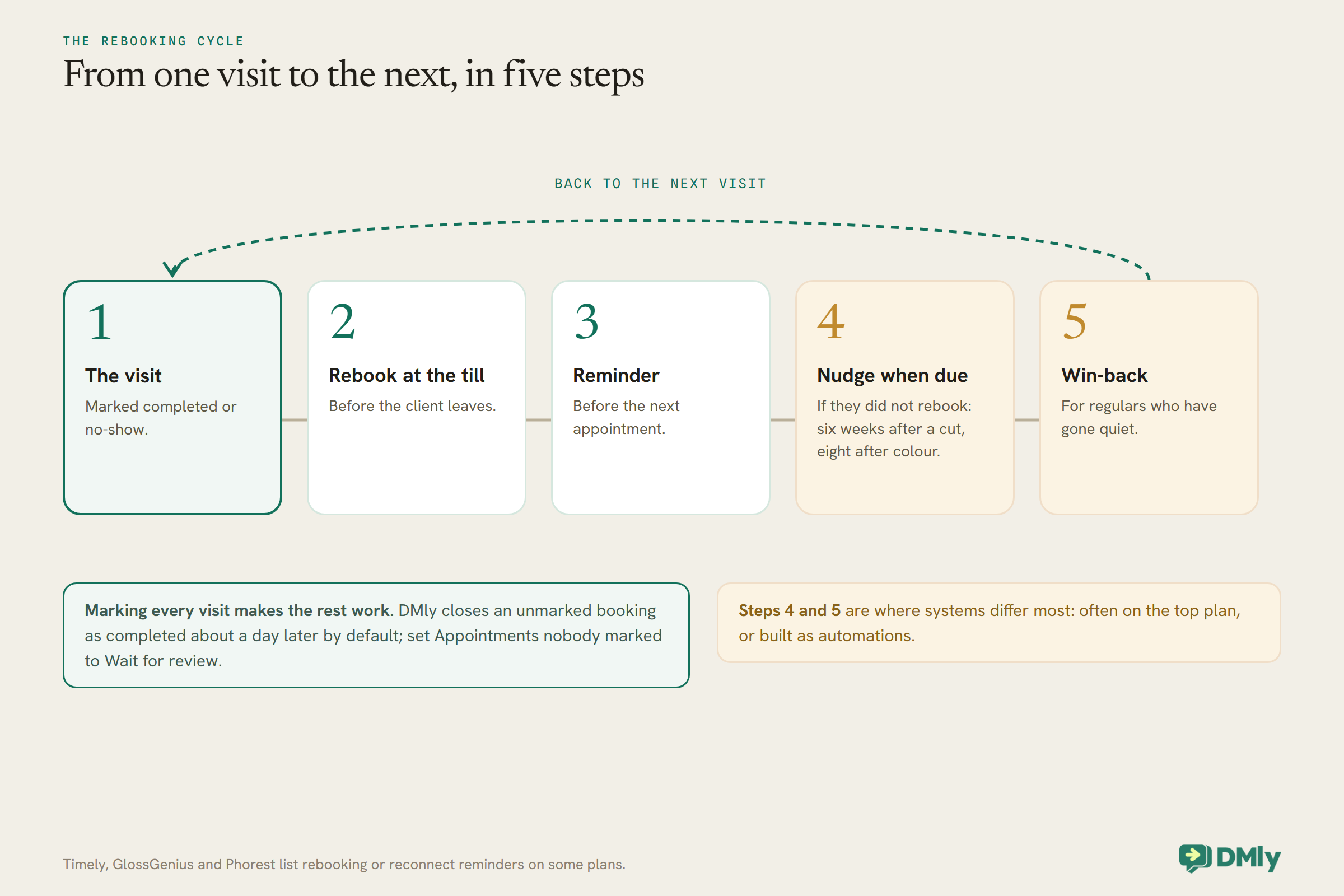
A salon lives on the next appointment. Check exactly how each system helps you get it.
The simplest help is rebooking at the till before the client leaves. The next is a reminder when the next visit is due, timed to the service: six weeks after a cut, eight after colour. Timely lists automated rebooking reminders on its top plan, GlossGenius lists rebooking reminders, and Phorest lists reconnect texts on Grow. In DMly, a completed appointment can start an automation that waits the right number of weeks for that service and then sends a rebooking message with tappable times or a booking link. One setting matters there: by default, DMly closes an unmarked booking as completed about a day later, so set Appointments nobody marked to Wait for review and mark each visit, or a client who never came will get the rebooking message too.
Beyond rebooking sits win-back: noticing a regular who has gone quiet and inviting them back before they settle somewhere else. That usually needs a segment of clients with no visit in a set period and a message to them. Our guide to WhatsApp automation for salons shows both flows in practice.
Deposits and No-Show Fees for Salons
Long colour appointments make a no-show expensive. Every system here has some answer; they differ in shape.
A deposit takes part of the price at booking. Phorest lists online booking with deposits on every plan, Boulevard lists booking deposits, and DMly’s deposit is a percentage on a pay-before service, with the balance collected at the till. A no-show fee charges only when someone does not turn up: Square offers it on Plus, Fresha adds no-show protection with its payments, and DMly’s no-show fee can be set per service or as a salon-wide default. How the fee is collected matters: systems that keep cards on file can charge the card, while DMly charges a saved card only for clients paying a subscription automatically and otherwise sends a payment link.
For most salons, the practical policy is a deposit on long and new-client colour, a reminder for everyone, and a fee or firmer terms for the few who miss repeatedly. Our guide to taking appointment deposits covers the setting and the wording.
Retail, Gift Cards and Packages
Retail and prepaid services are a meaningful share of many salons’ takings, and the systems differ in how seriously they treat them.
Salon specialists such as GlossGenius, Phorest, Boulevard, Fresha and Timely list inventory or stock management, gift cards, and packages or memberships, usually alongside a point of sale at the desk. DMly has products with stock tracking and low-stock alerts, gift cards that can be spent against any invoice, and plans and credits for packages and memberships, but it does not document card-reader hardware, so a salon using DMly takes card payments at the desk through its own terminal or a payment link. If your salon sells a lot of retail over the counter, a system with an integrated till will save time at the desk.
Where Your Clients Message You
A salon system is only as good as the messages clients actually read.
Most salon systems send reminders by text and email, some with WhatsApp notifications, and a few add two-way texting so reception can reply. Boulevard includes two-way texting with a monthly allowance; Phorest lists two-way SMS on its top plan. If your clients mostly message you on WhatsApp or Instagram, the gap between a notification sent by your booking system and a conversation your team can answer is large. DMly is built around that conversation: bookings, reminders, deposits and follow-ups happen in the same WhatsApp thread the client already uses. Look at your phone: if the salon’s WhatsApp is busier than its phone line, weigh this heavily.
Switching Systems Without Losing Clients
Your client list and future bookings are the salon. Move them carefully.
GlossGenius describes a free data transfer service, and most systems import clients from a spreadsheet. Before you switch, export everything from your current system: clients, future appointments, gift card balances, package balances and formulas. Check how each will be brought across, especially future bookings and outstanding balances, which are the ones clients notice. Run both systems in parallel for a week if you can, and tell clients the booking link is changing before it does.
How to Test Salon Software in a Week
Set up the salon CRM and booking software like your real salon and run a real week through it.
Add your real services with processing times and prices, your stylists with their real hours and which services each does, and a handful of real clients with formulas and notes. Then book a colour with a deposit from your phone as a new client, and a cut as a regular. Check the reminder arrives on the channel you expect. Cancel one from the client’s side. Mark one as a no-show and see what happens to any fee. Take a retail sale and a gift card. Finally, ask a stylist to find a client’s last formula in under ten seconds. If any of those is slow or confusing in a quiet week, it will be worse on a Saturday.
Mistakes Salons Make When Choosing
- Choosing on the booking page alone. The client record and rebooking are where the value is.
- Pricing the plan, not the team. Per-stylist pricing grows with every hire.
- Ignoring processing fees. A fraction of a per cent on every payment adds up faster than the plan price.
- Putting a deposit on everything. Deposits on long and new-client appointments only.
- Leaving formulas in stylists’ phones. Move them into the record on day one.
- Not marking no-shows. Without marking, rebooking, fees and reports all go wrong.
Frequently Asked Questions
What is the best salon CRM and booking software?
For salons that run on WhatsApp, DMly; for flat pricing and a polished all-in-one, GlossGenius; for texts included per stylist, Timely; for new clients, Fresha; for a full-service salon specialist, Phorest; for premium salons and spas, Boulevard; for salons already on Square, Square Appointments.
What is the difference between salon CRM and salon booking software?
Booking software manages the diary. A salon CRM manages the client: history, formulas, notes, spending and messages. Most salon systems now combine both; the question is how deep each half goes.
Can salon software take deposits?
Yes. Phorest, Boulevard and DMly list deposits at booking, Fresha offers them with its payments, and Square offers no-show fees on Plus. DMly’s deposit is a percentage of the price, with the balance collected in the salon.
How much does salon booking software cost?
For three stylists, the plans read here range from $29 to $143 a month, with Square’s free plan and Phorest’s quote-based pricing at either end. Card processing, extra texts and add-ons come on top.
Can I keep colour formulas in salon software?
Yes. Some systems have consultation forms or dedicated client fields; in others, formulas live in custom fields and notes. Check where they live, and who can see them, during a trial.
Which salon software works with WhatsApp?
Several send notifications on WhatsApp. DMly is built around WhatsApp conversations, so clients can book, pay a deposit, get reminders and rebook in the same chat.
Out of the Stylist’s Phone
“Sarah blonde Tuesday” is a client record waiting to happen. The right salon system puts her formula, her history and her next appointment where the whole team can see them, and then uses that record to remind, rebook and thank her without anyone having to remember. Choose on the client record and the rebooking cycle, price it for your real team, and test it with a real week. If your clients already message you on WhatsApp, DMly is worth putting on the shortlist.
Writing about WhatsApp automation, bookings and growth for local business.
Turn WhatsApp into your busiest channel.
Start free and run message, bookings, payments and reviews in one place.
