
Instagram Comment-to-DM Campaigns: The Complete Guide for Businesses
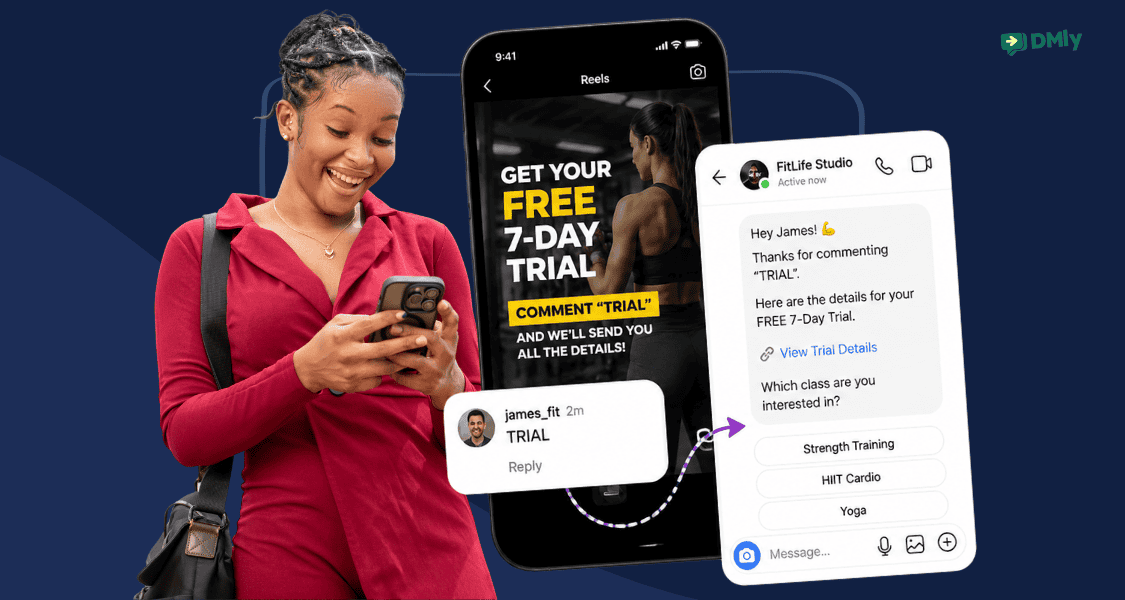
You’ve probably seen it on Instagram: “Comment GUIDE and I’ll send it to your DMs.”
That’s Instagram comment-to-DM automation in action. A customer comments on a post or Reel, and an automated workflow starts a private conversation without someone from the business manually replying first.
And it can do much more than send free guides. Businesses can use comment-to-DM campaigns to share pricing, capture leads, answer enquiries, promote offers, and move interested followers towards bookings or sales.
This guide shows you how Instagram comment-to-DM campaigns work, how to build a campaign that gets people responding, and how to set it all up with DMly.
What Is Instagram Comment-to-DM Automation?
Instagram comment-to-DM automation automatically sends someone a private message after they leave a qualifying comment on your Instagram post or Reel.
For example, a salon could post:
“Comment PRICE and we’ll send you our treatment prices.”
When someone comments PRICE, the automation detects it and starts the DM interaction. From there, the business can deliver the promised information and, with the right setup, continue the conversation towards an enquiry or booking.
Businesses commonly use these campaigns for lead magnets, pricing, product details, appointments, offers, event information, and waitlists.
The key is that the customer makes the first move by commenting. Your automation then makes sure that interest doesn’t sit unanswered.
Why Comment-to-DM Campaigns Work So Well on Instagram
Instagram moves quickly. A Reel can suddenly take off and bring 500 to 2,000 comments with it. Many of them may be casual reactions, but if even 20% of those comments are people asking about prices, availability, products, appointments, or how to get started, that’s about 100 to 400 warm leads appearing overnight.
No human team can keep up with responding to all them before the conversation window closes. Instagram DM automation is the only scalable answer.
Timing also matters here. Someone who comments “How much?” while watching your Reel at 11:45 PM may be ready to buy at that moment. By the time your team manually replies the following morning, they’ve probably watched another 50 Reels and may already be talking to a competitor.
Comment-to-DM automation helps businesses respond while that interest is still fresh. It can also make high-performing content easier to handle at scale. Buffer’s analysis found that Instagram Reels tend to achieve greater reach than other post formats, giving businesses more opportunities to turn content discovery into conversations.
That creates a simple progression:
Content gets discovered → viewer shows interest in the comments → DM arrives quickly → conversation continues privately
And because the customer initiated the interaction, the message has context. They asked for the menu, price list, guide, or booking information you’re sending them.
For businesses using Instagram to generate leads or sales, that’s the real appeal of comment-to-DM campaigns. A Reel that suddenly performs well doesn’t leave your team manually chasing every promising comment while the opportunity gets colder.
How an Instagram Comment-to-DM Campaign Works
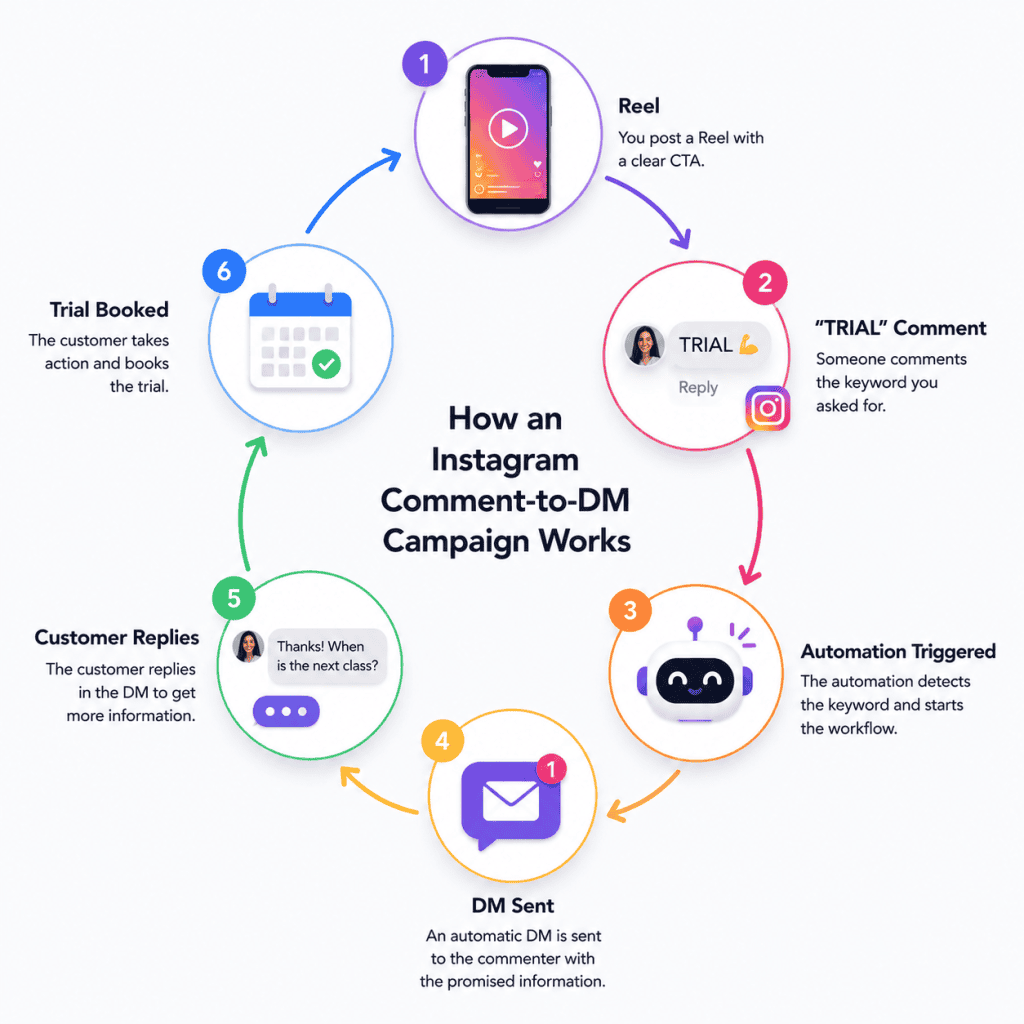
The easiest way to understand an Instagram comment-to-DM campaign is to follow one person through it.
Say a fitness studio posts a Reel promoting a free trial class. The caption says: “Want to try a class? Comment TRIAL and we’ll send you the details.”
Here’s what happens next:
1. Someone comments “TRIAL”
The viewer sees the Reel, likes the offer, and leaves the keyword you’ve asked for.
2. The automation spots the comment
Your automation checks the comment against the rules you’ve set. Because “TRIAL” is one of your trigger keywords, the workflow starts.
3. The customer receives a DM
Instead of waiting for someone on your team, the commenter receives the promised information privately.
4. The conversation can continue
The first DM doesn’t have to be the end. You could ask which class they’re interested in, answer common questions, or use AI to handle follow-ups.
5. The customer takes the next step
Depending on your campaign, that could mean downloading a guide, joining a waitlist, requesting a quote, booking an appointment, or speaking with your team.
So, the complete journey might look like this:
What Can You Use Instagram Comment-to-DM Campaigns For?
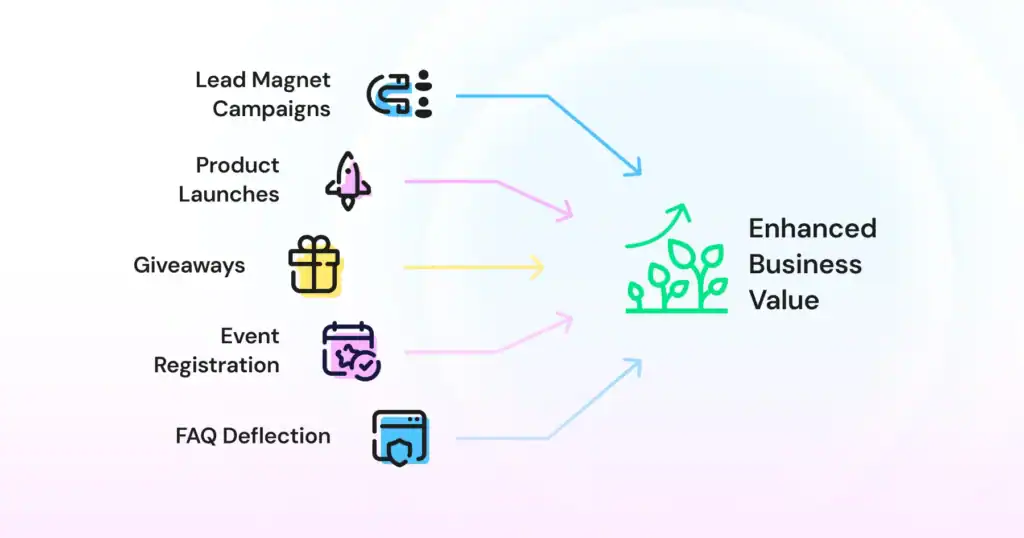
The nice thing about Instagram comment-to-DM campaigns is that the same idea can work for completely different goals. What you offer after the comment is what changes.
Here are a few campaigns businesses can put to work.
1. Give Away Lead Magnets
This is the classic “Comment GUIDE and I’ll DM it to you” campaign.
You could offer a checklist, template, ebook, catalogue, or other useful resource. Once someone comments, the automation delivers it privately and can continue the conversation if they want more help.
2. Turn Interest into Appointments
Service businesses can make booking the natural next step after a Reel.
A salon might post a treatment video with: “Want to try it? Comment BOOK and we’ll send you the details.“
The DM gives the price or the next free slot and then takes the booking in the same thread. That last part is a build of its own: availability, reminders and taking payment at the time of booking work the same way whichever channel the customer arrived on.
3. Share Pricing and Product Details
You don’t need to squeeze every detail into an Instagram caption.
Ask viewers to comment PRICE, DETAILS, or MENU, then send the relevant information privately. This works well for products and services where people commonly ask the same questions.
4. Collect Quote Requests
For businesses without fixed pricing, use the DM to learn what the customer needs.
A cleaning company could ask people to comment QUOTE, then collect details such as property size and required service before passing the enquiry to the right person.
5. Build a Waitlist
Launching a new service, product, class, or location? Ask interested followers to comment EARLY or WAITLIST. You can capture that interest while you’re promoting the launch rather than asking people to remember to come back later.
6. Promote Offers
A keyword can also give followers access to a promotion.
For example: “Comment SAVE and we’ll DM you this week’s offer.”
The customer gets the offer straight away and you get a conversation. Be careful with the second half: an offer is a marketing message, and sending one to someone who has not asked for marketing is the fastest way to a report. How opt-in actually works is worth twenty minutes before you run your first promotion.
7. Fill Classes and Events
Gyms, restaurants, workshops and event businesses can turn a promotional Reel into registrations. Where the thing being booked runs to a timetable and people buy a pass rather than a single session, a class booking system built on credits is what sits behind the keyword.
“Comment CLASS for this week’s schedule.”
“Comment EVENT for ticket details.”
The strongest campaigns usually have one thing in common: the keyword unlocks something the viewer already wants. Give them a good reason to comment, then make the DM deliver on that promise quickly.
How to Build a Comment-to-DM Campaign People Actually Respond To
The automation can work perfectly and still produce poor results. If the Reel, offer, or first DM isn’t compelling, people won’t have much reason to continue.
A strong Instagram comment-to-DM campaign starts before you build the automation.
Give People a Good Reason to Comment
“Comment below for more information” is vague. Tell people exactly what they’ll get.
That could be a price list, free guide, discount code, menu, appointment availability, template, or early access.
For example: “Comment MENU and we’ll DM you our full weekend menu.”
The value is clear before the person comments.
Keep the Keyword Simple
Choose something short, obvious and closely tied to the offer. Then choose how it has to match, which is the part most campaigns never touch and the part that decides how many people your automation ignores.
There are four matching settings, and capitals never matter on any of them. The comment can be an exact match for your keyword, start with it, contain it anywhere, or you can drop the keyword entirely and answer every comment. Most campaigns should use contains, because real people do not type what your caption asked them to type.
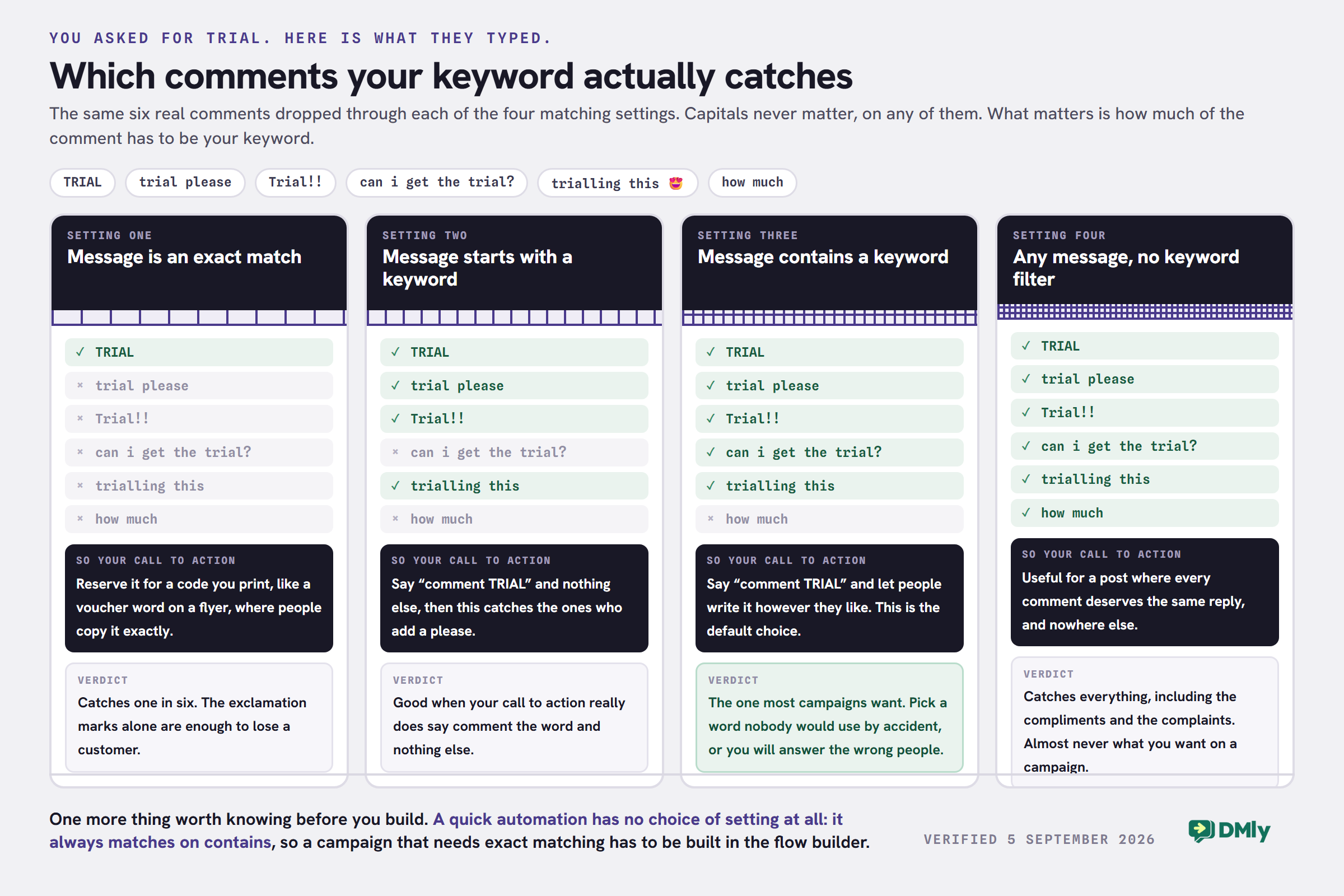
One consequence worth planning around: if you pick contains, pick a word nobody would use by accident. A skincare brand using SKIN will answer everybody who mentions their skin, which is everybody.
BOOK, PRICE, MENU, GUIDE and TRIAL are easy to understand and type. Complicated phrases create unnecessary friction and increase the chance of people entering the wrong keyword.
Make the CTA Hard to Miss
Don’t bury your comment instruction at the bottom of a long caption.
Mention it clearly in the Reel, caption or both: “Want the checklist? Comment GUIDE below.”
Someone should understand what to do without having to figure out how the campaign works.
Deliver What You Promised First
If someone comments PRICE, don’t open the DM by asking five questions before showing them the price. Give them what they requested first. Then continue the conversation.
For example: “Here’s our current treatment price list: [link]. Are you looking for a weekday or weekend appointment?”
That small follow-up gives the customer an easy reason to reply.
Keep the Journey Focused
Every extra step gives someone another opportunity to leave. Decide what you want the campaign to achieve and build around that.
If the goal is an appointment, guide interested customers towards booking. If it’s lead generation, collect the information you genuinely need and stop there.
A successful campaign should feel simple to the customer: they see something useful, comment for it, receive it quickly, and get an obvious next step.
How to Set Up Instagram Comment-to-DM Automation With DMly
DMly lets you build a campaign around the action you want someone to take after commenting. You can keep things simple with a keyword and one DM, or build a longer journey for leads and bookings.
Step 1: Connect Your Instagram Account
Log into DMly and head to Integrations. Add your Instagram Business account and complete the connection. Once connected, you can use Instagram activity as the starting point for your automations.
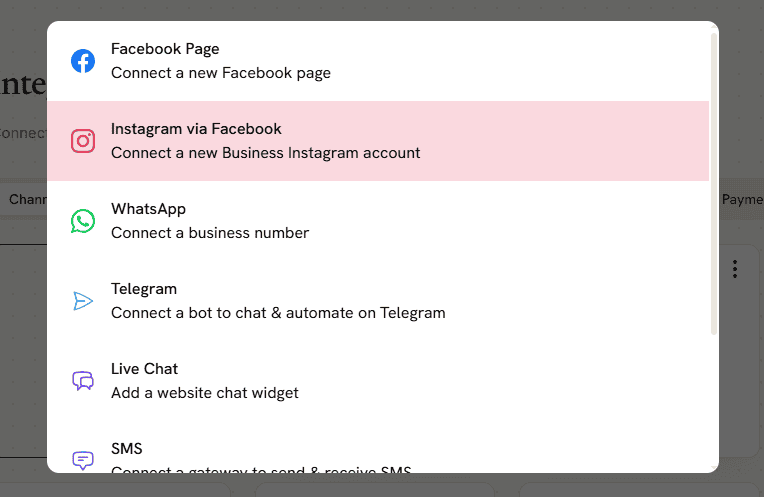
Step 2: Create a New Automation
Go to Automations and click New automation.
You’ll have the option to start with a template or build your own. For the purpose of this guide, let’s go with Start from scratch.
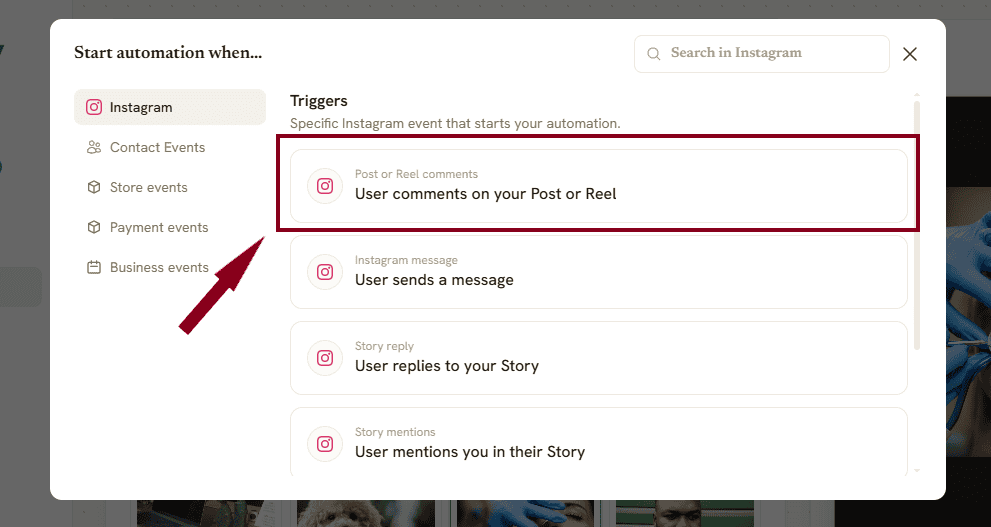
Next, select the type of automation you want to create:
- Quick automation is designed for straightforward rules with a trigger and actions.
- Flow builder gives you a visual canvas for longer conversations, branches, and multiple steps.
We’ll use Quick automation for this setup.
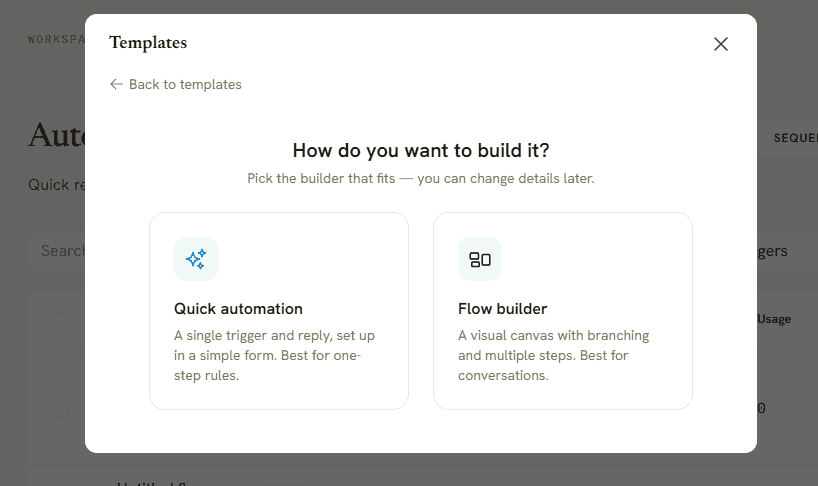
Step 3: Choose the Comment Trigger
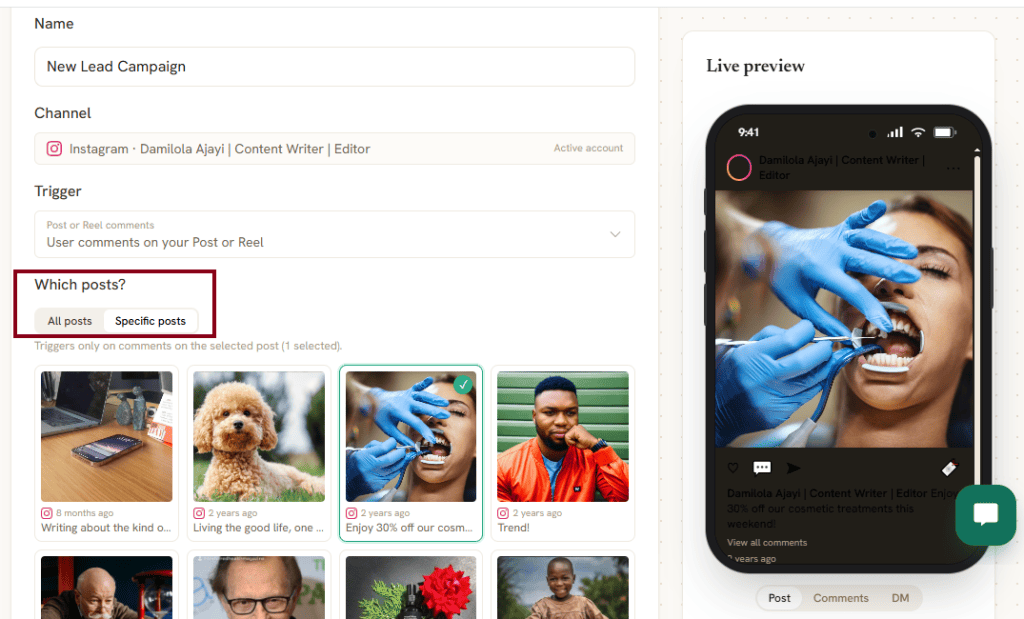
Give your automation a clear name and select your connected Instagram account as the channel.
For the trigger, choose the option for a user commenting on your Post or Reel.
Next, decide which content the campaign should apply to.
For example, you might attach the automation only to the Reel promoting your free trial rather than having it respond to comments across your entire Instagram account.
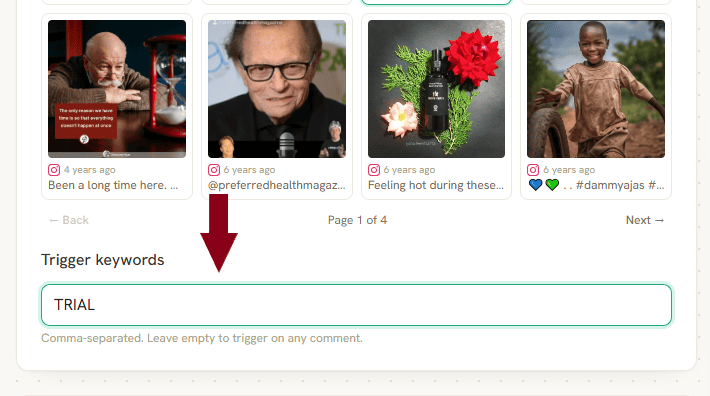
Step 4: Set Your Keyword
Now add the word people need to comment.
If your Reel says: “Comment TRIAL and we’ll send you the details.”
Add TRIAL as the trigger keyword.
This helps DMly distinguish people responding to your CTA from someone simply commenting “Great video!”
Step 5: Build What Happens Next
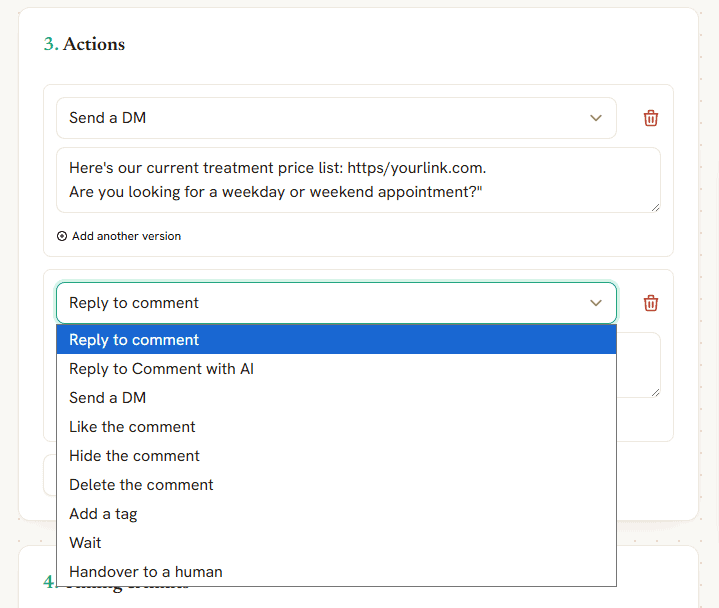
This is where you turn the initial comment into a useful journey.
A simple campaign could look like: Comment “TRIAL” → DM sent → Trial details delivered
Or you can take it further: Comment “TRIAL” → DM → Customer chooses a class → Questions answered → Appointment booked
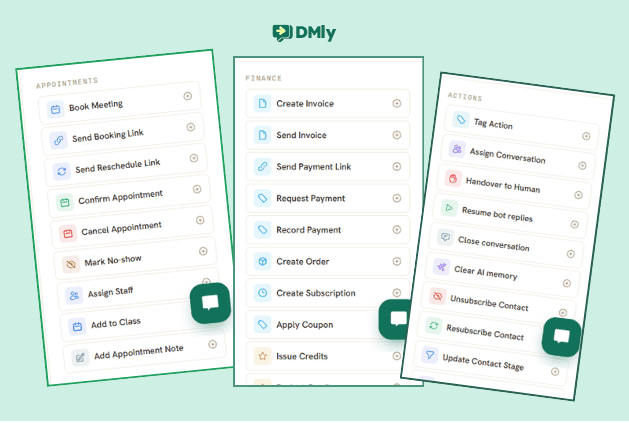
DMly can combine automated messages with actions such as tagging contacts, updating customer information, and handing conversations to your team.
Step 6: Add AI Where It Makes Sense
You do not need AI at every stage, and a campaign is usually better without it at the start.
Keep predictable actions fixed. If someone comments MENU, simply send the menu.
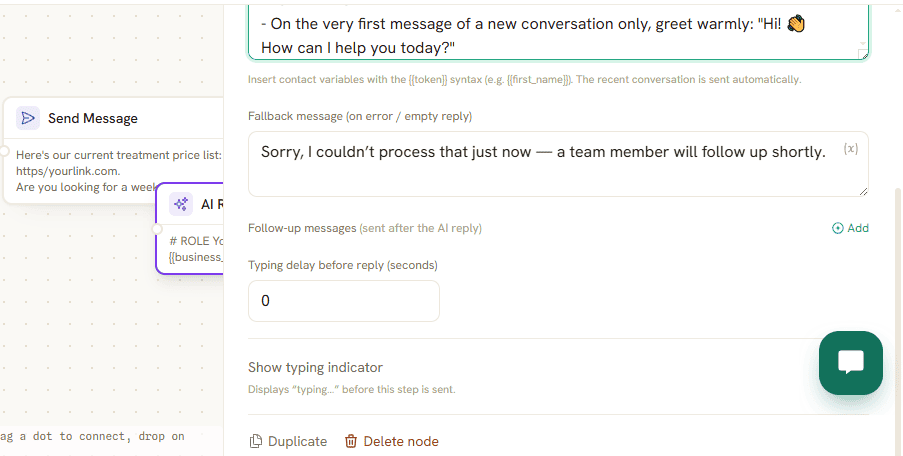
AI becomes more useful when the conversation opens up. If that customer then asks about dietary options, opening hours or reservations, a DMly AI agent trained on your business information can handle appropriate questions and pass the conversation to your team when needed. You can do all of that in the Flow Builder.
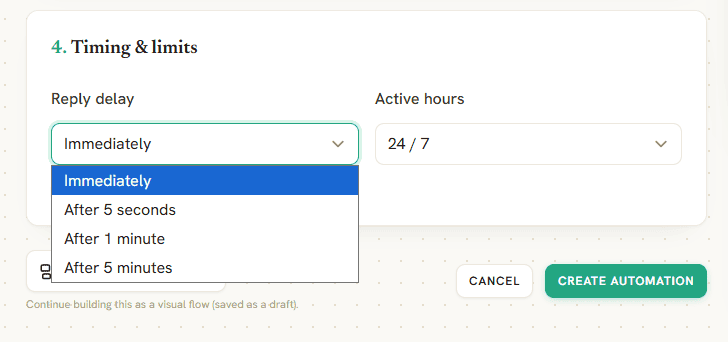
Step 7: Set Your Limits and Timing
Add any timing rules and limits needed to stop customers repeatedly triggering the same campaign.
This is particularly useful when someone leaves the keyword more than once or returns to an older campaign post.
Step 8: Test Before You Go Live
Use another Instagram account to run through the campaign exactly as a customer would.
Comment with your keyword, check the DM, click any links, answer the follow-up questions, and complete the final action. If the goal is a booking, test all the way through to the confirmation.
Once everything works, publish your campaign and let DMly handle matching comments as they arrive. For more complex campaigns, you can use the Flow Builder to create different routes depending on what each person says after entering your DMs.
What Should Your First Instagram DM Say?
Your first DM has one main job: deliver what the person commented for.
If they commented PRICE, send the pricing. If they commented GUIDE, give them the guide. Don’t make them answer several questions before getting what you promised.
Keep the message short and give them an easy way to continue:
“Here’s the treatment price list you asked for: https//yourlink.com. Are you looking to book soon or just checking prices?”
A few other examples:
For a restaurant:
“Here’s our weekend menu: https//yourlink.com. Want to see available reservation times?”
For a gym:
“Here are the details for your free trial. Which class are you interested in?”
For a lead magnet:
“Here’s the Instagram checklist you asked for: https//yourlink.com. Enjoy!”
The first message shouldn’t try to do everything. Deliver first, then give interested people a natural next step.
Turning the First DM Into a Customer Journey
Once you’ve delivered what was promised, you can decide where the conversation should go based on the campaign goal.
For a salon, that might look like:
PRICE comment → Price list sent → Customer chooses treatment → Available times shown → Appointment booked
A service business looking for leads could use:
QUOTE comment → DM sent → Customer answers two qualifying questions → Lead tagged → Team takes over
This is where DMly’s wider tools become useful. The conversation can connect with your CRM, AI agent, appointment calendar, or team inbox rather than ending after one automated message.
Don’t build a ten-step flow simply because the software allows it. If someone is ready to book after two messages, give them the booking option. If they need a person, hand them over. The shortest useful route is usually the better one.
Instagram’s Native Automation vs Third-Party Tools
Instagram and Meta Business Suite give you some native tools for handling messages and setting simple automatic responses. If a keyword reply is genuinely all you need, they may be enough, and there is no shame in that.
The reason to reach for something else is not features, it is where the conversation goes next: a booking, an invoice, a tag that a broadcast can use in a month. Choosing between tools is a bigger question than this page, and our guide to Instagram DM automation covers what to look for and the Meta rules that constrain all of it.
But once you want to build campaigns with longer journeys, a dedicated Instagram automation tool like DMly gives you more room to work.
| Feature | Meta Native Tools | DMly |
| Manage Instagram DMs | Yes | Yes |
| Basic automated replies | Yes | Yes |
| Keyword-based workflows | Limited | More flexible |
| Comment-to-DM campaigns | Limited native options | Built for more detailed campaigns |
| Multi-step conversations | Limited | Yes |
| Conditions and branching | Limited | Yes |
| AI conversations | Depends on Meta’s available features | AI agents can continue customer conversations |
| CRM actions | Limited | Tag, segment, and manage contacts |
| Appointment workflows | Separate tools may be needed | Can connect conversations with bookings |
| Human handover | Yes, through the inbox | Can be built into the workflow |
| Other messaging channels | Mainly Meta channels | DMly brings Instagram together with WhatsApp, Messenger, TikTok, Telegram, SMS, and Live Chat |
Among the dedicated tools, LinkDM is the one most often shortlisted for exactly this job, and its free plan carries a catch worth knowing before you pick it. When a campaign hits Instagram’s hourly send limit, paid plans queue the overflow and send it the next hour, while the free plan drops it, so the people who commented during your busiest hour never hear back. Our LinkDM review covers the pricing and where the tool stops.
Instagram Comment-to-DM vs Regular DM Automation
Both answer automatically on Instagram, but they start at different points, and this page is about only one of them.
Comment-to-DM automation begins with your content. Someone comments on a Reel or post, usually with a specific keyword, and that interaction starts the private conversation. It’s particularly useful for campaigns designed to generate leads, bookings, downloads or product enquiries.
Regular DM automation starts when someone messages your Instagram account directly. You might use it to answer FAQs, handle service enquiries, qualify leads, or route conversations to your team.
Here’s the simple difference:
Comment-to-DM:
Reel/Post → Comment → DM → Next action
Regular DM automation:
Customer sends DM → Automation responds → Conversation continues
You don’t have to choose one. A business can use comment-to-DM campaigns to turn content engagement into conversations, while regular DM automation handles people who come straight to the inbox.
With DMly both feed the same customer journey, so your team does not need one system for the people who arrive through comments and another for the people who message first. If it is the second half you actually need, the Instagram DM automation guide is the page for it, and the step-by-step setup guide covers getting the account and permissions right in the first place.
When Two of Your Campaigns Match the Same Comment
A customer who leaves one comment gets one automated answer, however many of your live campaigns match it. That is fine on your first campaign and a real problem by your fourth, because nobody switches the old ones off.
The rule is not random. The most deliberate match wins: an exact keyword beats starts with, which beats contains, and any real keyword beats a catch-all. On the same setting, the longer keyword wins. Still tied, the older automation wins, which is the bit that hurts.
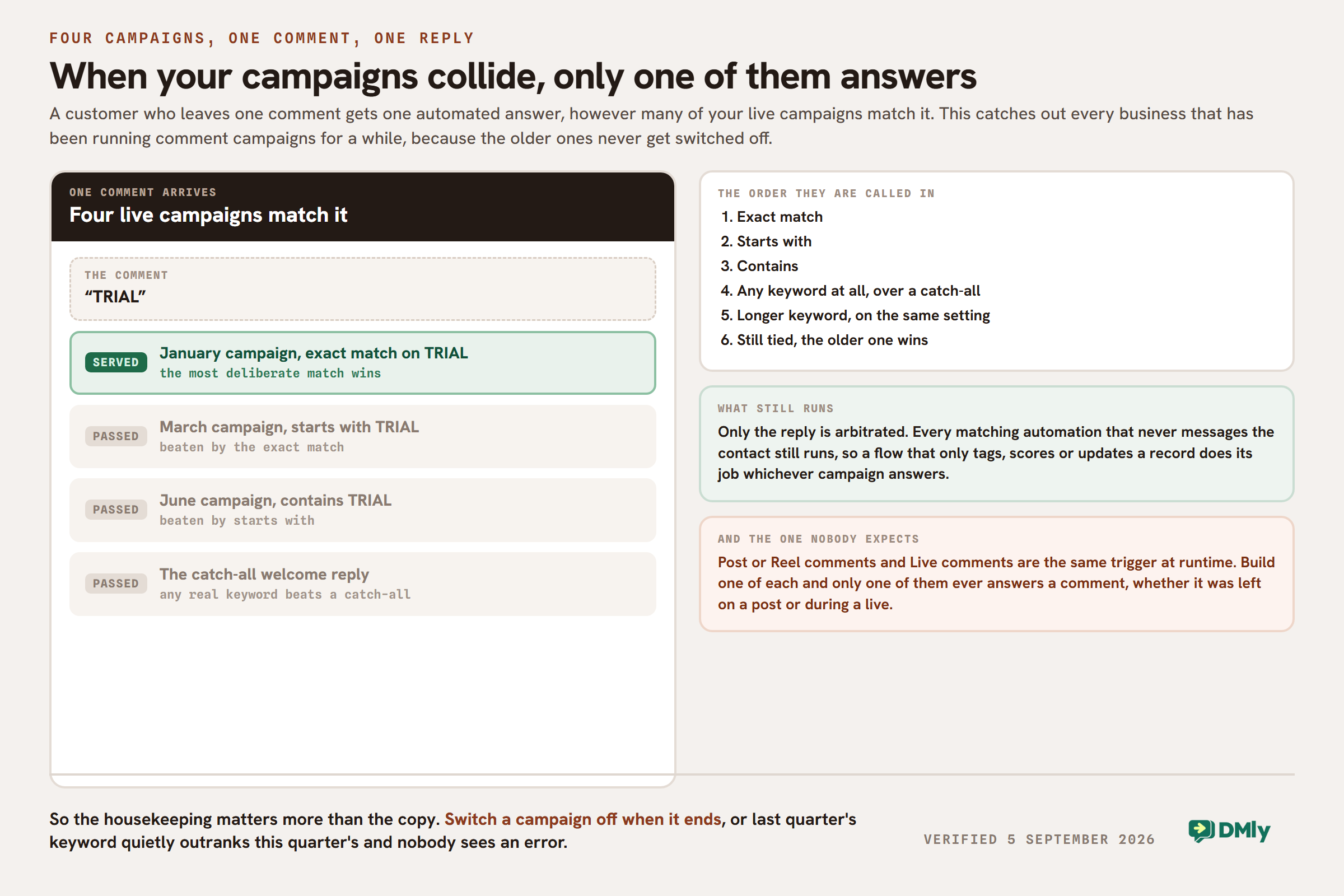
There is one more collision that catches almost everybody. Post or Reel comments and Live comments are the same trigger at runtime. Every Instagram comment is matched against both, so if you build one automation of each, only one of them ever answers, whether the comment was left on a post or during a live. Build one, not one of each.
So the housekeeping matters as much as the copy. Switch a campaign off when the promotion ends, keep the keywords distinct, and point each campaign at specific posts rather than at everything you have ever published.
Mistakes That Kill Instagram Comment-to-DM Campaigns
Even a technically perfect automation can fall flat if the campaign around it isn’t well thought out. Watch out for these common mistakes:
- Offering something nobody wants. Automation can’t rescue a weak offer. Give people a useful reason to comment, such as pricing, a guide, availability, a discount, or early access.
- Using awkward trigger keywords. Keep them short and memorable. BOOK is much easier than asking someone to comment BOOKMYAPPOINTMENT.
- Making the CTA easy to miss. If viewers don’t know they’re supposed to comment, the automation never gets a chance to work. Put the instruction somewhere obvious in the Reel or caption.
- Failing to deliver immediately. Someone who comments GUIDE expects the guide. Don’t make them complete a questionnaire before receiving it.
- Turning the DM into an interrogation. Asking five questions in a row can kill the conversation. Collect only the information you need at that stage.
- Sending everyone through the same journey. Someone ready to book shouldn’t have to sit through information intended for people who are still deciding.
- Keeping people trapped in automation. Give customers an easy route to a person when their question becomes too specific for your workflow or AI agent.
- Forgetting old campaigns. Turn off automations connected to expired discounts, finished events, and outdated offers.
- Skipping the test run. Test the comment, first DM, buttons, links, AI responses, booking journey, and handover before sending real customers through it.
- Celebrating comments instead of customers. A Reel generating 1,000 keyword comments looks great, but check how many people continue the DM conversation, become leads, or make a booking. That’s where you’ll find out if the campaign is doing useful work.
How to Measure an Instagram Comment-to-DM Campaign
The best campaign is rarely the Reel with the most comments. What you want to know is how many of those commenters did the thing you were asking for, and the same trap shows up when comparing platforms: the number everybody quotes is the one at the top of the funnel.
In that case, a few numbers are particularly useful:
- Keyword comments: How many people triggered the campaign?
- DM continuation rate: How many people replied or took another action after receiving the first message?
- Link clicks: If you’re sending a menu, guide, or product page, are people opening it?
- Qualified leads: How many conversations produced people who genuinely fit what you’re offering?
- Bookings or sales: How many campaigns eventually produced customers?
- Drop-off points: Where are people abandoning the conversation?
- Human handovers: Which questions regularly require your team to step in?
Pay particular attention to where the numbers suddenly fall.
If 600 people comment BOOK but only 30 continue after your first DM, the Reel clearly got their attention. Your first message or the next step probably needs work.
Final Thoughts
An Instagram comment can be a small action with plenty of intent behind it. Someone commenting PRICE, BOOK, MENU or GUIDE is telling you exactly what caught their attention.
Instagram comment-to-DM automation gives you a way to act on that interest quickly and at scale. With DMly, you can take the conversation beyond the first automatic message, using AI, CRM, bookings, and human handover to move interested people towards the right next step.
Remember to keep the campaign simple. Offer something people want, deliver it when promised, and judge success by what happens after the comment, not by how busy the comment section looks.
Frequently Asked Questions
How Does Instagram Comment-to-DM Automation Work?
Instagram comment-to-DM automation uses a comment on your post or Reel to trigger a private message. You can set a keyword such as PRICE, BOOK or GUIDE, then automatically send the commenter the information they requested.
Can You Automatically DM Someone Who Comments on Instagram?
Yes, supported Instagram automation tools can automatically send a DM after someone leaves a qualifying comment.
For example, you could ask followers to comment MENU underneath a Reel. When someone does, your automation can send the menu to their Instagram DMs without your team manually messaging them.
Is Instagram Comment Automation Safe?
Yes, when you use Instagram’s supported functionality and tools that work through Meta’s official APIs. Avoid unofficial bots that require questionable account access or promise things such as mass unsolicited DMs.
How Do I Set Up Comment-to-DM Automation on Instagram?
Connect your Instagram professional account to a supported automation platform such as DMly. Create an automation, select an Instagram comment as the trigger, choose the relevant post or Reel, add your keyword and decide what message or workflow should follow.
Does Instagram Allow Comment-to-DM Automation?
Yes, Meta supports messaging and automation capabilities for eligible professional Instagram accounts through its official platform and APIs. The exact actions available can depend on the account, integration and Meta’s current messaging rules.
Can I Send an Automatic DM When Someone Comments on a Reel?
Yes. A Reel can be used as the starting point for a comment-to-DM campaign.
For example: Reel → Customer comments “BOOK” → DM sent → Customer chooses service → Booking. This is particularly useful for Reels promoting services, offers, events, products and lead magnets.
Can Instagram Comment-to-DM Automation Work on Old Posts?
It can work with existing Instagram content when the automation platform and Meta’s current API rules support the post.
However, an automation generally won’t go back and message everyone who commented before you created the workflow. It’s better to set up the automation before actively promoting the campaign and test how your chosen tool handles existing posts.
Can I Use Comment-to-DM Automation to Collect Emails?
Yes. Once the customer enters the DM conversation, your workflow can ask for an email address when there’s a genuine reason to collect it, such as sending a resource or registering them for something.
Tell people why you’re collecting their information and handle it according to applicable privacy and marketing rules. Don’t turn a simple “send me the guide” interaction into an unexpected email marketing opt-in.
Can I Set Different Auto Replies for Different Posts or Reels?
Yes, supported automation tools can let you build different workflows for different Instagram content.
Your restaurant Reel might use MENU, while a separate event post uses TICKETS. Each trigger can lead to its own message and customer journey.
This is usually better than using one generic auto-reply across your entire account because the response stays connected to what the person originally commented on.
Writing about WhatsApp automation, bookings and growth for local business.
Turn WhatsApp into your busiest channel.
Start free and run message, bookings, payments and reviews in one place.
