
Facebook Comment Automation: The Complete Guide for Businesses
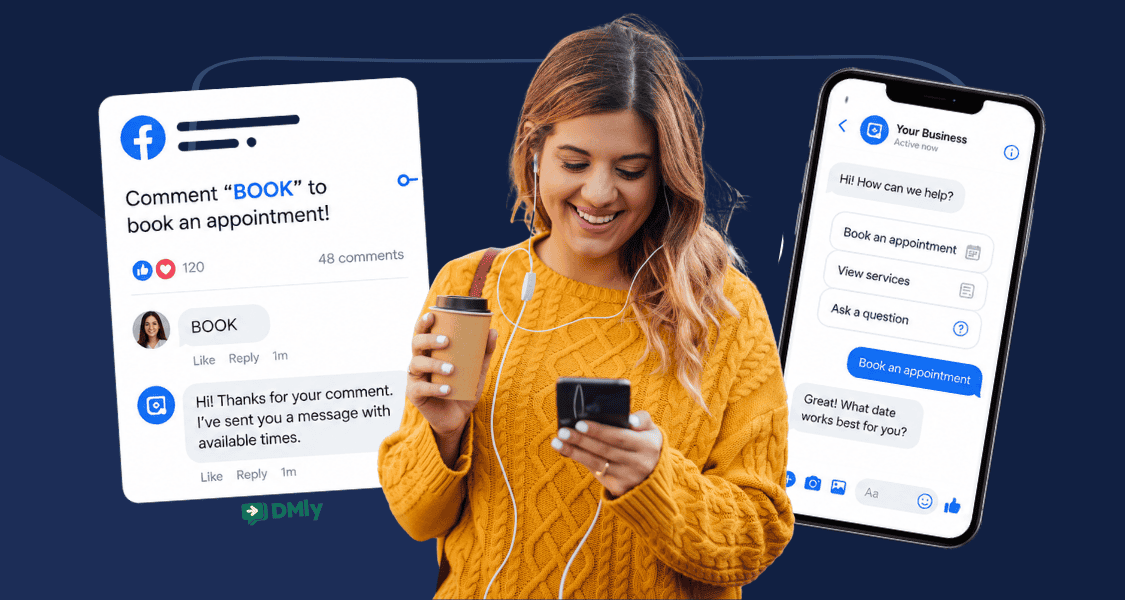
Some of your best Facebook leads may already be sitting in your comment section. “Where are you located?” “How much does this cost?” “Can you send me more information?” These aren’t passive likes. They’re people making the effort to start a conversation with your business.
Replying manually works when there are five comments. It gets harder when there are 50, or when those comments arrive while your team is serving customers.
Facebook comment automation gives you a way to respond quickly and decide what happens next, whether that means moving interested people into Messenger or handing a promising lead to your team. In this guide, we’ll show you how it works and how to set it up without turning your Facebook Page into a bot factory.
What Is Facebook Comment Automation?
Let’s begin with helping you see what the concept really means.
Facebook comment automation lets your business automatically take action when someone comments on your Facebook content. Instead of waiting for a team member to spot the comment, a predefined rule can respond within seconds.
What happens next depends on the automation you build. It could reply publicly, like or moderate the comment, send the person a private Messenger message, tag the contact, or pass the conversation to someone on your team.
For example, a gym could post:
“Want to try your first class? Comment TRIAL below.”
When someone comments “TRIAL”, the automation can acknowledge them and start a private Messenger conversation with the details.
This can be as simple as one comment and one automatic reply, or part of a longer workflow that qualifies the customer, answers questions, and eventually moves them towards a booking or sale.
How Facebook Comment Automation Works
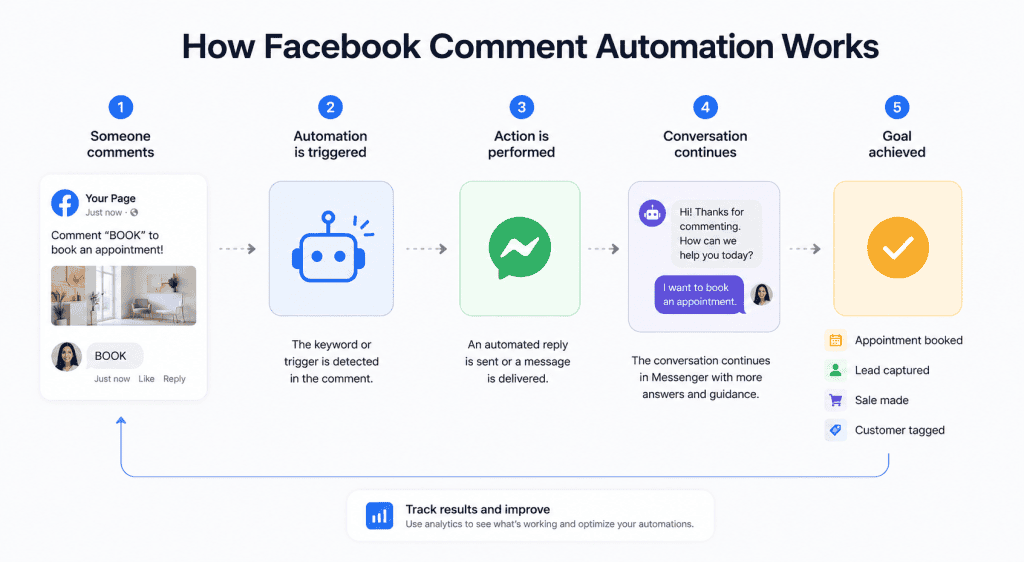
Think of Facebook comment automation as a set of instructions running behind your posts. You decide which comments matter and what an automation tool like DMly should do when it spots one.
A typical workflow looks like this:
Facebook post → New comment → Check rules → Take action → Continue the customer journey
The rules are what give you control. You might run an automation on every post or only on a specific campaign. You can also use keywords so that “BOOK” starts one workflow while “MENU” starts another.
Then comes the action. This is where you decide what should happen based on the person’s intent. A simple enquiry might get an immediate response, while a stronger lead could be moved into Messenger and taken through several steps.
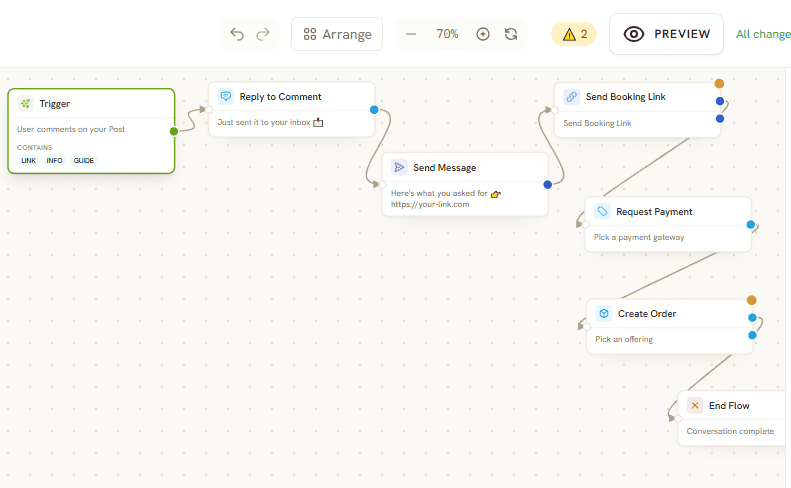
With DMly’s Flow Builder, that journey can branch depending on what the customer does next. Someone interested in booking could follow one route, while someone asking a general question follows another.
So the automation isn’t tied to a single canned response. You build the logic once, then let each customer’s actions determine where the conversation goes.
Why Businesses Automate Facebook Comments
A busy comment section is a nice problem to have. The trouble starts when potential customers are asking questions faster than your team can answer them. But with automation, businesses can make better use of that attention. Many businesses are using this today, and here are some of the reasons.
1. Catch Interest While It’s Fresh
Someone asking about availability or pricing is showing intent right now. An immediate response keeps the conversation moving instead of leaving them waiting until somebody checks Facebook later.
2. Handle Repetitive Questions Automatically
Popular posts can attract the same questions over and over:
“How much?”
“Where are you located?”
“Is this still available?”
Your team doesn’t need to type the same answer 30 times. Automation can deal with predictable enquiries while staff focus on conversations that need more attention.
3. Get More from High-Performing Posts
Imagine a restaurant posts a new weekend offer and it suddenly attracts hundreds of comments. Without automation, keeping up can become difficult.
With the right workflow, that post can continue generating conversations even while your staff are busy serving customers.
4. Move Interested People Closer to Becoming Customers
A Facebook comment doesn’t have to end with a public reply.
Someone asking about a haircut can be guided towards an appointment. A person interested in a gym membership can receive more details. Someone commenting on a product can continue the enquiry privately.
This gives businesses a way to turn social engagement into something measurable, such as leads, bookings, and sales.
5. Keep Your Team Focused on the Right Conversations
Not every Facebook comment needs a person. Automation can take care of predictable interactions and pass more complicated enquiries to your team. That makes it easier for employees to spend their time on customers who need advice, have a problem, or are ready to buy.
6. Keep Conversations Moving Outside Business Hours
Facebook doesn’t close when your business does. People may discover your post at 11pm or comment while your team is busy with customers. An automated first response means their enquiry doesn’t have to sit untouched until somebody is available.
For local businesses especially, Facebook comment automation can turn a comment section into a steady source of customer conversations without creating another inbox your team has to watch every minute.
Facebook Comment-to-Messenger Automation
Before the tactics, the one rule that makes any of this work. Messenger has no message templates, which means you can normally only message somebody who messaged your Page first, and only for 24 hours afterwards. Outside that window an automated reply is blocked outright, and a broadcast is recorded as failed rather than queued. A reply a person types by hand in the inbox is the exception Meta allows, and it stretches to seven days.
A private reply to a new comment is the other exception, and it is the important one: the 24-hour window does not apply to it at all. The comment is the permission. That is the entire reason comment automation is worth building on Facebook rather than simply waiting for people to message you.
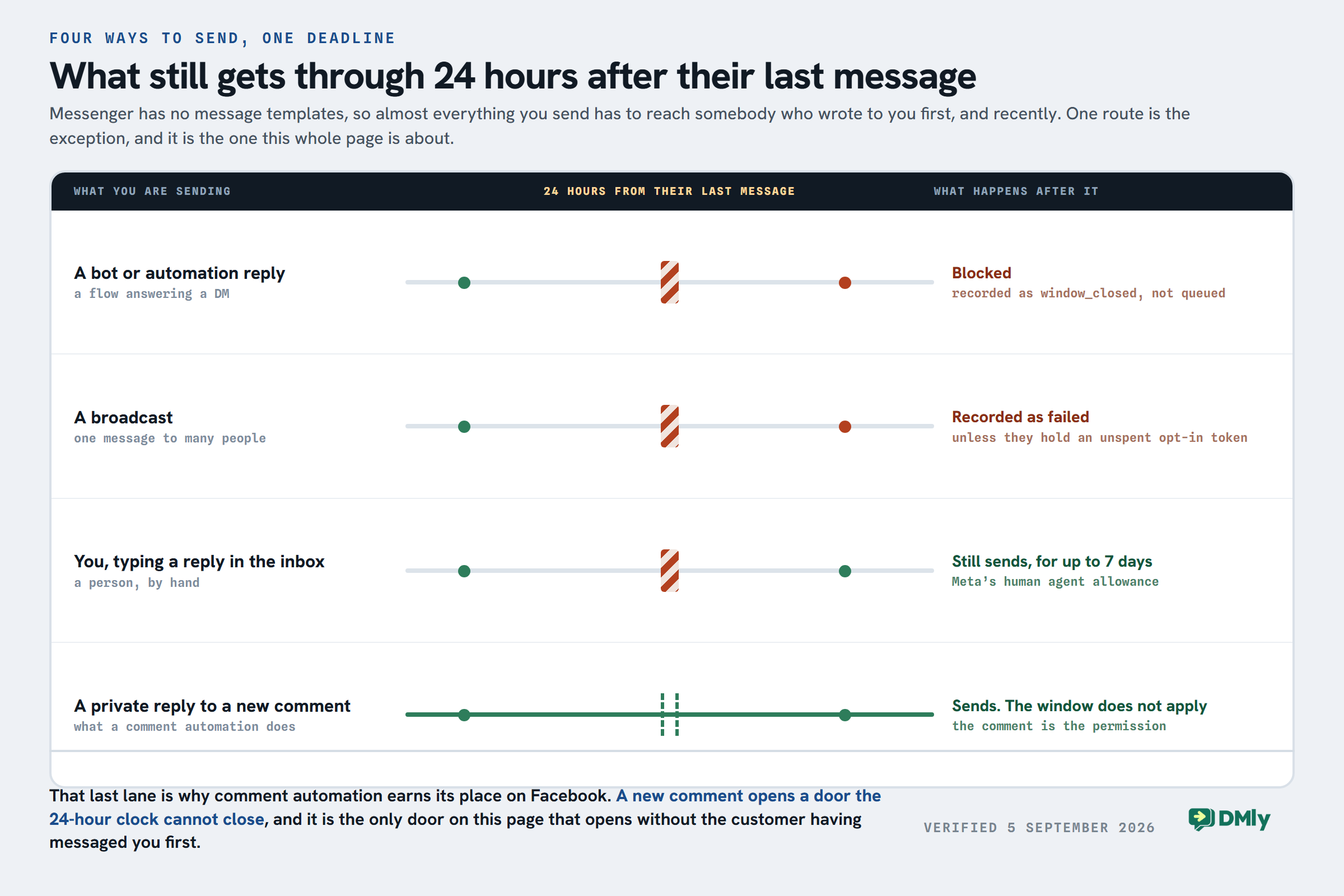
One caveat worth knowing before you plan around it. Meta shows a Marketing Messages (paid) option for reaching opted-in people outside the window, and it is currently labelled Coming soon and cannot be used. Plan for the window you have, not the one that is advertised.
Some conversations are better taken out of the comment section. Facebook comment-to-Messenger automation (or Facebook comment-to-DM automation) lets you use a public comment as the starting point for a private conversation with an interested customer.
Say a salon publishes a post about a new treatment with the CTA:
“Want to see our available packages? Comment GLOW below.”
Someone comments “GLOW“. The business can acknowledge the comment and continue the interaction in Messenger, where there’s more room to share details, answer questions, or help them take the next step.
This approach works particularly well for pricing enquiries, appointment requests, offers, lead magnets, quotes, and product information. Instead of putting everything under the original post, you can continue with a more useful one-to-one conversation.
With DMly, that private conversation can also become part of a larger automation. AI can answer follow-up questions, collect customer details, or help with service selection. If the person is ready to book or needs something more specific, the workflow can move them forward or hand them to your team.
One simple Facebook comment can therefore become the beginning of a proper customer journey.
Practical Facebook Comment Automation Ideas

The easiest way to understand what Facebook comment automation can do is to look at the conversations your business already gets. A good automation takes an action customers naturally make and gives them a useful next step.
1. Turn “PRICE” Comments Into Service Enquiries
A salon or spa posts a before-and-after photo and asks people to comment PRICE for details.
The automation can respond and move interested customers into Messenger, where they can see pricing, learn about the service and ask follow-up questions.
Comment “PRICE” → Send details → Answer questions → Book
2. Fill Empty Appointment Slots
Have a cancellation tomorrow afternoon? Post the available slot and ask interested customers to comment BOOK.
The automation picks those up straight away and starts the booking conversation before the slot goes to waste. Getting availability, reminders and payment into the booking itself works the same way whichever channel the customer arrived from.
3. Send Restaurant Menus
Rather than pasting the same menu link forty times a week, ask people to comment MENU. They get it privately and the thread carries on towards a table or an order. Orders, reservations and repeat visits is the longer version of that for restaurants.
4. Turn Fitness Content into Trial Bookings
A gym posts a workout video with an invitation to comment TRIAL for information about a first session. The automation can send membership or class details, collect basic information and guide interested people towards booking their trial.
5. Qualify Quote Requests
This works well for businesses where prices depend on what the customer needs.
Ask people to comment QUOTE, then continue in Messenger with a few qualifying questions. A cleaning company, for example, might ask about property size, location, and the service required before handing the enquiry to its team.
6. Send Product Details Privately
Retailers can use keywords such as LINK, SIZE, or INFO underneath product posts.
Instead of filling the comments with long descriptions, the customer can receive the relevant information privately and continue towards purchasing the product.
The best automation ideas usually start with comments you’re already receiving. Look through your recent Facebook posts for repeated questions and common signs of buying intent. Those are often the easiest places to find an automation worth building.
What Facebook Comment Automation Shouldn’t Do
Automation can save your team plenty of time, but giving every comment the same robotic treatment can quickly make your Facebook Page feel worse, not better. So, there are a few lines worth drawing.
- Don’t reply to everything with the same message. “Thanks for commenting!” underneath every question, complaint, and compliment looks automated because it is. Build different responses around different types of comments.
- Don’t turn every comment into a sales pitch. Someone saying “Love this!” doesn’t necessarily want a Messenger sequence selling them your latest package. Use triggers that show genuine interest before starting a sales-focused flow.
- Don’t automate arguments. Complaints and emotionally charged comments often need context. Flag them for your team instead of letting a chatbot get into a public back-and-forth.
- Don’t hide criticism just because it’s negative. Comment moderation is useful for spam, abuse, and inappropriate content. Legitimate criticism is different. Hiding every unhappy customer can create bigger reputation problems.
- Don’t bombard people with private messages. If a comment triggers a Messenger conversation, make the first message relevant to what they asked for. Avoid turning one small interaction into a long automated sequence they never wanted.
- Don’t leave outdated campaigns running. If your “SUMMER20” offer ended last month, the automation attached to it shouldn’t still be promising customers the discount. Review campaign-specific flows when promotions finish.
How to Set Up Facebook Comment Automation in DMly
Now, let’s show you how you can set up your first Facebook comment automation in DMly. Interestingly, this doesn’t require any coding skills. You simply choose what should trigger the automation, decide what DMly should do next, and set a few rules around when it should run.
Here’s the process.
Step 1: Connect Your Facebook Page
First, connect the Facebook Page you want to automate.
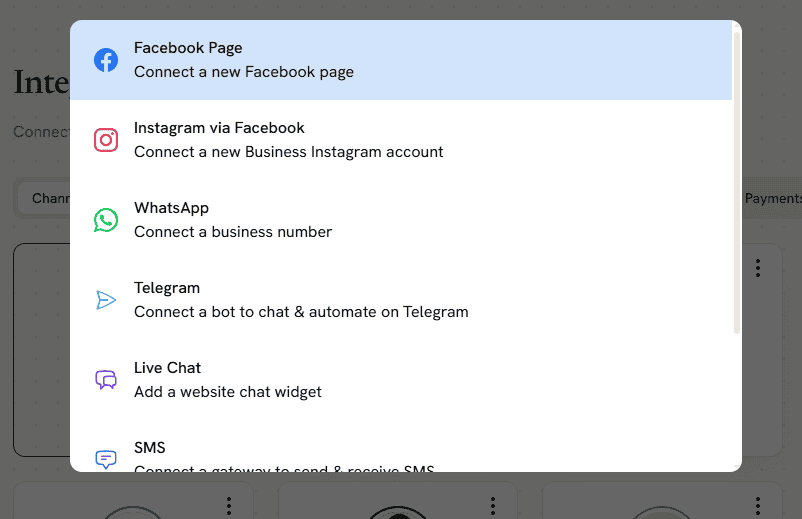
Log into your DMly dashboard and go to Integrations in the left-hand menu. Click Add account, find Facebook, and follow the prompts to connect your business Page.
Once connected, DMly can use that Page when you’re building Facebook automations.
Step 2: Create a New Automation
Go to Automations and click New automation.
You’ll have the option to start with a template or build your own. For the purpose of this guide, let’s go with Start from scratch.
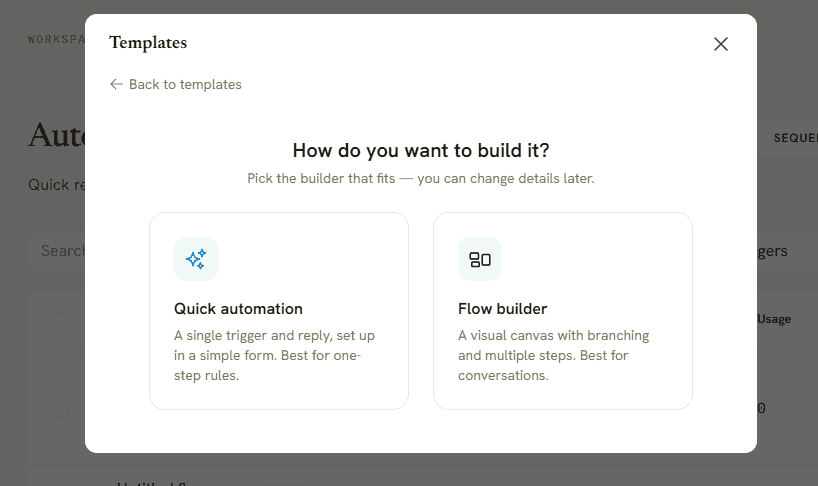
Next, select the type of automation you want to create:
- Quick automation is designed for straightforward rules with a trigger and actions.
- Flow builder gives you a visual canvas for longer conversations, branches, and multiple steps.
We’ll use Quick automation for this setup.
Step 3: Choose the Facebook Comment Trigger
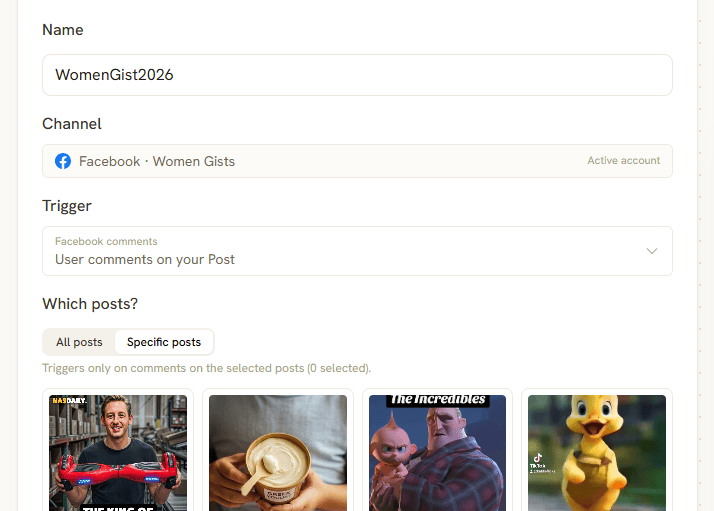
Give your automation a clear name and select your connected Facebook Page as the channel.
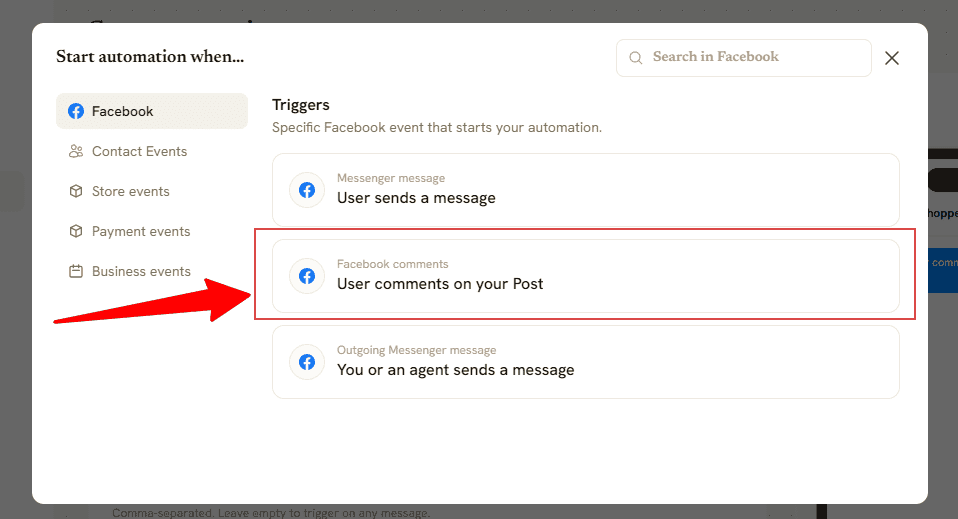
For the trigger, choose the option for a user commenting on your Facebook post.
Now decide where the automation should work. You can apply it across your posts or select the particular Facebook posts you want to use for the campaign.
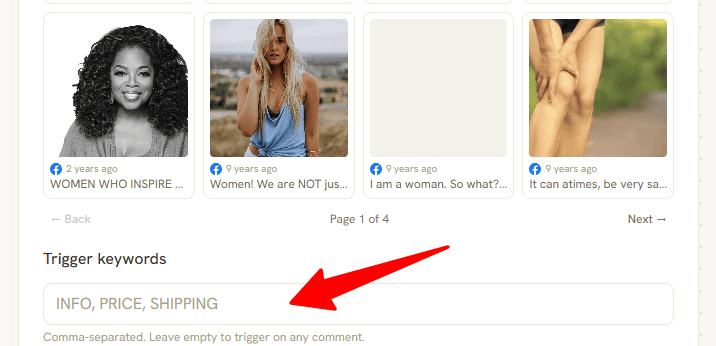
Next, add your trigger keywords.
Suppose a restaurant publishes: “Want to see our weekend menu? Comment MENU below.”
You can use MENU as the keyword, so the automation responds when someone comments with that intent rather than firing on every comment the post receives.
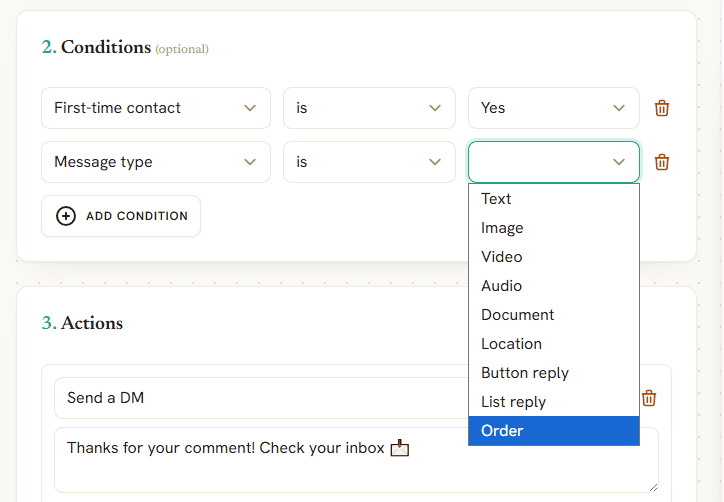
Step 4: Add Conditions
Conditions give you more control over who enters the automation and when.
You can add the relevant conditions available for your campaign rather than treating every interaction identically. You can also combine conditions when you need tighter control over when the automation runs.
For a simple keyword campaign, you may not need many. For a more targeted workflow, they’re useful for narrowing down exactly which interactions should continue.
Step 5: Choose What Happens Next
Now tell DMly what to do when the conditions are met.
Depending on the Facebook automation you’re building, actions can include things such as:
- Replying to the comment
- Sending a private message
- Liking or moderating the comment
- Adding information to the contact
- Handing the conversation to a person.
- You can also combine actions.
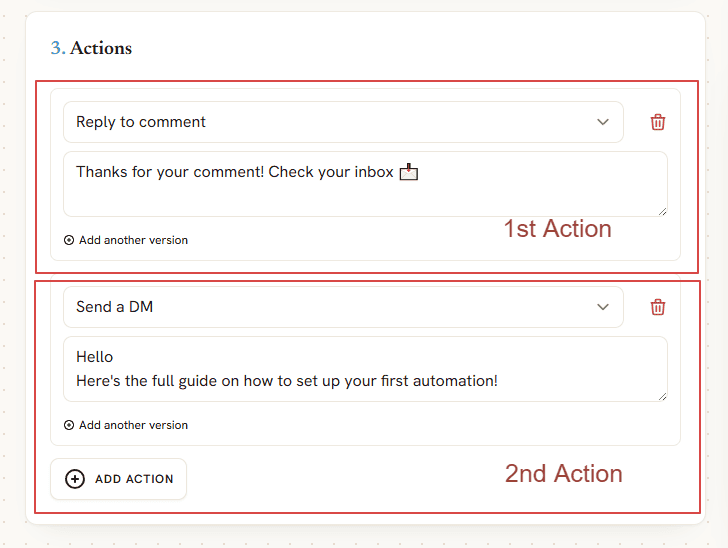
For example:
Customer comments “BOOK” → DMly replies to comment → sends Messenger message → starts booking conversation
This is where you can make a Facebook comment useful beyond simply acknowledging it.
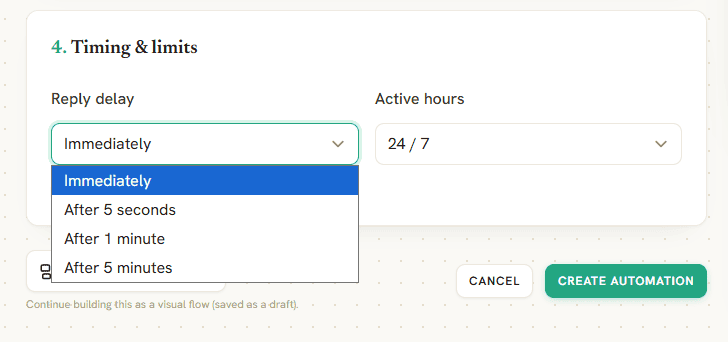
Step 6: Set Your Timing and Limits
You don’t necessarily want every automated response to arrive in exactly the same way.
Set the appropriate reply timing and active hours for the campaign. You can also use response limits to prevent the same person from repeatedly triggering an automation and receiving duplicate messages.
This is especially useful on popular posts where someone might comment several times.
Step 7: Test the Entire Journey
Don’t activate the automation and assume everything works.
Use another Facebook account to comment with your chosen trigger word. Check that the public action happens correctly, then follow the Messenger conversation yourself.
If the automation eventually leads to a booking, AI agent, or human handover, test that part too.
Once you’re happy with the journey, your comment automation can start handling matching interactions as they arrive.
And if a simple trigger-and-response setup starts feeling too limited, that’s when DMly’s Flow Builder becomes useful. You can build different branches based on customer responses, add AI into the conversation and create a much more detailed journey after that first Facebook comment.
Can You Automate Facebook Comments With Meta’s Own Tools?
The truth is, you don’t necessarily need a third-party tool to start automating parts of your Facebook activity. Meta Business Suite includes built-in automation and comment management tools for Facebook Pages.
Meta Business Suite Inbox brings Facebook comments and messages into one place. You can reply to comments, mark conversations for follow-up, organize customer information, and create automated responses for common messaging situations.
Meta also supports keyword-based message automations, instant replies, and away messages.
How to Set Up Native Automation
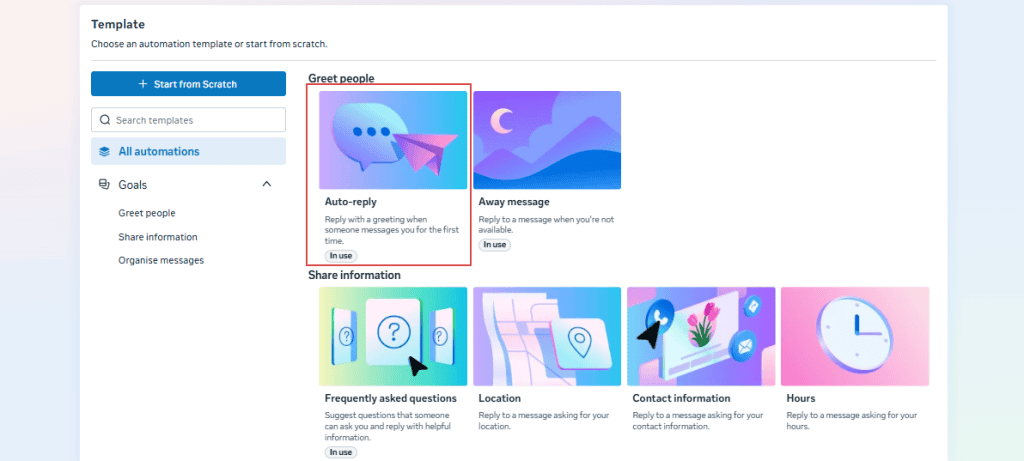
The exact options you see can vary, but Meta currently places its messaging automations inside Business Suite Inbox. For example, to create an instant reply:
- Open Meta Business Suite and go to Inbox.
- Select Automations at the top-right corner.
- Click Create automation.
- Choose the type of automation you want to create, such as Auto reply.
- Select the channel.
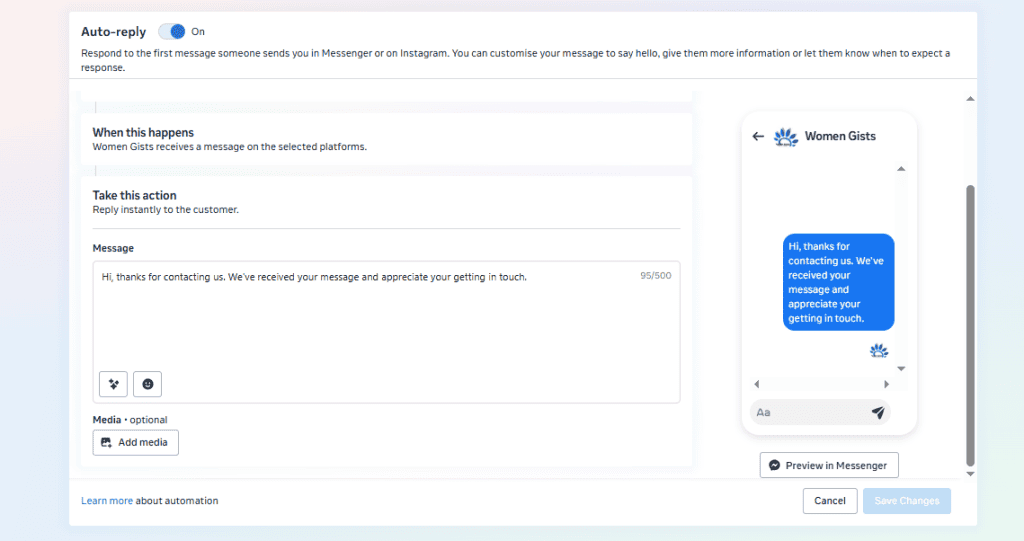
- Write your automated message.
- Save your changes and switch the automation on.
Meta also lets Page managers reply to an individual Facebook comment privately through Messenger. When you do this, Facebook shows underneath the original comment that the Page responded privately.
Where Meta’s Native Tools Start to Feel Limited
Meta’s built-in options make sense when your needs are straightforward. You might want an instant Messenger reply, basic keyword automation, or an easier way to manage and moderate comments.
Things change when you want to build a customer journey around those interactions.
A dedicated platform such as DMly gives you more control over what happens after someone comments. You can:
- combine triggers
- conditions and multiple actions
- build longer conversations in a Flow Builder
- bring AI into the process
- add customer information to your CRM
- connect the interaction with things such as appointments, products and payments.
So, if you only need basic Facebook automation, it’s worth trying Meta’s own tools first. If Facebook comments are generating leads and customer enquiries that need to go somewhere, a dedicated Facebook automation tool gives you considerably more room to build around them.
Meta Business Suite vs Facebook Comment Automation Tools
Just as we said earlier, Meta Business Suite gives you a decent starting point if your automation needs are simple. It allows you to manage comments and messages in one inbox and use Meta’s available automated responses without adding another platform.
But when you want those interactions to trigger longer customer journeys, you will need a dedicated Facebook comment automation tool.
| Feature | Meta Business Suite | Facebook Automation Tools like DMly |
| Manage Facebook comments | Yes | Yes |
| Automated responses | Basic native options | More flexible triggers and actions |
| Keyword-based automation | Available for supported automations | Yes, with custom workflows |
| Comment moderation | Yes | Yes, including automated moderation |
| Private conversations | Reply privately to individual comments | Automate comment-to-Messenger journeys |
| Multi-step workflows | Limited | Yes |
| Conditions and branching | Limited | Yes |
| AI conversations | Limited to Meta’s available features | AI agents can handle longer customer conversations |
| Human handover | Manage conversations through Inbox | Automation can route conversations to team members |
| CRM | Basic customer information | Built-in contact profiles, tags, segments, and customer history |
| Appointment booking | Not a core comment automation feature | Can connect comments to native bookings |
| Other messaging channels | Mainly Meta-owned channels | DMly also connects TikTok, WhatsApp, Telegram, SMS, and Live Chat |
What to Look for in a Facebook Comment Automation Tool
A good tool gives you control over what happens after the comment without making an ordinary automation a project. The same questions apply on the other networks, and the Instagram version of this campaign and the TikTok one answer them differently, because the platforms allow different things. Pay attention to these:
- Official Meta integration: Choose a tool that connects through Meta’s supported APIs rather than relying on risky workarounds.
- Flexible comment triggers: Look for keyword triggers and the ability to run automations on specific posts or across multiple posts.
- Comment-to-Messenger automation: This lets you move relevant interactions into private conversations where customers can ask questions or take the next step.
- Multiple actions: Useful tools can do more than reply. Look for actions such as liking comments, sending messages, adding tags, moderating content, and handing conversations to your team.
- AI and Flow Builder: These become useful when you want to answer questions or create conversations that change based on what the customer says.
- Human handover: Your team should be able to take over easily when automation reaches its limit.
- Business tools beyond Facebook: If comments regularly lead to appointments or purchases, features such as CRM, bookings and payments can save you from connecting several separate platforms.
DMly brings these pieces together, while also connecting Facebook with your other customer messaging channels. That makes it particularly useful when Facebook comments are the beginning of the conversation rather than the end.
Facebook Comment Automation vs Messenger Automation: Which Should You Use?
The difference is where the customer starts the conversation, and both end up in the same place: one inbox carrying Facebook, Instagram and WhatsApp together, threaded onto one contact.
Facebook comment automation works best when people are engaging publicly with your posts. It can respond to relevant comments and help move interested people towards the next step. This makes it useful for campaigns, offers, product posts, and content that generates lots of questions.
Messenger automation takes over once the conversation is private. There’s more room to answer questions, qualify leads, collect details, and guide someone towards a booking or purchase.
For many businesses, the better approach is to use them together.
For example:
Customer comments “TRIAL” → comment automation responds → Messenger conversation starts → customer gets class information → books a trial
DMly lets you connect both parts of that journey. Comment automation catches the initial interest, while Messenger automation gives you somewhere useful to take the conversation afterwards.
So you don’t necessarily need to choose between them. If Facebook is generating customer enquiries for your business, comment automation can open the door and Messenger automation can handle what happens next.
Using AI with Facebook Comment Automation
Keyword rules work well when customers follow the script. If your post says “Comment BOOK for an appointment” and someone types BOOK, the next action is easy to predict.
Real comment sections are not that tidy. People half-remember the keyword, type it inside a sentence, or ask something adjacent that no keyword covers. An AI agent handles the adjacent questions while the keyword rules keep doing the predictable half, which is the split worth building towards.
Someone might write “How do I make an appointment?”, “Any spaces on Saturday?” or “Can I come in tomorrow?” All three could signal the same intent without using your trigger word.
This is where AI can add another layer to comment automation on Facebook. Depending on the platform and workflow, AI can help:
- Understand customer intent: Recognize what someone is asking even when they don’t use an exact keyword.
- Answer common questions: Handle straightforward enquiries using information about your business.
- Moderate comments: Identify spam, abuse and other comments that may need moderation.
- Qualify potential customers: Ask relevant questions before passing a promising enquiry to your team.
- Know when to step aside: Route conversations to a person when the request needs human judgement.
DMly allows you to train an AI agent on your business and combine it with your automations. This means a Facebook comment can lead into a private conversation where AI answers questions, recommends a service, or gathers information, while your team remains available to take over.
Keywords still have their place, especially for campaigns with clear CTAs such as BOOK, MENU, or PRICE. But when customers ignore the script and start talking like actual people, AI quickly comes to save the day.
Best Practices for Facebook Comment Automation

- Use obvious keywords for campaigns. Words such as “BOOK”, “MENU” or “PRICE” are easier for customers to remember and less likely to trigger an automation accidentally.
- Match the reply to the comment. Someone asking about availability shouldn’t receive the same response as someone requesting prices.
- Keep public replies brief. If the answer needs customer details or several steps, continue the conversation privately in Messenger.
- Use specific-post automations for campaigns. This prevents a keyword such as “PRICE” from accidentally triggering the wrong workflow under an unrelated post.
- Set response limits. Stop customers receiving the same automated reply several times because they left multiple comments.
- Give people a clear next step. Each automation should have a purpose, such as viewing prices, getting information, booking an appointment or speaking with your team.
- Know when to hand over. Complaints, unusual requests and valuable leads may need a person rather than another automated response.
- Test before publishing. Leave a comment from another Facebook account and follow the full journey yourself. Check the public response, Messenger flow and any actions that follow.
- Review old automations. Turn off flows attached to expired offers, old events or services you no longer provide.
- Track business outcomes. Don’t judge an automation only by how many comments it handles. Look at the conversations, leads, appointments, and sales those comments eventually produce.
When Nothing Happens At All
Before you debug the keyword, prove the comment reaches you. A Facebook Page that has stopped delivering is the commonest failure on this whole subject, and it never shows an error anywhere: the comment is posted, Meta accepts it, and it lands nowhere. From the outside that is indistinguishable from a broken automation, which is why people spend an afternoon on the wording of a reply that was never going to fire.
One question splits the causes in two. Has anything ever arrived from this Page since the day you connected it? A Page that never delivered and a Page that stopped are different faults with different fixes.
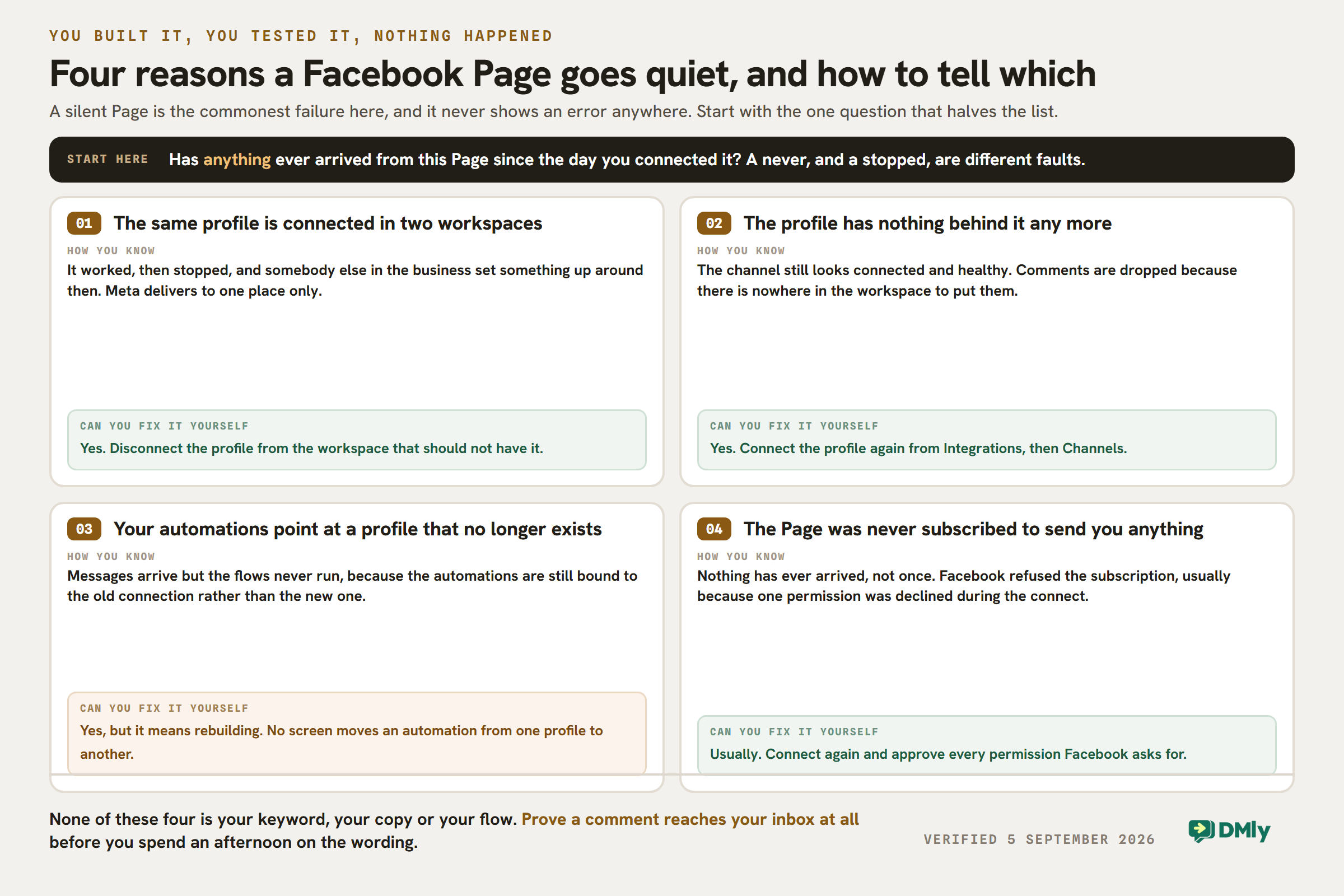
Test it the boring way: comment on your own post from a personal account and watch the inbox. If the comment appears, the plumbing works and the problem really is your keyword. If it does not, nothing you write will help.
How to Tell if Your Facebook Comment Automation Is Working
A post getting hundreds of automated replies can look impressive, but replies alone don’t tell you much. What matters is what people do after the automation starts.
Pay attention to a few useful numbers:
- Automation triggers: How many comments started your workflow? This shows how well your CTA and trigger keywords are performing.
- Messenger conversations: Track how many commenters continue into a private conversation rather than disappearing after the first response.
- Leads captured: If your flow collects names, contact details or other lead information, see how many conversations reach that point.
- Bookings or sales: For local businesses, this is often the number that matters most. How many Facebook conversations eventually become appointments, reservations, orders or purchases?
- Drop-off points: If lots of people start your automation but disappear at the same step, the flow may be too long, confusing, or asking for too much information.
- Human handovers: Look at how often conversations need your team. A high number could mean customers are asking questions your automation isn’t equipped to handle yet.
Don’t chase a perfect automation rate. If AI handles the repetitive questions and sends the right customers to your team, it’s doing useful work.
Final Thoughts
Facebook comments can be much more than likes and quick reactions. When someone asks about a price, available appointment or product, they’ve already made the first move. The challenge is responding before that interest disappears.
Facebook comment automation gives you a practical way to catch those conversations and take them somewhere useful.
With DMly, you can automate the initial response, continue the conversation in Messenger, bring in AI, collect customer details, and move people towards bookings, sales or your team when needed. Start with one useful workflow, see what customers do with it, then build from there.
Frequently Asked Questions
Can You Automate Facebook Comments?
Yes. Meta provides some native automation and comment management features through Meta Business Suite. Third-party Facebook automation tools such as DMly can provide more advanced triggers, conditions and multi-step workflows.
How Do I Automatically Reply to Comments on Facebook?
You can use Meta’s available native tools for basic automation or connect your Facebook Page to a supported third-party platform.
With DMly, for example, you can create an automation, choose a Facebook comment as the trigger, add any keywords or conditions you want, and decide what should happen when a matching comment arrives.
Can Facebook Automatically Message Someone Who Comments on a Post?
Facebook Pages can privately respond to comments, while supported automation tools can help businesses build comment-to-Messenger workflows within Meta’s messaging rules.
What Is a Facebook Comment Automation Tool?
A Facebook comment automation tool is software that connects with your Facebook Page and helps automate actions around incoming comments.
More advanced platforms can connect those comments with Messenger conversations, AI, customer profiles and other workflows instead of stopping at a simple automatic reply.
Can I Automate Facebook Comments Based on Keywords?
Yes, supported automation platforms can use keywords as triggers.
For example, you could ask people to comment “MENU” underneath a restaurant post. That keyword can trigger the appropriate workflow without automatically responding to every other comment under the post.
Can AI Reply to Facebook Comments?
AI can help businesses understand comment intent, answer common questions, and moderate certain types of content, depending on the platform being used.
With DMly, AI can also become part of the conversation that follows. An AI agent can answer questions using information about your business and hand the customer to a person when needed.
Can Facebook Comment Automation Generate Leads?
It can help turn existing Facebook engagement into leads. The automation itself doesn’t create customer interest, but it can respond quickly when that interest appears.
For example, someone commenting “QUOTE” could be moved into Messenger, asked a few relevant questions and then passed to your sales team with useful information already collected.
Writing about WhatsApp automation, bookings and growth for local business.
Turn WhatsApp into your busiest channel.
Start free and run message, bookings, payments and reviews in one place.
