
WhatsApp Newsletters: Which of the Two You Actually Want
Ask two businesses what a WhatsApp newsletter is and you will get two answers that have almost nothing in common.
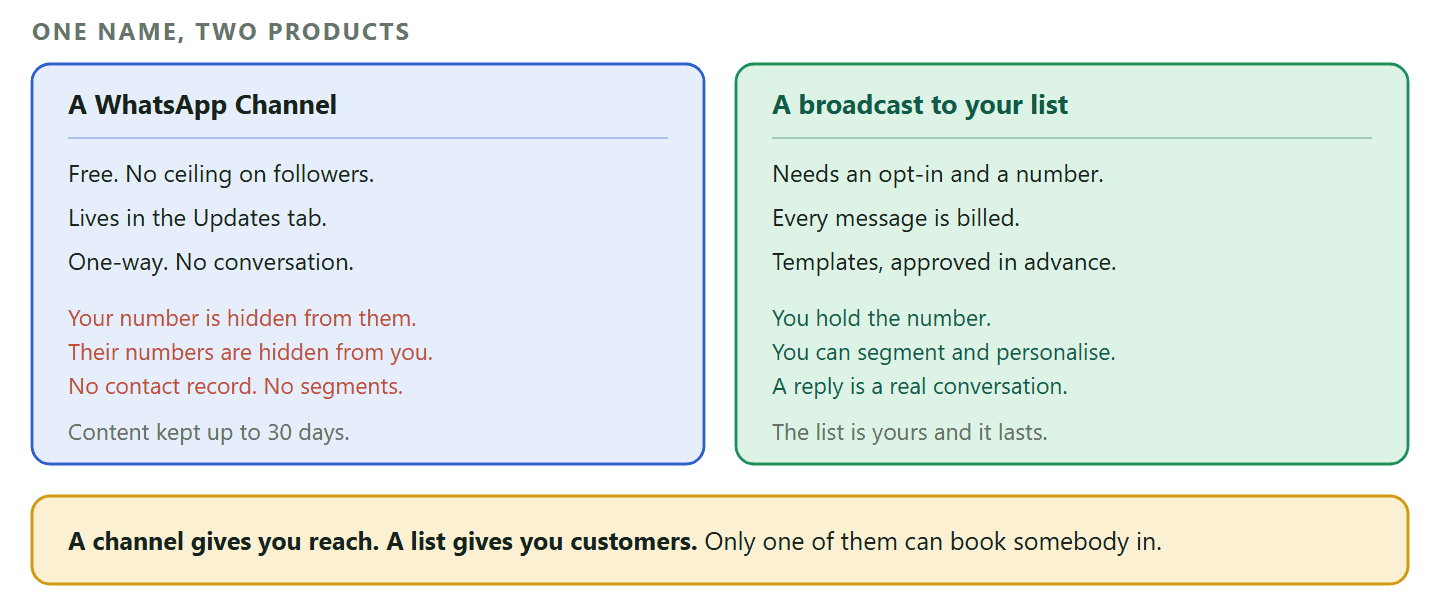
One of them means a WhatsApp Channel: a public feed people follow from the Updates tab, free to run, with no ceiling on how many follow it. The other means a scheduled broadcast to a list of customers who gave you their number, where every message is a template with a price on it.
The difference is not a detail. WhatsApp says a Channel is “an optional, one-way broadcasting feature within WhatsApp, separate from our private messaging services”, and it means separate literally. As an admin your phone number and profile photo are not shown to your followers, and following a channel does not reveal a follower’s phone number to you or to anybody else following it.
So one of these gives you an audience you can never contact, and the other gives you customers you can. That choice comes before everything else on this page, so it goes first.
The Two Things Called a WhatsApp Newsletter
Same word, opposite economics, and almost every guide on this subject describes one of them while its readers are thinking about the other.
A WhatsApp Channel
A Channel lives in the Updates tab alongside Status, deliberately kept apart from your chats. It is one-way: you post, people read, and there is no conversation to have. Nobody’s number is exposed in either direction, which is the whole design.
The things worth knowing before you build a business on one:
- You never learn who your followers are. Not their numbers, not their names. You cannot segment them, message one of them, or follow anybody up.
- Reactions are the only signal, and a weak one. Followers can react with emoji and the counts are visible, but who reacted is private from other followers and from you.
- The content is temporary. WhatsApp stores channel content on its servers for up to 30 days, and admins can make updates disappear faster, after seven days or twenty four hours.
- Sharing is the growth mechanism. A forwarded update carries a link back to the channel, and there is a directory people browse by country, sorted by new, most active and popular.
- You can lock it down. Admins have the option to block screenshots and forwards, though that trades away the sharing that grows it.
A broadcast to your own list
The other kind is a scheduled send on the WhatsApp Business Platform to contacts who opted in and whose numbers you hold. It is a real list: you can segment it, personalise it, and when somebody replies you are in a conversation with a person you can identify.
It also costs money. Every message outside the 24-hour customer service window is an approved template billed on delivery, so an audience of five thousand has a per-issue price, and the mechanics of getting one out are covered properly in our guide to WhatsApp broadcasts. This page is about running the thing week after week rather than sending it once.
Which One You Want
The question is not which is better. It is what you intend to do with the people who read it.
- If the goal is being followed, run a channel. A gym posting the week’s class changes, a bakery posting what came out of the oven, a football club posting team news. You want to be read by as many people as possible and you do not need to know who they are.
- If the goal is bookings, run a list. A salon, a clinic, a garage, a tutor. You need to know who each person is, what they last bought and when they last came in, because the value of the message is that it is aimed at them.
- If you want both, start with the list. A hundred people you can identify is worth more to a local service business than a thousand anonymous followers, and the list is the harder of the two to build, so it is the one worth starting.
Everything below is about the second kind, because that is the one with craft in it. A channel is a publishing job. A list is an operations job.
Building a WhatsApp Newsletter List Somebody Would Join
The list is the asset. Every other decision on this page is downstream of how it was built.
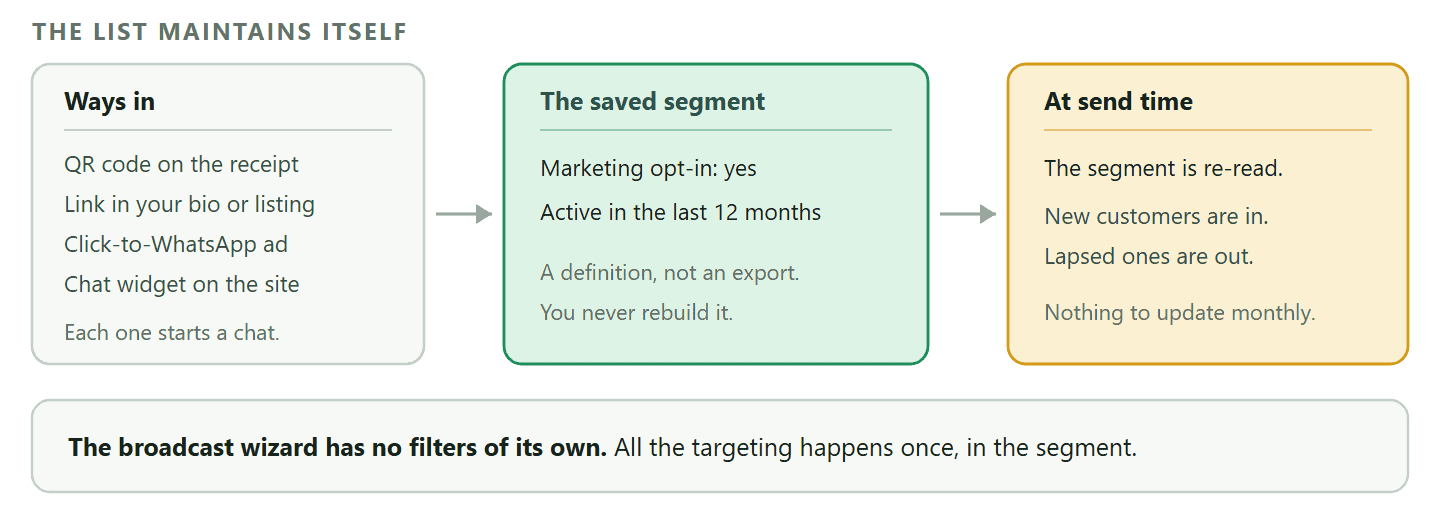
An opt-in on WhatsApp is not a checkbox at the bottom of a form. In practice people join by messaging you, which means the ways in are physical and conversational rather than a signup field: a QR code on the counter or the receipt, a link in your bio or your Google listing, a click-to-WhatsApp ad, a chat widget on your site. Each of those starts a conversation, and somewhere in that conversation you ask whether they want to hear from you.
Two things make that ask succeed or fail.
- Say what they are getting and how often. “Want the offers?” gets fewer yeses than “We send one message a month with the dates we have left. Want it?” The second one is a promise you can keep, and it sets the cadence expectation before you ever send anything.
- Ask when they are already talking to you. The moment after somebody books, pays or thanks you is the only moment they are minded to say yes. An opt-in request sent cold as a template is a marketing message asking permission to send marketing messages.
The list is a segment, not a spreadsheet
In DMly a broadcast audience is a single saved segment, and the broadcast wizard has no filters of its own: no tag box, no stage picker, no custom field. Anything more specific than all contacts is built once under Contacts, then chosen here by name.
That sounds like a limitation and is the opposite of one, because segments are re-evaluated at send time. A segment called “opted in, been in within a year” is not a list you export each month; it is a definition that is correct again every time you send to it. New customers appear in it on their own and lapsed ones drop out, without you touching anything.
The condition that matters most for a newsletter is marketing opt-in, which is one of the conditions a segment can be built on, alongside tags, pipeline stage, lifecycle stage, source, days since last activity, birthday month, total spend, last purchase, order count, loyalty points and credit balance. Build the newsletter list on the opt-in and it can never quietly include somebody who never agreed.
The one segment worth building on day one: Opted in, and active in the last twelve months. It is the whole newsletter list for most local businesses, it costs nothing to maintain because it maintains itself, and the twelve-month condition quietly protects you: people who have forgotten you are the ones most likely to report a message, which is the thing that damages the number you send from.
What Goes in a WhatsApp Newsletter Issue
On a channel where every message has a price, “here is our monthly roundup” is not an idea.
The email habit is to fill an issue: three stories, a picture, an offer, a footer. That habit is wrong here for two reasons. Length is not free, and more importantly a WhatsApp message arrives in the same list as somebody’s mother. It is read in three seconds, standing up, and the only question in the reader’s head is whether this concerns them.
So an issue is one thing.
- One subject, chosen because it is time-sensitive. The dates you have left this month. The thing that is back in stock. The change to your opening hours. If it would read the same next month, it is not an issue, it is a page on your website.
- The specific fact, not the category. “Three Saturday slots left in October” beats “book your autumn appointment”. The specific one is information; the general one is advertising, and people can tell the difference instantly.
- One action, and make it a reply where you can. A reply opens the 24-hour window, which lets you answer properly in ordinary text instead of another template, and Meta’s own documentation confirms that marketing messages sent inside an open window do not count toward its per-user limits. A newsletter that gets answered is cheaper and more deliverable than one that gets read.
- A way out, in the message. Not because the rules demand the wording, but because the alternative to an easy opt-out is somebody reporting you, and reports are what damage the number itself.
The test that decides whether to send at all: Would a specific customer be glad you told them this today? Not “would they mind”, which almost everything passes. Glad. If you cannot name a person who would be pleased to get it, the issue is not ready, and skipping a month costs you nothing while sending a filler issue costs you money, deliverability and a share of your list.
Three Issues, Written Out
The same structure works for most local businesses, and it is shorter than people expect.
Each of these is one subject, one specific fact, one action and a way out. Each would be built once as a reusable template with the changing parts as variables, which is why the wording around the variables matters more than the variables themselves.
A salon, on a quiet month
The subject is capacity, not promotion. “We have three Saturday slots left in October, on the 11th, the 18th and the 25th. If one of those suits, reply with the date and we will hold it. Reply STOP any time to come off this list.” Nothing about services, nothing about prices, no photograph. The information is the offer, and the action is a reply, which opens the window so the booking conversation costs nothing to finish.
A restaurant, on a change
The subject is a decision the reader has to make. “The autumn menu starts on Friday and the short rib is back. We are booked out on Saturday but Friday and Sunday are open. Reply with a day and a number of people. Reply STOP to stop these.” The specific dish and the specific unavailable night do more work than any adjective, because they prove the message was written this week by a person who knows.
A clinic, on something genuinely useful
The subject is timing, and it is the easiest kind of issue to justify. “Flu vaccinations start on the 6th and we usually run out of the early slots in the first fortnight. If you had one with us last year, reply BOOK and we will find you a time. Reply STOP to opt out.” Note what makes it defensible: it is aimed at people who did this before, and the segment condition doing that work is the same one deciding who receives it at all.
Three things are true of all three. None of them is longer than four sentences. Every one asks for a reply rather than a click, which is the cheapest and most deliverable thing a WhatsApp newsletter can ask for. And every one would be slightly embarrassing to send to somebody it did not apply to, which is a good sign: an issue that would suit anybody is an issue nobody needed.
Why the STOP line is not boilerplate: It is the cheapest insurance you can buy. A person who wants out and cannot find the exit reports the message instead, and reports damage the number you send everything from, including your appointment reminders. Making the exit obvious costs you the handful of people who were going to leave anyway and protects the reminders that keep your diary full.
Cadence, and What Goes Wrong When You Get It Wrong
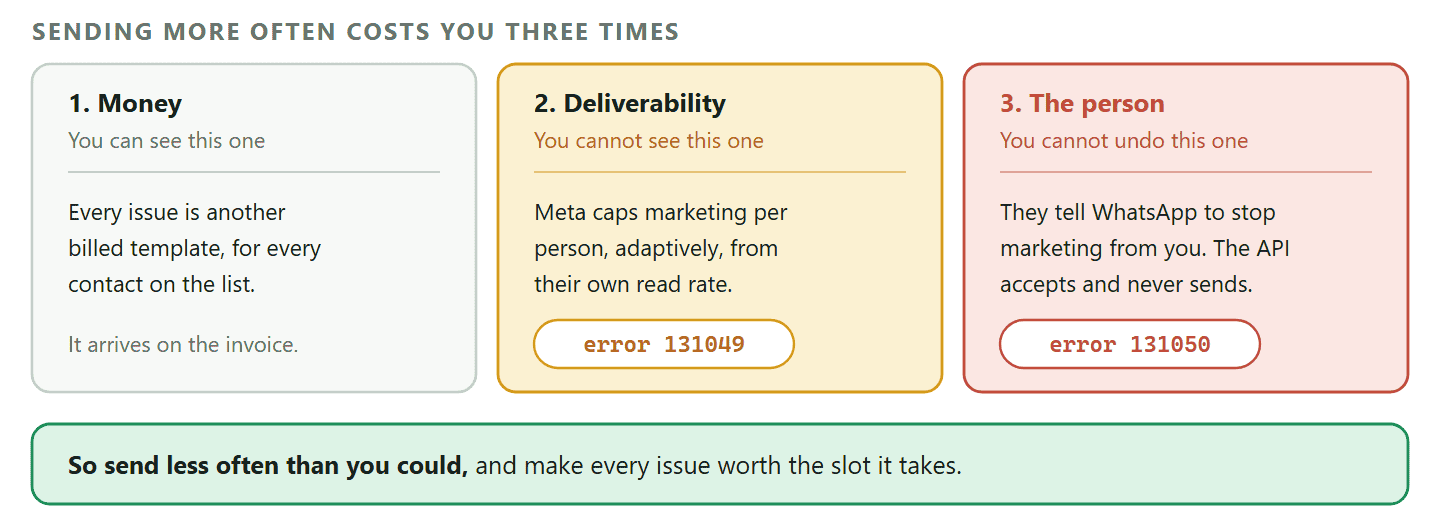
Sending more often has three separate costs, and only one of them shows up on the invoice.
The first is money, and it is the obvious one: twice as many issues is twice as many billed template messages.
The second is invisible. Meta limits how many marketing template messages a person receives from any business, and decides it per person, using what it describes as a dynamic view of that individual’s recent marketing message read rate and how many messages they already have from friends, family and businesses. Exceed it and the message comes back as error 131049 and is simply not delivered, with Meta advising a wait of at least 24 hours before trying again. Your reporting will show the failure; it will not show you the ceiling, because there is no ceiling to see.
The third is permanent. Someone who has had enough can tell WhatsApp to stop marketing messages from your business, and after that Meta says the API “will process the request but not send the message”, returning error 131050. That person is gone from your list forever and nothing on your side records the moment they left.
Which gives a simple rule: send less often than you could, and make each issue worth the slot. Once a month is a reasonable default for a local service business, once a fortnight is the ceiling for most, and weekly needs a genuine reason like a menu that changes or classes that fill.
Watch the quality rating on the number as your feedback signal rather than guessing, which we cover in our guide to quality ratings and messaging limits.
Sending It: The Operational Facts Nobody Mentions
Five things about a repeating send that are obvious in hindsight and expensive the first time.
- There is no draft state. Saving a broadcast queues it, immediately or for the time you chose. There is no half-written issue sitting safely in a folder. Write the copy somewhere else and build the broadcast when it is finished, or use the team approval option, which holds it until somebody signs it off.
- The send time is your account’s timezone, not your browser’s. Type 09:00 while travelling and it still sends at 09:00 wherever your account says you are, at the same instant for everybody.
- Per-contact timezone sending is a different thing entirely. Choose it and the same wall-clock time is staggered per recipient, which means the campaign can take more than a day to finish, because the spread between real-world timezones is about 25 hours. The status stays on sending until the last wave leaves. Useful for an international list, disorienting if you did not expect it.
- Tick “Reachable contacts only” every time. It is unticked by default. Opted-out contacts are blocked at the moment of sending whatever you do, so it changes nothing about who receives the issue, but leaving it unticked pulls them into the recipient list and then counts them as failures, which makes every issue look worse than it performed.
- Check the opted-out number in your contacts, not on the donut. As the documentation stands in September 2026, the audience breakdown shown on the schedule and review steps is a placeholder that reads 95 percent deliverable and 5 percent opted out whatever your data says. Treat it as decoration until the docs say otherwise, and read the real figure in Contacts.
There is no repeating broadcast: A broadcast is a one-off. A monthly newsletter is therefore either a recurring entry in your own diary, or a flow built on the Scheduled date trigger, which can be set to recur and can branch on what the contact did. For most businesses the diary entry is the right answer, because an issue worth sending needs somebody to decide what is in it.
Knowing Whether It Is Working
Read the trend across issues rather than the numbers on one, and know which number is lying to you.
A single issue tells you very little. A newsletter is a habit, and habits show up over a run of six or eight sends: whether the reply rate is holding, whether failures are creeping up, whether the list is growing faster than it is leaking.
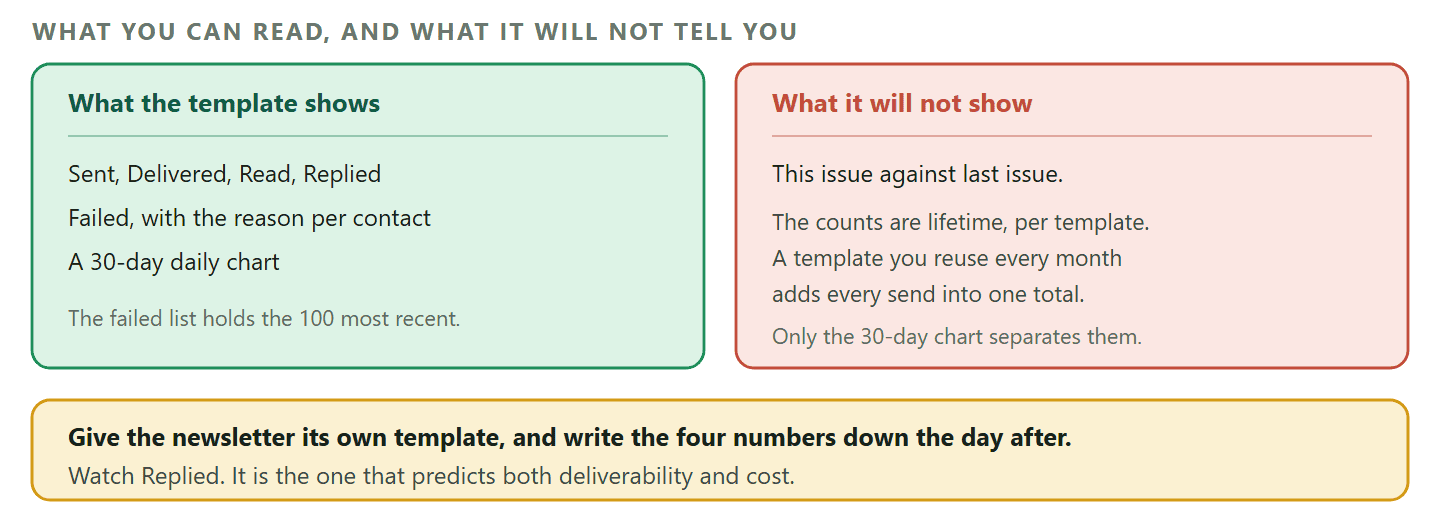
What you get to look at is per-template performance. Each template carries lifetime Sent, Delivered and Read counts with the read rate shown against Delivered, plus Replied, and opening its performance view adds Failed and a 30-day daily chart. When Failed is above zero the tile is selectable and lists up to the 100 most recent failed sends with the contact, the reason and the date, which is where you find your 131049s.
Now the catch, and it bites newsletters specifically.
Those numbers are lifetime, per template, not per issue: The whole point of a newsletter template is that you reuse it every month. That means its Sent, Delivered, Read and Replied counts are the sum of every issue you have ever sent with it, so they can only ever go up and they cannot tell you whether this month was better than last. The 30-day chart is the only view that separates one send from another, so read it within a few weeks of sending or the issue disappears into the total.
Two practical consequences. Give the newsletter its own template rather than sharing one with reminders or offers, or the numbers mix two different jobs. And write down the four numbers on the day after each issue, because the platform will not keep them separated for you.
The number to watch is Replied. On most channels a reply rate is a soft metric. Here it is the one that predicts everything else: a reply opens the 24-hour window, takes that contact out of Meta’s per-user marketing cap for the moment, and lets you finish the conversation in ordinary text. A newsletter with a falling reply rate is not one that needs a louder subject line. It is one that has stopped being about the reader.
What It Costs, and What Changes on 1 October 2026
Price a WhatsApp newsletter per issue per contact, because that is the shape of the bill.
Every template message is billed on delivery, and marketing templates cost more than utility ones, which is why “here is your appointment reminder” and “here are this month’s offers” are not the same product even when they are the same length. A monthly issue to two thousand opted-in contacts is twenty four thousand marketing messages a year, and that number is worth writing down before you commit to a cadence.
Two changes land on 1 October 2026. Meta will begin charging for service messages, and separately will charge on a per-message basis for utility messages sent in response to users within an open 24-hour customer service window. Both are free until that date, and Meta states that it does not offer volume tiers for service messages, so there is no discount for volume on that category.
For a newsletter the practical effect is on the conversation that follows an issue, not on the issue itself. Replies you answer today inside the window are free; from October the utility ones are not. That strengthens rather than weakens the case for a newsletter that earns replies, because the reply is still what takes a contact out of Meta’s per-user cap, but it does mean the follow-up conversation now belongs in the budget. The detail is in our guide to the 1 October pricing change.
DMly holds the list as a segment that re-reads itself at send time, schedules the issue in your timezone or each contact’s, and puts the replies in a shared inbox so answering them is somebody’s job rather than nobody’s. See the plans.
Frequently Asked Questions
What is a WhatsApp newsletter?
One of two things. Either a WhatsApp Channel, which is a free one-way feed people follow from the Updates tab where nobody’s phone number is visible in either direction, or a scheduled broadcast to a list of customers who opted in and whose numbers you hold. The second is the one that can lead to a booking.
Is a WhatsApp Channel the same as a broadcast list?
No, and the difference is the point. A channel is anonymous by design: your number is hidden from followers and theirs are hidden from you, so there is no contact record, no segmentation and no conversation. A broadcast list is made of contacts you can identify, message individually and reply to.
Do I need the WhatsApp Business Platform to send a newsletter?
For a real list, yes. Scheduled sends to a segment, approved templates and per-contact personalisation are Platform features. A Channel is different again and is created inside WhatsApp itself rather than through any provider.
How often should I send a WhatsApp newsletter?
Less often than you think. Once a month suits most local service businesses, once a fortnight is the practical ceiling, and anything weekly needs a genuinely changing reason to exist. Frequency costs money, costs deliverability through Meta’s per-user cap, and costs subscribers permanently.
Are WhatsApp newsletters compliant with data protection rules?
They can be, and the channel makes it easier than most, because you cannot message somebody who has not started a conversation with you or otherwise opted in. Keep a record of when and how each person opted in, tell them what you will send and how often, make opting out easy, and handle their data the way you would any other customer record. That is the shape of the obligation under most regimes, though the specifics of yours are a question for somebody qualified in your jurisdiction rather than for a blog.
Why did my newsletter reach fewer people this month?
Most often Meta’s per-user marketing limit, which is set per person and adapts to their recent engagement, so a list that has been messaged frequently delivers to less of itself over time. Check for error 131049 in your failed sends. The fix is a longer gap and a better issue, not a retry.
Can I put images or buttons in a WhatsApp newsletter?
In a broadcast, yes, as part of an approved template, since the format is decided when the template is approved rather than when you send. That is one reason a reusable issue template is worth building carefully once: the structure is fixed and only the variables change.
A List You Could Name People On
The measure of a WhatsApp newsletter is not its size. It is whether you could look at the list and name a handful of people who would be glad to hear from you this week.
If you can, the cadence and the copy work themselves out. If you cannot, no frequency, template or tool fixes it, and a channel is probably the honest product for what you are actually trying to do.
Writing about WhatsApp automation, bookings and growth for local business.
Turn WhatsApp into your busiest channel.
Start free and run message, bookings, payments and reviews in one place.
