
WhatsApp Media File Size Limits and Aspect Ratios: What the API Enforces
Error 131052 is the number Meta returns when a file you sent is too big. Most business owners never see it, because their provider catches it and shows something friendlier, or shows nothing at all and the message simply does not arrive. That silence is why the same question gets asked over and over: what are the actual WhatsApp media file size limits, and why does the answer change depending on where you read it?
The answer changes because there are two WhatsApps. The app on your phone lets you send a 2 GB file. The WhatsApp Business Platform, which is what your automation runs on, caps a single media message at 100MB and most types far below that. Both numbers are correct. Only one of them applies to a message your software sends.
This page gives the limits Meta publishes for the platform, separates them from the app rules that keep getting quoted alongside them, and flags the numbers that circulate widely and are not in Meta’s documentation at all.
The WhatsApp Media File Size Limits Your Automation Runs Into
Five numbers cover almost everything you will send: 5MB, 16MB, 16MB, 100MB and 100KB. Images, video, audio, documents, stickers. The rest of the WhatsApp media file size limits are detail hanging off those five.
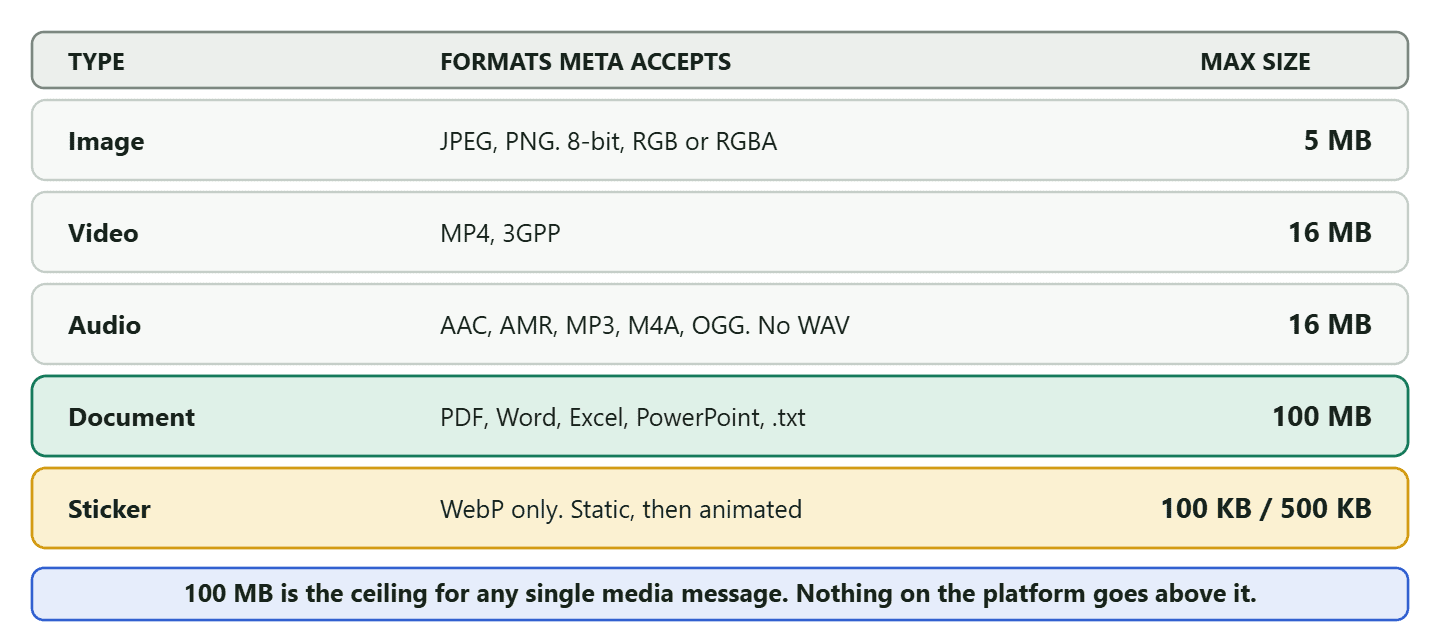
The same thing in plain text, because these are numbers you will want to copy rather than squint at.
| Media type | Formats Meta accepts | Maximum file size |
| Image | JPEG, PNG. Must be 8-bit, RGB or RGBA | 5 MB |
| Video | MP4, 3GPP. H.264 video with AAC audio is the safe pairing | 16 MB |
| Audio | AAC, AMR, MP3, M4A, OGG. WAV is not accepted | 16 MB |
| Document | PDF, Word, Excel, PowerPoint, plain text | 100 MB |
| Sticker, static | WebP only | 100 KB |
| Sticker, animated | WebP only | 500 KB |
Two things about that table are worth saying out loud, because they are where most failed sends come from.
The image limit is the tightest one and the one you will meet first. Five megabytes sounds like plenty until somebody exports a product photo straight out of a camera at 24 megapixels. A modern phone photo is routinely 4MB to 8MB, so “I just sent the photo I took” fails about half the time. Resizing to something like 1600 pixels on the long edge takes a typical photo to well under a megabyte and no customer will ever see the difference on a phone screen.
The 16MB video limit is real and it is not negotiable by paying more. There is no higher tier that lifts it. If your video is bigger, it either gets compressed before you send it or it goes as a document, and those two choices behave very differently in a chat.
Why You Keep Reading “2 GB”, and Why It Is Not Your Limit
Almost every guide on this subject mixes the consumer app with the business platform, and the numbers are wildly different. The 2 GB figure is real. It belongs to the WhatsApp app people have on their phones, where a file sent as a document is not compressed and can be very large indeed. It has nothing to do with a message sent by your automation.
Here is the honest split, because knowing which side you are on saves you an afternoon.
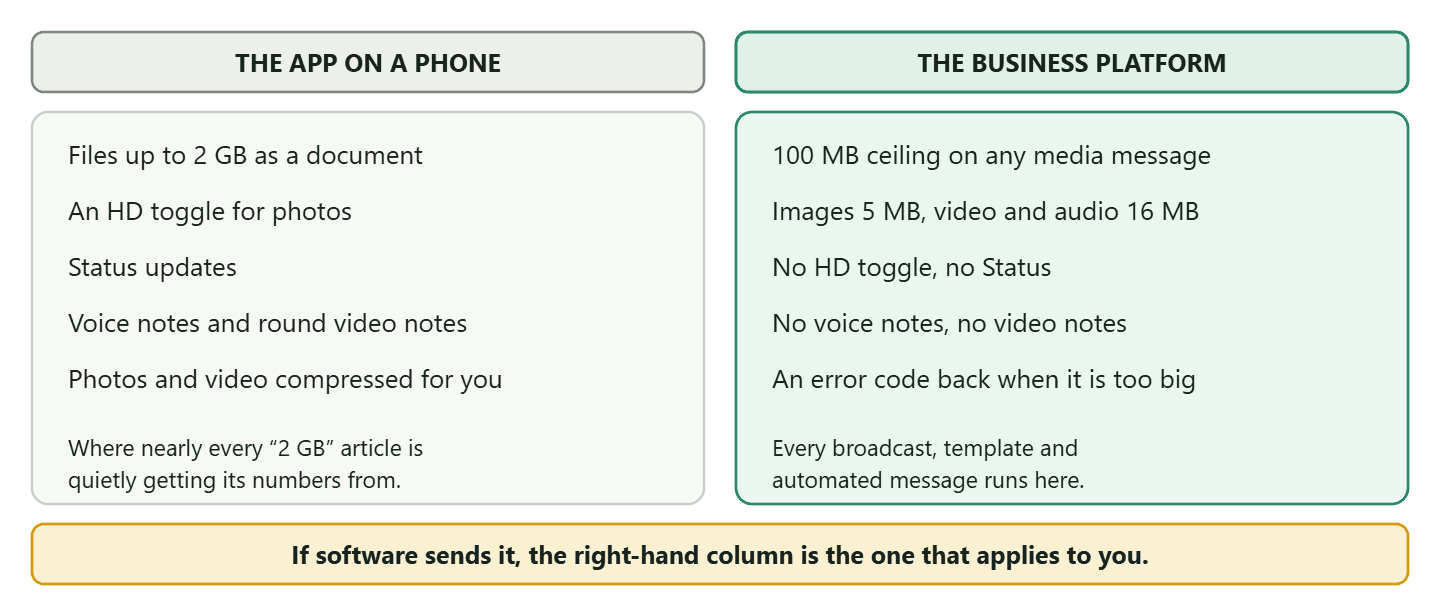
There is one more consequence of the split that catches people out. Because the platform has no Status, no voice notes and no round video notes, any advice built around those formats is advice for a different tool. If a guide tells you to design your WhatsApp marketing around Status safe zones, it is describing something your automation cannot post to.
Images: Two Formats, Five Megabytes, and One Rule Nobody Quotes
Meta accepts exactly two image formats and rejects everything else, including the one your design tool probably exports by default.
JPEG and PNG, up to 5MB. That is the whole list. And then the rule that almost no guide mentions: Meta states that images must be 8-bit, RGB or RGBA, and that WebP images can only be sent in sticker messages. So a WebP exported from a modern design tool, which is often the smallest and best-looking file you have, will be refused as an image message. Convert it to JPEG or PNG first.
On aspect ratio, the honest answer is that Meta does not publish one for image messages. WhatsApp displays your image inside a bubble whose shape depends on the recipient’s device and their chosen chat width, so there is no single ratio that is correct everywhere. What follows from that is practical rather than technical.
- Keep the subject away from the edges. The crop varies, so anything important near a border will eventually be lost on somebody’s screen.
- Avoid text as the only carrier of the message. A tall image gets scaled down and small text stops being readable long before the file stops being valid.
- Square or gently landscape is the safe habit. Not because Meta requires it, but because it survives every bubble shape without awkward cropping.
Video and Audio: Sixteen Megabytes Each, and a Format List Worth Checking
Video and audio share the same 16MB ceiling, and the format lists have a trap in each.
For video, Meta accepts MP4 and 3GPP. The combination that plays reliably on the widest range of phones is MP4 with H.264 video and AAC audio, and there is no upside to being clever here: an exotic codec buys you nothing and loses you the customers on older handsets. Sixteen megabytes is roughly thirty seconds of decent 1080p, or a minute or so at 720p, which is a useful sense of scale when you are planning a clip rather than trying to rescue one.
For audio, the list is AAC, AMR, MP3, M4A and OGG. The trap is that WAV is not on it, and WAV is exactly what a voice recording app on a laptop tends to produce. It is also a large uncompressed format, so a WAV file often breaks the size rule and the format rule at the same time. Convert to MP3 and both problems disappear.
One thing the platform simply does not have: voice notes. The tap-and-hold recording your customers send you is an app feature. Your automation can send an audio file, which arrives as a playable clip, but it is not the same object and it does not carry the same informality. That distinction is worth keeping straight if you are planning to sound personal at scale.
Documents: The 100MB Route and What It Costs You
Documents get twenty times the allowance of a video, which makes them the escape hatch for anything large. PDF, Word, Excel, PowerPoint and plain text, up to 100MB each.
That is genuinely useful. A price list, a brochure, a signed quote, a set of care instructions: all of these go as documents with room to spare, and a PDF arrives looking exactly as you designed it rather than as something WhatsApp has re-encoded.
The cost is attention. A document does not render in the conversation. It arrives as a file card with a name and a size, and the customer has to decide to open it. An image arrives already visible. So the rule of thumb is straightforward: if the point is to be looked at, send an image; if the point is to be kept, send a document. A promotion is an image. An invoice is a document.
The filename is doing more work than you think: Because a document shows its filename in the chat, that filename is a piece of copy. Invoice-1042-BrightSmile-Dental.pdf tells a customer what it is before they open it. doc_final_v3(2).pdf tells them it might be junk. This is the cheapest improvement on this page and almost nobody makes it.
Stickers: The One Specification That Really Is Exact
Everywhere else on this page the “exact” dimensions are somebody’s recommendation. Stickers are the exception, and the spec is unusually precise.
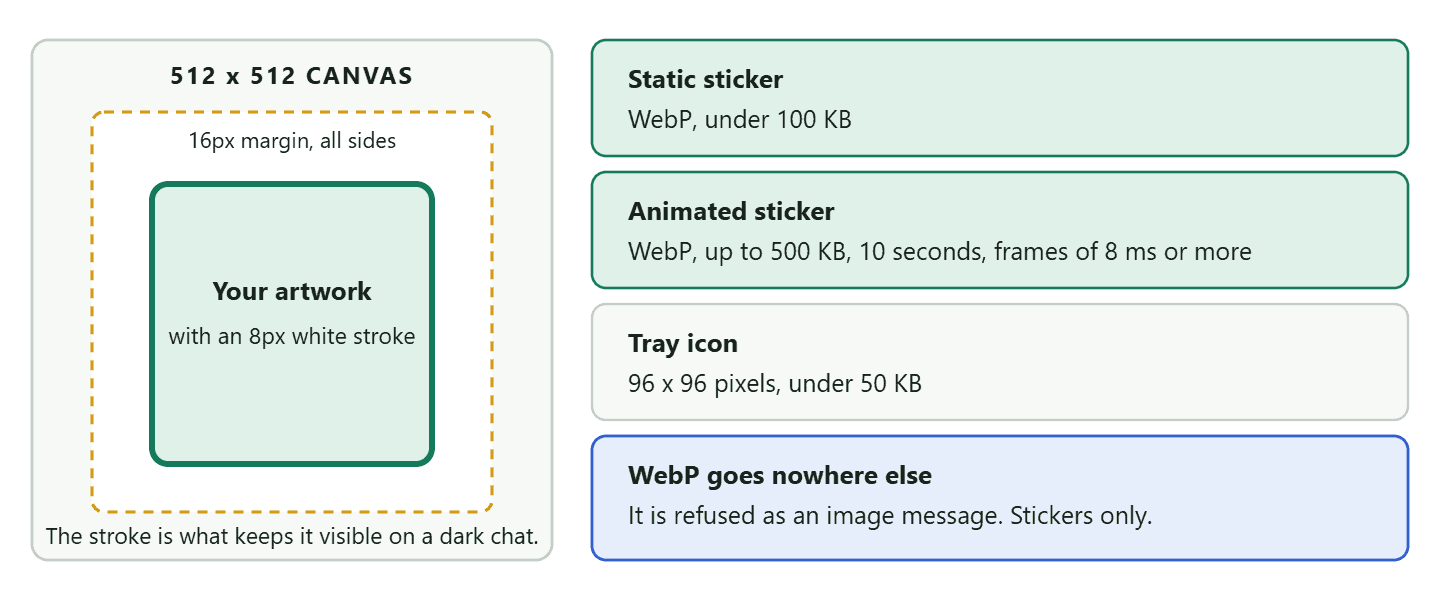
WhatsApp’s own sticker documentation sets it out: 512 by 512 pixels exactly, in WebP, under 100KB for a static sticker and no more than 500KB for an animated one. Meta’s Cloud API reference matches those two file sizes, and WebP is the only place on the whole platform where that format is accepted.
Three design rules that come with it are the ones people miss, and they are the difference between a sticker that looks made and one that looks scraped.
Worth being realistic about stickers, though. They are a brand toy, not a channel: you cannot broadcast a sticker pack, and a customer has to choose to add yours. For a salon or a clinic they are a nice touch and nothing more. For a brand people already like, they are cheap repeated exposure. Decide which you are before spending a designer’s afternoon on it.
Carousel Templates: There Is No Exact Size, and That Is the Point
You will find a very specific number quoted for carousel images, and Meta does not publish it. The figure that circulates is 1125 by 600 pixels at exactly 1.91 to 1. It is not in Meta’s documentation, and the reason it cannot be is in Meta’s documentation: media assets are automatically cropped to a wide ratio based on the WhatsApp user’s device.
In other words the crop is not fixed, so an exact source dimension cannot be a requirement. What Meta does document about carousels is more useful anyway:
- Up to ten cards in a carousel.
- Every card must have the same components. If one card has an image header and two buttons, they all do. You cannot mix an image card with a video card, or give one card an extra button.
- The media itself obeys the ordinary limits: an image card is JPEG or PNG under 5MB, a video card is MP4 or 3GPP under 16MB.
So the practical brief for a carousel is: shoot or design wide, keep the subject and any text well inside the middle, and above all keep the cards consistent with each other. A carousel where card three has a different background, a different crop and a different light reads as careless in a way that a single image never does, because the reader swipes them one after another and the comparison is unavoidable.
Link Previews: Meta’s Real Rule Is Not the One You Have Read
Everyone quotes 1200 by 630 pixels for a WhatsApp link preview. Meta’s published requirement is looser and has two extra conditions nobody mentions.
When you paste a link into a chat, WhatsApp reads the Open Graph tags on that page to build the preview card. Meta documents what it wants:
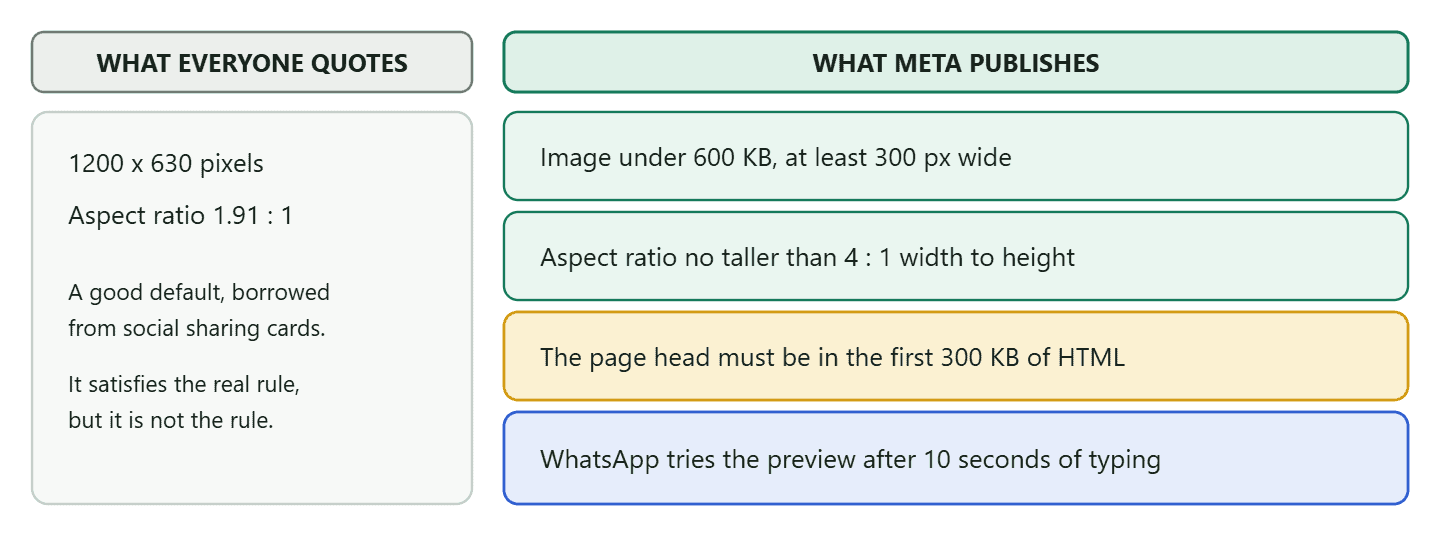
Those last two are the ones worth acting on. A bloated page can lose its preview entirely, because if your theme and its plugins push the head section past the first 300KB of HTML, WhatsApp never reaches your tags. And the ten second rule explains the behaviour everyone finds baffling: you paste a link, no preview appears, you send it anyway and it looks bare. WhatsApp was still fetching. Pasting the link and then writing the message gives the preview time to arrive.
Meta also gives two small copy rules with the tags. Your og:title shows in bold across at most two lines, and your og:description gets one or two lines, where Meta says 80 characters will suffice. Write to that rather than letting your SEO plugin’s 155-character description be cut off mid-sentence in a chat.
Your Profile Photo: What Meta Documents, and What It Does Not
This is the one place on this page where the honest answer is that the number you want does not exist.
You will read that the WhatsApp business profile photo should be 1080 by 1080 with a 500 by 500 minimum. Meta’s Cloud API documentation publishes no required dimension for it. What it publishes are the ordinary image rules that apply to everything you upload: JPEG or PNG, 8-bit, RGB or RGBA, and under 5MB.
So here is the split between fact and advice, clearly labelled. The fact is the format and the size cap. The advice is this: use a square image of at least a few hundred pixels a side and keep your logo or face well inside the middle, because WhatsApp displays the photo as a circle and the corners of your square are never seen. A wordmark that runs edge to edge will lose its first and last letters. That is not a Meta rule, it is what a circular mask does to a square, and it is the single most common reason a business profile photo looks amateurish.
Why the old 192 by 192 advice will not die: An older recommendation of 192 by 192 pixels still circulates widely, and on a modern phone screen it does look soft. But be careful about how that gets stated. The genuinely safe version is that the photo is displayed small and circular, so a modest square file at a sensible resolution is fine, and there is no published number to hit. Anyone quoting an exact optimal size for this, including the earlier version of this page, is quoting a preference rather than a specification.
How Long Your Media Lives, and Why That Photo Disappeared
Media on the platform is not stored forever, and the clock is shorter for the files your customers send you than for the ones you send them. This is the part of the specification nobody reads until something has already gone.
Meta documents three separate expiry rules and they are easy to keep straight once you have seen them together.
- Files you upload persist for 30 days. Meta states that media files sent through the API are encrypted and persist for 30 days unless deleted earlier, and that the media IDs returned when you upload expire after 30 days.
- Files your customers send you expire after 7 days. Media IDs that arrive in a webhook, which is to say every photo, voice note and document a customer sends into your inbox, have a shorter life than anything you upload yourself.
- The download link expires after 5 minutes. A media ID is a lasting handle; the URL you get from it is not. If a link has gone stale you query the ID again for a fresh one rather than treating it as lost.
What that means for the way you work
Upload once and reuse. Because an uploaded file keeps its ID for 30 days, the image on a template header does not need re-uploading for every send. That is why a template asks for its media once, at build time, rather than at each broadcast, and it is why swapping the picture on a live template is a template change rather than a campaign setting.
Save anything from a customer that you might need later, and save it soon. This is the rule that bites real businesses. A plumber photographs a leak before and after. A courier takes a doorstep photo as proof of delivery. A clinic receives a photo of a rash. Seven days later that file is not in the conversation any more in any form you can retrieve, and if a dispute arrives in month two there is nothing to produce. If a photo has evidential value, get it out of the chat and into a job record or a folder the same week.
Do not build a filing system on top of the chat. The conversation is a channel, not an archive, and the 7-day rule is Meta telling you so in plain terms. Anything you would be upset to lose belongs somewhere you control.
When a File Is Rejected: Reading the Error Behind It
Two error codes cover nearly every media failure, and they are much more specific than the message your software probably shows you.
- 131052 means the file is too large. Meta returns it when a media message exceeds the maximum supported file size. If you see this, the fix is arithmetic rather than debugging: check the file against the limit for its type.
- 131053 means the MIME type is wrong. Meta describes this as a mismatched MIME type and advises inspecting the file to verify it. This is the one that feels like a bug and is not. A file named
photo.jpgthat is really a WebP, or a PNG that has been re-saved by a tool as something else, will fail here while looking perfectly ordinary in your file manager.
The practical point is that these two codes tell you which half of the problem you have: size or format. Whatever wording your provider shows, that is the fork in the road. If a file fails and you cannot see a code at all, ask your provider where they surface it, because guessing between the two wastes far more time than looking.
Working With WhatsApp Media File Size Limits in DMly
The WhatsApp media file size limits are Meta’s, so they are the same in DMly as anywhere else, and our documentation quotes them because you meet them at template time rather than at send time.
When you build a template with a media header, DMly asks for a sample file and states the ceiling for each type: JPG or PNG up to 5MB, MP4 up to 16MB, PDF up to 100MB. Meta reviews media templates against that sample, which is why the file you attach at build time matters more than people expect. Most templates come back within minutes, and Meta allows itself up to 24 hours.
Two honest notes about where the platform ends and where we end.
- Nothing in DMly raises a Meta limit, and nothing compresses your file for you to sneak under one. If your image is 7MB, it is 7MB when it reaches Meta. Resize before you upload.
- A failure arrives as a failure, not as a warning. On a broadcast you read the result in the send report rather than being stopped beforehand, which is the same pattern as every other Meta-side limit. It is one more reason to send a test to your own number first, which takes ten seconds and catches almost everything on this page.
If the media you are attaching is going out to a list rather than to one person, the sending rules matter as much as the file rules. Those are covered in our guide to sending bulk messages on WhatsApp without getting banned, and the template mechanics in our guide to WhatsApp message templates.
Frequently Asked Questions
What are the WhatsApp media file size limits for the Business API?
Images 5MB, video 16MB, audio 16MB, documents 100MB, static stickers 100KB and animated stickers 500KB. Meta also sets an overall ceiling: the maximum supported file size for a media message on Cloud API is 100MB.
Can I really send a 2 GB file on WhatsApp?
On the consumer app, yes, as a document. Through the Business Platform, no. Anything your automation sends is capped at 100MB, and most types far lower. The 2 GB figure gets quoted in API guides because the two products keep getting written about as if they were one.
Why does WhatsApp reject my image?
Usually one of three things: it is over 5MB, it is not JPEG or PNG, or it is not 8-bit RGB or RGBA. WebP is a common culprit because design tools export it by default and WhatsApp accepts WebP only for stickers.
What is the correct aspect ratio for WhatsApp images?
There is not one. Meta publishes no aspect ratio for image messages, and carousel media is automatically cropped to a wide ratio that depends on the recipient’s device. Design with the subject in the middle and away from the edges, and the crop stops mattering.
What size should a WhatsApp sticker be?
Exactly 512 by 512 pixels in WebP, under 100KB static or up to 500KB animated, with a 16 pixel margin inside the canvas and a recommended 8 pixel white stroke so it stays visible on any chat background. Animation runs to 10 seconds at most.
What video format works best on WhatsApp?
MP4 with H.264 video and AAC audio, under 16MB. Meta also accepts 3GPP. There is no benefit to a more modern codec here and a real cost on older phones.
Why is my link preview not showing?
Three usual causes: your image is over 600KB or under 300 pixels wide, your page head sits beyond the first 300KB of HTML so WhatsApp never reads your tags, or you sent the message before the preview finished loading. WhatsApp attempts it about ten seconds after you paste the link.
Does sending a file as a document avoid compression?
It preserves the original file, which is the real benefit, and it raises your allowance to 100MB. What it costs you is the preview: a document arrives as a file card the recipient has to open rather than as something they can see in the conversation.
Check the File, Then Send It to Yourself
Almost everything on this page reduces to two habits. Know which WhatsApp you are on, because a number that is perfectly correct for the app on your phone can be five hundred times too generous for the platform your software sends on. And send a test to your own number before a campaign, because a media file that is going to fail will fail on that test in ten seconds, at no cost, with nobody watching.
The rest of the WhatsApp media file size limits fit on a card: 5MB for images, 16MB for video and audio, 100MB for documents, JPEG or PNG only, WebP only for stickers, and no exact aspect ratio anywhere because the crop is not yours to control. Design for the middle of the frame and you will never think about it again.
Templates that carry an image, a PDF or a video, built once and reused everywhere: see how DMly handles WhatsApp, media headers included.
Writing about WhatsApp automation, bookings and growth for local business.
Turn WhatsApp into your busiest channel.
Start free and run message, bookings, payments and reviews in one place.
