
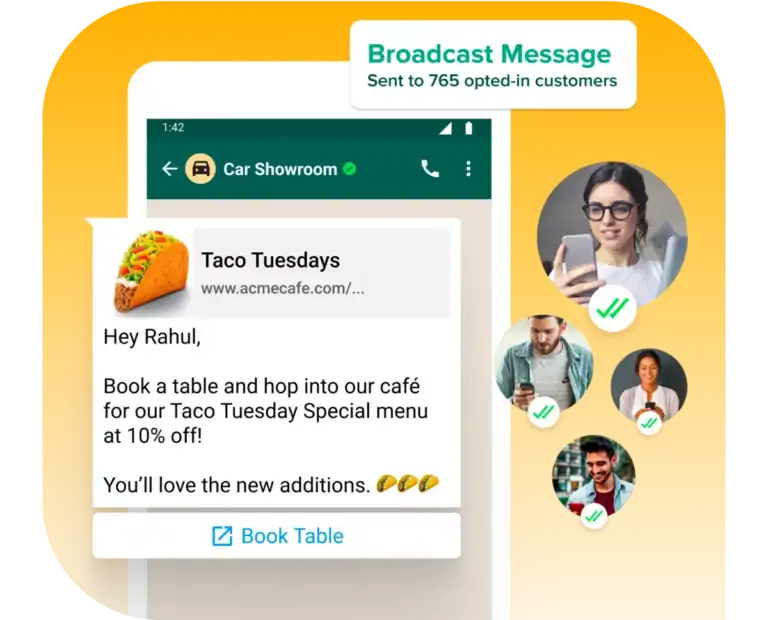
A restaurant sends the same “20% OFF TONIGHT!” message to 2,000 WhatsApp contacts every Friday. A salon messages 80 customers who haven’t booked recently to tell them about a few open Saturday appointments.
Both are using WhatsApp broadcasts, but the second message has a much better reason to land in someone’s personal inbox.
That’s the difference good broadcast marketing makes. WhatsApp gives local businesses direct access to customers, but that access can disappear quickly if every message feels like another mass promotion.
The best WhatsApp broadcast practices come down to sending useful messages to the right customers at sensible times, then making it easy for interested people to respond. In this guide, we’ll get straight into how to do that, with practical examples for salons, restaurants, gyms and other local businesses.
WhatsApp Broadcast vs Group Chat: Don’t Confuse Them
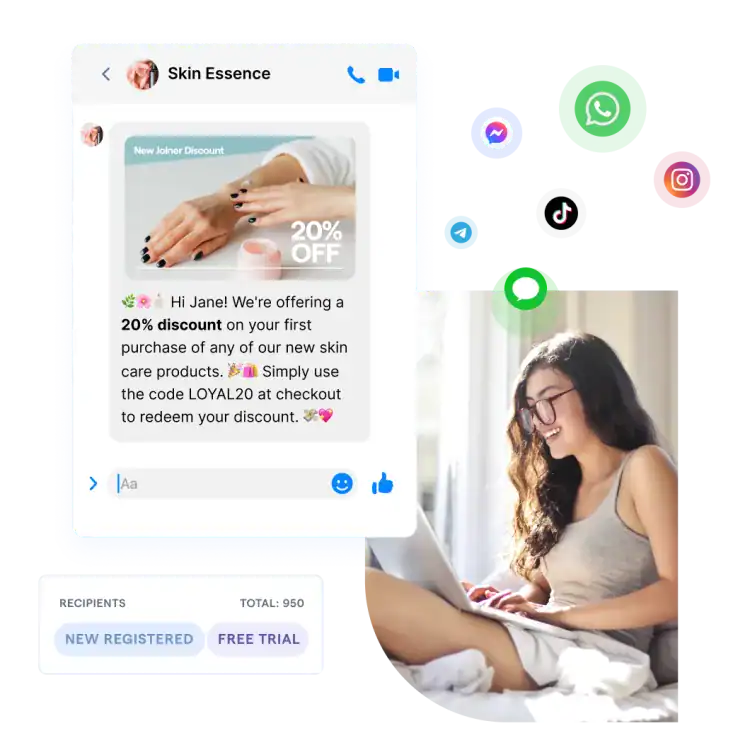
Before we get into the crux of the matter, let’s get this straight. A WhatsApp broadcast and a WhatsApp group are not entirely the same. While they both let you communicate with multiple people, the customer experience is quite different.
With a group, everyone shares the same conversation. Members can see messages from other participants and interact in the same space. That’s useful for communities, classes, or teams, but usually awkward when you’re sending promotions to customers.
A broadcast sends your message to customers individually. They receive it as a private message, and any reply comes back as a private conversation rather than appearing in front of everyone else.
| WhatsApp Broadcast | WhatsApp Group |
| Message delivered privately | Everyone shares one conversation |
| Customers don’t chat with each other | Members can interact with the group |
| Replies come back privately | Replies may be visible to the group |
| Better suited to offers, updates and customer campaigns | Better suited to communities and shared discussions |
For most local-business marketing, broadcasts are the better fit. A restaurant can announce its weekend menu to interested customers without putting 200 strangers into the same group, while a salon can promote available appointments and deal with each booking privately.
10 WhatsApp Broadcast Best Practices for Local Businesses
1. Get Permission Before You Start Messaging
Having someone’s phone number doesn’t automatically mean they want marketing messages from you on WhatsApp.
Customers should know they’re agreeing to receive WhatsApp messages from your business. You could collect that permission when they book, register online, make a purchase, or explicitly subscribe to WhatsApp updates.
Be clear about what they’re signing up for too. “Get appointment updates and occasional offers on WhatsApp” tells the customer much more than a vague checkbox saying “Receive communications.”
Starting with people who genuinely want your messages also gives your broadcasts a better chance of being read rather than ignored, blocked, or reported.
2. Segment Before You Send
The quickest way to make a WhatsApp broadcast feel like spam is to send every message to everyone.
A Saturday appointment opening might be useful to a salon customer who hasn’t booked in six weeks. It probably isn’t useful to someone who had their appointment yesterday.
Build smaller audiences around information such as:
- Previous purchases or services
- Customer interests
- Booking history
- Location
- New leads vs existing customers
- Tags or customer groups
With DMly, you can use segments and tags to decide which contacts should receive a broadcast instead of treating your entire customer database as one giant mailing list.
3. Give Every Broadcast a Reason to Exist
Before sending a message, ask one simple question: Why would this customer care about receiving this today?
“We haven’t sent anything this week” isn’t a good answer.
An appointment has opened tomorrow. Your weekend menu has changed. A class the customer previously asked about is accepting bookings. An item they were interested in is back in stock. Those are genuine reasons to start a conversation.
This doesn’t mean every broadcast needs a discount either. Useful updates, reminders, availability, and relevant information can give customers a reason to pay attention.
If you can’t explain why this audience needs this message now, you’re probably better off not sending it.
4. Keep the Message Short
WhatsApp isn’t the place for a five-paragraph sales pitch. People open the app expecting quick conversations, so get to the useful part early.
Instead of:
“We’re delighted to announce that this weekend we will be offering our valued customers an exciting opportunity to book…”
Try:
“We’ve had two Saturday appointments open up. Want one? Reply BOOK and we’ll show you the available times.”
Give people enough information to understand the offer, then make the next step easy.
5. Sound Like a Person
Broadcasting to 500 customers doesn’t mean the message needs to sound like it was written for 500 customers.
Skip stiff openings such as “Dear Valued Customer” and write closer to how your team would speak to someone in a normal WhatsApp conversation.
A restaurant could say: “Hi Sarah, our Sunday roast is back this weekend. Want to see the menu?”
That feels much more at home in WhatsApp than a miniature press release.
6. Personalize Beyond the First Name
Adding someone’s name is useful, but real personalization comes from relevance.
A gym could send a beginner-class offer to people who previously took a trial. A salon could contact customers due for another appointment. A retailer could tell customers when something they’ve shown interest in is back in stock.
This is another reason segmentation matters. The better you understand who you’re messaging, the less your broadcast feels like a broadcast.
7. Send at a Sensible Time
There isn’t one perfect time to send every WhatsApp broadcast. Timing should match the message and the customer.
A restaurant promoting tonight’s available tables could send its broadcast that afternoon. A salon advertising weekend availability might send earlier, giving customers time to make plans.
What you want to avoid is unnecessary disruption. A promotional message arriving at 6am or close to midnight is unlikely to make customers feel warmly towards your business.
With DMly, you can schedule broadcasts ahead of time rather than relying on someone to remember to press send at the right moment.
8. Don’t Broadcast Too Often
More messages don’t automatically mean more sales. If customers start expecting another promotion every time they see your business name on WhatsApp, muting or opting out becomes much more tempting.
There’s no perfect broadcast frequency for every local business. A restaurant with changing weekly specials might have a reason to message more often than a plumber offering an annual maintenance service.
Pay attention to how customers respond. Falling engagement, fewer replies and rising opt-outs can all suggest you’re sending too much.
9. Make the Next Step Obvious
Don’t make customers figure out what they’re supposed to do after reading your broadcast.
Give each message one clear next action:
- Reply BOOK to see available appointments.
- View the menu for this weekend.
- Choose a class to reserve your place.
- Reply YES if you’re interested.
- Book an appointment using the provided option.
This is also where broadcasts can become more useful with DMly. A customer can reply to the campaign and continue into an automated or human conversation, rather than the interaction ending with the broadcast.
For example:
Broadcast → Customer replies “BOOK” → Available times → Appointment confirmed
10. Make Opting Out Easy
Some customers will eventually decide they don’t want your broadcasts anymore. Give them a simple way to say so.
Your message might include a short instruction such as:
“Don’t want these updates anymore? Reply STOP.”
When someone opts out, respect it and update their messaging preferences so they aren’t included in future marketing broadcasts.
Making opt-out easy isn’t something to hide in tiny text. It helps you maintain a contact list of people who genuinely want to hear from your business, which is far more useful than a huge list of customers who ignore every message you send.
How to Send a WhatsApp Broadcast with DMly
Once you’ve decided what you want to send and who should receive it, creating the actual campaign in DMly takes a few steps.
Step 1: Create a New Broadcast
From your DMly dashboard, click Broadcast in the sidebar and select New Broadcast.
You can build the campaign from there or select Message Template if you’d rather start with one of the ready-made templates available on DMly.
Step 2: Choose Your Audience
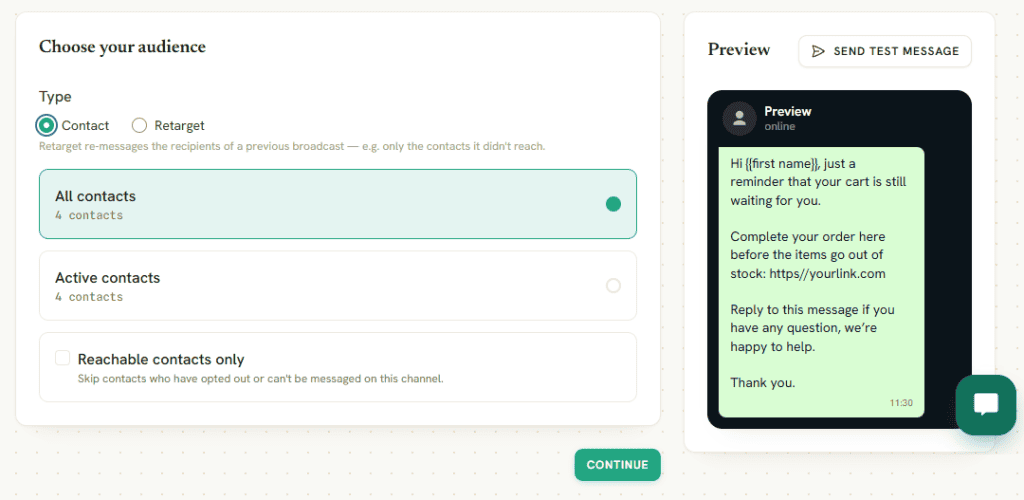
Next, decide who should receive the broadcast. DMly gives you two options:
Contact: Choose recipients from your existing contacts. This is where you can select the customers who are relevant to the campaign instead of broadcasting to everyone.
Retarget: Build a new campaign around people who received one of your previous broadcasts. You can retarget based on how they interacted with it:
- All sent
- All delivered
- All read
- All replied
- All sent but not replied
- All failed
This can be particularly useful for follow-up campaigns. For example, you could retarget customers who received your previous offer but didn’t reply rather than sending another message to everyone.
Once you’ve selected your audience, click Continue.
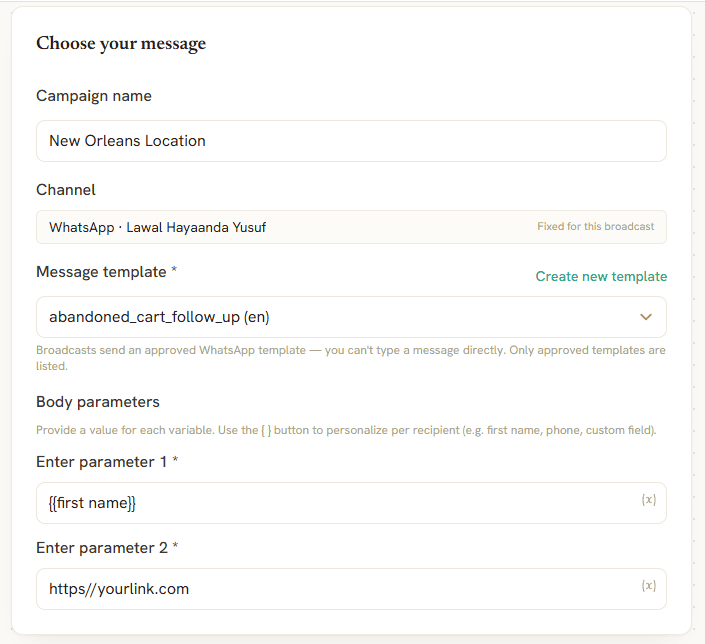
Step 3: Choose Your Message
Now, set up the actual WhatsApp message.
Give your campaign a name so it’s easy to identify later, select WhatsApp as the channel and choose the message template you want to use.
You can select an existing template or create a new one if none of your current templates fits the campaign.
Keep the best practices we discussed earlier in mind here. Your message should be short, relevant to the audience you’ve selected and clear about what the customer can do next.
Step 4: Send Now or Schedule It
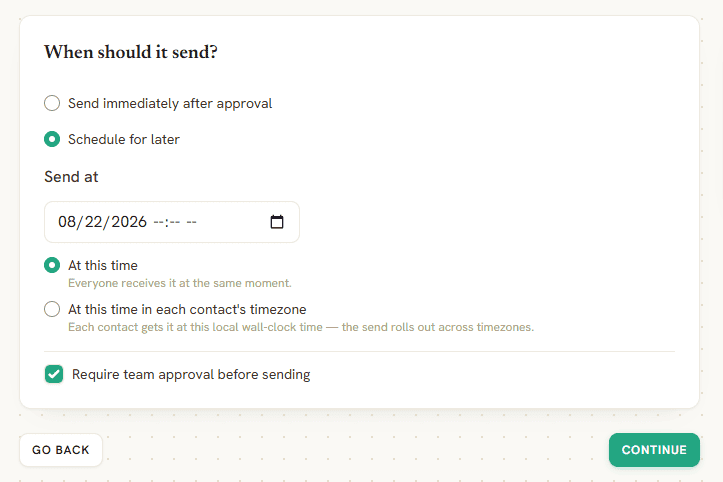
Next, decide when your broadcast should go out.
You can send it immediately or choose a custom date and time. Scheduling is useful when you’re preparing campaigns ahead of time or want the message to arrive at a particular moment.
A restaurant, for example, could prepare its weekend promotion earlier in the week and schedule it for Friday afternoon.
Step 5: Review and Confirm
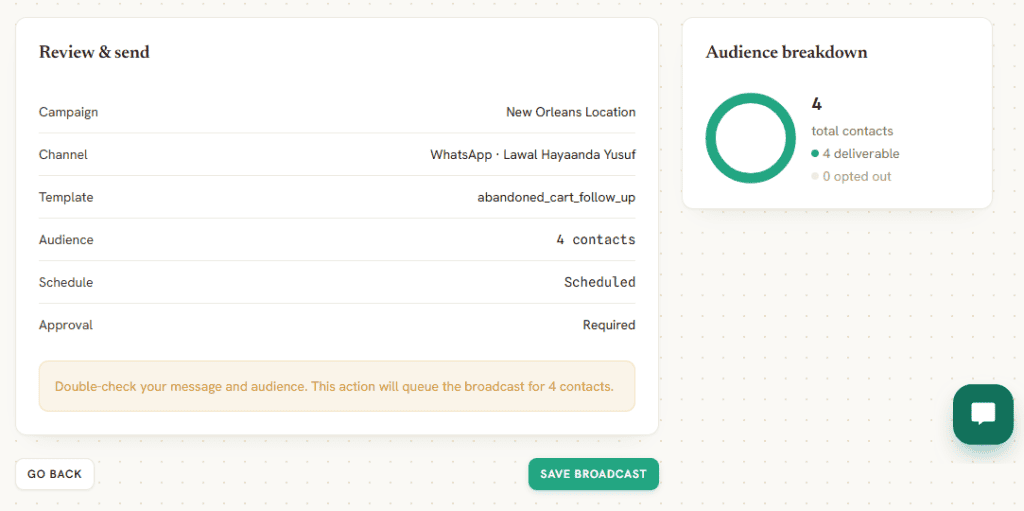
Before sending, DMly gives you a chance to review the campaign.
Check the audience, WhatsApp channel, message template, and schedule one more time. This is particularly important with broadcasts because a small mistake can be sent to hundreds or thousands of customers at once.
Once everything looks right, confirm the broadcast.
What Happens After You Send the Broadcast?
Sending the message is only the beginning. What makes a WhatsApp broadcast valuable is what customers do next.
With DMly, replies can come back into your shared inbox, where your team can continue the conversation. You can also use automation and AI agents to handle predictable responses and move more complex enquiries to a person.
WhatsApp Broadcast Ideas for Local Businesses
The best broadcasts usually have a specific reason for arriving. Instead of another generic “10% off everything” message, think about what would be genuinely useful to customers at that moment.
Here are some ideas for different local businesses:
| Business | WhatsApp Broadcast Idea |
| Salon or spa | Fill last-minute cancellations, announce new treatments or invite customers who are due for another appointment to book |
| Restaurant | Share a weekend menu, promote available tables or tell interested customers about a limited special |
| Gym or fitness studio | Announce new classes, invite previous trial customers back or promote spaces in an upcoming session |
| Dentist or clinic | Send appropriate scheduling updates or remind customers about services they’re eligible to hear about |
| Local retailer | Announce new stock, restocks or offers relevant to what particular customer segments buy |
| Tutor or coach | Share new lesson slots, upcoming courses or availability for the next term |
| Home service business | Send seasonal maintenance reminders or tell previous customers when a relevant service becomes available |
| Beauty professional | Promote appointment openings, new services or availability around busy periods |
WhatsApp Broadcast Rules and Limits to Know
WhatsApp broadcasts aren’t an unlimited license to message anyone whose phone number you have. Meta has rules around business messaging, particularly when you’re starting marketing conversations with customers.
A few things local businesses should pay attention to:
· Get customer opt-in
Customers should have agreed to receive WhatsApp messages from your business. Collecting their phone number for another purpose doesn’t automatically give you permission to send marketing broadcasts.
· Use approved templates when required
Businesses using the WhatsApp Business Platform generally need approved message templates to initiate conversations outside the customer service window. Marketing broadcasts fall under Meta’s template system.
· Understand the 24-hour customer service window
When a customer messages your business, a 24-hour window opens in which you can respond using free-form messages. Outside that window, an approved template is generally required to restart the conversation.
· Respect opt-outs
If someone asks to stop receiving marketing messages, remove them from future promotional broadcasts. Don’t keep messaging and hope they eventually change their mind.
· Watch your message quality
WhatsApp considers how recipients respond to business messages. Blocks, reports and other negative feedback can affect your ability to send messages.
· Messaging capacity isn’t always unlimited
WhatsApp applies messaging limits and eligibility rules to business-initiated conversations. The limits that apply can depend on your account and Meta’s current system.
How to Measure Your WhatsApp Broadcasts
Sending a broadcast to 5,000 contacts sounds impressive, but the size of the send tells you very little about how well the campaign worked. Track what customers did after receiving the message.
A simple funnel looks like this:
Sent → Delivered → Read → Clicked/Replied → Conversation → Booking or Sale
The metrics worth watching include:
- Delivery rate: How many messages successfully reached recipients?
- Read rate: How many delivered messages were opened?
- Reply rate: How many recipients responded to the broadcast?
- Click-through rate: If the message contains a link or button, how many people used it?
- Conversions: How many recipients completed the goal, such as booking an appointment or making a purchase?
- Opt-outs: Are people asking to stop receiving your broadcasts?
- Failed messages: Look for delivery problems that may need attention.
Which number matters most depends on the campaign. A salon advertising Saturday availability should care more about appointments booked than how many people simply read the message.
Also compare campaigns over time. You may discover that one customer segment replies more often, Tuesday broadcasts consistently beat Friday ones, or availability messages produce more bookings than discounts.
Final Thoughts
WhatsApp broadcasts work best when they still feel like useful messages rather than mass marketing.
That means getting permission, choosing the right audience, keeping messages short and giving customers a clear reason to respond. A smaller broadcast sent to 200 relevant customers can be far more useful than pushing the same promotion to 5,000 contacts.
DMly makes that process easier to manage. You can choose or retarget audiences, use WhatsApp templates, schedule broadcasts and then keep the customer journey moving when replies come in. A broadcast can lead naturally into a conversation, appointment, invoice or payment instead of ending once the message is delivered.
Writing about WhatsApp automation, bookings and growth for local business.
Turn WhatsApp into your busiest channel.
Start free and run message, bookings, payments and reviews in one place.
