
What Is an Omnichannel Inbox? Channels, Routing, and Setup (2026)
A customer finds your salon on Instagram and asks about balayage prices in a DM. Another sends a WhatsApp message asking if you can squeeze them in on Saturday. Someone comments “how much?” under your latest TikTok, and a fourth person is typing into the chat widget on your website while your receptionist is on the phone.
Each of those people expects a reply. Not tomorrow. Soon.
For most local businesses, “checking messages” has quietly turned into five different jobs on five different apps, usually shared between people who all assume someone else has already answered. That’s the problem an omnichannel inbox solves.
In this guide, we’ll cover what an omnichannel inbox actually is, how it differs from a multichannel setup or a plain shared inbox, which channels belong in it, how it works behind the scenes, and what to look for when you choose one. We’ll also show you how DMly’s unified team inbox handles all of this for busy local businesses, and how to set it up in an afternoon.
What Is an Omnichannel Inbox?
An omnichannel inbox is a single workspace where your team receives, replies to and manages customer conversations from every messaging channel your business uses. WhatsApp, Instagram DMs, Facebook Messenger, TikTok, Telegram, SMS and website live chat all arrive in one list, and your team answers from one screen.
That’s the visible part. What makes it “omnichannel” rather than simply “one screen” is what happens underneath:
- Every conversation is linked to one customer record, no matter which app it came from.
- The history travels with the customer. If someone messages you on Instagram in March and on WhatsApp in June, whoever replies in June can see the March conversation.
- Automation and AI work across channels instead of being built separately for each one.
- Team tools apply everywhere. Assignment, internal notes, tags and conversation statuses work the same way for a TikTok comment as for a WhatsApp message.
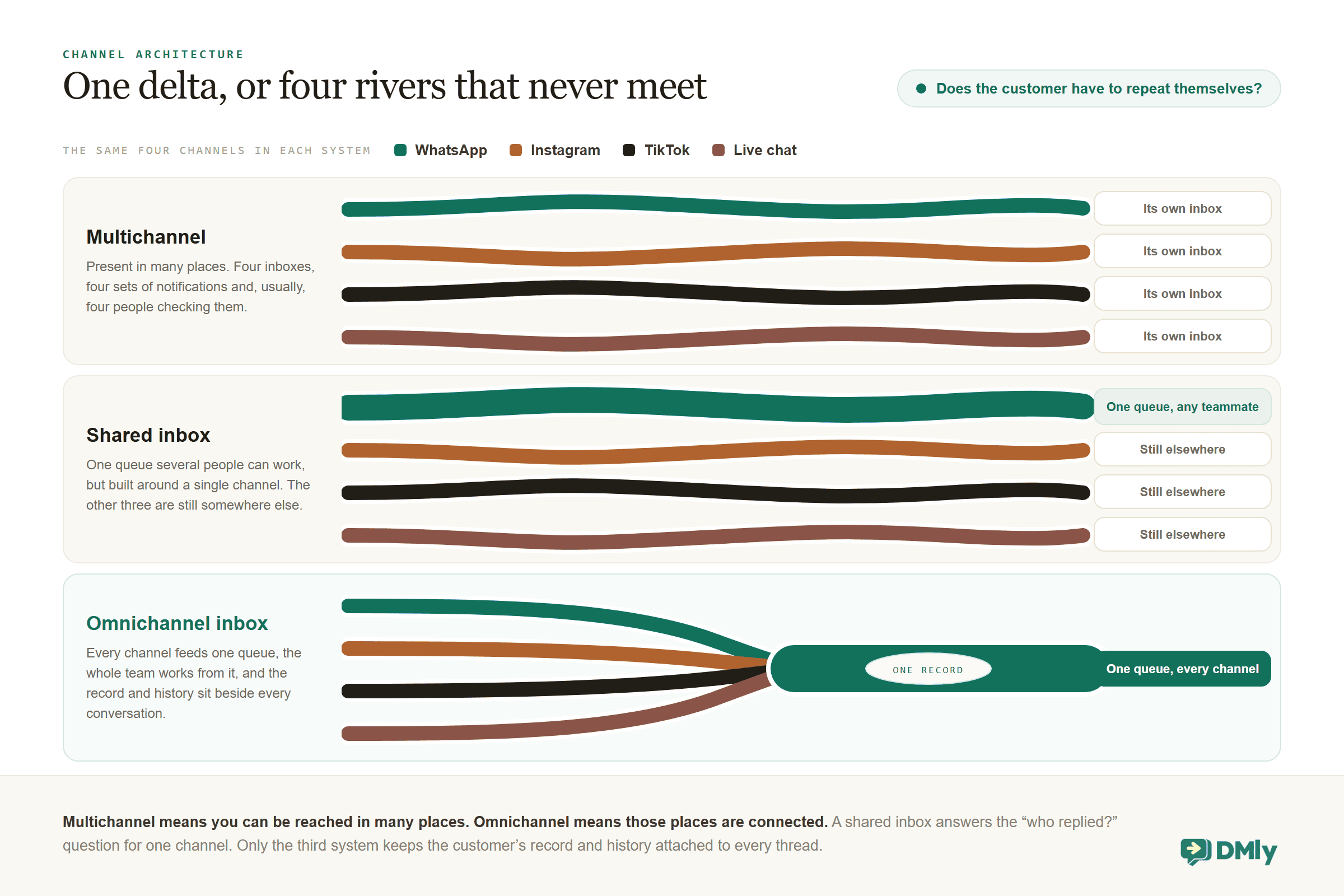
Put simply: multichannel means you can be reached in many places. Omnichannel means those places are connected.
A quick test: If a customer starts on one channel and continues on another, does your team have to ask them to repeat themselves? If yes, you have several inboxes. If no, you have an omnichannel inbox.
What an omnichannel inbox is not
It helps to clear up a few things people sometimes confuse it with.
- It isn’t a social media scheduling tool. Those publish posts. This handles the private messages and comments that come back.
- It isn’t a traditional helpdesk with tickets and email queues. Ticket numbers make sense for a software company. A salon customer asking “can I move my 3pm to 4pm?” wants a chat, not a case ID.
- It isn’t the WhatsApp Business app installed on two phones. Sharing one login gives you two people replying to the same customer, no record of who said what, and no way to see the Instagram conversation that started it.
Omnichannel vs Multichannel vs Shared Inbox
These three terms get used as if they mean the same thing, and the difference is exactly what you are paying for when you choose software.
Multichannel means your business is present on several channels. You have a WhatsApp number, an Instagram account and a Facebook page. Each one has its own inbox, its own notifications and, usually, its own person checking it.
A shared inbox means several people can work from the same queue. Many shared inboxes are built around one channel, often email or WhatsApp. They solve the “who replied?” problem for that channel, but the Instagram DMs are still somewhere else.
An omnichannel inbox does both jobs. Every channel feeds one queue, the whole team works from it, and the customer’s record and history sit alongside every conversation.
| Question | Multichannel | Shared inbox | Omnichannel inbox |
| Where do messages arrive? | Separate apps | One inbox, usually one channel | One inbox, every channel |
| Who can reply? | Whoever holds the phone | Any teammate | Any teammate, with a clear owner |
| Does history follow the customer? | No | Only within that channel | Yes, across channels |
| Can automation react to what happens? | Per app, if at all | Basic rules | Cross-channel flows and AI |
| What happens after the reply? | Switch tools to book, invoice or update the CRM | Same | Book, sell, invoice and update the record from the conversation |
Here’s the practical difference. Say a customer discovers your spa on TikTok, asks a question in the comments, then sends a WhatsApp message two days later to book the treatment they saw. With a multichannel setup, the person answering WhatsApp has no idea about the TikTok conversation. With an omnichannel inbox, both threads sit under the same contact, so the reply can pick up where the customer left off.
Which Channels Belong in an Omnichannel Inbox?
The honest answer is the channels your customers already use, and no more than that. For most local businesses that means WhatsApp first, then Instagram, and increasingly TikTok. Messenger, Telegram, SMS and website chat fill in the gaps.
One thing worth understanding early is that each platform sets its own rules about when a business can message someone. A good inbox shows you where you stand with each rule instead of leaving you to guess.
| Channel | What it’s best for | Messaging window (set by the platform) |
| WhatsApp (Business API) | Bookings, reminders, payments, support, broadcasts | 24 hours after the customer’s last message. Approved message templates can be sent outside that window. |
| Instagram DMs and comments | Discovery, product questions, comment-to-DM | 24 hours for automated replies, up to 7 days for a reply a person types by hand. |
| Facebook Messenger and Page comments | Local audiences, older customers, ads that click to Messenger | Same rules as Instagram. |
| TikTok DMs and video comments | Younger audiences, viral moments, comment questions | 48 hours after the last message. No templates. |
| Telegram | Communities and some regions | No window. |
| SMS (via Twilio, Plivo or an HTTP gateway) | A fallback when someone isn’t on WhatsApp | No window. |
| Website live chat | Visitors who aren’t in any app yet | No window. |
| Google Business Profile reviews | Not a chat channel, but reviews are conversations too | Reply any time. |
Notice the last row. Reviews aren’t messages in the usual sense, but a new one-star review is a customer talking to you in public. Platforms like DMly bring Google reviews into the same inbox as your chats, so a review gets the same attention (and the same owner) as a WhatsApp enquiry.
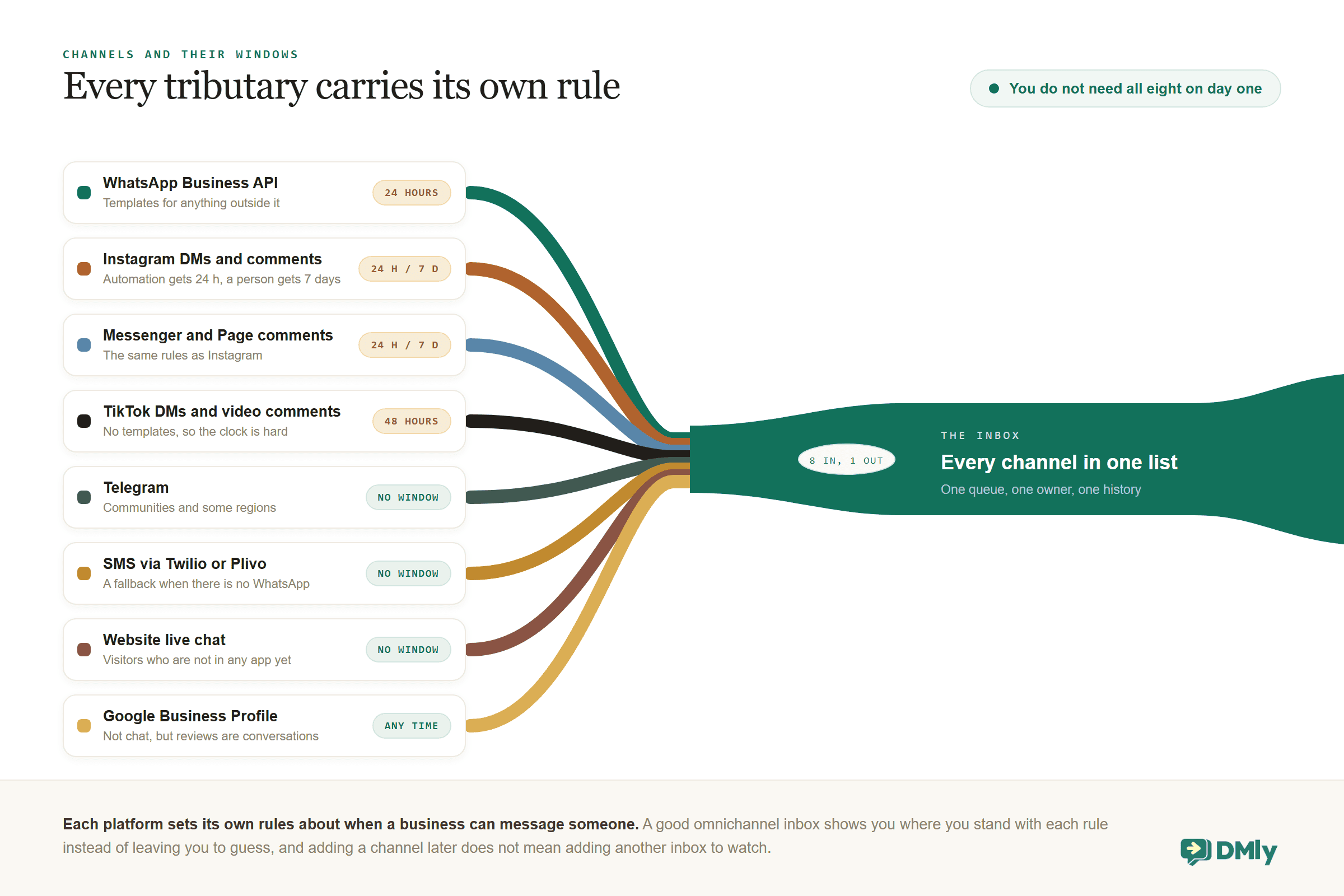
You don’t need all eight channels on day one. Start with the two or three that generate most of your enquiries and add the rest as they earn a place. The point is that adding a channel later shouldn’t mean adding a new inbox, a new process and a new person to watch it.
How an Omnichannel Inbox Works, Step by Step
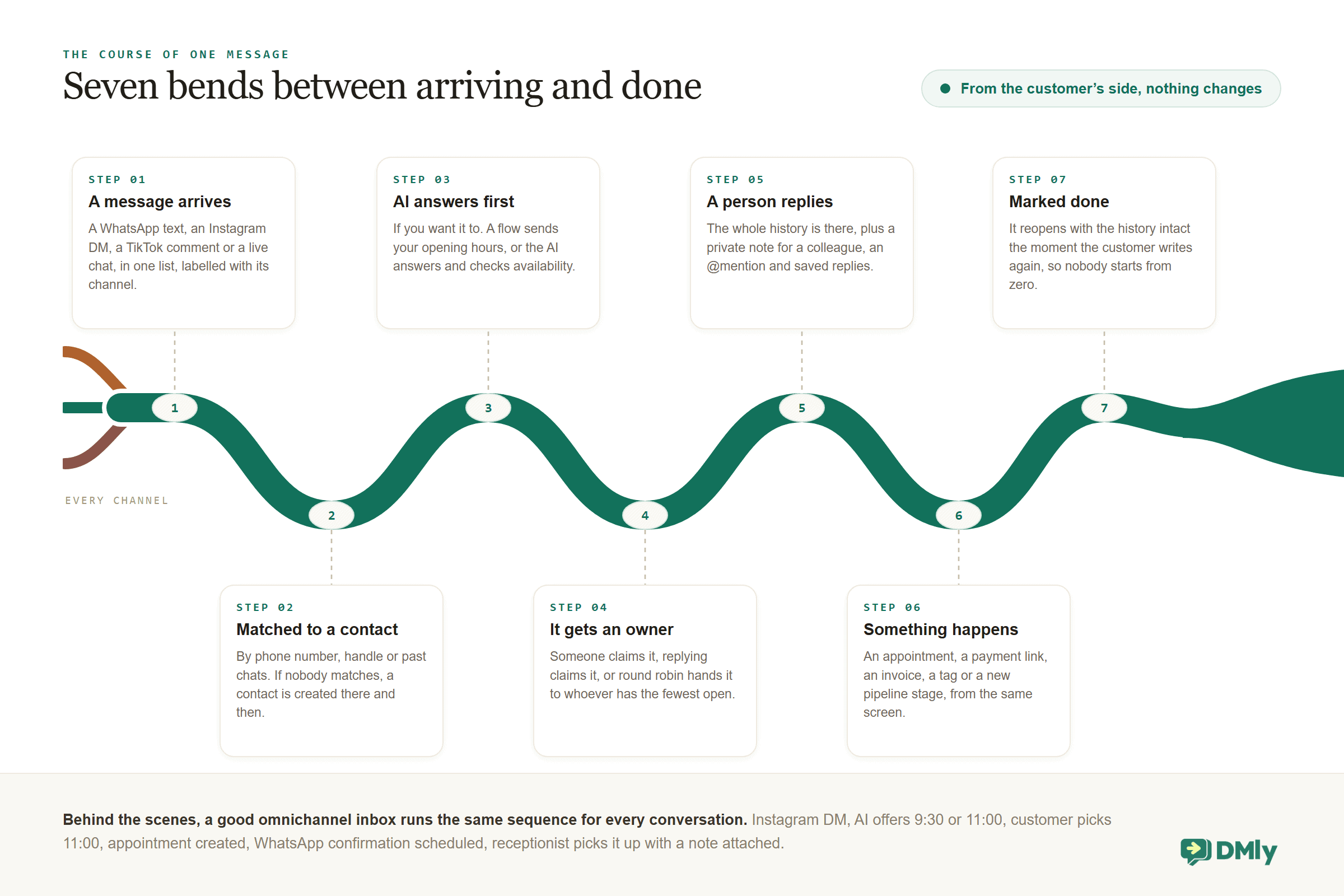
From your customer’s side, nothing changes at all: they message you wherever they like. Behind the scenes, a good inbox runs the same sequence for every conversation.
- A message arrives. It could be a WhatsApp text, an Instagram DM, a TikTok comment or a live chat from your website. It lands in one list, labelled with its channel, next to everything else.
- The inbox matches it to a contact. Using the phone number, social handle or previous chats, the message is attached to a customer record. If it’s someone new, a contact is created automatically. Everything your team knows about that person, including tags, notes, custom fields, past appointments and previous conversations, sits beside the chat.
- Automation or AI answers first (if you want it to). A flow can reply to a keyword, send opening hours or collect a few details. An AI agent can understand the question, answer from your business information, and check availability or take a booking.
- The conversation gets an owner. Either someone claims it, the person who replies becomes the owner automatically, or a round-robin rule hands new conversations to whoever has the fewest open ones.
- A person replies with full context. They can see the whole history, leave a private note for a colleague, @mention someone for help, or drop in a saved reply instead of retyping the same answer.
- Something happens. This is where a modern inbox earns its keep. The reply might create an appointment, send a payment link, raise an invoice, add a tag or move the contact to a new pipeline stage, all from the same screen.
- The conversation is marked done. When the customer writes again, it reopens with the history intact, so nobody starts from zero.
Put together, a typical conversation looks like this:
Instagram DM: “Do you have anything Saturday morning?”
→ AI checks availability and offers 9:30 or 11:00
→ customer picks 11:00, appointment created
→ WhatsApp confirmation and reminder scheduled
→ receptionist gets the conversation with a note: “New client, wants balayage, booked 11:00”
→ after the visit, a review request goes out automatically
The customer sees one smooth conversation. Your team sees one queue with a clear owner and a complete history.
Why This Matters (With the Numbers)
It is tempting to treat messaging as a small part of running a business, and the numbers say otherwise.
- 1 billion+ active conversation threads between people and businesses every day across WhatsApp, Messenger and Instagram. Meta, Q3 2025 earnings call
- 3 billion+ monthly active WhatsApp users, with the platform still growing in the United States. Meta, 2025 earnings calls
- 90% of customers rate an immediate response as important or very important when they have a service question, and most define “immediate” as ten minutes or less. HubSpot Research
- 63% of consumers say they would switch to a competitor after just one bad experience, up 9% year on year. Zendesk CX Trends 2025
Two things stand out. First, customers already message businesses at enormous scale, and they’re spreading that behaviour across more apps, not fewer. Second, their patience is thin. A slow reply on Instagram doesn’t just cost you that enquiry; it can cost you the customer.
There’s an upside to getting it right. Harvard Business Review’s well-known study of 46,000 shoppers found that 73% used multiple channels during their journey, and those omnichannel customers spent more, both in store and online, than customers who stuck to a single channel. People who move between your channels are your most engaged customers. They deserve a team that can follow the conversation.
Here’s what that means in practice for a local business:
- Fewer enquiries slip through. Nobody has to remember to check five apps. New conversations arrive in one place, and unassigned ones are easy to spot.
- Faster replies. Staff see new messages sooner, and AI or automation can acknowledge and answer routine questions instantly, including outside opening hours.
- Everyone knows who owns what. No more two people replying to the same customer, or everyone assuming someone else did.
- Customers stop repeating themselves. The person replying can see the last conversation, the last booking and the notes.
- Routine work gets automated. “How much?”, “Are you open today?”, “Can I book?” are predictable. Let AI handle them and save your people for the conversations that need judgement.
- You can grow without hiring for each new channel. When TikTok suddenly sends you 40 enquiries a day, you add a channel, not a headcount.
- You learn where customers come from. When bookings and sales are created from the conversation, you can see which channel actually produces them.
The Features That Separate the Real Thing From a Pretty Dashboard
Plenty of tools will show you messages from several apps on one screen, and far fewer do the things below. Use this as a checklist when you compare options.
- One customer record across channels The Instagram handle, the WhatsApp number and the email should resolve to the same person, with a way to merge duplicates. Tags, custom fields and pipeline stage live on the contact, not on the conversation.
- Assignment and fair distribution Manual assignment, automatic assignment when someone replies, and an optional round-robin so new conversations go to whoever has the fewest open ones. Plus an “unassigned” view for triage.
- Internal notes and @mentions Ask a colleague a question inside the conversation without the customer seeing it, and get notified when you’re mentioned.
- Saved replies and approved templates Stock answers inserted in one click, and WhatsApp templates for messages outside the 24-hour window.
- Conversation statuses and filters Open, done and archived. Filters for unread, unassigned, channel and tag. Search that reaches old threads, not just the last hundred.
- DMs and comments together A TikTok or Instagram comment is often the start of a sale. It should sit next to the private thread with the same person, not in a separate tool.
- AI and humans that don’t talk over each other When a person replies, the bot should pause automatically, with a clear way to resume it. Flows that were mid-way should park, not break.
- Actions inside the conversation Booking an appointment, sending a payment link, raising an invoice or sharing a product should happen from the chat, not in a different tab.
- Channel rules made visible The 24-hour WhatsApp window, the 7-day Instagram window and TikTok’s 48-hour window should be obvious in the interface, with the right options offered when a window has closed.
- Notifications and roles Desktop alerts for new messages, a bell for mentions and assignments, and roles that control who sees the inbox and whether phone numbers are masked.
- Reporting that ties channels to outcomes Not just message counts, but which channels produce bookings, leads and sales.
If a product ticks the first four and none of the rest, it’s a shared inbox with extra tabs. That’s fine for some teams, but it isn’t omnichannel.
Where AI Fits In
Bringing every conversation into one place solves the “where are the messages?” problem, but it does not answer them. That’s where AI has changed what an inbox can do.
An AI agent trained on your business information can reply to common questions the moment they arrive, on any connected channel. It can understand intent, so “can I come in Saturday morning?” is treated as a booking request even though the word “appointment” never appears. It can collect the details your team needs, such as which service, which day and which staff member, before a person gets involved. And in the better platforms, it can act: check availability, book, reschedule, cancel, add a tag or move a lead to the next stage.
The part people worry about is the handover. Nobody wants a customer stuck arguing with a bot, and nobody wants a bot and a receptionist replying to the same message at the same time. Look for three things:
- Clear boundaries. You decide what the AI handles (FAQs, lead qualification, straightforward bookings) and what always goes to a person (complaints, unusual requests, anything sensitive).
- Automatic pause. When a human replies, automation should stop, and the human should be able to resume it later.
- Context on handover. The person taking over should see what the AI already asked and answered, so the customer never repeats themselves.
Handled that way, AI doesn’t replace your team. It takes the repetitive first layer of conversations off their plate and gives them a head start on the rest.
What It Looks Like in Different Businesses
The mechanics are the same everywhere; the conversations are not. Here’s how it plays out for a few of the businesses we work with.
Salons and spas
Instagram is where people find you, WhatsApp is where they book. The inbox connects the two: a comment on your before-and-after reel becomes a DM, the DM becomes a Saturday appointment, and the reminder and review request go out on WhatsApp.
Clinics and dental practices
Confirmations, reminders and reschedules dominate. Automation handles the routine, patients reply in the same thread, and anything sensitive is routed to a named person. Recall messages bring lapsed patients back.
Restaurants and cafés
A TikTok comment asking about the menu, a WhatsApp reservation, a Messenger question about a birthday booking. One queue for front of house, with the menu, a payment link or the reservation created from the chat.
Gyms and studios
Trial enquiries from Instagram, class bookings on WhatsApp, membership questions on Messenger. Every member has one record, so the person answering can see the plan, the last class and the open balance.
Ecommerce and D2C brands
“Where is my order?” arrives on every channel. Order updates, cart recovery and support run from one inbox, and the customer’s purchase history sits next to the chat.
NGOs and community organisations
Supporters ask questions on WhatsApp, volunteers coordinate on Telegram, donors reply to Instagram posts. One inbox keeps a small team on top of it, with segments for the next broadcast.
An Omnichannel Inbox Can Do More Than Manage Messages
A shared inbox helps you organise conversations. The point of an omnichannel one is that it lets you do something with them.
Think about why people message a local business in the first place. They want to book, buy, ask what something costs, pay, or get help. If the inbox is connected to the rest of your business, most of that can happen in the conversation instead of sending the customer somewhere else.
Turn Conversations into Bookings
Somebody messages your salon on Instagram asking whether you have anything on Friday. That conversation can move straight into booking: show the available times, create the appointment, and send the confirmation and the reminders. DMly has its own calendar and can also connect to an external one. The same shape works for dental appointments, spa treatments, consultations and fitness classes.
Sell Products and Services in the Chat
Sometimes the customer has already decided. You can build your products and services inside DMly and share them in the conversation, so they can look at the options, pick one and move towards paying without anyone copying product details between systems. For a service business that is anything from a haircut to a personal training session.
Create Invoices and Collect Payments
A conversation can end in payment rather than in admin. Your team can raise an invoice and collect the money as part of the same thread, so agreeing a service on WhatsApp does not have to finish with “we will email you an invoice later”. You keep going while the customer is still ready to pay.
Keep Your Customer Records Up to Date
Every useful conversation tells you something worth keeping. DMly’s built-in CRM holds contacts, tags, custom fields, notes and activity in one place, and you can move leads along a visual sales pipeline as the conversation progresses. It means whoever picks up the chat can see more than the message in front of them.
Automate What Happens Next
This is where the parts start working together. A new enquiry triggers a chatbot. A completed booking triggers a reminder. A new lead gets tagged. Somebody who needs help gets routed to the right person. Instead of your team remembering every follow-up, the follow-ups are built around what the customer actually does.
Ask Happy Customers for Reviews
The relationship does not have to stop at the appointment. DMly can send a review request over WhatsApp or SMS after a visit and help you handle the replies through its Google Business Profile tools, which is the simplest way a local business turns a good visit into a public review.
So the value of an omnichannel inbox is not seven messaging apps squeezed onto one screen. It is that the conversation connects to the work that comes next: bookings, sales, payments, follow-ups, customer records and reviews.
Why DMly Is the Best Omnichannel Inbox for Local Businesses
There are plenty of shared inboxes built for support teams at software companies, and your salon is not one of those. DMly is built for the businesses in the examples above: salons, clinics, gyms, tutors, restaurants, ecommerce brands and non-profits that live on WhatsApp and social messages and need those conversations to turn into bookings, sales and repeat visits. Here’s what that looks like in the inbox itself.
Every channel your customers use, in one list
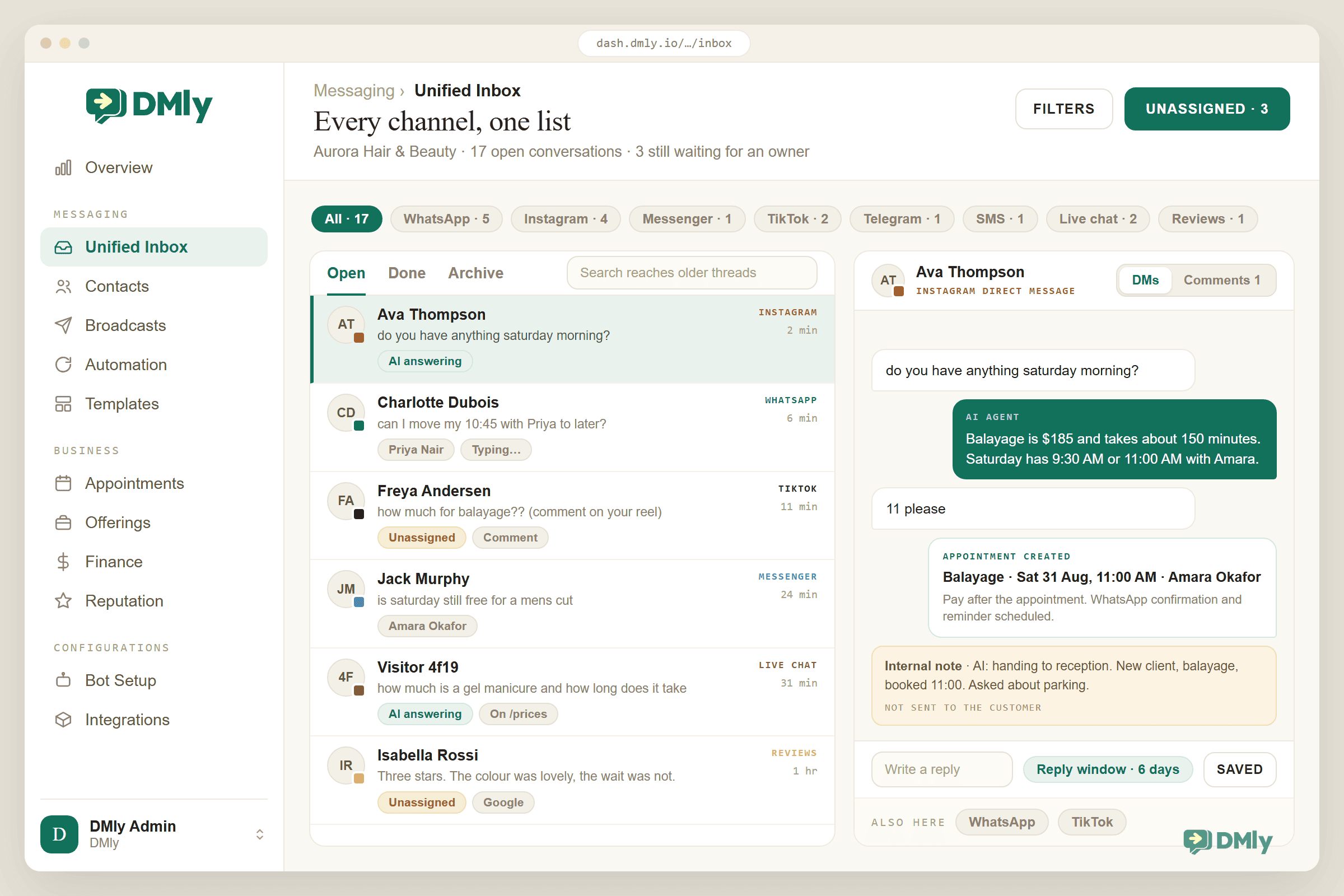
DMly’s inbox brings together WhatsApp, Instagram, Messenger, TikTok, Telegram, SMS, the live chat widget for your website, and reviews from your Google Business Profile. Each channel appears as a filter, so you can look at everything at once or just the WhatsApp queue.
Public comments and private messages are handled together but kept separate. A DMs / Comments toggle lets you switch between someone’s Instagram or TikTok comments and their direct messages, and one contact can have both threads. That matters, because a lot of local business sales start with a comment.
Built for a team, not a phone
Conversations sit in Open, Done and Archive folders, and a conversation only closes when someone marks it done or an automation does. If the customer replies later, it reopens on its own. You can filter by unread, by unassigned, by channel or by tag, and search reaches older threads.
Ownership is clear. Replying assigns the conversation to you, you can hand it to a teammate from the details panel, and admins can switch on round-robin so every brand-new conversation goes to whoever has the fewest open chats. Internal notes and @mentions keep the discussion between colleagues invisible to the customer, typing indicators show when a teammate is already replying, and saved replies put your stock answers one click away.
Roles control who sees the inbox at all, and whether a teammate sees full phone numbers or masked ones. If your team is small today, none of that gets in the way. If it grows, it’s already there.
AI and people in the same conversation, without stepping on each other
This is where DMly’s inbox is genuinely different from most. Your AI agent can answer FAQs from your own documents, web pages and FAQs, and it can act: list your bookable services, check available times, book, reschedule or cancel an appointment, book a class, add tags, move a contact’s CRM stage, leave a note, and hand the conversation to a human or into the round-robin queue.
When a person replies, automation stops by default. There’s an explicit Pause bot (human takeover) control in the details panel and a matching Resume bot when you’re done. If a flow was mid-way, it parks rather than breaks, and a banner lets you resume, skip a step or end it. You choose the model behind the agent (OpenAI, Claude, Google Gemini or DeepSeek), and you set the boundaries for what it handles.
The conversation can actually go somewhere
Most inboxes stop at the reply. DMly’s doesn’t, because the rest of the business is in the same product:
- Appointments and classes with staff availability, deposits, reminders and a booking page, created from the chat or by the AI.
- Services and products you can share in the conversation, and invoices and payments through Stripe, PayPal, Paystack, Razorpay, MyFatoorah or Mercado Pago.
- A built-in CRM with tags, segments, custom fields, pipeline stages, notes and a full client profile, all visible beside the conversation.
- Review requests after a visit, and Google reviews you can read and answer from the same inbox.
- Broadcasts to segments, a no-code flow builder with triggers on channel, contact, booking, commerce and finance events, and WhatsApp calls you can make and take from the inbox.
That’s the practical definition of omnichannel for a local business. Not “seven apps on one screen”, but one place where a message becomes an appointment, a payment, an updated customer record and a review request without anyone leaving the conversation.
| Capability | Typical shared inbox | DMly omnichannel inbox |
| Channels | Email or WhatsApp, sometimes both | WhatsApp, Instagram, Messenger, TikTok, Telegram, SMS, live chat, Google reviews |
| Comments | Separate tool | Instagram, Facebook and TikTok comments beside the DMs |
| Team | Assign, notes | Assign, round-robin, notes, @mentions, typing indicators, saved replies, roles |
| AI | Suggested replies | AI agent that answers, books, reschedules, tags and hands over; pause and resume per conversation |
| After the reply | Copy details into other tools | Book, sell, invoice, collect payment, update CRM, request a review from the chat |
| Built for | Support desks | Salons, clinics, gyms, tutors, restaurants, ecommerce brands, NGOs |
DMly is used by more than 12,000 local businesses, and you can try the whole platform free for seven days without a card. If your team is currently juggling the WhatsApp Business app, an Instagram login and a shared spreadsheet, that’s usually enough time to feel the difference.
Bring every conversation into one inbox
Connect WhatsApp, Instagram, TikTok and the rest, add your team, and let AI handle the routine questions. Free 7-day trial, no credit card.
How to Set Up Your Omnichannel Inbox in DMly
You don’t need to move everything at once, and you shouldn’t. Here’s the order that works for most businesses.
- Create your workspace. Sign up, name your business and set your timezone and opening hours. This becomes the central place for conversations, contacts and automations.
- Connect the channels that matter most. Go to Integrations, add your WhatsApp number through the official API, then connect Instagram and Messenger from your Facebook Page. Add TikTok, Telegram, SMS and the website widget as you need them. Each channel starts appearing in the inbox as soon as it’s connected.
- Invite your team and set roles. Give receptionists, sales and support their own logins instead of one shared account. Decide who can see the inbox, and whether some roles should see masked phone numbers.
- Decide how conversations get an owner. Leave the default (whoever replies owns it), or turn on Give new conversations an owner so new chats are shared out round-robin. Agree a simple rule for triage: someone checks the Unassigned view a few times a day.
- Automate the questions you answer every day. Open the flow builder and start with two or three: opening hours, prices, and “can I book?”. A quick automation for a keyword takes minutes; a multi-step flow with conditions can come later.
- Train your AI agent. Add your services, prices, policies and FAQs as knowledge, give the agent a clear persona and boundaries, and turn on the booking tools if you want it to check availability and book. Test it in a few real conversations before you let it loose.
- Connect the rest of the journey. Set up your bookable services and staff, connect a payment gateway, and switch on review requests after completed appointments. Now a message can become a booking, a payment and a review without leaving the inbox.
Start small: If WhatsApp and Instagram bring you most enquiries, start there with one automation and one AI boundary. Add channels and flows once the team is comfortable working from one queue. It’s far easier to add than to untangle.
Best Practices Once Everything Is in One Queue
The software gets you organised; these habits are what keep you that way.
Give every conversation an owner
Unowned conversations are where enquiries go to die. Use assignment or round-robin, and make the Unassigned view someone’s responsibility during opening hours.
Agree response-time targets by type
A “can I book for this afternoon?” needs a reply in minutes. A “do you do gift vouchers?” can wait an hour. Write the targets down, and let AI or an auto-reply acknowledge anything a person can’t reach quickly.
Keep tags few and useful
Tags are helpful until you have fifty and nobody remembers what half of them mean. Pick a short list that drives action: New Lead, Booked, Payment Pending, VIP, Needs Follow-Up. Segments and broadcasts get much easier.
Be explicit about what AI hands over
Routine questions, lead qualification and straightforward bookings are good AI territory. Complaints, refunds, medical questions and anything emotional should have a clear route to a person, and the person should see the AI’s conversation so far.
Write notes the next person will thank you for
“Prefers Sara, allergic to a product, always runs 10 minutes late” is worth more than a dozen fields nobody fills in. Encourage short, specific notes on the contact.
Respect the channel rules
Use approved templates for WhatsApp messages outside the 24-hour window, keep TikTok replies inside 48 hours, and never treat a broadcast as a substitute for a real reply.
Look at where bookings come from, not just messages
Once bookings and payments happen inside the conversation, you can see which channel produces customers rather than just chatter. That should shape where you spend your marketing time.
Common Mistakes to Avoid
- Connecting everything on day one and automating nothing. You’ve moved the chaos, not reduced it. Connect what matters, then automate the repetitive layer.
- Letting the bot and the team reply at the same time. Make sure replies pause automation, and teach the team to resume it when they’re done.
- Treating comments as marketing, not sales. “How much?” under a reel is a lead. It belongs in the inbox with an owner.
- Sharing one login. You lose accountability, notes and history the moment two people use the same account.
- Ignoring the messaging windows. A missed WhatsApp window means you need a template, and a missed TikTok window means you can’t reply at all. Build reminders into your process.
- Choosing a tool built for a different business. A ticketing helpdesk designed for software support will feel heavy for a salon. Pick something built around bookings, payments and local customers if that’s what you are.
Final Thoughts
Customers will always message you wherever is most convenient for them. Today it’s WhatsApp and Instagram; next year another app may join the list. Your team shouldn’t have to chase those conversations across a growing pile of apps, and your customers shouldn’t have to repeat themselves every time they switch.
An omnichannel inbox gives you one queue, one customer record and one set of tools for every channel. With DMly, it also gives you AI to handle the routine, a team layer that scales, and the bookings, payments, CRM and reviews that turn a reply into revenue. Start with the channels you already use, automate the questions you already answer, and let the inbox grow with the business.
Frequently Asked Questions
What is the difference between an omnichannel inbox and a shared inbox?
A shared inbox lets several people work from one queue, usually for one channel such as email or WhatsApp. An omnichannel inbox brings every channel (WhatsApp, Instagram, Messenger, TikTok, Telegram, SMS, live chat) into that queue and keeps each customer’s history connected across them. Every omnichannel inbox is a shared inbox; most shared inboxes aren’t omnichannel.
Do I need the WhatsApp Business API to use an omnichannel inbox?
Yes, if you want WhatsApp in it. The WhatsApp Business app on a phone can’t feed a shared, multi-user inbox. Platforms like DMly connect your number through the official WhatsApp Business API, which is what allows multiple teammates, automation, templates and integrations. You can usually keep your existing number.
Can AI and my team work in the same inbox without talking over each other?
They can, if the inbox is designed for it. In DMly, a human reply pauses automation for that conversation by default, there’s an explicit pause and resume control, and a flow that was mid-way parks with its progress saved. The person taking over can see everything the AI already said.
Will customers notice I’m using one inbox?
Only in a good way. They keep messaging on the app they chose and get faster, more consistent replies from people who already know their history. Nothing about the experience on their side changes.
How many channels should I connect first?
Start with the two or three that bring most of your enquiries, which for most local businesses means WhatsApp and Instagram, then TikTok or Messenger. Add the others when they earn a place. Adding a channel later shouldn’t mean adding a new process.
Is this only worth it for big teams?
No. A one-person business benefits from having every message in one place with AI handling the routine questions. The team features (assignment, round-robin, notes, roles) simply stay out of the way until you need them.
Can I use it on my phone?
Yes. DMly’s inbox works on mobile with one pane at a time: open a conversation to read and reply, and go back to the list. Desktop notifications and the notification bell keep the team informed when the tab is in the background.
Writing about WhatsApp automation, bookings and growth for local business.
Turn WhatsApp into your busiest channel.
Start free and run message, bookings, payments and reviews in one place.
