
Best TikTok DM Automation Tools for Businesses in 2026

Here is a piece of advice this page used to give, which we are withdrawing. If you have read anything about Instagram automation, you know the trick: ask people to comment a word under your video, and the tool sends them a private message. It works beautifully on Instagram. It does not work on TikTok at all, and no tool on this page can make it work, because TikTok’s API has no comment-to-DM mechanism to connect to. That one fact changes which TikTok DM automation tools are worth paying for, so it is where this comparison starts rather than where it ends.
There is real business on the channel to go after. 93% of daily TikTok users say they would use the platform to research products before buying, according to research Ipsos ran for TikTok in 2026 across 9,000 social media users in 12 markets. A good number of those people are typing their research straight into a business inbox, and most businesses still have nobody answering.
This guide compares six tools that can answer for you: what each one genuinely does on this channel, and what each one costs. Every price below was read on the vendor’s own pricing page on 6 September 2026, and where we could not read one, the section says so plainly rather than leaving a gap.
One thing to get out of the way first: we build DMly, which is the first tool on this list. Rather than pretend otherwise, we have written every entry to the same standard, described what each competitor is genuinely good at, and said plainly where another tool fits better than ours. Verify anything here that matters to your decision, starting with our own claims.
What a TikTok DM Automation Tool Actually Does
It answers the messages you are already getting, and it decides what happens next. Instead of someone on your team typing out every “How much?”, “Can I book?” and “Do you deliver?”, the tool handles the ones that repeat and passes on the ones that do not.

The capability range is wide. At the simple end, a tool sends one automatic reply when somebody messages your account. At the other end, it matches keywords, runs multi-step conversations, uses AI to understand a question that was not phrased the way you expected, captures the customer’s details, and hands the thread to a person with everything already said still attached. For a salon that means a price range and two slots. For a restaurant it means today’s hours, the delivery area and a menu. For a retailer it means getting a serious buyer in front of a human before they lose interest.
If you want the mechanics rather than the shortlist, our TikTok DM automation setup guide walks through connecting an account and building the first flow.
Three TikTok Rules That Decide Which Tool You Need
TikTok is stricter than any other messaging channel, and the limits are TikTok’s, not the tools’. A vendor cannot buy its way around them. Read these three first, because they rule out about half of what a TikTok automation tool is usually sold on.
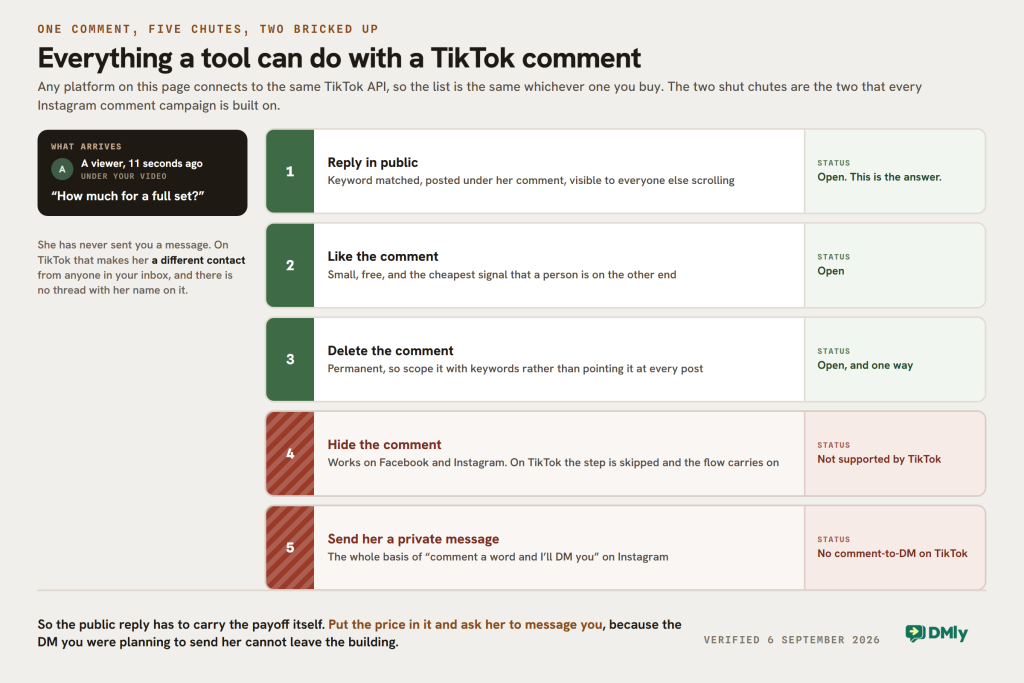
1. A comment can never become a DM
On Facebook and Instagram, a comment gives you permission to open a private thread with somebody who has never messaged you. Meta calls it a private reply, and it is the engine behind every “comment WANT and I’ll send it over” campaign you have seen.
TikTok has no equivalent. It also treats a commenter and a message sender as two separate people even when they are the same person, so there is not even a thread to open. What you can do to a TikTok comment is reply to it in public, like it, or delete it. Hiding is not supported either.
The practical effect is that on TikTok the public reply is the answer, not a doorway to one. Put the actual payoff in the public comment and ask people to message you, rather than promising a DM that will never arrive. Chatfuel’s own TikTok product describes exactly that sequence on its landing page: the bot replies in the comments asking the person to message, and only takes over “once the client writes in”.
We have written up the difference in detail in our comparison of Instagram and TikTok comment automation, and the mechanics of the TikTok side in our TikTok comment automation guide.
2. You get 48 hours, and there is no way to buy more
The conversation closes 48 hours after the customer’s last message. Inside the window a bot or a person can send freely. Outside it, every send is blocked, including a reply your team types by hand.
WhatsApp gives you paid templates to reopen a closed conversation. TikTok has nothing of the sort: no templates, no notification opt-in, no extension for a human reply. The customer has to message you again first. You also cannot start a TikTok conversation, so there is no cold outreach, no broadcast and no chat link to hand out.
SleekFlow says the same thing on its own TikTok page, which is worth knowing because it is a competitor confirming a limit rather than a supplier explaining one away: TikTok “does not allow traditional broadcast lists like WhatsApp Business API or SMS”.
3. Text and images only, and buttons fail loudly
TikTok has no buttons, no quick replies and no carousels. If you reuse a WhatsApp flow that offers three tappable choices, TikTok rejects the whole message: the customer receives nothing at all, not even the text, the send is marked failed, and the rest of that automation stops running.
Anything you want a customer to choose has to be written out as plain text. In DMly, the booking step already handles that for you on TikTok by sending the available times as a numbered list and closing with “Reply with a number to book”, but any flow you build yourself needs the same treatment. Images are allowed, as JPG or PNG under 3 MB.
None of this makes TikTok a bad channel. It makes it a channel for answering people who came to you, which is exactly what the 93% figure above describes. It is a poor channel to build your outbound marketing on, and any tool sold to you on that basis is selling you something TikTok will not deliver.
What to Look for in a TikTok DM Automation Tool
With those three rules in hand, the shopping list changes. Five things are worth checking, and the second and third are the ones vendor pages tend to blur.
An official TikTok integration, and proof of it
The platform should connect through TikTok’s own Business Messaging API rather than a browser bot driving a logged-in session. An official integration is more reliable and keeps you inside TikTok’s rules. Ask which TikTok permissions the provider holds, because access varies between tools and TikTok has to approve an app for messaging and comment permissions individually.
What it can do to a comment, stated honestly
This is the criterion most vendor pages blur. Since a TikTok comment cannot become a DM, the useful questions are narrow: can the tool reply publicly with a keyword-matched answer, can it like a comment, can it delete one, and can it do all that without a person watching. Anything described as “comment-to-DM on TikTok” deserves a direct question to the vendor about how it works.
Which comments it can even see
Comment automation has a ceiling nobody advertises. In DMly, comments are collected from your 10 most recent videos and the 30 most recent comments on each, and anything past that is never seen and cannot be collected later. If a video goes properly viral, the tail of the comments is gone. Ask any vendor what their equivalent limit is before you plan a campaign that depends on catching everybody.
AI that answers questions nobody scripted
Pre-written replies work when customers follow the script, and real customers rarely do. “Are you guys around Sunday?” and “What are your Sunday opening hours?” are the same question wearing different clothes. Look for a platform that lets you feed its AI accurate information about your business, and check what the AI costs, because that is where the pricing models diverge most sharply.
What happens after the automated reply
Some conversations need a person, and on a 48-hour clock they need one quickly, so a bot should be able to pass the thread over with the history attached. Check whether seats are included or charged per head, because on some of these platforms your third employee costs more than your subscription. Then look further along: whether the booking, the payment and the customer record live in the same place, or whether you will be paying for a calendar, a CRM and a payment tool as well. A shared inbox across your channels is worth more than a second standalone tool.
The Six TikTok DM Automation Tools, Side by Side
Here is the shape of each tool before the detail. The comment column says what the platform can do to a TikTok comment, since none of them can turn one into a DM.
| Tool | Best for | What it does with a TikTok comment | Entry price, read 6 Sep 2026 | What the price counts |
|---|---|---|---|---|
| DMly | Local and service businesses | Keyword-matched public reply, like, delete | $29/mo billed yearly | The workspace: seats, contacts and AI replies by plan |
| Respond.io | Teams handling high conversation volumes | No TikTok comment automation in their help centre | $79/mo billed yearly | Monthly active contacts, plus users above the included count |
| SleekFlow | Conversational sales teams | Not described on their TikTok page | US$79/mo billed yearly | Monthly active contacts, seats and channels |
| Manychat | Social marketing and lead capture | Not verifiable by us today, see below | Published, but not verifiable by us | Active contacts a month |
| Chatfuel | AI-led TikTok conversations | Replies to every comment on every post | Free tier; AI PRO $49/mo billed yearly | Conversations, with AI on the paid tier |
| Kommo | CRM-focused sales teams | Keyword reply and auto-like on comments | $25 per user/mo, billed six months up front | Every seat, every month |
How we compared these tools: every capability claim below comes from the vendor’s own current product pages, pricing pages, help centre or documentation, read on 6 September 2026, and every price is quoted with the billing period it belongs to. We have not graded anybody’s product on how good it feels to use, because that would mean having run all six on a current plan this month, and we have not. Capabilities on this channel change quickly, so verify anything decisive with the vendor before committing.
1. DMly: Best Overall for Local Businesses
DMly is an AI-powered business messaging platform that connects TikTok with the rest of your customer communication. It suits salons, restaurants, dentists, spas, fitness studios and other local businesses that turn conversations into bookings and sales.
On TikTok you get three triggers: an incoming DM, a comment on one of your videos, and an outgoing message, which is useful for asking a satisfaction question once a chat is handled. All of them accept keywords, matched on any message, an exact phrase, a prefix or text contained anywhere. You can build the reply as a quick automation or lay out the whole journey in the visual flow builder.
What TikTok comment automation means here, precisely: a flow can post a keyword-matched public reply under a comment, like it, or delete it. It cannot message the commenter, because TikTok offers no way to do that. Hiding a comment is not supported either, and a flow that tries it notes that the step was skipped and carries on.
AI takes it further. You can train an AI agent on your own business so it answers FAQs, recommends services, captures leads and works overnight, then hands a conversation to a colleague with the history attached. AI agents are included on every plan; what differs is the monthly allowance, at 500, 5,000 and 20,000 AI replies, with the option to bring your own provider key on the top plan. The shared inbox covers TikTok, WhatsApp, Instagram, Messenger, Telegram, SMS and Live Chat, with assignment, private notes and saved replies so several people can work the same queue without colliding.
Where DMly separates itself is what happens after the reply. A customer sees your video, sends “BOOK”, talks to your AI agent, picks a service and books a real appointment, because bookings, class scheduling, products and services, subscriptions, invoices and payment collection are part of the same product rather than a link to somewhere else. There are native Shopify and WooCommerce integrations for ecommerce, and if TikTok is one channel among several, you are not standing up a separate automation system for each one.
Pricing, read on the pricing page on 6 September 2026: Starter $29, Growth $65 and Premium $149 a month, each billed yearly, with a 7-day trial that does not ask for a card. Seats are 3, 6 and 15, and additional seats are $10 a month. WhatsApp messages are billed by Meta directly at Meta’s own rates, with no markup added by DMly. See the DMly pricing page for the current numbers.
Where DMly is the wrong answer: on TikTok specifically, DMly cannot broadcast, cannot generate a chat link or QR code, and cannot see comments beyond your 10 most recent videos. Those are TikTok’s limits rather than ours, but if TikTok is the only channel you care about and you want outbound campaigns on it, no product on this page will give you that.
Best for: local and service businesses that want TikTok DMs and comments answered, and then want the booking, the payment and the customer record to happen without a second system.
2. Respond.io: Best for High Conversation Volumes
Respond.io is a conversation management platform built around routing, workflows and team collaboration. Its TikTok Business Messaging integration brings TikTok threads into the same inbox as WhatsApp, Instagram, Messenger and Telegram, and their integration page still carries a Beta label on it, which is worth noticing before you build a process on top of it.
The routing is the reason it earns a place here. Workflows can qualify an enquiry, assign it by team, shift or round robin, and escalate it, and their AI Agents answer FAQs, qualify leads and recommend products. There is a genuine sales angle for anyone spending on the platform: Respond.io supports TikTok Messaging Ads, so an ad interaction can start a workflow and the conversation carries the campaign it came from. Their integration page also lists a win at the TikTok Partner Innovation Awards 2026 for messaging technology.
What we could not find: anything about TikTok comment automation. Their help centre documents comment auto-reply and private replies for Facebook and Instagram, and their published index of every help article carries no TikTok comment page at all. If comments matter to you, ask them directly rather than assuming parity across channels.
On bookings, their own integration pages are refreshingly literal: Calendly and Cal.com are described as sharing “booking links inside respond.io conversations”. The appointment is made in the calendar tool, not in Respond.io.
Pricing, read on their pricing page on 6 September 2026: Starter $79, Growth $159 and Advanced $279 a month billed yearly, at the smallest setting of 1,000 monthly active contacts. Paid monthly, the same three tiers are $99, $199 and $349, which their own structured data on the page confirms. Starter includes 5 users and extra ones are $12 a month; Growth includes 10 at $20 each after that. The number that matters most: workflow automation and AI Agents start on Growth, so the plan that delivers the routing this tool is known for is $159 a month, not $79.
Best for: larger customer-facing teams with real volume, who already run a separate CRM, calendar and payment stack and want the messaging layer to be the strong part.
3. SleekFlow: Best for Conversational Sales Teams
SleekFlow approaches business messaging from the sales side. Its TikTok Business Messaging integration puts TikTok DMs and ad leads in an omnichannel inbox, and its Flow Builder and AI agents handle follow-ups, lead scoring, data capture and routing to a salesperson. TikTok conversations can be assigned automatically, and agents see which ad or piece of content produced the thread.
It also connects TikTok Messaging Ads and TikTok Instant Forms, and syncs leads out to HubSpot, Salesforce, Zoho CRM and Google Sheets, so a TikTok lead can land in an existing sales stack rather than a new one.
The eligibility rule is the thing to check first, and it rules out a lot of readers. Their own TikTok page states that the integration is available for TikTok Business Accounts registered outside the United States, the European Economic Area, Switzerland and the UK, and that accounts in restricted regions cannot use it. If your business is registered in any of those places, the rest of this section does not apply to you.
Comment automation is not described anywhere on their TikTok page, which covers DMs, ads, AI agents, routing and analytics.
Pricing, read on their pricing page on 6 September 2026: the page runs a two-way toggle, so there are four numbers rather than two. Pro is US$79 a month billed yearly or US$99 monthly; Pro AI, which adds unlimited AI usage, is US$99 or US$129. Premium is US$249 or US$299, and Premium AI is US$299 or US$349. Enterprise is quoted. Pro starts at 500 monthly active contacts, 3 user accounts and 3 channels; Premium starts at 1,000 contacts, 10 users and 10 channels.
Best for: sales-led teams outside the restricted markets who want TikTok leads qualified, scored and routed alongside every other channel.
4. Manychat: Best for Social Marketing Campaigns
Manychat is one of the best known names in social messaging automation, and it supports TikTok alongside Instagram, Messenger and WhatsApp. Its strength has always been campaign mechanics for creators and social-first brands: keyword triggers, a visual flow builder, welcome messages, default replies, suggested questions, and capturing an email address or phone number inside the conversation.
We could not read Manychat’s own pages today, and that is a limitation on us rather than a criticism of them. Manychat publishes its prices and its TikTok product details openly, and any person opening the site in a browser can read them. Our checks, made without disguising what we are, receive an automated challenge response on every path including robots.txt, so we cannot verify a figure. The alternative would be quoting a directory listing, and directory prices have been wrong often enough on this blog that we will not do it. Go and read Manychat’s own pricing page before you decide anything.
What survives without a figure is the structural part, and it is the part that actually affects your bill. Manychat meters active contacts a month, which means your cost tracks how many different people you talk to rather than how many seats your team has. That is a good fit for campaign spikes and an awkward one for a business with a large, quiet contact list.
One more thing to check with them directly, given the first section of this guide. Manychat’s reputation is built on Instagram comment-to-DM, which is a real Meta mechanism. Since TikTok has no such mechanism, ask specifically what a TikTok comment automation does in their product: whether it replies in public, and what happens to somebody who has never messaged you.
TikTok access also comes with regional restrictions across the whole category, so confirm your own market is supported before you commit.
Best for: creators, marketers and social-first businesses building campaigns around keywords and automated social conversations, who are already comfortable in the Manychat way of working.
5. Chatfuel: Best for AI-Led TikTok Conversations
Chatfuel has been building chatbots for years, and its TikTok product, Fuely AI, puts the AI at the front. It connects through TikTok’s official Business Messaging API and answers both DMs and comments, with keyword triggers on words like “pricing” or “book”.
Their own description of the funnel is the clearest confirmation on this page that a TikTok comment cannot become a DM. A viewer comments “How much?”, the bot replies in public asking them to send a message, and, in Chatfuel’s words, “once the client writes in”, the AI continues the conversation. That is the correct pattern, and it is worth noting that a vendor selling TikTok comment automation describes it this way rather than promising an automatic DM.
One limitation they publish themselves. Their TikTok FAQ answers “Can I choose which videos my TikTok chatbot replies to?” with “Right now, the automation replies to all comments under every post.” If you run several campaigns at once, you cannot point one automation at one video, so keywords are the only way to keep them apart. It is worth saying that this is not unique to Chatfuel: in DMly the equivalent post-picker exists in the interface but is not enforced today, which comes to the same thing, and we scope automations with keywords for the same reason.
There is a unified inbox for TikTok and the other supported channels, and a person can step into an AI conversation when a customer needs one.
Pricing, read on their pricing page on 6 September 2026: two tiers, Chatfuel Light at no cost with no card required, and AI PRO at $49 a month billed yearly or $69 monthly. Worth knowing before you plan around it: the plan cards on that pricing page describe channels as Facebook, WhatsApp and Instagram, and do not name TikTok. The TikTok product sits on its own landing page with its own 7-day trial, so ask which plan the TikTok automation actually falls under before you subscribe.
Best for: creators and small businesses who want an AI-first way to handle TikTok DMs and comments and push people towards a booking link or a WhatsApp conversation.
6. Kommo: Best for CRM-Focused TikTok Sales
Kommo comes at this from the opposite direction. It is a CRM first, so a TikTok conversation arrives as a lead on a sales pipeline rather than a thread in a social inbox. Connect a TikTok Business Account and incoming messages create leads automatically, your team replies from the Kommo inbox, and the conversation history sits on the lead card.
Comment handling is real and specific. Their TikTok page describes keyword detection in comments, automatic replies to comments and messages, and automatically liking comments, plus welcome messages and suggested questions to get a new DM thread moving. They also support TikTok Instant Forms and messaging ads, and can show which campaign produced which conversation.
Note that Kommo publishes several performance figures on that page, including a return-on-investment multiple and a faster-qualification percentage. They are the vendor’s own numbers with no methodology attached, so we have not repeated them here and would not plan a budget on them.
Pricing, read on their pricing page on 6 September 2026, and this is where the model bites: Base is $25, Advanced $35 and Pro $45 per user per month, billed six months at a time, so a single seat costs $150, $210 or $270 up front. The automation you came for is not on the entry plan: no-code bots start on Advanced, the booking page and scheduling link start on Pro, and AI agents run to 3 on Advanced and 50 on Pro, with Base getting reply and summary suggestions rather than agents. AI is metered in credits per user per month, at 750, 1,250 and 2,250.
For a three-person salon that wants bots and bookings, that is three Pro seats: $135 a month, taken as $810 up front for the six months. Whether that is expensive depends entirely on whether you want a CRM at the centre of your business.
Best for: sales teams who want TikTok conversations feeding a structured pipeline, and who are already sold on running the business from a CRM.
What TikTok DM Automation Tools Cost, and What the Price Is Counting
The headline numbers are not comparable, because the six tools are not measuring the same thing. One counts seats, two count the contacts you spoke to, one counts conversations, one counts the workspace, and one we could not read. A cheaper number can be the more expensive product by the time your third employee logs in or your busiest month arrives.
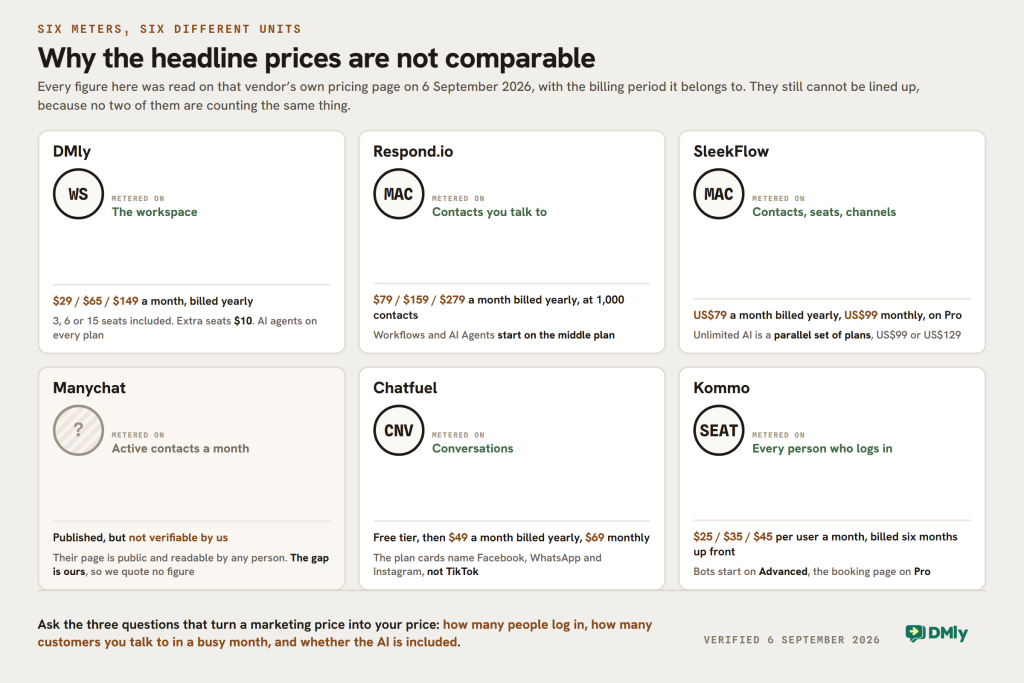
Three questions turn the marketing price into your price:
- How many people will log in? On Kommo every seat multiplies the bill. On Respond.io, 5 or 10 are included and the ones after that are $12 to $24 each. On SleekFlow, Pro includes 3. On DMly, plans include 3, 6 and 15 and extra seats are $10.
- How many different people will you talk to in a month? Respond.io, SleekFlow and Manychat all price on that number, so a viral video is a billing event as well as a good day. DMly prices contacts in bands by plan, at 3,000, 10,000 and unlimited.
- Is the AI included, metered or a separate tier? On Respond.io, AI Agents start on the middle plan. On SleekFlow, unlimited AI is a parallel set of plans costing US$20 to US$50 a month more. On Chatfuel it is the difference between free and paid. On Kommo it is credits per seat. On DMly it is on every plan with a monthly allowance.
One more thing that is easy to miss: on any of these tools, if you also run WhatsApp, Meta charges for the messages separately from your subscription. Ask whether the vendor passes those charges through at Meta’s rate or adds a margin, because that is a real difference between suppliers and it does not appear on a pricing page comparison.
Which TikTok DM Automation Tool Should You Choose?
The honest answer depends on what you want to happen after somebody messages you. A creator collecting leads and a salon trying to fill Saturday have almost nothing in common.
- DMly, if you run a local or service business. A flat plan price with seats included, and the booking and the payment in the same product as the reply.
- Respond.io, if volume and routing are the problem, provided you are comfortable that the useful tier starts at $159 a month and that bookings happen in your calendar tool.
- SleekFlow, if conversational sales is the priority and your business is registered outside the US, EEA, Switzerland and the UK, since their TikTok integration excludes those markets.
- Manychat, if you are running social campaigns and the contact-based model suits your traffic. Read their pricing page yourself, because we could not.
- Chatfuel, if you want AI first and can live with an automation that answers every comment on every post.
- Kommo, if you want a CRM at the centre. Budget for Advanced or Pro per seat rather than the $25 headline.
For most local businesses, the deciding question is not which tool answers a TikTok message best. All six will answer a message. It is how many other tools you will still be paying for afterwards. If a TikTok enquiry gets answered but then needs a calendar for the appointment, a CRM for the customer, a payment tool for the money and a separate platform for WhatsApp, you have solved a quarter of the problem and bought four subscriptions.
TikTok’s Own Automation, and Who Can Actually Use It
TikTok has built-in automatic messaging, and most small businesses cannot switch it on. This is the correction that matters most in this section, because the usual advice is to start with the native tools and upgrade later.
TikTok offers four kinds of automatic direct message: a welcome message when someone starts a chat, a keyword reply triggered by matching words, suggested questions shown as tappable FAQs, and chat prompts, which are topic buttons that open a conversation. TikTok’s own help documentation states that these are “only available to TikTok Account with Advanced Access and Verified Business Account (VBA)” and are “not available to General TikTok Accounts”.
The same applies to Message Assistant, TikTok’s own AI chatbot, previously called TikTok Lead Genie. It answers customer questions in TikTok DMs from a knowledge base you provide, it is for Verified Business Accounts, and TikTok says it is currently available only in selected countries and regions.
So the real comparison is not “native tools versus paid tools for the same job”. For most owners reading this, it is: nothing at all, or a third-party platform connected through the Business Messaging API, which works with an ordinary TikTok Business account. Check your account status in the TikTok app before you plan around the native features, because finding out afterwards is an expensive way to learn it.
If you do qualify, the native tools are a reasonable start for a handful of canned answers. What they will not do is carry a conversation across several steps, use AI trained on your own information, capture a lead into a customer record, route to a colleague, or connect a TikTok thread to anything else in your business.
| TikTok’s native automation | A third-party automation tool |
|---|---|
| Verified Business Account with Advanced Access only | Any TikTok Business account, subject to regional availability |
| Four fixed message types | Multi-step flows with keywords, conditions, delays and branches |
| Pre-set answers, plus Message Assistant where available | AI trained on your own business information |
| Works inside TikTok only | TikTok managed alongside your other channels |
| No customer record | Contacts, tags and a CRM on most platforms |
| Nothing happens after the reply | Bookings, payments and follow-up on some platforms |
Can You Automate TikTok DMs Safely?
Yes, and the way you do it matters more than whether you do it.
TikTok provides official Business Messaging APIs for sending and managing business conversations. The safe route is TikTok’s own tools or a platform connected through those official APIs, and every tool on this page is in the second category.
Be careful with anything promising unlimited cold DMs, mass messaging to people who have not contacted you, or automation that behaves like a personal account. Set aside the account risk for a moment: those things are not possible through the official API in the first place, since you cannot start a TikTok conversation at all. A tool offering them is either doing something unofficial or describing a different platform.
Design your automations around TikTok’s messaging rules. Answer the question that was asked, keep the conversation useful, and give people an easy route to a person. Opt-outs work here as everywhere: a contact who sends a stop keyword should stop receiving automated messages until they choose otherwise.
There is nothing inherently risky about TikTok DM automation done this way. Stick to official integrations, respect the 48-hour window, and build around helping people who genuinely want to talk to your business. That is a better long-term position than trying to automate your way into inboxes that never invited you.
What This Looks Like for a Local Business
For a local business the best tool is the one that can do something after the message. A salon, dentist, spa, restaurant or fitness studio has a very practical goal when a TikTok DM arrives: answer quickly, keep the lead, book the customer, take the money if there is money to take, and stay in touch afterwards.
Take a single message: “How much is a facial?” On a tool that only automates replies, the good outcome is a fast, accurate answer and a person still to chase. On a connected platform, the same message can run all the way through: an AI reply with the real price range, a service chosen, the free slots written out as a numbered list because TikTok has no buttons, a booking made, payment taken, a reminder sent, and a review requested a few days later.
The reason that matters here more than on other channels is the clock. You have 48 hours and then the thread is shut, so the useful measure of a TikTok tool is how much of the journey it can finish before the window closes rather than how clever the first reply sounds.
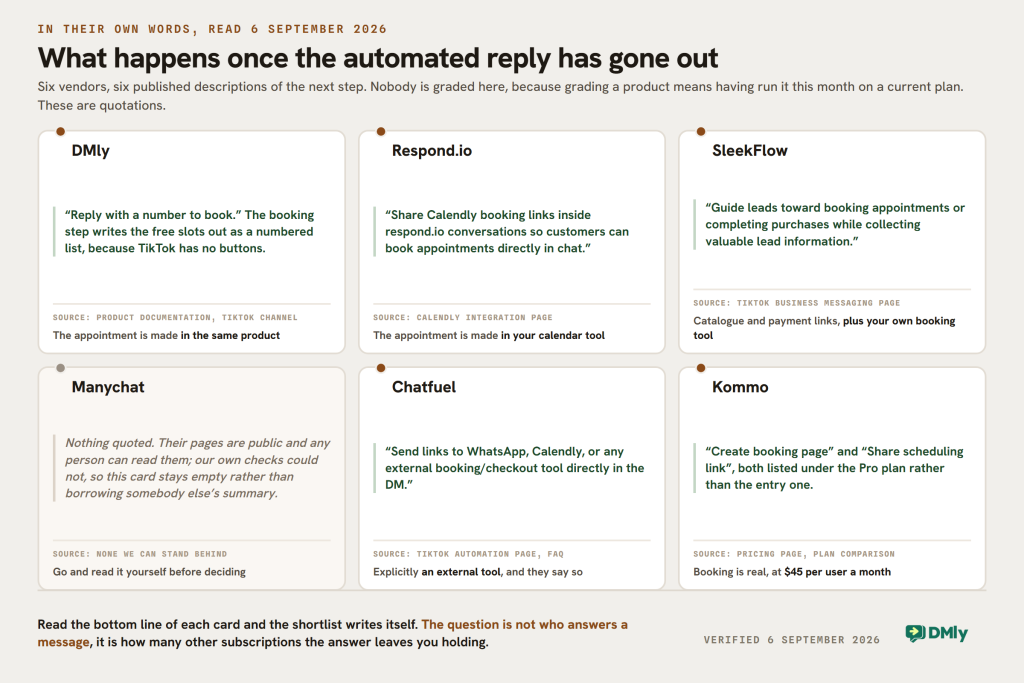
The other platforms here have real strengths. Respond.io is the better answer at high volume with a big team. Kommo is the better answer if you want everything to be a CRM record. Manychat is strong on social campaigns and Chatfuel on AI-led replies. For a local business that wants messaging, automation, bookings, CRM, payments and follow-up to be one system rather than five, DMly is the more complete setup, and that is the specific claim we are making rather than a general one.
Final Thoughts
TikTok DM automation takes a lot of repetitive work off your hands, but only inside the shape TikTok allows. Nobody can sell you comment-to-DM on this channel, nobody can reopen a closed 48-hour window, and nobody can put a button in a TikTok message. Any comparison that leaves those out is comparing brochures.
Inside that shape there is plenty worth automating. If you qualify for TikTok’s native tools and need three canned answers, use them. Once TikTok DMs start producing real enquiries, a dedicated platform pays for itself quickly, and the right one is whichever leaves you with the fewest other subscriptions to buy.
Frequently Asked Questions
What Are the Best TikTok DM Automation Tools?
The six compared here are DMly, Respond.io, SleekFlow, Manychat, Chatfuel and Kommo. Each takes a different approach, so the right one depends on whether your priority is local business automation with bookings and payments, social campaigns, AI-led replies, CRM-led sales, or managing a high volume of conversations across a large team.
Does TikTok Allow DM Automation?
Yes. TikTok publishes official tools and APIs for business messaging automation. A TikTok Business account can connect to a third-party platform through the Business Messaging API, and TikTok also has native automatic messages for Verified Business Accounts with Advanced Access. Your account type and region both have to be eligible, and automations have to operate inside TikTok’s current messaging rules, including the 48-hour window.
Can I Automatically Message Someone Who Comments on TikTok?
No. You can automate comments on TikTok, but not the way Instagram’s comment-to-DM works. TikTok has no comment-to-DM mechanism, and it treats commenters and message senders as separate contacts, so there is no private thread to open.
On TikTok the public reply is the answer, not a stepping stone to one. A tool like DMly can reply publicly, like a comment or delete it, so the reliable approach is to put the payoff directly in that public reply and invite the person to message you.
How Long Can I Reply to a TikTok Message?
48 hours from the customer’s last message. After that every send is blocked, including one your team types by hand, and there is no template or paid mechanism to reopen the thread. The customer has to message you again.
Can AI Reply to TikTok Messages?
Yes. Several of these platforms use AI agents to understand and answer customer questions on TikTok, and TikTok has its own Message Assistant for eligible Verified Business Accounts in supported countries.
With DMly you train an AI agent on information about your own business, and it answers FAQs, recommends services, captures leads and hands over to a colleague when a person is needed. AI agents are on every DMly plan, with a monthly allowance of replies that increases with the plan.
Do I Need a TikTok Business Account for DM Automation?
Yes. TikTok’s business messaging only works on a Business account, and it is free to switch in the app. A personal account can complete the connection and then quietly do nothing, which is a confusing failure worth ruling out first if messages are not arriving.
Is TikTok DM Automation Free?
TikTok’s native automatic messages cost nothing, but they are limited to Verified Business Accounts with Advanced Access. Among the third-party tools, Chatfuel publishes a free tier and most others run a trial: DMly’s is 7 days with no card, Respond.io’s is 7 days, and SleekFlow’s is 7 days on Pro.
Is TikTok DM Automation Available in Every Country?
No. TikTok’s Business Messaging API has regional restrictions and they differ by provider. SleekFlow, for example, states that its integration is for TikTok Business Accounts registered outside the United States, the European Economic Area, Switzerland and the UK. Confirm your own market with the vendor before you buy.
Can TikTok DM Automation Help Generate More Leads?
It helps you use the interest you are already creating. Rather than an enquiry sitting unanswered for hours, automation answers immediately, collects what you need to know, and moves the person to the next step, which for a local business is usually a quote, a service, an appointment or a conversation with somebody on your team.
The 48-hour window is what makes speed worth paying for here. On most channels a slow reply costs you goodwill. On TikTok it can cost you the ability to reply at all.
Writing about WhatsApp automation, bookings and growth for local business.
Turn WhatsApp into your busiest channel.
Start free and run message, bookings, payments and reviews in one place.
