
Instagram Automation for Salons: How to Turn Comments Into Appointments
Count the taps. Someone sees your balayage reel and wants that hair. They tap to comment “how much?!”, then wait. Hours later, someone at the salon replies “DM us!” They open your profile, tap Message, type the question again, and wait again. A price arrives the next morning, then a question about which day, then a link. By the time they could book, they have tapped a dozen times over two days and the reel is long gone from their mind. Most of those taps are yours, not theirs.
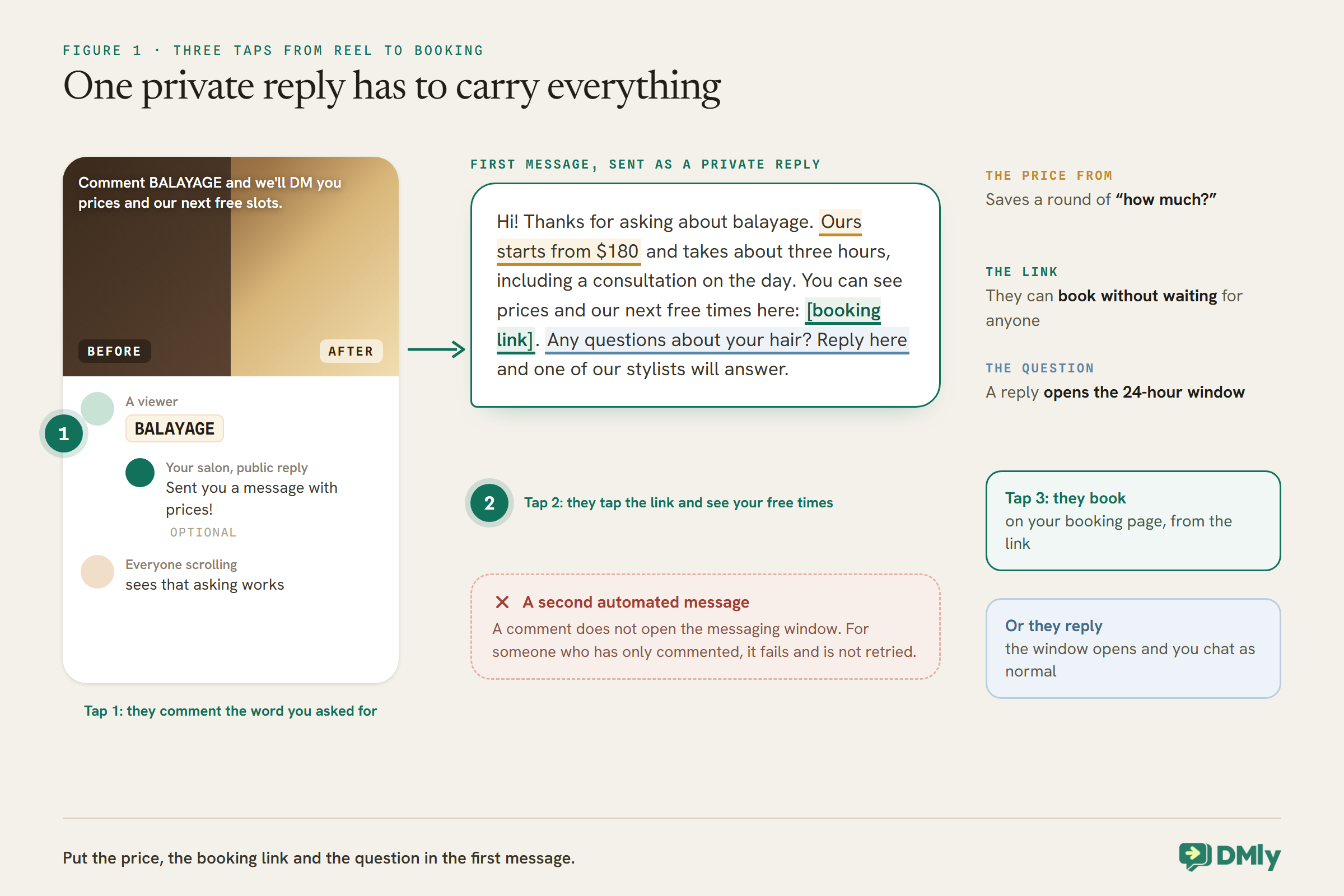
With Instagram automation for salons, the count drops to three: they comment a word you asked for, a message arrives in their DMs within seconds with the price and a booking link, and they tap it and book. Nothing about the salon’s warmth changes. The waiting disappears.
This guide builds that path in DMly, from a comment on a transformation reel to an appointment in the diary: choosing which posts to watch, the keyword, the public reply, the private message that has to do all the work, colour enquiries that need a consultation first, and the step that makes sure the client’s reminders actually arrive. For the general mechanics, see our guide to Instagram comment-to-DM automation.
Why Comments Are Worth Automating for a Salon
A comment is a public hand raised. For a salon, it often comes from someone who has just seen exactly the result they want.
Salons have an advantage on Instagram: their best content is proof. A transformation reel shows the result, and the people who comment on it may already be halfway to booking. The trouble is timing. Comments arrive in bursts when a reel does well, often when the team is busiest, and by the time anyone answers, the moment has passed.
Comment automation answers every matching comment immediately, however many arrive, with the same care you would give the first one. It also shows everyone else scrolling the comments that asking works, which is half the point.
Before You Start: Connect Instagram the Right Way
Instagram connects to DMly through Facebook, and only a certain kind of account can connect.
Your salon’s Instagram must be a professional account, Business or Creator; a Personal account cannot be connected. You do not need a Facebook Page: connect with Instagram Login and sign in with the Instagram account itself. If the account is already linked to a Page you manage, you can connect through the Page instead. Once connected, Instagram DMs arrive in the same inbox as your WhatsApp messages, and your flows can answer them.
Two Instagram behaviours are worth knowing before you build. Instagram has no Get Started button, so your Welcome message goes out as the reply to a contact’s very first DM, when it matches no flow or keyword. And your Default reply, for DMs that match nothing, can be set to go once per 24 hours per contact or every time. Both are useful safety nets alongside the comment flows in this guide.
How Comment-to-DM Works on Instagram
A comment lets you send one private message to someone who has never messaged you. That one message has to carry everything.
In DMly, a flow on your Instagram channel starts from the Post or Reel comments trigger. When a comment matches, the first message the flow sends is delivered as a private reply to the comment: a Meta mechanism that opens a DM with the commenter even though they have never written to you, outside the normal 24-hour messaging window.
The catch is in the word “first”. DMly’s docs are clear that a comment does not open the messaging window. Any further messages in the same flow are ordinary DMs, and for someone who has only commented, they fail as outside the window and are not retried. Only messages sent after the person replies to your DM reach them. So the rule for a salon is simple: put the price, the booking link and the question in the first message. Anything you save for a second message will not arrive unless they reply.
One more thing to know: a commenter only becomes a contact in DMly if an automation matches their comment, or they were already a contact. Comments that match nothing are dropped, and you moderate those in Instagram directly.
Step 1: Choose Which Posts Your Instagram Automation for Salons Watches
For a salon, watch the posts that sell, with a keyword each, rather than every post on the account.
Every comment trigger has a Which posts? setting: All posts, including ones you publish later, or Specific posts, picked from your recent posts. A few details from DMly’s docs matter:
- Specific means exactly those. A comment on any post you did not pick does nothing.
- Specific with nothing picked means every post. The builder does not warn you; check the hint says how many are selected.
- Two catch-alls cannot run side by side. Two automations on the same trigger and channel with no keywords are refused at publish, even if each is pinned to a different post. Give each its own keyword.
- Both Instagram triggers see every comment. Post or Reel comments and Live comments are checked against the same comments, so do not build one of each expecting them to split the work.
A practical salon setup is one automation per service you promote: a balayage flow on your balayage reels with the keyword BALAYAGE, a bridal flow on bridal posts with BRIDAL, and so on. Each sends the link for that service.
Step 2: Choose the Keyword
The keyword is what you ask people to comment. Make it easy to type and hard to trigger by accident.
The trigger can match a comment that contains a keyword, is an exact match, or starts with one, and matching ignores capital letters, so BALAYAGE, Balayage and balayage all match. Leave the keyword list empty and the automation fires on every comment on the watched posts.
- Use a word people would not write by chance. A service name works well: BALAYAGE, BRIDAL, FRINGE. A short common word like “price” will catch people chatting in the comments too. “Contains” matching is a substring check, so a short keyword can hide inside a longer word: BOOK also matches “Facebook”. Use exact match for short words.
- Say it in the caption. “Comment BALAYAGE and we’ll DM you prices and our next free slots.” People do what the caption tells them.
- Consider the no-keyword option carefully. Firing on every comment on a specific reel catches “how much?” and “love this!” alike, which can feel like a lot of DMs for someone who only left a heart.
The trigger also has Only respond once per contact. Turn it on if the same person might comment on several of your reels and you do not want them to receive the same DM each time.
Step 3: The Public Reply
Optional, but useful: it tells everyone scrolling the comments that asking works.
Comment-triggered flows get a Comment actions group with Reply to Comment, Like Comment, Hide Comment and Delete Comment. A short public reply such as “Sent you a message with prices!” under each matching comment shows other viewers what to do, which is why the mechanic spreads. Two cautions from the docs: a fresh commenter’s name comes from their username, so {{first_name}} may produce a handle rather than a name, and the default reply text says “Check your DMs”, so change it if you are not also sending a DM.
Keep the public reply free of prices and details. Those belong in the private message, where you can say more and where the client can act on them.
Step 4: Write the Private Message That Does the Work
One message, three jobs: say what it costs, give the link, and invite a reply.
Add a Send Message step after the public reply. Because it is the first message the flow sends, it goes as the private reply. Here is a balayage version to adapt:
Hi! Thanks for asking about balayage. Ours starts from $180 and takes about three hours, including a consultation on the day. You can see prices and our next free times here: [booking link for the consultation]. Any questions about your hair? Reply here and one of our stylists will answer.
Each part earns its place. The price from saves a round of “how much?”. The link lets them book without waiting for anyone. And the question gives them a reason to reply, which matters: a reply opens the 24-hour window, and from then on you can talk normally, send times, and answer questions.
For the link, every service in DMly has its own. On the service under Offerings, then Services, Get booking link gives you the link to share. Linking straight to the service’s page, rather than your whole booking page, saves the client a decision.
Colour Enquiries Go to a Consultation
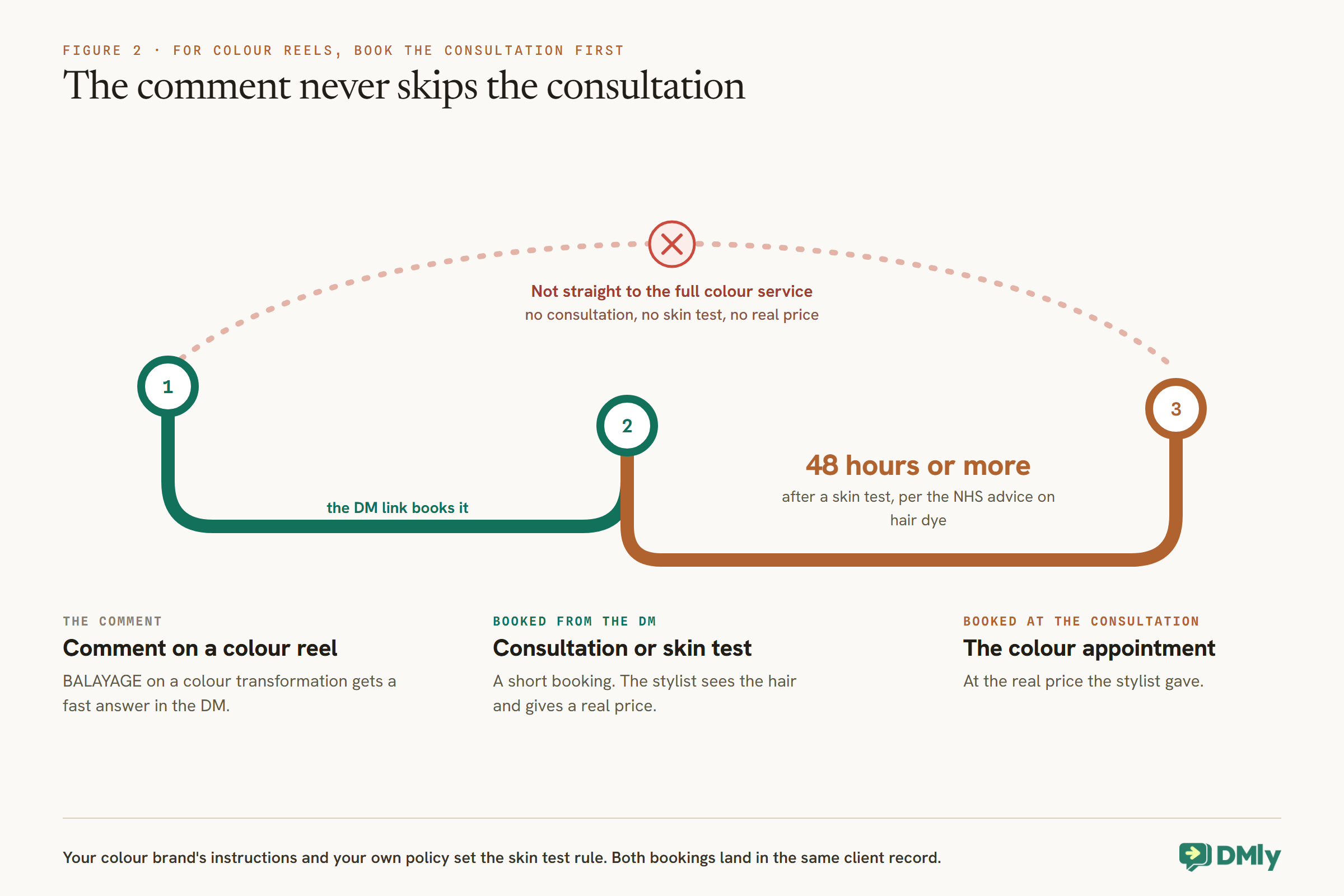
A transformation reel sells colour. Colour often needs a consultation, and if your salon asks for one, a skin test, before the main appointment.
A new client who sees a dramatic colour change and books the full service straight from a link can arrive without the consultation or skin test your salon requires. For colour reels, point the private message at a short consultation or skin-test booking rather than the full colour service. The NHS advises testing a hair dye at least 48 hours before using it; your colour brand’s instructions and your own policy set the rule. The consultation is also where your stylist can see the client’s hair and give a real price, which a “from” price in a DM cannot.
This makes the Instagram path a two-step one for colour: the comment books a consultation, and the consultation books the colour. Both land in the same client record, and our guide to WhatsApp automation for salons covers what happens from there.
When They Reply: Keep the Conversation Going
A reply turns a commenter into a conversation. Now you have 24 hours to be helpful.
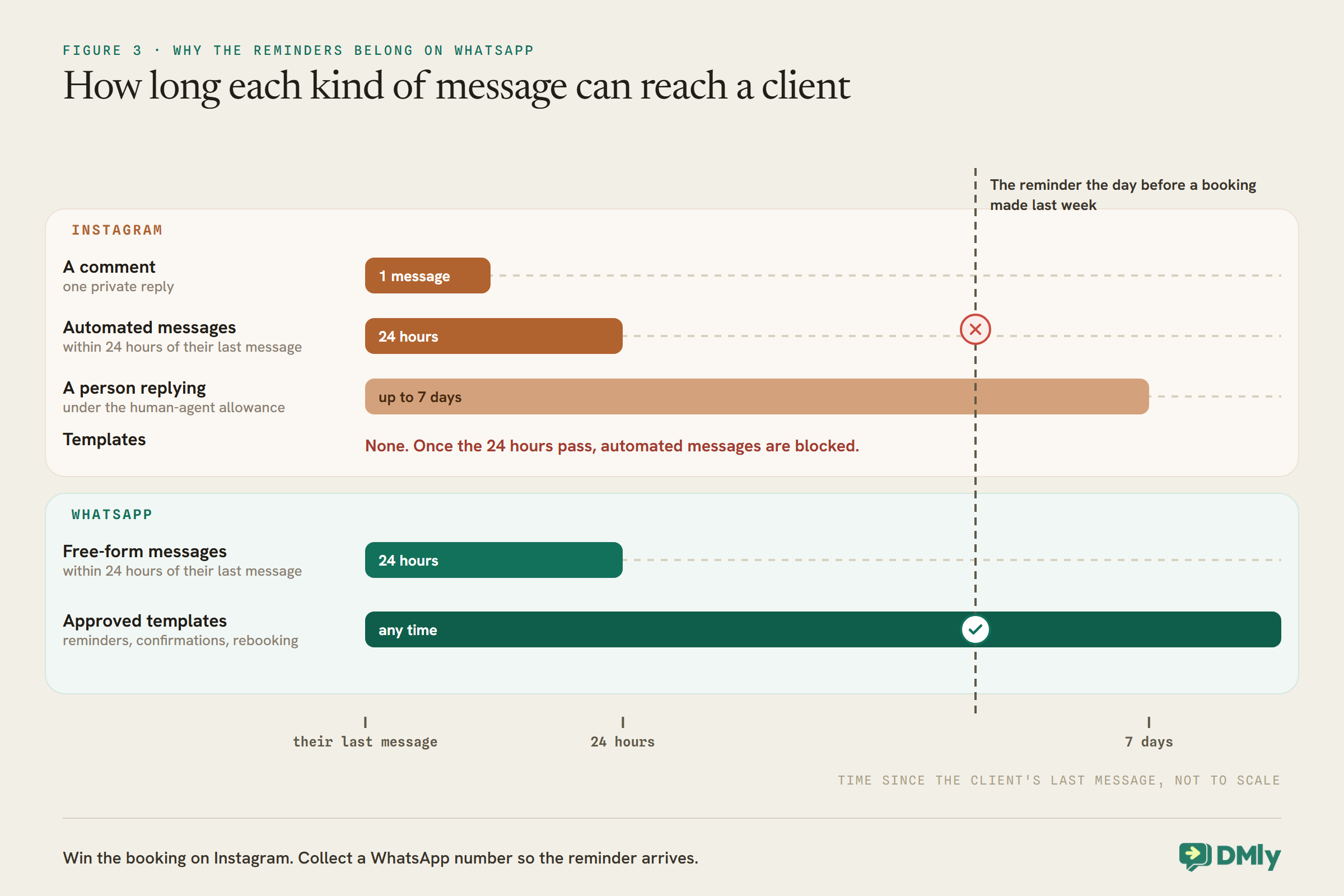
Once a client replies to your DM, Instagram’s rules let automations message them for 24 hours from their last message, and a person in your team can reply for up to 7 days, which DMly sends under Meta’s human-agent allowance automatically. In that time, you can do much more than a link:
- Offer times in the chat. DMly’s Book Meeting step shows tappable times on Instagram for free services, such as a consultation. Paid services always go through the booking page.
- Let an assistant answer. An AI receptionist on your Instagram channel can answer questions and book from your real diary; our guide to building an Instagram AI chatbot covers setting one up. Our guide to booking appointments through Instagram DMs covers both routes in detail.
- Hand over to a stylist. A photo of their hair and “could you do this on me?” deserves a stylist’s eye, not a script.
Anything you want automated should happen while the client is still in the window. Instagram has nothing like WhatsApp’s approved templates, so once the 24 hours pass, automated messages to them are blocked.
Story Replies and Mentions
Stories are where salons show the day: the chair, the finished look, the free slot at 3pm. Replies to them can be automated too.
DMly has two Instagram-only triggers for stories. Story reply fires when someone replies to one of your stories, and has a Which stories? setting, like Which posts?, with All stories or Specific stories. Story mentions fires when someone mentions your account in their own story, on every mention.
- Story replies open the conversation properly. Unlike a comment, a story reply is a message from the client to you, so the 24-hour window is open and your flow can send several messages, including tappable times for a free consultation. A “last-minute slot today” story with a reply flow that sends the booking link can fill a gap within minutes.
- Story mentions are a thank-you moment. A client who tags you in their story after a visit is doing you a favour. A mention flow that thanks them warmly, perhaps with a link to book their next visit, is a nice touch. Keep it short and personal.
Keep the Comments Clean
A reel that does well attracts spam as well as clients. Moderation flows can hide it before your clients see it.
The same comment trigger can moderate. Build a flow with Message contains a keyword, list the spam phrases you keep seeing, and add a Hide Comment step. DMly’s docs describe the difference between the two moderation steps clearly: Hide Comment hides the comment from everyone except its author, who does not know it was hidden, while Delete Comment permanently deletes it and cannot be undone. For spam on a salon’s posts, hiding is the calmer choice.
Two warnings from the docs. Keep keywords specific, because matching is a substring check: a short keyword like “win” also matches “winter”. And never combine a trigger with no keywords, watching all posts, with Delete Comment: that permanently deletes every new comment on your account, including the ones asking to book.
Get a WhatsApp Number So Reminders Arrive
This is the step most salons miss. A client booked through Instagram can miss their reminders.
DMly sends appointment reminders on the client’s channel. For a client whose only channel with you is Instagram, a reminder is an automated message, and Instagram only allows automated messages within 24 hours of the client’s last message. A reminder the day before a booking made last week falls outside that, and has no template to fall back on. The practical result is that a client who booked from a reel may never get the reminder that would have stopped them forgetting.
The fix is to collect a phone number while the conversation is open, so the client can be reached on WhatsApp, where reminders travel on approved templates at any time. Asking in the DM (“What’s the best WhatsApp number for your reminders?”) works, and an AI assistant can save a number the client types with its Update phone number tool. When the same person is known on both Instagram and WhatsApp, DMly keeps them as one client with two channels; if they end up as two contacts, merge them on the profile. Our Instagram DM booking guide has a section on asking for the number without spoiling the conversation.
If You Boost the Reel
Paid reach changes one thing: whether comments on the ad fire your automation.
Salons often boost their best transformation reel. DMly’s docs are candid here: on Facebook, comments on ads fire a comment automation set to All posts, but on Instagram that is marked “Not confirmed”, and Instagram ads do not appear in the Specific posts picker. So before you rely on automation for a boosted reel, comment on the ad itself from another account and check the DM arrives. If it does not, the organic post’s comments will still work, and people seeing the ad can be told in the ad text to message you directly.
Ice breakers for people who message you directly
Some people skip the comments and open a chat with you straight from your profile. Ice breakers are the suggested questions they see before typing anything, and on Instagram each one can either send an answer you wrote or start one of your flows. DMly allows up to four on Instagram, set under Configurations, then Bot Setup, with your Instagram account selected. Instagram shows them on mobile only.
For a salon, four good ice breakers might be “Book an appointment”, “Prices”, “Where are you?” and “Do you do bridal?”. The first can start your booking flow; the others can send a short written answer with a link. Because the client has messaged you by tapping one, the 24-hour window is open, and the conversation can carry on naturally from there. On WhatsApp, ice breakers are questions only and cannot start a flow, so the same idea works differently there.
Your booking link in the bio
Not everyone comments. Your booking page is an ordinary web address, so it can sit in your Instagram bio, where anyone who visits your profile after seeing a reel can book without messaging at all. Clients who book there get the same services, stylists and rules as everyone else.
Test It From Another Account
Your own account’s comments never trigger your automations, so testing needs a second account.
- Publish the flow, then comment the keyword on a watched post from a different Instagram account.
- Check the public reply appears under the comment and the private message arrives in that account’s DMs, with a working link.
- Reply to the DM and check the conversation continues as you intended.
- Comment on a post the flow does not watch, and check nothing happens.
- Comment the keyword again from the same account, and check Only respond once per contact behaves as you set it.
If something fails silently, look in DMly’s Logs, where failed sends, including follow-up DMs blocked by the window, are recorded.
What to Watch
Comments are easy to count. Appointments are what matter.
Two simple habits give you an honest picture. Add a Tag step to each comment flow, such as ig-balayage-reel, so every commenter the flow answered carries a mark you can later filter on. And compare that list with your appointments: DMly’s Appointment report and its CSV export show bookings by service and date, and a segment on the tag shows who came from the reel. The honest question is not how many people commented, but how many of them sat in your chair.
Mistakes to Avoid
- Saving the link for the second message. For a pure commenter, it will not arrive.
- Specific posts with nothing picked. It fires on every post.
- A keyword people type by chance. Use the service name.
- Sending colour enquiries straight to the full colour booking. Consultation first.
- No WhatsApp number for Instagram clients. Their reminders may not arrive.
- Assuming boosted reels work. Instagram ad comments are not confirmed; test.
- Testing from your own account. Your own comments never trigger it.
- Keeping the default public reply without a DM. “Check your DMs” with nothing in their DMs looks broken.
- A catch-all flow with Delete Comment. It deletes every new comment, bookings included.
Frequently Asked Questions
Can a salon DM everyone who comments on a reel?
Yes, once per comment, or once per person if you switch on Only respond once per contact. The first message an automation sends to a commenter goes as a private reply, which Meta allows even though they have not messaged you. Further automated messages only reach them after they reply.
What should the keyword be?
A word people would not type by accident, ideally the service name, such as BALAYAGE or BRIDAL, announced in the caption. Matching ignores capital letters.
Why did my follow-up message not arrive?
Because a comment does not open Instagram’s messaging window. Only the first message goes as a private reply; later messages in the flow fail for someone who has not replied, and are not retried.
Can I send appointment reminders on Instagram?
Only within 24 hours of the client’s last message, because Instagram has no templates. For reliable reminders, collect the client’s WhatsApp number while the conversation is open.
Does this work on boosted posts?
DMly’s docs mark comments on Instagram ads as not confirmed to fire comment automations. Test by commenting on the ad from another account before relying on it.
Will the automation reply to a complaint in the comments?
Only if the comment matches. With a keyword such as BALAYAGE, an unhappy comment does not trigger it. With no keyword on a watched post, every comment fires the flow, complaints included, so a cheerful “Check your DMs!” can land under an unhappy comment. Use a keyword, and answer complaints yourself.
Can the same automation work on TikTok?
Not as comment-to-DM. TikTok has no private reply mechanism, so DMly can reply publicly to a TikTok comment but cannot DM a commenter who has not messaged you.
Three Taps
The dozen taps and two days of waiting at the top of this guide were never the client’s fault. They were the gap between a salon’s best content and its diary. Instagram automation for salons closes that gap: a keyword in the caption, a private message with the price and the link, a consultation for colour, and a WhatsApp number so the reminder arrives.
Start with your best-performing reel. Give it a keyword, write the one message that has to do all the work, test it from a second account, and see how many of the people who comment end up in the chair.
Writing about WhatsApp automation, bookings and growth for local business.
Turn WhatsApp into your busiest channel.
Start free and run message, bookings, payments and reviews in one place.
