
Here is the most useful thing you can do about appointment no-shows, and it sounds like terrible advice: make it easier for people to cancel on you.
Nobody wants to hear that. Every instinct says the opposite, that the exit should be a bit awkward, that a customer who has to ring up and explain herself is a customer who turns up. It does not work like that. A customer who cannot face the phone call does not come and confess. She simply does not arrive, and you find out at the appointment time, when the hour is already gone.
A cancellation at 24 hours is a slot you can resell. A no-show is an hour of paid staff time you gave away. You are not trying to stop people cancelling. You are trying to move their cancelling earlier, to a moment when it is still worth something to you.
That is one lever of several, and this guide covers the lot: the five different problems that all get called a no-show, the levers ranked by how much they actually move the number, what marking a no-show does and does not do, how to handle the small number of people who do it repeatedly, and what you can honestly measure.
Why Appointment No-Shows Happen
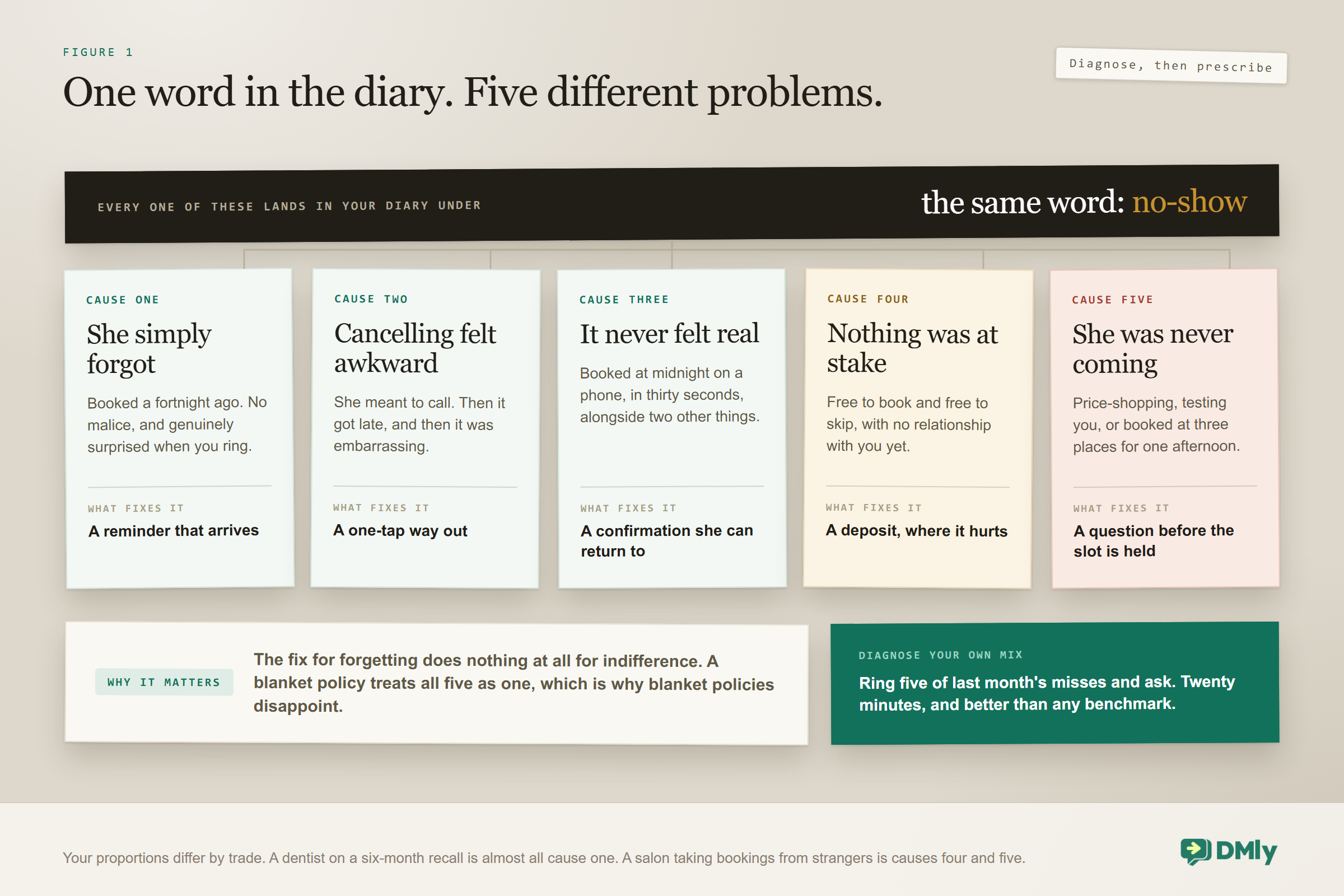
Five different things get called a no-show, and lumping them together is exactly why blanket fixes disappoint. Watch a month of your own missed appointments and you will find all five sitting in the same list.
| Cause | What it looks like | What actually fixes it |
| She forgot | Booked a fortnight ago, no malice, genuinely surprised when you ring | Reminders that arrive |
| Something came up and cancelling was awkward | She meant to call, and then it got late, and then it was embarrassing | A one-tap way out |
| The booking never felt real | Booked at midnight on a phone in thirty seconds, alongside two other things | A confirmation that lands, and a link she can return to |
| Nothing was at stake | Free to book, free to skip, and no relationship with you yet | A deposit, on the services that hurt |
| She was never really coming | Price-shopping, testing you, booked three places for the same afternoon | A question or two before the slot is held |
The proportions differ enormously by trade. A dentist with a six-month recall is dealing almost entirely with the first. A salon taking bookings from Instagram strangers is dealing with the fourth and fifth. Diagnose before you prescribe, because the fix for forgetting does nothing at all for indifference.
The quickest way to diagnose your own mix: take last month’s missed appointments, ring five of them, and just ask. It takes twenty minutes and it is more useful than any benchmark you will read.
The Levers That Reduce Appointment No-Shows, Ranked
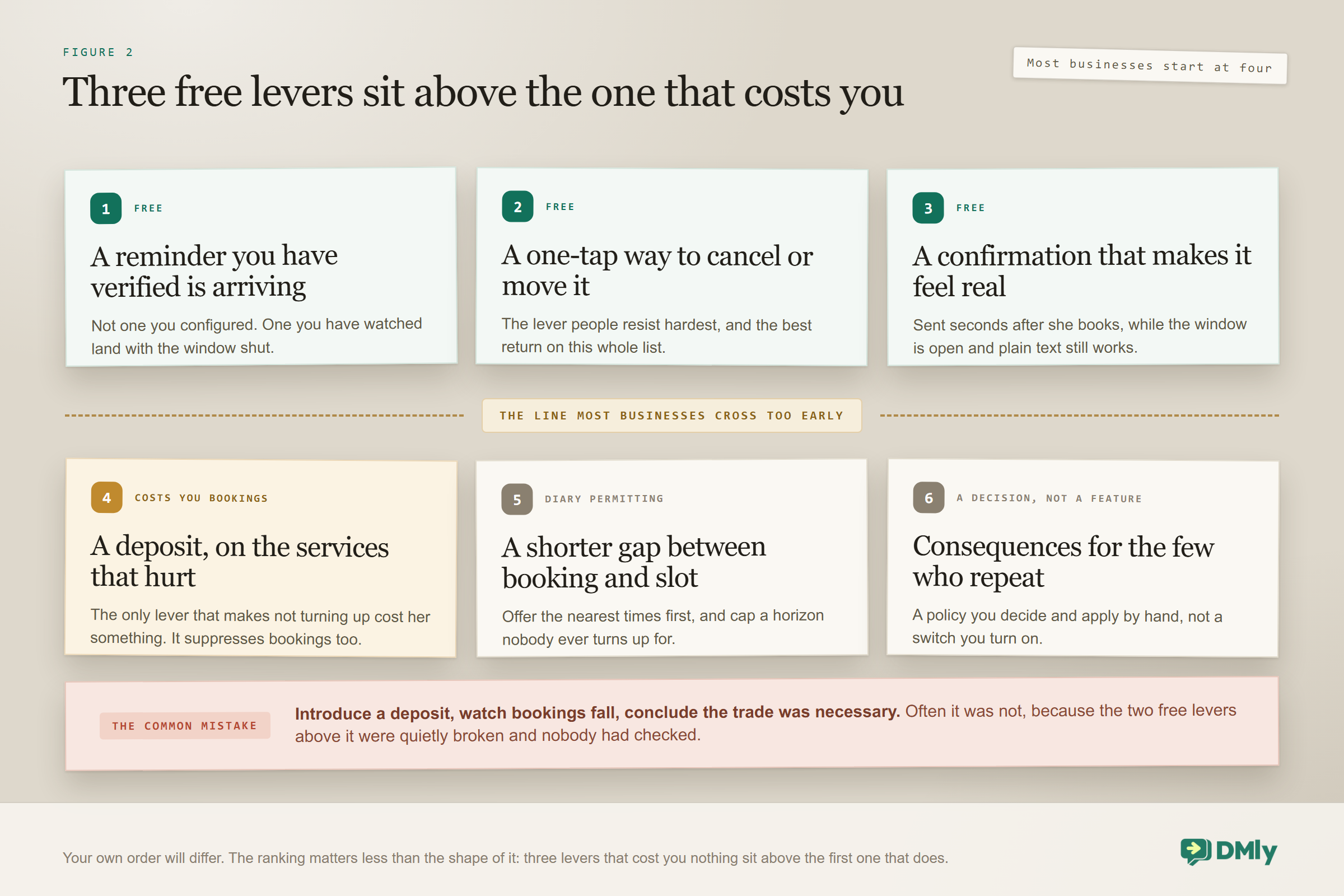
The first three cost you nothing. The fourth costs you bookings. That is the single most useful thing to know before you start, because most businesses reach for the fourth first.
- A reminder that actually arrives. Not a reminder you configured. One you have verified is being delivered.
- A one-tap way to cancel or move it. The lever people resist hardest, and the best ratio of effort to effect on this list.
- A confirmation at booking that makes it feel real, carrying the details and a link she can come back to.
- A deposit, on the services where an empty slot genuinely hurts. Effective, and expensive, because it suppresses bookings too.
- A shorter gap between booking and appointment, where your diary allows it.
- Consequences for repeat offenders, which is a policy rather than a feature.
Your order will differ, and the ranking matters less than the shape of it: three free levers before you reach for one that costs you. Most businesses introduce a deposit, watch bookings fall, and conclude the trade was necessary. Often it was not, because the two levers above it were quietly broken and nobody had checked.
Lever One: Reminders That Arrive
There is a difference between a reminder you set up and a reminder that was delivered, and most businesses have never checked which they have. This is the single most common quiet failure in appointment booking.
Reminders are seeded from the service’s own reminder times and go out on the customer’s own channel. On WhatsApp, a reminder due the day before an appointment is almost always outside the 24-hour messaging window, which means it can only be delivered as an approved template. If that template is not approved, the message is dropped rather than sent as plain text, and nobody is told. Reminders never notify your team either, so nobody in your business sees it fail.
Three other conditions skip a reminder silently: the booking is no longer confirmed, the contact has opted out, or the bot is paused for that contact.
How to check yours in half an hour: Book a test appointment on a hidden service with a short reminder lead time, then do not message your own business again. Let the window close. That is the whole test, and it is the one nobody runs, because testers have always just messaged the business, which keeps the window open and lets plain text through.
Two reminders is the working pattern: one far enough out that a cancellation can still be resold, one close enough that nobody forgets on the day. Three is nagging, and being blocked costs you more than being forgotten.
Lever Two: Make Cancelling Embarrassingly Easy
Yes, this produces more cancellations. That is the point. You are converting an hour you were going to lose into an hour you might resell.
Three things make the exit genuinely easy, and all three are free:
- The manage page link, in every message. Every booking has its own page where the customer can cancel, reschedule or add it to her calendar, within your deadlines. Put it in the confirmation and in every reminder, not just the first one.
- Buttons on the reminder. A quick reply to confirm, and a way to change it, so she never has to compose a message explaining herself. Most people do not cancel because they do not want the conversation, not because they cannot find the number.
- The client portal. She can log in from your booking page with her phone number, get a 6-digit code on WhatsApp (or by SMS if WhatsApp is not connected), and see My bookings with every appointment and an Upcoming, Past or Cancelled badge. From there she can cancel or reschedule within your deadlines.
Two things about the portal worth knowing before you promote it: The code expires after 10 minutes, there is a deliberate cooldown between requests, and there is a daily cap on how many codes one number can ask for. And a booking only appears if it is linked to the contact that the login phone number resolves to, so somebody who booked with an email address and no phone will see an empty portal until she books again with the number she logs in with. The portal shows booking history only: no invoices, no payments, no gift card balances.
Then check that your deadlines match your intentions. Cancellation and reschedule deadlines are workspace-wide settings in hours, and they accept zero, which lets somebody change things right up to the start time. A deadline that closes 48 hours out will push a customer who wanted to cancel at 36 hours into simply not turning up, which is the exact outcome you were trying to prevent.
Lever Three: Make the Booking Feel Real
A surprising share of missed appointments come from bookings that never landed as commitments in the first place. Booked at midnight, on a phone, in thirty seconds, alongside two other things. Nothing about it felt like an arrangement with a person.
The confirmation is what fixes that, and unlike the reminder it is easy, because it goes out seconds after she acted. On a booking taken in a chat the window is wide open, so plain text works and no template is needed.
What a good confirmation carries: the service, the day and the date rather than just the day, the address or the joining detail, anything she needs to bring, your cancellation policy in one line, and the manage link. That last item is doing double duty, because it is also lever two.
One behaviour to know if you take payment up front. On a pay-before service, no confirmation is sent during the fifteen-minute payment hold, and no reminders are scheduled until the payment clears. A customer who abandoned the checkout believing she had booked receives nothing at all, which feels to her like being ignored by a business she just tried to give money to.
Lever Four: A Deposit, Where It Is Warranted
A deposit is the only mechanism that makes not turning up cost the customer something, and the only lever here that reduces your bookings. Treat it as a targeted instrument, not a policy.
Take one on the services where an empty slot genuinely hurts: long appointments, first-time customers, peak times, anything that cannot be refilled the same day. Do not take one on a fifteen-minute service with a waiting list, where the friction costs you more than the risk does.
Two facts shape how this works in practice. There is no deposit percentage setting anywhere, so a deposit is built by pricing a service at the deposit amount and taking the payment before the booking is confirmed. And a price of zero makes every payment mode inert, so a free consultation cannot hold a deposit at all, however you set it.
There is also a hole worth naming out loud: appointments created by hand from the Calendar bypass payment modes entirely. Once your team learns that adding somebody to the diary is quicker than sending a link, your deposit policy quietly stops applying to half your bookings and nothing will tell you.
Lever Five: Shorten the Gap
The further out a booking sits, the more likely it is to be missed. Life moves, enthusiasm fades, and a fortnight is long enough for somebody to forget she ever wanted the thing.
You cannot always shorten the gap, and for recall-based businesses you would not want to. Where you can influence it:
- Offer the nearest available times first. Three options starting with the soonest converts better, and books sooner, than a full calendar to browse.
- Use the booking horizon deliberately. The workspace setting and the service’s Days ahead both cap how far out people can book, and the shorter of the two wins. If bookings beyond six weeks never turn up, stop offering them.
- Add an extra reminder to the long ones only. Different services can carry different reminder times, so a six-month recall can have a schedule your haircut does not need.
What Marking a No-Show Actually Does
It records what happened. It does not take money. There is no automatic no-show charge in DMly, and being clear about that saves you designing a policy the software will never enforce for you.
What marking does give you is data and a trigger. Appointment statuses cover the whole lifecycle: confirmed, pending and awaiting payment while upcoming; cancelled, completed, no-show, expired and payment-failed once past. Those distinctions matter when you come to measure, because expired and payment-failed are checkout problems rather than people who did not turn up, and lumping them in will either flatter or damn your reminders unfairly.
Three sensible things to hang off a no-show:
- Tag the contact. Not to punish, to count. A tag applied on every no-show is what turns a vague sense that somebody is unreliable into a fact you can filter on later.
- Send one message, without accusation. Sorry we missed you, here is a link to rebook. A meaningful share of no-shows still want the appointment and are quietly embarrassed.
- Free the slot properly, and if you run a waitlist, offer it on.
Mark them consistently or do not bother. A no-show rate calculated from a diary where the team only sometimes sets the status is worse than having no number at all, because you will make decisions on it.
Handling the Small Number Who Do It Repeatedly
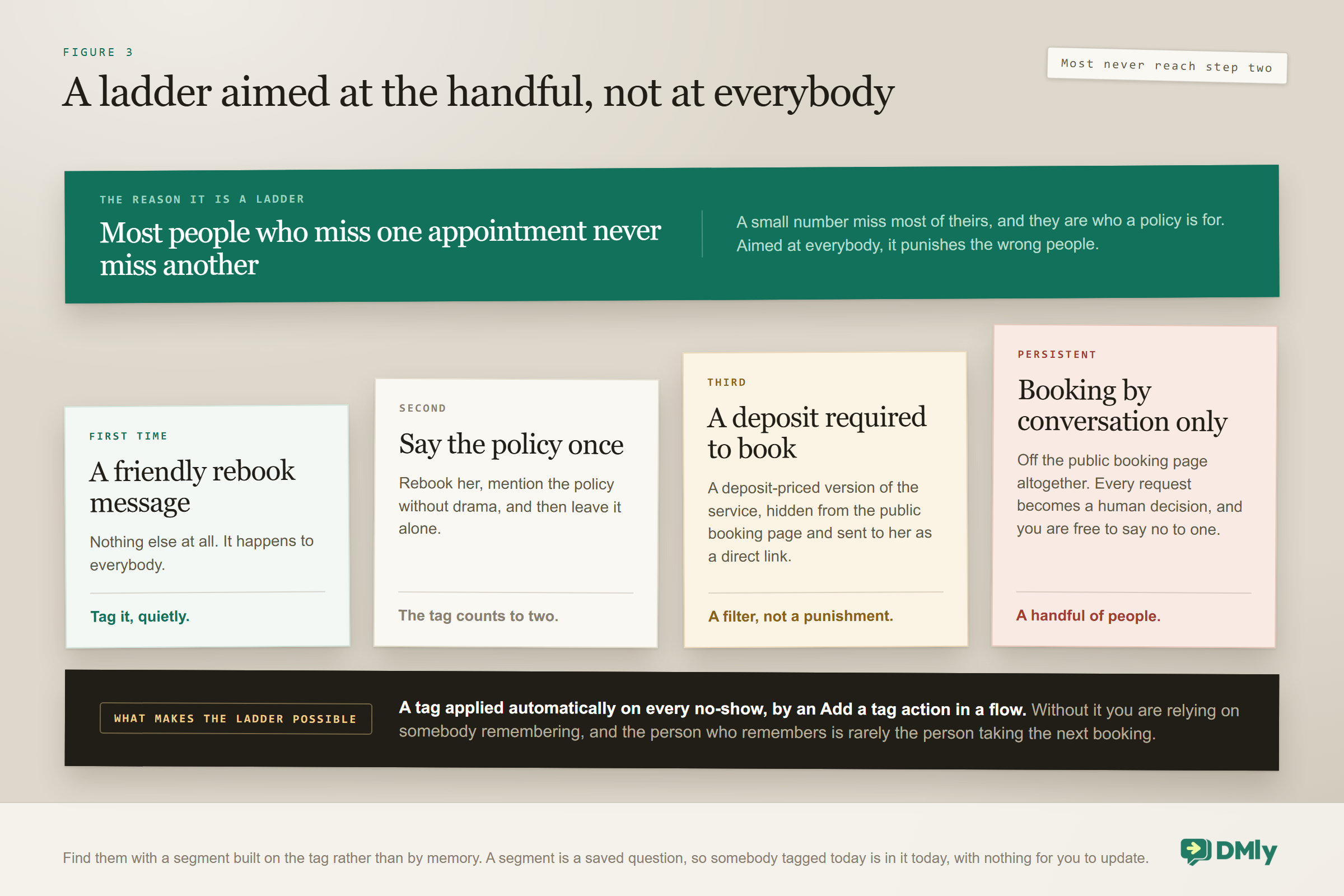
Most customers who miss an appointment never miss another one, and a policy aimed at everybody punishes the wrong people. A small number miss most of theirs, and they are who a policy is for.
Tag the contact on every no-show, then use the count. A tag is a decided fact that persists, which is exactly right here, and tags work across every channel that customer uses. You can apply one automatically with an Add a tag action in a flow, so nobody has to remember. Our contacts and CRM page covers the mechanics.
| Occurrence | Response |
| First | Nothing beyond a friendly rebook message. It happens to everybody |
| Second | Rebook, and mention the policy once, without drama |
| Third | Deposit required to book, using a deposit-priced version of the service |
| Persistent | Booking by conversation only, not through the public page |
The third row is where tags and services meet, and it is the most useful thing on this page for a busy salon. Keep a deposit version of your main services, hidden from the public booking page, and send it as a direct link to the handful of people who need it. That is a far better outcome than either losing the customer or absorbing the losses quietly for another year.
To find them, build a segment on the no-show tag rather than trying to remember who they are. A segment is a saved question rather than a saved list: tag somebody today and she is in the segment today, without you touching it. There is no way to add a contact to a segment by hand, because segments have no members to add. The WhatsApp CRM guide covers building them.
Refilling the Slot
Reducing appointment no-shows is only half the job. The other half is what happens to the hour once you know it is empty. Speed is everything: a slot released at 24 hours can be sold, a slot released at zero cannot.
For classes there is a mechanism built in. A cancelled seat passes automatically to the next person on the waitlist. Worth knowing that a class seat can be cancelled but never rescheduled, so the waitlist is the only way that seat ever gets reused.
For one-to-one appointments the refill is manual, and the fastest route is a message to a small, well-chosen group rather than a broadcast to everybody. The people who asked for that exact time and could not have it. The people who book that service regularly and are overdue. A short list, one message, first to reply gets it.
Do not broadcast a free slot to your whole list. The response rate is poor, the message reads as desperation, and you will have annoyed several hundred people to fill one hour. If you run a salon, where this happens most weeks, our salon automation guide covers the refill list as a standing thing rather than a scramble.
What You Can Honestly Measure
Nothing in DMly reports on appointment no-shows, and there is no reminder report either, so this section is more counting than reading. What you have is the Bookings list, filterable by service, staff, status and source. Everything below comes out of that, plus a calculator.
Three numbers worth having, in this order:
- No-show rate by service. Filter by service and by status. This is almost always uneven, and the service with the worst rate is exactly where a deposit belongs. It is the single most useful number on this page.
- Cancellations that arrived after the first reminder. You want this to be healthy rather than low. Those are slots you got back with enough notice to resell, which is lever two doing its job.
- No-shows on bookings made through the page against bookings made by hand. Filter by source. If the hand-made ones are worse, your deposit policy has a hole in it.
Two things to do before you calculate anything. Separate expired and payment-failed bookings out, because those are checkout failures rather than people who did not turn up, and they need a completely different fix. And make sure the team marks no-shows consistently, because a rate calculated from a half-marked diary is a number that will send you in the wrong direction with great confidence.
What you cannot get from any screen: a reminder delivery rate, a split by lead time, or new customers against returning ones. If you want those, they are a spreadsheet and an hour once a quarter, and for most businesses the by-service number is enough to act on.
What Does Not Reduce Appointment No-Shows
Five things businesses try against appointment no-shows that either do nothing or actively make it worse.
- More reminders. Past two you are training people to ignore you, and risking blocks that damage your number’s quality rating, which is a far more expensive problem than a missed haircut.
- Stern wording. A reminder that threatens a fee you cannot actually charge tells the customer you are annoyed, and nothing else.
- A blanket deposit. It suppresses your easy bookings just as effectively as your risky ones, and you will not notice the ones that never happened.
- Overbooking. Works beautifully until both of them turn up, at which point you have converted a no-show problem into a reputation problem.
- A cancellation policy nobody agreed to. If it is not on the terms page you link from your booking page, you will not enforce it when somebody argues, and you will feel bad about trying.
Frequently Asked Questions
What reduces appointment no-shows the most?
Reminders you have verified are arriving, and a one-tap way to cancel or reschedule. Both are free. Most businesses reach for a deposit first, which works but also suppresses bookings, and never check whether their reminders are being delivered at all.
Does making cancellation easy just cause more cancellations?
Yes, and that is the intention. A cancellation with 24 hours of notice is a slot you can resell; a no-show is an hour of paid staff time you cannot recover. The aim is to move cancellations earlier, not to prevent them.
Can I charge a customer automatically for not turning up?
No. Marking a booking as a no-show records what happened but does not take any money, and there is no automatic no-show charge. The only way not turning up costs the customer anything is if you took the payment before the booking was confirmed.
Why did a reminder not reach a customer who then missed her appointment?
Four reasons cover most cases: the booking was no longer confirmed, the contact had opted out, the bot was paused for her, or the WhatsApp template was not approved while the messaging window was shut. In that last case the message is dropped silently and nobody is notified, so it is worth ruling out first.
How do I find customers who repeatedly miss appointments?
Tag the contact on every no-show, ideally automatically with an Add a tag action, then build a segment on that tag. A segment is a saved question rather than a saved list, so it stays current on its own. Tags persist and work across channels, which makes the count reliable in a way that memory is not.
Should I require a deposit from everybody?
No. Take one on the services where an empty slot genuinely hurts and cannot be refilled: long appointments, first-time customers, peak times. A blanket deposit costs you the easy bookings as well as the risky ones, and you will never see the bookings you did not get.
Can customers manage their own bookings?
Yes. She can log in from your booking page with her phone number, receive a 6-digit code on WhatsApp or by SMS, and see My bookings with each appointment and its status. From there she can cancel or reschedule within your deadlines. The code lasts 10 minutes, there is a cooldown between requests and a daily cap per number, and the portal shows booking history only.
Check the Free Levers First
The usual sequence is to introduce a deposit, watch bookings fall, and conclude that the trade was necessary. Often it was not, because the two levers above it were quietly broken and nobody had looked.
So before you charge anybody anything, do these two things. Test one reminder properly, with your own window shut, and find out whether it arrives. Then open your own booking page on your own phone and try to cancel something, and count how many taps it takes. If either of those surprises you, you have found more no-shows than a deposit was ever going to save you.
After that, the rest is proportionate. Tag the ones who miss, aim the policy at the handful who repeat, and put the deposit only on the slots you genuinely cannot afford to lose. If you run a clinic, where an empty hour is expensive and the recall gap is long, our clinic automation guide works through the same levers with a full week attached, and the WhatsApp appointment booking guide covers the booking that comes before all of it.
Writing about WhatsApp automation, bookings and growth for local business.
Turn WhatsApp into your busiest channel.
Start free and run message, bookings, payments and reviews in one place.
