
How Restaurants Can Take Reservation Deposits to Stop No-Shows
Reservation deposits work like a cloakroom ticket. When you hand over your coat, the attendant tears the ticket in two. You keep one half, they pin the other half to your coat, and at the end of the night the two halves come back together.
A table booking is the same kind of deal, except that most restaurants only ever hand out one half. The guest gets a table held for them. The restaurant gets a name in a book and a hope. If the guest doesn’t come, the restaurant is left holding a coat that nobody will collect.
A deposit is the restaurant’s half of the ticket. It’s small, it’s fair, and it means both sides have something riding on the evening. In this guide, we’ll look at which reservations should carry one, how much to ask, how to price a table when your menu isn’t priced per table, what happens on cancellation, no-show and at the till, and how to set it all up in DMly without turning your regulars into suspects.
What Reservation Deposits Do for a Restaurant (and What They Don’t)
Reservation deposits ask a guest to pay a small, agreed amount when they book a table, which you take off their bill when they arrive and keep if they don’t show without warning. The money isn’t really the point. The point is that a booking now costs something to abandon, so the guests who were never going to come either don’t book or tell you in time.
That changes who books, not just who shows. A guest who holds three tables across town on a Saturday and picks one at 7pm won’t pay three deposits. A guest who genuinely wants your table will barely notice.
What a deposit won’t do is fix every empty chair. Guests who are running late, a party of six that turns up as four, and the couple who forgot it was their anniversary dinner the night before all need other tools: clear reminders, an easy way to cancel, and a host who knows what to do at 8:15 when the table is still empty. Deposits sit on top of those, they don’t replace them.
And deposits have a cost. Some guests will book elsewhere rather than pay up front, especially for a casual weeknight. That’s why the rest of this guide is about deciding where a deposit earns its keep, rather than switching one on for everything.
Four Ways to Protect a Table, From Lightest to Firmest
There are four levels of protection a restaurant can put on a reservation: reminders only, a no-show fee, a deposit to book, and full prepayment. Each one asks a little more of the guest and protects a little more of your evening.
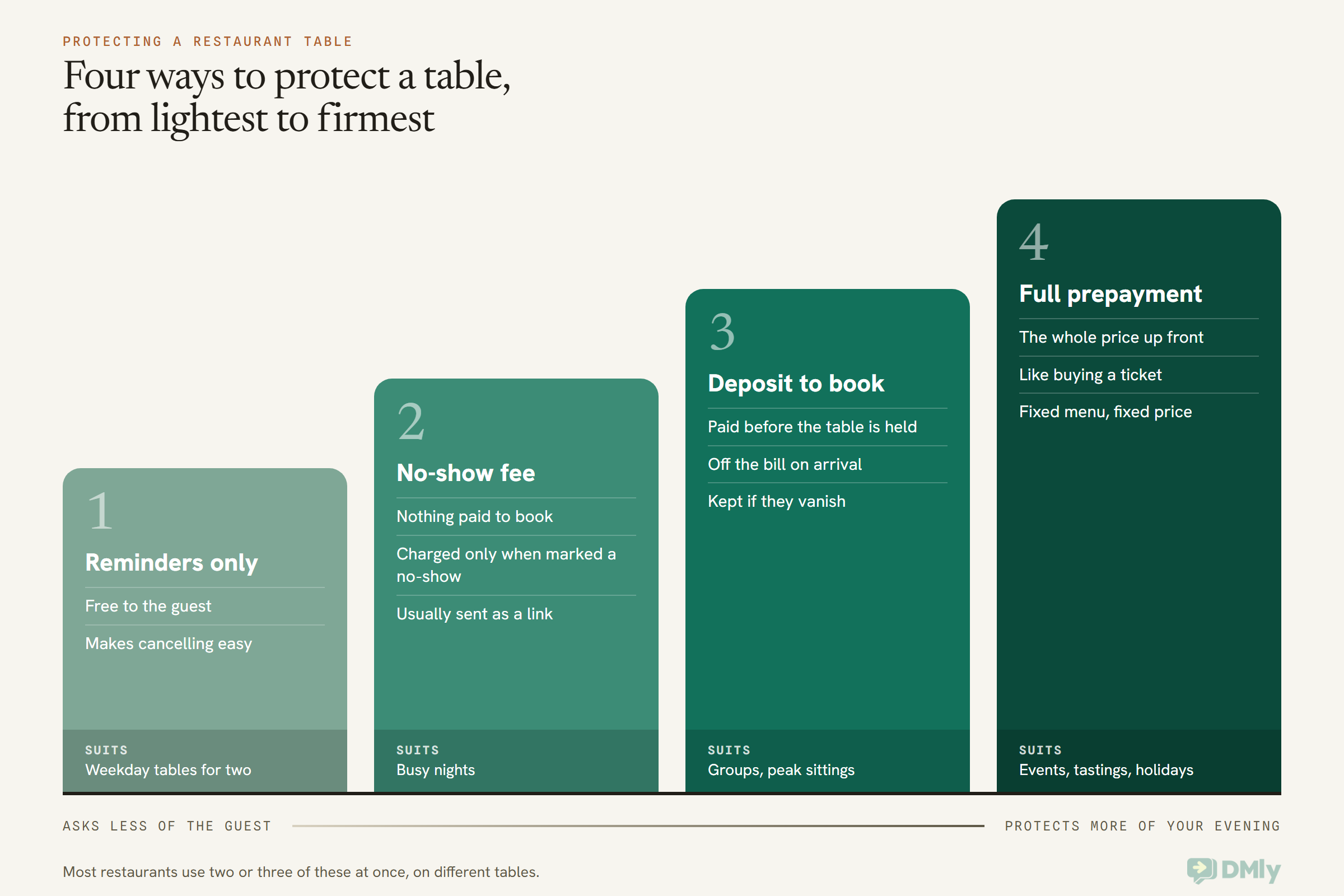
1. Reminders only. Every reservation gets a confirmation and a reminder, with an easy way to cancel. On WhatsApp, a table reminder can only go out inside the 24-hour chat window, so test where yours arrive. Nothing is charged. This is where every restaurant should start, because most no-shows are forgetfulness, not malice, and a guest who can cancel in one tap usually will. Reminder timing and wording deserve their own guide, so here we’ll only say this: get reminders right before you ask anyone for money. Our guide to two-way reminders where guests confirm, reschedule or cancel in the chat covers the replies side.
2. A no-show fee. The guest pays nothing to book, but agrees that a fee applies if they don’t come. In DMly the fee is only charged when someone marks the booking as a no-show, and for most guests it arrives as a payment link they can choose to ignore. Think of it as a polite warning with a small stick, not as guaranteed money.
3. A deposit to book. The guest pays part of the expected spend to confirm the table. It comes off the bill on the night, and you keep it if they don’t turn up or cancel too late. This is where reservation deposits really change behaviour.
4. Full prepayment. For a fixed-price event, a supper club, a tasting menu or New Year’s Eve, the guest pays the whole price when they book, like buying a ticket. It’s the firmest option and only works when the price is known in advance.
Which Reservations Should Carry a Deposit
Ask for reservation deposits on the bookings where an empty table costs you most: large groups, your busiest sittings, special nights with a set menu, and guests who’ve failed to show before. Leave the rest on reminders.
A no-show for two on a quiet Tuesday is a shame. A no-show for twelve on a Saturday in December can be the difference between a good week and a bad one, because you turned away other guests to hold that space and prepped food for it.
| Booking | Deposit? | Why |
| Table for 2 to 4, weeknight | Usually no | Easy to refill with walk-ins; a deposit may lose you more bookings than it saves |
| Table for 2 to 4, Friday or Saturday peak | Maybe, or a no-show fee | Hard to refill at 8pm; a light rule may be enough |
| Groups of 6 or more | Yes | One no-show empties a whole section and the kitchen has prepped for it |
| Set menus, tastings, events, holidays | Deposit or full prepayment | Fixed cost per cover; you can’t sell the seat twice |
| Guests who’ve failed to show before | Yes, booked by your host | Fair to ask, and the guest usually understands why |
| Your regulars | Your call | Many restaurants waive it; a regular who never misses shouldn’t feel policed |
The group threshold is yours to choose. Some restaurants start at six, others at eight or ten. Pick the size at which you’d genuinely struggle to refill the table at short notice, and start there.
One practical point shapes everything below. In DMly, a deposit lives on the service a guest books, not on the guest. Most restaurants set up each table size as its own bookable service (“Table for 2”, “Table for 4”, “Table for 8 to 10”), so the deposit decision is really a decision about which of those services carries one. A Saturday group table can take a deposit while the weeknight table for two stays free. DMly doesn’t have a rule that asks only certain guests for a deposit on the public booking page, so for repeat no-shows your host books them in by hand, which we cover below.
How Much to Ask: Putting a Price on a Table That Has No Price
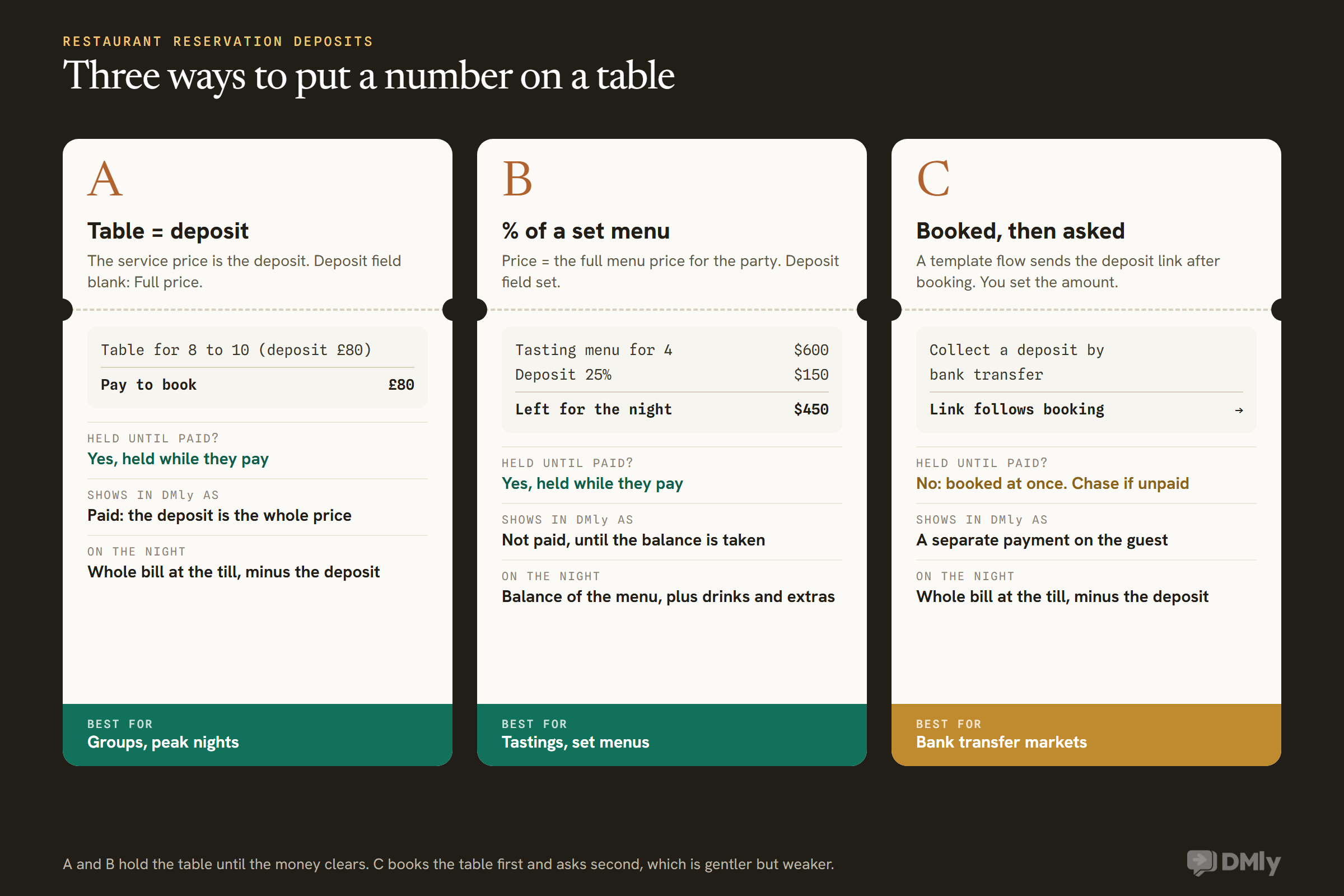
A reservation deposit needs a number, but a restaurant table usually has no fixed price, so you have three ways to set one: price the table at the deposit itself, take a percentage of a fixed menu price, or book the table first and ask for the deposit straight after.
This is the part most guides skip. A salon knows a haircut costs $60, so a 25 per cent deposit is $15. A restaurant doesn’t know what a table for eight will spend until the bill arrives. DMly’s Deposit field is a percentage of the service’s price, from 1 to 99 per cent, so you need to decide what that price represents.
Route A: price the table at the deposit amount
This is the simplest route for à la carte restaurants. You create a service such as “Table for 8 to 10 (deposit £80)”, give it a price of 80, set it to Pay before booking and leave the Deposit field blank, which means Full price. The guest pays £80 to book. On the night, your team takes the whole bill at the till and knocks £80 off.
The upside is that the number is exactly what you want it to be, and the booking shows as paid in DMly, because the guest paid the full “price” of the service. The downside is that DMly has no idea what the guest will actually spend, so the deduction happens in your till, not in DMly. Put the word “deposit” in the service name so nobody, guest or staff, mistakes £80 for the cost of dinner.
A per-head deposit works the same way. If you want ₹500 a head from groups of eight, price “Table for 8 (₹4,000 deposit)” at 4,000. DMly has no per-head field, so the arithmetic goes into the service price and the name.
Route B: a percentage of a fixed menu price
When the price really is known, such as a tasting menu, a festive set menu or a supper club, set the service price to the full menu price for that party size and use the Deposit field. A “Tasting menu for 4” priced at $600 with a 25 per cent deposit charges $150 to book and leaves $450 to pay on the night. DMly shows that split under the field as you type, and the booking page shows the guest what they pay now and what’s due at the table.
Two things to know. The percentage is taken of the price including tax, so check your tax setting on the service first. And a deposit-only booking shows as not paid in DMly until the full price is collected, which is actually useful: it’s how you spot who still owes the balance. DMly doesn’t send a link for the rest. You take it at the table, as you would anyway.
If you’d rather charge the whole thing up front, like a ticket, leave the Deposit field blank and the guest pays the full price to book.
Route C: book the table, then ask for the deposit
DMly’s automation template library includes ready-made flows called Collect a deposit to hold the booking and Collect a deposit by bank transfer. The bank transfer one fires when an appointment is booked and sends the deposit as a payment link; you set the amount and the currency yourself.
The difference matters. With routes A and B, the table isn’t held until the money clears. With route C, the table is booked straight away and the deposit request follows. If the guest never pays, the booking still stands until you or your host cancel it. That’s softer, which suits some restaurants, but it also means someone has to check for unpaid deposits before service.
Where route C shines is markets where many guests pay by bank transfer, which we’ll come back to in the section on phone and chat bookings.
How much is fair? There’s no rule, and we won’t invent a benchmark. A useful test: the deposit should be large enough that a guest wouldn’t book three restaurants and drop two, and small enough that a guest who means to come doesn’t think twice. Many restaurants anchor it to a share of a typical spend per head. Whatever you pick, say it in plain numbers, not percentages, when you tell the guest.
Setting Up Reservation Deposits in DMly
Setting up reservation deposits in DMly takes four jobs: connect a payment gateway, set your table services to take payment before booking, choose your cancellation and no-show rules, and test it with a real booking. If your tables aren’t bookable in DMly yet, set those up first; the guide to WhatsApp automation for restaurants covers the wider picture of orders, reservations and repeat visits.
- Connect a payment gateway. Go to Configurations → Integrations, open your gateway’s tile and paste the credentials from the provider’s dashboard. DMly’s built gateways are Stripe, PayPal, Paystack, Razorpay, MyFatoorah, Mercado Pago, Monnify and Flutterwave. Then add DMly’s webhook address in the provider’s own dashboard. DMly can’t do that step for you, and without it a guest can pay successfully while DMly still says unpaid. Our guide to setting up WhatsApp payments walks through the gateway side.
- Choose which gateway takes the money. If you’ve connected more than one, go to Finance → Settings → Gateways and pick it in Charge through. Leave it on First connected gateway and the earliest still-connected gateway is used.
- Open the table service. Go to Offerings → Services and edit the service, for example “Table for 8 to 10”. Payment settings live here, not on the Appointments screens.
- Give it a price above zero. A service priced at 0 ignores every payment setting. The form says so: “Set a price above 0 to require payment.”
- Set Payment mode to Pay before booking. The Deposit field only appears in this mode.
- Set the deposit. Leave it blank for route A (the price is the deposit) or type a percentage for route B. Check the split DMly shows underneath.
- Leave the No-show fee blank on deposit tables. DMly’s docs say this is how you make the deposit itself the penalty. A no-show fee on top would be charged as well, not instead.
- Set your cancellation deadline. Go to Appointments → Settings → Booking policy and set Cancellation deadline (hours), for example 24. It starts at 0, which lets guests cancel right up to the start time from their booking link.
- Make sure no-shows get recorded. In the same panel, set Appointments nobody marked to Wait for review. Otherwise, unmarked bookings are closed as completed about a day later, and the guest is thanked for coming.
- Tell guests the rule before they pay. Put a short version in your Booking page description and link your full terms with Terms URL, both under Business → Appointments → Settings → Appointment → Branding. With a Terms URL set, the confirm step shows “By booking you agree to our terms.”
- Book a test table. From your own phone, book the deposit table, pay with a small real amount or your gateway’s test mode, and check the confirmation arrives. Then refund it, so you’ve practised that too.
Check the tip setting. If you’ve switched on Collect tips at checkout under Finance → Settings → Invoice, DMly’s docs say a booking’s payment link opens a tip page first, with No tip and your preset percentages. A guest paying a table deposit may find a tip prompt odd before they’ve eaten. Book a test table and see what your guests will see, then decide whether to keep tips on.
What the Guest Sees When a Table Needs a Deposit
A guest booking a deposit table picks a time, sees what they pay now and what’s due on the night, pays, and only then gets a confirmation. Here’s the journey in order, so you can describe it honestly to your team.
First, they choose a table size and time on your booking page, or from a link you sent them on WhatsApp. A first-time guest has to give at least a first name and an email address, plus whatever other booking questions you’ve switched on.
Then the table is held, not booked, while they pay: by default 30 minutes for a card and 60 for a bank transfer, which you can change with the Slot held for payment setting. During that hold nobody else can take the table, but nothing else happens either: no confirmation, no reminders, no calendar event, and no automation that runs when a booking is made. All of that fires the moment payment clears. A guest who abandons the checkout never gets a confirmation for a table they don’t have.
If they don’t pay in time, or the payment fails, the hold ends and the table goes back on sale within about a minute. DMly doesn’t chase them or re-hold the table. If they still want it, they book again.
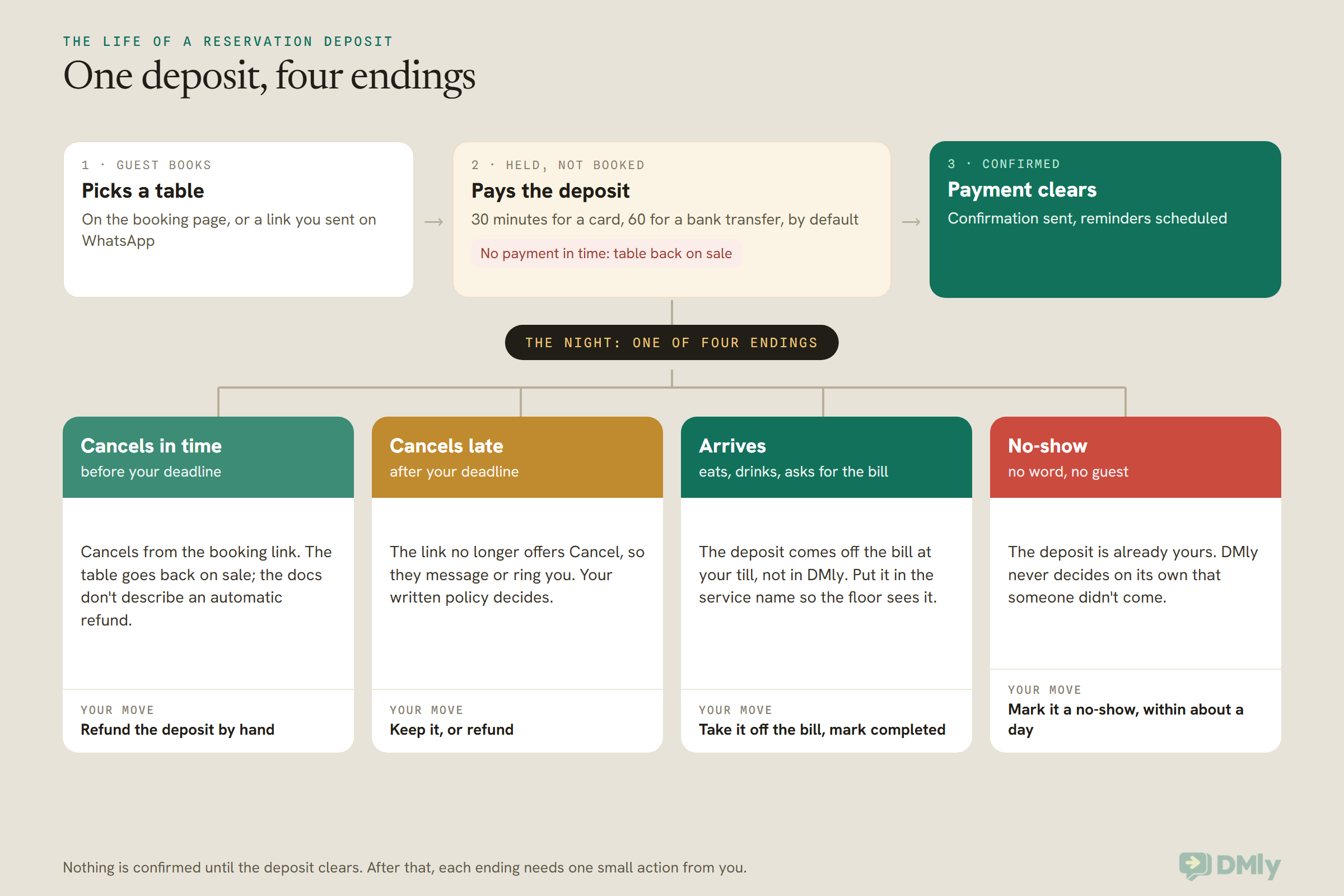
Once paid, the guest gets their confirmation on their channel. If your WhatsApp number is connected and they gave a phone number, it arrives on WhatsApp; otherwise by email. Their reminders are scheduled from the table service’s reminder times, and the booking gets its own private page, the manage link, where they can cancel inside your deadline.
If no gateway is connected, a deposit table can’t be booked online at all. The booking page tells the guest “Online payment isn’t available right now. Please contact us to book this service.” That’s a clear message, but it’s not one you want a guest to see on a Saturday, so check your gateway is connected before switching a live table to a paid mode.
A payment that lands after the hold has ended isn’t applied. If a guest’s payment clears after the hold is up, DMly doesn’t bring the table back, because someone else may have booked it. It flags the booking for a refund or review and writes a note on it. The guest still gets your payment receipt, and your team gets an ordinary “Payment received” alert, with nothing saying this money needs a refund. If a guest says “I paid but I have no booking”, look for that note, then rebook them or refund them.
Deposits for Phone, Chat and Group Reservations
Reservation deposits apply to bookings your team adds by hand as well, so a phone booking for a deposit table gets a payment link by message and a two-hour hold instead of the booking page’s shorter one. That’s the route for big groups, which many restaurants prefer to take by conversation rather than through a booking page.
Phone and host bookings
When your host books a guest in from Appointments → Calendar on a Pay before booking service, DMly holds the table and messages the guest a payment link, for the deposit if the service has one. The booking confirms once they pay. The hold lasts two hours rather than the booking page’s 30 minutes for a card, because a guest who booked over the phone needs time to see the message.
If the guest pays you another way, such as a card machine at the counter, cash, or a voucher they already hold, tick Payment taken in person. The booking is confirmed straight away and no link is sent. That box only appears for a single booking. Booking several slots at once, or a repeating booking, confirms them without taking payment, so collect for those yourself.
A phone guest usually hasn’t messaged you on WhatsApp, so their 24-hour chat window is closed. In that case DMly sends the link on an approved WhatsApp template called dmly_payment_request, a Utility template (the kind of message WhatsApp lets a business send outside the 24-hour window). Before you rely on it, book a test table from the Calendar for a staff phone that hasn’t messaged you recently, and check the link arrives. Our guide to sending WhatsApp payment links explains the window and the templates in more detail.
This is also how you handle guests who’ve failed to show before. Rather than putting a deposit on everyone, your host books those guests onto a deposit table service by hand, and the link goes out with the booking.
Bookings taken by an AI assistant in the chat
If you let an AI assistant take reservations in WhatsApp, the deposit still applies. DMly’s docs say that when the AI agent books a deposit service, it also tells the guest what’s left to pay at the table. That matters, because a guest who’s told “£80 to book” and nothing else may think dinner costs £80. Our guide to building a WhatsApp AI appointment booking chatbot covers the booking tools, including handing over to a person for anything unusual, such as a party of twenty.
Groups that want to talk first
Large parties often have questions before they book: a set menu, a private room, a birthday cake, dietary needs. Handle those in the chat, agree the details, then either send them your deposit table’s booking link or have your host book them in from the Calendar so the link goes out automatically. Either way, the deposit rule is the same one everyone else sees.
Where guests pay by bank transfer
In Nigeria, and in other markets where many people prefer to pay by transfer from their banking app, the payment hold can still be tight. DMly holds the table for 60 minutes by default when the guest pays by bank transfer, and you can lengthen it with the Slot held for payment setting. A guest who leaves the checkout to open their bank app, wait for an OTP and come back may still run past the hold, and that’s how you end up with money for a table that’s already been released.
Three ways to make that smoother:
- Take group deposits by host booking from the Calendar, which gives the guest a two-hour hold.
- Use the Collect a deposit by bank transfer template (route C). The table is booked first and the deposit request follows as a transfer-only link, so there’s no hold to run out. Paystack and Monnify support transfer-only links; Flutterwave is also live for Nigeria.
- If you’d rather take transfers into your own bank account, DMly can send your account details in the chat with an I’ve paid button, and you confirm each transfer under Finance → Payments once you’ve seen it on your statement.
When a Guest Cancels: Refunds, Deadlines and the Word “Cancel”
When a guest cancels a deposit table before your deadline, the table goes back on sale, but DMly’s docs don’t describe the deposit being refunded on its own, so plan to refund it by hand. When a guest cancels after the deadline, your policy decides whether you keep it.
Cancelling in time
A guest can cancel from their booking link while they’re inside the Cancellation deadline (hours) you set. A cancelled booking skips its reminders, and DMly messages the guest that it’s been cancelled.
The refund is a separate step. Find the payment under Finance → Payments and choose Refund from its menu. DMly asks the gateway to send the money back first, and only marks the payment refunded once the gateway agrees. If the gateway can’t refund that payment, DMly tells you to do it in the provider’s own dashboard instead. Refunding needs the Issue refunds permission, which is admin-only out of the box, so decide who on your team can do it. If your hosts work evenings and you don’t, give one trusted person that permission rather than leaving refunds until Monday.
Test the whole thing once with a real small payment: book, pay, cancel, and see whether anything happens to the money before you press Refund. The docs don’t describe an automatic refund on cancellation, and you want to know for certain what your guests will experience.
Cancelling late
After your deadline, the guest’s booking link no longer offers Cancel, so they’ll message you or ring. This is where your written policy does the work. Most restaurants keep the deposit for a late cancellation, or keep part of it, and many make an exception when the guest offers to move the booking to another night.
If you want to keep part and refund part, refunding a partial amount isn’t described in DMly’s docs, so do it in your payment provider’s dashboard and check how it shows in DMly afterwards. The cancellation deadline is one setting for the whole workspace, so it applies to every table, not just the deposit ones.
When a guest replies just “cancel”
This one catches restaurants out. When a guest sends just the word cancel, on its own, as their whole message, on WhatsApp or another chat channel, DMly doesn’t opt them out. It asks first: “Reply STOP to stop all messages, or STOP OFFERS to stop promotions only.” Nothing is muted, and the message still reaches your automations. Their booking is not cancelled, and the deposit isn’t touched. SMS is the exception: there, a bare “cancel” opts the guest out at once, and from then on DMly blocks every message to them, including your own manual replies and any payment link, until they opt back in or are resubscribed.
“Cancel my table tomorrow” reads as an ordinary message. But a bare “cancel” is exactly what a guest might send in reply to a reminder, meaning the table rather than your messages. So:
- Never write “reply CANCEL to cancel” in any message. Say “tap the link to cancel” or “message us to change your booking”.
- If a guest does reply “cancel”, the booking is still live. Cancel it yourself if that’s what they meant, refund the deposit if they’re inside your deadline, and confirm with them. If it came by SMS they’re now opted out, so phone them instead.
- If a guest did opt out and wants to keep hearing from you, they can send start, or you can use Resubscribe under Contacts → Suppressions. Only do that when the guest has actually asked; DMly records it in their consent history under your name.
When a Guest Doesn’t Show: Keeping the Deposit and Marking the No-Show
When a deposit guest doesn’t show, you keep the deposit by doing nothing to it, and you mark the booking as a no-show so your records, follow-ups and any fees work.
The deposit is already in your account. There’s no button to press to “keep” it. What you do need to do is tell DMly what happened, because DMly never decides on its own that someone didn’t come.
Mark the reservation as a no-show from the Appointments screens or the mobile app at the end of service. You have about a day on the Calendar before the booking is closed off and the No-show button disappears. With Appointments nobody marked set to Wait for review, unmarked bookings wait for you as Needs review instead, and your team gets one in-app nudge a day until they’re settled. With the default, Count as completed, a no-show nobody marked is closed as completed and thanked for coming.
Should you add a no-show fee on top?
On deposit tables, usually not. DMly’s no-show fee is separate from the deposit and is not subtracted from it, so a guest would pay both. If the deposit is the penalty, leave the fee blank.
On tables without a deposit, a no-show fee can be your lighter option for busy nights. Set it on the table service under Offerings → Services, or set a workspace default under Appointments → Settings → Booking policy. Be honest with yourself about how it works:
- It’s charged only when the booking is marked a no-show. An unmarked booking is never charged.
- A saved card is only charged if the guest has set up automatic payment for a subscription with you, which restaurant guests rarely have. Everyone else gets a payment link, which they may not pay.
- It’s charged once per booking. If you change the status back, it isn’t refunded.
- It needs a connected gateway. Without one, nothing is charged and you get a “No-show fee not collected” alert.
- A guest who’s opted out of your messages, for example by replying STOP, won’t receive the link.
That’s why a no-show fee sits on the second rung of the ladder, not the third. It tells guests you take bookings seriously; it doesn’t put money in the till the way a deposit does.
Remembering repeat no-shows
DMly’s automations can run when a booking is marked a no-show (the Appointment no-show trigger, which means “when this happens, do that”). One simple use is to add a tag such as no-show to the guest, so your host sees it the next time they call and books them onto a deposit table. Remove the tag when they’ve come in a couple of times. It’s a quiet way to ask for a deposit only from the guests who’ve given you a reason to.
At the Till: Taking the Deposit Off the Bill
The deposit comes off the guest’s bill at your till, not in DMly, so your floor team needs a simple way to see who paid what. This is where good deposit systems fall down, not in the setup but on a busy Saturday when the server doesn’t know the table already paid £80.
Make it routine:
- Put the deposit in the service name. “Table for 8 to 10 (deposit £80)” shows on the booking, so whoever looks at the evening’s list sees it.
- Check the list before service. On the Bookings list, filter to tonight’s deposit table service. For route B bookings, the ones showing not paid are the ones with a balance still to take, which is all of them until the bill is settled.
- Write it on the floor plan or the ticket. Whatever your team looks at during service, the deposit needs to be on it.
- Mark the booking completed after the guest has eaten, or let your review routine do it at the end of the night.
DMly doesn’t send a link for the balance on its own. If you’d rather settle the remainder of a set-menu event before the night, for example a private dining booking, you can send an invoice or a payment link yourself.
How it works, if you’re curious. DMly counts a booking as paid only once the full price has been collected. A route A booking is paid as soon as the deposit clears, because the deposit is the whole price of that service. A route B booking stays not paid until the balance is recorded, which is how you spot who still owes. If you refund a route B deposit, the full price shows as owed again, which is harmless on a cancelled booking but worth knowing when you read the list.
Restaurant Deposit Policy Wording You Can Adapt
A good restaurant deposit policy says how much, when it’s charged, how it comes off the bill, and what happens if plans change, in five or six short lines a guest can read before they pay. Put the short version in your booking page description and the full version on the page your Terms URL points to.
Deposits for larger tables
For tables of [8] or more, and on [Friday and Saturday evenings / special menus], we ask for a deposit of [amount] when you book.
Your deposit comes off your bill on the night.
Need to cancel? Use the link in your confirmation at least [24] hours before your booking and we’ll refund your deposit in full.
Cancellations after that, or tables where nobody arrives, keep the deposit.
Running late or changing numbers? Message us on WhatsApp and we’ll do our best.
Please don’t reply with just the word “cancel”: tap the link or tell us in a sentence, so we can help.
Change the numbers to suit you. If you’d like help drafting a fuller version, our free cancellation policy generator builds one from your own rules. If you serve in more than one country, check your local consumer rules on keeping deposits before you publish yours.
Salons face the same balance between protecting the diary and not punishing loyal clients, and our guide to how salons reduce no-shows with deposits and reminders is a useful comparison if you run both kinds of booking.
Reservation Deposit Messages to Copy
These messages cover the moments around reservation deposits: asking, confirming, refunding, keeping and following up. Inside an open 24-hour chat window you can send them as normal replies. Outside it, WhatsApp only delivers an approved template, and the category matters. Messages tied to one booking, with no offers, are Utility; add a discount or a “come back soon” offer and Meta treats it as Marketing. Marketing templates aren’t currently delivered to US (+1) numbers at all. Our explainer on WhatsApp message templates: marketing, utility and authentication covers the categories.
1. Deposit request for a group booked by chat or phone
Hi [Name], lovely to have you joining us. Your table for [10] on [Saturday 14 December] at [7:30pm] is held for the next two hours. To confirm it, please pay the [£80] deposit here: [link]. It comes straight off your bill on the night.
Category: a normal reply inside the chat window. If your host books from the Calendar and the window is closed, DMly sends the link on its own dmly_payment_request Utility template instead.
2. Deposit received
Thanks, [Name], your deposit of [₹4,000] is in and your table for [8] on [date] at [time] is confirmed. We’ll take it off your bill on the night. If plans change, use the link in your confirmation at least [24] hours before.
Category: Utility if sent as a template. DMly also sends its own payment receipt automatically when a payment is confirmed.
3. Group question before booking
For groups of [8] or more we take a deposit of [₦10,000] per table to hold it, which comes off your bill. We can also do our [set menu] at [price] a head. Would you like me to send you the booking link, or book it in for you now?
Category: a reply to the guest’s own question, inside the window.
4. Cancelled in time, deposit refunded
All done, [Name]. Your table for [date] is cancelled and we’ve refunded your [$150] deposit. Depending on your bank, it can take a few days to show. Thanks for letting us know in good time.
Category: Utility. Keep it free of offers.
5. Cancelled late, deposit kept
Thanks for letting us know, [Name], and sorry you can’t make it. As our booking terms say, deposits for cancellations within [24] hours are kept, so we won’t be refunding this one. If you’d like to move to another evening in the next [two weeks], reply here and we’ll see what we can do.
Category: Utility as a template. The offer to move the booking is part of your policy, not a promotion, but keep it specific to this booking.
6. The morning after a no-show
Hi [Name], we held your table for [8] last night until [8:15pm] and didn’t see you. We hope everything’s all right. As our booking terms say, the deposit has been kept. If something went wrong on our side, reply here and we’ll look into it.
Category: Utility, tied to one booking. DMly’s own no-show follow-up template, dmly_appointment_no_show, is Utility for the same reason. Add “and here’s 10% off your next visit” and it becomes Marketing.
7. A line to add to every confirmation and reminder
Need to change or cancel? Tap your booking link or message us in a sentence. Please write a sentence rather than just “cancel”, so we know you mean the table.
Category: part of whichever message it sits in.
Reservation Deposits in Six Restaurants
The same reservation deposits setup looks a little different in every market, mostly because of how guests pay and how big groups book. These six are illustrative examples, not DMly customers, and the amounts are examples, not recommendations.
A barbecue joint in Austin. Weeknights run on reminders only. Saturday tables for six or more go on a “Table for 6 to 10 (deposit $60)” service priced at 60, Pay before booking, Full price. The host books private-room parties from the Calendar so the link goes out with a two-hour hold. Gateway: Stripe.
A rooftop restaurant in Bengaluru. The Friday and Saturday rooftop is the scarce seat. Groups of eight book “Rooftop for 8 (₹4,000 deposit)”. A festive set menu runs as route B: priced per table, 25 per cent deposit, balance at the table. Gateway: Razorpay. Guests often ask in the chat first, so the team sends the booking link once the menu’s agreed.
A grill house in Lagos. Many guests pay by transfer, so the team uses the Collect a deposit by bank transfer template for groups: the table is booked, the transfer link follows, and the host checks for unpaid deposits at 4pm. Smaller tables stay free. Gateways: Paystack, with Monnify for in-chat account numbers.
A neighbourhood bistro in London. Tables for two to four stay free with reminders. Groups of eight or more and the Christmas set menu take deposits, with a 48-hour cancellation deadline published in the terms. Repeat no-shows are tagged and booked onto the deposit service by the host. Gateway: Stripe.
A seafood restaurant in Dubai. Friday brunch is the busiest service of the week and sells like an event, so it runs as full prepayment per table, with a cancellation deadline in the terms. Dinner tables stay on reminders. The team writes messages in English and Arabic. Gateway: whichever of DMly’s gateways their bank works with, such as Stripe or MyFatoorah.
A taquería in Mexico City. No deposits at all for the main dining room; it fills with walk-ins. The chef’s counter tasting menu takes full prepayment in pesos through Mercado Pago, which charges in its own country’s currency, MXN for a Mexican account.
For more on how DMly fits a restaurant beyond reservations, see DMly for restaurants.
What DMly Doesn’t Do for Reservation Deposits (Yet)
DMly handles deposits, holds, refunds and no-show fees, but a few things restaurant booking systems sometimes offer aren’t in its docs, and it’s better you know before you plan around them.
| You might want | What DMly does instead |
| A card held on file without charging it | No card pre-authorisation hold is documented. Cards are only saved for subscriptions. Take a deposit, or use a no-show fee sent as a link. |
| A deposit only for certain guests on the booking page | Deposits live on the service. Book those guests onto a deposit service yourself from the Calendar. |
| An automatic refund when a guest cancels in time | Not described in the docs. Refund from Finance, Payments, and test it once so you know. |
| A late-cancellation fee | There’s a no-show fee, charged when a booking is marked a no-show, but no separate late-cancellation fee. Your deposit policy covers late cancellations. |
| A per-head deposit field | Put the per-head arithmetic in the service price and name. |
| A “how many guests?” question on the booking form | Booking form questions come from a fixed list you can switch on, off and relabel, but you can’t add your own. Let the table-size service name carry the party size, and relabel Additional Notes for occasions and access needs. |
| A different cancellation deadline for big tables | The deadline is one setting for the whole workspace. |
If you run sittings rather than turning tables, for example a supper club with a 6pm and an 8:30pm seating, DMly’s classes may fit better, and paid classes follow the same three payment modes. Whether a class-type service shows the Deposit field isn’t spelled out in the docs, so test it before you promise guests a part payment for a sitting.
Are Your Reservation Deposits Working? How to Tell After a Month
To see whether reservation deposits are working, compare your no-show rate on the deposit tables for a month before and a month after, using DMly’s appointment reports. Don’t compare yourself to someone else’s figure; compare yourself to last month.
The numbers are under Configurations → Reports → Appointments. The No-show rate card sits across the top, and the By service table breaks bookings, completions and no-shows down by table service, so you can see your deposit tables on their own. Narrow it by date and service. The CSV download gives one row per booking, including a paid column.
Two cautions. First, the report only knows the no-shows you marked. If Appointments nobody marked is on the default, unmarked no-shows count as completed, and your no-show rate will look better than it is. Second, watch your booking numbers too. If no-shows fall but group bookings fall further, your deposit may be too high or on too many tables. Lower it, or move some tables back down a rung.
The other thing to watch is softer: what guests say in the chat. If you’re getting “why do I have to pay to book?” questions, your policy isn’t visible enough before checkout. If you’re not getting any, it probably is.
Frequently Asked Questions
Are reservation deposits worth it for a small restaurant?
Reservation deposits are usually worth it on the tables where a no-show really hurts, such as large groups, peak sittings and set-menu nights, and usually not worth it on weeknight tables for two that walk-ins can fill. Start with reminders for everyone, add a deposit to your group tables, and widen it only if no-shows on busy nights stay high.
How much should a restaurant deposit be?
There’s no standard amount. Choose a figure large enough that a guest wouldn’t book several restaurants and drop most of them, and small enough that someone who means to come doesn’t hesitate. Many restaurants base it on a share of a typical spend per head. In DMly you either set the table’s price to the deposit amount, or set a percentage of a fixed menu price.
Can I take a deposit only from large groups?
Yes. In DMly the deposit lives on the service, so set up your large-group table as its own service with Pay before booking and a deposit, and leave your smaller table services free. Guests booking the group table pay; everyone else books as normal.
Do I have to refund a deposit if a guest cancels?
That’s your policy to set, and you should publish it before guests pay. Most restaurants refund in full when a guest cancels before a deadline such as 24 or 48 hours, and keep it after that. In DMly, set the deadline under Appointments, Settings, Booking policy, and refund from Finance, Payments using the Refund option. Check your local consumer rules too.
What happens to the deposit when the guest arrives?
You take it off their bill at your till. DMly doesn’t know the final bill, so it can’t deduct the deposit for you. Put the deposit amount in the table service’s name and on whatever your floor team uses during service, so nobody charges the guest twice.
Is a no-show fee the same as a deposit?
No. A deposit is paid before the table is confirmed. A no-show fee is charged only after the booking is marked a no-show, and for most guests it arrives as a payment link they may not pay. In DMly the two are separate, and a no-show fee isn’t subtracted from a deposit, so leave the fee blank on deposit tables.
What if a guest replies “cancel” to my message?
On WhatsApp and the other chat channels, a bare “cancel” doesn’t opt the guest out or cancel the booking: DMly asks whether they want to stop all messages (STOP) or only promotions (STOP OFFERS), and the message still reaches your automations. On SMS, a bare “cancel” opts them out at once. Either way the booking is still live, so cancel it yourself if that’s what they meant and refund if they were inside your deadline. Then change your wording so guests are told to tap their booking link or write a sentence instead.
The Other Half of the Ticket
A cloakroom ticket works because both halves exist. Nobody minds handing over their coat for a slip of paper, because they know exactly what happens next: they come back, the halves match, they leave with their coat.
Reservation deposits work the same way when they’re done well. The guest knows the amount before they pay. They know it comes off the bill. They know how to cancel and by when. And your team knows what to do at the till, at the end of the night, and the morning after a table sat empty.
Start small. Put reminders on every table, a deposit on your group and peak tables, and a clear policy where guests see it before they pay. Mark your no-shows. Look at the numbers after a month and move tables up or down the ladder from there. If you’d like to try it on your own tables, you can start a free DMly trial, connect a gateway and book your first deposit table from your own phone today.
Writing about WhatsApp automation, bookings and growth for local business.
Turn WhatsApp into your busiest channel.
Start free and run message, bookings, payments and reviews in one place.
