
“Is the beginners’ circuit class really for beginners? I haven’t trained in years and I don’t want to be the one holding everyone up.” It is not a question many people want to ask out loud at a front desk. Typed into a chat, it is much easier to send. The question behind a lot of gym enquiries is not “what time is the class” but “will I fit in”, and the person asking wants a quick, kind, honest answer before they lose their nerve.
A well-built WhatsApp AI assistant for a gym is good at exactly that moment. It can answer from your own class descriptions, say what to bring and where to park, show the next sessions, and book one in the same chat. It can also tell a regular what they are booked into, cancel a place they cannot make so someone on the waitlist gets it, and hand over to your team the moment a question is about an injury, a medical condition or a billing problem.
This guide builds one in DMly, step by step: what the assistant should and should not handle, what has to exist before it can book anything, the template to start from, the knowledge and tools it needs, the instructions to give it, and how it behaves with your class rules, class packs, personal training and memberships. It is the assistant chapter of our wider guide to WhatsApp automation for gyms.
What a WhatsApp AI Assistant for a Gym Should, and Should Not, Do
The assistant is your front desk in the chat. Coaching, health and money problems stay with people.
Gym messages fall into a fairly predictable set. Sort them before you build, because the split decides the assistant’s tools and its instructions:
| The assistant handles | A person handles, every time |
| “What classes are on tomorrow?” | Injuries, pain, medical conditions, pregnancy |
| Booking a place in a class | Training plans, diet or supplement questions |
| “What am I booked into this week?” | Freezing, pausing or cancelling a membership |
| Cancelling a place the member cannot make | Payment problems, refunds and billing disputes |
| What a class is like, what to bring, who it suits | Complaints, and anyone upset |
| Opening hours, parking, lockers, prices from your list | Disputes about a credit balance (see below) |
The line on the right is not only caution. WhatsApp’s Business Messaging Policy says not to use WhatsApp to “send or request any health related information, if applicable regulations prohibit” it on systems without heightened protections, and it expects automated chats to offer a prompt, clear route to a person. A gym assistant that never asks about health, and hands over when a member raises it, stays well away from that line wherever you are. Whether your local rules say more is a question for your own advisers.
Keep the assistant about your gym, too. Meta’s terms for the WhatsApp Business Platform, in a section headed “AI Providers” (last modified 23 September 2026), prohibit companies from using the platform to offer AI tools such as “general-purpose artificial intelligence assistants” where the AI is the “primary (rather than incidental or ancillary)” thing being offered, as Meta decides. That clause is aimed at AI companies, not at a gym answering questions about its own classes. The practical lesson is still worth taking: an assistant that happily writes a member’s essay or plans their holiday is not what you are building, so tell it to decline anything unrelated to the gym and to leave web search off.
What Has to Exist Before the Assistant Can Book
The assistant books into your real timetable, so the timetable comes first.
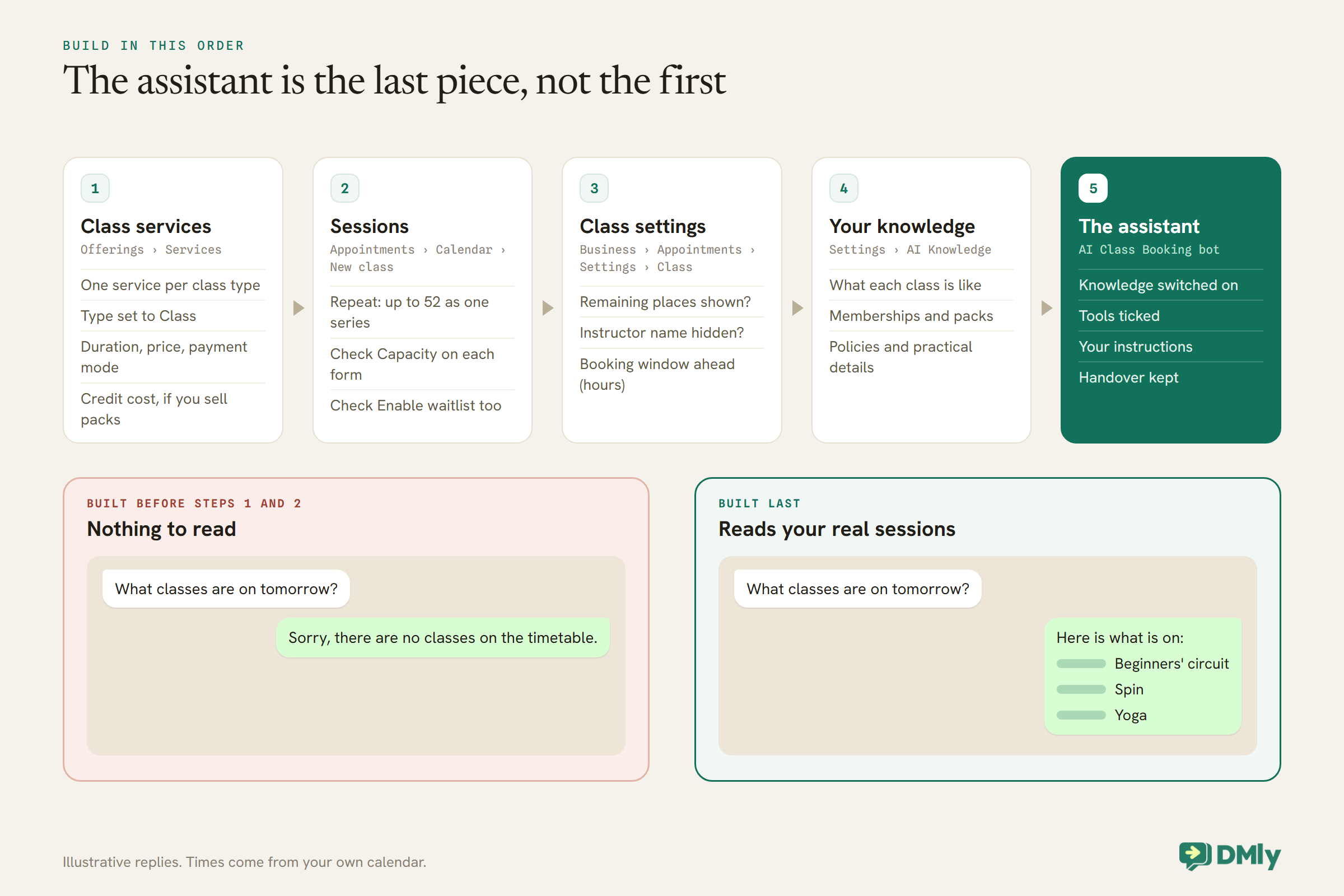
DMly’s booking tools act on your actual Appointments data. A WhatsApp AI assistant for a gym with nothing to read will politely tell every member there are no classes. Set these up first, in this order:
- Class services. In Offerings → Services, create one service per class type (Beginners’ circuit, Spin, Yoga) and set its type to Class, with its duration, price and payment mode. If you sell class packs, set Credit cost here too.
- Sessions. In Appointments → Calendar, select New class, pick the service and set the date and time. Tick Repeat to create a weekly class in one go: DMly generates up to 52 occurrences as one series. Check Capacity and Enable waitlist on each form, because they open pre-filled from the service and do not re-fill if you switch services.
- Class settings. At Business → Appointments → Settings → Class, decide whether to display remaining places, whether to hide the instructor’s name, whether waitlists are on, and the Booking window ahead (hours), which stops people signing up for a class that is about to start.
- Your knowledge. A short set of documents the assistant answers from (Step 2 below).
Step 1: Start From the AI Class Booking Bot
DMly ships a template built for exactly this job. Start there and change what is wrong for your gym.
In the automation template library, pick the AI Class Booking bot. Like the other ready-made AI bots, it is a three-step flow: a trigger, an AI Reply step and an end. It arrives with the class tools already ticked: Get contact info, List upcoming classes, Book a class, View booked classes, Cancel a class booking and Hand over to a human. It also arrives with a working customer-service prompt that you will rewrite in Step 4.
Because the AI Reply step leads straight to the end, it is what DMly calls a conversational step: it stays in the chat and answers the member’s next message too, up to 40 turns in one run. At 40 it leaves a note in the Inbox saying a teammate should take it from here. That is plenty for a booking conversation and a sensible backstop for one that is going round in circles.
Set the trigger to WhatsApp message, so the assistant answers when a member writes to your number. One thing to know before you publish: only one automation ever answers a given message. If another active automation on the same channel already replies to every message, DMly blocks the publish and asks you to give one a specific keyword or pause the other. Decide which automation owns the general inbox before you switch the assistant on.
Step 2: Give It Your Gym’s Knowledge
The assistant only knows what you give it. Give it the answers your front desk gives every day.
Build a collection at Settings → AI Knowledge. You can add files (PDF, TXT and MD, up to 20 MB), web pages, FAQs or pasted text. There is no training step: a source can be searched on the next reply once its status reads ready. The collection is shared across the workspace, so build it once.
What a gym’s collection should hold:
- One paragraph per class, written for the nervous newcomer: who it suits, how hard it is, whether moves can be scaled down, what to wear and bring, and how early to arrive. This is the answer to the question at the top of this article.
- Memberships and packs: what each option includes, prices, how class packs work, and how long credits last.
- Policies: how late a member can cancel a class, what happens after a no-show, guest passes, age limits.
- Practical details: opening hours, address, parking, showers, lockers, accessibility.
- What the assistant must not answer, written plainly, so its own reading material reinforces its instructions.
Two settings catch people out. First, a new AI Reply step, and each AI template, arrives with AI Knowledge set to No knowledge, and it does not warn you: the assistant simply never searches. Choose All workspace knowledge or pick your collection on the Built-in Tools tab. Second, if you connect your own AI provider, pick OpenAI or Gemini for this step. DMly’s docs are clear that Claude and DeepSeek cannot search documents, so a step running on either searches nothing, whatever you select. DMly’s own shared AI searches your collections normally.
If a source came from a web address, the assistant appends that address to its reply as a plain link, at most two per reply. That makes your class pages on your website a useful source: a member asking about Spin gets a short answer and the link to your Spin page.
Step 3: Choose the Tools
Ticking a tool makes it available. Your instructions make the assistant use it.
The class template’s tools cover the core jobs. Add a few from the same list, because CRM and booking tools share one set of checkboxes on the Built-in Tools tab:
| Tool | What it does for a gym |
| List upcoming classes | Reads your real timetable, so “what’s on tomorrow?” gets actual sessions |
| Book a class | Books the place in the chat instead of “use the app” |
| View booked classes | Answers “what am I booked into?” |
| Cancel a class booking | Frees the place so it can go to someone else |
| Get contact info | Reads the member’s name, stage, tags and custom fields |
| Add a note (add it) | Leaves “asked about knee-friendly classes” for the coach who picks the chat up |
| Add tags (add it) | Tags trial-enquiry or interested-yoga for later campaigns |
| Hand over to a human | Pauses the bot and passes the chat on |
Handover is the one tool never to remove. When it fires, the bot pauses and the assistant stops its turn there, so it cannot keep talking over the coach who has just taken the chat. Leave Web search off: your timetable and prices are not on the open web, and a searching assistant is slower and more likely to wander off topic.
Step 4: Write the Instructions
The instructions are the assistant’s job description. Write them the way you would brief a new front-desk hire.
Open the AI Reply step’s Prompt tab. It holds the built-in customer-service prompt; edit it rather than starting from nothing. You can use {{business_name}} for your workspace name and {{first_name}} for the member’s first name. Here is a starting point for a gym, to adapt:
You are the WhatsApp assistant for {{business_name}}, a gym.
You are talking to {{first_name}}. Be warm, brief and plain.
Say you are the gym's automated assistant, and that a person
is one message away.

What you do:
- Answer questions about classes, prices, opening hours,
  parking and policies, using the gym's knowledge only.
- Show upcoming classes with List upcoming classes. Never
  invent a class or a time.
- Book a place only with Book a class, and only after the
  member has chosen a session. Never say "you're booked"
  unless the tool confirmed it.
- Use View booked classes when asked what they are booked
  into, and Cancel a class booking when they ask to cancel.
- Be kind to beginners. Describe the class honestly and say
  the coach can adjust moves.

What you never do:
- Never give training, diet, supplement or medical advice.
- If the member mentions an injury, pain, a medical condition
  or pregnancy, say a coach will reply, add a note, and use
  Hand over to a human. Do not ask for details.
- Hand over for membership freezes, cancellations, payments,
  refunds, complaints and anything you are unsure about.
- Never ask for card numbers or ID numbers.
- Politely decline anything not about the gym.
The rule about only confirming a booking after the tool succeeds matters more than it looks. Without it, a friendly assistant can say “lovely, see you Thursday” before it has booked anything, and the member turns up to a full class. If the assistant seems to ignore a tool you ticked, the fix is almost always in the instructions: tell it, in words, when to use that tool.
On the same tab, set a Fallback message for when the AI provider errors or returns nothing. DMly ships a sensible default saying a team member will follow up; keep something like it. If you clear it, the member gets nothing at all and the only sign is a note in the Inbox.
How the Assistant Meets Your Class Rules
The assistant books through the same rules as everyone else. Knowing them lets you word its replies well.
The booking window
If you set Booking window ahead (hours), members cannot sign up for a class starting inside that window. The AI agent applies the same window itself and offers a later session instead of seating someone inside it. That is kinder than your public booking page, where a session inside the window still looks bookable and the booking fails with a generic “try another session” message that never mentions the window. The window is workspace-wide and starts at 0, meaning no limit.
Full classes and the waitlist
Each session holds one place per member, and a full session with its waitlist on queues people in order, first in, first promoted, with DMly messaging them automatically when a place opens. Joining a waitlist fires its own trigger, Joined class waitlist, if you want to send something extra. DMly’s docs describe the waitlist for members booking themselves and for flows, but they do not spell out what the AI’s Book a class tool does on a full session. Test it before you rely on it (see Step 5), and tell the assistant in its instructions what to say when a class is full.
Classes cannot be moved
A class place cannot be rescheduled to another session. There is no other slot to move to, so the only path is to cancel one place and book another. Tell the assistant to do those as two clear steps and to confirm both, so “can I switch to Saturday?” does not end with a member holding two places or none.
Paid classes
A class takes the same payment modes as any other service. If a class is set to pay before booking, it needs a connected payment gateway: without one, DMly refuses the booking with a message asking the client to contact you. A member promoted from the waitlist of a paid class is not handed a free seat either; they get a checkout link and a payment hold, and the next person is promoted if they do not pay in time. DMly documents that, for a paid 1:1 service, the assistant’s booking holds the slot for 15 minutes while DMly itself sends a Pay button; the docs do not describe the class tool on a paid class, so test that path too. Keep your gateway connected while any paid class has a waitlist: if DMly cannot create a checkout link when it promotes someone, it confirms the seat anyway and marks it paid without a payment.
Class Packs and Credits
If you sell packs, the assistant’s bookings spend credits. Know what that means before members ask.
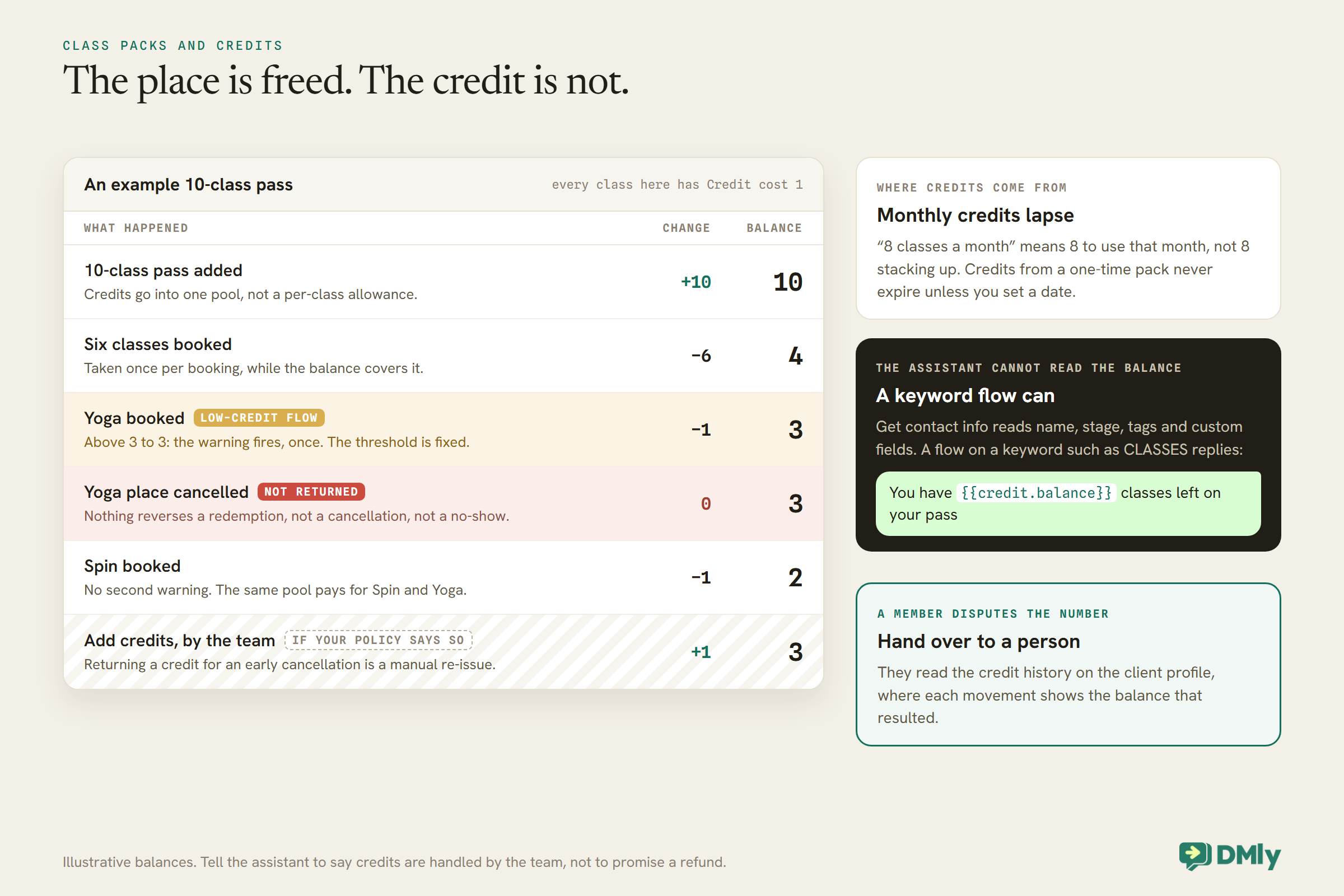
In DMly, a plan such as a 10-class pass gives the member credits, and each booking of a class with a Credit cost above 0 takes that many credits off their balance, once per booking, when they have the balance for it. A few behaviours shape how the assistant should talk about packs:
- A cancelled place does not give the credit back. Nothing reverses a redemption: not a cancellation, not a no-show. If your policy is to return the credit for an early cancellation, someone on your team has to re-issue it with Add credits on the member’s profile. Tell the assistant to say, when it cancels, that credits are handled by the team, rather than promising a refund.
- Credits are one pool. A member’s balance is a single number, not a per-class allowance. Attaching a service to a plan’s credit row labels it, but nothing checks it when the credit is spent. If Spin and Yoga both cost credits, a Spin pack pays for Yoga too.
- Monthly credits lapse. Credits from a recurring membership last for that billing period: “8 classes a month” means 8 to use that month, not 8 stacking up. Credits from a one-time pack never expire unless you set a date when you add them by hand.
- The low-credit warning fires once, at 3. DMly can start a flow when a balance drops from above 3 to 3 or below. The threshold is fixed, it fires once per crossing, and only spending sets it off. That one message is the natural moment to offer the next pack; see our gym automation pillar for the renewal side.
One gap matters for the assistant directly. DMly’s docs say Get contact info reads a contact’s name, stage, tags and custom fields, and they do not list the credit balance. So do not rely on the assistant to answer “how many classes do I have left?”. A small keyword flow does it better: DMly’s {{credit.balance}} token reads the member’s current balance at the moment a message sends, in any flow. A flow on a keyword such as CLASSES can reply “You have {{credit.balance}} classes left on your pass”, and the assistant’s instructions can tell members to send that word. A keyword automation can sit alongside an assistant that answers everything else; only two automations that both reply to every message clash. If a member disputes the number, hand over to a person, who can read the credit history on the member’s client profile, where each movement shows what changed and the balance that resulted.
Personal Training and Other 1:1 Sessions
Personal training is an appointment, not a class. It needs the appointment tools.
A personal training session, an induction or a body composition check is a 1:1 service booked into a coach’s time, not a seat in a class. The class template’s tools do not book those. If you want the same assistant to handle both, tick the appointment set on the same step: List bookable services, List staff for a service, Check available times, Book an appointment, View upcoming appointments, Reschedule an appointment and Cancel an appointment. Always include Check available times; without it, an assistant can offer times you cannot honour.
For a paid session set to take payment first, DMly holds the slot for 15 minutes and sends the member a Pay button showing the amount, which is the deposit where the service takes one; the assistant is told the amount so it can say what is owed, but it never writes the payment link itself. Our guide to a WhatsApp AI appointment booking chatbot covers the 1:1 side in more depth. If one assistant doing both becomes confusing, split them: one step for classes, and a keyword route to a second for personal training.
Memberships: Hand Them Over, Cleanly
The assistant can explain your memberships. Changing one is a job for a person.
DMly’s AI tools list covers contacts and bookings. There is no tool for subscriptions, so the assistant cannot freeze, pause or cancel a membership, and it should not pretend to. Have it explain the options from your knowledge collection, take a note of what the member wants, and hand over.
Brief whoever picks those chats up on how subscriptions behave in Finance → Subscriptions, because a freeze is where members get charged by surprise:
- Pause subscription stops billing and renewals immediately, but it does not move the billing date. If you resume after that date has passed, the nightly run treats the subscription as due and charges it. The docs give the safe order: resume first, then use Adjust end date to set a future date, before the next nightly run.
- Cancel subscription stops future billing but refunds nothing, and it cannot be undone from the list; a cancelled member needs a new subscription. Credits already in their balance stay there.
A clean handover here keeps the member’s trust. The assistant says a person will sort the freeze, writes a note with the dates they asked for, and hands over; the person replies with the outcome. Nobody has to explain the request twice.
Make Handovers Work
A handover is only as good as the person on the other end of it.
When the assistant hands over, the bot pauses and the chat waits for your team in the Inbox. Decide three things before launch:
- Who picks up. If several people share the Inbox, tick Auto-assign to an agent so handed-over chats go round-robin; for a small team, Move to unassigned queue lets whoever is free grab it.
- What the member hears. A short line such as “I’ve passed this to one of our coaches, who will reply here” sets the expectation. If nobody is on shift in the evening, say when they will hear back.
- How the bot comes back. A handover pauses the bot for that conversation; make sure the team knows how to resume it once they are done, so the next “what’s on tomorrow?” is answered again.
Injury messages deserve a word of their own. The assistant should never judge whether someone can train with a sore knee, suggest an alternative exercise, or ask for medical details. It should say a coach will reply, note that the member mentioned an injury, and hand over. What your coaches then say, and whether they ask the member to check with a health professional, is a matter for your own policies.
Step 5: Test Your WhatsApp AI Assistant for a Gym Like a Member Would
Test with the messages your members actually send, including the awkward ones.
If your plan lets you connect your own AI provider, the step has a Playground tab. It runs your setup against a test message and shows the reply plus a Tool calls trace, without sending anything or touching a real contact; tool calls run against demo data. On plans that use DMly’s shared AI only, the Configuration and Playground tabs are not shown, so test with a staff phone on your real number instead. Either way, send at least these:
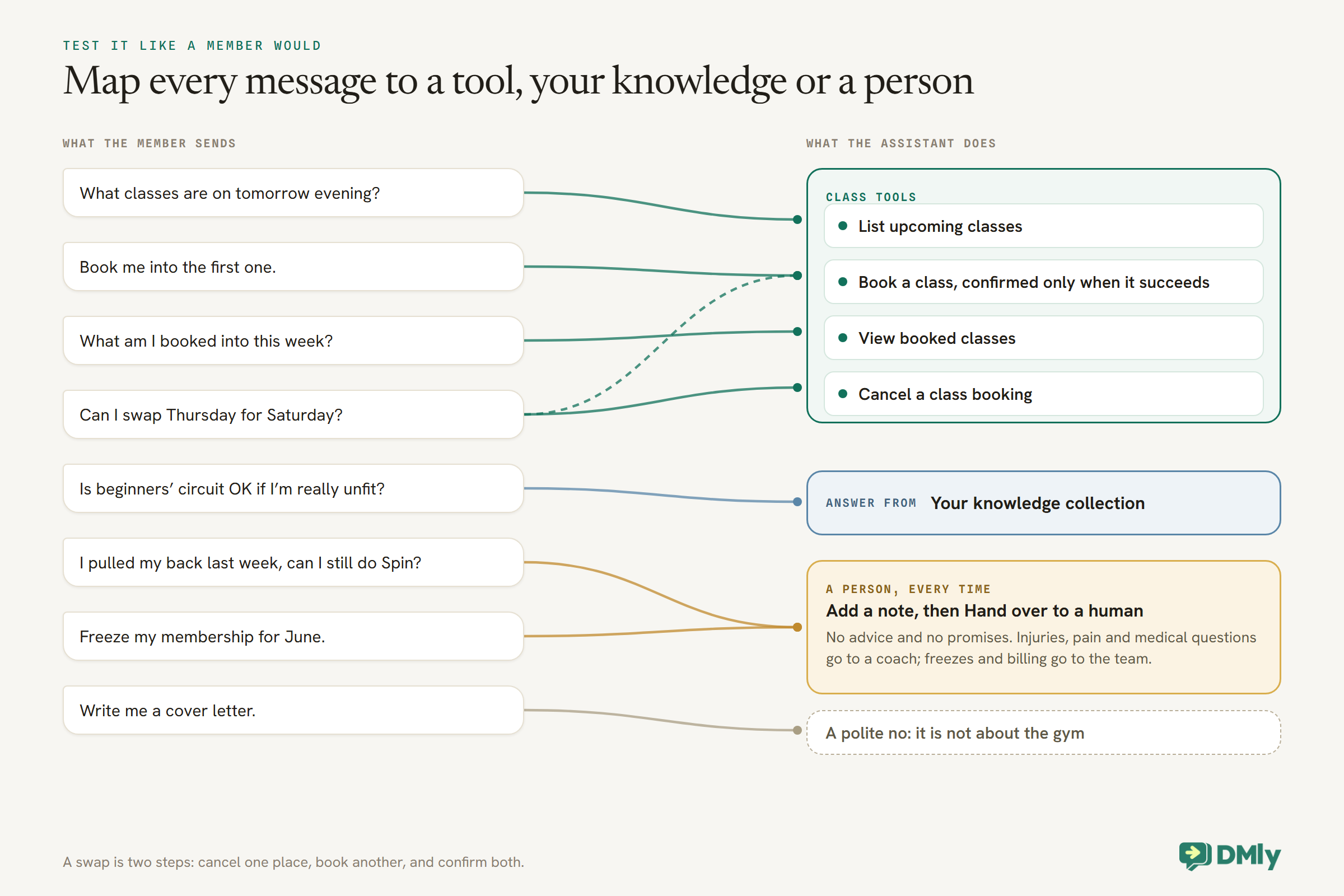
- “What classes are on tomorrow evening?” (does it call List upcoming classes, or make times up?)
- “Book me into the first one.” (does it confirm only after Book a class succeeds?)
- A booking for a class starting inside your booking window (does it offer a later session?)
- A booking for a full class, with the waitlist on and off (what does it tell the member?)
- A booking for a pay-before class, if you run any (what arrives, and in what order?)
- “Can I swap Thursday for Saturday?” (does it cancel and rebook, and confirm both?)
- “Is beginners’ circuit OK if I’m really unfit?” (is the answer kind, honest and from your collection?)
- “I pulled my back last week, can I still do Spin?” (no advice, a note, a handover)
- “Freeze my membership for June.” (a note and a handover, no promises)
- “Write me a cover letter.” (a polite no)
Check the Playground trace, or the booking on your calendar and the note on the test contact, after each one. If the knowledge answers are right but the trace is empty, that is normal: knowledge search runs inside the provider and never appears in the trace. Book real places into a test session you then cancel, and remember that a real test booking spends real credits if the test contact holds any.
Set Up Everything Around It
The assistant is one flow among several. Make sure the others agree with it.
Confirmation and reminder flows use class triggers
A booked class place fires Class booked, not Appointment booked. Flows you built for 1:1 appointments do not run when the assistant books a class, which is the most common surprise when a workspace adds classes. Cancelling a place fires both Class cancelled and Appointment cancelled, so a cancellation flow you already have will run for classes too. There is also a Class starts soon trigger for a same-day nudge, which our spoke on gym class reminders covers.
A keyword route for “join tonight’s class”
For one very common request, a simple flow can be faster than the assistant. The Add to Class step books the contact into the next upcoming session of a class, has a separate WAITLISTED output so the flow can say “you’re on the list” instead of “you’re booked”, and a switch to hold the seat for payment on a paid class. It books on your behalf, so your booking window does not hold it back. Use it deliberately, for a “tonight” keyword or a button, and give it a keyword so it does not clash with the assistant.
Attendance
Marking a seat Attended on the class roster completes the booking behind it, which is what an attendance-based loyalty award waits for. Mark no-shows last: Mark all attended flips every seat not already attended, including ones you marked as no-shows.
Tell members who they are talking to
Have the assistant introduce itself as the gym’s automated assistant, with a person one message away. Members who know that tend to ask it the right things, and hand-overs feel natural rather than like a failure.
Limits and Costs
An AI assistant has two running costs: AI replies, and WhatsApp messages.
AI replies. DMly’s AI agent is on every plan. A new AI Reply step answers on DMly’s shared AI, and those replies count against your plan’s monthly AI Replies allowance. If your plan allows it, connecting your own OpenAI, Claude, Gemini or DeepSeek key makes replies unmetered on your own provider account. There is no running usage counter; the first sign of reaching the allowance is a note in a conversation, and the step is skipped rather than failing until the allowance resets at the start of the next month.
WhatsApp messages. The assistant replies inside the 24-hour window a member opens by writing to you. From 1 October 2026, Meta charges for those free-form service messages after the first 1,000 per business phone number each month, and it also starts charging for utility templates sent in response inside an open window. Our guides to the 24-hour messaging window and the October 2026 pricing change explain both.
Technical limits. Each reply can make up to eight rounds of tool calls before the assistant is asked to answer without tools, which a normal booking conversation is unlikely to reach. New steps see the last 12 messages of the chat (capped at 50) and keep replies to about 500 tokens; raise the history if the assistant forgets which class a member mentioned earlier.
Mistakes to Avoid
These are the traps the docs warn about, or that follow from how classes and credits behave.
- Knowledge left on “No knowledge”. The assistant answers from its instructions alone and invents what it does not know.
- A provider that cannot read documents. Claude and DeepSeek search nothing in DMly’s AI Knowledge.
- Promising refunds on cancelled places. Cancelling frees the seat but never returns the credit.
- Expecting the assistant to quote a credit balance. Its contact tool does not read it; a keyword flow with
{{credit.balance}}does. - Confirmation flows on Appointment booked. They never run for class places.
- Letting it coach. Training, diet and injury questions go to people, every time.
- Two automations answering everything. Only one ever replies; give one a keyword.
- Clearing the fallback message. A provider error then sends the member nothing.
For the general version of this build, see our guide to an AI customer service chatbot for WhatsApp and the wider WhatsApp AI receptionist guide.
Frequently Asked Questions
Can a WhatsApp AI assistant book gym classes?
Yes. In DMly, the AI Class Booking bot’s tools list upcoming classes, book a place, show what a member is booked into and cancel a place, all against your real timetable and capacity.
Does it respect my booking window and class capacity?
It books through the same rules. DMly’s docs say the AI agent applies the class booking window itself and offers a later session. Capacity is one seat per member per session. Test what it says on a full class before launch.
Can it use a member’s class pack?
A booking of a class with a credit cost takes credits from the member’s balance, the same as any other booking. Cancelling does not return the credit. The assistant cannot read the balance, but a keyword flow using DMly’s {{credit.balance}} token can reply with it.
Can it freeze or cancel memberships?
No. DMly has no AI tool for subscriptions. The assistant explains the options, writes a note and hands the chat to your team, who pause or cancel in Finance.
Will it give workout or injury advice?
Not if you build it as described. Its instructions forbid training, diet and medical advice, and any mention of an injury or condition triggers a note and a handover to a coach.
Is an AI assistant allowed on WhatsApp?
Meta’s platform terms prohibit AI companies from offering general-purpose AI assistants as their main product on the WhatsApp Business Platform. A gym assistant that answers about its own classes is a different use; keep it on topic, and read Meta’s terms yourself if you are unsure.
What does it cost to run?
Replies on DMly’s shared AI count against your plan’s monthly allowance, or run unmetered on your own key where your plan allows. Meta charges for service messages beyond 1,000 free per number per month from 1 October 2026.
The Question Nobody Asks at the Desk
Go back to the member worried about holding everyone up. With the build above, they get a kind, honest answer from your own class description, the next sessions on your timetable, and a booked place a minute later, without having to say any of it out loud. If they had mentioned a bad knee instead, the chat and a note would already be waiting for a coach.
That is the job of a WhatsApp AI assistant for a gym: the timetable, the place and the reassurance, at any hour, with people kept for coaching, health and money. Set up your classes first, write the knowledge a nervous beginner needs, and start from the class template.
Writing about WhatsApp automation, bookings and growth for local business.
Turn WhatsApp into your busiest channel.
Start free and run message, bookings, payments and reviews in one place.
