
How to Build a WhatsApp AI Receptionist for Your Business
A good receptionist is not impressive because they are clever. They are impressive because nothing gets dropped. Every caller is greeted, the easy questions are dealt with on the spot, the appointment goes in the diary, the message reaches the right person, and the difficult one is put through to someone who can actually help. An AI receptionist is judged by the same standard, and it is a higher bar than most demos clear.
That is the job an AI receptionist is being asked to do, and it is worth stating plainly because it explains why these builds succeed or fail. The technology is not the hard part. The hard part is writing down what your front desk actually does, then deciding honestly which of it an assistant should hold and which of it must reach a person.
This guide does that. It assembles a working front desk from parts covered in more detail elsewhere in this series, and it assumes you would rather have one assistant doing five jobs adequately than five clever automations nobody maintains.
What Does an AI Receptionist Actually Do?
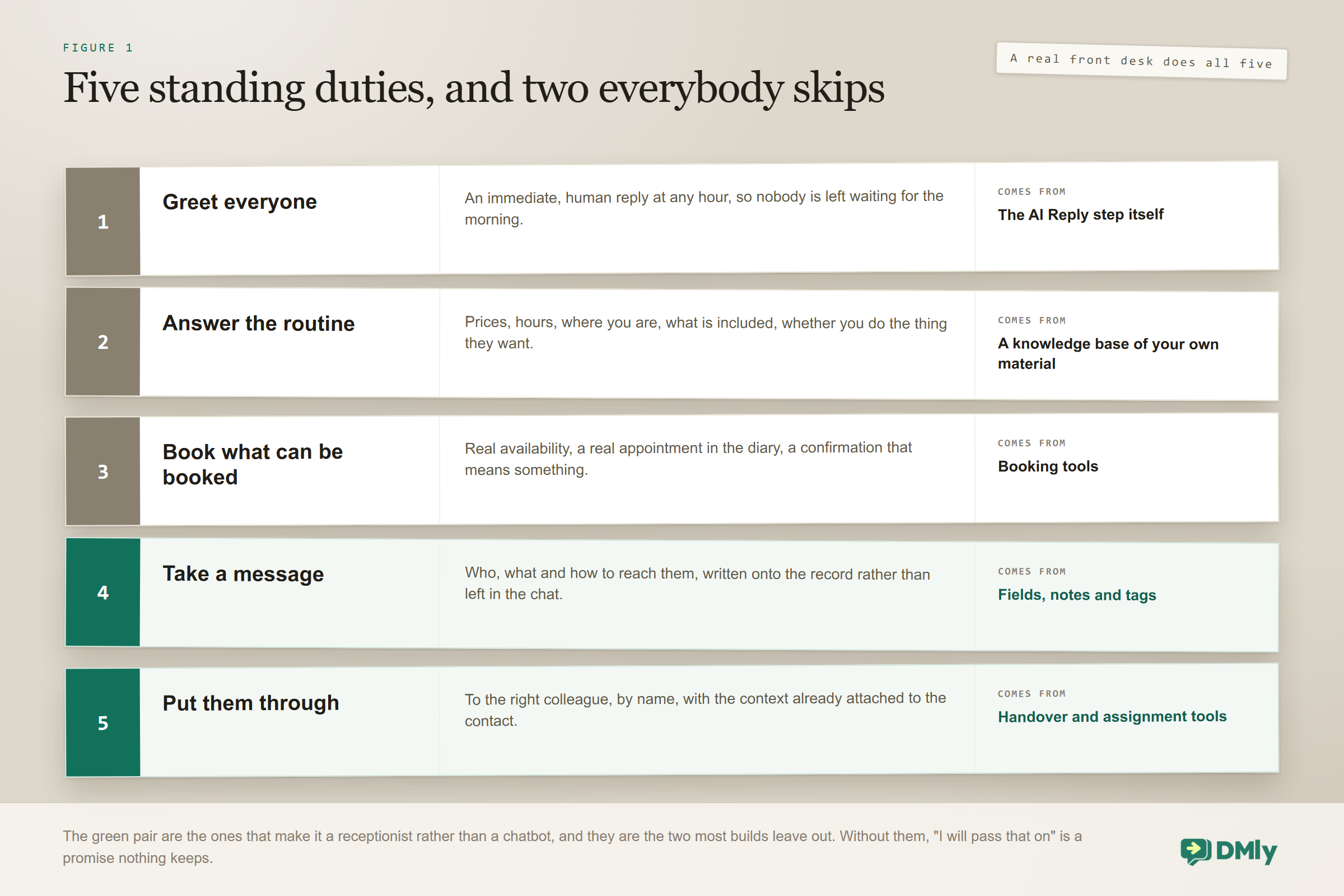
An AI receptionist greets every incoming message, answers the routine questions, books what can be booked, takes a message when it cannot help, and routes the conversation to the right person. Five jobs. A real front desk does all five without thinking about it, and any build that covers only two will feel like a disappointment regardless of how well it writes.
| Front desk job | What that means in a chat | Where it comes from |
| Greet everyone | An immediate, human reply at any hour, so nobody waits | The AI Reply step itself |
| Answer the routine | Prices, hours, location, what is included, do you do X | A knowledge base of your own material |
| Book what can be booked | Real availability, a real appointment, a confirmation | Booking tools |
| Take a message | Capture who, what and how to reach them, on the record | CRM tools: fields, tags, notes |
| Put them through | Hand to the right person, with context attached | Handover and assignment tools |
Notice that only the second and third are what people usually picture. The last two are what make it a receptionist rather than a chatbot, and they are the ones most builds skip.
The Three Builds This Is Made Of
An AI receptionist is not a separate product. It is the three agents in this series wearing one uniform, which is good news: each part is documented on its own page, and you can build them in stages rather than all at once.
- The answering half is a knowledge base: your prices, policies and hours in a collection the assistant can search, and a provider that can actually read documents, since Claude and DeepSeek cannot. Get this wrong and the front desk improvises.
- The booking half is the booking tools: reading genuine availability and writing a real appointment, rather than promising that somebody will call back. This is the half that makes it worth having at 9pm.
- The screening half is the CRM tools: learning the few facts that decide who a message should reach, and writing them onto the contact so the colleague who picks it up is not starting from nothing.
Build them in that order if you are building in stages, because each is useful on its own and the order matches what customers ask for most. Then build all three into one assistant rather than three, for the reason in the mistakes section below.
Assembling the Front Desk
Assuming your services, staff hours and knowledge base already exist, this is a single AI Reply step with a wider set of permissions than any of the individual builds.
- Create one flow on incoming messages. Resist the urge to build three. A single assistant that can do everything produces far better conversations than three that each handle a slice and hand the customer between them.
- Turn on the answering tools. Point the knowledge scope at your collections, and use OpenAI or Gemini, since Claude and DeepSeek cannot search documents at all.
- Turn on the booking tools. List bookable services, Check available times and Book an appointment at minimum. Add View upcoming appointments, Reschedule and Cancel so it can handle changes, which is a large share of real front desk work.
- Turn on the message-taking tools. Set custom fields and Add a note are how a message actually gets taken. Without them the assistant says it will pass something on, and nothing is passed on.
- Choose how it puts people through. Auto-assign to an agent for round-robin, or Move to unassigned queue for a shared pile. Hand over to a human stays on regardless; it is the switchboard.
- Write the job description. The prompt below. For a receptionist this is longer than usual, because the role is broader.
- Test the awkward calls, then publish. The complaint, the supplier, the person who wants someone by name, the wrong number.
The Prompt Is the Job Description
The ordered preference list is the part that makes this feel like a receptionist rather than a bot. It tells the assistant what to try first and what to fall back to, which is exactly the judgement a good front desk exercises without being asked.
Where an AI Receptionist Earns Its Keep
Daytime enquiries mostly get answered eventually, because someone is around. The messages that turn into lost revenue are the ones arriving at 9pm on a Sunday, and that is where an AI receptionist earns its place: it answers immediately, books the ones that can be booked, and takes proper messages on the rest so Monday starts with a list rather than a backlog.
Two things make the out-of-hours version work. The prompt must tell it to keep working rather than announcing that the office is closed and stopping, which is the single most common misconfiguration. And the fallback message needs setting, because if the provider errors and you have left it empty, the customer is told nothing at all and simply watches the conversation stop. Its default wording is “Sorry, I couldn’t process that just now”, which is fine as a floor but better replaced with something that promises a human in the morning.
The One Rule That Decides What Monday Morning Can Say
Everything the assistant sends on Sunday night is fine. It is the reply your colleague sends afterwards that has a deadline on it, and almost nobody building a front desk finds this out until it bites.
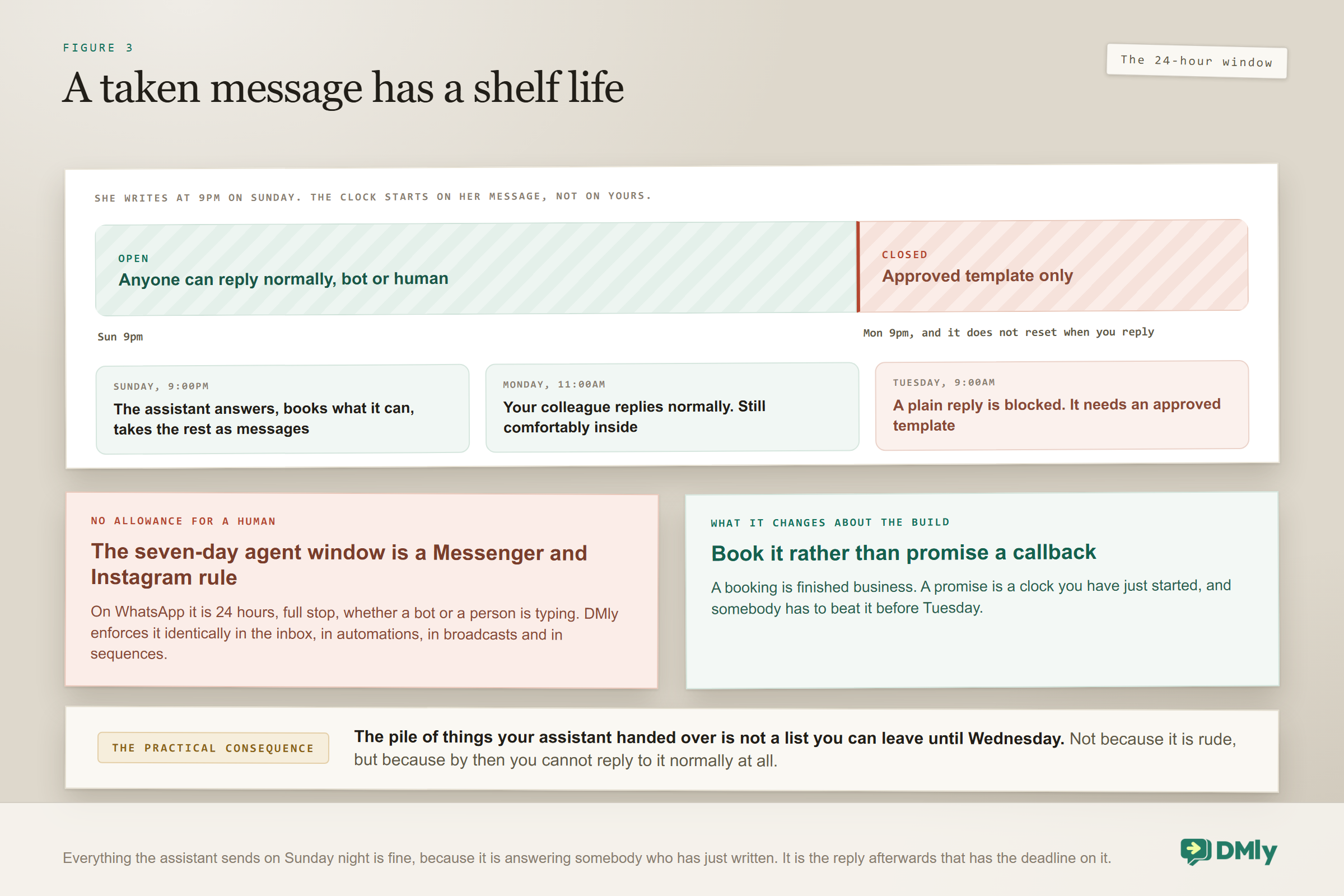
WhatsApp only lets you send a normal, free-form message to somebody within 24 hours of their last message to you. The clock starts on their message, not on yours, and it does not reset when you reply. Outside that window the only thing WhatsApp will deliver is an approved template.
For the assistant this is a non-issue: it is answering somebody who has just written, so the window is wide open. For the message it took, it matters a great deal. A customer who wrote at 9pm on Sunday can be answered freely until 9pm on Monday. If your colleague gets to it on Tuesday morning, a plain reply is blocked by Meta and they need a template instead.
There is no extra allowance for a human: The seven-day agent reply window you may have read about is a Messenger and Instagram rule. On WhatsApp it is 24 hours, full stop, whether a bot or a person is typing. DMly enforces it identically everywhere, in the inbox composer, in automations, in broadcasts and in sequences, because they all read the same window. When it has closed, the composer says so and asks you to pick a template.
Two practical consequences for a front desk build. First, a taken message has a shelf life, so the queue of things the assistant handed over is not a list you can leave until Wednesday without losing the ability to reply normally. Second, this is another reason the assistant should book what can be booked rather than promising a callback: a booking is finished business, and a promise is a clock you have started.
Taking a Message and Putting People Through
These are the two jobs that separate a front desk from an FAQ, and both live in the tools rather than the prose. Taking a message means writing to the contact record: Set custom fields for what they need, Add a note for the context a colleague will want, and a tag if the enquiry belongs to a category you track. A message that exists only in the transcript has not been taken.
Putting people through means the conversation arriving in your shared inbox assigned to somebody, with that note attached. When the assistant transfers during its turn it stops immediately rather than talking over the colleague now typing, which is what makes a mixed human and AI front desk workable in practice.
Say who you are: Have the assistant identify itself in its first message. “Hi, I’m the assistant for [business], happy to help or put you through to the team.” People are markedly more patient with an assistant that is honest about being one, and the handover then reads as a service rather than a failure.
Putting a Human Back in Charge
A receptionist who will not hand the phone over is not a receptionist, and the settings that govern this are the ones most often left unexamined.
The good news is that the default already does the right thing. When a teammate replies to a conversation, the workspace setting When a teammate replies defaults to pause the bot and the running flow. It pauses both, not just the AI, and it requires nothing from the person replying, which is exactly why it works. Any process that depends on an agent remembering to press something fails on the day it matters.
The companion setting is when automation should resume, and this one deserves a deliberate choice rather than the default:
| Option | What happens | Suits |
| Only when someone resumes it (default) | The assistant stays off on that conversation until a person turns it back on | Businesses where a human taking over means a human owns it |
| When the conversation is closed | Marking it done re-arms the assistant | Teams with a reliable Mark as done habit |
| After a quiet period | Resumes after a set number of hours with no activity, from 1 to 720, defaulting to 24 if left blank | Most receptionist builds, because it protects out-of-hours cover |
| Never, end it by hand | Automation on that conversation is finished until someone intervenes | Support-heavy workspaces |
A quiet period is usually right for a receptionist, and here is why. Leave the setting on its default and a conversation where somebody replied once, three weeks ago, still has its assistant paused today. When that customer comes back at eleven at night with a simple question, nothing answers them, which is precisely the moment the receptionist was supposed to earn its keep. A quiet period hands the conversation back on its own once the hours you set have passed.
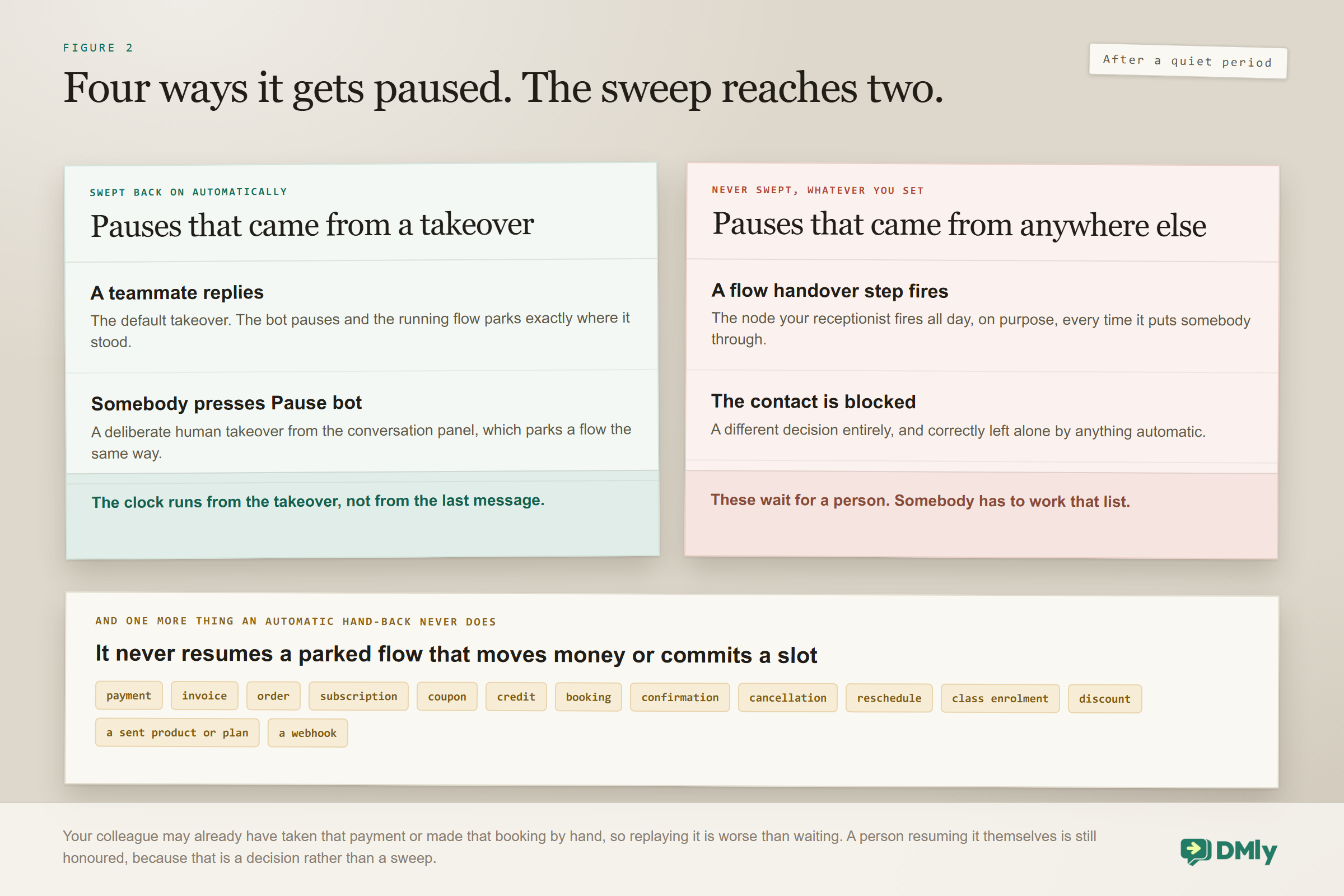
The sweep does not reach every kind of pause, and this is the one to know: A quiet period only lifts a pause that came from a takeover, meaning a teammate replying or somebody pressing Pause bot (human takeover). A pause set by a flow’s Handover to Human step is never swept, and neither is one caused by blocking a contact. Your receptionist fires that node constantly, by design, so those are exactly the conversations that stay paused for ever unless a person resumes them. Plan for somebody to work that list, or accept that a handed-over customer is one the assistant will not answer again.
Two smaller details shape how the quiet period behaves. The clock runs from when the takeover happened, not from the last message, so a long conversation does not keep pushing the hand-back further away. And DMly checks every minute, so the return is close to punctual rather than batched overnight.
An exception that is genuinely on your side: An automatic hand-back never resumes a flow that moves money or commits a slot. If the parked flow contains a payment, invoice, order, subscription, coupon, credit, booking, confirmation, cancellation, reschedule, class enrolment, discount, a sent product or plan, or a webhook, DMly leaves it parked and leaves the bot paused even when your policy says resume. The reasoning is sound: your colleague may already have taken that payment or made that booking by hand, and replaying it is worse than waiting. A receptionist spends its day on exactly those flows, so the sweep protects you more often than it helps you, and a person resuming it deliberately is still honoured.
Two more controls are worth setting while you are on that tab, and one of them is a workspace-wide switch it is better to know about before you need it.
- Wait before an AI reply is a workspace setting, 0 seconds by default with a maximum of 5. Setting it to 5 costs nothing and closes the common race where the assistant answers a second before your colleague finishes typing. It is a floor rather than an override: if the step’s own typing delay is longer, the longer one wins, and the real pause never exceeds five seconds either way.
- Let the AI reply is the workspace kill switch, on by default. Turn it off and every AI step in every flow is skipped at once. Nothing breaks, each flow keeps running, and a line appears in the conversation saying AI replies are turned off for this workspace. It is the fastest way to stop a misbehaving front desk without unpicking anything, and it is also worth checking before you spend an hour debugging a single flow.
Both live on the Conversation settings tab, which is admin territory: reaching it needs a permission in the Team and Settings module, and saving needs Manage workspace settings. If a colleague tells you the options are not there, that is their role rather than a fault.
One more piece of the picture. The human handover node, which you place on branches you already know need a person, drops an explanatory note into the thread, pauses bot replies and tells the contact somebody will respond shortly. Two precise points about takeovers save a lot of confusion: a takeover only happens if the reply actually goes out, so a message DMly refuses to send, because the window has closed or the body is empty, leaves the bot running and nothing parked; and it applies to a person’s reply only, so an automation, a notification or a broadcast is never a takeover.
On that last message, one piece of advice: say when, not soon. A caller at nine on a Sunday evening does not need to be told you will reply shortly. They need to know you open at eight on Monday, and that the receptionist can book them in right now if they would rather not wait.
The Six Calls to Test Before It Meets Anyone
A receptionist is judged on the awkward interactions, not the easy ones, so test those deliberately in the Playground. These six expose almost every misconfiguration.
- The straightforward booking. “can i get in thursday afternoon”. It should check real availability, offer specific times and confirm before writing anything.
- The question you never wrote down. Ask something true about your business that is not in the knowledge base. The correct behaviour is admitting it does not know and offering to take a message, not improvising something plausible.
- The person asking for a colleague by name. “is Sarah there”. It should not attempt to answer on Sarah’s behalf. It should take a message or put them through.
- The supplier or the recruiter. Not everyone messaging a business is a customer. Without an instruction covering this, an assistant will try to book a sales rep in for a haircut.
- The complaint. “nobody called me back last week”. Handover, immediately, with a note. If it apologises and keeps going, tighten the prompt.
- The 11pm message. Run one with your business hours set to closed. It should still answer, still book if it can, and set an honest expectation about when a person will reply.
If a build passes those six it will handle the ordinary traffic comfortably, because the ordinary traffic is easier than all of them. Fixing what fails is nearly always a prompt edit rather than a tooling change.
What Changes by Industry
The five jobs hold everywhere; the emphasis moves. Four worth calling out, each with a fuller guide of its own.
- Salons and spas. Booking dominates, and so does rescheduling. The receptionist that earns its keep here is mostly a diary, and the wider workflow sits in WhatsApp automation for salons.
- Clinics and dental practices. The front desk must stay clinically silent: it books, confirms and takes messages, and it never offers an opinion about a symptom. Recalls and reminders carry most of the value, covered in WhatsApp automation for clinics.
- Gyms and studios. Class booking and membership questions dominate rather than one-to-one appointments, and the mechanics differ enough to be worth reading separately in WhatsApp automation for gyms.
- Tutors and training centres. The person messaging is often a parent rather than the student, so the receptionist has to establish who it is speaking to first. That and the termly rhythm are covered in WhatsApp automation for tutors.
Dedicated receptionist builds for salons, dental practices, gyms and admissions teams are coming as their own guides in this series.
Five Ways a Front Desk Build Goes Wrong
- Building three assistants instead of one. The customer does not know they have crossed from the booking bot to the support bot, and the seams show as repetition and lost context.
- Announcing that the office is closed. Out of hours is when it is most useful. It should carry on working and set expectations, not put up a shutter.
- Taking messages nowhere. Without the fields and notes tools switched on, “I’ll pass that on” is a lie the assistant tells politely.
- No named handover. “Someone will get back to you” is weaker than “I have passed this to James, who will reply in the morning”, and the second needs assignment tools rather than better writing.
- Setting a quiet period and assuming it covers everything. It sweeps a teammate’s reply and a manual pause back on, and it never touches a pause your own handover node set. Half the conversations you expected it to reopen are the half it cannot.
What an AI Receptionist Costs to Run
Running costs are modest: replies on the shared AI count against your monthly plan allowance, or you connect your own provider key and they become un-metered by DMly on the plans that allow it. The comparison people usually want, an AI receptionist against a human one or an answering service, is its own piece, and the messaging side of the bill is set out on the pricing page.
Frequently Asked Questions
What is an AI receptionist?
It is an assistant that performs the front desk role on your messaging channels: greeting everyone, answering routine questions from your own material, booking appointments, taking messages onto the customer record, and routing anything that needs a person to the right colleague. The distinction from a chatbot is that it can act on your systems rather than only reply, which is what lets it actually book and actually take a message.
Can it answer phone calls?
This build is for messaging rather than voice. Its natural home is WhatsApp and your other chat channels, where the conversation is written and can be handled asynchronously. For many small businesses that is where the enquiries already are, and a missed-call-to-WhatsApp follow-up is often a better answer than trying to automate the phone itself.
Will customers know it is not a person?
Usually, and it is better if they do. Have it introduce itself as the assistant in its first line. The alternative, a bot pretending to be staff, works right up until the moment it does not, and the discovery costs more goodwill than the disclosure ever would.
Does it replace a receptionist?
For most small businesses there is no receptionist to replace, which is the real point. It fills a role that was never filled: the messages arriving while everyone is with a customer, or asleep. Where a front desk does exist, the honest framing is that it removes the repetitive half of the job so the person can do the half that needs a person.
How long does it take to set up?
An afternoon for the assistant, assuming your services, staff hours and knowledge base are already accurate. If they are not, that tidying is the actual project, and it is worth doing regardless: the assistant only inherits what your calendar and documents already say.
One assistant that greets, answers, books, takes messages and puts people through, on the number your customers already use.
Write the Job Description First
The businesses that get this right do not start with the tools. They start by writing down what the front desk actually handles in a week, then marking which lines an assistant should own, which it should take a message about, and which must reach a person immediately. That list becomes the prompt, and the prompt is the build.
Do that honestly and you end up with something genuinely useful by Friday: nothing dropped, every message answered, and Monday starting with a list of people who already got a reply. The wider case for putting AI on your WhatsApp at all, if you are still weighing it, is in our guide to WhatsApp AI chatbots for small businesses.
Writing about WhatsApp automation, bookings and growth for local business.
Turn WhatsApp into your busiest channel.
Start free and run message, bookings, payments and reviews in one place.
