
Best Google Review Management and Automation Software for Local Businesses
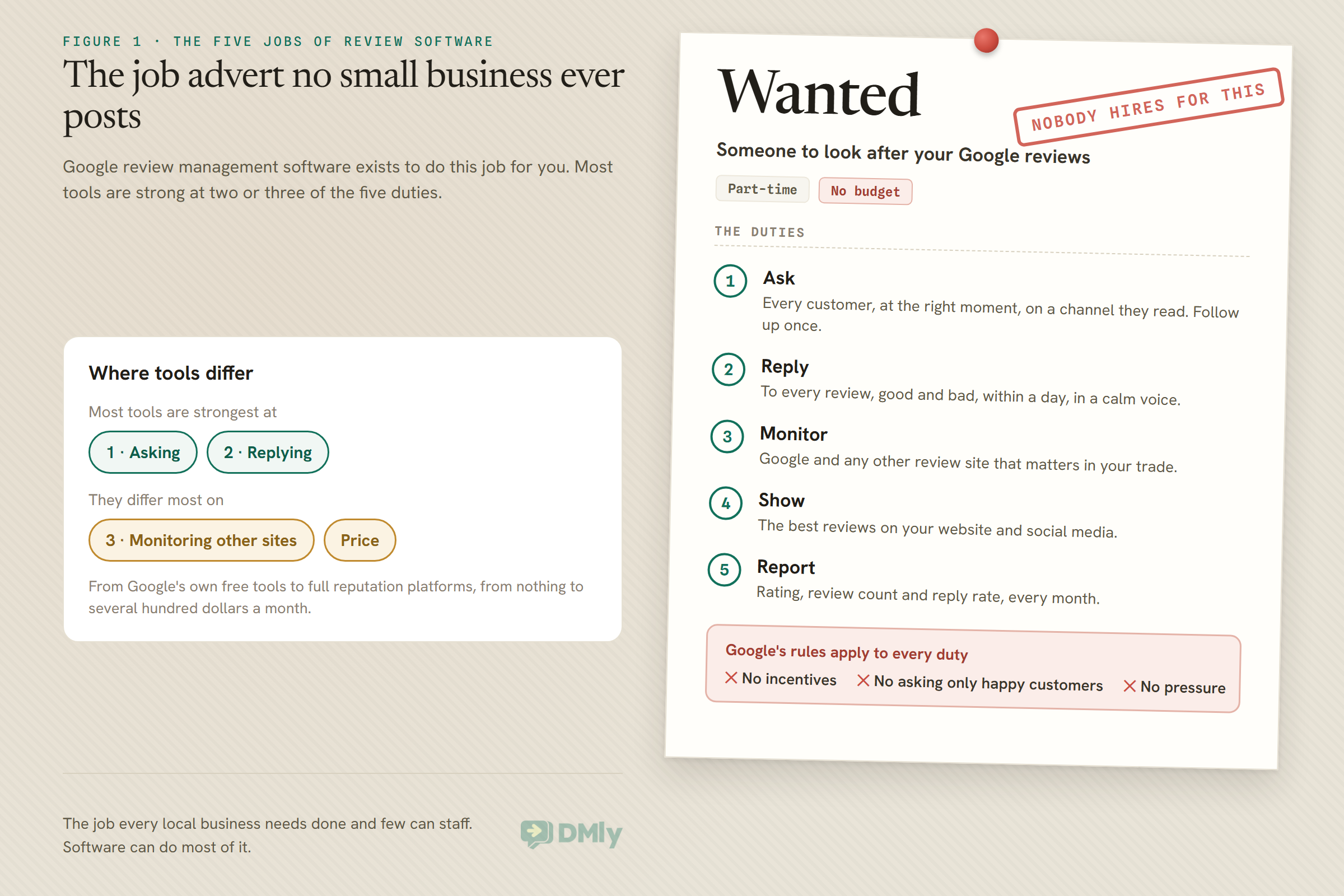
Wanted: someone to ask every customer for a Google review, at the right moment, on a channel they read. Must reply to every review within a day, in a calm voice, including the unfair ones. Must never offer a discount for a review and never ask only the happy customers. Must notice a fake review before it does damage, keep track of three other review sites, put the best reviews on the website, and report every month on whether any of it is working. Part-time. No budget.
No small business hires that person, which is why Google review management software exists. Every tool in this category is trying to do some or all of that job for you. They differ in which parts they do, on which channels they ask, whether AI writes your replies, how many review sites they watch, and what they cost, from nothing to several hundred dollars a month. This guide compares six options for local businesses, with prices read on each vendor’s own page on 25 September 2026, and sets out the Google rules that every one of them has to work within.
A disclosure, up front: DMly publishes this blog and is one of the tools compared. We have described every tool from its own pages and documentation, and said where another is the better choice. For how to set up review automation step by step, see our complete guide to Google review automation.
The Five Jobs of Review Software
Google review management software does five jobs. Most tools are strong at two or three.
1. Asking. Sending customers a link to leave a review, at the right time, on a channel they read, and following up once if they do not. This is the job that most affects how many reviews you get, because a customer who is not asked has to remember on their own.
2. Replying. Answering every review, good and bad, publicly and promptly. Replies show future customers that someone is listening, and on Google the reviewer is notified when you reply.
3. Monitoring. Seeing new reviews as they arrive, on Google and on any other site that matters in your trade, and being told when something needs attention.
4. Showing. Putting your best reviews on your website and social media, where they help convert visitors.
5. Reporting. Tracking your rating, review count and reply rate over time, and ideally which requests led to reviews.
Google’s Rules Every Tool Must Work Within
Software can make asking for reviews effortless. It cannot make a banned practice safe, and some tools make banned practices easy.
Google’s policy on user-generated content in Maps sets the boundaries. Three points matter most for review software. You must not offer incentives for reviews, such as payment, discounts or free goods or services. You must not selectively solicit positive reviews from customers: sending the review link only to people who said they were happy, sometimes called review gating, is exactly that. And merchants should not require or pressure people to leave reviews. Google may remove reviews that break its policies, and it has restrictions for Business Profiles that break them.
A few more facts shape what any tool can do. Only a verified business can reply to reviews on its profile. You get one public reply per review, which you can edit. Google checks replies against its content policies before they are posted; its help page says this usually takes up to ten minutes, and sometimes up to 30 days. The reviewer is notified when you reply, and can still change their review. Nobody, not you and not your software, can delete a customer’s review; you can only report one you believe breaks Google’s policies.
Keep those rules in mind as you read the reviews below. Several tools, including ours, include features for sorting happy and unhappy customers. Use them to reach unhappy customers faster, never to decide who gets asked for a public review.
How We Compared Them
We judged each option as Google review management software for a local business: vendors’ own pages, one day, the five jobs.
We read each vendor’s pricing page in a browser on 25 September 2026 and recorded plan prices, what each plan includes for asking, replying, monitoring, showing and reporting, and how the price scales. We read Google’s own help pages for the free option. For DMly we used its documentation, which also describes the limits. Two well-known tools are missing: Birdeye’s pricing page returned an error when we visited, and Grade.us’s pricing page could not be found, so we could not describe them from their own pages on the day.
The Quick Answer: Best by Situation
| If you are… | Look first at | Why |
| A local business whose customers use WhatsApp | DMly | Review requests on WhatsApp from the same system that books and bills the customer |
| Just starting, with no budget | Google Business Profile | Free: reply to reviews and share a review link or QR code |
| A business wanting reviews plus local SEO tools | BrightLocal | Review requests, monitoring and replies across sites alongside rank tracking and listings |
| A service business wanting simple, automatic asking | NiceJob | Automated requests and follow-ups by text and email, with AI replies on Pro |
| A business or agency needing many review sites and locations | GatherUp | Monitoring on 100+ sites, per-location pricing and generous message credits |
| A larger local business wanting reviews inside a full messaging platform | Podium | Reviews, text messaging, lead capture and AI in one platform |
The Best Google Review Management Software, Reviewed
1. DMly: best overall for getting more Google reviews
Asking. DMly sends customers a tracked link to your Google review page on WhatsApp, SMS or email. You can send by hand to up to 200 contacts at a time, or add a Request Google review step to any automation, for example after an appointment is completed or an order is paid. On WhatsApp, requests use an approved template, so they arrive even when the customer has not messaged you for days. For walk-in customers, DMly generates a tracked review QR code with print-ready designs for the counter, door or table.
Replying and monitoring. Once your Google Business Profile is connected, DMly syncs your reviews about every hour and also opens each new review in the shared inbox, so the team sees it alongside customer messages. You reply from DMly and the reply goes to Google. The Reviews tab shows your average rating, reply rate and star breakdown. With more than one location, you connect one profile per location and switch between them. The Request Google review flow step has no location picker, so test which location your automated requests go to.
Beyond reviews. DMly also lets you publish Google posts, edit your hours, phone, website and description, see your Google performance numbers, and add a WhatsApp button to your Google listing where Google offers it. Reputation is on every plan when you buy DMly directly, $29, $65 or $149 a month billed yearly, alongside bookings, payments and the inbox.
Watch out for. DMly covers Google only: no Facebook, Yelp or trade-specific sites. There is no AI drafting of review replies documented, and a reply posts immediately with no draft or approval step. The review request template is classed by Meta as marketing, so it needs the customer’s marketing opt-in and is billed at marketing rates. Opened is the firm number on the requests page; Responses is an estimate that links a review to a request when the reviewer’s name matches. And whichever automation template you start from, including Post-chat CSAT to Google review, check that every score reaches the review request (see below).
Best for: salons, clinics, restaurants, gyms and other local businesses that already talk to customers on WhatsApp and want review requests to follow bookings and orders automatically.
2. Google Business Profile: the free starting point
What it does. Your Business Profile itself lets you read and reply to reviews once the business is verified, edit or delete your replies, and create a review link or QR code to share with customers. You can report reviews you believe break Google’s policies.
What it does not do. It does not send review requests for you, follow up, watch other review sites, put reviews on your website, or report on which requests worked. Everything beyond replying is manual.
Best for: any business, as the foundation. Even if you buy software, verify the profile, keep it accurate, and learn how replies work here first.
3. BrightLocal: best for reviews plus local SEO
What it does. BrightLocal is a local SEO platform. Its Grow plan, $49 a month billed annually ($584 a year) for one location, lets you monitor and respond to reviews across multiple sites, request reviews by email, SMS and in-store campaigns, and publish reviews on your website. The same plan includes the lower plans’ rank tracking, local SEO audits, Google Business Profile audits, listings management and scheduled Google posts.
Watch out for. BrightLocal is built around search visibility, so its review tools sit alongside a lot of SEO reporting you may or may not use. It is not a messaging platform: requests go by email and SMS rather than WhatsApp.
Best for: businesses, and the marketers who help them, that want review management and local search tracking in one subscription.
4. NiceJob: best for simple automatic asking
What it does. NiceJob automates review requests and follow-ups by SMS and email, shows reviews on your website with widgets, shares your best reviews to social media, gives you a reviews microsite, and ranks your team by the five-star reviews they drive. Starter is $75 a month.
Pro. At $125 a month, Pro adds AI replies that respond to reviews automatically in your brand voice, “Repeats” rebooking reminders based on the last service date, referral requests, email broadcasts, NPS surveys and competitor tracking. There is a 14-day trial and no contract.
Watch out for. Automatic AI replies save time but publish in your name. Decide whether you want every reply posted automatically or reviewed first, especially for negative reviews.
Best for: local service businesses that want review requests running with almost no effort.
5. GatherUp: best for many sites and many locations
What it does. GatherUp is priced per location: $99 a month for a single location, or $60 per location for two to ten, with 20% off on annual billing. Every plan includes up to 300 SMS and 3,000 email credits per location each month, review monitoring on more than 100 sites, AI-crafted replies, in-app responding, QR codes and feedback links, review widgets, NPS surveys, and API, Zapier and webhook access. A Review Defense add-on uses AI to flag suspicious reviews, and a Listings Hub add-on syncs your details to 125 directories for $40 a month per location. There is a 14-day trial and agency white-label pricing.
Watch out for. GatherUp’s plans include “multiple feedback and review options”. If you use a feedback-first setup in any tool, configure it so every customer still gets the chance to review publicly.
Best for: multi-location businesses and agencies that need broad monitoring and predictable per-location pricing.
6. Podium: best inside a full customer messaging platform
What it does. Podium is a lead conversion and messaging platform for local businesses, with review management built in. Its Core plan, $399 a month, includes review management with AI responses, Google, Facebook and industry-specific review sites, review response templates, a reviews leaderboard, unlimited one-to-one text messages and 250 bulk message credits a month. Pro, $599 a month, adds an AI Reputation Specialist, surveys and advanced automations. Signature is custom. Podium’s pricing page asks you to talk to sales.
Watch out for. Podium is the most expensive option here by some distance, because you are buying a whole messaging and lead platform. That is good value if you use it all, and a lot to pay for reviews alone.
Best for: established local businesses with a steady flow of leads, who want reviews, texting and lead handling in one place.
Comparison at a Glance
| Option | Price for one location | Ask on | Sites monitored | AI replies |
| DMly | From $29 a month billed yearly, as part of the platform | WhatsApp, SMS, email, tracked QR | Not documented | |
| Google Business Profile | Free | Your own link or QR code | No | |
| BrightLocal Grow | $49 a month billed annually | Email, SMS, in-store | Multiple sites | Not listed |
| NiceJob | $75 or $125 a month | SMS, email | Not assessed | On Pro |
| GatherUp | $99 a month | SMS, email, QR | 100+ sites | Yes |
| Podium | $399 or $599 a month | Text messaging | Google, Facebook, industry sites | Yes |
What It Costs for One Location
Google review management software ranges from free to several hundred dollars a month, and the reason is what else comes with the reviews.
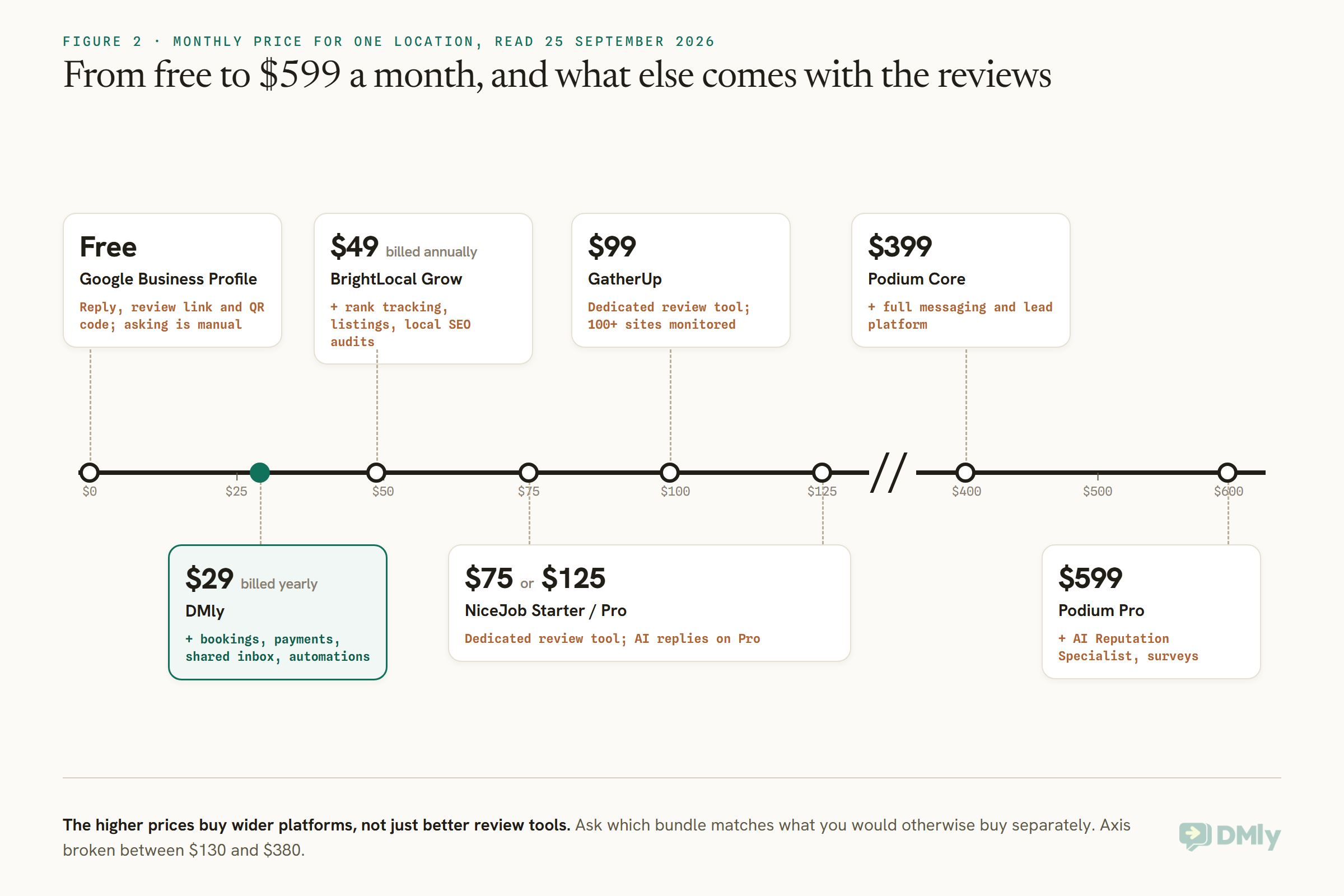
Dedicated review tools (NiceJob, GatherUp) sit in the middle. BrightLocal bundles reviews with local SEO. Podium bundles them with a full messaging and lead platform. DMly bundles them with bookings, payments, a shared inbox and automations. So the useful question is not which is cheapest but which bundle matches what you would otherwise buy separately. If you already have booking and messaging software you like, a dedicated review tool may be best. If you do not, a platform that covers several jobs may cost less overall.
Which Channel to Ask On
A review request only works if it is opened. Ask on the channel your customers read.
Most review tools here ask by text message and email; Podium through its texting platform; GatherUp includes a monthly allowance of both; BrightLocal adds in-store campaigns. DMly’s default is WhatsApp, with SMS and email as alternatives. For walk-in trade, a QR code at the till or on the table reaches people no message can, and DMly, GatherUp and Google itself all offer one.
WhatsApp has its own rules. A request sent days after the visit falls outside WhatsApp’s 24-hour window, so it must go as an approved template, and Meta classes review requests as marketing. That means the customer must have agreed to receive marketing messages from you, and you pay Meta’s marketing rate for your customers’ country. In DMly, the dmly_review_request template has to be approved before requests go out; while it is pending, a request to someone outside the window is dropped silently.
When to Ask
The best moment to ask is soon after the customer has experienced what they paid for, while it is fresh.
For a salon or clinic, a few hours after the appointment is a natural moment. For a restaurant, later the same day or the next. For an online order, after delivery, not after payment. The best review software lets you tie the request to that event, not to a fixed day of the week. In DMly, a Request Google review step can sit in an automation triggered by a completed appointment or a paid order, after a delay you choose. Allow one polite follow-up if there is no response, then stop. Asking regulars after every single visit wears thin; ask once, or once in a long while. Our guide to asking for reviews after an appointment covers timing and wording in detail.
Review Gating, and How to Avoid It
Many review tools make it easy to ask customers how they felt first and send only the happy ones to Google. Google’s policy prohibits that.
Review gating usually looks like this: the customer is asked to rate their experience privately, and only those who give a high score are sent the public review link. It feels sensible, because it keeps unhappy customers away from your public rating. It is also what Google’s policy calls selectively soliciting positive reviews, and Google can remove reviews gathered that way.
DMly ships a ready-made Post-chat CSAT to Google review template that asks for a rating after a conversation and sends low scores to a person. If you use it, check that every score reaches the review request, with low-score customers still offered the review link after a person has followed up, or remove the rating step before the request altogether. Keep the part that is valuable: getting an unhappy customer to a human quickly.
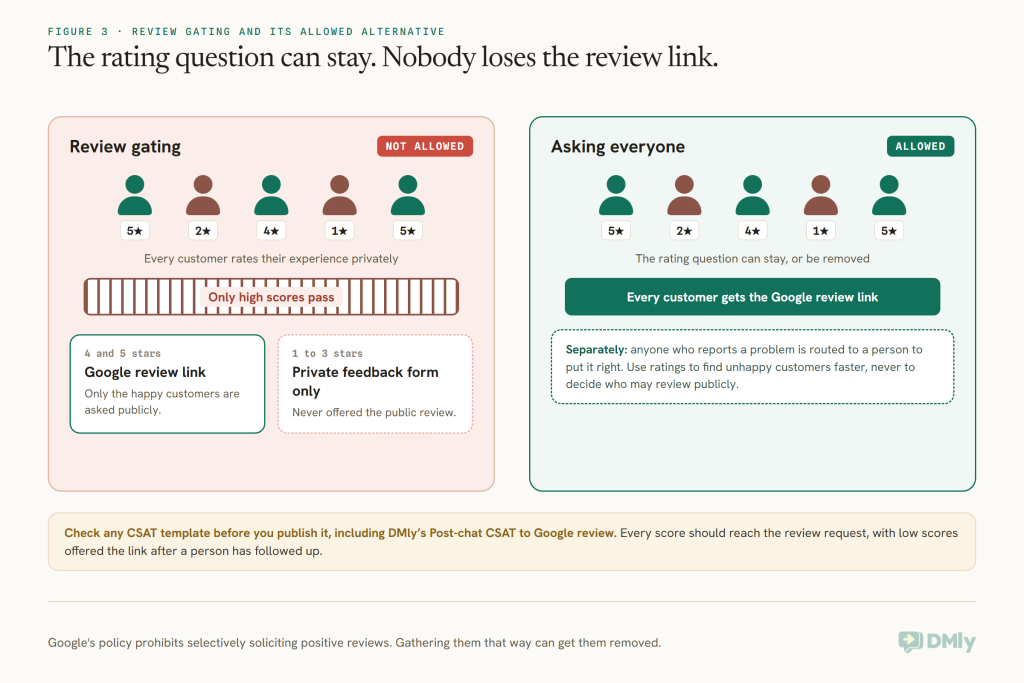
The same caution applies to any tool with “feedback first” or satisfaction-survey features, including GatherUp’s multiple feedback options and NiceJob’s NPS surveys. Surveys are useful for learning what went wrong. Just keep them separate from the decision about who is invited to review.
AI Replies: Useful, With a Human Check
AI can draft a good reply in seconds. It can also publish a bad one in your name just as fast.
Podium lists AI responses on every plan, NiceJob lists AI replies on Pro that respond automatically in your brand voice, and GatherUp lists unique AI-crafted replies. DMly does not document AI drafting for review replies; you write them, and they post as soon as you press the button.
AI replies work well for the steady flow of short, positive reviews, where a warm thank-you is all that is needed. They are riskier for negative reviews, which often need a specific apology, an offer to talk privately, and care not to confirm details the customer has not shared. In health and other sensitive trades, avoid confirming in a public reply that someone was your client or patient. A sensible rule for any tool: let AI draft, let a person approve anything below four stars. Our guide to handling negative Google reviews covers what to write.
Google Only, or Every Review Site?
Google is where every tool here starts. For some trades, other review sites matter too.
If your customers also check Facebook, Yelp, TripAdvisor or a site specific to your trade, you need a tool that watches those as well. GatherUp monitors more than 100 sites, BrightLocal’s Grow plan monitors and responds across multiple sites, and Podium covers Google, Facebook and industry-specific sites. DMly and Google Business Profile cover Google only. Before paying for broad monitoring, search for your business and your competitors and note which sites actually appear on the first page. If it is only Google, you do not need to pay for a hundred sites.
Fake and Unfair Reviews
No software can delete a review. Some can help you spot the ones worth reporting.
Google lets you report reviews you believe break its policies, from your Business Profile, and it also has a process for reporting negative review extortion scams. GatherUp sells a Review Defense add-on that uses AI to flag suspicious or fraudulent reviews and help you dispute them. DMly shows every review in its Reviews tab and inbox, but cannot delete or dispute reviews; reporting is done on Google. Whatever tool you use, reply calmly and factually to an unfair review while a report is pending, because other customers will read your reply long before Google decides.
Measuring Whether It Works
Judge any Google review management software by reviews gained and replies sent, not by messages sent.
The numbers that matter are simple: new reviews a month, average rating, and reply rate. A tool’s own “requests sent” figure tells you effort, not results. Be careful with dashboards that claim to link requests to reviews; Google does not tell anyone which request led to which review. DMly’s documentation is candid about this: on its requests page the Opened count, measured by the tracked link, is the firm number, and the Responses card is an estimate, matched on the reviewer’s name and correctable by hand. Track your review count and rating in the Reviews tab month by month instead.
How to Test Google Review Management Software in a Week
Ask real customers and reply to real reviews for a week, then look at what changed.
Connect your Google Business Profile and check that your existing reviews appear and your reply rate is right. Send a review request to yourself on each channel you plan to use, and check the link opens the Google review form directly on a phone. Then send requests to a week of real customers, all of them, not just the ones you think were happy. Reply to every new review from the tool and check the reply appears on Google. At the end of the week, compare new reviews against the week before, and check your template status if you are asking on WhatsApp.
Mistakes to Avoid
- Asking only happy customers. Google prohibits selective solicitation. Ask everyone.
- Offering a reward for reviews. Discounts, free items or prize draws for reviews break Google’s policy.
- Letting AI reply to complaints unchecked. Approve anything below four stars by hand.
- Asking the same regulars after every visit. Once is enough for most people.
- Paying for 100 sites when one matters. Check which review sites your customers actually see.
- Judging by messages sent. Count reviews gained and replies posted.
Frequently Asked Questions
What is the best Google review management software?
DMly is our top pick: review requests on WhatsApp, SMS or email from the same system that books and bills the customer, with every Google review in your inbox. Google Business Profile itself is the free starting point; for reviews plus local SEO, BrightLocal; for simple automatic asking, NiceJob; for many sites and locations, GatherUp; for a full messaging platform, Podium.
Can review software delete bad Google reviews?
No. Nobody can delete a customer’s Google review except Google. You can reply publicly and report reviews you believe break Google’s policies.
Is it allowed to automate Google review requests?
Yes, asking customers for reviews is allowed, automatically or by hand. What Google’s policy prohibits is offering incentives, asking only customers likely to leave positive reviews, and pressuring people to review.
What is review gating?
Asking customers to rate you privately first and sending only the happy ones to your public review page. Google’s policy prohibits selectively soliciting positive reviews, which is what gating does.
Should I use AI to reply to Google reviews?
AI is fine for drafting replies, especially to short positive reviews. Have a person approve replies to negative reviews, and never let a reply confirm private details about the customer.
Can I ask for Google reviews on WhatsApp?
Yes. Outside WhatsApp’s 24-hour window the request goes as an approved template, which Meta classes as marketing, so the customer needs to have agreed to marketing messages. DMly sends review requests on WhatsApp this way.
Filling the Job Nobody Hires For
The job advert at the top of this page describes work every local business needs done and few can staff. Software can do most of it: ask every customer at the right moment, surface every review, help you reply, and show you the trend. What it cannot do is decide your standards. Ask everyone, reward nobody, reply to everything, and let a person handle the hard ones. Then choose the tool whose bundle fits the rest of your business. If your customers already talk to you on WhatsApp, DMly’s reputation tools are worth a look alongside the others here.
Writing about WhatsApp automation, bookings and growth for local business.
Turn WhatsApp into your busiest channel.
Start free and run message, bookings, payments and reviews in one place.
