
Best Appointment Reminder Software for Salons and Clinics
The reminder arrived. That was never the problem. It arrived by email, into a folder the client checks on Sundays, and it said the appointment was “tomorrow” on the day after the appointment had already been missed. The software had done exactly what it was set up to do. It had sent a reminder. Nobody had asked whether the reminder would be seen in time to matter.
The best appointment reminder software is judged on that question, not on whether it has a reminders feature, because every booking tool has one. What separates them is the channel the reminder travels on, when it goes, how many messages your plan includes before the per-message charges start, what the client can do when they read it, and whether anything happens when they say they cannot come. This guide compares eight tools used by salons and clinics on exactly those points, with prices and allowances read on each vendor’s own pricing page on 25 September 2026.
A disclosure, up front: DMly publishes this blog and is one of the tools compared. We have described every tool from its own pages and documentation and said where another tool is the better choice. For how to set up reminders on WhatsApp step by step, see our guide to WhatsApp appointment reminders; for the wider setup of booking on WhatsApp, see our WhatsApp appointment booking guide.
What Good Reminder Software Does
A reminder is only useful if it is seen, in time, by someone who can still act on it. Good software makes all three likely.
It uses a channel the client reads. Email is free to send and easy to miss. Text messages and WhatsApp land on the phone the client carries, and most tools charge for them in some way. The best tool for you is the one whose channel matches how your clients actually communicate.
It sends at the right times for each service. A 15-minute trim and a two-hour colour, or a quick check-up and a long first consultation, may deserve different reminder timing. Software that lets you set reminder times per service beats one global setting.
It makes cancelling or moving easy. A client who cannot come should be able to say so from the reminder, not by phoning during your busiest hour. A cancellation you hear about the day before is a slot you can refill; a silent no-show is not.
It does something with the gap. When a slot frees up, a waitlist can offer it to someone else. Not every tool has one, and some only have it on higher plans.
It confirms and it follows up. A booking confirmation, a reminder, and after the visit, a thank-you or review request.
It brings people back. Recall or rebooking reminders (“it has been six weeks since your last cut”, “your six-month check is due”) are reminders too, and for many salons and clinics they are worth more than the day-before message.
How We Compared Them
To find the best appointment reminder software for each situation, we asked every vendor’s own pages the same questions on the same day.
We read each vendor’s pricing page in a browser on 25 September 2026 and recorded the plan prices, how the price scales, which reminder channels each plan includes, how many messages are included and what extra messages cost. Where a price was shown in a local currency (Jane shows Canadian dollars; Fresha showed us our own currency), we say so rather than convert it. For DMly we used its documentation, which also spells out the limits. We did not test deliverability, which depends on your country, your clients’ networks and, for WhatsApp, Meta’s rules.
The Quick Answer: Best by Situation
| If you are… | Look first at | Why |
| A salon or clinic whose clients live on WhatsApp | DMly | Reminders on WhatsApp from each service’s own schedule, and the client can reply to move or cancel in the same chat |
| A clinic wanting unlimited text reminders | Jane | Unlimited, free SMS reminders on Practice and Thrive where SMS is available, plus return visit reminders on Thrive |
| A clinic wanting simple, all-features pricing | Cliniko | Every feature on every plan, priced by number of practitioners, with SMS at 10 cents a message |
| A hair or beauty salon | Timely | A monthly SMS allowance per staff member and automated rebooking reminders on Innovate |
| A beauty business wanting new clients too | Fresha | Salon depth, a marketplace, and a free monthly allowance of text and WhatsApp notifications |
| A business already on Square | Square Appointments | Appointment reminders on the free plan; no-show fees on Plus |
| A small team starting cheap | Setmore or SimplyBook.me | Low entry prices, with text reminders on Setmore Pro and message credits on SimplyBook.me |
The Best Appointment Reminder Software, Reviewed
1. DMly: best for reminders on WhatsApp
How reminders work. You set reminder times on each service, under Offerings and then Services: for example, a day before and an hour before. When a booking is confirmed, DMly schedules those reminders and sends them on the client’s own channel, which for most local businesses using DMly means WhatsApp. Confirmations, reschedule notices and cancellations go automatically too, and bookings with a Zoom or Google Meet link get a version of the reminder carrying the join link.
What the client can do. A reply to a WhatsApp reminder opens a conversation, so the client can simply write “can we move it to Friday?”. An AI agent given DMly’s booking tools can check open times and reschedule or cancel in that chat, or a person on your team can pick it up in the shared inbox. Clients can also manage the booking from their own booking link, within the cancellation and reschedule deadlines you set.
Going further. Two triggers, Appointment reminder due and Appointment starts soon, let you build your own reminder flows on top of the standard ones, and a Send SMS step can text a client from any flow if you have connected an SMS gateway. No-show, completed and cancelled bookings can each start a follow-up.
Cost. Plans are $29, $65 and $149 a month billed yearly. DMly does not sell message credits for WhatsApp reminders; outside the 24-hour window, they go as approved utility templates, which Meta charges for by country.
Watch out for. Outside the 24-hour window, a reminder needs its approved WhatsApp template, and if the template is not approved, nothing is sent; check the dmly_ templates are Approved before you rely on them. A reminder is skipped, not retried, if the booking is no longer confirmed or the contact has opted out. DMly has a waitlist for classes but not for one-to-one appointments, so a freed slot is not offered to anyone automatically.
Best for: salons and clinics whose clients already message them on WhatsApp.
2. Jane: best for clinics wanting unlimited text reminders
How reminders work. Jane is practice management software for health and wellness clinics. Email reminders and confirmations are on every plan. The Practice and Thrive plans include unlimited, free SMS appointment reminders, with Jane noting that SMS availability varies by region. Thrive adds scheduled return visit reminders and automated waitlist management.
Pricing. In Canadian dollars: Balance is $54 a month for a single practitioner, limited to 20 appointments a month; Practice is $79 a month including one full-time practitioner, plus $35 for each additional full-time or $17.50 for each part-time practitioner; Thrive is $99 including one full-time practitioner, plus $40 or $20.
Watch out for. Unlimited SMS reminders are not on the Balance plan, and SMS is only offered in selected regions, so check yours before counting on it. Jane is built for clinical practice, with charting and intake forms; a salon would be paying for features it does not use.
Best for: health and wellness clinics, especially in regions where Jane’s SMS is available.
3. Cliniko: best simple pricing for clinics
How reminders work. Cliniko is practice management software for clinics, and its pricing page states that every feature is included on every plan. The one optional cost is SMS: messages are prepaid credits at 10 cents each.
Pricing. In US dollars, by number of practitioners: $45 a month for one, $95 for two to five, $145 for six to eight, $195 for nine to twelve, and up to $395 for 26 to 200. There is a 30-day free trial, and paying annually gives one month free a year. Admin and reception users, locations and patients are unlimited.
Watch out for. Text reminders cost 10 cents each on top of the plan, so work out your monthly volume. A clinic with 400 appointments a month sending one text reminder each would add about $40 a month; two reminders each, about $80.
Best for: clinics that want predictable pricing, every feature included and pay-as-you-go texts.
4. Timely: best for hair and beauty salons
How reminders work. Timely is built for hair and beauty businesses. Every plan sends automated client reminders by SMS and email and includes a monthly SMS allowance for each bookable staff member: 100 on Build, 200 on Elevate and 350 on Innovate. Messages beyond the allowance are charged at your SMS rate, and Timely lets you check usage and warns you before you go over. Elevate adds a waitlist to fill cancellations; Innovate adds automated reminders to encourage rebooking.
Pricing. On the Rest of World pricing in US dollars, billed monthly, the price is per bookable staff member and falls slightly per person as the team grows: one person on Build is $26, three are $74 in total; Elevate is $39 for one or $97 for three; Innovate $47 or $119. Timely says there are no new client fees.
Watch out for. Timely states SMS is included in every country except the UAE, Ghana, Saudi Arabia and Qatar, so salons there would lean on email. Rebooking reminders are only on the top plan.
Best for: hair and beauty salons wanting text reminders included in a per-staff price.
5. Fresha: best for beauty businesses also wanting new clients
How reminders work. Fresha sends automated email notifications free. Text and WhatsApp notifications come with a monthly allowance, 20 on the Independent plan and 20 per team member on Team, and are then charged per message, at rates Fresha shows in your local currency.
Pricing. A flat monthly price for a one-person business or a price per bookable team member for teams, shown in your local currency. Fresha lists waitlists on its plans, and says taking payments through Fresha adds deposits and no-show protection.
Watch out for. Twenty messages per team member is a starting allowance, not a month of reminders for a busy chair. Count your appointments and multiply by your reminders per booking to see the real message bill.
Best for: beauty and wellness businesses that want deep salon features and would welcome marketplace clients.
6. Square Appointments: best if you already use Square
How reminders work. Square lists appointment reminders on its free plan, alongside a booking site and unlimited staff calendars. The Plus plan, at $49 a month per location in the US, adds a cancellation policy with no-show fees and a waitlist.
Watch out for. Square’s pricing page lists reminders without spelling out the channel in its plan comparison, so check how reminders are sent in your country during a trial. The no-show fees that make reminders stick are a Plus feature.
Best for: businesses already taking payments with Square.
7. Setmore: best low-cost text reminders for a small team
How reminders work. Setmore’s free plan, for up to four users, sends email confirmations and reminders. Pro, at $5 a user a month billed annually, adds SMS reminders, multiple reminders per booking and custom notifications. Setmore notes that SMS reminder availability varies by country under its fair use policy.
Watch out for. On the free plan reminders are email only. If text reminders are the point, budget for Pro from the start.
Best for: small teams wanting text reminders at a low per-person price.
8. SimplyBook.me: best if you want to buy messages as you go
How reminders work. Every SimplyBook.me plan sends automatic confirmation and reminder emails, with notifications in the client’s time zone. Text and WhatsApp messages are bought as credits: 100 SMS credits for $8, and 100 WhatsApp credits for $8.
Pricing. Plans are flat by booking volume: Free for 50 bookings a month, Basic $11.9 a month billed annually for 100, Standard $24.9 for 500, Premium $49.9 for 2,000.
Watch out for. Two limits interact: the plan’s monthly booking allowance and your message credits. A salon doing 300 bookings a month needs Standard and, with one text reminder each, about three packs of credits a month.
Best for: businesses that want low fixed costs and pay for messages as they use them.
Comparison at a Glance
| Tool | Reminder channels listed | Messages included | Extra messages | Waitlist | Recall or rebooking reminders |
| DMly | WhatsApp and the client’s other channels; SMS from a flow | No WhatsApp message credits sold | Meta’s template charges | Classes only | Build with automations |
| Jane | Email, SMS | Unlimited SMS on Practice and Thrive, where available | None for reminders | Thrive | Return visit reminders on Thrive |
| Cliniko | Email, SMS | None | 10 cents per SMS | Not assessed | Not assessed |
| Timely | SMS, email | 100 / 200 / 350 SMS per staff a month | Your SMS rate | Elevate and up | Rebooking reminders on Innovate |
| Fresha | Email, text, WhatsApp | 20 a month (per member on Team) | Per message, varies by country | Listed | Not assessed |
| Square Appointments | Not specified on pricing page | Reminders on Free | Not stated | Plus | Not assessed |
| Setmore | Email; SMS on Pro | SMS on Pro, fair use | Not stated | Not listed | Not assessed |
| SimplyBook.me | Email; SMS and WhatsApp by credit | None | $8 per 100 credits | Not listed | Not assessed |
“Not assessed” means the vendor’s pricing page did not make the feature clear enough for us to state it; check it in a trial if it matters to you.
Count Your Messages Before You Compare Prices
Even the best appointment reminder software is priced in two parts: the plan and the messages. The second part depends entirely on your numbers.
Do this sum before you look at any pricing page. Take the appointments you had last month. Multiply by the number of reminders you want per appointment, say one or two. Add a confirmation per booking, and a message for each reschedule and cancellation. That is your monthly message count. A salon with 300 appointments and two reminders each sends at least 600 reminders a month before confirmations.
Now read each tool’s pricing against that number. With Cliniko, 600 texts at 10 cents is $60 on top of the plan. With Timely, three staff on Build include 300 texts, so the other 300 are charged at your SMS rate. With SimplyBook.me, 600 texts are six packs of 100 credits, $48. With Jane’s Practice plan, SMS reminders are unlimited where available. With DMly, WhatsApp reminders outside the 24-hour window are billed by Meta per template, at a rate that depends on your clients’ country, so check Meta’s rate card for your market.
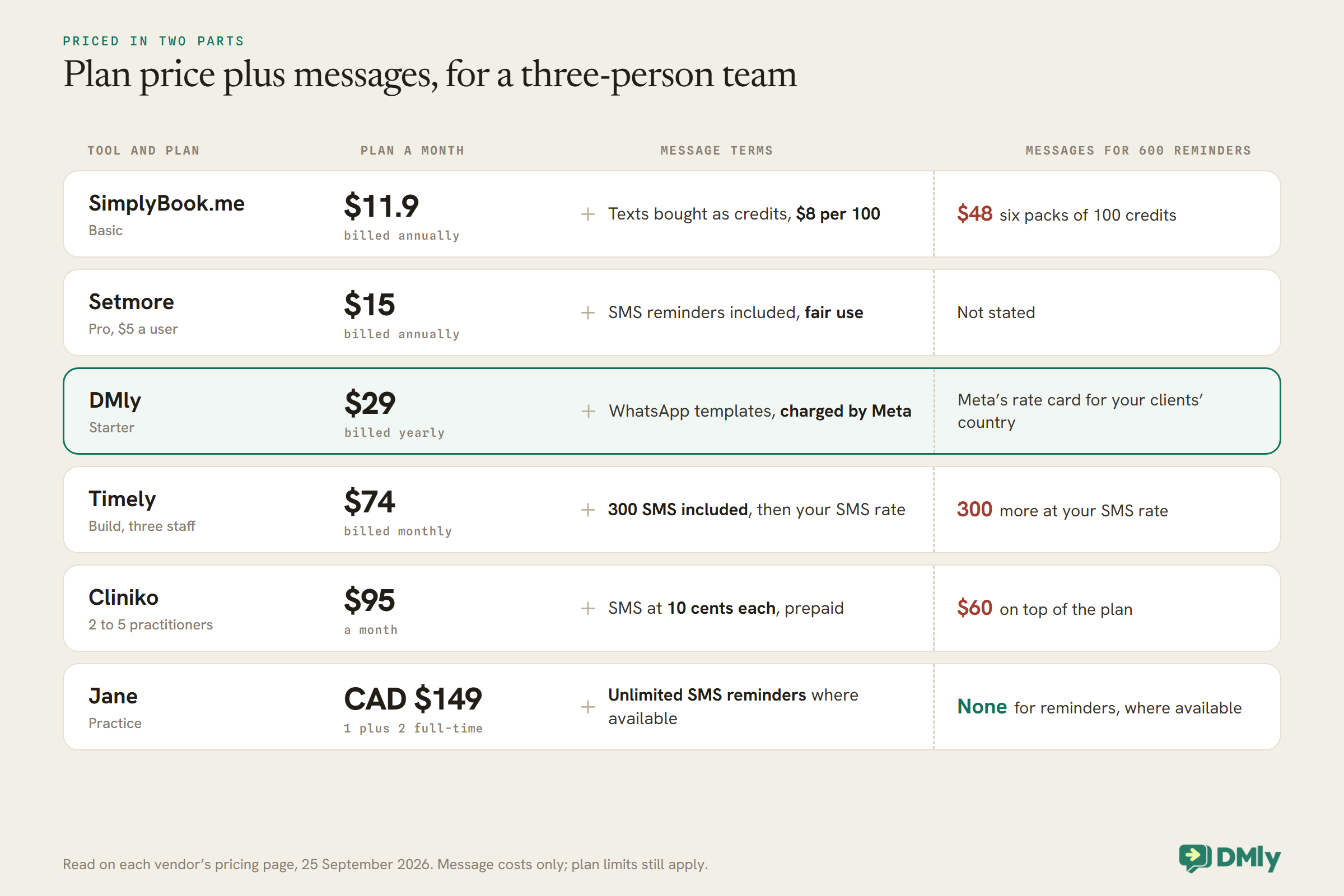
The figure shows why “cheapest” depends on volume. A small practice with few appointments pays least on a low plan with pay-as-you-go credits. A busy one may pay less overall on a plan with generous or unlimited messages included, even if its sticker price is higher.
Email, Text or WhatsApp
The channel matters more than any other feature, because a reminder nobody sees does nothing.
Email is included by every tool here and costs nothing per message. It is a sensible backup and fine for clients who live in their inbox, and a weak primary channel for anyone who does not.
Text messages reach any mobile phone, without an app. Most tools include an allowance, sell credits or charge per message, and several note that SMS availability varies by country.
WhatsApp is where many clients already talk to local businesses, and a reminder there sits in the same thread as their booking conversation, so replying is natural. It has its own rules. A business can message freely only within 24 hours of the client’s last message; outside that, which is when most reminders go, WhatsApp requires a pre-approved message template, and Meta charges for template messages by category and country. Reminders about an existing appointment are the kind of message Meta treats as utility rather than marketing, but Meta decides the category when it reviews the template. Of the tools here, DMly and Fresha list WhatsApp reminders or notifications, and SimplyBook.me sells WhatsApp credits.
If your clients use a mix, the practical answer is one primary channel that most of them read, with email as the backup. Ask your clients, or look at how they currently contact you: the channel they message you on is usually the channel they will read a reminder on.
When to Send Reminders
Each reminder has a job. Time it for that job, not by habit.
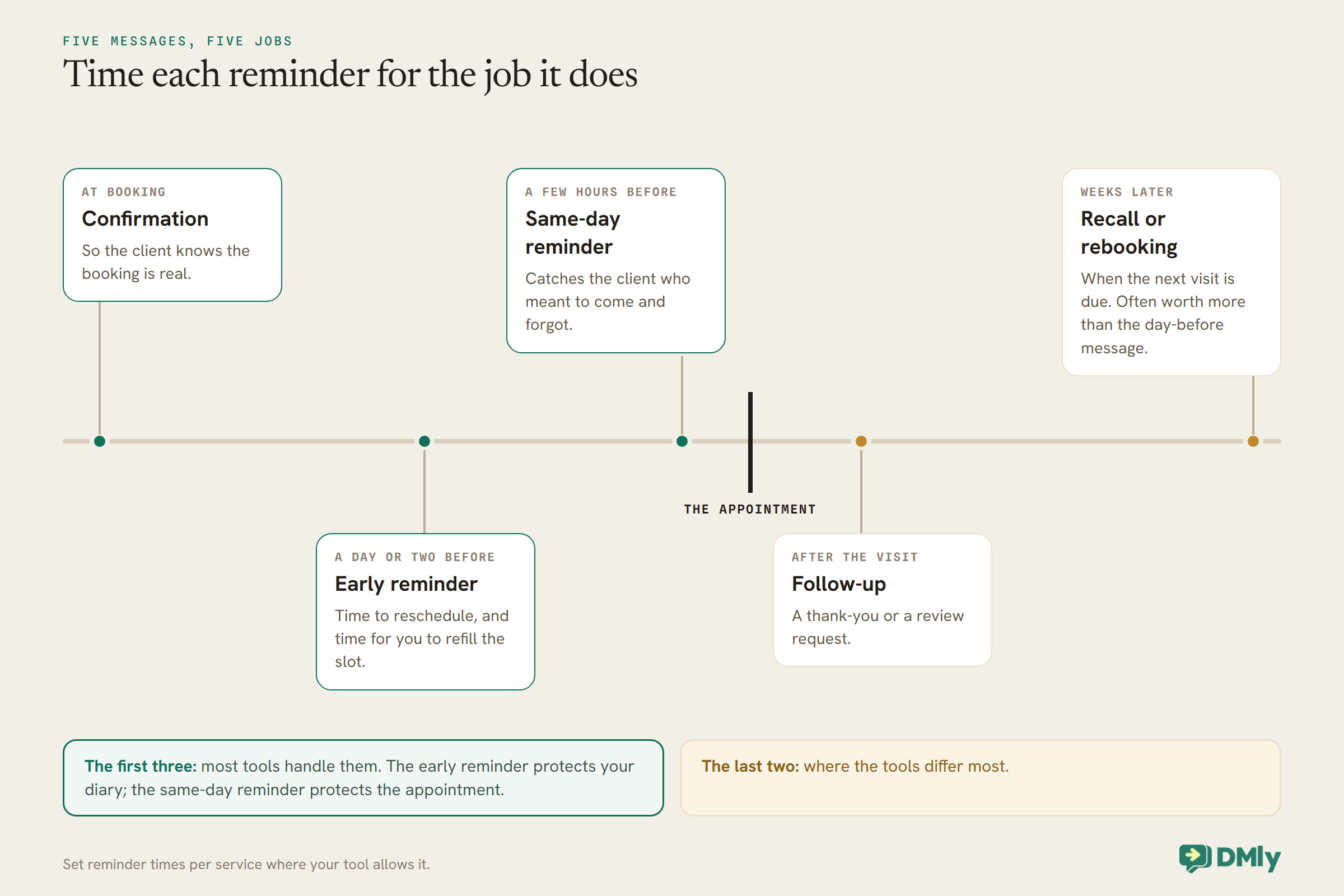
The early reminder is the one that saves money. Sent a day or two ahead, it gives the client time to say they cannot come and gives you time to fill the slot. The same-day reminder does a different job: it catches the client who meant to come and forgot. If you only send one, think about which failure costs you more: late cancellations you could have refilled, or forgetful no-shows.
Set the times per service where your tool allows it. In DMly, the reminder times live on each service, so a long first appointment can have an earlier reminder than a quick one. Our WhatsApp reminders guide discusses timing and wording in more depth.
What Salons Need, and What Clinics Need
Salons and clinics both lose money to empty appointments, but their reminders do slightly different work.
Salons usually care most about rebooking and filling gaps. A client who comes every six weeks is worth far more than a single visit, so a recall reminder when the next cut is due does real work. Long appointments such as colour make a no-show expensive, which is why salons often pair reminders with deposits or no-show fees. A waitlist helps a salon turn a late cancellation into another client’s lucky slot. For salons, look closely at Timely, Fresha and DMly.
Clinics usually care most about reliability and discretion. Appointments may be part of a course of treatment, so recall reminders (“your review is due”) and return visit reminders matter. Intake forms before the first visit are common. And clinics need to think about what a reminder says, because it may be read on a lock screen by someone other than the patient. For clinics, look closely at Jane, Cliniko and DMly.
Keeping Reminders Discreet
A reminder should tell the client what they need to know, and nobody else anything they do not.
Reminders are often read in a notification preview, on a phone left on a table or shared in a family. For many services that does not matter. For some clinics and treatments, it does. A reminder can do its job with the date, time, place and your business name, without naming the treatment or the reason for the visit. Most tools let you edit the wording of reminder messages, and it is worth doing before you go live. Whatever rules your profession or regulator sets for patient communication apply to your reminders too; check them rather than relying on your software’s defaults.
On WhatsApp there is an extra consideration. Template wording is reviewed by Meta, so plan it once, carefully, before submitting. In DMly the standard reminder templates are managed for you, and custom reminder flows built on the Appointment reminder due trigger let you control the wording yourself.
When the Client Cannot Come
The most valuable reply to a reminder is “I can’t make it”, as long as something useful happens next.
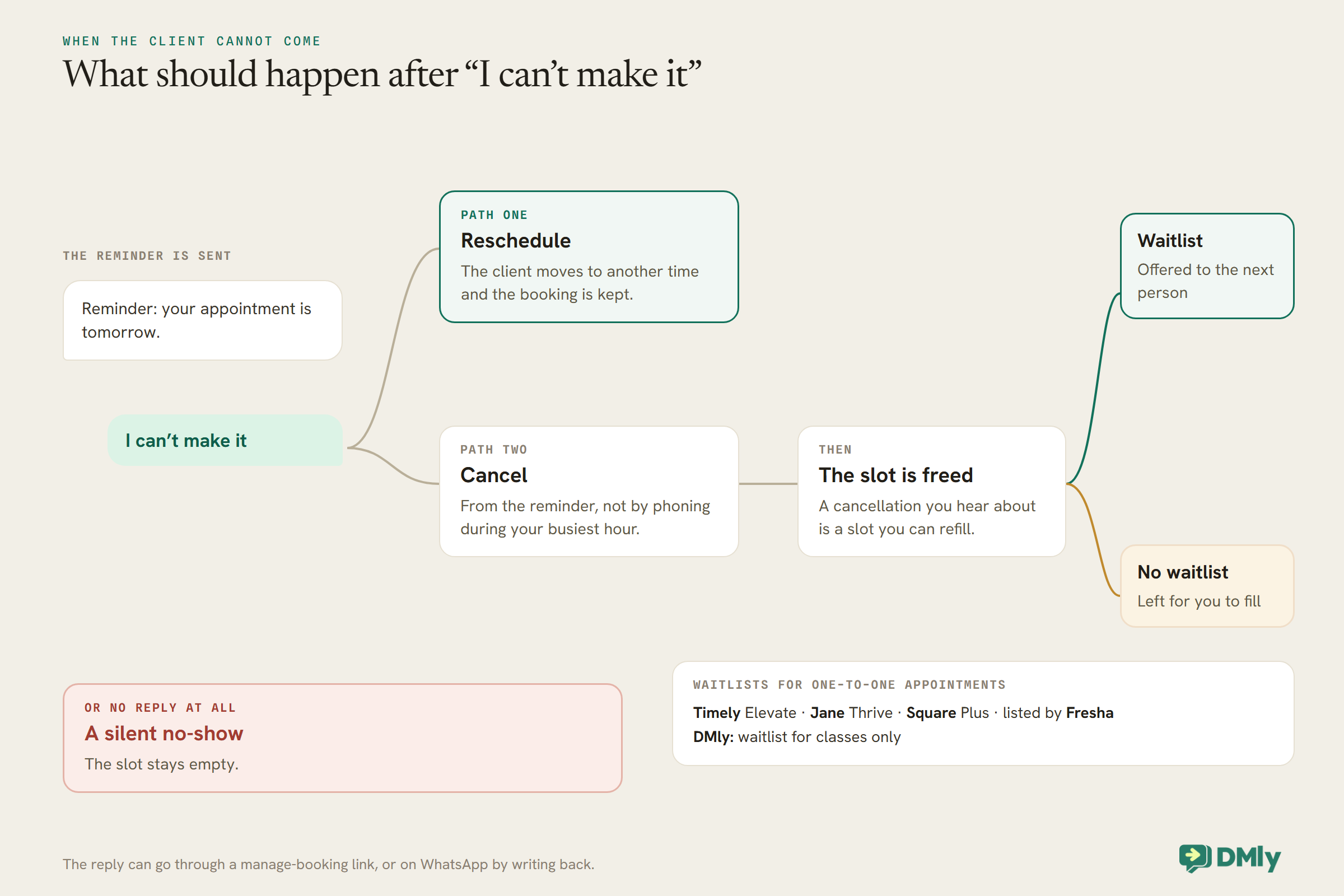
Three things decide how well this works. First, how easy it is to reply: a link to manage the booking, or on WhatsApp simply writing back. Second, how the reply is handled: by a person, by the client choosing a new time themselves, or in DMly’s case optionally by an AI agent that can reschedule or cancel in the chat. Third, what happens to the freed slot: offered to a waitlist automatically, or left for you to fill.
Set your cancellation and reschedule deadlines deliberately. In DMly they are workspace-wide and start at zero, which means clients can cancel right up to the start time; you may want a deadline of some hours, stated in the confirmation. Our guide to reducing appointment no-shows covers policies, deposits and wording.
Recall and Rebooking Reminders
The reminder that brings a client back is often worth more than the one that gets them to today’s appointment.
Jane’s Thrive plan lists scheduled return visit reminders. Timely’s Innovate plan lists automated reminders to encourage rebooking. In DMly, recall is built with automations: a completed appointment can start a flow that waits the right number of weeks and then sends a rebooking message with a booking link or tappable times. One detail from DMly’s docs matters here: about a day after an unmarked appointment, DMly closes it as completed by default, which fires the Appointment completed trigger, so a client who never came would get the recall too. Set Appointments nobody marked to Wait for review and mark visits, so the recall only reaches people who attended.
A recall reminder is closer to marketing than a day-before reminder is. On WhatsApp, a message inviting a client to book again can be classed as marketing, which needs the client’s marketing opt-in and is billed at marketing rates. Keep that in mind when you plan recall on any channel, and respect clients who have asked not to hear from you.
How to Test Appointment Reminder Software in a Week
Book yourself in, and see what actually arrives.
Set up two real services with different reminder times. Book yourself into each as a client, using a phone number and email you check. Then watch: did the confirmation arrive, on which channel, and how fast? Did each reminder arrive at the time you set, in your time zone, with the right details? Reply to one saying you cannot come and see what happens: can you reschedule from it, and does the slot come free? Cancel the other and check that no further reminders arrive. Finally, look at the message count in the tool’s settings or billing page and multiply by your real monthly volume. If you plan to use WhatsApp, check your reminder templates are approved before the test, or the reminders will not go at all.
Mistakes Salons and Clinics Make With Reminders
- Choosing by plan price alone. Messages are often the bigger cost. Count them first.
- Relying on email alone. Keep email as a backup, and send the main reminder on a channel clients read.
- One reminder time for everything. A long appointment deserves an earlier reminder.
- No easy way to cancel. A client who cannot cancel easily becomes a no-show.
- Too much detail in the message. Keep treatment details out of the lock-screen preview.
- Never checking what was sent. Look at delivery and failures in your tool, and for WhatsApp, at template status. DMly records a reminder that could not be sent in its logs rather than pretending it went.
Frequently Asked Questions
What is the best appointment reminder software?
For salons and clinics whose clients use WhatsApp, DMly; for clinics wanting unlimited text reminders, Jane where its SMS is available; for simple clinic pricing, Cliniko; for hair and beauty salons, Timely or Fresha; for businesses on Square, Square Appointments; for a low-cost start, Setmore or SimplyBook.me.
Is there free appointment reminder software?
Setmore’s free plan sends email reminders for up to four users, SimplyBook.me’s free plan sends reminder emails, and Square lists appointment reminders on its free plan. Text and WhatsApp reminders almost always cost something, through a plan, credits or per-message charges.
Are SMS or WhatsApp reminders better?
Whichever your clients read. WhatsApp keeps the reminder in the same thread as the booking conversation and makes replying easy; SMS reaches any phone without an app. Several tools support both, and email makes a good backup for either.
How many reminders should I send?
A common pattern is two: one a day or two before, so clients can reschedule, and one a few hours before, so they turn up. Set them per service if your tool allows it.
Can clients reschedule from a reminder?
In most tools, through a link to manage the booking. In DMly, a client can also reply on WhatsApp, and a team member or an AI agent with booking tools can reschedule in the chat.
Do WhatsApp reminders cost money?
Outside the 24-hour window, WhatsApp reminders are sent as template messages, which Meta charges for by category and country. Some tools pass that on as credits or per-message charges; with DMly you pay Meta’s charges for template messages.
Reminders That Arrive in Time to Matter
The reminder at the top of this page was sent on time by a tool that worked. It failed because it went on a channel the client did not read, at a time too late to act on, with no easy way to say “I can’t come”. Choose the best appointment reminder software for you by those three things, count the messages you will send, and test it by booking yourself in. If your clients already talk to you on WhatsApp, DMly is worth a place on your shortlist.
Writing about WhatsApp automation, bookings and growth for local business.
Turn WhatsApp into your busiest channel.
Start free and run message, bookings, payments and reviews in one place.
