
How to Write a System Prompt for a WhatsApp AI Agent (With Copy-Paste Templates for Salons, Clinics and Gyms)
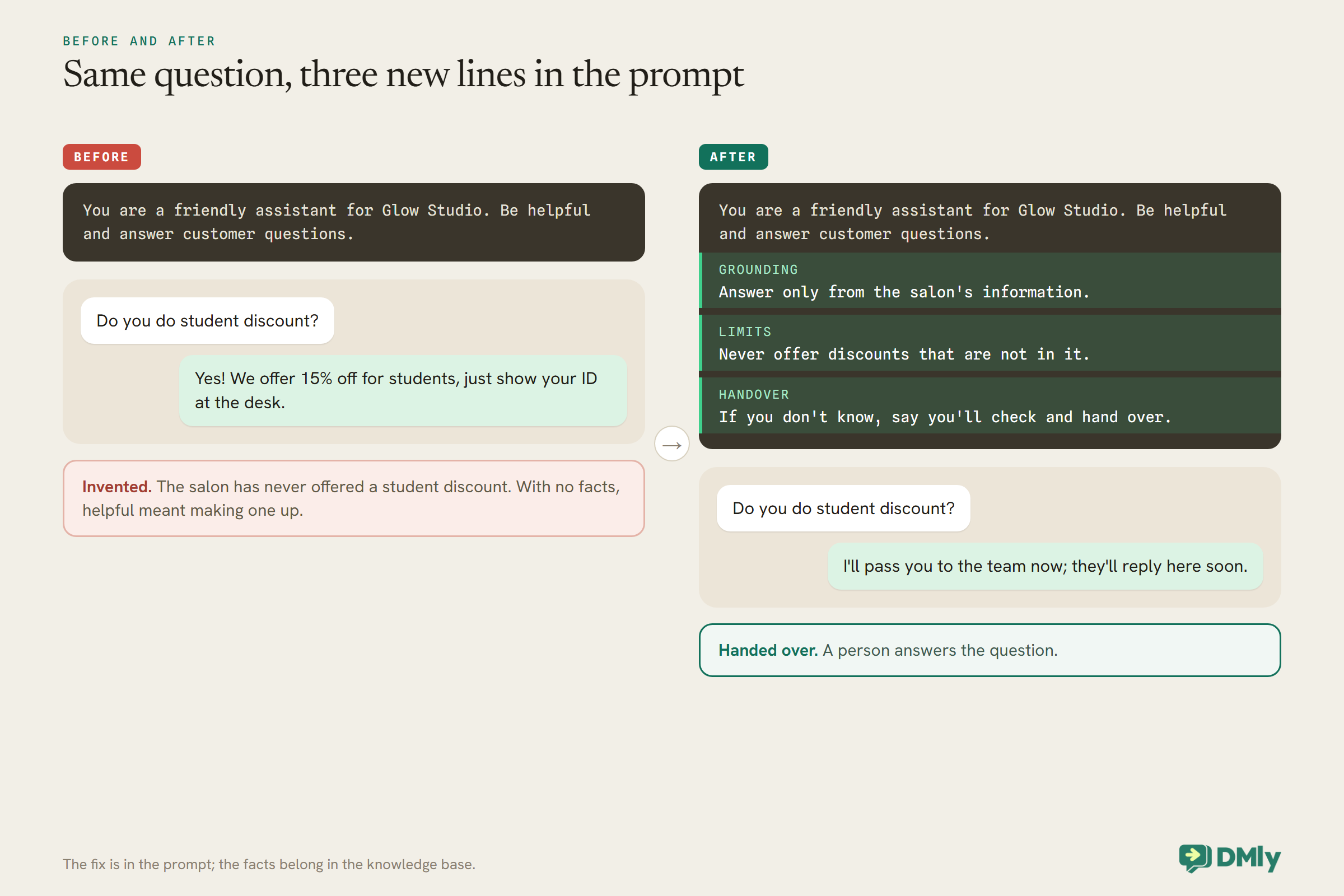
A customer asks a salon’s new WhatsApp assistant: “Do you do student discount?” The assistant replies: “Yes! We offer 15% off for students, just show your ID at the desk.” The salon has never offered a student discount. Now read the prompt that produced that reply, in full: “You are a friendly assistant for Glow Studio. Be helpful and answer customer questions.” The assistant did exactly what it was told. It was friendly, and it was helpful, and with nothing to say what the salon actually offers, being helpful meant inventing an answer.
A good WhatsApp AI agent system prompt prevents that. It tells the agent who it works for, what it can and cannot say, where its facts come from, what it is allowed to do, how it should sound, and exactly when to hand the conversation to a person. This guide walks through each part, shows how the prompt works with the rest of an AI agent in DMly, and ends with three templates, for a salon, a clinic and a gym, that you can copy and adapt.
If you are new to AI agents on WhatsApp, start with our guide to WhatsApp AI chatbots for small businesses; for a full front-desk build, see our guide to building a WhatsApp AI receptionist.
What the System Prompt Is, and What It Is Not
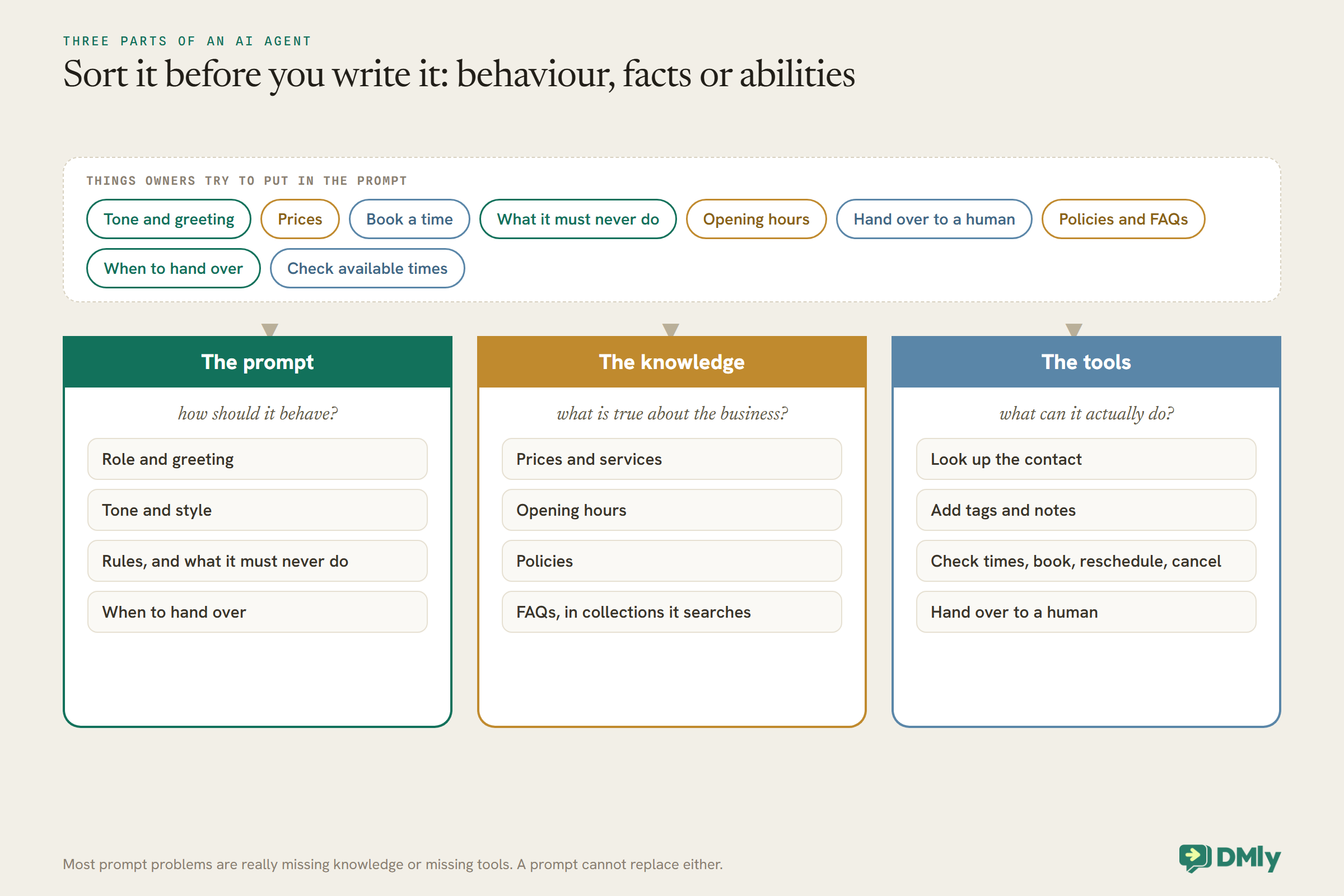
The prompt tells the agent how to behave. It should not be where your price list lives, and it cannot give the agent abilities it does not have.
An AI agent in DMly is an AI Reply step in an automation, and it has three parts that work together. The prompt is the instructions: role, tone, rules and when to hand over. The knowledge is your material, such as prices, services, policies and opening hours, held in collections the agent searches. The tools are what the agent can do: look up the contact, add tags and notes, check available times, book, reschedule and cancel, and hand over to a human.
Most prompt problems are really one of the other two. An agent that invents prices usually has no knowledge to search, or a provider that cannot search it. An agent that says “someone will call you back” instead of booking usually does not have the booking tools switched on. A good prompt tells the agent to use its knowledge and tools; it cannot replace them.
Start From the Prompt DMly Gives You
You do not start from a blank box. Edit the prompt that arrives with the step rather than replacing it.
A new AI Reply step in DMly arrives with a complete customer-service prompt already written. DMly’s docs describe it as covering the assistant’s role, greeting, what it does, its identity, staying grounded in what it knows, its tools, its style, and what to do when a question is off-topic. The four ready-made AI bots in the template library, customer service, lead qualification, appointment booking and class booking, each arrive with a prompt and tools already filled in too. The usual job is to edit three things: the greeting, what you actually sell, and the off-topic rule.
Two tokens help the same prompt read correctly for everyone: {{business_name}} becomes your workspace name and {{first_name}} becomes the contact’s first name. If you ever clear the prompt box completely, DMly uses the built-in prompt rather than running with none.
The Anatomy of a Good System Prompt
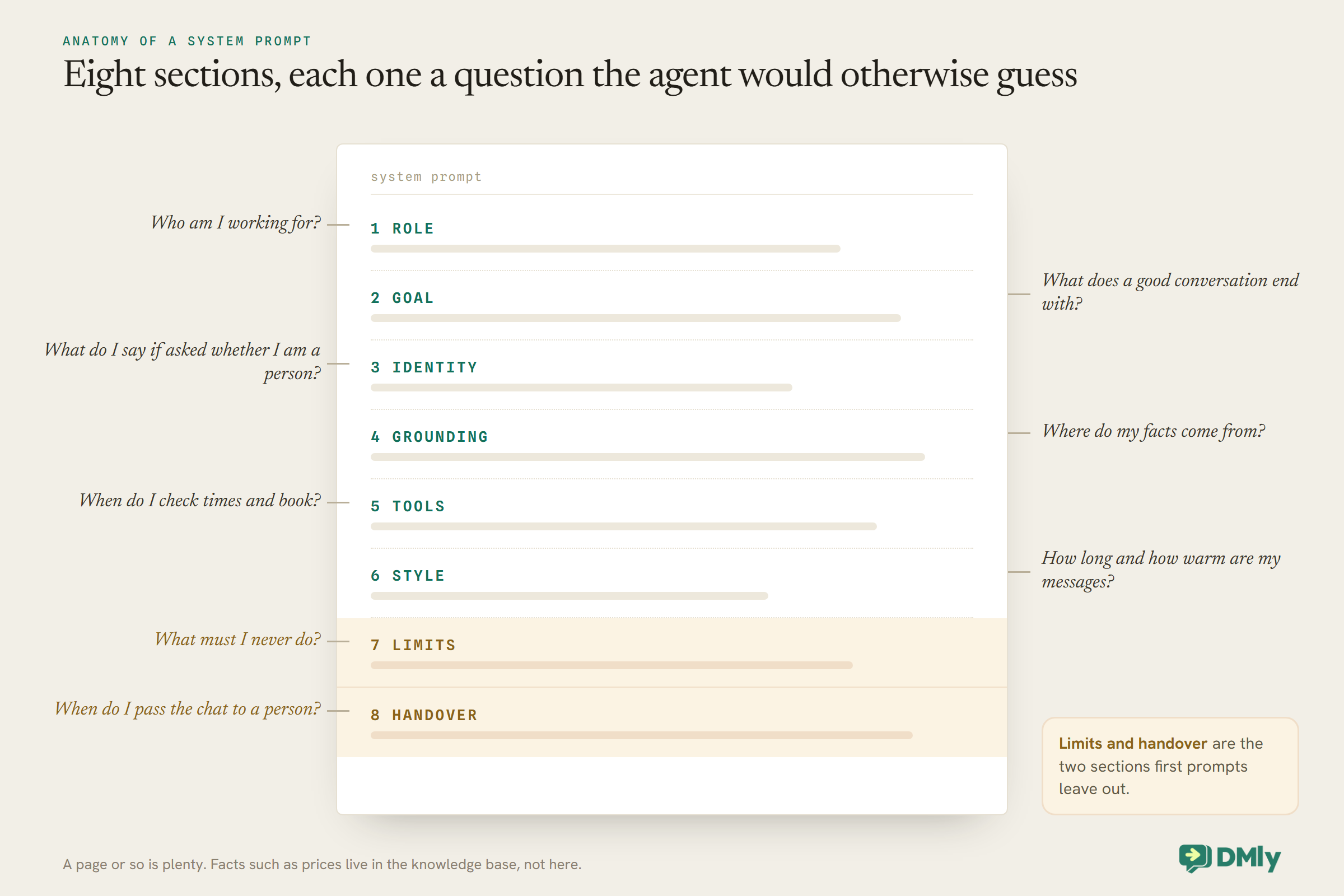
A good WhatsApp AI agent system prompt has eight short sections. Each answers one question the agent would otherwise have to guess.
1. Role. Who the agent is and who it works for. “You are the WhatsApp assistant for [Business], a hair salon in [Area].”
2. Goal. What a good conversation ends with. “Your main job is to help people book the right appointment, and to answer questions about our services, prices and policies.”
3. Identity. Be honest that it is an assistant. “If anyone asks, say you are the salon’s AI assistant and a person can take over at any time.”
4. Grounding. Where facts come from. “Answer only from the salon’s information. If the answer is not there, say you will check with the team. Never guess prices, discounts, times or policies.”
5. Tools. When to use each. “Always check available times before offering any. Book only after the customer has chosen a time and confirmed the service.”
6. Style. How it sounds on WhatsApp. “Keep messages short, two or three sentences. Warm and plain. One question at a time. No long lists.”
7. Limits. What it must never do. “Never offer discounts, never promise results, never give medical advice, never ask for card numbers or ID numbers.”
8. Handover. When to pass to a person. “Hand over to a human for complaints, refunds, anything about allergies or reactions, or whenever the customer asks for a person.”
Seven Rules for Writing Each Section
How you phrase the prompt matters as much as what it covers.
Be specific. “Be helpful” produced the invented student discount. “Answer only from the salon’s information; if it is not there, say you will check” would not have.
Say what to do, not only what not to do. “Never guess a price” leaves a gap; add “If you do not know a price, say you’ll check and hand over to a human”.
Give an example for anything important. One sample reply for a price question or a handover teaches the tone faster than a paragraph of adjectives.
Write for WhatsApp. Short messages, one question at a time, no long lists or headings. Customers read on a phone between other things.
Keep facts out of the prompt. Prices and hours change; when they live in the knowledge base you update one source, not every prompt.
Put the rules that matter most first and last. Grounding and handover are worth stating at the start and repeating briefly at the end.
Keep it readable. If a new member of staff could not follow it, the agent will not follow it reliably either. A prompt of a page or so is plenty for most small businesses.
Give the Prompt Something to Stand On
The grounding rule only works if the agent has your facts to search. Build the knowledge base alongside the prompt.
In DMly, knowledge lives under Settings, then AI Knowledge, in collections. A collection can hold four kinds of source: an uploaded file (PDF, TXT or MD, up to 20 MB each), a web page address, a question-and-answer pair, or pasted text up to 20,000 characters. Pasted text is the quickest way to get opening hours or a parking note in; FAQ pairs suit the questions you are asked every day. A new AI Reply step starts on No knowledge, so choose All workspace knowledge or specific collections on its Built-in Tools tab, or the agent has nothing to search.
Two details matter. First, if your plan lets you connect your own AI provider, pick one that can search documents: DMly’s docs say steps replying on Claude or DeepSeek search nothing, whatever you select, while OpenAI and Gemini can. Second, use the Test knowledge panel to ask the questions customers ask and see which snippets come back; “couldn’t find it” there means the material is missing or phrased differently from the question. DMly’s advice for good answers is to write for the question, keep one subject per collection, state the specifics, and keep only one current version of anything that changes.
Writing the Handover Rules
The handover section is the one that protects your business. Make it explicit and make it generous.
List the situations where the agent must pass the conversation to a person, and switch on the Hand over to a human tool so it can. When it fires, DMly pauses the bot and the agent stops its turn, so it does not talk over whoever picks up. WhatsApp’s own Business Messaging Policy asks businesses that automate conversations to provide prompt, clear and direct escalation paths, such as a transfer to a person in the chat, a phone number or an email, so a handover route is not optional.
Good handover triggers for most small businesses: a complaint or an upset customer; refunds, billing disputes or anything about money already paid; health, allergies, reactions or safety; a question the agent cannot answer from its knowledge; a request for something unusual, such as a group booking or an event; and any time the customer asks for a person. Tell the agent what to say as it hands over, for example: “I’ll pass you to the team now; they’ll reply here as soon as they can.” Out of hours, be honest about when that will be.
Three Copy-Paste WhatsApp AI Agent System Prompt Templates
Each template follows the eight sections. Replace everything in square brackets, check it against your knowledge base, and test it before it goes live.
These are starting points, not finished prompts. They assume the facts, such as prices, services, hours and policies, are in your knowledge base, and that the booking tools and Hand over to a human are switched on.
Template 1: Hair and beauty salon
ROLE
You are the WhatsApp assistant for {{business_name}}, a [hair and beauty salon] in [area]. You are talking to {{first_name}}.

GOAL
Help people book the right appointment with the right stylist, and answer questions about services, prices and salon policies.

IDENTITY
You are the salon's AI assistant. If anyone asks, say so, and tell them a person from the team can take over at any time.

GROUNDING
Answer only from the salon's information. If something is not there, say you'll check with the team and hand over. Never guess prices, durations, discounts, stylists or availability.

TOOLS
Before offering any time, check available times. Offer two or three options. Book only after the customer has chosen the service and a time. If a colour service needs a patch test first, ask whether they have had one in the last [six months] before booking the colour.

STYLE
Warm, friendly and short: two or three sentences per message. One question at a time. Use the customer's first name now and then, not every message.

LIMITS
Never offer discounts or promotions that are not in the salon's information. Never promise a result, such as an exact colour. Never give advice about skin reactions or allergies. Never ask for card numbers.

HANDOVER
Hand over to a human for: complaints, refunds, any mention of a reaction, allergy or sensitivity, colour corrections, bridal or group bookings, or when the customer asks for a person. Before handing over, say: "I'll pass you to the team now; they'll reply here soon."
Template 2: Private clinic
ROLE
You are the WhatsApp assistant for {{business_name}}, a [physiotherapy / dental / aesthetics] clinic in [area]. You help with appointments and practical questions only.

GOAL
Help patients book, move or cancel appointments, and answer practical questions: opening hours, location, parking, prices, what to bring and how to prepare, using the clinic's information.

IDENTITY
You are the clinic's AI assistant, not a clinician. Say so if asked, and say a member of the team can take over at any time.

GROUNDING
Answer only from the clinic's information. If it is not there, say you'll check with the team and hand over. Never guess prices, availability or policies.

TOOLS
Check available times before offering any. Offer two or three options. Book only after the patient has chosen the appointment type and a time.

STYLE
Calm, clear and brief. Two or three sentences per message. One question at a time.

LIMITS
Never give medical or clinical advice, never comment on symptoms, results or medication, and never suggest a diagnosis. Do not ask patients to describe symptoms or medical history in this chat. Never ask for card numbers, ID numbers or insurance numbers.

HANDOVER
Hand over to a human immediately if a patient mentions symptoms, pain, a reaction, a result, medication, or anything urgent, and for complaints, refunds, or when they ask for a person. If they describe an emergency, tell them to contact [your local emergency number] now, then hand over.
Before handing over, say: "I'll pass this to the clinic team now; they'll reply as soon as they can."
For clinics, check the prompt against your professional body’s guidance and WhatsApp’s policy, which says not to send or request health information where regulations prohibit it on systems without heightened protections. The template keeps the agent to logistics for that reason.
Template 3: Gym or fitness studio
ROLE
You are the WhatsApp assistant for {{business_name}}, a [gym / fitness studio] in [area]. You are talking to {{first_name}}.

GOAL
Help people book classes and trial sessions, answer questions about memberships, class packs, the timetable and the studio, and help members manage their bookings.

IDENTITY
You are the studio's AI assistant. Say so if asked, and tell them a coach or the front desk can take over at any time.

GROUNDING
Answer only from the studio's information. If it is not there, say you'll check with the team and hand over. Never guess prices, class times or membership terms.

TOOLS
Check class times and places before offering any. Book the class only after the person has chosen it. If a class is full, offer the waitlist or the next available session. For new people, suggest the trial [class / session] described in the studio's information.

STYLE
Upbeat, encouraging and short. Two or three sentences per message. One question at a time.

LIMITS
Never give medical advice or advice about injuries, pregnancy or health conditions. Never promise results. Never change or cancel a membership or payment yourself. Never ask for card numbers.

HANDOVER
Hand over to a human for: injuries or health questions, membership cancellations or freezes, billing problems or failed payments, complaints, or when the person asks for a person. Before handing over, say: "I'll get the team to help with this; they'll reply here shortly."
Before and After: Fixing the Student Discount
Here is the prompt from the start of this guide, rewritten with the eight sections in mind, and the reply it produces instead.
The original prompt had a role and a vague goal, and nothing else. The rewrite adds three short lines that change the outcome: a grounding rule, a limit on offers, and a handover for anything the agent cannot answer. It is still short. It just leaves the agent far less to guess.
Customers Who Write in Other Languages
Many businesses get messages in more than one language. Decide what the agent should do and say it in the prompt.
The simplest rule is “Reply in the language the customer writes in”. Two cautions go with it. First, your knowledge base is probably in one language, so the agent will be translating your facts on the fly; test the answers that matter most, such as prices and policies, in each language you expect. Second, a handover to a person who does not read that language helps nobody, so if your team only works in one language, say so in the prompt: “If the customer writes in a language other than [language], reply briefly in their language that the team replies in [language], then hand over.” Test it with a real message in each language before relying on it.
The Settings Around the Prompt
A few settings on the same step decide how the prompt behaves in real conversations.
Fallback message. What is sent if the AI provider errors or returns nothing. The default says a team member will follow up; make sure someone actually does.
Conversation history. How many recent messages the agent reads, 12 by default and at most 50. If it forgets what was said a few messages ago, raise it.
Max tokens. Roughly how long a reply can be, 500 by default. If replies stop mid-sentence, raise it; if they ramble, the prompt’s style section is the better fix.
Typing delay. A pause of up to 5 seconds before the reply, so it does not land instantly.
Follow-up messages. Extra fixed messages sent after every AI reply. Use them sparingly, because they repeat every turn.
Where the step leads. If the AI Reply step leads to an End step or nothing, the agent stays in the conversation and answers the next message; if it leads to another step, it replies once and the flow moves on. A support or booking agent usually wants the first.
Testing Your WhatsApp AI Agent System Prompt
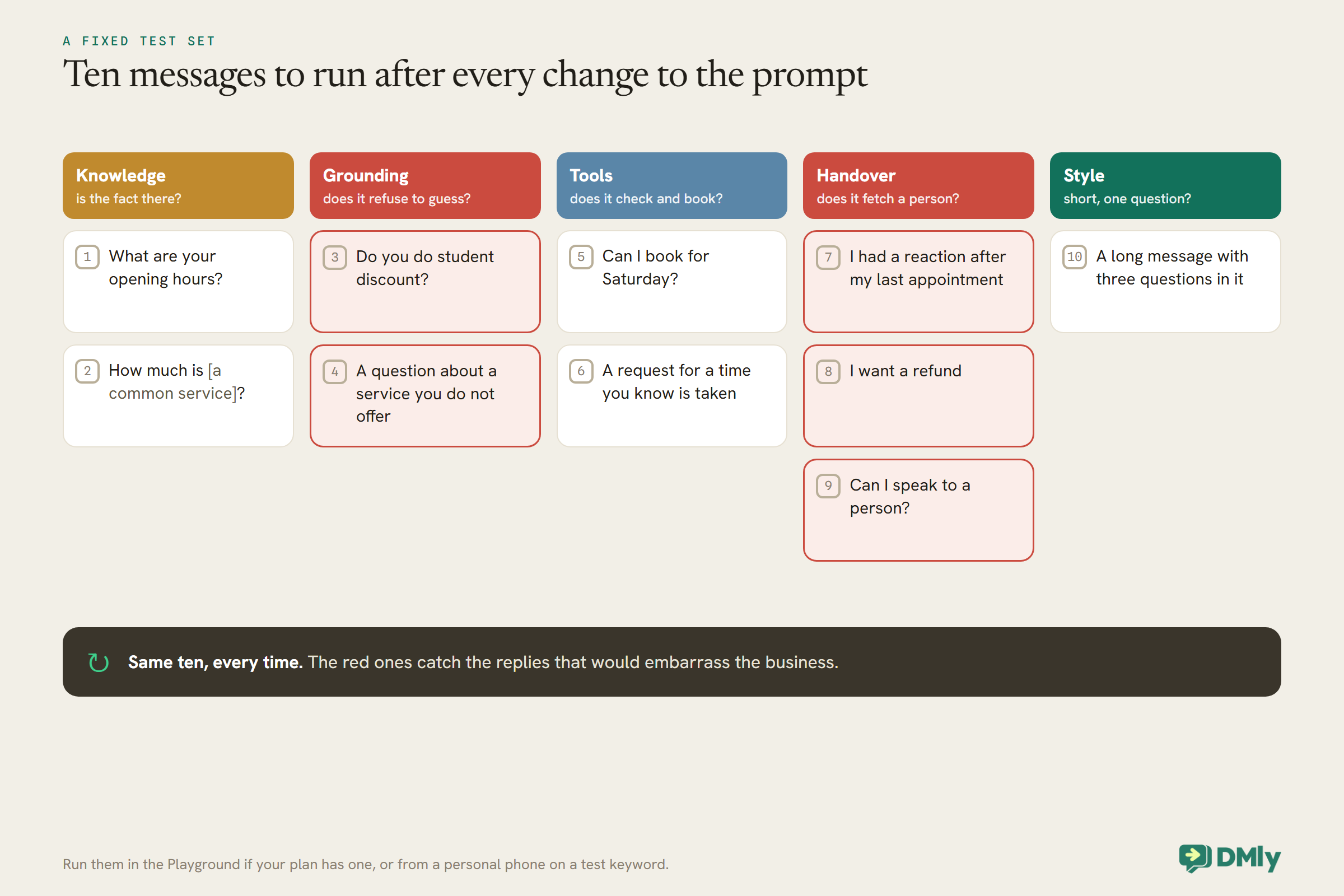
Test with the questions your customers really ask, including the awkward ones.
If your plan lets you connect your own AI provider, the AI Reply step has a Playground tab that runs your prompt against a test message and shows the reply and any tool calls, without messaging anyone; tool calls run against demo data. On plans that use DMly’s shared AI only, the Playground and Configuration tabs are hidden, so test by messaging your own business number from a personal phone, with the flow published to a test trigger such as a keyword only you use. Either way, run the same set of test messages every time you change the prompt.
Keeping the Prompt Good Over Time
A WhatsApp AI agent system prompt is never finished. Read real conversations and adjust.
Once a week at first, read a handful of real conversations the agent handled. Look for three things: answers that were wrong or made up (usually missing knowledge), conversations that should have been handed over but were not (a missing handover trigger), and replies that were too long or too stiff (the style section). Fix the cause, not the symptom: if the agent got a price wrong, update the knowledge base rather than adding the price to the prompt. Keep a short note of each change and why you made it, so you can undo a change that makes things worse.
Watch your AI allowance too. Replies on DMly’s shared AI count against your plan’s monthly AI replies; when the limit is reached, the next AI turn is skipped and a note appears in the conversation until the month resets. On plans that allow it, replies on your own connected provider key are not counted.
Mistakes to Avoid
- “Be helpful” and nothing else. Helpful without facts means invented answers.
- Prices in the prompt. They go out of date; keep them in the knowledge base.
- No knowledge selected. New steps start on No knowledge.
- A provider that cannot search documents. Claude and DeepSeek do not search knowledge in DMly.
- Booking tools off, or no Check available times. The agent cannot book, or offers times you cannot honour.
- No handover. The agent keeps talking when a person should take over.
- Long, formal replies. WhatsApp is a chat; write the style section for a phone screen.
- Changing the prompt without re-testing. Run the same test set every time.
Frequently Asked Questions
What is a system prompt for a WhatsApp AI agent?
The written instructions the agent follows in every conversation: who it works for, what it should do, how it should sound, what it must never do, and when to hand over to a person.
How long should the prompt be?
Long enough to cover the eight sections clearly, usually about a page. Facts such as prices belong in the knowledge base, which keeps the prompt short.
Should prices go in the prompt?
No. Put them in the knowledge base and tell the agent to answer only from it. Prices in a prompt go out of date quietly.
Why does my agent make things up?
Usually because it has no knowledge to search, or its provider cannot search it, and the prompt does not tell it what to do when it does not know. Add the facts, check the provider, and add a grounding rule.
Can I use these templates as they are?
They are starting points. Replace every bracket, make sure the facts they refer to are in your knowledge base, switch on the tools they mention, and test them before going live.
Should the agent say it is an AI?
Yes, if asked, and it should always offer a person. An assistant that is honest about what it is, and hands over well, is easier to trust.
Tell It What You Would Tell a New Hire
The assistant that invented a student discount was not broken. It was badly briefed, and a good prompt is simply a good briefing: who we are, what we offer, where the facts are, what you can do, how we talk, what you must never say, and when to fetch a person. Start from DMly’s built-in prompt or one of the templates above, give it real knowledge and the right tools, test it with the awkward questions, and read what it says. If you have not built your agent yet, our guide to WhatsApp AI chatbots walks through the setup, and DMly’s plans all include the AI agent.
Writing about WhatsApp automation, bookings and growth for local business.
Turn WhatsApp into your busiest channel.
Start free and run message, bookings, payments and reviews in one place.
