
WhatsApp Automation for Schools, Kindergartens and Daycares: Closures, Pickups, Absences and Parent Updates (2026)
Run a quick drill before you read on. It’s the kind of drill WhatsApp automation for schools is really built for, and it needs no software. Imagine the heating fails tonight and your setting has to close tomorrow. Now count honestly: how many families would know within the hour?
Some would see it in the class group, somewhere under forty replies about a lost jumper. Some would get a call from a member of staff working down a printed list. A few would find out at the gate, with a toddler on one hip and a meeting in forty minutes. And a small number couldn’t be reached at all, because months ago they replied “STOP” to something and nobody noticed what that did.
That last group is the one this guide is really about. Messaging parents isn’t hard. Messaging every parent who needs to hear, privately, quickly and without sharing anything about a child that shouldn’t travel, is. In this guide, we’ll look at what WhatsApp automation looks like in a school, kindergarten, nursery or daycare, which messages to automate first, how to handle closures, pickup changes, absences, daily updates, tours and events, what the rules on children’s data say in the US, UK, India and Nigeria, and how to set it all up step by step.
What Is WhatsApp Automation for Schools, Kindergartens and Daycares?
WhatsApp automation for schools means sending and answering parent messages from your setting’s own WhatsApp number, one family at a time, with routine replies and notices handled by rules you set up once. A closure notice reaches every parent on a list, a pickup change gets the right questions asked and passed to a person, and an enquiry about places gets an answer at 10pm instead of the next morning.
It’s different from the class WhatsApp group most settings already have. In a group, everybody sees everybody’s messages and phone number, the loudest parent sets the tone, and anything private ends up public. With automation through the WhatsApp Business Platform (Meta’s official system for businesses, often called the API), every family has its own private chat with the setting. Nobody sees anyone else’s replies.
| Class group chat | WhatsApp automation with a platform | |
| Who sees replies | Every member of the group | Only your staff |
| Phone numbers | Visible to every member | Visible to your team, and can be masked for some roles |
| Reaching every family | Only those in the group, if they read it | Everyone on a saved list who hasn’t opted out |
| Private matters (fees, absences, pickups) | Shouldn’t be posted at all | Handled in each family’s own chat |
| Who answers | Whichever teacher happens to be online | The office, from one shared inbox |
| Out-of-hours enquiries | Wait until someone looks | Answered by a bot or AI, handed to a person when needed |
Two things it isn’t. It isn’t a nursery management app or learning journal, the kind that logs naps, nappies and development notes against each child. And it isn’t your register or school information system. A good setup sits beside those tools and does the talking, while the records of the day stay where they belong.
If you run a tuition centre rather than a setting with children on site all day, our guide to WhatsApp automation for tutors covers lesson reminders, termly blocks and re-enrolment in more depth. For an overview of what DMly does for education businesses, see DMly for Education & Tutoring.
Parents Are the Contacts, Children Are the Details
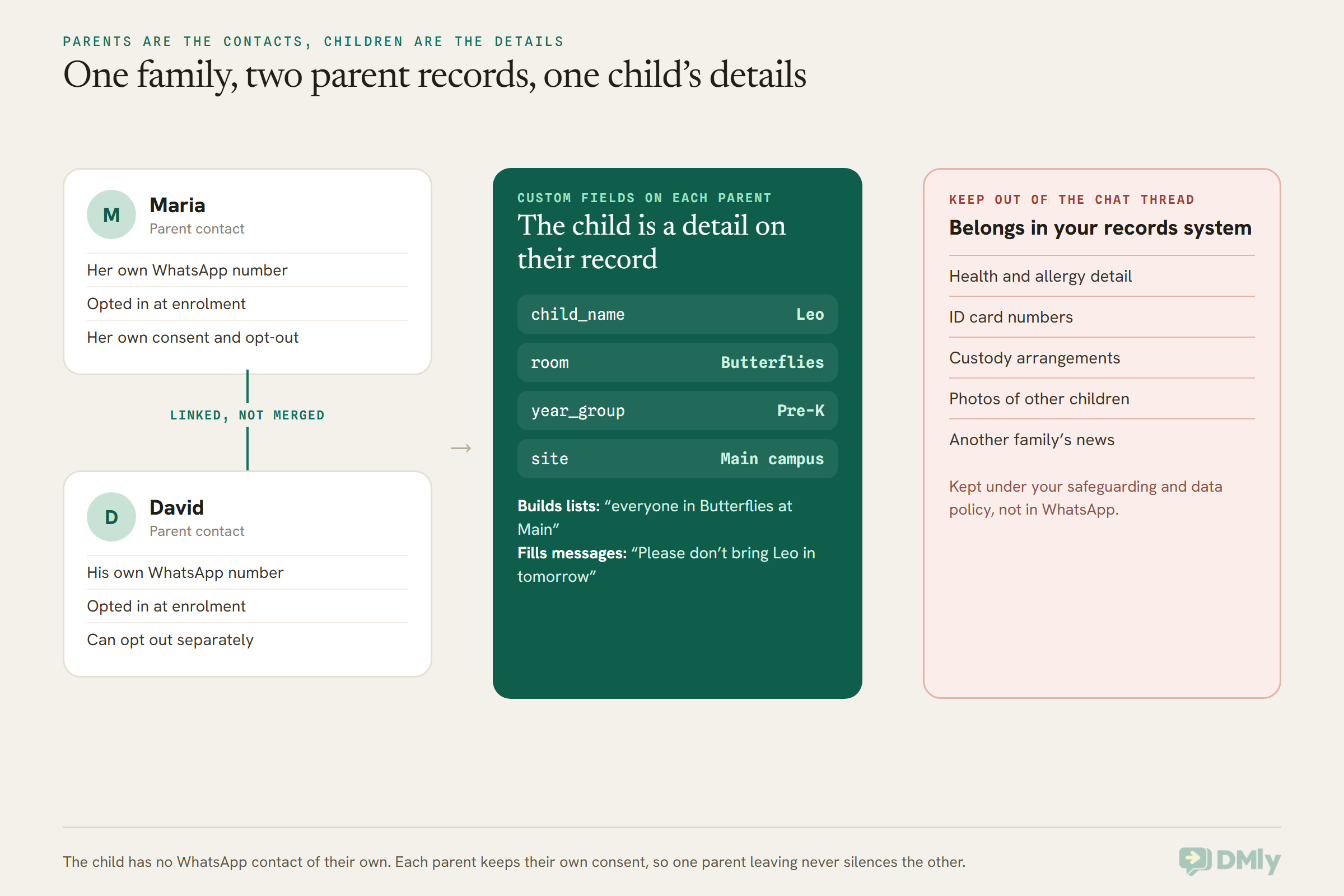
In any school messaging system, the parent or guardian is the contact, and the child is information held on that parent’s record. Children under five don’t have WhatsApp, and older children shouldn’t be messaged by the school on a channel the parents haven’t agreed to. Getting this right at the start saves you from most of the privacy problems later.
Here’s how that looks in practice in DMly:
- One contact per adult. Each parent who’ll receive messages gets their own contact, with their own phone number. Two parents means two contacts, and each one has their own consent and their own opt-out.
- The child’s details go into custom fields. These are extra boxes you define once under Settings → Custom fields:
child_name,room,year_group,site. You can then use{{custom.child_name}}inside a message, and build lists from those fields. - Link the two parents. DMly’s linked contacts feature lets you record that two contacts are related (Parent, Child, Spouse, Guardian, Sibling or Other) without merging them. Each keeps their own chat, tags and records, and your staff can see the household at a glance.
- Siblings. A parent with two children in different rooms can carry both, for example with two tags (
room-butterflies,room-owls) so they land on both rooms’ lists.
Bringing your parent list in
Most settings start from a spreadsheet. DMly imports contacts from a CSV file (Contacts → Import), and a few rules decide what actually lands:
- Every row needs a name and a phone number. Rows missing either are skipped, and DMly tells you how many. So a parent you only have an email for won’t come in.
- Pick the WhatsApp channel first. The importer attaches each contact to the channel you have selected.
- Tick the consent box only if it’s true. There’s a box for “I have consent to send marketing messages to everyone in this file”, with a space to say how it was collected (for example, “enrolment form, September intake”). That record goes into each parent’s consent history.
- An import never starts automations. No welcome message goes out, and tags added by the file don’t trigger anything. That’s usually what you want on day one, but it means you can’t use an import to kick off a “welcome to the new term” flow.
- Re-imports replace tags. If you import the same parents again with an empty tags column, their existing tags are removed. Carry the tags across in the file every time.
Which School Messages to Automate First
Start with the messages where a missed or late reply causes real harm (closures, emergencies and pickup changes), then work down to the ones that are merely convenient. Most settings do this the other way round, because event reminders and fee notices are easier to picture. But the payoff of a working system is the day the boiler breaks, not the day of the bake sale.
A useful rule runs through all of it: automate the asking and the sorting, and keep the deciding with a person. A flow can collect the name of the aunt who’s collecting today. Only your staff should decide whether she can take the child home.
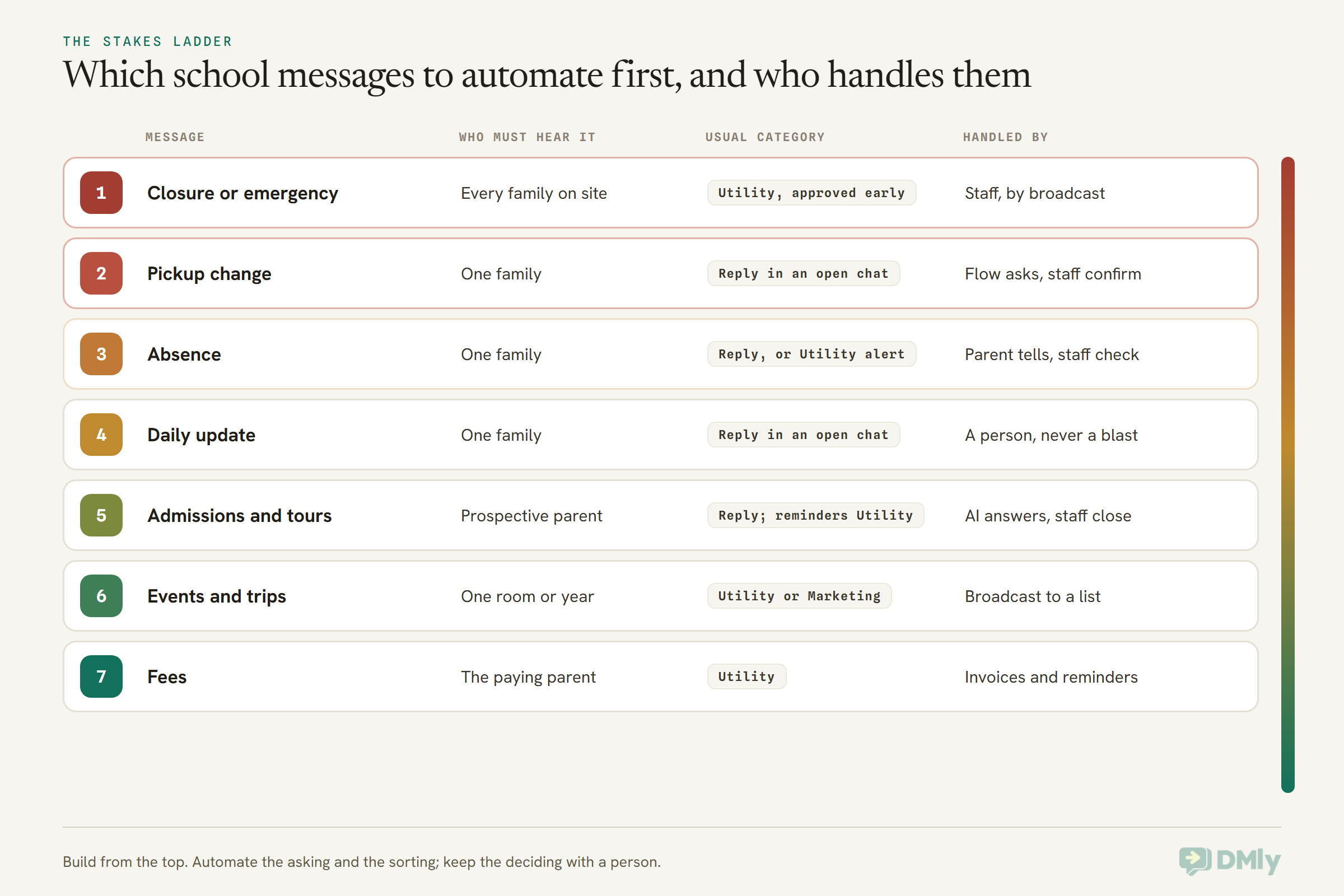
The “usual category” column needs a word of explanation. Outside a 24-hour window after a parent last wrote to you, WhatsApp only lets a business start a conversation with a pre-approved message called a template. Meta sorts templates into categories. Utility is for strictly factual messages about something the person already has with you (their child’s place, their booking, their invoice), or something essential like a safety alert. Marketing is anything that promotes, persuades or sells, and anything that mixes the two. The category decides the price, and whether the message needs a marketing opt-in. If this is new to you, WhatsApp message templates explained walks through all three categories, and how the 24-hour messaging window works covers when you can simply type a reply.
One caution that applies to every template in this guide: Meta decides the final category from your exact wording, and its own examples are described as illustrative only. Write the factual messages plainly and you’ll usually land in Utility. Add “and don’t forget our summer camp!” and the whole thing becomes Marketing.
School Closures and Emergencies: The Message That Has to Reach Everyone
For closures and emergencies, the job is to reach every family on a site within minutes, with a message that’s already approved, and to know exactly which families didn’t get it. That means doing most of the work on a calm day, long before you need it.
Get the closure templates approved now
A WhatsApp broadcast in DMly always sends an approved template. There’s no box to type a free message, because most of your list won’t have written to you in the last 24 hours, and a typed message would only reach a fraction of them. Meta’s approval takes as long as it takes, so a closure template you create during a snowstorm may not be ready in time.
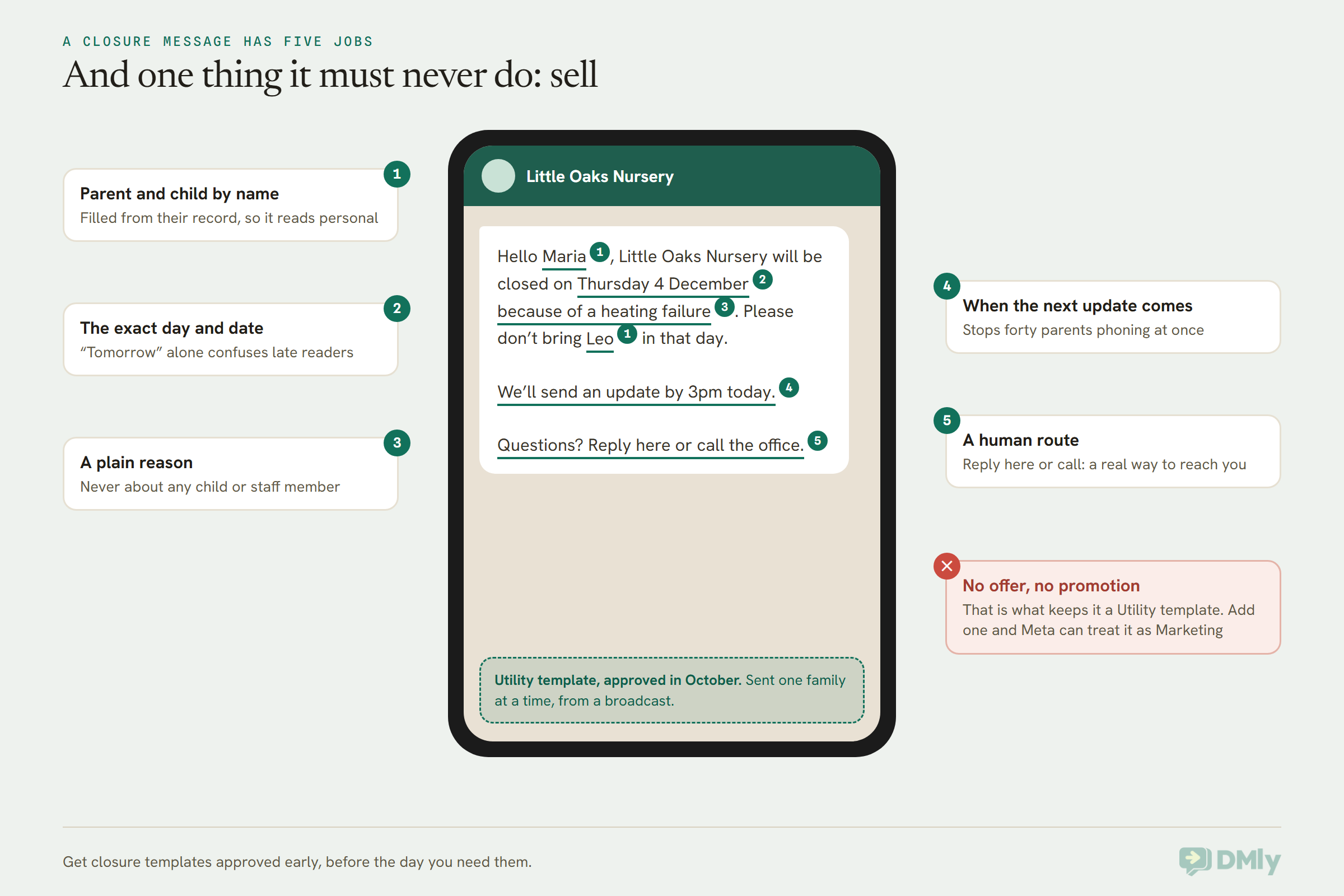
Create two or three now, with the details left as variables (the numbered gaps a template fills in when it sends): the date, the reason, what parents should do and when the next update comes. Meta’s own list of “essential or critical” Utility examples includes severe weather alerts and operational disruption, and a plain notice that your setting is closed fits the same pattern: factual, specific, no offer attached.
Closure and emergency templates you can copy
1. Closure notice
Hello [Parent name], [Setting name] will be closed on [Thursday 4 December] because of [a heating failure]. Please don’t bring [Child name] in that day. We’ll send an update by [3pm today]. Questions? Reply here or call the office.
Category: Utility. Factual, specific to the family’s place, no promotion.
2. Reopening update
Hello [Parent name], good news: [Setting name] reopens as normal on [Friday 5 December]. Doors open at [7:30am]. Thank you for your patience. Reply here if you have any questions.
Category: Utility.
3. Early collection needed
Hello [Parent name], we need to close [Setting name] early today because of [a power cut]. Please collect [Child name] by [1pm], or reply here to tell us who is collecting. All children are safe and with their key staff.
Category: Utility. Notice the reply route: a parent who can’t come will tell you who is coming, and that reply lands in your inbox, not in a group.
Sending it on the day
- Build your lists in advance. A broadcast in DMly points at a saved list (a segment) rather than filtering on the spot. Make one segment per site, and one per room or year group, using the custom fields above. Segments update themselves at send time, so a family who joined last week is included automatically.
- Tick “Reachable contacts only”. Parents who’ve opted out are always blocked at the moment of sending, whatever you choose. Ticking the box simply keeps them out of your recipient and failed counts, so you can see clearly who was actually reached.
- Decide who can approve. DMly has a “Require team approval before sending” setting that holds a broadcast until a teammate signs off. That’s a good habit for event notices. For emergencies, make sure the people who’ll be sending at short notice either have approval rights or know who does.
- Check the template still reads Approved. DMly checks a template’s status at send time. If Meta has paused or disabled it, the send fails. Look at Messaging → Templates once a term so you’re not surprised.
- Mind the clock. A scheduled broadcast is read in your account’s timezone by default, or at the same local time for each contact if you choose that option. For a single site, the default is what you want.
Plan for the families you can’t reach
Even a perfect system leaves a few families out: no WhatsApp, a changed number, or an opt-out. Your broadcast’s recipients list shows each failed contact with a reason. Keep your existing phone tree for exactly those families. If a meaningful number of your parents don’t use WhatsApp, DMly also connects SMS (through Twilio, Plivo or a custom gateway), which needs no templates but sends plain text only, with no buttons or images.
For the broader mechanics of sending to a list, our guide to WhatsApp broadcasts: opt-in, templates and timing goes deeper.
Pickup Changes and Authorised Collectors on WhatsApp
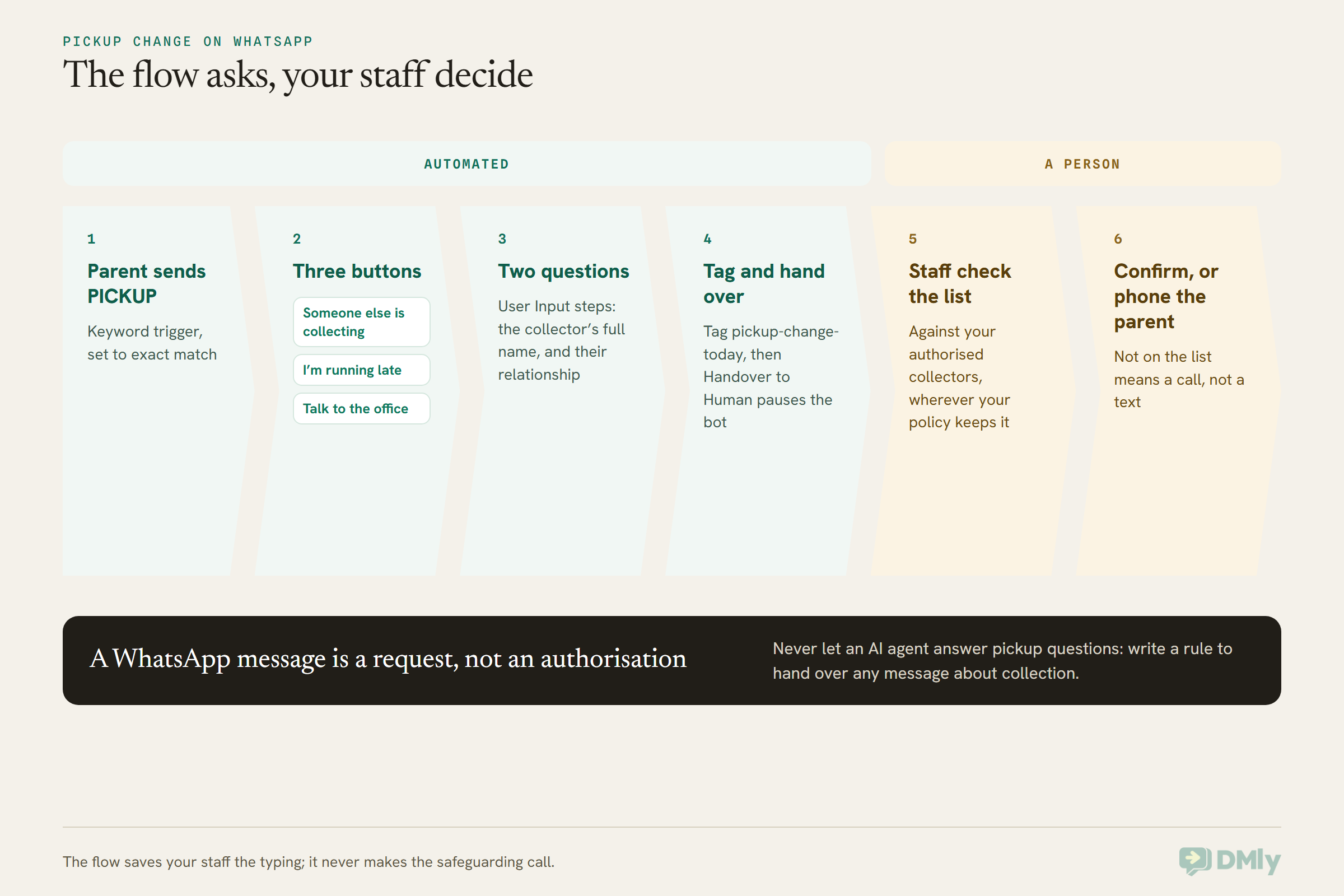
A WhatsApp message about pickup is a request, not an authorisation. Automation can collect the details neatly and put them in front of the right person in seconds. Whether a child goes home with someone stays a decision for your staff, made against the authorised collector list and the checks your safeguarding policy sets out.
This is the message settings most often get wrong, because it arrives at the worst moment: mid-afternoon, from a parent stuck in traffic, saying “My sister is picking up Amira today.” In a group chat, that’s a safeguarding problem. In a teacher’s personal WhatsApp, it’s an unrecorded one.
A simple pickup change flow
In DMly you can build a small flow that starts when a parent sends the word PICKUP (a keyword trigger, set to “exact match” so it doesn’t fire on every message containing the word). It then:
- Sends buttons: Someone else is collecting, I’m running late, Talk to the office.
- For “someone else”, asks two questions with a User Input step: the collector’s full name and how they’re related to the child. The answers are saved to the contact and shown on their profile.
- Adds a tag such as
pickup-change-today, so the office can see every change at a glance. - Uses Handover to Human, which pauses the bot and passes the chat to staff.
A member of staff then checks the name against your authorised list (kept wherever your policy says it lives), and either confirms in the chat or phones the parent. If the person isn’t on the list, the reply is a phone call, not a message.
Pickup replies you can copy
These are sent inside the chat the parent just opened, so they’re ordinary replies rather than templates.
4. Pickup change received
Thanks, [Parent name]. We’ve noted that [Collector name] ([relationship]) is collecting [Child name] today. A member of staff will check this and confirm here shortly. If we can’t confirm, we’ll call you before pickup.
5. Pickup confirmed
Confirmed: [Collector name] can collect [Child name] today. Please ask them to bring photo ID to the door. See you tomorrow!
Two habits keep this safe. Never use the word “approved” in an automated reply, because only a person should approve. And never let an AI agent answer pickup questions: give the AI a rule to hand over any message about collection straight away.
Absences: When Parents Report In, and When You Check
Absence messages run in two directions: parents telling you a child is off, and you asking why a child hasn’t arrived. WhatsApp handles the first beautifully. The second depends on where your register lives.
Parents reporting an absence
A short flow on the keyword ABSENT can ask the child’s name (or read it from the parent’s record), the expected return date and a short reason with buttons: Unwell, Appointment, Family reason, Other. Then it tags the contact and passes the chat to the office.
Notice what it doesn’t ask: symptoms, diagnoses or medication. WhatsApp’s own policy says not to use WhatsApp to send or request health information where the rules that apply to you require stronger handling, and a sick child’s details rarely need to sit in a chat thread. If your policy needs more (for example, a return-to-setting rule after vomiting or a fever), ask the parent to call or fill in your usual form.
6. Absence received
Thanks for letting us know, [Parent name]. We’ve recorded that [Child name] is away today. We hope they feel better soon. If anything changes, just reply here.
Checking on a child who hasn’t arrived
This is where honesty matters. DMly isn’t a register, and it doesn’t read attendance from one. Even DMly’s own class roster won’t help here: marking a class seat as attended or no-show doesn’t start any automation. So an “unexplained absence” alert needs one of three routes:
- A member of staff sends it from the inbox, using an approved template, for each missing child. Fine for a small setting.
- Your register system sends it through DMly. DMly’s API can send a WhatsApp template to a contact, and its n8n integration has a Message, Send action that does the same. Whoever manages your school system can connect the two.
- You don’t automate it at all and keep the phone call, which is often the right answer for the youngest children.
7. Unexplained absence check
Hello [Parent name], [Child name] hasn’t arrived at [Setting name] today and we haven’t had a message. Please reply here or call the office to let us know they’re safe.
Category: usually Utility, because it’s factual, about the family’s own child and has no promotion in it. Meta makes the final call on the wording.
Daily Updates to Parents in Nurseries and Daycares
Daily updates work best on WhatsApp as a short personal note from a key person, not as an automated blast, and photos of children need more care than any other message you send. Parents of babies and toddlers love hearing how the day went. The trick is giving them that without turning your WhatsApp number into a photo feed that nobody’s checked.
What fits WhatsApp, and what doesn’t
If your setting already uses a nursery app or learning journal for meals, naps, nappies and development notes, keep it. Those tools are built to hold records about a child. WhatsApp is better for the human moments: “She ate all her lunch and asked for you twice, in a happy way.”
A note to one parent is easy and free-form when the parent has messaged you in the last 24 hours. Outside that window, any message you start needs an approved template, and every template is a paid message. A daily template to every family adds up, so most settings keep WhatsApp for replies and for the notes that genuinely matter. Since 1 October 2026 Meta also charges for service messages (your replies inside an open window) beyond 1,000 free each month per number, so even replies aren’t unlimited on a busy number.
Photos of children: the rules to set before anyone sends one
- Get photo consent in writing, separately. A parent agreeing to WhatsApp messages hasn’t agreed to photos. Ask both questions on your enrolment form.
- One child, one family. A photo goes only to that child’s own parents, and only if no other child is recognisable in it.
- Never in a broadcast. A broadcast template can carry an image header, which is perfect for an event poster. It’s never the place for a picture of children.
- Never forward between families. WhatsApp’s Business Messaging Policy says plainly that you may not forward or share information from one customer’s chat with another customer. “Leo’s mum asked for the photo of the two of them” is still a decision for Leo’s mum and the other parent.
- Use the setting’s devices. Staff should send from the shared inbox, not their own phones, so no child’s photo lives in a personal camera roll.
8. Daily note (inside an open chat)
Hi [Parent name], a quick one from [Key person]: [Child name] had a lovely morning in the garden, ate well at lunch and slept for about an hour. They’re ready for a big cuddle at pickup!
Admissions Enquiries and School Tours on WhatsApp
For admissions, WhatsApp automation for schools does three things well: it answers the same ten questions at any hour, books a tour or open day place, and hands warm enquiries to a person before they go cold. Parents often enquire in the evening, after work and after bedtime. A reply the next morning is a reply to someone who’s already messaged two other settings.
Answering questions with an AI agent
DMly’s AI agent is on every plan. You give it a prompt and, ideally, your own material: a prospectus, a fees sheet, your opening hours and age ranges. That material lives under Settings → AI Knowledge, where you can upload PDF, TXT or Markdown files, add web pages, or paste text. Two settings catch people out. Knowledge starts switched off on every new AI step, so you have to pick what it may search. And if you’ve connected your own Claude or DeepSeek key, those two can’t search documents, so the agent would answer from its prompt alone.
Always switch on Hand over to a human, and tell the AI in its prompt when to use it: any question about a specific child’s needs, any safeguarding concern, anything about pickup, and anyone who asks for a person. WhatsApp’s policy also requires a clear way to reach a human when you automate replies, so this isn’t optional. For a full walkthrough, see our guide to building an AI admissions assistant.
Tours and open days
DMly gives you two ways to take bookings, and schools usually need both:
- A private tour works as an Appointment service: one family, one slot, with a member of staff. Confirmations and reminders go out automatically, using DMly’s own Utility templates.
- An open day works as a Class service: a fixed session with a capacity, so twenty families can book the same morning. When it’s full, a waitlist fills the next place automatically if someone cancels. Seats can be cancelled but not moved to another time, so a family who wants a different date cancels and rebooks.
The AI agent can check times and book either kind if you switch on its booking tools, and DMly has ready-made AI Appointment Booking and AI Class Booking templates to start from. One thing to know: DMly’s booking form questions come from a fixed list. You can switch each one on or off and rename it, but you can’t add your own, so there’s no “child’s date of birth” or “preferred start date” question for the child. Ask those in the chat instead, either with a User Input step or by letting the AI save them with its Set custom fields tool. And switch the booking form’s Identification Number question off for tours: WhatsApp’s policy says not to ask people to share personal ID card numbers, and you don’t need one to show a family round.
QR codes at the gate and on banners
A QR code on your banner, prospectus or noticeboard opens a WhatsApp chat with your number. In DMly these live under Messaging → Growth Tools, and a flow on the User clicks a link trigger can greet people from one particular code. On WhatsApp, a growth tool only starts its flow on a person’s first ever message to your number, so it’s ideal for new families and won’t fire for current parents who scan it.
9. Tour follow-up (for a family who asked to hear more)
Hello [Parent name], thank you for visiting [Setting name] on [date]. We have [two] places left in [Pre-K] for [January]. Would you like us to hold one while you decide? Reply YES and we’ll send the forms.
Category: Marketing. It’s persuading a family to enrol, so it needs a marketing opt-in. Meta doesn’t currently deliver marketing templates to US (+1) phone numbers at all, so US settings should follow up by email, SMS or a call, or reply while the parent’s 24-hour window is still open.
Events, Trips and Parents’ Evenings
Event messages are where schools most often cross from Utility into Marketing without noticing. A notice that tomorrow’s trip leaves at 9am is a fact about the child’s day. An invitation to the summer fair with a raffle ticket offer is promotion. Keep them in separate templates.
- Send to the right list. A Year 2 trip goes to the Year 2 segment, not the whole school. Parents stop reading messages that aren’t about their child.
- Use buttons for permission and RSVPs. A reply button such as Yes, Leo can go is easier than a slip, and the reply lands in your inbox. If your policy needs a signed form, link to it rather than relying on the tap alone.
- Parents’ evenings can be booked like appointments. Set each teacher up as bookable staff and the meeting as a short Appointment service, and parents pick a slot on your booking page, with reminders sent for you.
10. Trip reminder
Hello [Parent name], a reminder that [Year 2] visit [the city museum] on [Wednesday 12 November]. Please bring [Child name] in by [8:45am] with a packed lunch and a coat. Reply here with any questions.
Category: usually Utility, because it’s specific to the child’s place and contains nothing promotional. Meta decides from the final wording.
11. Holiday club places
Hello [Parent name], our [Easter] holiday club is now open for bookings, with [arts, sports and cooking] every day from [8am to 6pm]. Book a place for [Child name] here: [link].
Category: Marketing. It’s selling a new service, however friendly the tone. Send it only to parents who agreed to hear about offers.
Fees, Briefly
Fee messages go to the paying parent, never to the child or a group, and plain fee notices and reminders are Utility. In DMly, sending an invoice already sends the parent a message with a pay link, and ready-made automations can remind before the due date and follow up after it, skipping anyone who’s paid. Parents can pay through gateways such as Stripe, PayPal, Razorpay, Paystack, Flutterwave or MyFatoorah, or by bank transfer you record yourself.
Three rules cover most of what goes wrong. Raise the invoice against the parent who pays, with the child’s name in the invoice notes. Keep early-bird discounts and re-enrolment offers out of reminders, because those are Marketing. And remember that every reminder that invites a reply can get a one-word “cancel” back, described below. For the general chasing approach, see how to automatically remind customers about unpaid invoices.
12. Term fees notice
Hello [Parent name], [Child name]’s fees for [spring term] are [$1,450 / ₹42,000 / ₦380,000 / £1,240 / AED 9,500], due on [9 January]. You can pay with the button below. Thank you, [Setting name] office.
Category: Utility.
Children’s Data and School WhatsApp Messages: The Rules by Country
Wherever you are, the safe pattern is the same: message parents who agreed to it, share the least about any child that does the job, and never send one family’s information to another. The detail varies by country, and this section is a plain reading of the rules, not legal advice. Check with your own adviser or education authority before you rely on it.
| Where | Rule | What it means for parent messaging |
| United States | FERPA (34 CFR Part 99) | Applies to schools that receive funds under US Department of Education programs. It protects “education records” directly related to a student. Many private daycares and preschools aren’t covered, but follow the same care anyway. |
| United States | COPPA (16 CFR Part 312) | Covers online services that collect personal information from children under 13. Messaging parents doesn’t usually trigger it; inviting children to message you directly could. |
| United Kingdom | UK GDPR, with ICO guidance on children | The ICO’s “Children and the UK GDPR” guidance (updated 15 May 2026 for the Data (Use and Access) Act 2025) treats children’s information as meriting specific protection. |
| India | DPDP Act 2023 and DPDP Rules 2025 | A child is anyone under 18. Verifiable parental consent is needed before processing a child’s data, with limited exemptions including education. No tracking or targeted advertising directed at children. The Rules phase in over 18 months from November 2025. |
| Nigeria | NDPA 2023 and the GAID 2025 | GAID Article 18(1) requires consent for any direct marketing and for processing a child’s personal data. |
| Gulf, Southeast Asia and elsewhere | National data protection laws | Most have specific rules on consent and children’s data. Check your own country’s regulator. |
United States: FERPA and COPPA
FERPA applies to an educational agency or institution that receives funds under a program run by the US Secretary of Education. Its “education records” are records directly related to a student and kept by the school or someone acting for it, which can include absence notes and incident details. FERPA lets a school share records with “school officials” who have a legitimate educational interest, and a contractor can count as one if it’s under the school’s direct control for the use of those records. If you’re covered, ask your district or counsel how your messaging platform fits that test, and keep the details you put into messages to the minimum.
COPPA is about online services directed at children under 13, or services that know they’re collecting personal information from a child. A daycare messaging parents isn’t usually that. A school that invites eight-year-olds to message its WhatsApp number could be, so keep the contacts adult.
United Kingdom: the ICO’s children’s guidance
In the UK, children’s information sits under the UK GDPR, and the ICO’s guidance for organisations handling it was updated in May 2026 to reflect the Data (Use and Access) Act 2025. Early years settings and schools will also have their own safeguarding and statutory guidance. In practice: a lawful basis for each kind of message, a clear privacy notice for parents, and separate consent for photos.
India: verifiable parental consent
India’s Digital Personal Data Protection Act defines a child as anyone who hasn’t turned 18, and section 9 requires verifiable consent from a parent or lawful guardian before processing a child’s personal data. It also bars tracking, behavioural monitoring and targeted advertising directed at children. The government notified the DPDP Rules on 14 November 2025 with an 18-month phased timeline, and its announcement mentions limited exemptions for purposes such as education. Schools should get the parent’s consent recorded at admission and avoid any promotional messaging aimed at the children themselves.
Nigeria: NDPA and the GAID
In Nigeria, the Nigeria Data Protection Act 2023 is backed by the General Application and Implementation Directive (GAID) 2025. Article 18(1) of the GAID requires consent for any direct marketing and for processing the personal data of a child. So a school’s admissions promotions need a parent’s clear agreement, and so does holding the child’s details. Nigerian schools can also see our page on WhatsApp for schools in Nigeria.
What WhatsApp’s own policy adds
Meta’s WhatsApp Business Messaging Policy (last updated 23 September 2026) applies everywhere, on top of your local law:
- You can only message people who gave you their number and opted in to hear from you, and you must honour any request to stop, on or off WhatsApp.
- When you automate replies, there must be a clear route to a person: a human in the chat, a phone number, an email or a visit.
- Don’t share or ask people to share personal ID card numbers, full card numbers or other sensitive identifiers.
- Don’t send or request health information where your rules require stronger handling than a chat app.
- Don’t forward or share information from one customer’s chat with any other customer.
Opt-In, Opt-Out and the One-Word “Cancel”
Ask for WhatsApp consent on your enrolment form, separately for everyday notices and for offers, and teach your team what a one-word “cancel” and a STOP each do. Opt-in is the easy half. Opt-out is where schools quietly lose families.
Consent at enrolment
WhatsApp’s policy suggests an opt-in that covers the different kinds of messages you’ll send, and separate opt-ins by category where you can. For a school, that’s two lines on the form: one for notices about your child (closures, absences, trips, fees), one for news and offers (holiday clubs, open days for siblings, fundraising). Record both. If you add parents by CSV, use the import’s consent box and say where the consent came from. Our guide to WhatsApp opt-in and how to prove consent goes through the wording.
When a parent replies “cancel” or STOP
On WhatsApp, a reply that is only the word “cancel” (or “end” or “quit”) doesn’t opt a parent out. DMly asks first: “Reply STOP to stop all messages, or STOP OFFERS to stop promotions only”, nothing is muted, and the message still reaches your flows. So a parent who answers a tour reminder with just “Cancel” probably meant the tour, and someone still has to cancel it. On SMS, though, a lone “cancel” opts the parent out at once. And a parent who replies STOP (or “unsubscribe” and a few others) has opted out of everything, on every channel: closure notices, absence checks, fee reminders. Your staff can’t even send them a manual reply until they opt back in. STOP OFFERS is the lighter choice: it stops promotions only, so notices and reminders still go.
Three habits prevent it:
- Don’t write “Reply CANCEL to cancel.” It earns the parent DMly’s stop-messages question. Use “Reply CHANGE” or a button that says I can’t make it.
- Watch the Unsubscribe tag. DMly adds it automatically to anyone who opts out. Check it after big sends and talk to the family if it looks like a mistake.
- Only resubscribe when the parent asks. A parent can send START to opt back in, or your team can use Resubscribe on the Suppressions list. Do it only with the parent’s agreement, and DMly records who did it.
Who on Your Team Sees What
Give each member of staff the narrowest access that lets them do their job, and keep every parent conversation in one shared inbox rather than on personal phones. A teaching assistant needs to answer a daily note; they don’t need to export every family’s phone number.
- Base roles. DMly has three: Admin, Member and Viewer. Members can do the everyday work but can’t delete, import or export contacts, or approve broadcasts. Viewers can only look.
- Custom roles. Under Workspace Settings → Team Members → Team Roles, you can build roles from individual permissions: an office manager who approves broadcasts, a room lead who only works the inbox.
- Masked phone numbers. Some roles see parents’ phone numbers and emails masked, so a casual glance at a screen doesn’t give a number away.
- Private documents. Files attached to a contact (a signed consent form, say) are stored privately and only open for someone logged in. Members can’t upload or delete them unless you grant that permission.
- One inbox. Staff answer from the shared inbox on the setting’s devices. Our guide to the shared team inbox for WhatsApp covers assignment and seats.
When a family leaves
DMly doesn’t age records out on its own, so decide what happens when a child leaves. Deleting a contact removes their chats, files, invoices and bookings, but keeps a recovery copy for 30 days. For a full erasure request, delete the contact and then use Delete permanently under Recently deleted. Download anything you’re required to keep, such as invoices, first. Consent records survive deletion, so you can still show when a parent agreed or withdrew.
How to Set Up WhatsApp Automation for Schools in DMly
Set up WhatsApp automation for schools in this order: number, records, lists, templates, flows, then a test. Most settings can do it over two or three quiet afternoons, and DMly’s 7-day trial needs no card.
Step 1: Connect your setting’s WhatsApp number
Connect the number parents already have saved, so they don’t need a new one. Use a number that belongs to the setting, not to a member of staff.
Step 2: Define your custom fields
Under Settings → Custom fields, add child_name (text), room or year_group (text), and site (text) if you have more than one. Agree on the exact spelling with your team: a typo creates a new field on one contact without any warning.
Step 3: Import your parents
Go to Contacts → Import, choose your WhatsApp channel, and upload a CSV with a name and phone number on every row, the custom fields as a JSON column and room tags in the tags column. Tick the consent box only for families who agreed, and say how. Then link the two parents in each household from each contact’s Linked tab.
Step 4: Build your lists
Under Contacts → Segments, create one segment per site and one per room or year group, using a Custom field condition or a tag. Add Unsubscribe to the excluded tags so opted-out parents never show up in your counts.
Step 5: Create and approve your templates
Under Messaging → Templates, create your closure, reopening, early collection, absence check and trip templates as Utility, and any holiday club or open day messages as Marketing. Wait for each to read Approved. Check the System tab too, where DMly’s own booking and payment templates live.
Step 6: Build the keyword flows
Under Automations → New automation, choose Flow builder and build your PICKUP and ABSENT flows with buttons, User Input steps, a tag and Handover to Human. Set each keyword to exact match.
Step 7: Set up the admissions AI and tour bookings
Add your prospectus and fees sheet under Settings → AI Knowledge. Start from the AI Appointment Booking or AI Class Booking template, point it at your knowledge, switch on Hand over to a human, and write the handover rules into the prompt. Create a tour service and an open day class under Offerings → Services.
Step 8: Set up your team
Invite staff under Workspace Settings → Team Members, give them the narrowest role that works, and agree who can approve an emergency broadcast.
Step 9: Run the drill
Send your closure template to a test segment of staff and two or three volunteer parents. Check the recipients list for failures, try the PICKUP flow from a staff phone, and ask a volunteer to reply “cancel” so your team sees DMly’s stop-messages question, and how to put a mistaken STOP right with the parent’s agreement.
Six Settings, Six Ways to Use School WhatsApp Messages to Parents
These are illustrative examples, not customers, showing how the same tools fit different places.
A daycare in Atlanta
Families are spread across WhatsApp and plain texting, so the daycare connects both WhatsApp and SMS. Closure and pickup messages go out on WhatsApp as Utility templates. Because Meta doesn’t deliver marketing templates to US numbers, the summer camp announcement goes by SMS and email to parents who agreed to offers. Pickup changes always end with a staff member checking photo ID at the door.
A primary school in Bengaluru
Most admissions enquiries arrive in the evening, after the office has closed. An AI agent answers from the prospectus, books campus tours as appointments and hands every question about a specific child’s needs to the admissions office. Consent for WhatsApp notices and photos is collected from parents at admission, in line with the DPDP Act’s verifiable parental consent rule.
A nursery and primary school in Abuja
The school moves fees, absences and results out of class groups and into private chats. Resumption reminders and term fee notices go as Utility templates, parents pay by card or transfer, and open day invitations for siblings go only to parents who ticked the offers box, as the GAID’s consent rule for direct marketing expects.
A day nursery in Leeds
Key persons send one short personal note a week to each family from the shared inbox, and the nursery’s learning journal app keeps the daily records. Photos are only sent to the child’s own parents, never with another child in frame, and photo consent is a separate question on the registration form.
A kindergarten in Dubai
With two campuses, the kindergarten keeps one segment per campus and per class. A dust storm closure goes out to one campus only in minutes. Parents’ evenings are booked as appointments with each teacher, and reminders go out automatically the day before.
A preschool in Singapore
The preschool runs a monthly open morning as a class with twenty places and a waitlist. A QR code on its gate banner starts a greeting flow for new families only, collects the child’s age group with a User Input step and offers the next open morning.
Common Problems and How to Fix Them
| Problem | Likely cause | Fix |
| A parent says they never got the closure notice | Opted out, changed number, or no WhatsApp | Check the broadcast’s recipients list for their reason; call them; keep a phone tree for these families |
| The closure broadcast failed entirely | Template paused, disabled or rejected by Meta | Check Messaging → Templates each term; keep a second approved closure template |
| The broadcast is stuck and hasn’t sent | It’s waiting for team approval | Agree in advance who approves emergency sends |
| Your welcome flow didn’t run for imported parents | A CSV import never starts automations | Send a welcome broadcast to the imported segment instead |
| A parent’s tags disappeared | A re-import with an empty tags column | Always include current tags in re-import files |
| The PICKUP flow fires on unrelated messages | Keyword set to “contains” | Set it to exact match |
| The admissions AI makes up fees | AI Knowledge left on “No knowledge” | Select your knowledge collection on the AI step |
| The QR code flow doesn’t start for a current parent | Growth tools only trigger on a first ever message on WhatsApp | Expected; current parents reach the normal inbox |
| Your trip template was approved as Marketing | Promotional wording mixed in | Split facts and offers into two templates |
Frequently Asked Questions
What is WhatsApp automation for schools?
It’s sending and answering parent messages from your school’s own WhatsApp number, one family at a time, with routine work handled by rules you set once. Closure notices reach every family on a list, pickup changes are collected and passed to staff, and admissions questions are answered at any hour.
Can a school send messages to all parents at once on WhatsApp?
Yes, as a broadcast using a template Meta has approved. Each parent receives it privately, replies come back to your inbox, and parents who opted out are skipped automatically.
Is it safe to send photos of children to parents on WhatsApp?
Only with separate written photo consent, only to that child’s own parents, and only when no other child is recognisable. Never put children’s photos in a broadcast, and never forward a photo or message from one family’s chat to another.
Should a school message the child or the parent?
The parent or guardian. Parents are the contacts and the child’s name, room and year group are details on the parent’s record. In the US, inviting children under 13 to message you directly could bring COPPA into play.
Are school closure messages Utility or Marketing?
A plain closure notice is usually Utility, because it’s factual and specific to the family’s place at your setting. Add any promotion and Meta can treat the whole template as Marketing.
Can WhatsApp automation for daycare handle pickup authorisation?
It can collect the request and the collector’s details and pass them to staff straight away. The decision to release a child must stay with your staff, checked against your authorised collector list.
What happens if a parent replies “cancel”?
On WhatsApp, DMly doesn’t opt them out: it asks whether they want to stop all messages or just promotions, and the message still reaches your flows, so check what they meant (often a tour or a booking). On SMS, a lone “cancel” does opt them out. A parent who replies STOP is opted out of all automated and manual messages until they opt back in. Avoid asking parents to reply CANCEL, and use a button or a word like CHANGE instead.
The Drill, Run Again
Go back to the drill from the start. The heating fails tonight. This time, your closure template is already approved, your segments are already built, and a member of staff with approval rights sends the notice from the office laptop in about a minute. The recipients list shows who got it and who didn’t. The three families it couldn’t reach get a phone call, and the parent who replied “STOP” in the spring was spotted and asked months ago.
Nobody finds out at the gate. That’s what WhatsApp automation for schools, kindergartens and daycares is for: not more messages, but the right message reaching every family that needs it, privately, with a person still making every decision that matters. If you’d like to try it, start with the closure template and one segment, and run the drill on a quiet afternoon.
Writing about WhatsApp automation, bookings and growth for local business.
Turn WhatsApp into your busiest channel.
Start free and run message, bookings, payments and reviews in one place.
