
WhatsApp Opt-In Explained: How to Collect Customer Consent (and Prove It)
Open your contacts list and look at the person who joined most recently. Three questions about them. Where did they give you permission to message them? On what date? And what exactly did the words in front of them say they were agreeing to? If you cannot answer all three, you could not prove their WhatsApp opt-in if somebody asked.
That is not necessarily carelessness. DMly records that somebody opted out, and when, and that opt-out stops your broadcasts and automations reaching them. DMly leaves recording the opt-in to you.
This guide covers what Meta actually requires, what the law separately requires, six ways people come to you and what each one proves about consent, and how to build a record you can produce a year later. Broadcasting to the list you end up with is a different subject, and it has its own guide.
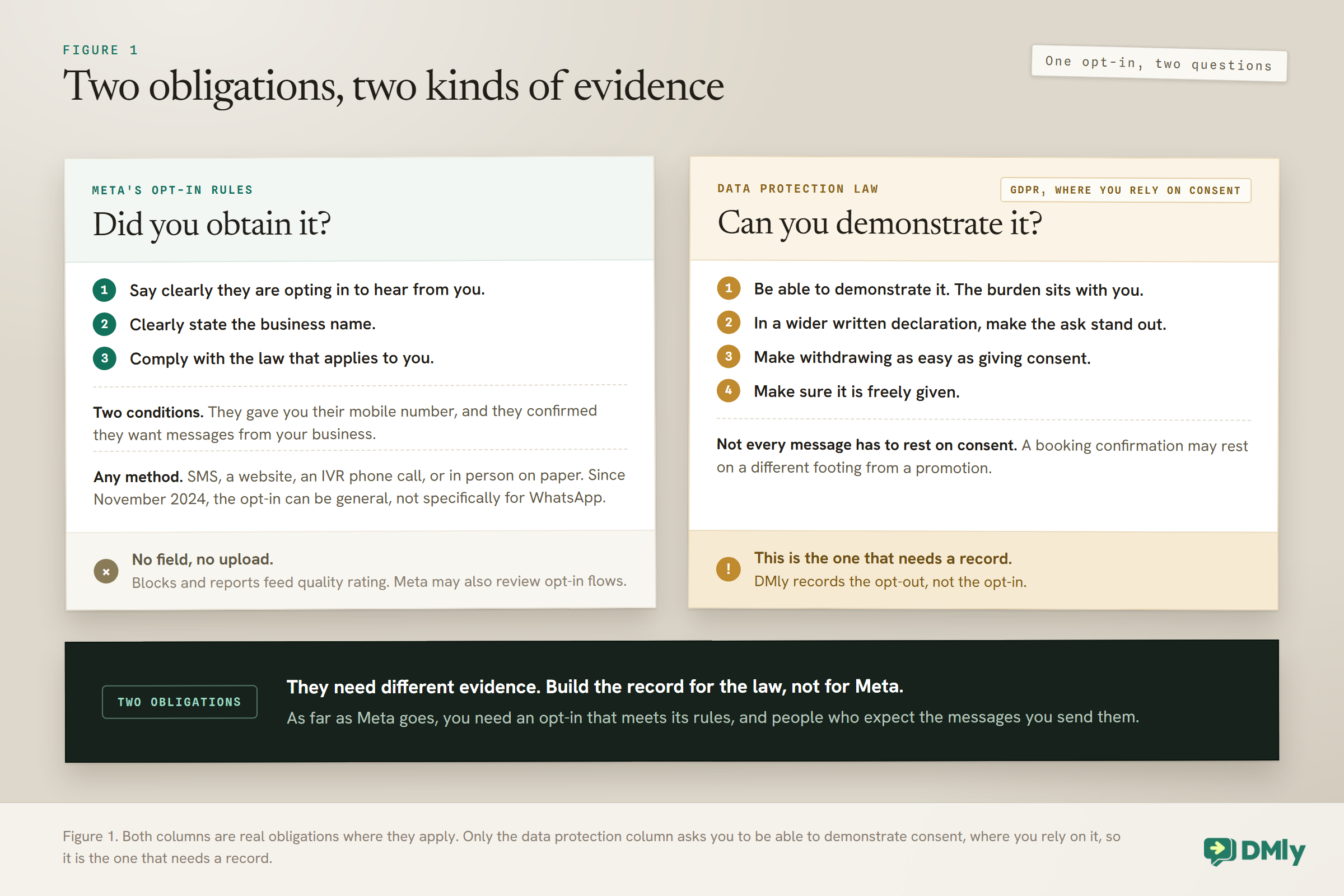
These are two separate obligations, and they need different evidence: Meta requires you to obtain opt-in. Where you rely on consent, a law like the GDPR, if it applies to you, requires you to be able to demonstrate that you obtained it. Those are different jobs with different evidence, and Meta gives you nowhere to put the second one: there is no field to submit consent to and no upload. Build the record for the law, not for Meta, because the law is what asks you to demonstrate it.
What Meta Actually Requires From a WhatsApp Opt-In
Meta’s rule is short, and the part that lets an opt-in be general dates from the November 2024 policy update. It is worth reading rather than guessing at.
Meta’s documentation says businesses are required to obtain opt-in before messaging people on WhatsApp, and that the opt-in can be general and not specifically for WhatsApp, as long as the business complies with all local laws. A business may contact somebody on WhatsApp if two things are true: they have given their mobile phone number, and the business has received opt-in permission confirming they wish to receive subsequent messages or calls from that particular business.
Three requirements sit under that:
- State clearly that the person is opting in to receive communication from the business.
- State clearly the name of the business they are opting in to hear from.
- Comply with applicable law. Which law applies depends on where your business is and who it serves.
The method is left entirely to you. Meta’s own list of supported examples is SMS, a website, a phone call using an interactive voice response flow, and in person or on paper, where a customer signs a physical document. A signed piece of paper in a drawer can be a policy-compliant opt-in, as long as it meets those three requirements.
There is nothing to file with Meta: What Meta’s opt-in page describes is feedback from your customers: people can block or report a business, and Meta’s systems rate limit a business whose quality is low for a sustained period. Meta’s Help Centre adds that your number’s quality rating is determined by customer feedback, such as the reason people blocked you, and the opt-in page says businesses should monitor quality rating, especially when rolling out a new opt-in method. Meta’s Business Messaging Policy also says Meta may review a business’s opt-in flows, including user feedback, to flag policy violations, and may limit or remove your access if you break its policies. So, as far as Meta goes, you need an opt-in that meets its rules, and people who expect the messages you send them.
What the Law Separately Requires, and Why It Is a Different Job
Where a law like the GDPR applies to your business and you rely on consent, the standard is not “we got consent” but “we can show, for this individual, that we got it”. That is a records problem, not a policy problem.
Nothing here is legal advice, and you should take proper advice for your own situation. But the structure is worth understanding, because it tells you what to keep. Under the EU’s GDPR, Article 7 says four things:
- You have to be able to demonstrate it. The wording is that where processing is based on consent, the controller “shall be able to demonstrate that the data subject has consented”. The burden sits with you, not the customer.
- The ask has to stand out. If consent is asked for in a written declaration that also covers other matters, the request must be presented in a way that is “clearly distinguishable from the other matters”, in plain language.
- Leaving has to be as easy as joining. “It shall be as easy to withdraw as to give consent.” If people opt in by tapping a button, they should not have to email you to get out.
- It has to be freely given. When judging whether consent is freely given, utmost account is taken of, among other things, whether a service is made conditional on consent to processing that the service does not need.
One nuance worth knowing: not every message you send has to rest on consent. A booking confirmation you send because somebody booked, or a receipt for something they paid for, may rest on a different footing from a promotional broadcast. That is precisely the sort of distinction to check with an adviser rather than to guess at, and it is why the practical advice below is to record what somebody agreed to rather than just that they agreed.
Six Ways In, and What Each One Proves About a WhatsApp Opt-In
Not every WhatsApp opt-in method leaves the same evidence behind.
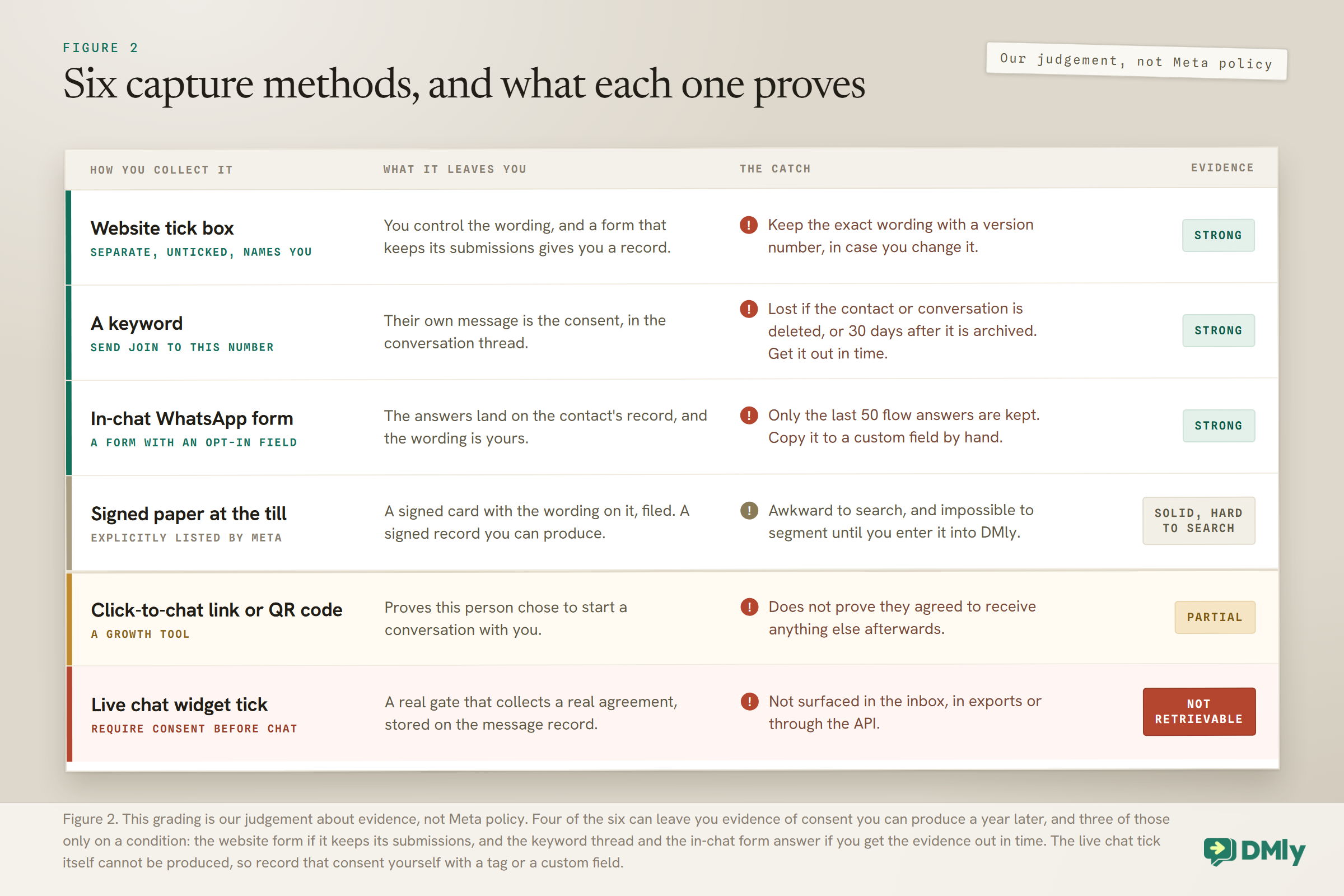
1. A click-to-chat link or QR code. Somebody scans a code on your window or taps a link in your bio, and a WhatsApp chat opens with a message prefilled. In DMly these are growth tools, and when somebody’s first ever message to your WhatsApp number comes through one, DMly stamps the tool’s name on their contact as the source, so if each poster or post has its own tool, you know which one brought them in. What it proves: that this person chose to start a conversation with you. What it does not prove: that they agreed to receive anything else afterwards. Somebody asking your opening hours has not consented to a Christmas offer. Our guide to click-to-chat links covers the mechanics.
2. A tick box on your website form. A separate, unticked box beside a phone field, with wording that names you and says what you will send. This can be one of the strongest everyday methods, because you control the wording and, if your form keeps its submissions, you have a record of each one. Keep the exact wording you used, with a version number, because if you change it you will need to know which version somebody agreed to.
3. A WhatsApp form, inside the chat. Meta’s in-chat forms, WhatsApp Flows, can be built in DMly under Forms in the WhatsApp settings, and the form editor there offers an Opt-in field type alongside text, email, phone, number, paragraph, dropdown, choice and date. The ready-made Register starting point already carries name, email, phone and a consent opt-in. The contact taps a button, a form opens over the chat, and the answers land on their record. It is quick for the contact, because they never leave WhatsApp, and the wording is yours.
4. A keyword. “Send JOIN to this number for our weekly offers.” The person’s own message is the consent, sitting in the conversation thread, while the wording they saw is on whatever you printed the keyword on. It is unusually good evidence for how simple it is, and the keyword can be printed on a poster or on packaging.
5. At the till, on paper. Meta explicitly lists this. A signed card with the wording on it, filed. Awkward to search and impossible to segment until you enter it into DMly, but policy compliant when it meets the three requirements above, and a signed record you can produce.
6. A live chat widget on your site. DMly’s widget has a Require consent before chat gate with your own consent text. It is a real gate and it collects a real agreement to your consent text. To use it for WhatsApp, turn on Require phone before chat as well, because Meta’s conditions include the person giving you their mobile number. There is a catch, covered in the next section, and it is important.
The Honest Gap: DMly Records the Opt-Out, Not the WhatsApp Opt-In
DMly’s own documentation states it plainly, and it is worth repeating rather than softening: there is no consent record, DMly records that someone opted out and when, it does not record how or when they opted in, and if you need proof of consent you should keep it in a custom field or a note.
In short, DMly keeps a dated record of the opt-out for you, and a record of how and when somebody opted in is yours to keep.
Three more gaps sit right beside it:
The live chat consent tick is stored but cannot be produced. A ticked consent box on DMly’s widget is written onto the message record, and it is not surfaced in the inbox, in exports, or through the API. So the gate works and the evidence is unreachable. If you rely on that widget for consent, record the fact somewhere you can retrieve it, for example with an Add a tag action in a flow on the Live Chat channel or a custom field filled in by hand, or you have a gate with no receipt. A record made on the Live Chat contact stays on that contact, which DMly keeps separate from the same person’s WhatsApp contact, even when the phone number they typed matches, until you merge the two.
Flow answers are not an archive. Answers a contact gives in a flow appear in their own Flow answers section on the contact page, with the question, the answer and the date, which sounds exactly like what you want. For a WhatsApp form, though, each answer is labelled with the field’s internal name rather than the label you wrote, so a field you added yourself shows up as something like field_2. Only the last 50 are kept. Where a User Input step asks the question, save the answer straight to a custom field. Copy anything from a WhatsApp form answer into a custom field by hand, before it drops out of the last 50.
Booking forms cannot ask your question. Booking form questions come from a fixed list. You can turn each one on or off and change its label, but you cannot add your own, so you cannot add a consent checkbox of your own to a DMly booking form. If people join your list by booking, the consent has to be collected somewhere else in the journey.
The Workaround That Works: Four Custom Fields
If the platform will not keep a WhatsApp opt-in record for you, make one, and make it out of an object that is segmentable, exportable and readable back into a message. That object is a custom field. It lives on the contact, though, so it goes if the contact is deleted, including when a contact’s only conversation is archived and then deleted 30 days later. Keep a copy of the contacts export, which carries the fields, somewhere outside DMly.
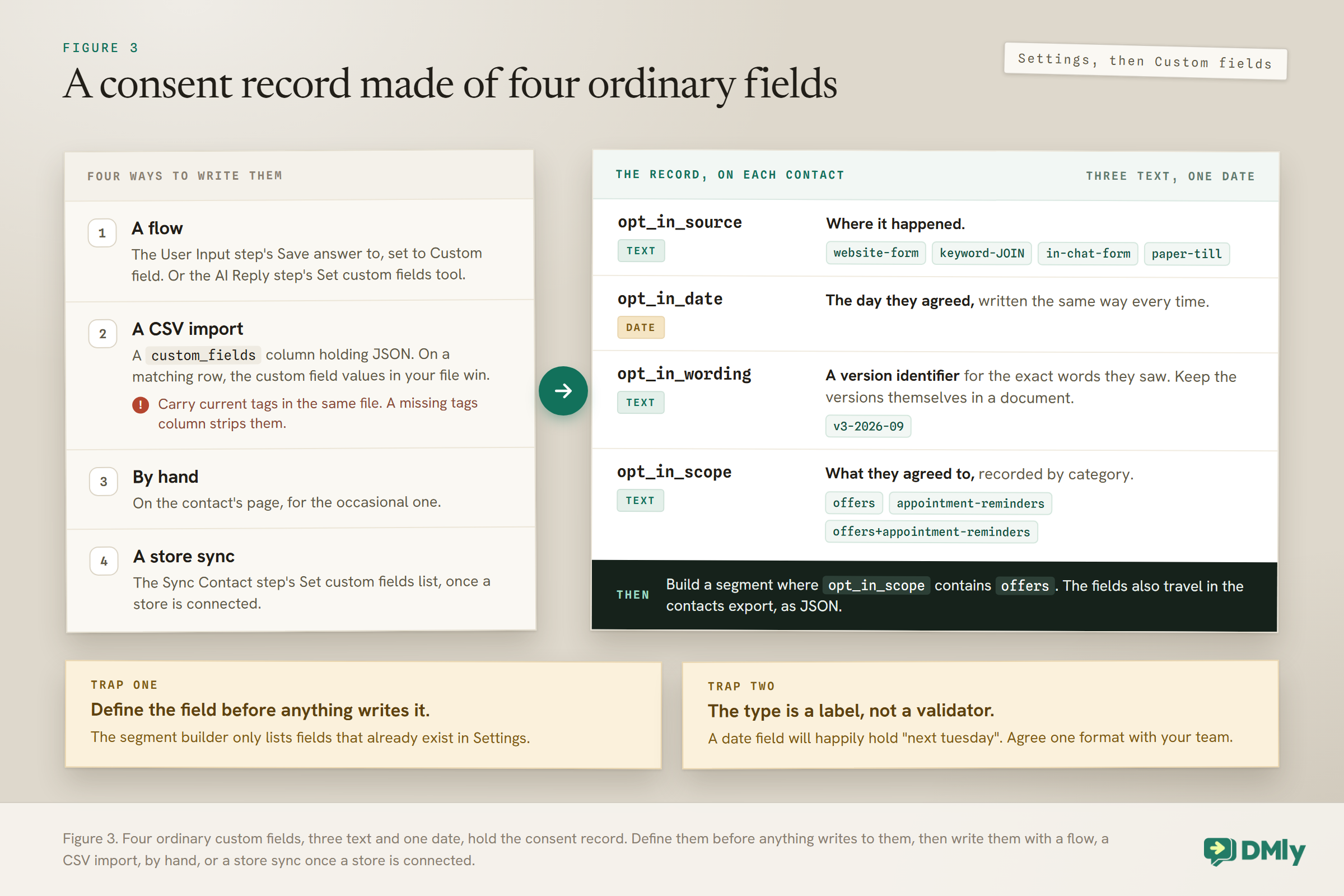
Define four of them, under Settings and then Custom fields, before you collect anything:
opt_in_source, type text. Where it happened:website-form,keyword-JOIN,in-chat-form,paper-till.opt_in_date, type date. The day they agreed, written the same way every time.opt_in_wording, type text. A version identifier for the exact words they saw, such asv3-2026-09. Keep the versions themselves in a document.opt_in_scope, type text. What they agreed to:offers,appointment-reminders, oroffers+appointment-reminderswhen they agreed to both, so the combined value still contains each scope’s name. This is the field that records separate consent by category, one of the two approaches Meta suggests.
Four ways to write them, all verified:
- A flow. The User Input step has a Save answer to dropdown with a Custom field option; pick it and type the field name. The AI Reply step has a Set custom fields tool that can be switched on.
- A CSV import. The contacts importer has a
custom_fieldscolumn that takes a JSON object, such as{"opt_in_source":"paper-till"}. On a row that matches an existing contact by phone or email, custom fields merge key by key and the values in your file win, which is exactly what you want when you are backfilling a year of paper consent. Carry each contact’s current tags in the same file, though, because the importer replaces tags rather than adding to them, and a missing tags column strips every tag from every contact it matches. - By hand, on the contact’s page, for the occasional one.
- A store sync, once a store is connected: the Sync Contact step carries a Set custom fields list.
Two traps that will quietly waste the whole exercise: Define the field before anything writes it. The segment builder only lists fields that exist under Settings and then Custom fields. A value sitting on a contact under a name that is not on that list can never be picked in a segment, so no audience will ever match it. That covers a typo, and it covers a flow node saving to a name you never defined.
The type is a label, not a validator. Nothing checks what gets typed against the type you chose: a date field will happily hold “next tuesday”. Agree one format with your team and write it the same way every time, or your consent audit becomes a spelling exercise.
Turning the Record Into an Audience: Segments, Not Filters
Once the fields exist, the point of them is that you can build an audience out of consent rather than out of everybody you happen to have a number for.
Custom fields are not filterable on the spot. Neither the contacts list nor the broadcast wizard has a custom-field box. You save the rule as a segment first, and then select that segment. In the segment editor, open the Conditions panel, add a group, add a condition, and pick Custom field from the Contact section. The comparisons on offer include is, is not, contains, has any value and is empty.
Two rules to start from:
- For a marketing audience: a condition where
opt_in_scopecontainsoffers, which also catchesoffers+appointment-reminders. Not “has any value”, because somebody who consented only to appointment reminders should not be in it. - For a belt-and-braces exclusion: in the basic filters, add Unsubscribe to Exclude contacts with tags. That drops opted-out people by tag as well as by timestamp. It is redundant, because suppression is enforced at send time anyway, and it costs nothing.
One caveat on that second rule, straight from the documentation: Telegram opt-outs record the date but never attach the tag, so treat the tag exclusion as the second belt rather than the thing doing the work. And when you come to send, our guide to broadcast best practices covers what a consented audience should actually receive.
The Opt-Out Side, Which Is Already Wired, and the Trap Inside It
You do not have to build opt-out. It is already enforced on broadcasts, sequences, automations and booking reminders. What you do have to do is understand its edges, because two of them are easy to get wrong.
A contact opts out by sending one of a small set of words as their whole message: stop, stopall, stop all, unsubscribe, cancel, quit, end, opt out, optout. The match is exact, so “cancel my appointment tomorrow” opts nobody out. But somebody replying with just cancel, meaning their booking rather than your marketing, is opted out immediately. If you run appointment reminders, that alone is worth briefing your team on. The signs on your side include a system message in that conversation, an Unsubscribed state on the contact, their row on the Suppressions list and, on every channel except Telegram, the Unsubscribe tag.
The opt-out lives on the contact rather than on one channel, so a stop sent on WhatsApp also stops automated messages to that contact on Instagram, Telegram and SMS. DMly does not join those channels up by itself, though: the same person messaging you on two channels arrives as two contacts until you merge them, and the merged contact keeps the opt-out. Telegram is the exception on the keyword list: it recognises only /stop, stop, unsubscribe and cancel.
Then the trap. Opting out stops automated messages. It does not stop a person typing in the inbox. The composer stays open, the send goes through, and the contact receives it. That is a deliberate design choice, because somebody who unsubscribed from your offers may still be mid-conversation about an order, and it means the discipline has to come from your team rather than from the software. Meta’s policy says you must respect a person’s request to block, discontinue or opt out of your WhatsApp communications, including removing that person from your contacts list. Opting somebody out on its own still leaves your team able to message them by hand, so if somebody has asked you to stop, block the contact as well: blocking disables the composer, and it is reversible. If the same person is also a separate contact on another channel, block that one too, or merge the two first, because a merged contact keeps the block.
Everything suppressed shows up under Contacts and then Suppressions, filterable by Blocked or Unsubscribed, with an Unblock button on one axis and a Resubscribe button on the other. They are separate switches, so a contact who is both needs both.
Three Records That Will Not Save You on Their Own
Worth knowing before you rely on any of them at the moment somebody asks a hard question.
The contacts CSV export. It has seven columns: name, country code, phone, tags, pipeline stage, notes and custom fields. It is a round-trip file for the importer, and it leaves out the email address, the lifecycle stage, the source, the status, the opt-out date, the birthday, the language, the timezone, the channel identities and the entire message history. Do not hand it to somebody as a complete answer to “send me everything you have on me”. What is useful about it here is that your four consent fields do travel in it, as JSON.
The flow answers list. Last 50 only, as covered above.
The conversation thread. Better than nothing, but it can go: deleting the contact takes it, deleting the conversation takes it, and an archived conversation is deleted for good 30 days after it was archived. Deleting a contact in DMly is a hard delete with no soft delete, no undo and no trash, and it takes the entire message history with it. If a thread is your consent evidence, get it out before any of that happens.
Setting It Up
Seven steps, in order.
- Write the wording once, and give it a version number. One or two sentences naming your business, saying what you will send and how often, and how to stop. That wording is what somebody agrees to when they give you their WhatsApp opt-in. Keep the file. Every version of it.
- Define the four custom fields under Settings and then Custom fields, before anything writes to them.
- Put the wording where people sign up. Prefer the website form or the in-chat form to the QR code, which on its own proves only that a conversation started.
- Wire the write. A User Input step can ask the contact to reply with the word for what they want, such as
offers, and save that reply straight toopt_in_scope. Check the values afterwards, because nothing checks them. On the keyword route, an Add a tag action in the flow marks who joined. Whatever the route, including a website form, fill in whichever of the source, scope, date and wording version nothing else wrote, by CSV import or by hand. Answers from an in-chat WhatsApp form land in Flow answers instead, so copy them into the custom fields by hand from the contact’s page. - Backfill what you already have through the CSV importer, honestly. If a batch of contacts came from a paper form in March, record that. If a batch came from nowhere you can name, leave their scope empty, so your consented segment leaves them out until they confirm and you record it.
- Build the consented segment and use it as your broadcast audience, with Unsubscribe in the tag exclusions.
- Brief the team on the two facts that are easy to get wrong: a bare “cancel” opts somebody out, and opting out does not stop a human reply.
If you are building a list from scratch rather than tidying one up, our guide to WhatsApp lead generation covers the capture side, and adding a live chat widget covers the website route.
Frequently Asked Questions
What is a WhatsApp opt-in?
It is permission from a person to receive messages from your business. Meta requires it before you message anybody, and its opt-in guidance says the permission can be general rather than WhatsApp specific, as long as you comply with local law. You may then contact somebody when two things are true: they gave you their mobile number, and they confirmed they wish to receive subsequent messages or calls from your business.
Does the opt-in have to mention WhatsApp specifically?
No. Meta’s opt-in guidance says that, since its November 2024 policy update, it can be general and not specifically for WhatsApp, provided you comply with local law. What it must do is name your business and make clear the person is opting in to receive communication from you.
Do I have to submit my opt-ins to Meta?
No, and there is nowhere to submit them. Meta has no field or upload for consent records. Customer blocks and reports feed your number’s quality rating, and Meta’s policy also says it may review a business’s opt-in flows, including user feedback, to flag policy violations. Any duty to prove consent comes from the law that applies to you, such as data protection or anti-spam law where you rely on consent, not from Meta.
Does my platform store when somebody opted in?
In DMly, no, and its documentation says so directly: it records that someone opted out and when, and does not record how or when they opted in, recommending a custom field or a note instead. If you use another tool, check whether it records how and when somebody opted in.
Is somebody messaging me first the same as consent?
Meta’s policy for the WhatsApp Business Platform lets you reply without a template within 24 hours of their last message, but neither that policy nor Meta’s opt-in page says that messaging you first counts as opt-in. It is not consent to a promotional broadcast three weeks later. Treat a click-to-chat contact as a lead, and ask for the marketing opt-in separately.
Can I add a consent tick box to a DMly booking form?
No. Booking form questions come from a fixed list, and you can turn each one on or off and relabel it but not add your own. Collect the consent somewhere else in the journey, for example with a tick box on your own website form, or with an in-chat form while they are messaging you.
What happens if a customer replies “cancel” meaning their appointment?
They are opted out of every automated message immediately, because the opt-out keyword match is on the whole message and “cancel” is on the list. Their running flows are cancelled and their sequences stop. You can clear it with Resubscribe on the Suppressions list. DMly’s advice is to do that only when you have a record of them asking.
Does opting somebody out stop my team messaging them?
No. It stops broadcasts, sequences, automations and booking reminders. The inbox composer stays open and a manual reply sends normally. Meta’s policy says you must respect a person’s request to block, discontinue or opt out of your WhatsApp communications, including removing that person from your contacts list. Because an opt-out does not close the composer, if somebody has asked you to stop messaging them, block the contact as well, which disables the composer and is reversible, and check they are not also a separate contact on another channel.
How long should I keep an opt-in record?
That is a question for your own adviser, since retention periods depend on your jurisdiction and what the data is for. What is worth knowing is that DMly has no retention schedule you can set, so whatever period you settle on is one you will have to enforce yourself. A few things do clear on their own, though: an archived conversation, for example, is deleted 30 days after you archive it, and takes the contact with it if that was their only conversation.
Do I need separate consent for reminders and for offers?
Meta lists it as one way to set expectations, alongside a single opt-in that covers every category you will send, and says separate opt-in reduces the risk of people blocking you. Whether it is legally required for you depends on your jurisdiction and on what each message is for, since a confirmation you send because somebody booked may rest on different ground from a promotion. That is why the field structure above records the scope and not just the fact.
How do I make my existing list defensible?
Backfill honestly, then re-permission the part you cannot account for. Record the real source for every batch you can trace. For anybody you cannot, ask them to confirm the next time they message you, and until then treat them as a list you do not have. It is a smaller list and it is a list you can defend.
Writing about WhatsApp automation, bookings and growth for local business.
Turn WhatsApp into your busiest channel.
Start free and run message, bookings, payments and reviews in one place.
