
WhatsApp Automation for Tutors: Enrolment, Lesson Reminders, and Parent Updates (2026)
Most local businesses have customers. A tutoring business has terms.
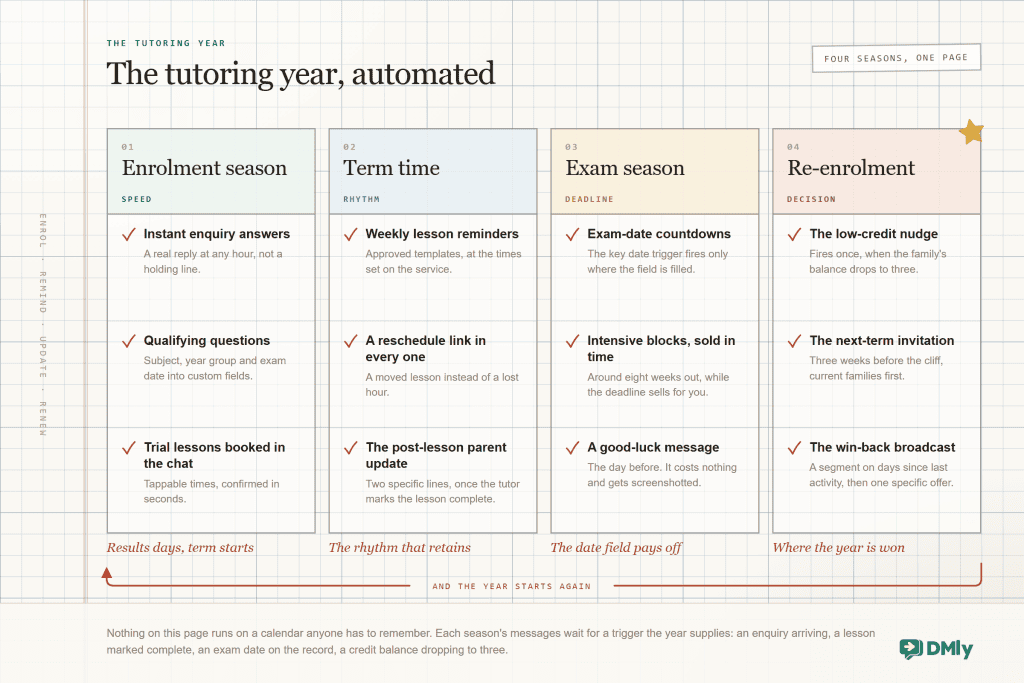
Everything about your work runs on the academic calendar: enquiries surge when results land and terms begin, lessons repeat weekly until they abruptly stop, exams put a countdown behind every decision, and revenue falls off a cliff at the end of every term unless something makes re-enrolment happen. Generic business advice keeps missing this, which is why so much tutoring software feels like salon software with the nouns changed.
WhatsApp automation for tutors earns its keep precisely because it can follow that calendar: the enquiry answered at once during enrolment season, the lesson reminders and parent updates that hold a family through term time, the exam-date countdown, and the re-enrolment nudge that fires three weeks before the cliff instead of after it. This guide builds your full year in DMly, season by season, with the product details verified and the traps flagged, because tutoring builds fail on one unmarked checkbox more often than on any grand strategy.
What WhatsApp Automation for Tutors Actually Does
WhatsApp automation for a tutoring business is the set of parent-facing messages and bookings that run on their own: enquiry replies, trial lesson booking, lesson reminders, post-lesson parent updates, term fee collection and re-enrolment invitations, delivered on the WhatsApp number families already use, through a platform like DMly.
One structural fact shapes every decision you make, and it is unique to tutoring: the person who pays is not the person who attends. The parent holds the phone, books the lessons, receives every message and decides whether tuition continues. The student sits the lesson and reports back “fine”. So the parent is the contact in DMly, and the student lives as detail on the parent’s record, in custom fields for name, year group, subject and exam date. Get the greeting right accordingly: the parent’s name opens the message, the student’s name lives in the content. “Hi Nkechi, a reminder that Aisha’s maths lesson is tomorrow at 4” signals you know the family; “Hi Aisha” sent to her mother signals a mail merge.
Messaging students directly is a policy decision, not a default. Adult learners are their own contact and that is simple, while messaging a minor’s own number is governed by rules that vary by country and by your own safeguarding standards. Decide it deliberately, write it down, and keep the parent on the record either way.
Enrolment Season: Turning WhatsApp Enquiries Into Booked Students
A tutoring enquiry has a distinctive shape: anxious, specific, and comparative. “Do you do GCSE chemistry?” arrives the same evening it is being sent to two other tutors, usually shortly after a mock result, and the first genuinely useful reply frames the whole comparison. That is the entire argument for automating the front of your funnel: speed you cannot staff for.
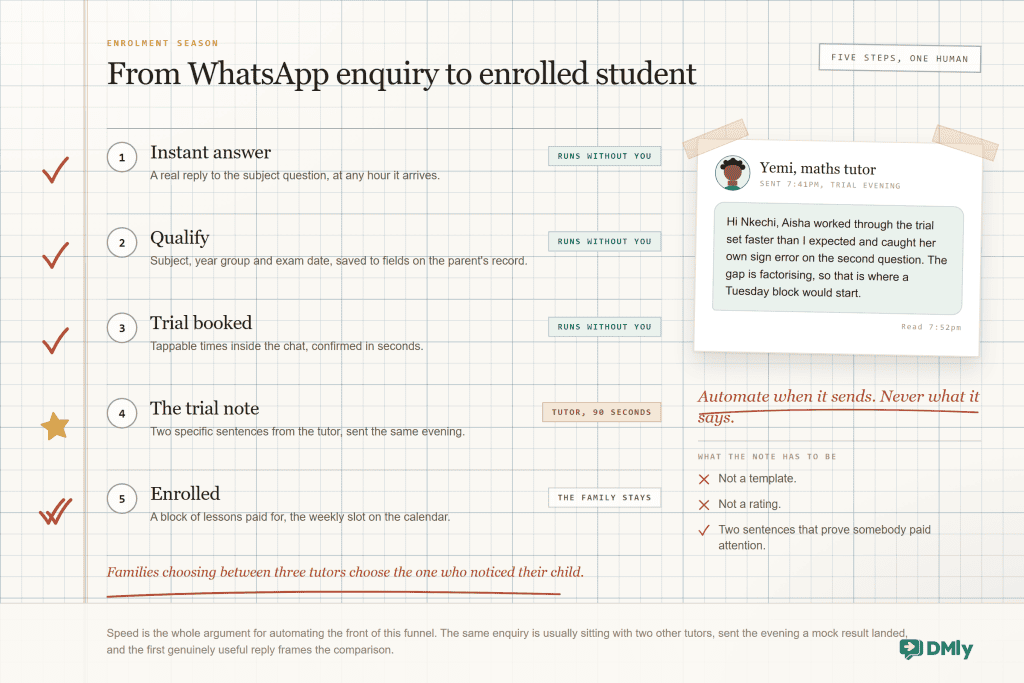
The build is one flow. A message trigger answers the subject question with substance rather than a holding line; an Ask Question step or two captures the subject, year group and exam date into custom fields (that exam date matters enormously later, so capture it now); and a Book Meeting step offers the trial lesson as tappable times inside the conversation, so booking happens before the comparison shopping resumes. Make the trial its own service with its own length and price, and give each tutor real working hours in their own timezone, which is what keeps a 4pm Lagos slot from being offered as 4pm to a family in Manchester.
Then comes the one step no automation should touch. After the trial, the tutor sends two specific sentences about the student. Not a template, not a rating, two sentences that prove somebody paid attention. Families choosing between three tutors choose the one who noticed their child. Automate its delivery and its timing if you like; never its content.
What not to automate in enrolment: behind “do you do chemistry?” there is often a parent watching a confident child stop being confident. Automate the facts: subjects, availability, price, how trials work. The moment a message carries worry rather than a question, a Handover to Human step should put a person in the conversation, and if you run an AI reply for the factual long tail, instruct it explicitly never to reassure anyone about a specific child’s progress or chances. That is a promise only a human should make.
Term Time: Lesson Reminders and Reschedules That Protect the Slot
Once a family enrols, your automation’s job flips from selling to protecting the slot. Tutoring becomes a weekly repeating commitment. Recurring lessons go on the calendar as a repeating series, a term of Tuesdays created in one action, and lesson reminders run from the reminder times on the service, delivered as approved WhatsApp templates so they reach parents whose chat window has closed.
Two documented behaviours keep the reminder system predictable. Reminders skip rather than retry: an unconfirmed booking or an opted-out parent gets no reminder and no error, so when someone insists they were never reminded, the booking status and opt-out state hold the answer. And the reminder should always carry the reschedule link, because a parent whose child has a fever at 3pm for a 4pm lesson will message you regardless. The link turns that message into a moved lesson instead of a lost hour, and your cancellation deadline in the booking policy decides how late self-service stays open before it becomes a conversation.
If you run group classes alongside one-to-one lessons, a revision group or a Saturday club, one trigger detail will bite exactly once, so here it is in advance: a group class seat fires the Class booked trigger, not Appointment booked. A confirmation flow built for private lessons will test perfectly and then silently ignore every group enrolment. Build your group messaging on the class triggers, or branch by type.
Online lessons: the Zoom link that sends itself
Online tutoring adds one logistical message to every single lesson, the meeting link, and it is exactly the kind of repetitive send that belongs to the machine. With Zoom connected, a session can carry an automatic meeting link, available to your confirmations and reminders as a variable, so the parent’s day-before reminder arrives with the join link already inside and nobody hunts through last week’s thread at 3:58pm. The default is one shared link per session, which suits group revision classes as well as one-to-ones; per-attendee links exist through Zoom Webinar, but need the paid add-on and an email address on the contact. The failure behaviour is the right way round: if a link cannot be minted, the booking still succeeds, so a technical hiccup costs you a link to re-send rather than a lesson.
Parent Updates: The Message That Renews Families
Parent updates are the retention engine of a tutoring business, and this is the section the whole guide bends toward. Progress in a subject is invisible from the kitchen table, tuition is the softest line in a stretched family budget, and the family that hears nothing between invoices eventually decides on price. The fix costs ninety seconds a lesson: a short, specific note to the parent after each session, automated in delivery, human in content.
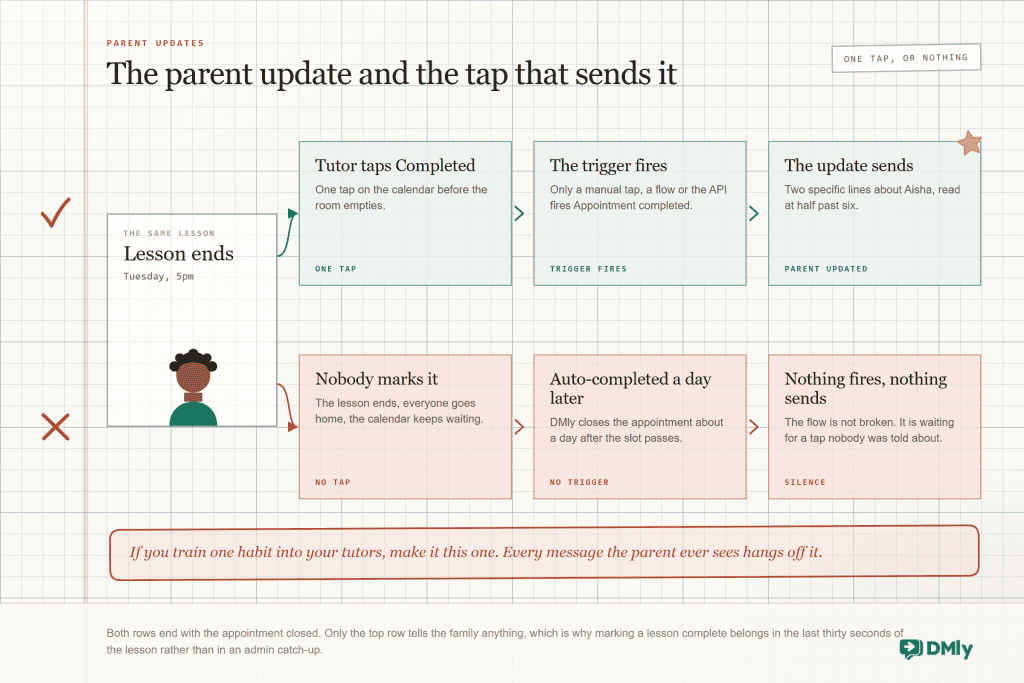
The product fact this whole section stands on: DMly auto-completes an appointment roughly a day after the slot passes, but automatic completion does not fire the Appointment completed trigger. Only marking it complete manually, from a flow, or through the API does. A parent-update automation built on that trigger sends nothing at all until marking lessons complete becomes an end-of-lesson habit. The automation is not broken; it is waiting for a tap nobody was told about.
Content beats cadence, and a modest cadence survives. After every lesson: two lines, one thing covered, one thing to practise. Every few weeks: a slightly longer progress note, timed for just before the point where a parent starts wondering about value. Before an exam: what the remaining sessions will focus on, which is the message that renews families because it makes the plan visible. Never: a message that exists to look busy. Parents can tell, and the first ignored update trains them to ignore the rest.
If your tutors also drop one line into the contact’s notes each week, the record compounds: your end-of-term report assembles itself from eleven weeks of specifics, and any colleague covering a lesson opens the family and starts warm instead of cold.
Course Payments on WhatsApp: Blocks, Termly Fees and Auto-Charge
Tutoring money arrives in three shapes, and DMly models each one differently. Choosing deliberately here prevents the single most common billing argument in the industry, which is always, always about credit expiry.
| How you sell | The DMly mechanic | What to know |
| Pay per lesson | Pay after the appointment on the service, or an invoice per lesson | Lowest commitment, highest admin, nothing holding next week in place. Fine for adult learners; weak for exam courses. |
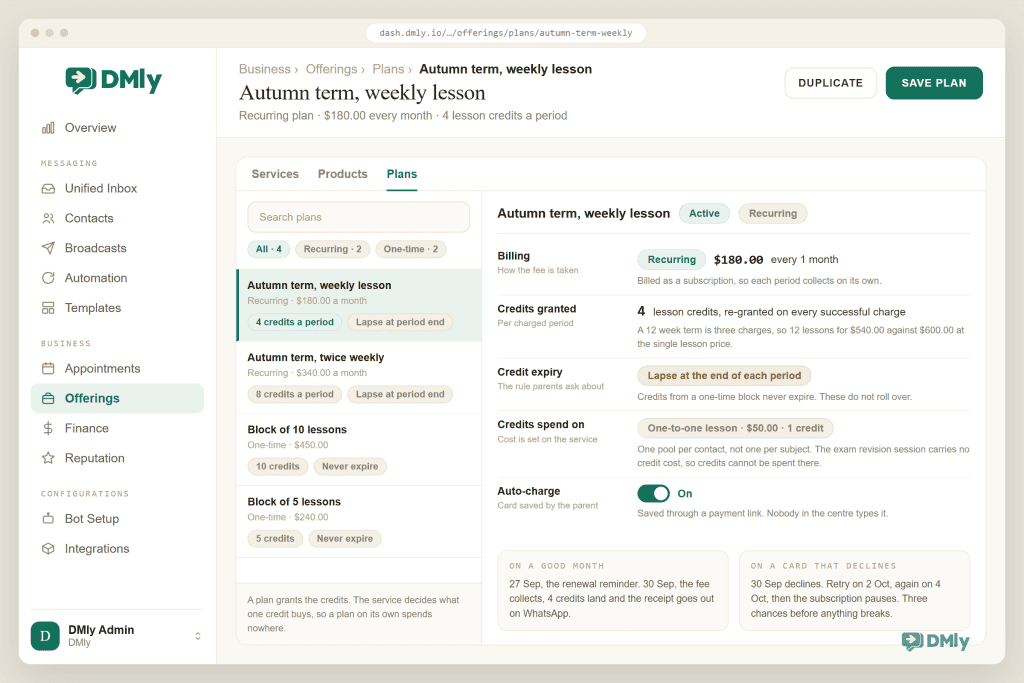
| A block of lessons | A one-time Plan granting credits, with a Credit cost on the lesson service | Credits from a one-time pack never expire, so a family can stretch ten lessons across a difficult patch. Flexible and forgiving. |
| Termly or monthly fees | A recurring Plan billed as a Subscription with auto-charge | Credits re-grant each charged period and lapse when the period ends, which keeps families booking. The strongest structure for a centre. |
Auto-charge is what removes the monthly chase. The parent saves a card once through a link, and each period the fee collects, the term rolls, credits re-grant and the receipt lands on WhatsApp, with a renewal reminder three days ahead as standard. Failed charges get told, retried two days later and once more after that, then the subscription pauses, so a card that expired over the holidays gets three chances before anything actually breaks. Add one warm message on the failed-payment trigger and most of those families never notice there was a problem.
Two credit rules belong in your welcome message rather than in a dispute: credits are one pool per family, not divided by subject, so only give a credit cost to services any credit should buy; and cancelling a lesson does not return the credit, which is a defensible policy that parents accept when told up front and resent when they discover it. Say both once, in writing, on day one.
Exam Season: The Countdown the Date Field Bought You
Remember the exam date you captured during enrolment? This is where it becomes the most valuable field in your CRM. A date on the record turns into a countdown you can automate against with the key-date trigger, which fires when a contact’s date arrives, and only for contacts whose field is filled in.
Three messages hang off it, each earning its timing. Around eight weeks out, the intensive offer: revision blocks sell to exam-date families at rates a September broadcast never touches, because the deadline is now doing your marketing. In the final weeks, the plan message: what the remaining sessions focus on, which reassures the parent writing the last cheques of the course. And the day before, a good-luck message to the family, which costs you nothing, gets screenshotted, and is remembered at referral time in a way no discount ever is.
Set the trigger’s timing by creating the field as “exam countdown” dates offset to when you want each message, or run one key-date flow with delays. Either way, the discipline that powers the season is the same one from enrolment: no date in the field, no countdown. Audit the field once a term.
Re-Enrolment: Beating the Term-End Cliff
Tutoring churn is seasonal, predictable, and mostly a failure to ask early enough. Terms end, exams finish, and a family that attended for eleven straight weeks simply stops, not from dissatisfaction but from the absence of a decision. The fix is to make that decision happen while lessons are still running, three to four weeks before the end, and the machinery is already in place:
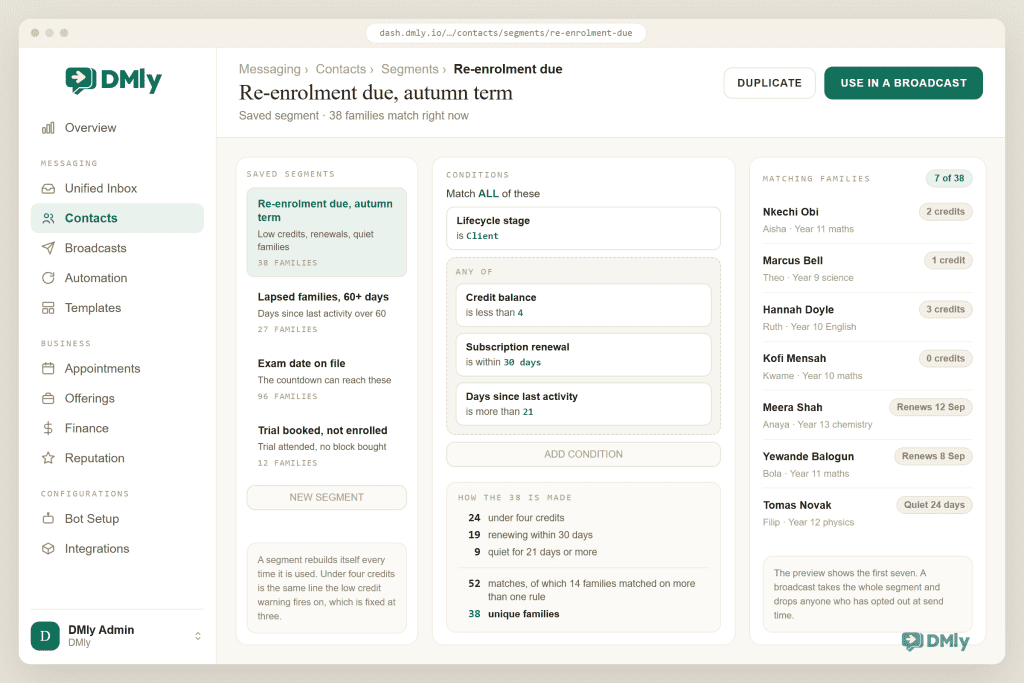
- The low-credit nudge. The credit warning fires once when a family’s balance drops to three, which for a lesson block is the perfect re-enrolment moment: the habit is proven, your updates have been landing for weeks, and the next block is one message away. Attach the plan to the message so payment happens in the chat.
- The next-term invitation. A segment of subscription families renewing within the month, plus block families under four credits, gets the “September slots open Monday, current families first” message. Priority access is honest scarcity, and it re-enrols better than any discount.
- The win-back. A saved segment on days since last activity finds the families who slipped through, and a broadcast to opted-in parents with an approved template reaches them. Specific beats sentimental: “Year 11 maths slots for September” outperforms “we miss Aisha” because it contains a decision and a deadline.
Running a Centre: Notes for More Than One Tutor
Everything above works for a solo tutor with a phone; a centre adds one requirement, which is that the family experiences one business even though six people teach in it. The shared inbox carries that: every family’s thread in one place, assigned visibly to whoever owns the relationship, so questions get answered once, by the right person, with the family’s bookings, balance and notes beside the chat. The weekly note habit is what makes cover lessons survive: the substitute opens the record and already knows the child struggles with balancing equations.
One planning choice to make before you scale: DMly’s Google Calendar works at two levels. The workspace calendar blocks every staff member, so keep it for centre-wide closures, and each tutor can connect their own Google calendar on Appointments, Staff, which closes only their slots and receives their bookings. A tutor’s own calendar wins, and the workspace calendar is the fallback for anyone without one. Tutors who keep no Google diary can manage availability through their working hours and time off inside DMly, and the booking page stays truthful either way.
Permissions round out the centre setup. Team members work to their roles, so an administrator can raise invoices and manage subscriptions while tutors handle lessons and notes, and money-sensitive actions like refunds stay admin-gated. The practical effect is that a centre of eight runs on one workspace without everyone being able to touch everything, which matters the first time a well-meaning tutor almost refunds a term.
Measure WhatsApp automation for tutors the way you run the year, seasonally. Three numbers at each term end tell the story: enquiry-to-trial conversion from enrolment season, the share of lessons with a parent update sent (which is really the completion-tap habit wearing a metric), and the re-enrolment rate among families who hit the low-credit nudge. A centre that watches those three knows in week ten what its September will look like.
How to Set Up WhatsApp Automation for Tutors
- Connect the number, build the services, add the tutors. Trial lesson as its own service, real durations, and each tutor’s genuine hours and timezone.
- Build the enrolment flow. Instant answer, qualifying questions into custom fields including the exam date, trial booking with tappable times, and the handover for anything that carries worry.
- Confirm templates, set lesson reminders, add the reschedule link. Then set the cancellation deadline your terms actually claim.
- Launch the parent update, and train the tap. The flow takes twenty minutes; the habit briefing is the part that decides everything. Marking the lesson complete becomes how a lesson ends.
- Choose the billing shape and switch on auto-charge. Blocks for flexibility, termly plans for predictability, both with the two credit rules stated in your welcome message.
- Arm the season triggers. The low-credit nudge, the key-date exam countdown, and the re-enrolment segment, all of which then wait quietly for their moments.
Common Problems With WhatsApp Automation for Tutors
| Symptom | Cause | Fix |
| Parent updates go out for lessons that never happened | Unmarked lessons auto-close as completed about a day later, which fires Appointment completed on the default setting | Set Appointments nobody marked to Wait for review, and train the end-of-lesson tap. |
| Group class families get no messages | Flows built on Appointment booked; class seats fire Class booked | Rebuild group messaging on the class triggers. |
| Messages greet the student, not the payer | The student field used in the greeting | Parent’s name in the greeting, student’s name in the content. |
| Chemistry credits spent on maths | Credits are one pool per family, not per subject | Only give a credit cost to services any credit may buy, or watch balances. |
| “Our lessons disappeared” | Recurring-plan credits lapse at period end, unlike pack credits | Correct behaviour; state it at sign-up, and sell packs to families needing flexibility. |
| Argument over a cancelled lesson’s credit | Cancellation never refunds a credit and nobody said so | Put it in the welcome message; refund manually as goodwill when deserved. |
| A reminder never arrived | Unconfirmed booking or opted-out parent; reminders skip, not retry | Check both states before suspecting the system. |
| One tutor’s diary blocks every tutor | A personal calendar was connected as the workspace calendar, which blocks all staff | Connect each tutor’s own calendar on Appointments, Staff, and keep the workspace calendar for centre-wide closures. |
| The exam countdown fired for nobody | The key-date trigger only fires where the date field is filled | Audit the exam-date field once a term; capture it at enquiry. |
Tutoring WhatsApp Automation FAQs
Should tutors message the parent or the student?
The parent, for everything involving money, scheduling and progress, because the parent is deciding whether tuition continues. Adult learners are their own contact. Messaging a minor’s own number is a deliberate policy decision governed by local rules and your safeguarding standards, never a default, and the parent stays on the record either way.
How do lesson reminders work for weekly lessons?
The weekly slot is a repeating series on the calendar, and reminders send automatically at the times set on the service, as approved WhatsApp templates with a reschedule link included. They skip, rather than retry, for unconfirmed bookings and opted-out contacts, which is the first thing to check when one seems to have gone missing.
What is the best way to collect term fees on WhatsApp?
A recurring plan billed by subscription with auto-charge: the parent saves a card once, fees collect each period with a reminder three days ahead, credits re-grant, and failed cards get two retries before anything pauses. Families who resist subscriptions buy a one-time block instead, whose credits never expire. The deciding factor is usually flexibility anxiety rather than price.
Will automated parent updates feel impersonal?
Parents cannot see whether delivery was automated; they can see instantly whether the message knows their child. Automate the timing and the sending, never the substance: two specific sentences from the tutor beat any polished template. The families that renew are the ones whose updates contained their child rather than a placeholder.
Can I run group classes and one-to-one lessons together?
Yes, as different service types: lessons are appointments, group sessions are classes with capacity and optional waitlists. They fire different triggers (Class booked versus Appointment booked), so shared messaging needs building on both or branching by type, which is a ten-minute job once you know it is there.
Can parents book and manage lessons themselves?
Yes. Parents book from tappable times in the chat or from your booking page, and they can manage their own bookings through the client portal, which they enter with a 6-digit code sent to them rather than a password. The cancellation deadline you set in the booking policy governs how late self-service changes stay open, so your terms are enforced by the system instead of by an awkward conversation.
Where should WhatsApp automation for tutors start?
The parent update, against instinct. Enrolment funnels look more exciting, but the update flow plus the completion-tap habit is what retains the families you already have, and retention is cheaper than any funnel. Build it in week one, put the enrolment flow in week two, and let billing automation follow once the first two are boringly reliable.
How do I bring back families after the summer?
Start before the summer: the low-credit nudge and next-term invitation should land three to four weeks before term ends, while lessons are still running. For families already lapsed, a segment on days since last activity plus a specific, deadline-carrying broadcast (“Year 11 slots open Monday”) outperforms any amount of “we miss you”, because it asks for a decision rather than a feeling.
Enrol, remind, update, renew
Enquiries answered at once, lesson reminders that protect the slot, parent updates that make progress visible, and term fees that collect themselves. On the WhatsApp number families already use.
See lessons and billing in DMly
The Year, Won in Week Nine
The tutoring year is not won in enrolment season, and it is not won at the cliff. It is won in week nine of an ordinary term, when a parent who might have wobbled reads two specific sentences about her daughter’s quadratics and decides, without noticing she decided, that this is working.
Build the enrolment funnel and the billing, because they buy you time. Build the parent update, because it buys you years. And put the tap that sends it into every tutor’s end-of-lesson routine this week, because the whole calendar above runs on it.
Writing about WhatsApp automation, bookings and growth for local business.
Turn WhatsApp into your busiest channel.
Start free and run message, bookings, payments and reviews in one place.
