
At shift change, the person leaving writes a handover note. “Mrs Okafor messaged about moving Thursday, I said I’d check. The man with the red car wants a quote, send prices. Someone asked about gift vouchers, not sure who.” Every line is a customer, and every line is half a record: a name without a number, a promise without a date, a lead without a name. The person starting the shift inherits the lot, and some of it is lost before lunch.
The best WhatsApp CRM software makes that note unnecessary. Every conversation sits on a customer record that anyone on the team can open, with what they asked, what was promised, where they are in your sales process, and, in the fuller tools, their bookings and payments too. This guide compares seven WhatsApp-native CRMs on the things that decide whether that happens: what the record holds, how pipelines and segments work, how teams share it, and what it costs. Prices were read on each vendor’s own pricing page on 25 September 2026.
A disclosure, up front: DMly publishes this blog and is one of the tools compared. We have described every tool, including our own, from its own pages and documentation, and said where each is the better choice. For what a WhatsApp CRM is and how to use one, see our WhatsApp CRM guide for small businesses.
What Makes a WhatsApp CRM, Rather Than an Inbox
An inbox holds conversations. A CRM holds customers, with the conversations attached.
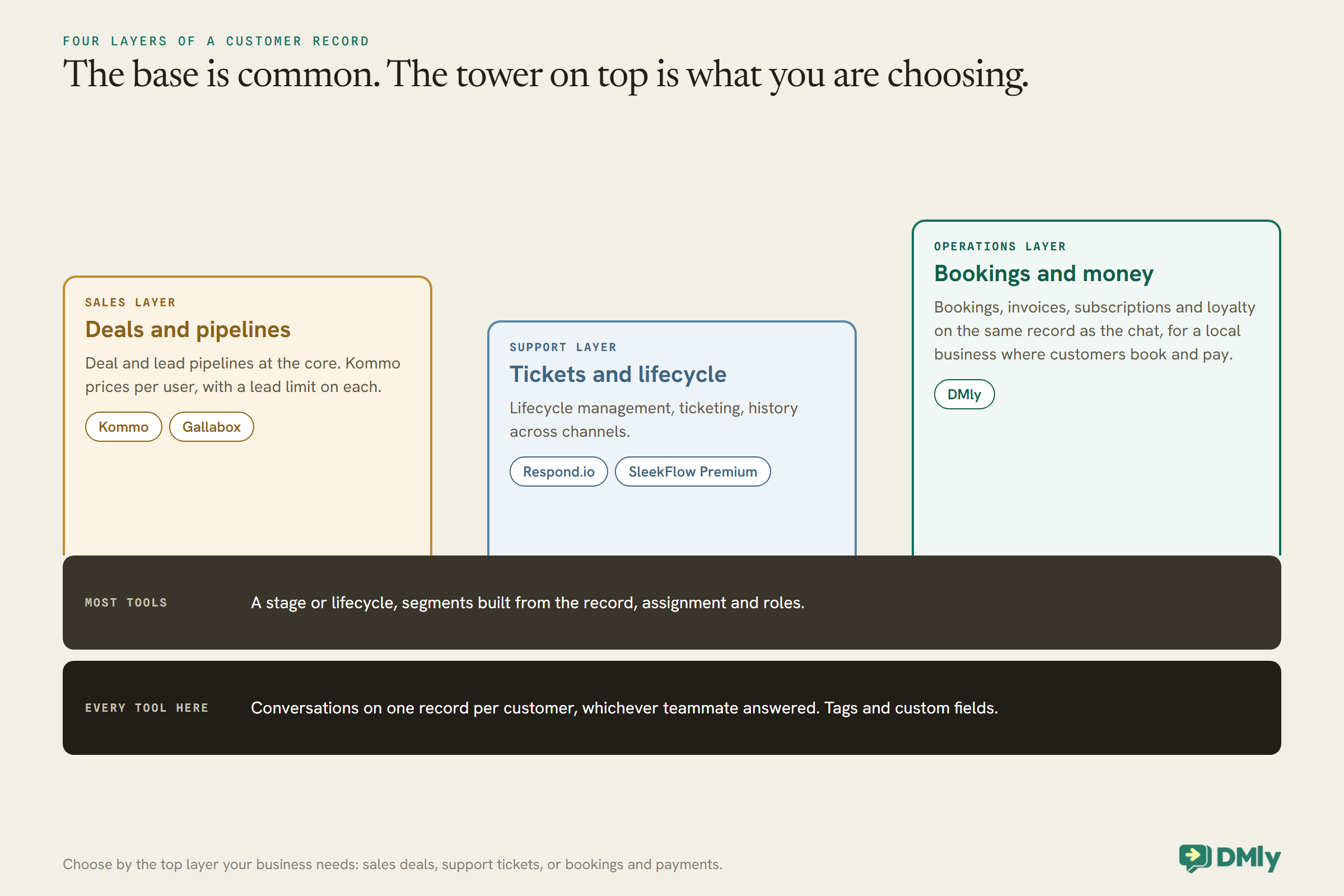
Most WhatsApp platforms start as a shared inbox and add CRM features. The difference matters in practice. A WhatsApp CRM should give you, at minimum:
- One record per customer, with every conversation attached, whichever teammate answered.
- Structured information: tags, custom fields and a lifecycle or stage, not just chat history.
- A pipeline for enquiries or deals, so you can see who is where in your sales process.
- Segments built from that information, to message the right people.
- Team controls: assignment, roles and, for many businesses, masking of phone numbers.
Beyond that, the tools split. Some add sales features such as per-user lead limits and deal pipelines; some add support features such as ticketing; and some, DMly among them, add the operations of a local business: bookings, invoices, subscriptions and loyalty on the same record.
How We Compared Them
- What the record holds: fields, tags, stages, and whether bookings or payments sit on it.
- How work is organised: pipelines, segments, assignment.
- How teams share it: seats or users, roles, masking.
- How it connects: integrations with mainstream CRMs and other tools.
- What it costs: read on each vendor’s pricing page, excluding Meta’s WhatsApp charges.
Where a vendor’s pricing page lists a feature without making clear which plan includes it, we say it is listed rather than guess the plan.
The Quick Answer: Best by Situation
| If you are… | Look first at | Why |
| A local business where customers book and pay | DMly | Bookings, invoices, subscriptions and loyalty on the same customer record as the chat |
| A sales team working deals through WhatsApp | Kommo | Sales pipelines at the core, priced per user, with AI agents from the middle plan |
| A support team across many channels | Respond.io | Lifecycle management and a mature omnichannel inbox |
| A lead-heavy sales team in India | Gallabox | Lead pipeline management and AI qualification on its upper plans |
| A team that needs strong WhatsApp broadcasting plus a CRM layer | DoubleTick or Wati | Segments, tags and custom fields around WhatsApp campaigns |
| An omnichannel brand that will connect a mainstream CRM | SleekFlow | HubSpot and Zoho integrations on Premium, Salesforce on Enterprise |
The Best WhatsApp CRM Software, Reviewed
1. DMly: best for local businesses where customers book and pay
What the record holds. Each contact is one record across every channel, with conversations, internal notes, tags, custom fields and flow answers. Once someone is a client, a Finance tab adds credits, amount due, loyalty points and lifetime value, with tabs for invoices, payments, subscriptions, credits, loyalty, appointments and classes. Linked contacts record family relationships without merging records.
How work is organised. Pipeline stages are separate from the lead and client lifecycle, and flows can move contacts through them. Segments combine tags, custom fields, lifecycle, spend, loyalty points, credit balance, birthday month and channel reachability, and are re-checked every time they are used.
Team and pricing. Per-member controls can mask phone numbers and email addresses. Plans are $29, $65 and $149 a month billed yearly, with 3, 6 and 15 seats and 3,000, 10,000 and unlimited active contacts; DMly states it adds no markup to Meta’s WhatsApp rates.
Watch out for. DMly’s docs are candid that the contacts export is a round-trip file for the importer, not a subject-access export, and that deleting a contact is a hard delete that also removes their invoices and bookings. The pipeline board shows up to 300 contacts, so it suits enquiries more than large deal books.
Best for: salons, clinics, gyms, tutors and other businesses where the customer record needs the calendar and the money on it.
2. Kommo: best for sales teams working deals
What the record holds. Kommo describes itself as an AI CRM built around sales pipelines and a unified inbox, with a dashboard and calendar on every plan, and AI reply suggestions, summaries and task suggestions from the first plan.
How work is organised. Pipelines are core. Advanced adds pipeline automation, broadcasting, no-code bots and up to 3 AI agents; Pro adds a booking page and scheduling links, dynamic segments synced to ad platforms, up to 50 AI agents and AI appointment booking.
Pricing. Kommo prices per user. On its default six-month billing, Base is $25, Advanced $35 and Pro $45 per user per month, with lead limits of 2,500, 5,000 and 10,000 per user and a monthly allowance of AI credits per user.
Watch out for. Per-user pricing grows with your team, and each plan caps leads per user.
Best for: sales teams that live in a pipeline and want WhatsApp conversations attached to deals.
3. Respond.io: best for support-heavy, omnichannel teams
What the record holds. Respond.io lists lifecycle management, contact and call activities, and team and custom inboxes among its features, with a mobile app.
Connections and controls. Its pricing page lists HubSpot and Salesforce integrations, webhook events, an HTTP request step, masking of phone numbers and email addresses, and data export, with multiple workspaces on the higher plans.
Pricing. With 1,000 monthly active contacts and monthly billing, Starter is $79, Growth $159 and Advanced $279 a month; WhatsApp fees are not included.
Watch out for. Pricing scales with monthly active contacts; check which plan includes the integrations you need before choosing.
Best for: teams whose CRM is mainly a support record across many channels.
4. Gallabox: best for lead-heavy sales teams
What the record holds. Gallabox’s flow builder includes contact field and tag update nodes, and its plans add lead pipeline management, custom roles and number masking on Advanced.
Connections. CRM push and pull nodes and bi-directional CRM integrations from Essential.
Pricing. Billed annually, Basic is $112, Essential $248 and Advanced $474 a month, with 3, 6 and 10 users.
Watch out for. The full lead pipeline is on the top self-serve plan.
Best for: teams whose WhatsApp is a lead channel, who want qualification, pipeline and AI in one place.
5. DoubleTick: best for WhatsApp-first teams wanting a CRM layer
What the record holds. Unlimited tags, customer segments and custom contact fields (10 on Starter, 30 on Pro), bulk import, Excel export and a Google Sheets integration.
Team and controls. A team inbox with 5 agents on Starter and 10 on Pro, plus roles and permissions and number masking on Pro.
Pricing. Starter is $170 a month and Pro + AI $308 a month, billed yearly; AI agents are not on Starter. DoubleTick’s FAQ says there is no free trial, only a demo.
Watch out for. A higher entry price than most, and no trial to test with your own data.
Best for: WhatsApp-heavy sales and service teams that want broadcasting and a CRM layer together.
6. Wati: best for marketing-led teams on a budget
What the record holds. Wati’s plans include team inbox staples (assign, track, automate follow-ups, tag and report) and CTWA source tags on Pro.
Connections. Two commerce or CRM integrations on Growth, five including HubSpot on Pro, unlimited including Salesforce on Business, where phone number masking also appears.
Pricing. Billed annually, Growth $39, Pro $79 and Business $199 a month.
Watch out for. Wati is WhatsApp-marketing first; its CRM depth comes largely from integrations.
Best for: teams that want WhatsApp campaigns now and a mainstream CRM connected later.
7. SleekFlow: best for omnichannel brands connecting a mainstream CRM
What the record holds. An omnichannel inbox with broadcast campaigns and an automation flow builder; Premium adds ticketing and role-based access control.
Connections. Premium adds HubSpot and Zoho integrations and webhooks; Enterprise adds Salesforce, PII data masking, multiple workspaces and conversation export.
Pricing. Pro is US$109 a month billed monthly and Premium US$279, plus a US$15 monthly WhatsApp number hosting fee.
Watch out for. Data export and PII masking are Enterprise features.
Best for: brands that will run HubSpot or Zoho as the main CRM, with SleekFlow as the conversation layer.
Comparison at a Glance
| Tool | Entry price read | Priced by | Stand-out CRM strength |
| DMly | $29/mo billed yearly | Plan (seats and contacts per plan) | Bookings, invoices and loyalty on the record |
| Kommo | $25 per user/mo (6-month billing) | Per user | Sales pipelines |
| Respond.io | $79/mo monthly (1,000 contacts) | Monthly active contacts | Lifecycle management, omnichannel |
| Gallabox | $112/mo billed annually | Plan (users per plan) | Lead pipeline and AI qualification |
| DoubleTick | $170/mo billed yearly | Plan | Segments and fields with broadcasting |
| Wati | $39/mo billed annually | Plan | Low entry, integrations up the plans |
| SleekFlow | US$109/mo monthly | Monthly active contacts | HubSpot, Zoho and Salesforce connections |
All prices exclude Meta’s WhatsApp charges, were read on 25 September 2026, and use different billing periods, so compare like with like.
Which WhatsApp CRM by Business Type
Your kind of business narrows the list faster than any feature table.
| Business | What the record must hold | Shortlist |
| Salon, spa, clinic | Appointments, deposits, reminders, loyalty | DMly; Kommo Pro if sales-led |
| Gym or studio | Memberships, class bookings, credits | DMly |
| Tutor or training centre | Lessons, parents and students, term fees | DMly; Gallabox for enquiry-heavy centres |
| Ecommerce brand | Orders, campaigns, product interest | SleekFlow, Wati, DoubleTick |
| B2B or high-ticket sales | Deals, stages, owners, follow-ups | Kommo, Gallabox |
| Support-led company | Tickets, history across channels | Respond.io, SleekFlow Premium |
If your business sits across two rows, pick the tool that fits the row where the money is made, and connect the rest.
Per User, Per Contact or Per Plan: Why It Matters
The same business can cost very different amounts under different CRM pricing models.
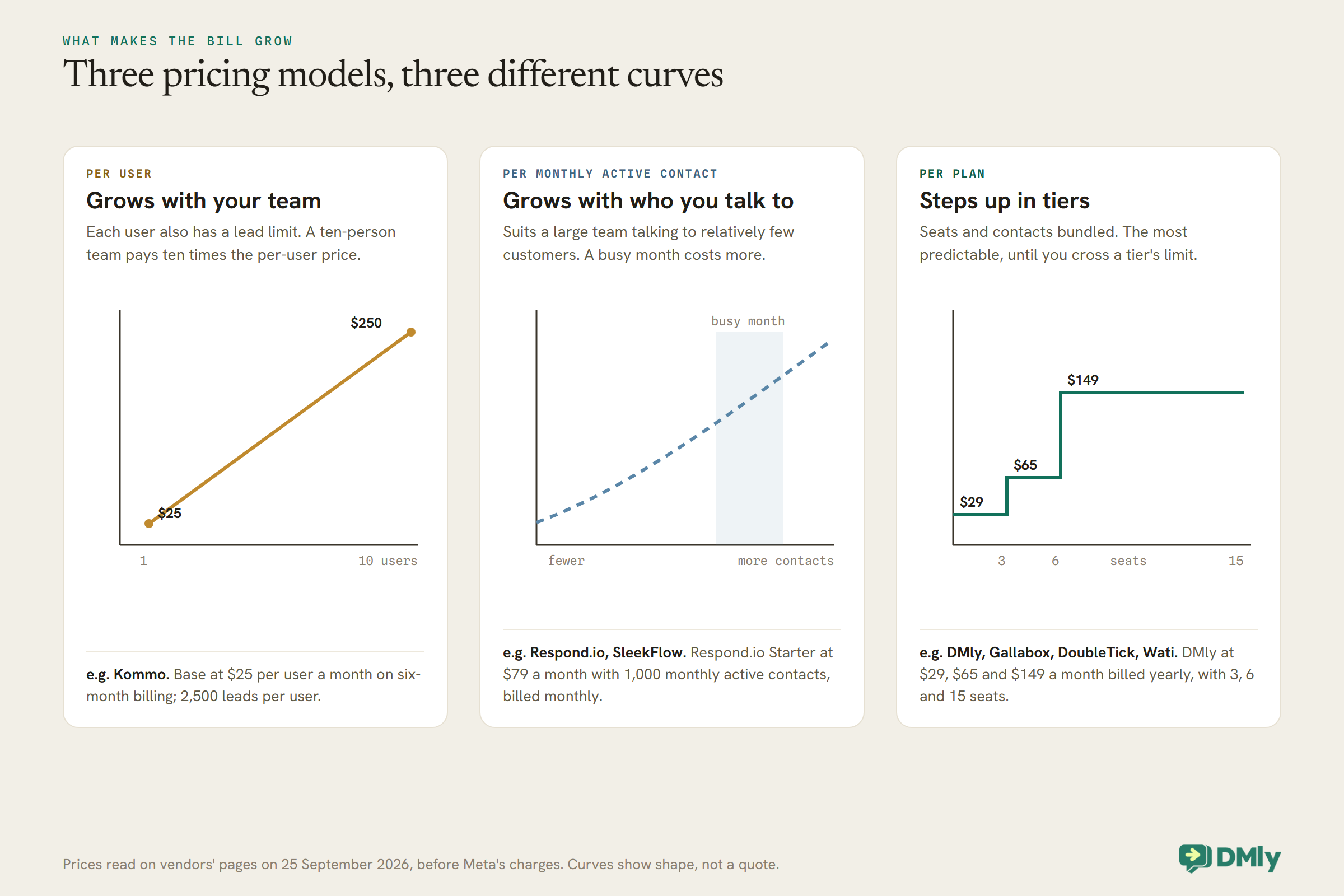
- Per user suits a small team with many customers each. A ten-person team pays ten times the per-user price, and each user’s lead limit caps how much the CRM can hold.
- Per monthly active contact suits a large team talking to relatively few customers a month. A busy month costs more.
- Per plan bundles seats and contacts into tiers. It is the most predictable, until you cross a tier’s limit and step up.
AI Inside the CRM
AI in a CRM is most useful when it keeps the record up to date, not just when it chats.
Almost every tool here now has AI (DoubleTick’s Starter plan is the exception), and the most useful kind for a CRM is the quiet kind that writes things down. Kommo lists AI summaries, task suggestions and field value suggestions. Respond.io lists AI chat summaries and AI assist. Gallabox has an inbox AI copilot from Essential. DoubleTick describes its AI agent as one that answers customers, qualifies leads and updates customer records. In DMly, an AI step can be given tools to add tags, set custom fields, add notes and move pipeline stages, so the answers a customer gives in a conversation land in the fields your segments use.
Two questions to ask in a trial: does the AI write to structured fields, or only into notes nobody reads? And can you see, afterwards, what it changed? A CRM that the AI fills with guesses is worse than one that stays empty.
Moving Your Data In
The first week with a new CRM is mostly an import. Know how each one handles it.
Most of these tools import contacts from a CSV or spreadsheet: DoubleTick lists bulk import and Excel import and export, for example. The details differ in ways that matter. In DMly, the contacts import needs a name and phone number on every row, takes tags and a custom fields column, matches existing contacts by phone or email, and replaces tags on re-import, so a blank tags column removes existing tags. An import also starts automations row by row, firing new-contact, tag and field triggers, so pause automations before a large import.
Whichever tool you choose, import a small test file first, read a handful of records afterwards, and only then bring in the rest. And remember that importing a list is not the same as having each person’s permission to message them on WhatsApp.
More Than One Location or Brand
Multi-location businesses need to decide whether customers are shared or separate.
If you run several locations or brands, check how each tool separates them. Respond.io lists multiple workspaces on its higher plans, and SleekFlow on Enterprise, which keeps each brand’s data and access apart. DMly plans include one, three or five profiles per channel, so a Premium workspace can run five WhatsApp numbers under one set of customers, and DMly’s white-label plans are built for agencies running separate client workspaces. Decide first whether a customer who visits two of your locations should be one record or two; the right structure follows from that answer.
Security and Access
A CRM holds your customers’ details. Check who can see them and how people sign in.
The pricing pages read for this guide list a range of controls, usually more on higher plans: Respond.io lists two-factor authentication, masking of phone numbers and email addresses, and single sign-on; Wati lists phone number masking, roles and IP whitelisting on Business; SleekFlow lists role-based access control on Premium and PII masking on Enterprise; Kommo lists single sign-on on Enterprise; DoubleTick lists roles and permissions and number masking on Pro. In DMly, per-member controls can mask contact phone numbers and email addresses and remove whole areas such as the Inbox or broadcasts for a teammate. Decide who on your team genuinely needs to see a customer’s number, and choose a plan that lets you enforce it.
WhatsApp-Native CRM or a Mainstream CRM With WhatsApp?
If you already run HubSpot or Salesforce, the question is different.
Every tool above is a CRM built around WhatsApp conversations. The alternative is to keep a mainstream CRM such as HubSpot, Salesforce or Zoho as the system of record and connect WhatsApp to it, which several of these tools support through integrations on their upper plans. The trade-off is simple. A WhatsApp-native CRM is quicker to set up and keeps the conversation and the record in one place. A mainstream CRM with WhatsApp connected keeps one record across sales, marketing and service at the cost of an integration to maintain. If your team already lives in a mainstream CRM, start there; our guide to mainstream CRMs with WhatsApp integrations covers that side.
What to Check Before You Choose
- Your fields. List the ten facts your team needs on a customer record. Check each tool can hold them, and whether its segments can filter on them.
- Your pipeline. Sketch your stages. Can the tool show them, and move people through them automatically?
- Your team. How many people, which of them should see phone numbers, and who should see money?
- Your data out. Can you export contacts and conversations if you leave, and what does the export include? DMly’s docs, for example, say its contacts export is not a subject-access export, so answering a customer’s data request needs the profile or the API.
- Your other systems. Accounting, bookings, ecommerce. The best CRM is the one that needs the fewest extra tools around it.
How to Test a WhatsApp CRM in a Week
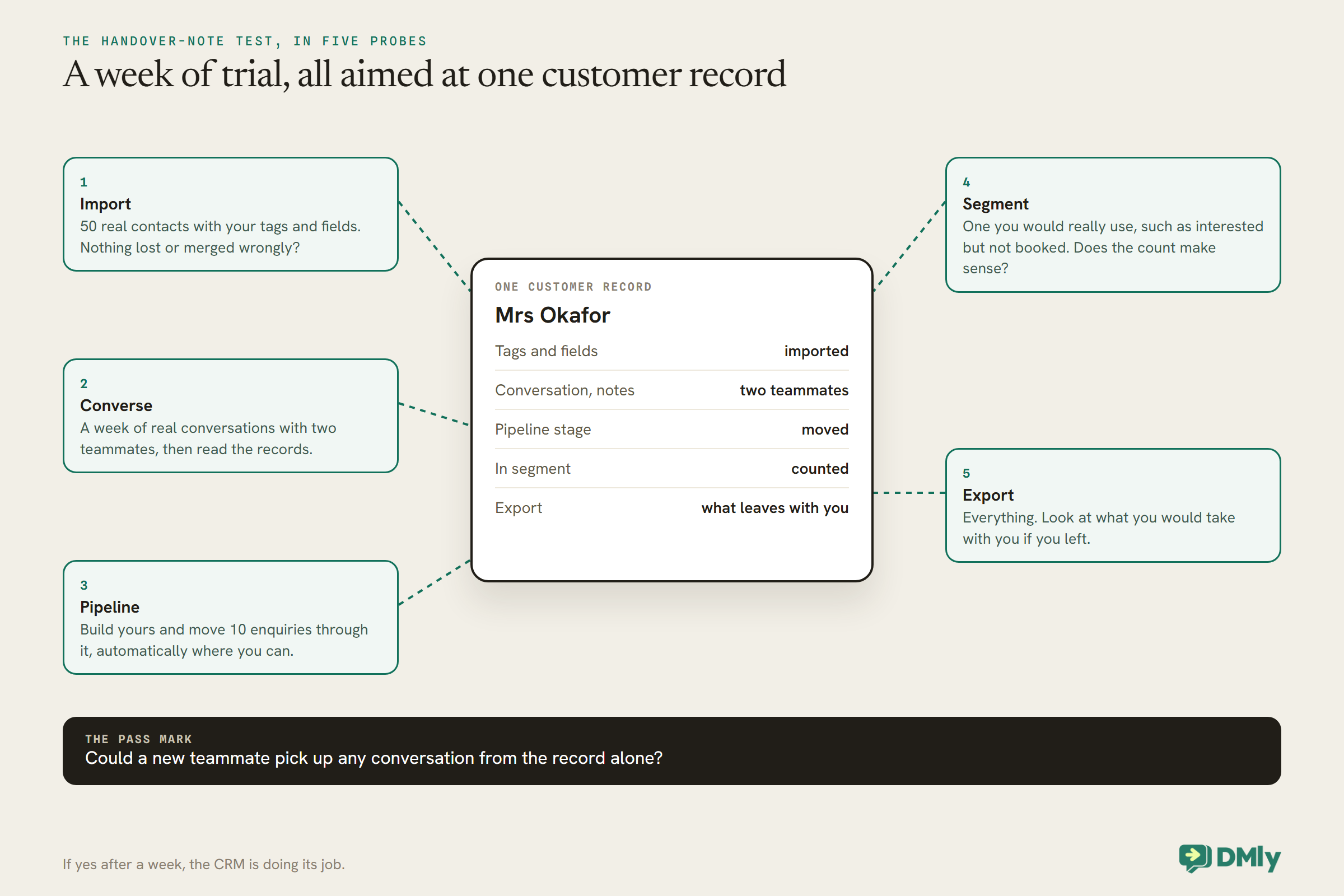
- Import fifty real contacts with your tags and fields, and check nothing is lost or merged wrongly.
- Run a week of real conversations through it with two teammates, and read the records at the end: could a new person pick up any conversation from the record alone?
- Build your pipeline and move ten enquiries through it, automatically where you can.
- Build one segment you would really use, such as customers interested in a service who have not booked, and check the count makes sense.
- Export everything and look at what you would take with you if you left.
Meta’s Charges, on Top of Every Tool
WhatsApp messages are billed by Meta whichever CRM you choose. From 1 October 2026, Meta charges for free-form service messages beyond the first 1,000 per business phone number each month and for utility templates sent in response inside an open window, as well as for marketing and utility templates outside it. Some vendors pass Meta’s rates through with no markup, as DMly states it does; others bill messages through their own rate cards. Ask each vendor which applies. Our explainer on the October 2026 pricing change has the detail.
Mistakes Buyers Make
- Buying an inbox and calling it a CRM. Check the record, not the chat window.
- Ignoring the pricing model. Per user, per contact and per plan behave very differently as you grow.
- Not testing the export. Your data is only yours if you can take it with you.
- Too many fields on day one. Start with ten; add more when someone asks for one twice.
- Unmasked numbers for everyone. Choose a tool that lets you restrict who sees them.
Frequently Asked Questions
What is the best WhatsApp CRM software?
It depends on your business. For businesses where customers book and pay, a CRM with bookings and invoices on the record, such as DMly; for sales teams working deals, Kommo; for omnichannel support, Respond.io. Test with your own contacts before deciding.
What is the difference between a WhatsApp CRM and a shared inbox?
A shared inbox organises conversations. A WhatsApp CRM organises customers, with tags, fields, stages, pipelines and segments, and attaches the conversations to them.
Can a WhatsApp CRM connect to HubSpot or Salesforce?
Several can, usually on upper plans. Respond.io lists HubSpot and Salesforce integrations, SleekFlow offers HubSpot and Zoho on Premium and Salesforce on Enterprise, and Wati includes HubSpot on Pro and Salesforce on Business.
How much does a WhatsApp CRM cost?
Among the tools here, entry prices read on 25 September 2026 ranged from about $25 per user a month to around $170 a month, before Meta’s message charges, with different billing periods and pricing models.
Which WhatsApp CRM includes bookings and payments?
DMly keeps bookings, invoices, subscriptions and loyalty on the customer record. Kommo’s Pro plan adds a booking page and AI appointment booking; Gallabox’s Advanced plan lists appointment booking management.
Can I move my contacts if I switch?
Usually, through a CSV export and import, but exports differ in what they include. Test the export during your trial.
No More Handover Notes
Go back to the note at shift change. In a good WhatsApp CRM, Mrs Okafor’s request to move Thursday is on her record with the booking beside it, the man with the red car is a lead in the pipeline with a note to send prices, and the gift voucher question is tagged to the person who asked it. The next shift opens the records and carries on, and nobody’s promise gets lost before lunch.
The best WhatsApp CRM software is the one that makes that happen for your kind of business: sales deals, support tickets, or bookings and payments. Shortlist from this guide, then give each a week with your own customers.
Writing about WhatsApp automation, bookings and growth for local business.
Turn WhatsApp into your busiest channel.
Start free and run message, bookings, payments and reviews in one place.
