
One word, typed a thousand times by a thousand strangers. You posted a reel about your new product and asked people to comment “LINK” if they wanted it. They did. Now the comment section is a wall of the same four letters, each one a person waiting for a DM that you, sitting alone with your phone, cannot possibly send before they lose interest. By the time you have answered fifty, the reel has moved on and so have the other nine hundred and fifty.
The best Instagram DM automation tools answer every one of those comments with a private message in seconds, send the link, and, in the better tools, carry on the conversation: capture an email, book an appointment, hand a serious buyer to a person. This guide compares seven tools on what they automate, how they handle Instagram’s strict messaging rules, what AI they bring, and what they cost. Prices and plans were read on each vendor’s own pages on 25 September 2026.
A disclosure, up front: DMly publishes this blog and is one of the tools compared. We have described every tool, including our own, from its own pages and documentation, and said where each is the better choice. For the full picture of Instagram DM automation, see our guide to building an Instagram AI chatbot.
Instagram’s Rules Shape Every Tool
Whatever tool you choose, Meta’s messaging rules decide what it can send, and when.
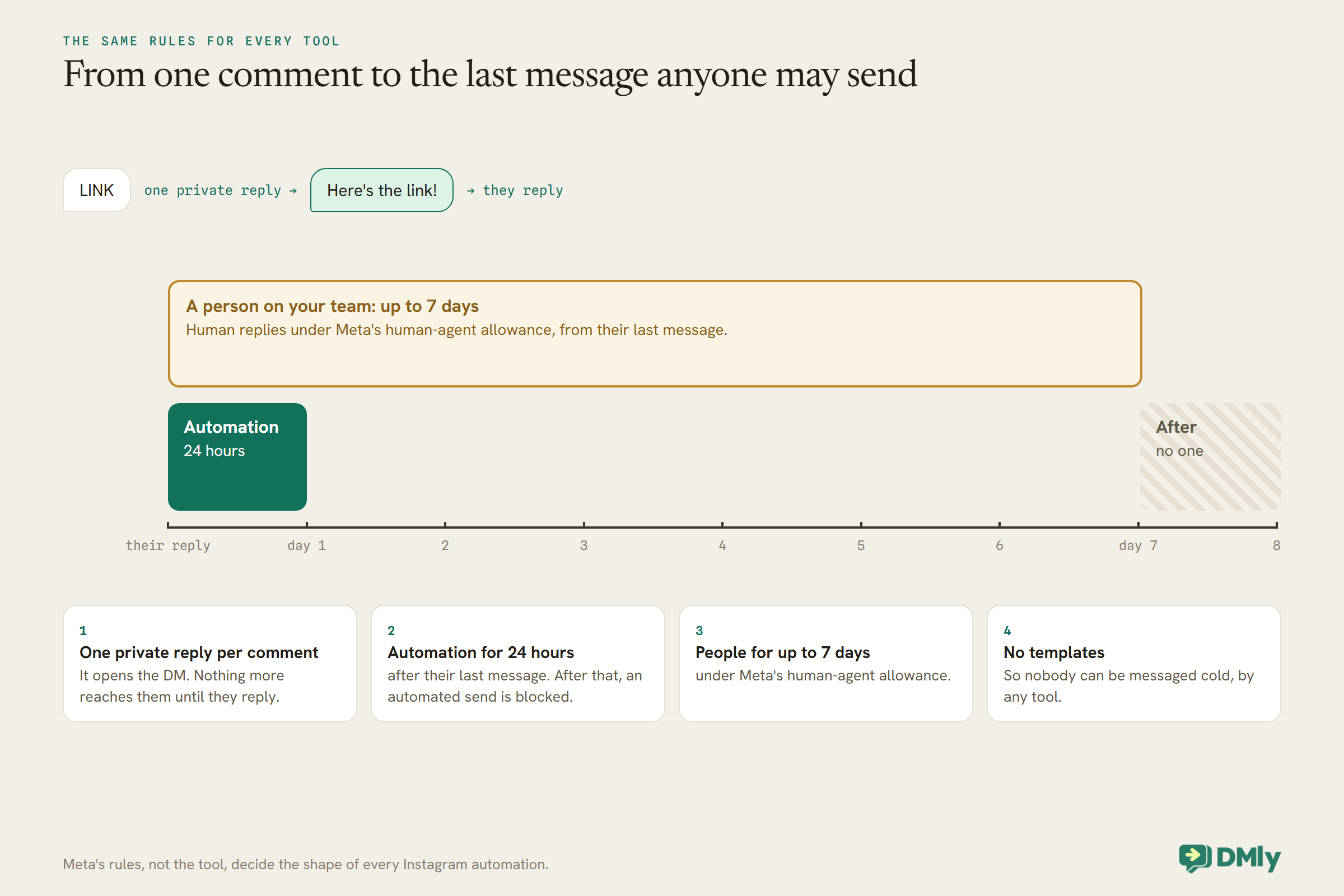
Instagram DM automation runs on Meta’s official messaging platform, and Meta’s rules apply to every tool equally. DMly’s documentation sets them out plainly:
- Automated messages only within 24 hours of the contact’s last message to you. After that, an automated send is blocked.
- Human replies for up to 7 days, sent under Meta’s human-agent allowance.
- No templates. Unlike WhatsApp, Instagram has no approved message templates, so there is no way to open a new conversation with someone who has not written to you first.
- One private reply per comment. A comment lets you send the commenter one private message, which opens the DM. A later message only reaches them once they reply.
Those four rules explain most of what separates a good Instagram automation from a frustrating one. The first message after a comment has to be worth replying to, because until the person replies, you get nothing more. And anything you want to automate, a link, a question, a booking, has to happen inside the 24 hours after they last wrote.
Before You Connect Any Tool
A few account settings decide whether a tool can connect at all. Check them first.
- Account type. Tools connect through Meta’s official platform, which works with professional accounts, and some are stricter than others. DMly, for example, connects Business and Creator accounts through Instagram Login, but not Personal accounts. Creators should confirm a tool supports Creator accounts before building anything.
- A linked Facebook Page, or not. Some tools find your Instagram account only through the Facebook Page it is linked to, and need you to be an admin of that Page. Others, DMly included, can also connect with Instagram Login, which needs no Page. Check which route a tool uses before you start.
- What greets a first-time DM. Instagram has no “Get Started” button like Messenger. In DMly, a welcome message is sent as the reply to a contact’s first DM when it matches no flow, with up to three buttons, and ice breakers are pushed to Instagram as tappable prompts. Decide what a stranger’s first message should get before you switch anything on.
What Instagram DM Automation Tools Do
The core jobs are the same everywhere. The differences are in what happens after the first message.
- Comment-to-DM: a keyword in a comment triggers a private message, often with a public reply under the comment too.
- Story replies and mentions: a reply to your story, or a mention in someone else’s, starts a conversation.
- DM keywords and conversation starters: a word in a DM, or a tapped prompt, runs a flow.
- Lead capture: collecting an email or phone number in the chat.
- AI replies: an AI agent answering questions from your own material.
- What comes next: moving the lead to email or WhatsApp, a sale, or a booking.
The first four are table stakes. The last two are where tools differ most, and where the choice for a business usually lies.
The Quick Answer: Best by Situation
| If you are… | Look first at | Why |
| A creator, brand or local business on Instagram | DMly | Comment-to-DM automation, growth tools and AI lead qualification, with bookings, payments and CRM in one platform |
| A WhatsApp-first brand adding Instagram | Wati | Instagram DM and comment automation alongside WhatsApp campaigns |
| An omnichannel team handling Instagram with other channels | SleekFlow or Respond.io | Instagram in a shared inbox with AI agents |
The Best Instagram DM Automation Tools, Reviewed
1. DMly: best overall Instagram DM automation tool
What it automates. Flows start from DMs, story replies and mentions, comments on posts, reels and Instagram Live, and tapped ice breakers or menu items. Comment automation can reply publicly, send a private DM, like, hide or delete comments, and moderate comments on ads. An AI agent can answer from your knowledge and, with booking tools, check availability and book appointments inside the chat, and the same inbox handles WhatsApp, Facebook, TikTok and more. A Marketing Opt-in step, asked inside the window, earns exactly one more message after it closes.
Pricing. $29, $65 and $149 a month billed yearly, with comment automation and AI agents on every plan and 500, 5,000 or 20,000 AI replies a month.
Watch out for. DMly connects Business and Creator accounts with Instagram Login, no Facebook Page needed, or Business accounts through a linked Page; Personal accounts cannot be connected. DMly is built for businesses rather than creators, so its strengths are bookings, payments and the customer record, not growth tricks like follower checks. A commenter only becomes a contact when an automation matches their comment, by design, so drive-by comments do not fill your contact allowance.
Best for: salons, clinics, gyms, tutors and shops whose Instagram DMs should end in a booking or a payment.
2. ManyChat: a well-known comment-to-DM tool
What it automates. Comment replies, story replies, welcome messages and DM responses on every plan; from Essential, unlimited automations with lead capture, follower checks, tags and Google Sheets sync; from Pro, AI-powered automation, custom inbox labels and rules, integrations, the ManyChat API, and moving leads from Instagram or TikTok into WhatsApp.
Pricing. ManyChat’s help centre describes a pricing model introduced on 2 March 2026, with availability varying by region. Free is $0 for up to 25 active contacts a month and 4 live automations, with a “Powered by Manychat” message on first contact. Essential is $17 a month billed monthly or $14 billed yearly, for 250 active contacts. Pro is $39 monthly or $29 yearly for 2,500 active contacts, with 3 users and 2 inbox seats. Business is $99 monthly or $69 yearly for 7,500 active contacts, with no free trial. Extra active contacts are charged per contact on every paid plan.
Watch out for. WhatsApp is not available on Free or Essential; AI arrives on Pro. Active contact overages add up on a viral month.
Best for: creators and social-first brands who live on Instagram and TikTok.
3. LinkDM: a low-cost comment-to-DM tool
What it automates. Post and reel auto-replies, story and story-mention replies, Facebook automations and inbox conversation starters on the free plan; from Pro, comment auto-reply, flow automation, lead generation, a DM planner, a follower growth tool, reminder DMs, inbox automation, advertising and Instagram Live automation, and branding removal.
Pricing. Free connects one Instagram account and sends up to 1,000 DMs a month; Pro is $19 a month for 3 accounts and 25,000 DMs; Platinum+ is $99 a month for 10 accounts and 300,000 DMs.
Watch out for. LinkDM’s plan comparison lists comment auto-reply from Pro, not Free. It is focused on Instagram creators rather than business operations.
Best for: creators and small brands whose main need is sending links from comments, cheaply and at volume. Our LinkDM review goes deeper.
4. Gallabox: AI agents on Instagram and WhatsApp
What it automates. Instagram DMs in a shared inbox, AI-based comment automation (basic intents on Basic, custom intents higher up), a DM agent, a follower check and, from Essential, AI agents on Instagram and WhatsApp.
Pricing. Billed annually: Basic $112, Essential $248, Advanced $474 a month.
Watch out for. AI agents on Instagram start at Essential.
Best for: sales teams that want Instagram and WhatsApp leads qualified by AI in one place.
5. Wati: best for WhatsApp-first brands adding Instagram
What it automates. Every plan includes campaigns that automate DM and comment engagement on Instagram and Facebook Messenger; Pro adds Instagram automation within its advanced chatbots.
Pricing. Billed annually: Growth $39, Pro $79, Business $199 a month; AI agents are the Astra add-on, priced separately.
Watch out for. Wati’s heart is WhatsApp; Instagram is part of a wider inbox rather than the focus.
Best for: brands that sell on WhatsApp and want Instagram DMs and comments feeding the same team.
6. SleekFlow: best for omnichannel teams with AI agents
What it automates. Instagram DMs are among SleekFlow’s channels, in an omnichannel inbox with AI agents on every plan, broadcasts and a flow builder, with TikTok and other messaging channels alongside.
Pricing. Pro US$109 a month billed monthly (10 users, 500 monthly active contacts); Premium US$279.
Watch out for. A team inbox price for what may be a solo creator’s need.
Best for: teams handling Instagram alongside WhatsApp, email and more, with AI agents doing the first line.
7. Respond.io: best for support teams that also answer Instagram
What it automates. Instagram as one of many channels in an omnichannel inbox, with workflows and AI agents; AI usage is included from the Growth plan.
Pricing. At 1,000 monthly active contacts, billed monthly: Starter $79, Growth $159, Advanced $279 a month.
Watch out for. It is built for support volume, not creator growth mechanics.
Best for: support-led businesses whose Instagram DMs are customer service.
Comparison at a Glance
| Tool | Entry paid price read | Free option | AI |
| DMly | $29/mo billed yearly | 7-day trial | On every plan, monthly AI replies |
| ManyChat | $14/mo yearly or $17 monthly (Essential) | Yes, 25 active contacts | From Pro ($29 yearly, $39 monthly) |
| LinkDM | $19/mo (Pro) | Yes, 1,000 DMs a month | Not listed on the pricing page |
| Gallabox | $112/mo billed annually | Free trial with AI credits | Instagram AI agents from Essential |
| Wati | $39/mo billed annually | 7-day trial | Astra add-on |
| SleekFlow | US$109/mo monthly | Free trial | AI agents on Pro |
| Respond.io | $79/mo monthly | 7-day trial | Included from Growth |
All prices were read on 25 September 2026 and use different billing periods and limits (active contacts, DMs or users).
Which Tool by Kind of Account
| Account | What the DMs must achieve | Shortlist |
| Creator or influencer | Deliver links, grow followers, capture emails | DMly, ManyChat, LinkDM |
| Online shop | Answer product questions, send to checkout, move buyers to WhatsApp | DMly, ManyChat Pro, SleekFlow, Wati |
| Salon, clinic, gym, studio | Turn “price?” and “availability?” into a booking | DMly |
| Course seller or coach | Qualify leads, book calls | DMly, Gallabox, ManyChat |
| Brand with a support team | Answer customers across channels | DMly, Respond.io, SleekFlow |
How the Limits Differ: Contacts, DMs or Users
Instagram automation pricing is really a bet on how viral your next post will be.
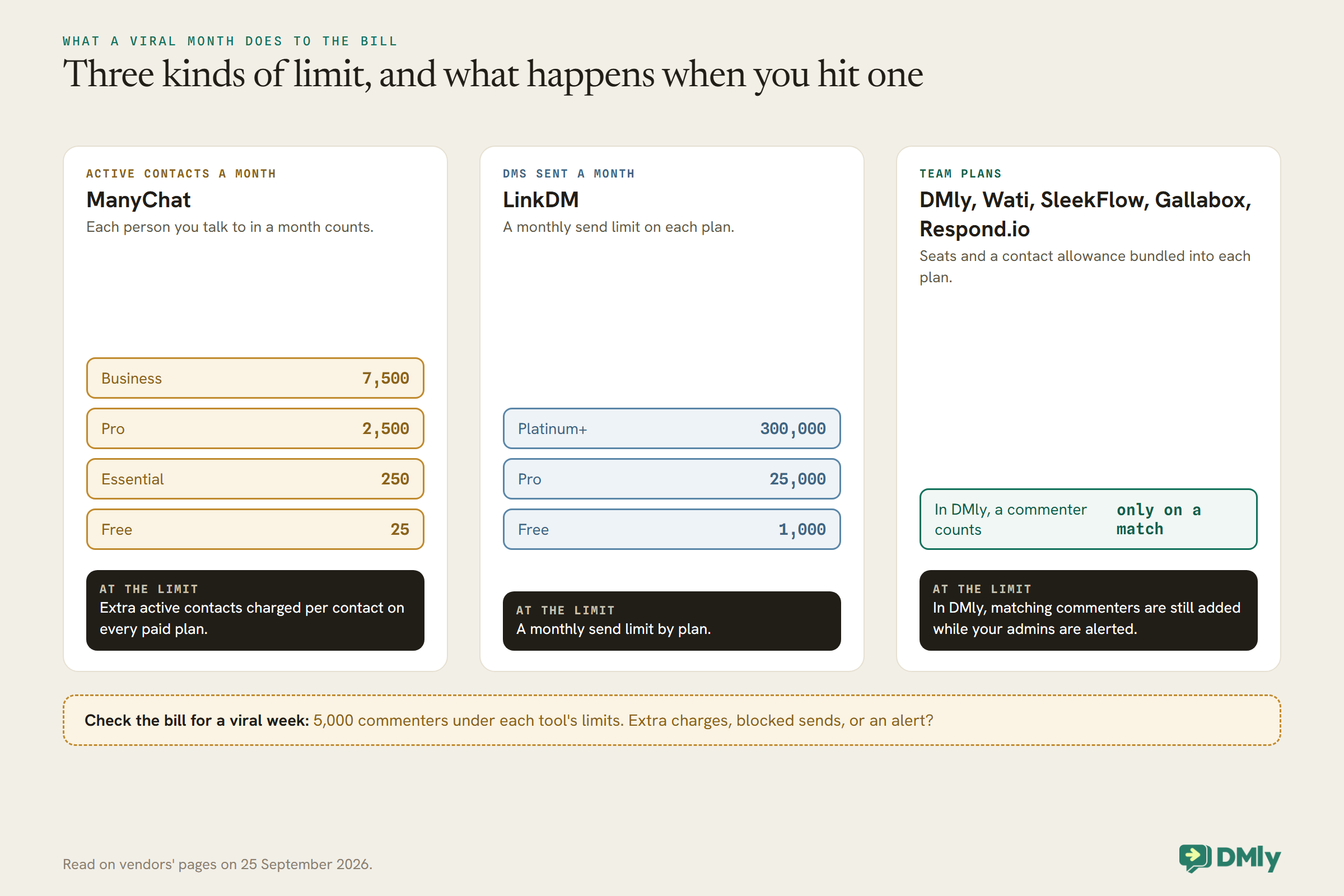
A post that brings in five thousand commenters in a week is the dream, and it is also the month your automation bill jumps. Tools priced on active contacts, like ManyChat, charge overages per extra contact; tools priced on DMs sent, like LinkDM, have monthly send limits by plan; team platforms bundle a contact allowance into each plan. In DMly, a commenter only becomes a contact when a comment automation matches their comment, so drive-by commenters do not use your allowance, and a workspace that hits its contact limit still adds commenters who match while alerting your admins. Whatever tool you choose, check what happens at the limit: extra charges, blocked sends, or an alert.
Design the First Message for One Chance
The private reply to a comment is the only message you get until they answer. Make it count.
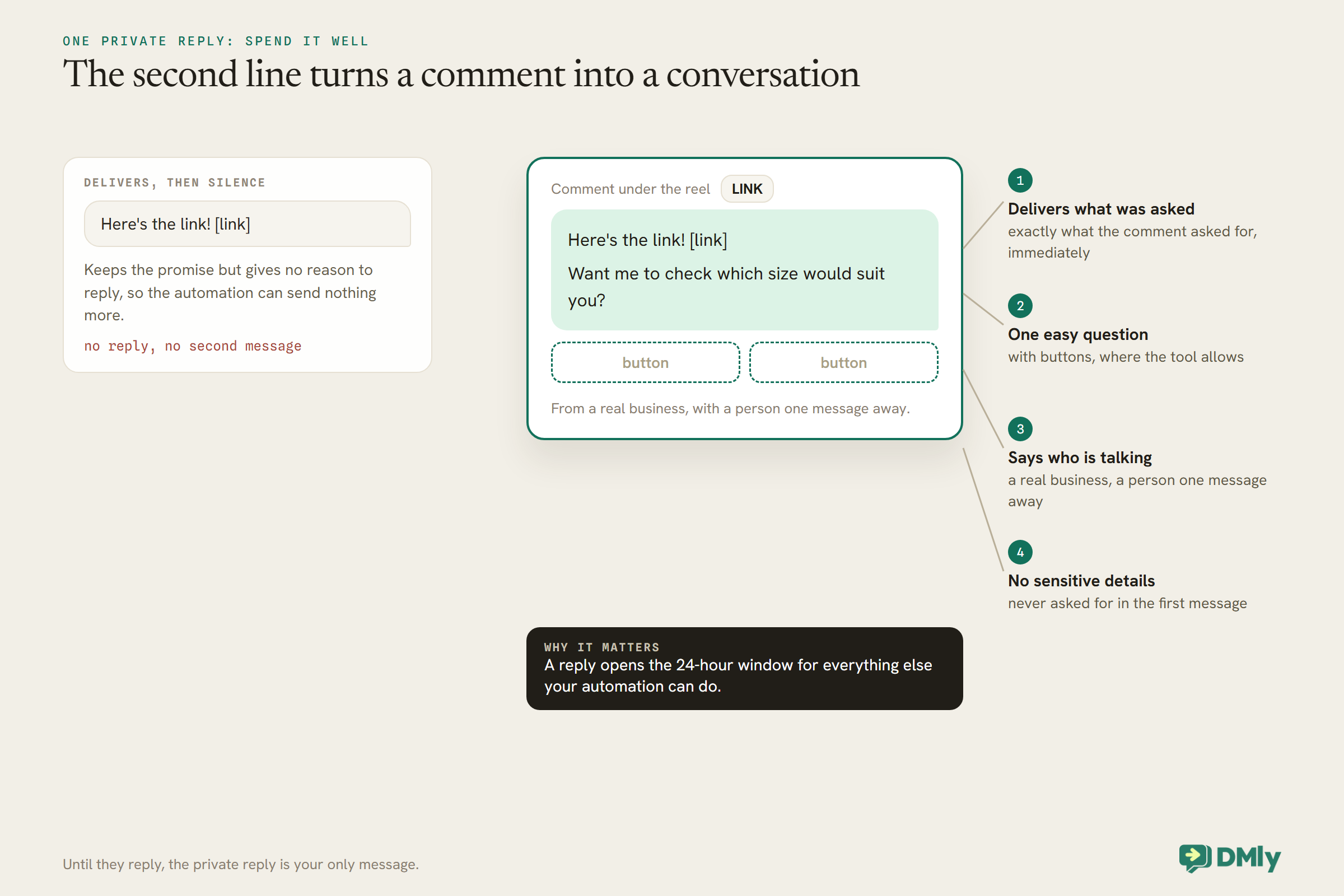
Because Meta allows one private reply per comment, the first DM has two jobs: deliver what was promised, and give a reason to reply. “Here’s the link!” does the first. “Here’s the link! Want me to check which size would suit you?” does both, and a reply opens the 24-hour window for everything else your automation can do. A good first message:
- delivers exactly what the comment asked for, immediately;
- asks one easy question with buttons where the tool allows;
- says who is talking: a real business, with a person one message away;
- never asks for sensitive details in the first message.
Beyond the DM: Where the Conversation Should Go
Instagram’s rules make it a poor place to keep a customer. Plan the next step.
Because automated messages stop 24 hours after a person’s last message and Instagram has no templates, you cannot follow up next week by automation. The tools deal with this in different ways. ManyChat’s Pro plan describes moving leads from Instagram or TikTok into WhatsApp to close sales. Capturing an email or phone number in the chat, which ManyChat offers from Essential and LinkDM lists as lead generation on Pro, gives you a channel you can use later with permission. In DMly, a Marketing Opt-in step asked inside the window earns exactly one more message after it closes, and the same platform runs WhatsApp, where approved templates can reach people days later. For a business, the best Instagram automation often ends by moving the conversation somewhere you can keep it: a booking, a purchase, or an opted-in WhatsApp contact.
AI in Instagram DMs
AI can answer the questions that follow the link. It still has to stay inside Instagram’s window.
Most tools here now offer AI replies on Instagram: ManyChat on Pro, DMly on every plan, Gallabox from Essential, SleekFlow’s AI agents, Respond.io’s AI agents from Growth, and Wati’s Astra add-on. What the AI can do beyond answering differs: DMly’s agent qualifies leads and books appointments; SleekFlow’s can recommend Shopify products; Gallabox’s qualifies leads. The same rule applies to all of them: an AI reply is an automated message, so it only reaches people within 24 hours of their last message. Give the AI your real material, keep it to your business, and make sure it hands anything sensitive to a person.
Stories, Mentions and Lives
Comments get the attention, but stories and lives start some of the warmest conversations.
A reply to your story is a person choosing to message you, which makes it one of the best moments to automate a helpful answer. A story mention, when someone tags you in their own story, is a chance to say thank you and, for a business, to invite them back. Instagram Live comments can trigger automations too. LinkDM lists story and story-mention auto-replies on its free plan and Instagram Live auto-reply on Pro; ManyChat lists story replies among its basic automations on every plan; in DMly, story replies, story mentions and Live comments all start flows. Keep story-reply automations light: people replying to a story are often reacting, not asking, so a friendly reply with one useful link usually beats a questionnaire.
Moderating Comments Automatically
A popular post attracts spam and the occasional unpleasant comment. Some tools can handle those too.
Automation is not only about answering. DMly’s comment automation can also like, hide or delete comments that match keywords, on Facebook, Instagram and TikTok, and can message the commenter after moderating. Gallabox lists AI-based comment automation that works by intent. Before you switch on automatic hiding or deletion, decide carefully what counts as unwanted: hiding a genuine complaint looks worse than answering it. A sensible rule is to hide obvious spam and abuse automatically, and route real complaints to a person who replies in public and in private.
Comments on Your Ads
Ad comments are some of your most valuable, and most ignored, conversations.
If you run ads on Instagram or Facebook, people comment on the ads as well as your posts. LinkDM lists advertising auto-reply on Pro. DMly’s comment automation covers comments on ads, including targeting one specific Facebook ad. The same one-private-reply rule applies, so the first DM to an ad commenter should deliver what the ad promised and invite a reply. Tracking which ad a conversation came from also tells you which ads start conversations, not just which get clicks.
More Than One Instagram Account
Agencies and multi-brand businesses should check account limits before anything else.
Limits on connected accounts vary widely. LinkDM connects one Instagram account on Free, three on Pro and ten on Platinum+. ManyChat’s plans limit the number of connected channels, two on Free and Essential, three on Pro and unlimited on Business. DMly plans include one, three or five profiles per channel, and its white-label plans are built for agencies running many client workspaces. If you manage several brands, count your accounts first, then compare the prices that fit.
How to Test Them
- Connect a real Instagram professional account and post something that asks for a comment keyword.
- Comment from a second account and time how fast the DM arrives, and whether the public reply appears too.
- Reply to the DM and check the conversation continues, with lead capture or AI.
- Wait 25 hours and try to send an automated follow-up, to see how the tool handles the window.
- Check the bill for a hypothetical viral week: 5,000 commenters under each tool’s limits.
Frequently Asked Questions
What is the best Instagram DM automation tool?
DMly is our top pick: comment-to-DM automation, growth tools and AI that qualifies leads, with bookings, payments and a CRM in the same platform. Other options are ManyChat and LinkDM for comment automation, Gallabox for AI agents, and SleekFlow or Respond.io for omnichannel teams. Test with a real post before deciding.
Is Instagram DM automation allowed?
Yes, through tools on Meta’s official messaging platform, within Meta’s rules: automated messages within 24 hours of the person’s last message, one private reply per comment, and no cold messages.
Can I message people who only commented on my post?
Once. A comment allows one private reply. After that, you can only keep messaging them if they reply.
Can I follow up with Instagram leads next week?
Not by automation, because automated messages stop 24 hours after their last message and Instagram has no templates. A person can reply for up to 7 days; for later follow-up, capture an email or move the lead to WhatsApp with their permission.
Is there a free Instagram DM automation tool?
ManyChat’s Free plan covers up to 25 active contacts a month and LinkDM’s Free plan up to 1,000 DMs a month, both read on 25 September 2026.
Can I automate DMs on an Instagram Creator account?
It depends on the tool. Tools work through Meta’s platform for professional accounts, but requirements differ: some take Business accounts only, while DMly, for example, also connects Creator accounts through Instagram Login. Check each tool’s connection requirements before you build.
Which tools have AI for Instagram DMs?
ManyChat from Pro, DMly on every plan, Gallabox from Essential, SleekFlow, Respond.io from Growth, and Wati through its Astra add-on.
A Thousand Comments, Answered
Go back to the wall of “LINK”. With any of the tools above, every one of those commenters gets a private message within seconds, with the link and one good question. The ones who answer start real conversations your automation can carry for a day and your team for a week, and the ones who are serious end up booked, bought or on your WhatsApp list. The reel moves on; the customers do not.
The best Instagram DM automation tools all work inside the same Meta rules. Choose by what should happen after the first message: a link, a lead, or a booking. Shortlist here, then post something and watch what each one does.
Writing about WhatsApp automation, bookings and growth for local business.
Turn WhatsApp into your busiest channel.
Start free and run message, bookings, payments and reviews in one place.
