
Best Appointment Booking Software for Small Businesses
Here is a bill for a booking tool, itemised before it arrives. The plan: free. Two more people on the team who need their own calendars: a charge per seat. Text reminders, because email reminders are easy to miss: a paid plan, or a pack of message credits. Taking a deposit so the Saturday slots stop going to no-shows: another plan. Card fees on every payment. A fee for the new client the marketplace sent you. None of that is hidden, exactly. It is all on the pricing pages. It just is not in the headline number, and the headline number is what most people compare.
This guide compares the best appointment booking software for small businesses the other way round: by the jobs a booking tool has to do for a salon, clinic, studio, tutor or consultant, and by what those jobs cost once they are switched on. There are seven tools here, from simple schedulers to full salon systems. Every price was read on the vendor’s own pricing page on 25 September 2026.
A disclosure, up front: DMly publishes this blog and is one of the tools compared. We have described every tool, including our own, from its own pages and documentation, and we say plainly where another tool is the better choice. If you are setting up booking through WhatsApp specifically, our WhatsApp appointment booking guide covers the setup step by step; this page is about choosing the software.
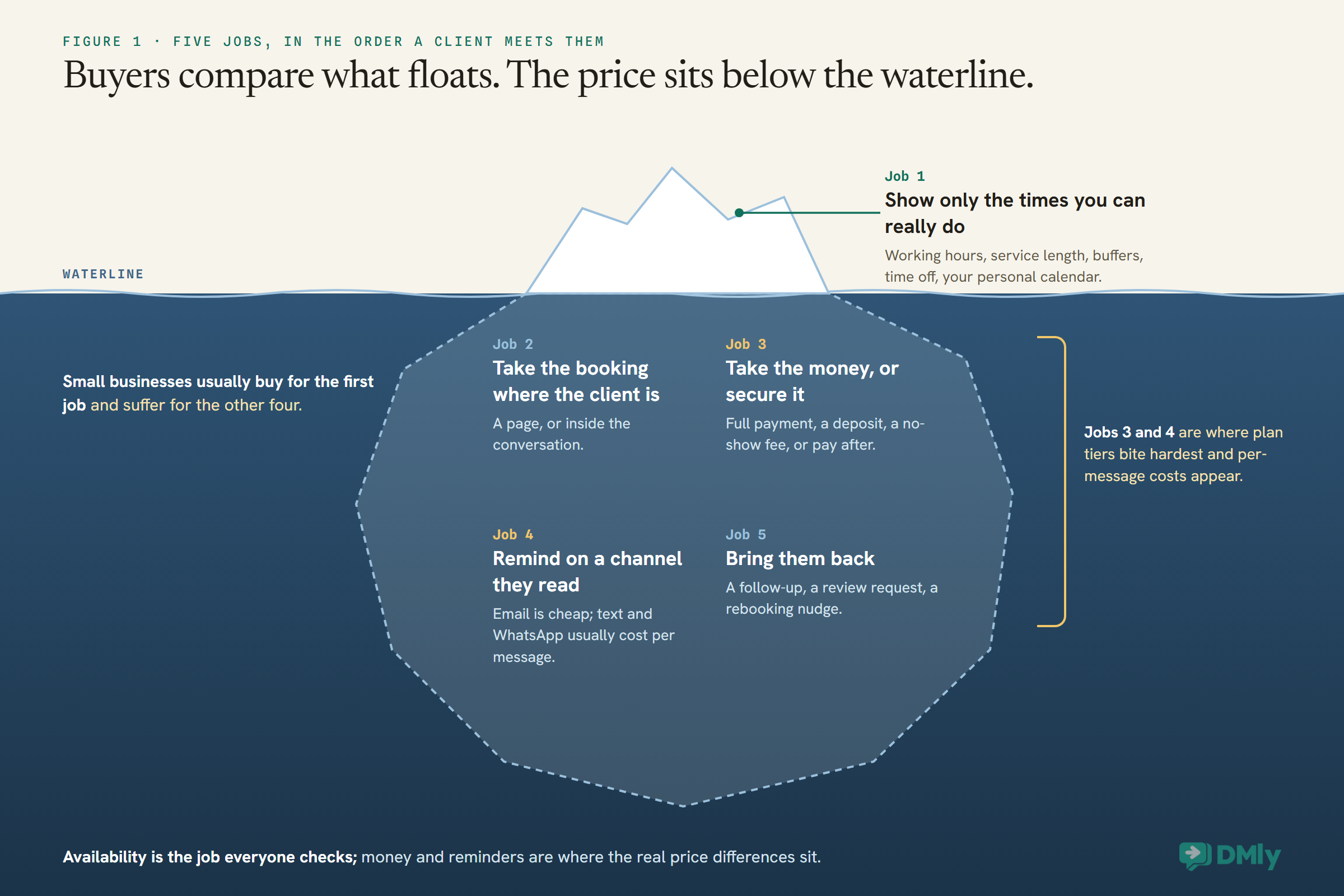
The Five Jobs Booking Software Has to Do
A booking tool is not a calendar with a link. It has five jobs, and small businesses usually buy for the first and suffer for the other four.
1. Show only the times you can really do. Availability has to account for each person’s working hours, the length of each service, gaps for cleaning up or travelling, time off, and anything already in your personal calendar. A tool that gets this wrong offers slots you cannot honour, and a double booking costs more goodwill than no booking at all.
2. Take the booking where the client already is. Some clients book from your website. Others ask in a message: “can I come in Thursday?” Booking software either sends them to a page or books them inside the conversation. The difference shows up in how many of those questions turn into appointments.
3. Take the money, or at least secure it. Full payment in advance, a deposit, a card held for a no-show fee, or payment after the visit. Each tool supports a different mix, and this is where plan tiers bite hardest.
4. Remind the client on a channel they read. Email reminders are cheap and easy to miss. Text and WhatsApp reminders land on the phone the client already checks, and they usually cost something per message, either from the tool or from the network.
5. Bring them back. A follow-up, a review request, a rebooking nudge when a regular goes quiet. Some booking tools stop at the appointment; others treat the appointment as the middle of the relationship.
How We Compared Them
Every tool was judged on the five jobs, from its own pricing page and documentation, on the same day.
We read each vendor’s pricing page in a browser on 25 September 2026 and noted the plan names, the prices, what each plan unlocks and how the price scales: per person, per location or per plan. Where a pricing page shows features as ticks in a comparison grid without making clear which plan includes them, we say the feature is listed rather than guess the plan. For DMly we used its public documentation, which also describes the limits, and we have included those. Prices are in US dollars except Fresha, which showed us local-currency pricing, so we describe how it charges rather than quote a dollar figure. Taxes, card processing fees and messaging charges are extra unless we say otherwise.
We did not score tools out of ten. A booking tool that is perfect for a solo therapist can be wrong for a six-chair salon, so the comparison is organised around situations instead.
The Quick Answer: Best by Situation
| If you are… | Look first at | Why |
| A local business whose clients book by message | DMly | Books inside WhatsApp, Instagram and Messenger chats, with payments, reminders and follow-ups on the same client record |
| A shop or salon already taking cards with Square | Square Appointments | A free plan with unlimited staff calendars, and bookings, payments and point of sale in one account |
| A beauty or wellness business wanting new clients | Fresha | Salon features in depth plus a marketplace where new clients find you |
| A consultant, coach or therapist selling packages | Acuity Scheduling | Intake forms, packages and memberships, and payments on every plan |
| Someone booking meetings, not treatments | Calendly | The simplest way to share availability and let people pick a time |
| A small team on a tight budget | Setmore | A free plan for up to four users and a low per-user Pro price |
| A business that needs lots of options without per-user pricing | SimplyBook.me | Flat plans by booking volume, with a long list of optional features |
The Best Appointment Booking Software for Small Businesses, Reviewed
1. DMly: best when clients book by message
How booking works. DMly has a public booking page, which can be embedded on your website inline or as a popup and served on your own domain on every paid plan. Its difference is what happens in the chat. A flow’s Book Meeting step shows tappable times inside WhatsApp, Instagram and Messenger conversations, and an AI agent given DMly’s booking tools can check real open slots, book, reschedule and cancel for the client in the same conversation. Availability comes from each staff member’s own working hours in their own timezone, minus buffers, time off, existing bookings and busy time from a connected Google Calendar. Classes have a capacity and an optional waitlist that promotes the next person when someone cancels.
Money. Each service can take no payment, send a pay link after the appointment, or require payment before booking, which holds the slot while the client pays (15 minutes on the booking page, two hours when staff book from the calendar) and releases it if they do not. A pay-before service can take a deposit instead of the full price, a percentage from 1 to 99 shown to the client as what they pay now and what is due at the appointment, with the balance left for you to collect. Any service can carry a no-show fee, charged when a booking is marked as a no-show. A payment gateway has to be connected first, or a pay-before service cannot be booked at all.
Reminders and after. Reminders are set per service, for example a day and an hour before, and go out on the client’s own channel. Because the booking sits on the same contact record as the conversations, invoices, loyalty points and review requests, follow-ups and win-back messages can run from the booking itself. Plans are $29, $65 and $149 a month billed yearly.
Watch out for. Calendar sync is Google Calendar only, plus Zoom for video links; Outlook and iCloud are not documented. Outside WhatsApp’s 24-hour window, reminders need an approved WhatsApp template, and a reminder whose template is not approved is dropped rather than sent. The no-show fee charges a saved card only if the client pays a subscription automatically; for everyone else it is a payment link they may not pay. A recurring series booked by your team takes no payment, so collect for courses yourself.
Best for: salons, clinics, gyms, tutors and other local businesses whose clients mostly ask to book in a message, and who want reminders, payments and repeat business handled in one place.
2. Square Appointments: best if you already take payments with Square
How booking works. Square Appointments gives you a booking site, automated reminders and unlimited staff calendars on its Free plan, priced per location. For businesses that already use Square’s card readers or point of sale, bookings and payments sit in one account.
Money. On Free you pay only card processing, which Square lists as 2.6% plus 15 cents in person and 3.3% plus 30 cents online in the US. The Plus plan, at $49 a month per location, adds cancellation and no-show fees and a waitlist, with a 30-day trial and slightly lower processing rates. Premium, at $149 per location, adds features for larger operations such as resource management, and Pro is custom pricing for businesses above $250,000 a year.
Watch out for. The prices and fees quoted here are from Square’s US pricing page, so check the page for your own country before comparing. The free plan is genuinely useful, but no-show protection, which is the reason many businesses want booking software, is a Plus feature.
Best for: retail-adjacent service businesses in countries Square serves, especially those already on Square for payments.
3. Fresha: best for beauty and wellness businesses wanting new clients
How booking works. Fresha is built for salons, spas, barbers and similar businesses. Its pricing page lists waitlists, point of sale, client management, consultation forms, patch tests, memberships, packages, gift cards, group bookings, processing and finishing times, and resources. Clients can book through your own link, your Facebook and Instagram pages, and the Fresha marketplace.
Money. Fresha charges a monthly subscription: a flat price for a one-person business and a price per bookable team member for teams. It showed us those prices in our local currency, so check the figure for your country. It states there are no per-booking fees, and that a one-time fee applies only to brand-new clients who find you through the Fresha marketplace, not to clients who come from your own website or social profiles. Payment processing is optional, and Fresha says taking payments through it adds features such as upfront deposits and no-show protection.
Reminders. Automated email notifications are free; text and WhatsApp notifications come with a monthly allowance (20 per team member on the Team plan) and are then charged per message.
Watch out for. Several features that businesses expect are paid add-ons, including client loyalty and Google review prompts, each charged monthly per location. Budget for the add-ons you would actually use, not just the base plan.
Best for: beauty and wellness businesses that want deep salon features and would welcome new clients from a marketplace.
4. Acuity Scheduling: best for consultants, coaches and practitioners
How booking works. Acuity is a scheduler for businesses that sell time to clients. Plans are priced by the number of calendars: one on Starter, up to six on Standard and up to 36 on Premium. Every plan includes custom intake forms, email reminders and automatic time zone conversion; its comparison grid lists two-way sync with Google Calendar, Outlook and iCloud.
Money. Payments through Stripe, Square, PayPal or Venmo are on every plan. The comparison grid also lists deposits and prepayment, tips, payment links, invoices and cancellation fee protections. Standard adds text reminders, an appointment waitlist, packages, memberships and gift certificates.
Pricing. Starter is $16, Standard $27 and Premium $49 a month billed annually, or $20, $34 and $61 billed monthly, with a seven-day trial. Premium adds an AI booking assistant, a signed BAA for HIPAA, removal of the Acuity logo, and multiple time zones for staff and locations.
Watch out for. Text reminders start on Standard and Acuity notes that their availability varies by country. The calendar count, not the user count, is what pushes you up a plan.
Best for: consultants, coaches, therapists and practitioners who need intake forms and sell packages or memberships.
5. Calendly: best for booking meetings rather than treatments
How booking works. Calendly is the familiar “pick a time on my calendar” tool. It shines for meetings: sales calls, consultations, interviews. You share a link, the other person picks a slot that fits both calendars, and the meeting appears in both.
Pricing. There is a free plan. Standard is $10 a seat a month billed yearly, or $12 monthly, and Teams is $16 or $20. Payments through Stripe and PayPal, and reminders, come with Standard.
Watch out for. Calendly is priced per seat and designed around people’s calendars rather than a service menu, staff rota and treatment rooms. A salon or clinic can use it, but it will be doing the job of a meeting scheduler, not a salon system.
Best for: consultants, agencies and professionals whose “appointments” are really meetings.
6. Setmore: best free plan for a small team
How booking works. Setmore’s Free plan covers up to four users with unlimited appointments, a branded booking page, online and in-person payments, email reminders and confirmations, group classes and booking buttons for Google, Facebook and Instagram.
Money and reminders. Pro, at $5 a user a month billed annually, adds deposits, SMS reminders and multiple reminders, recurring appointments, two-way calendar sync, removal of Setmore branding and a signed BAA for HIPAA. Setmore notes SMS reminder availability varies by country.
Watch out for. On the Free plan, reminders are email only and there are no deposits, which are the two features that do the most about no-shows. Setmore also sells a live receptionist add-on at $99 a month, separate from the booking plans.
Best for: small teams who want to start free and pay a little per person when they need text reminders and deposits.
7. SimplyBook.me: best flat pricing with lots of options
How booking works. SimplyBook.me prices by plan rather than by user, with each plan including a number of bookings a month and a number of service providers. Every plan includes recurring appointments, event bookings, a booking website, a website widget, buffer times, client history and automatic reminder emails.
Money and messaging. Payments, deposits, tips and point of sale start on Basic. Text and WhatsApp messages are bought as credits, 100 for $8 each, rather than included.
Pricing. Free covers 50 bookings and one provider. Basic is $11.9 a month billed annually ($13.9 monthly) for 100 bookings and five providers; Standard $24.9 ($29.9) for 500 bookings and 15 providers, adding HIPAA; Premium $49.9 ($59.9) for 2,000 bookings and 30 providers. There is a 14-day trial.
Watch out for. The booking allowance is the limit to watch. A busy salon can pass 100 bookings a month quickly, and extra bookings are sold in packs.
Best for: businesses that want many features and predictable flat pricing, and can estimate their monthly bookings.
Comparison at a Glance
| Tool | How the price scales | Entry paid price (billed yearly) | Deposit or no-show protection | Book inside a chat |
| DMly | Per plan | $29 a month | Prepayment, deposits and no-show fees | Yes: WhatsApp, Instagram, Messenger, plus AI agent |
| Square Appointments | Per location | Free; Plus $49 a month | No-show and cancellation fees on Plus | Not listed |
| Fresha | Per bookable team member | Local currency | Deposits and no-show protection with Fresha payments | Not listed |
| Acuity Scheduling | By number of calendars | $16 a month | Listed: deposits, prepayment, cancellation fees | Not listed |
| Calendly | Per seat | $10 a seat a month | Payments from Standard | Not listed |
| Setmore | Per user | Free; Pro $5 a user a month | Deposits on Pro | Not listed |
| SimplyBook.me | Per plan, by bookings | $11.9 a month | Deposits from Basic | Not listed |
“Not listed” means the vendor’s pricing page did not list booking inside a messaging conversation; several of these tools do let you put a booking link in your Instagram or Facebook profile, which is a different thing.
What a Three-Person Team Really Pays
When you compare the best appointment booking software for small businesses, the fair comparison is not the entry price. It is the plan you would actually need, for the number of people you actually have.
Take a three-person business that wants text or WhatsApp reminders and some way of securing payment. On yearly billing, where offered, the plan it needs costs roughly: Calendly Standard, three seats at $10, so $30 a month; Acuity Standard, which covers up to six calendars and adds text reminders, $27; Setmore Pro, three users at $5, $15; SimplyBook.me Basic, which covers five providers and 100 bookings, $11.9, plus message credits; Square Appointments Plus, for no-show fees, $49 per location, plus card processing; DMly Starter, $29, plus Meta’s charges for WhatsApp template messages.
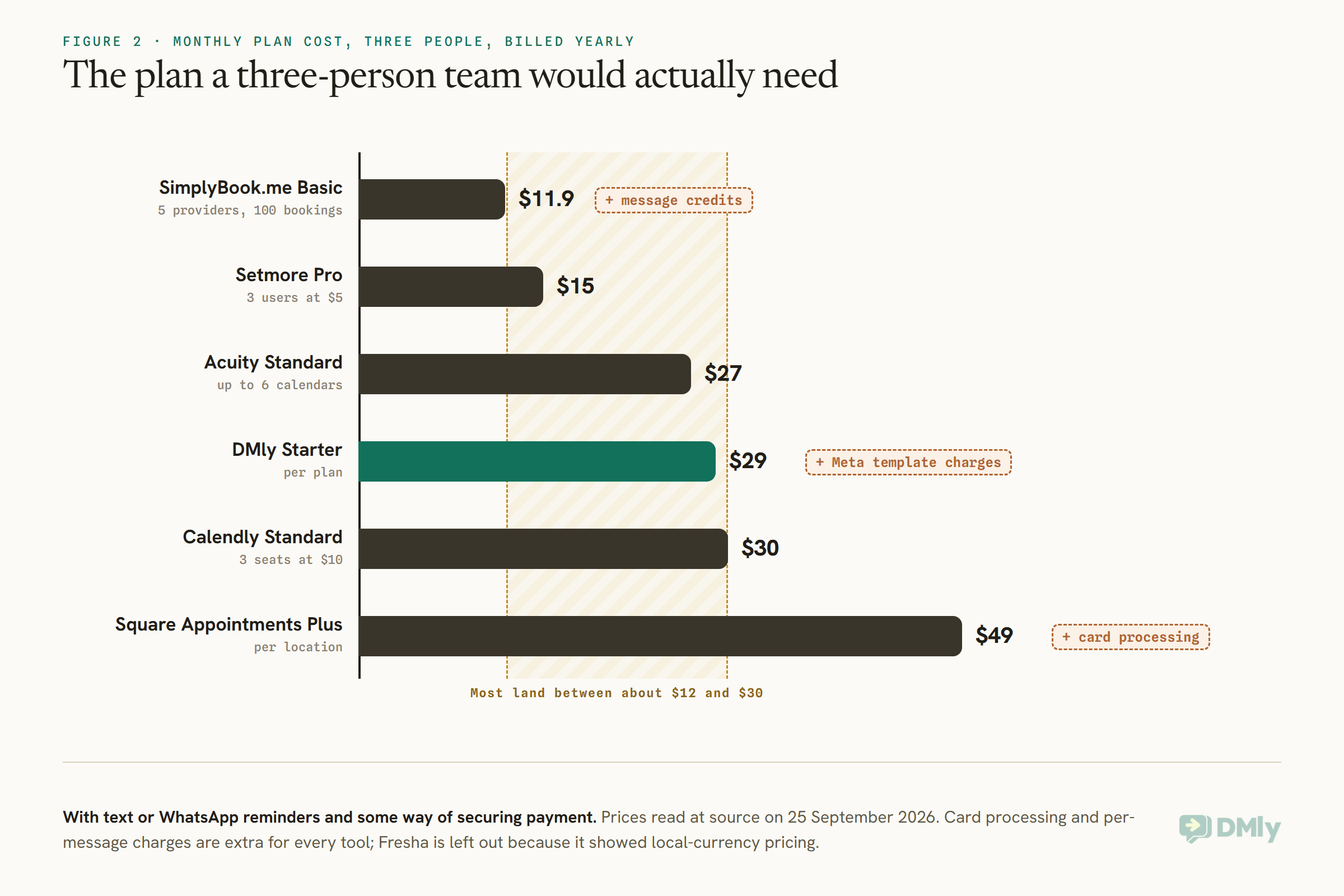
Two things stand out. First, the spread is narrower than the headline prices suggest: most of these land between about $12 and $30 a month for a small team. Second, the extras decide the real bill. A busy business sending two reminders per appointment sends a lot of messages, and whether those are included, sold in credits, or charged by the network per message matters more than a few dollars on the plan. So does the card processing rate on every payment. Do this sum with your own numbers of people, locations, bookings a month and reminders per booking before you choose.
Per Person, Per Location or Per Plan
How a tool charges tells you which kind of growth it will make expensive.
Per-person pricing (Calendly, Setmore, Fresha’s Team plan) is cheap when you are small and grows with every hire. That is fair if each person brings in revenue, but it can make you hesitate to give a part-timer their own calendar. Per-calendar pricing (Acuity) is similar but in steps: six calendars cost the same as three. Per-location pricing (Square) suits a single busy site with many staff and gets expensive when you open a second branch. Per-plan pricing (DMly, SimplyBook.me) keeps the price flat as your team grows, but each plan has its own limits: SimplyBook.me counts bookings a month, while DMly counts team seats and active contacts. In DMly, a bookable staff member does not need a login, so a stylist who only needs to be booked does not use a seat.
Ask yourself what is likeliest to grow in the next year: people, locations or bookings. Then choose the pricing model that does not penalise it.
Deposits, Prepayment and No-Show Fees
This is where booking tools differ most, and where you should read the plan tables most carefully.
There are four ways to handle money at booking, and they protect you differently. Pay after costs the client nothing up front and protects you from nothing. A deposit takes part of the price, which filters out casual bookers while keeping the barrier low. A card on file with a no-show or cancellation fee charges only when someone lets you down, which feels friendliest to good clients. Full prepayment gives the strongest protection and the highest barrier.
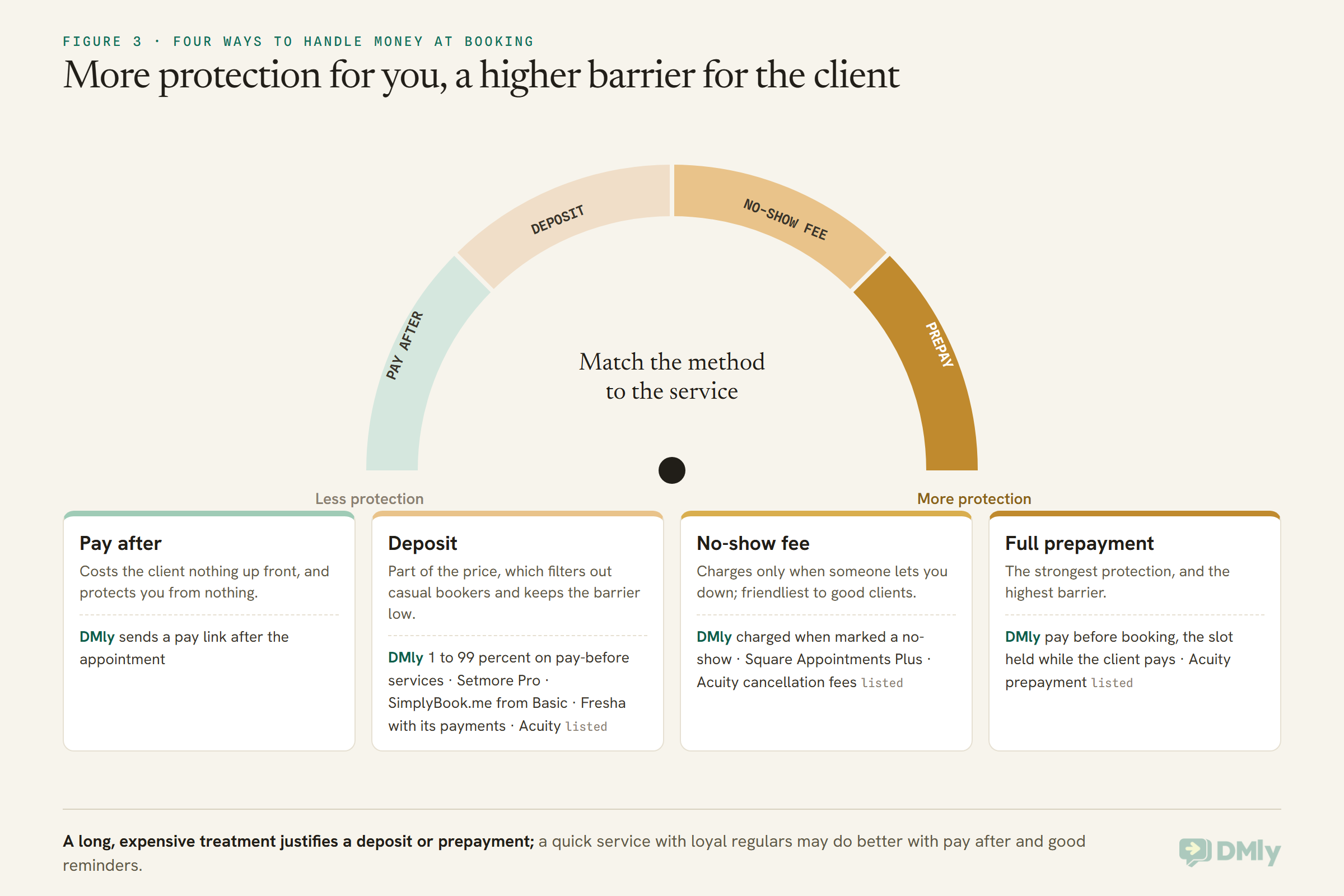
Match the method to your business. A long, expensive treatment with a high cost when the chair sits empty justifies a deposit or full prepayment. A quick, cheap service with loyal regulars may be better with pay after and good reminders. Whatever you choose, state the policy in the booking confirmation, not just in small print. Our guide to taking deposits or full payment for appointments goes through the trade-offs, and how to reduce appointment no-shows covers what works besides money.
Reminders: Which Channel, and Who Pays Per Message
Reminders are the cheapest way to cut no-shows, and the channel decides whether they are read.
Every tool here sends email reminders. The differences are in text and WhatsApp. Acuity adds text reminders on Standard; Setmore on Pro; Square includes automated reminders on its Free plan; SimplyBook.me and Fresha offer text and WhatsApp messages with credits or an allowance, then charge per message. DMly sends reminders on the client’s own channel, most often WhatsApp, and schedules them from the reminder times you set on each service.
WhatsApp reminders have a rule worth knowing whichever tool sends them. A business can message freely only within 24 hours of the client’s last message. Outside that window, which is where most reminders land, WhatsApp requires an approved message template, and Meta charges for template messages by category and country. In DMly’s case, reminders outside the window use templates that must be approved, and one whose template is not yet approved is dropped rather than sent as plain text. Check your templates before you rely on reminders, and read our guide to WhatsApp appointment reminders for timing and wording.
A common pattern, whichever tool you choose, is two reminders: one a day or two before, so the client can rearrange, and one a few hours before, so they turn up. Give the client an easy way to reschedule from the reminder itself. A rescheduled appointment is revenue; a no-show is not.
Booking From a Page or Inside the Conversation
A booking page asks the client to leave the conversation. Some businesses lose more bookings there than they realise.
Most booking software is built around a page. The client clicks a link, chooses a service, a person and a time, and fills in a form. That works well from a website or a Google profile. It works less well when the client has just messaged “can I get in Thursday after work?”, because the reply “here is our booking link” hands them a form to fill in, often on a small screen, for a question they asked in one line.
Booking inside the conversation keeps them where they are. In DMly, the Book Meeting step replies with tappable times in WhatsApp, Instagram or Messenger, and for SMS it sends a booking link instead. If the client arrives on the booking page from a link DMly sent them, the page already knows who they are and skips the name and email fields. For paid services the client is always sent to the hosted page to pay. An AI agent with the booking tools can go further and handle the whole exchange: what do you offer, what is free Thursday, book the 6pm, actually can we move it.
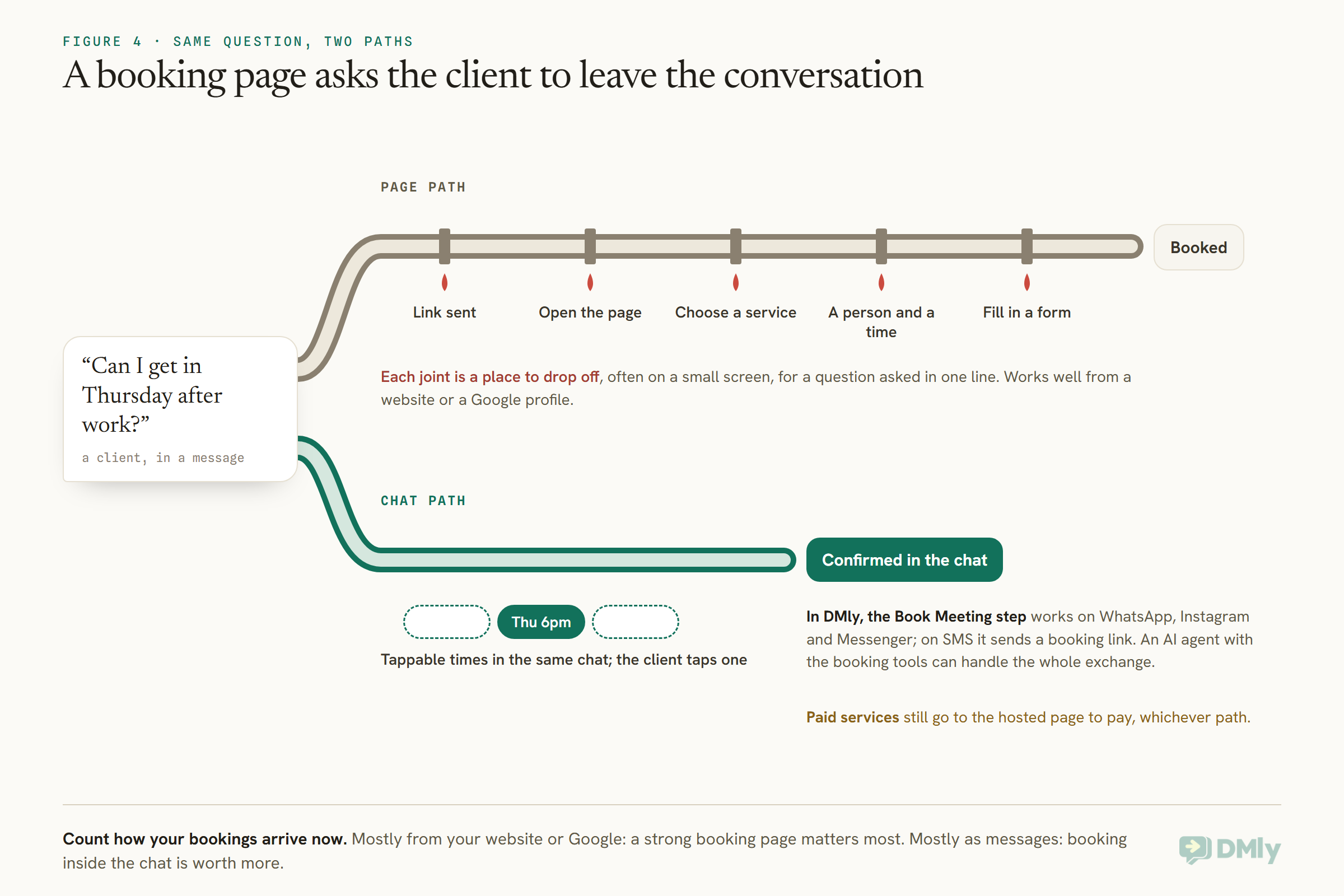
This is the main reason DMly is on this list at all, and it is also the honest test of whether you need it. Count how your bookings arrive now. If most come from your website or Google, a strong booking page is what matters, and several tools here have excellent ones. If most start as messages, booking inside the chat is worth more than any feature on a pricing grid.
Calendar Sync and Double Bookings
If you or your team keep personal calendars, the booking tool has to read them, or it will book over them.
Two-way sync means bookings appear in your calendar and events already in your calendar block time in the booking tool. Acuity’s comparison grid lists two-way sync with Google Calendar, Outlook and iCloud. Setmore includes two-way sync on Pro. DMly syncs with Google Calendar, once for the business and once per staff member, and pulls busy time back so nobody books over a personal appointment; it also creates Zoom links. It does not document Outlook or iCloud, so if your team lives in Outlook, check that first. DMly’s docs also note one trap worth knowing in any tool: deleting a booking’s event from Google Calendar cancels the appointment in DMly without telling the client, so cancel from the booking tool, not the calendar. Our guide to connecting Google Calendar to a booking system covers the setup.
Whatever the tool, test for double bookings before you go live: book a slot from two phones at once and make sure only one succeeds. DMly locks the slot while a booking is written, so the second person sees a message asking them to choose another time.
Classes, Packages and Regular Clients
If your clients book more than one-to-one appointments, check how the tool handles groups and repeat visits.
Group sessions need a capacity and ideally a waitlist. Setmore’s Free plan includes group classes; SimplyBook.me includes event bookings and a setting for how many clients a provider can take at once; Fresha lists group bookings; Acuity lists group events. DMly has classes with a seat capacity and an optional waitlist, and when someone cancels, the next person on the waitlist is promoted; for a paid class, the promoted person gets their own payment hold.
Regular clients need recurring bookings. Setmore puts recurring appointments on Pro; SimplyBook.me includes them on every plan. In DMly, your team can book a recurring series of up to 52 dates from the calendar, weekly, fortnightly, daily or monthly, with one confirmation for the whole series. Clients cannot start a series from the booking page themselves, and a series booked by staff takes no payment through DMly, so invoice it separately.
Packages and memberships, where a client pays once for several visits, are listed by Acuity from Standard, by Fresha and by SimplyBook.me’s feature list. DMly handles them with plans and credits: a service can carry a credit cost, and a booking draws down the client’s credits.
After the Appointment: Reviews and Rebooking
The appointment is the middle of the relationship, not the end. Check what the tool does next.
A booking tool that stops at the appointment leaves the most valuable work to you: asking for a review while the client is happy, and reminding them to come back before they drift to someone else. Setmore’s Pro plan lists Google review requests. Fresha sells Google Rating Boost and Client Loyalty as add-ons. DMly runs this from automations that trigger on the booking: appointment completed, cancelled, rescheduled or marked as a no-show can each start a flow, so a thank-you and review request, a rebooking nudge a few weeks later, or a friendly “we missed you” after a no-show can all be automatic. One detail from DMly’s docs: about a day after an unmarked appointment, DMly closes it as completed by default, which fires the Appointment completed trigger and thanks a client who may not have come. Setting Appointments nobody marked to Wait for review holds those bookings until someone marks them.
How to Test Booking Software in a Week
A trial is only useful if you use it the way your real week works.
Set up your real services with their real durations and buffers, and at least two staff members with different hours. Then run five tests. Book a slot from your phone as a new client and time it. Try to double book the same slot from two devices. Add a personal event to your calendar and check the slot disappears. Take a payment, then cancel and see what happens to the money and the slot. Finally, check the reminders arrive, on the channel you expect, at the time you set, and that the client can reschedule from them. Anything that fails in a trial week will fail on a busy Saturday.
If your clients book by message, add a sixth test: message the business as a client would, in your own words, and see how many steps it takes to get from the question to a confirmed booking.
Mistakes Buyers Make
Most regrets about booking software come from the same handful of oversights.
- Comparing entry prices. Compare the plan that has the features you need for the people you have.
- Forgetting the per-message cost. Reminders on text and WhatsApp are rarely free at volume.
- Turning on prepayment without a gateway. In DMly, a pay-before service cannot be booked at all until a payment gateway is connected. Other tools have their own version of this. Book a paid service yourself before going live.
- Setting durations without buffers. Back-to-back bookings with no cleanup time make every day run late.
- Leaving the cancellation policy vague. Decide your deadline, set it in the tool, and say it in the confirmation.
- Never checking the numbers. Look at bookings, no-shows and cancellations each month. DMly’s appointment reports show total bookings, completed, no-show rate and paid revenue, by service and by staff.
Frequently Asked Questions
What is the best appointment booking software for small businesses?
It depends on how your clients book and how you take payment. For clients who book by message, DMly; for businesses on Square, Square Appointments; for beauty and wellness businesses wanting new clients, Fresha; for consultants and coaches, Acuity; for meetings, Calendly; for a free start, Setmore or SimplyBook.me.
Is there free appointment booking software?
Yes. Square Appointments, Setmore, SimplyBook.me and Calendly all have free plans, each with limits: Setmore’s covers up to four users with email reminders only, SimplyBook.me’s covers 50 bookings a month and one provider, and Square charges card processing on payments.
Which booking software takes deposits?
Setmore on Pro, SimplyBook.me from Basic, Fresha when you take payments through it, and Acuity lists deposits and prepayment. Square Appointments Plus adds no-show and cancellation fees. DMly offers deposits and no-show fees as well as full payment before booking.
Can clients book appointments through WhatsApp?
With DMly, yes: the Book Meeting step shows tappable times inside a WhatsApp chat, and an AI agent can book for the client. Other tools here send reminders or notifications on WhatsApp but did not list booking inside the chat on their pricing pages.
Do I need a booking page if clients book in chat?
Usually yes. Some clients will always book from your website, Google profile or Instagram bio link. DMly gives you a booking page as well as in-chat booking, and paid services go through the hosted page to pay.
How much does appointment booking software cost?
For a three-person team wanting text or WhatsApp reminders and payment protection, most tools here cost roughly $12 to $30 a month billed yearly, with Square Plus at $49 per location. Card processing and per-message charges come on top.
Does booking software reduce no-shows?
Reminders on a channel clients read, an easy way to reschedule, and a payment policy that suits your services all help. No tool removes no-shows entirely, which is why tracking them in your reports matters.
A Bill You Can Predict
The itemised bill at the top of this page is not an argument against any tool. Every one of them charges for real work: seats, messages, payments, features. The point is to add it up before you sign up, not after. Decide how your clients book, how you want to secure payment, and which channel your reminders need to reach. Then price the plan that does those things for your team, and test it for a week with your real services. If your clients mostly book by message, DMly’s plans are worth putting in that sum. For the wider picture, our guide to the best WhatsApp business software for small businesses compares tools beyond booking.
Writing about WhatsApp automation, bookings and growth for local business.
Turn WhatsApp into your busiest channel.
Start free and run message, bookings, payments and reviews in one place.
