
WhatsApp Drip Campaigns: 10 Examples and the Rule That Decides Whether They Arrive
Meta limits how many marketing messages a person receives from any business, and it decides that limit for each person individually. Its own documentation says the decision uses “a dynamic view of an individual’s recent marketing message read rate and how many messages they currently have in their inbox from friends, family, and businesses”.
Read that twice, because it is the strangest fact in WhatsApp marketing. Whether your day-three message reaches somebody depends partly on how many messages they have waiting from their friends. You cannot see it, you cannot query it, and it moves.
That is why a WhatsApp drip campaign is not an email sequence with a different envelope. On email, sending five messages costs nothing and everything you send is delivered. On WhatsApp, each message after the window closes is a pre-approved template that costs money, and an invisible per-person cap decides whether it lands.
There is one way out of that, Meta publishes it, and the whole craft follows from it. This guide covers the rule first, then the two tools you build a WhatsApp drip campaign with, then ten campaigns written the way they can actually be built.
Why a WhatsApp Drip Campaign Is Not an Email Sequence
Three differences, and each of them changes the design rather than the wording.
- The later messages have to be written before you know anything. Outside the 24-hour customer service window, WhatsApp will only carry a template Meta has approved in advance. So your day-five message is drafted, submitted and reviewed weeks before the person it is going to has said a word. There is no writing it in response to what they told you on day two.
- Every one of those templates is billed. A drip is not a free channel. Each template message is charged on delivery, and a five-step run to ten thousand contacts is a real line in the budget rather than a rounding error.
- Delivery is capped per person, invisibly. This is the one nobody plans for, and it is the subject of the next section.
None of that makes drip campaigns a bad idea on WhatsApp. It makes them a different shape: shorter, fewer, and built to earn an answer rather than to accumulate impressions.
The Rule Everything Else Follows From
A reply does more for a WhatsApp drip campaign than any other single thing you can do to it.
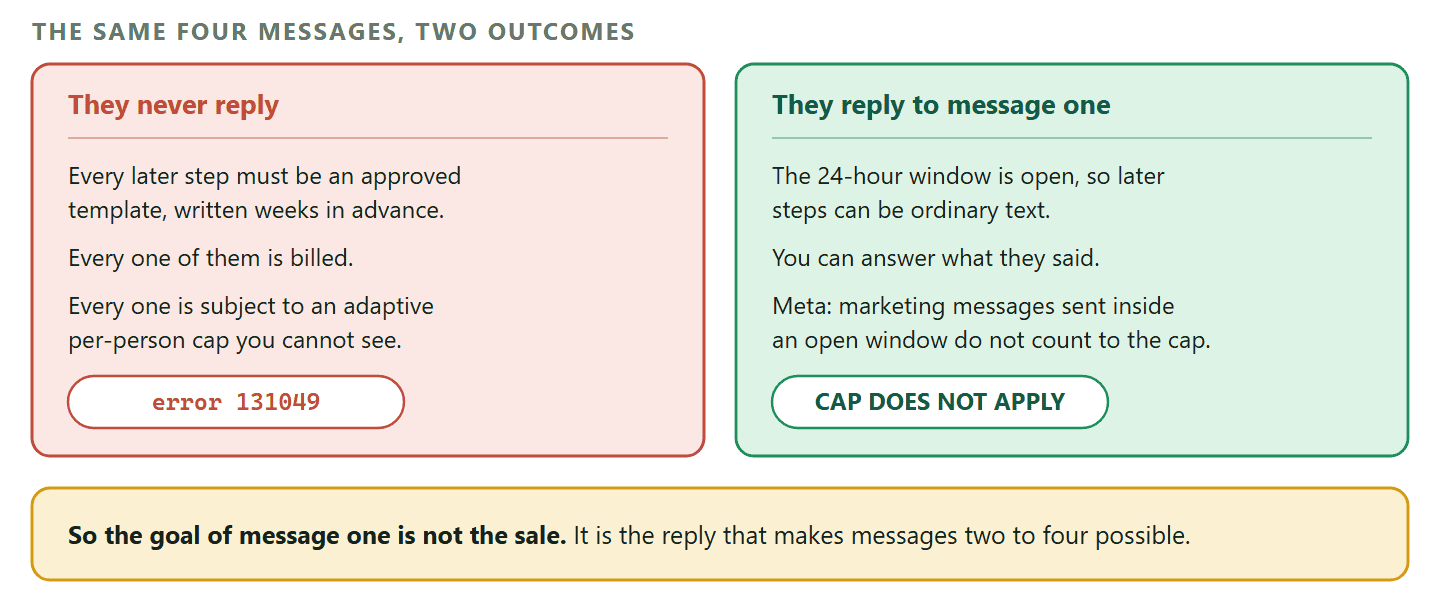
Meta’s per-user marketing limits page is short and worth knowing by heart. It says WhatsApp “may limit the number of marketing template messages a WhatsApp user receives from any business in a given period of time when they are less likely to be receptive”, that the limit “adapts automatically over time based on a person’s recent engagement levels”, and that a message which exceeds it comes back with error code 131049 and a status of failed. Meta’s advice is to “wait at least 24 hours before attempting to resend a marketing template message to a user that has reached their limit”, because retrying sooner produces more errors and quietly wrecks your own delivery reporting.
Then comes the sentence that shapes every campaign on this page. Marketing messages sent within a 24-hour customer service window, after the person has responded, do not count toward the limit.
What that means in practice: A drip campaign that never gets a reply is fighting an adaptive cap on every step, one you cannot measure, set per person by their own recent behaviour. A campaign whose first message gets a reply is not fighting it at all: the window is open, the later steps can be free-form, and they are exempt from the cap. Design for the reply. Everything else is downstream of it.
There is a second failure worth knowing because it is completely silent. A person can tell WhatsApp to stop receiving marketing messages from your business. Send to them anyway and Meta says “the API will process the request but not send the message”, returning error code 131050 with the reason that the recipient has chosen to stop receiving marketing messages from you. The call succeeds. The message does not exist.
So your reporting will show a send. Your customer will show nothing. If a re-engagement campaign reports well and produces nothing, this is the first place to look, along with your quality rating and messaging limits.
Two Tools, and Most Drips Need the Second
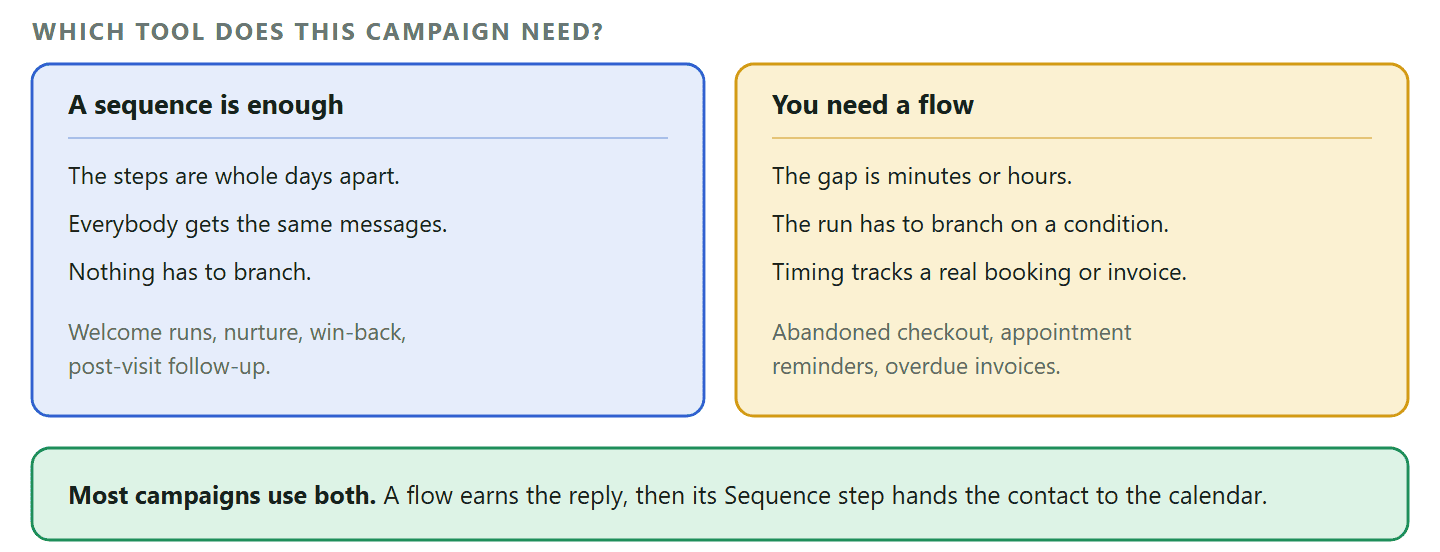
DMly has a drip campaign feature and an automation builder, and choosing wrongly is what makes a campaign impossible to build halfway through.
The drip campaign feature is called Sequences, under Automation. A sequence is a calendar: an ordered set of steps, each with a Day number, delivered to each contact from the moment that contact subscribes. Someone who enquired this morning is on day 0 while someone who enquired last week is on day 5, and both are working through the same run at their own pace.
Three things about sequences decide whether one fits your campaign.
- A step’s Day is a whole number of days. Day 0, day 1, day 3. There is no half day and no hours. If your campaign needs a message an hour after something happened, a sequence cannot express it.
- A sequence does not react. It sends step two a day after step one whether the contact replied or not. There is a single Stop when the contact replies switch, off by default, and that is the whole of its branching.
- There is exactly one way in. The flow builder’s Sequence step subscribes a contact. There is no button on a contact record, no bulk action and no import.
A flow is the other tool and it is a conversation rather than a calendar. Its waiting step is Smart Delay, which has three modes worth knowing:
- Duration waits a fixed amount of time and takes minutes, hours or days. This is what an abandoned checkout needs.
- Wait until holds the run until the next moment inside a window of days and times you draw, which is how an overnight enquiry waits for office hours instead of pinging somebody at 03:00.
- Until event waits for a date DMly reads off the actual appointment, invoice or subscription, with an offset. If the booking moves, the reminder moves with it, because the object is re-read when the step runs.
The Until event mode also grows a second output called SKIPPED, taken when waiting has stopped making sense: the appointment was cancelled, completed or marked a no-show, or the invoice was settled, voided or refunded. That is the difference between a reminder and a reminder sent to somebody who cancelled a week ago.
The combination most real campaigns use: A flow for the conversation, which reacts in seconds and can branch, and a Sequence step inside it that hands the contact to a sequence for the days that follow. The flow handles the reply you are trying to earn. The sequence handles the calendar afterwards.
Ten Drip Campaigns, Written the Way They Can Be Built
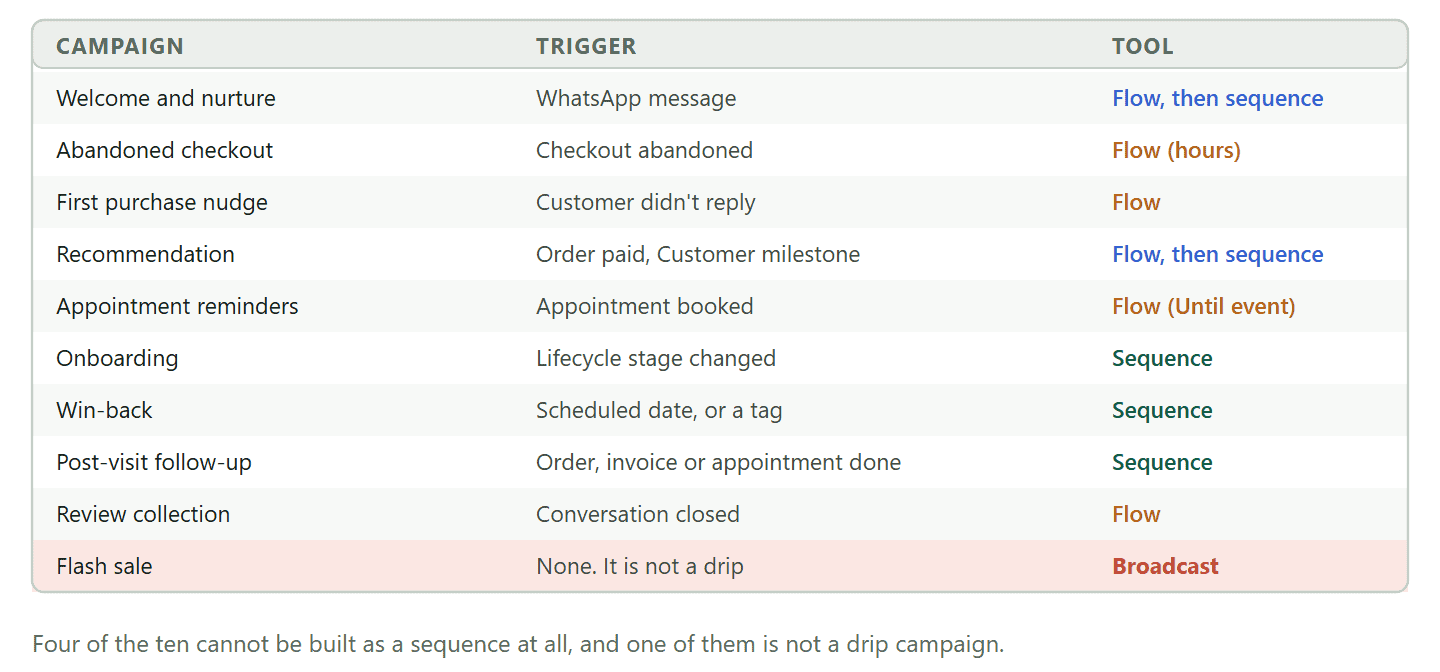
Each one names the trigger that starts it, the tool it needs and whether it needs an approved template, because those three decide whether it works.
1. Welcome and lead nurture
Trigger: WhatsApp message, or New contact. Tool: flow, then a sequence. Templates: step one no, later steps yes.
Somebody messages you for the first time. The flow answers immediately and asks a question, which is the entire point of it. Then the flow’s Sequence step subscribes them to a short run: day 1 shows what you do, day 3 invites them to book. Because step one is a live reply inside the window, it is free-form and free of the per-user cap. Build the day 1 and day 3 steps as templates so they reach the people who did not answer.
2. Abandoned checkout recovery
Trigger: Checkout abandoned. Tool: flow with a Smart Delay in hours. Templates: yes, unless they messaged you recently.
This is the example most guides get wrong, because the useful gap is an hour or two and a sequence only does whole days. Build it as a flow: Checkout abandoned, Smart Delay set to Duration with the unit on Hours, then the message. One honest condition: store events like this one fire from a connected Shopify or WooCommerce store, so this campaign needs that connection rather than just a WhatsApp number.
3. Turning a first enquiry into a first purchase
Trigger: Customer didn’t reply. Tool: flow. Templates: usually yes.
There is a WhatsApp trigger for exactly this: a contact does not reply to your last message. It is a better start than a timer, because it only fires for the people who actually went quiet, which keeps your paid template volume down and stops you chasing somebody who is mid-conversation with you.
4. Product or service recommendation
Trigger: Order paid, or Customer milestone. Tool: flow, then a sequence. Templates: yes.
Recommendation drips fail when they recommend the thing the person just bought. Trigger on the purchase rather than on a date, use the store filters to narrow which orders qualify, and let the milestone trigger handle the customers who cross a spend or order-count threshold you set. Two steps is usually enough.
5. Appointment reminders and confirmations
Trigger: Appointment booked. Tool: flow with Smart Delay in Until event mode. Templates: utility.
This is the campaign that must not be a sequence, and the reason is worth understanding. A sequence counts days from the subscription; a reminder has to count backwards from the booking. Smart Delay’s Before the appointment anchor reads the appointment itself and re-reads it when the step runs, so a rescheduled booking is reminded at the right time without anybody touching the flow. Wire the SKIPPED output and a cancelled appointment stops the run instead of getting a reminder.
6. Customer onboarding
Trigger: Contact converted to client, or Lifecycle stage changed. Tool: sequence. Templates: mixed.
Onboarding is the campaign sequences were built for: the same short run, the same order, starting whenever a given person joins. Day 0 confirms what happens next, day 2 covers the one thing people get stuck on, day 5 asks whether they got there. Keep it to three steps. A new customer who is already happy does not need a course.
7. Re-engagement and win-back
Trigger: Scheduled date, or a tag applied by a segment you maintain. Tool: sequence. Templates: marketing, every step.
This is where the per-user cap bites hardest, because by definition you are messaging people who have not engaged recently, which is exactly the signal Meta’s limit reads. Expect a share of 131049 failures, do not retry inside 24 hours, and keep the run to two steps. A win-back that opens with a question a quiet customer might actually answer will outperform a longer one that opens with an offer.
8. Post-purchase and post-visit follow-up
Trigger: Order paid, Invoice paid, or Appointment completed. Tool: sequence. Templates: utility for the first step.
The strongest three-step run most local businesses can build. Day 1 checks how they got on, day 2 asks whether they would recommend you, day 3 nudges a rebooking. Note the small print on one trigger: Appointment completed fires when an appointment is marked completed by you, by a flow or through the API, and not when a past booking is retired automatically.
9. Feedback and review collection
Trigger: Conversation closed. Tool: flow. Templates: usually not, if you are quick.
Closing a conversation in the inbox is the natural moment to ask, and it is a trigger in its own right. Because the customer has almost certainly messaged you within the last day, the window is open and the ask can be an ordinary message. The flow builder also has a Request Google review action, so the ask and the link are one step rather than a copy and paste.
10. The flash sale, which is not a drip
Trigger: none. Tool: a broadcast. Templates: yes.
A limited-time offer is one message, to many people, today. It has no per-contact clock, so there is nothing for a sequence to do. Send it as a broadcast, which is the tool for the message that only makes sense today. The test is simple: if the message would make just as much sense to somebody who enquires next month, it belongs in a sequence. If it only makes sense now, it is a broadcast.
Five Things That Break a Drip Campaign Once It Is Live
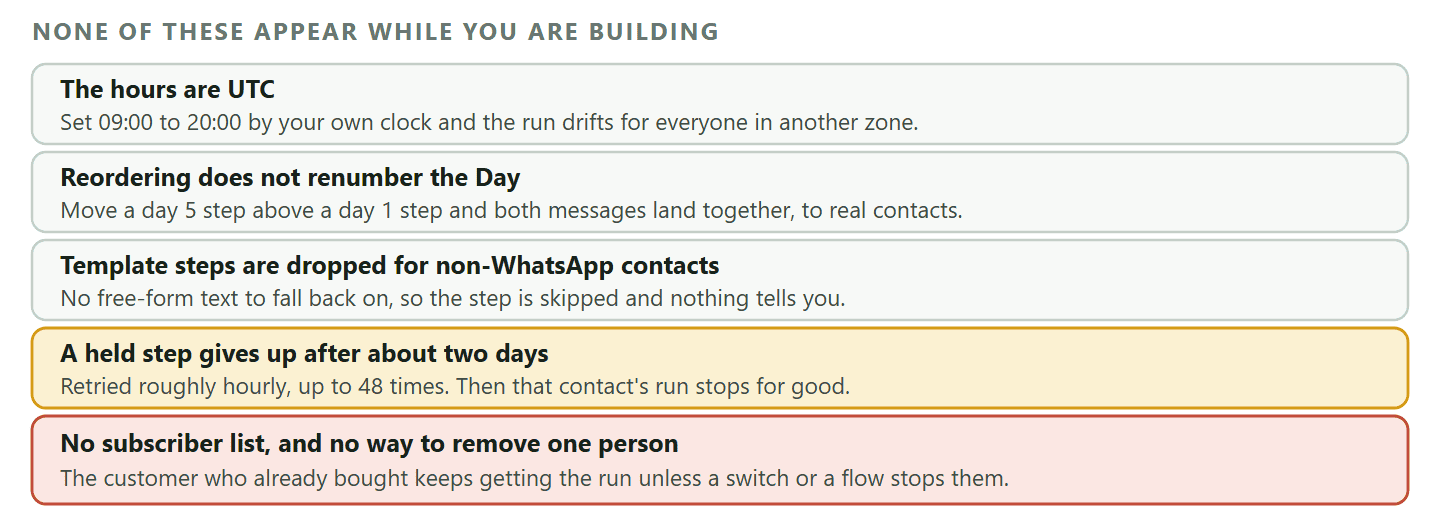
None of these show up while you are building. All of them show up two weeks later.
- The hours are read in UTC. A sequence step has a From and To time controlling when it may go out, defaulting to 09:00 to 20:00, and those times are UTC rather than yours. Set them by your own clock and a run for customers in Lagos or Karachi will drift into the evening.
- Reordering a step does not renumber its Day. Because the wait is the gap between consecutive Day numbers, dragging a day 5 step above a day 1 step leaves no gap at all, and the second message goes out to real contacts as soon as the first one lands. After any reorder, read the timeline top to bottom and check the numbers still climb.
- A template step is silently skipped for anyone who is not on WhatsApp. A sequence delivers on whichever channel the contact actually uses. A free-form step still reaches them, but a template step has no text to fall back on, so it is dropped and the run moves on with nothing to tell you. Subscribe only WhatsApp contacts to a template-based WhatsApp sequence.
- A held step gives up after about two days. When a step comes due and the channel will not carry it, DMly holds it and retries roughly hourly, up to 48 times. If the contact messages you in that window it goes out in order. If they never do, that contact’s run stops there and no later step is sent. This is the mechanism behind the most common complaint about drips, which is that half the list stops receiving the drip campaign.
- There is no subscriber list and no way to remove one person by hand. You cannot see who is mid-run, and a contact who replied and booked on day 1 still gets day 2 and day 3 unless the sequence’s Stop when the contact replies switch is on or a flow unsubscribes them. Plan the way out when you plan the way in.
One more, because it fails without an error: Delete a sequence that a flow is still pointing at and nothing breaks loudly. The flow keeps running and its Sequence step simply does nothing. If you retire a campaign, open the flows that fed it and repoint or remove the step.
What a Drip Campaign Costs, and What Changes on 1 October 2026
Budget by message rather than by campaign, because that is how Meta charges.
Every template message is billed on delivery, and the category decides the rate. A marketing template costs more than a utility one, which is one reason a follow-up that can honestly be written as a utility message is worth writing that way. Free-form messages sent inside an open 24-hour window are the cheap part of any drip campaign today, which is the second reason the reply matters so much.
That last point changes soon, and it changes in a specific way that is easy to get backwards. Meta will start charging for service messages and, separately, will charge on a per-message basis for utility messages sent in response to users within an open 24-hour customer service window. Both are free until 1 October 2026. Meta also states that it does not offer volume tiers for service messages, so unlike template categories there is no discount for sending more.
What this does to a drip campaign specifically: The design advice on this page does not change: a reply still exempts you from the per-user cap and still lets you write what you actually mean. What changes is the arithmetic. A long in-window run that is free this month has a per-message cost from 1 October 2026, so the argument for two good messages instead of six mediocre ones gets stronger rather than weaker. The detail is in our guide to the 1 October pricing change.
Writing a First Message That Earns a Reply
Everything above says the reply is the goal, so here is the part that actually produces one.
The message that gets answered is short, sounds like a person, and ends on a question that is easy to answer. That is most of it. The failures are consistent enough to list.
- Ask one question, not three. Two questions in one message reliably gets you an answer to the second one only, and three gets you silence. Pick the one whose answer changes what you do next.
- Make it answerable in four words. “What day suits you?” gets replies. “Tell us about your requirements” does not, because answering it is work.
- Put the awkward thing in the first message, not the fourth. The deposit, the lead time, the fact that you do not cover their area. People answer honest messages and ignore smooth ones.
- Do not open with the offer. A discount in message one reads as a broadcast, and a broadcast does not get replied to. Save it for the step where a reply has already opened the window and it costs you less to send.
- Say who you are in the first line. Your template arrives in a thread that may have nothing else in it. A person who cannot place you does not reply, they mute.
If you want a fuller treatment of how automated conversations are built around this, our guide to WhatsApp automation covers the flow side in detail.
Building a Drip Campaign End to End
The post-visit follow-up, because it is the run most businesses get results from and it uses both tools.
Three messages after somebody has been in: how did you get on, would you recommend us, ready to book again. Here is the whole build, in the order the screens want it.
- Get the templates approved first. Days 1 and 3 will be going to people whose window has closed, so they need approved templates and approval takes as long as Meta takes. Submit them before you build anything else, or you will finish the campaign and then wait on it. Write the day 1 one as a utility message if it honestly is one, because it costs less than a marketing message.
- Create the sequence. Select the WhatsApp channel first, because a sequence belongs to the channel that was selected when it was created and that can never be changed afterwards. Then Automation, Sequences, New sequence. Name it after the job:
Post-visit follow-up. - Set the Day numbers and the hours. Day 1, day 3, day 7 is a reasonable run. Check the From and To times, remembering they are read in UTC, and shift them so the messages land in your customers’ daytime rather than yours.
- Pick the Send as option on each step. Standard send is free-form and only delivers inside the 24-hour window. Utility template and Marketing message both deliver outside it. For a run that has to reach everybody, the later steps are templates.
- Decide the exit before you decide anything else. Turn on Stop when the contact replies if any reply should end the run, which for this campaign it usually should. If you want a subtler exit, leave it off and unsubscribe them from the flow instead.
- Build the flow that feeds it. A new flow on the same channel, triggered on Appointment completed or Invoice paid. Add the Sequence step from the Logic group, point it at your sequence, publish. Nothing sends until this exists, because subscribing through a flow is the only way in.
- Test it on yourself, then read the timeline. Run one real contact through, check the first message arrives as you expect, and read the sequence timeline top to bottom to confirm the Day numbers still climb after any edits.
The version that performs better, once the simple one works: Put a flow in front of the sequence rather than a bare trigger. A short question sent while the window is still open (“How did today go?”) costs nothing, and every person who answers it takes the rest of the run out of Meta’s per-user cap and lets you write the later steps as ordinary messages. That is the same argument as figure 1, applied to one campaign.
What You Can Actually Measure
Not what you would expect, and knowing this before you launch saves an argument later.
There is no report for a sequence. A sequence’s own list shows a Subscribers number, and it is a count of contacts working through it right now rather than a lifetime total, so it goes down as people finish rather than up. The overview’s Active sequences figure counts contacts mid-run too, not sequences, which is why it can read twelve on a workspace with three.
What you do get is per-template performance, and for a drip that is the useful half. On the templates page each row carries lifetime Sent, Delivered and Read counts with the read rate shown against Delivered, plus Replied. Open View performance on a template and you get those five totals with Failed, a 30-day daily chart, and, when Failed is above zero, a selectable tile that lists up to the 100 most recent failed sends with the contact, the reason and the date.
Two caveats decide how you read all that.
- The numbers are per template and lifetime, not per campaign. If the same template is used by a broadcast and by a sequence step, its counts are both of them added together. Give a drip its own templates if you want to be able to tell what it did.
- A send that never reached WhatsApp does not appear at all. The template’s Failed count only covers messages WhatsApp accepted and later reported as undelivered. Anything rejected before that never enters the template’s numbers.
The number worth watching is Replied. On most channels it would be a vanity metric. On WhatsApp it is the one that predicts whether the rest of your run gets delivered at all, because a reply opens the window and takes that contact out of the per-user marketing cap. A drip with a low reply rate on message one is not a campaign that needs more messages. It is a campaign that needs a better first one.
DMly has both halves of a drip: flows for the conversation, sequences for the days that follow, and the triggers that start them. See the plans if you want to try the post-visit follow-up first, which is the one most businesses get results from.
Frequently Asked Questions
What is a WhatsApp drip campaign?
A WhatsApp drip campaign is an ordered set of messages sent to each contact on a schedule that starts when that contact joins, rather than all at once to everybody. In DMly the feature is called Sequences, and each step has a Day number counted from the moment the contact was subscribed.
How many messages should a WhatsApp drip campaign have?
Fewer than you would use on email. Two or three is a normal run and five is a lot, because every message outside the window is a billed template subject to a per-person cap you cannot see. The number that matters is not how many you send but whether the first one gets answered.
Are WhatsApp drip campaigns allowed?
Yes, within the rules. Messages outside the 24-hour window must use templates Meta has approved, marketing templates are subject to per-user limits, and anyone who opts out must stop receiving them. A campaign built on approved templates to contacts who chose to hear from you is exactly what the platform is for.
Why do my later drip messages stop arriving for some people?
Usually the window. A free-form step only reaches somebody who has messaged you recently. When they have not, DMly holds the step and retries about hourly for roughly two days, then that contact’s run stops. Build the later steps as approved templates and they arrive regardless.
Can I set a drip message to send a few hours later?
Not in a sequence, where a step’s Day is a whole number of days. Build it as a flow instead and use a Smart Delay in Duration mode, which takes minutes, hours or days. That is the right tool for anything shorter than a day, including abandoned checkout recovery.
How do I stop a drip when the customer converts?
Deliberately, because it does not happen by itself. Either switch on the sequence’s Stop when the contact replies option, which is off by default, or add an Unsubscribe Contact step to the flow that runs when they do the thing you were asking for. There is no way to remove one contact from a sequence by hand.
Do drip campaigns work for small businesses?
They work better for small businesses than for large ones, because a two-step follow-up after a visit is well within reach and is the thing most local businesses never get round to doing manually. Start with the post-visit run and add nothing until it is working.
Fewer Messages, Better Aimed
The instinct carried over from email is that a longer drip campaign is a stronger one. On WhatsApp the opposite is closer to true, because length costs money and, past a point, delivery.
Pick one campaign from the ten, start it on the thing your customer actually did rather than on a date, make the first message something a person would answer, and plan how somebody gets out of it before you turn it on.
Writing about WhatsApp automation, bookings and growth for local business.
Turn WhatsApp into your busiest channel.
Start free and run message, bookings, payments and reviews in one place.
