
QuickReply.ai Review 2026: What Counts as One Chat
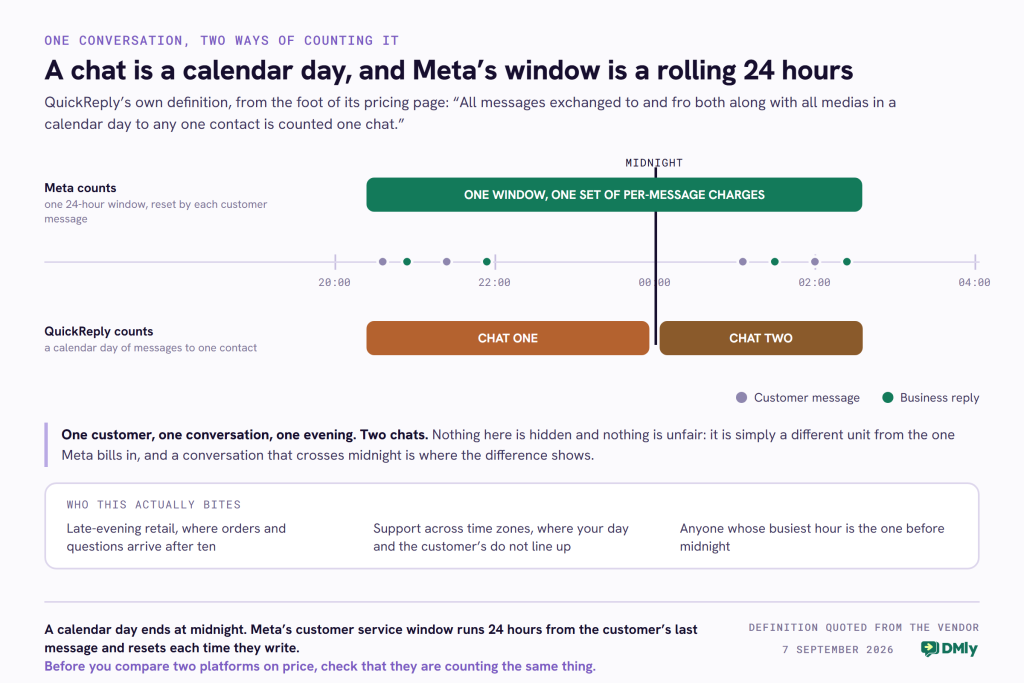
At the very bottom of QuickReply.ai’s pricing page, under the comparison grid, in the smallest type on the page, is this sentence: “All messages exchanged to and fro both along with all medias in a calendar day to any one contact is counted one chat. Chat charges vary by destination number country.”
That footnote matters more than any of the prices above it. Every WhatsApp platform bills you twice, once for the software and once for the messages, and the second bill is usually the bigger one. What that sentence does is define the thing being counted, and QuickReply counts something nobody else on this blog counts: a calendar day of messages with one person, in both directions, media included, as a single unit.
So this QuickReply.ai review spends most of its length on that unit, on what their published rate card actually says, and on the one question you should ask before signing anything. It also corrects several things this page used to say, most of them in QuickReply’s favour.
Who QuickReply.ai Is, and What It Sells
Step zero first. Checked on 7 September 2026: quickreply.ai returns 200 on the root, the robots file and the pricing page, redirecting to the www host, with a real, current product behind it and a rate card that has been revised for what happens on 1 October. The vendor is trading.
QuickReply.ai is a conversational commerce platform built first and foremost around WhatsApp, aimed hard at online retail. Its own navigation lists WhatsApp, Instagram, Messenger, RCS, SMS and a website widget as channels, and its use case menu reads like an e-commerce operations checklist: cart and checkout abandonment, product browsing abandonment, order updates, cash-on-delivery confirmation, converting cash on delivery to prepaid, return-to-origin reduction, repeat purchase reminders, feedback and NPS collection, upsell and cross-sell, and appointment booking.
That is a narrower and more opinionated product than most of the platforms compared on this blog, and being narrow is not a weakness. If your business is a Shopify or WooCommerce store and the thing you want automated is the gap between an abandoned basket and a completed order, this is a tool designed for that specific job by people who have clearly done it a lot.
QuickReply.ai Pricing in 2026, and the Number Every Comparison Gets Half Right
The old version of this page quoted Starter at $39, Standard at $99 and Plus at $199, and all three of those figures are correct. It is worth saying so plainly. What it did not say is that those are the prices on an annual commitment, and that the same three plans cost half as much again if you want to pay quarterly.
| Plan | Billed annually | Billed quarterly | Agent logins included | Monthly active contacts |
|---|---|---|---|---|
| Starter | $39 a month | $59 a month | 1 | Unlimited |
| Standard | $99 a month | $149 a month | 2 | Unlimited |
| Plus | $199 a month | $299 a month | 5 | Unlimited |
| Enterprise | Quoted | Quoted | Not stated | Unlimited |
Three things in that table deserve a sentence each.
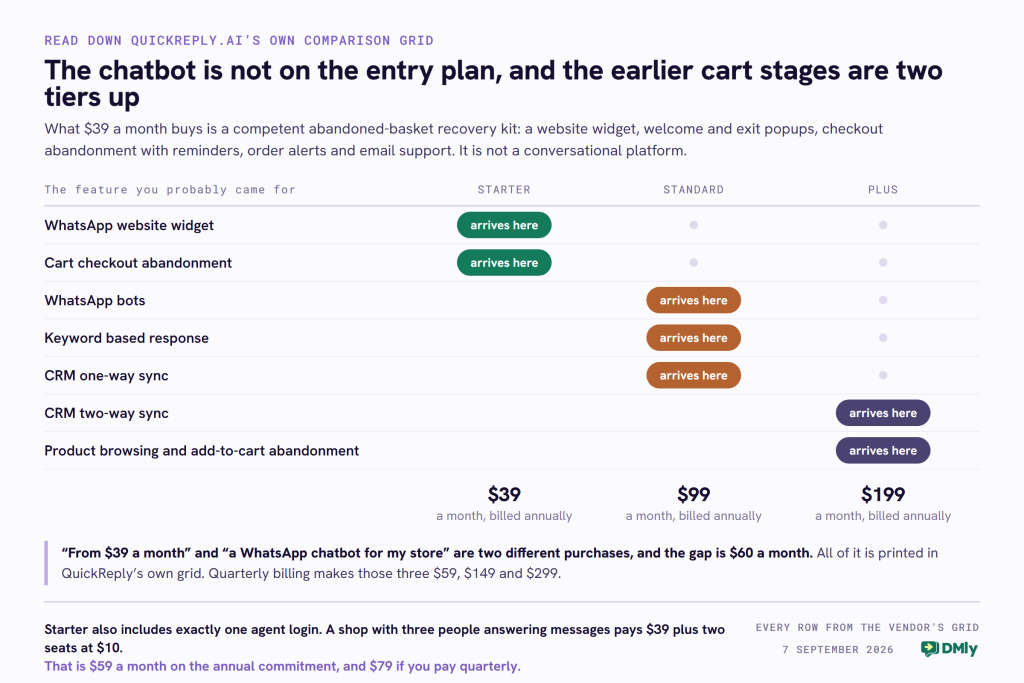
Starter includes one agent login. Not one owner plus some agents, one login. A shop with three people answering WhatsApp is on $39 plus two extra seats at $10, which is $59 a month before a single message is sent, and that is on the annual commitment. On quarterly billing the same three people cost $79.
Monthly active contacts are unlimited on every plan. That is a genuine and unusual strength. QuickReply does not charge you for holding a list, which for an online retailer with fifty thousand past customers is a materially different proposition from any per-contact platform, ours included.
The annual and quarterly prices differ by about a third, and only the annual number ever gets quoted. If you have seen $39 attached to QuickReply anywhere, including on the older version of this page, that was the twelve-month price.
What “One Chat” Means, and Why the Unit Decides the Bill
Here is the sentence again, because everything below turns on it: “All messages exchanged to and fro both along with all medias in a calendar day to any one contact is counted one chat.”
Read carefully, that unit has three properties, and each one has a consequence.
- It is a calendar day, not a rolling window. Meta’s own customer service window is 24 hours from the customer’s last message and resets each time they write. A calendar day ends at midnight. A conversation that starts at eleven at night and continues at one in the morning is one Meta window and two QuickReply chats.
- It counts both directions. Meta charges “for messages from businesses to WhatsApp users only, and only when the message is delivered”, in its own words. The customer’s replies are free to you on Meta’s meter. On a chat meter they are part of the same billable unit, which is neither better nor worse, just different.
- It bundles media. A day in which you send a product photo, a size chart and a payment link to one person is one chat.
Now the part that is genuinely useful, and that no comparison of this platform seems to have done. QuickReply publishes a full country-by-country rate card, in rupees and dollars, with four columns matching Meta’s message categories. Set the two side by side and you can work out the volume at which a bundle beats a per-message rate.
| Category | QuickReply, North America | Meta, North America | QuickReply, India | Meta, India |
|---|---|---|---|---|
| Marketing | $0.0285 | $0.0250 | 1.049 | 0.8631 |
| Utility | $0.0047 | $0.0034 | 0.174 | 0.1150 |
| Authentication | $0.0047 | $0.0034 | 0.174 | 0.1150 |
| Service | $0.0105 | Nothing until 1 October, then the utility rate | 0.414 | Nothing until 1 October, then the utility rate |
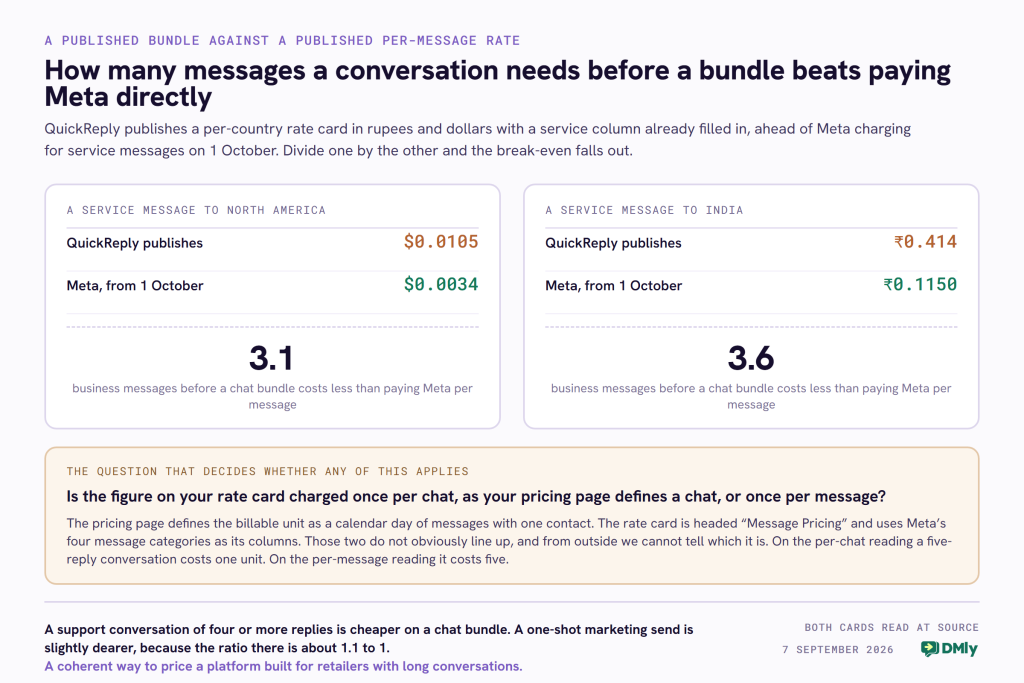
Divide one by the other and you get a break-even in messages. QuickReply’s North American service figure is $0.0105 against a Meta service rate of $0.0034 from 1 October, so the two are level at about three business messages. In India it is 0.414 against 0.1150, level at about three and a half. On marketing the ratio is much tighter: 1.2 messages in India, 1.1 in North America, and a marketing send is almost always one message.
So if a chat really is a day’s worth of messages, the arithmetic is straightforward and rather favourable: a support conversation of four or more replies is cheaper on a chat bundle than on a per-message rate, and a one-shot marketing blast is slightly dearer. That is a coherent and defensible way to price a platform aimed at retailers who have long back-and-forth conversations about sizes and delivery.
The question to ask, because we could not settle it from the published pages
Here is our own uncertainty, stated plainly rather than papered over. The pricing page defines the billable unit as a chat. The rate card is headed “Message Pricing” and its columns are Meta’s four message categories. Those two descriptions do not obviously line up, and from the outside we cannot tell whether the figures in that sheet are charged once per chat or once per message.
It is not a small difference. On the per-chat reading, a five-reply support conversation in India costs 0.414. On the per-message reading it costs five times that. So ask, before anything else: is the figure on your rate card charged once per chat as your pricing page defines it, or once per message? Then ask for a sample invoice line. Any provider can answer that in one sentence, and the answer changes your monthly cost by a multiple rather than a percentage.
The Chatbot Is Not on the Entry Plan
Read down QuickReply’s own comparison grid and the Starter column has a gap where most buyers assume the product is. “WhatsApp Bots” and “Keyword Based Response” both first appear on Standard, at $99 a month annually or $149 quarterly. On Starter there is no bot at all.
What $39 does buy is a specific and coherent set of things: a WhatsApp website widget, welcome and exit popups, cart checkout abandonment with reminders, order alerts, help with the WhatsApp blue tick application, and email support. That is a competent abandoned-basket recovery kit. It is not a conversational platform, and if the reason you are shopping is “I want a bot to answer questions”, the entry price for that is $99.
Three more things sit above Starter that are worth knowing before you pick a tier. Collect Feedback, cross-sell and upsell, chat support and one-way CRM sync all start on Standard. Two-way CRM sync, custom integrations, custom chatbot setups, white glove services and product browsing and add-to-cart abandonment all start on Plus, at $199 a month annually. Note that last one particularly: Starter has checkout abandonment, and the earlier browsing and add-to-cart stages are a $199 feature.
None of that is hidden. It is all printed in their grid. It is simply that “from $39 a month” and “a WhatsApp chatbot for your Shopify store” are two different purchases, and the gap between them is $60 a month.
What QuickReply Publishes That Most Vendors Do Not
Three credits, and the old version of this page gave none of them.
A full per-country rate card for every message you broadcast, published openly, in two currencies. Thirty-eight markets and regions, with separate columns for marketing, utility, authentication and service, in rupees and in dollars, on a public sheet linked from the pricing page. Plenty of vendors in this category publish no per-message figure at all.
The two currency columns are a genuine conversion of each other. Check it on any row: India is 1.049 against $0.0140, the United Kingdom 5.215 against $0.0709, the Netherlands 12.979 against $0.1767. Every pair implies roughly 74 rupees to the dollar. That sounds like faint praise until you have seen a vendor whose two published price lists imply exchange rates of 30, 32, 33 and 50 on four consecutive rows.
They have already priced a service message, before Meta charges for one. The rate card carries a Service column with a real figure in every row, and the sheet tab is labelled “QR Post 1 Oct Standard”. Whatever else is unclear about the unit, this vendor has plainly done the work on the October change rather than leaving a page saying service messages are free.
What Changes on 1 October 2026, Whichever Platform You Are On
Read at source on Meta’s own developer documentation on 7 September 2026. From 1 October Meta charges per message for service messages, the ordinary replies a person or a bot types inside an open conversation, free since November 2024. It also starts charging for utility messages sent in reply to a customer inside the open 24-hour window, free since July 2025. Service messages are priced at the same rate as utility and authentication in the customer’s country, and Meta says plainly that service gets no volume tiers while utility and authentication keep theirs.
For an online retailer this is the change that matters most, because the messages it newly charges for are exactly the ones a store sends: the reply about a size, the answer about delivery, the confirmation after a cash-on-delivery call. If your operation is built on long conversations, your Meta bill goes from zero on that traffic to a per-message rate.
The part that softens it is new, and Meta marks it as such: “Effective October 1, 2026, Meta will introduce a free monthly tier of service messages. Each month, every business phone number will receive 1,000 free service messages; Meta will only charge as of the 1,001st service message delivered. These free service messages do not roll over if not used in a specific month and reset monthly, for each business phone number.” Per phone number, per month, counting messages.
And there is a deadline three weeks away. Meta’s page states that any solution provider or directly integrated business “that does not have a payment method on file by September 30, 2026” will have Meta “stop delivering service messages” from the day they become chargeable. Ask your provider today whether one is on file for your WhatsApp Business Account and get the answer in writing. Our guide to the 1 October pricing change has the arithmetic and our rate card by country has the figure for your market.
Six Criticisms This Page Made, and What Survives
An earlier version of this QuickReply.ai review carried a set of comparisons that were mostly adjectives. Checked against what QuickReply actually publishes, four do not stand.
Withdrawn: “limited integrations.” They publish named integration pages for Zoho CRM, HubSpot, LeadSquared, Salesforce and Calendly, alongside Shopify and WooCommerce, plus a technology partner programme. “Limited” was an adjective standing in for a list nobody had looked at.
Withdrawn: “campaign tracking only.” Their grid lists conversion analytics, engagement analytics, chatbot analytics and custom reports, plus agent analytics on the plans that include live chat.
Withdrawn: “primarily WhatsApp” as a criticism. It is true that WhatsApp is the centre of the product, and their own channel menu also lists Instagram, Messenger, RCS, SMS and a website widget. More to the point, being WhatsApp-first is the design rather than a shortfall, and for a retailer whose customers are on WhatsApp it is the reason to buy.
Withdrawn: “basic chatbot plus flows.” Their grid lists WhatsApp bots, keyword-based responses, NLP-based training, custom triggers, custom campaigns, API and payload-based personalisation, exit conditions, and a user journey builder. The accurate criticism is not that the automation is thin, it is that none of it is on the entry plan, which is the section above.
Survives, sharpened: “CRM sync required.” True, and now with the detail: one-way sync starts on Standard and two-way sync on Plus. There is no customer record inside QuickReply in the sense of pipeline stages and lifecycle; you sync to a CRM you already own, and which direction that sync runs is a function of what you pay.
Survives: no bookings, no invoicing, no review requests. Appointment booking and reminders appear as a use case, and the platform is not sold as a calendar, an invoicing tool or a reputation product. For a pure online store that is entirely reasonable.
Where DMly Is Different, and Two Ceilings You Should Know About
The old version of this page implied DMly was the more capable e-commerce tool and QuickReply the simpler one. That framing was lazy and it is not what the two products actually are. QuickReply is a retail conversion machine. DMly is a platform for a business that both sells and books, and its store automations exist to serve that rather than to lead it.
What DMly does have on the retail side, from our own documentation: Shopify and WooCommerce connect, and connecting one adds a Store events tab to the trigger picker and a Store group to the step palette. There are ten store triggers, from Order placed through Abandoned checkout, Product back in stock, Inventory low and Customer milestone. They can be filtered by minimum and maximum order total, by currency, and by payment method, with the field’s own hint suggesting “cod” to target cash-on-delivery orders. The store steps can find an order, send its status, send a checkout link, send a product, sync the contact, create a discount code, and write a note back onto the store order.
The first ceiling: a back-in-stock alert reaches 500 people
This is the limitation an online retailer will hit first, and it is in our own documentation rather than hidden. A product event like Product back in stock or Inventory low has no single recipient, so the flow runs for every contact holding a tag you nominate, a waitlist tag say. That behaviour is capped at 500 contacts per event.
For a salon with a waiting list for a treatment, five hundred is far more than enough. For a clothing brand restocking a size that three thousand people asked to be told about, it is a hard wall on the exact automation you bought the tool for. The workaround is to segment the waitlist and use a scheduled broadcast rather than the product trigger, which works but is manual. If restock alerts at that scale are your core use case, check that cap against your list before you commit.
The second: store automations are effectively WhatsApp only
Our own documentation is explicit. A store event names a store customer, and DMly has to find a matching contact before it can message anyone, matching by phone number and then email. On a WhatsApp automation, a customer with no matching contact gets one created from the order’s phone number. On Messenger and Instagram no contact is ever created, because Meta only allows messages to people who have written to your page first, so store events for anyone else are skipped entirely.
There is a second consequence in the same place, and it catches people. A store event says nothing about when the customer last messaged you, so on WhatsApp the contact is usually outside the 24-hour window. That means an abandoned-checkout flow has to start with a template Meta approved in advance, or the first message is simply not delivered. This is Meta’s rule and it applies to QuickReply identically, but it is the single most common reason a cart-recovery flow silently does nothing, so it belongs on the page.
What DMly is for, and what it costs
DMly is built for a business whose conversations end in an appointment as often as an order. Seven channels and SMS in our own site’s counting, landing in one shared inbox: WhatsApp through the official Business API, Instagram, Facebook Messenger, TikTok, Telegram, a Live Chat widget and Google Business Profile for reviews, plus SMS through Twilio, Plivo or a custom gateway. Beside the messaging sit bookings with services, staff, availability and classes; invoices, orders, payments, coupons and expenses; recurring plans, subscriptions and gift cards; a contact record with pipeline stages; and a Reputation section that requests and manages Google reviews.
Read off our own pricing page on 7 September 2026, billed yearly: Starter $29 a month with 3 seats, 3,000 active contacts, 10,000 broadcast or template messages and 500 AI replies; Growth $65 with 6 seats, 10,000 contacts, 50,000 messages and 5,000 AI replies; Premium $149 with 15 seats, unlimited contacts, 300,000 messages and 20,000 AI replies. AI agents, bookings, invoices, CRM, reputation and the automation builder are on every plan, so the tier decides capacity rather than features. Extra seats are $10 a month, the same as QuickReply charges. DMly adds no markup to Meta’s per-message rates, which you pay Meta directly.
And the honest structural difference in the pricing, which cuts against us for a large list. QuickReply’s monthly active contacts are unlimited on every plan and DMly meters them at 3,000, 10,000 and unlimited. An online store with forty thousand past customers is on our Premium plan for that reason alone, at $149, where QuickReply would hold the same list on Starter. Against that, our $29 plan includes three seats where their $39 plan includes one, and every feature is on every tier. Which way that lands depends entirely on the shape of your business, and no comparison table settles it for you.
QuickReply.ai and DMly Side by Side
Every cell in this QuickReply.ai review was read off one of the two companies’ own published pages on 7 September 2026. Where a figure depends on the billing period, both are given.
| What you are comparing | QuickReply.ai | DMly |
|---|---|---|
| Entry plan | Starter, $39 a month billed annually or $59 quarterly | Starter, $29 a month billed yearly |
| Seats on the entry plan | 1 agent login | 3 team seats |
| Extra seat | $10 a month | $10 a month |
| Contacts | Unlimited on every plan | 3,000, 10,000 or unlimited by tier |
| Chatbot | From Standard, $99 a month annually | Included on every plan |
| Product browsing and add-to-cart abandonment | From Plus, $199 a month annually | Abandoned checkout on every plan; no separate browsing trigger |
| CRM | Sync to your own: one way from Standard, two way from Plus | Contact record with pipeline stages, tags and custom fields |
| Message billing unit | A chat: all messages both ways to one contact in a calendar day | Meta’s per-message rate, paid to Meta, no markup |
| Per-country rate card | Published in rupees and dollars, 38 markets, four categories | Meta’s own published card applies |
| Channels | WhatsApp, Instagram, Messenger, RCS, SMS, website widget | WhatsApp, Instagram, Messenger, TikTok, Telegram, Live Chat, Google Business Profile, plus SMS |
| Bookings, invoices, reviews | Appointment booking as a use case; not sold as a calendar or invoicing tool | Services, staff and classes; invoices, orders and payments; Google review requests |
| Back-in-stock alerts | Not stated as a capped feature | Runs on a tag, capped at 500 contacts per event |
QuickReply.ai Review Verdict: Who Each One Fits
The question that decides it is not which platform is better. It is whether your business ends in an order or an appointment.
Choose QuickReply.ai if you run a store
If you sell on Shopify or WooCommerce, if the automations you actually want are cart recovery, order alerts, cash-on-delivery confirmation and repeat purchase reminders, and if you hold a very large past-customer list you do not want to pay to store, QuickReply is built for exactly that and prices it for that. Budget for Standard rather than Starter if you want a bot, price the annual commitment rather than the quarterly one, and count your agent logins.
Choose DMly if the conversation ends in a booking
If a customer message usually becomes an appointment with a staff member, a reminder the day before, an invoice and a review request, then a cart-recovery tool is the wrong shape however good it is at recovering carts. DMly’s argument is that those jobs share one contact record and one subscription, and that argument is worth nothing if you do not have those jobs.
If you are a store that also books
Plenty of businesses are both: a clinic that sells products, a studio with a shop, a salon with a retail counter. That is the case where DMly’s store triggers plus its calendar are genuinely one tool rather than two, and it is the honest reason to look at us rather than a claim to be better at retail. Check the 500-contact cap on product events against your list before you decide.
Whichever you pick, the 30 September payment method deadline attaches to your WhatsApp Business Account rather than to your software, so changing platform does not reset it.
Frequently Asked Questions
How much does QuickReply.ai cost in 2026?
Starter is $39 a month, Standard $99 and Plus $199, all on an annual commitment, with Enterprise quoted. Paying quarterly instead makes those $59, $149 and $299. Every plan carries the notes “All taxes extra” and “Messaging charges extra”. Agent logins are 1, 2 and 5 by tier with additional agents at $10 each a month, and monthly active contacts are unlimited on every plan. The message charges are separate and priced from a published per-country rate card.
Does the $39 plan include a WhatsApp chatbot?
No. On QuickReply’s own comparison grid, WhatsApp Bots and Keyword Based Response both start on the Standard plan at $99 a month annually. Starter buys a website widget, welcome and exit popups, cart checkout abandonment with reminders, order alerts, blue tick application help and email support. It is a cart-recovery kit rather than a conversational platform.
What is a “chat” on QuickReply.ai?
Their own definition, from the foot of the pricing page: “All messages exchanged to and fro both along with all medias in a calendar day to any one contact is counted one chat.” Note the three parts: it is a calendar day rather than a rolling 24 hours, it counts both directions where Meta charges only for business-to-user messages, and it bundles media. Their rate card is headed “Message Pricing” with Meta’s four categories as columns, so the one thing to confirm before signing is whether those figures are charged per chat or per message.
Does QuickReply.ai charge a markup on WhatsApp messages?
Its published rates sit above Meta’s own card, and by how much depends on the unit. For North America, QuickReply publishes $0.0285 marketing against Meta’s $0.0250, and $0.0047 utility against Meta’s $0.0034. On the service row it publishes $0.0105 against a Meta service rate of $0.0034 from 1 October, which is a little over three times. If the figure is charged once per chat rather than once per message, that ratio flips, because a support conversation of four or more replies would cost less on a chat bundle than on Meta’s per-message rate. That is why the unit is the question to ask.
Is QuickReply.ai good for Shopify stores?
It is designed for them. Its whole use case menu is retail: cart and checkout abandonment, product browsing abandonment, order updates, cash-on-delivery confirmation and conversion to prepaid, return-to-origin reduction, repeat purchase reminders and upsell. Two things to plan for: the browsing and add-to-cart stages start on the $199 plan, and the bot starts on the $99 one.
What is the best QuickReply.ai alternative?
It depends what you are replacing. If you want the same job done, compare on the billing unit, on which tier the bot sits, and on whether contacts are metered, rather than on feature counts. If your conversations end in a booking or an invoice as often as an order, that is a different category, and our list of WhatsApp platform alternatives compares ten of them on the smallest cheque each will take.
When was this QuickReply.ai review last checked against the source?
7 September 2026. Every QuickReply figure was read that day from its own pricing page with both billing toggles set, from its comparison grid, and from the per-country rate card it publishes. Every Meta figure came from Meta’s own developer documentation and its published USD and INR rate card files. Every DMly figure came from our own pricing page and documentation. Prices in this category move quarterly, so check the source before you decide.
Writing about WhatsApp automation, bookings and growth for local business.
Turn WhatsApp into your busiest channel.
Start free and run message, bookings, payments and reviews in one place.
