
How to Create an Instagram Business Account in 2026 (and What Changes When You Do)
Creating an Instagram business account takes about four minutes, and almost every guide to it, including Instagram’s own setup screen, tells you the same true thing: connecting a Facebook Page is optional.
It is true. You can finish the whole switch this afternoon without a Page, your profile will work, your posts will post, and nothing will look broken.
This guide takes that advice back about halfway down, because “optional” is true of the account and false of almost everything you will later want to plug into it. Skipping the Page costs nothing on day one and costs you an afternoon on the day you decide you would like something other than the Instagram app answering your messages.
There is a second thing nobody mentions, and it matters more to some businesses than the Page does. The moment you switch, your account stops being able to be private, and any follow request sitting in your pending list is accepted for you. Meta says so on its own help page. Most guides skip it because it is not a feature.
So this is the setup walkthrough, using Meta’s current wording, in Meta’s current order, on both the phone and the computer. It is also an honest account of what an Instagram business account trades away, what you will be able to measure, where you can and cannot sell, and what happens once the messages start arriving faster than you can answer them.
What changes when you switch to an Instagram business account
You are not adding a label. You are changing what the account is allowed to be. Five things change the moment the switch completes, and the first two are the ones people find out about afterwards.
Your account becomes public, permanently, for as long as it is professional. Meta’s help page on professional accounts states that “Professional accounts can’t be set to private.” There is no setting to hunt for. If your current account is private and you have people waiting in your follow requests, converting accepts them for you. For a shop or a clinic that is exactly what you want. If you have been running your business from an account that started as a personal one, read that sentence twice before you tap.
A category label appears under your name, and contact buttons appear next to it. Phone, email and directions, in whatever combination you choose. You can hide the category later under Edit profile if it is not helping you, but the contact buttons are the actual point: they are the difference between someone wanting to reach you and someone reaching you.
Your inbox splits into folders. Meta lists Primary, General and Requests for professional accounts. This is worth knowing early, because the message you are waiting for from a stranger lands in Requests, not in Primary, and a lot of businesses discover a month of unopened enquiries there.
You get Insights, and a professional dashboard to read them in. More on what those numbers do and do not cover further down, because the limits are real and nobody prints them.
Meta lists better discoverability in search engines among the things a professional account gets, which is a small thing on its own and a useful one alongside a bio that says what you actually do.
If you change your mind: If you change your mind You can switch back to a personal account whenever you like. Meta’s own note is that you will “lose access to some Meta business tools like Meta Business Suite and Meta Ads Manager” when you do. Your posts and followers stay. It is a reversible decision, just not a free one.
Personal, creator or business: the question that settles it
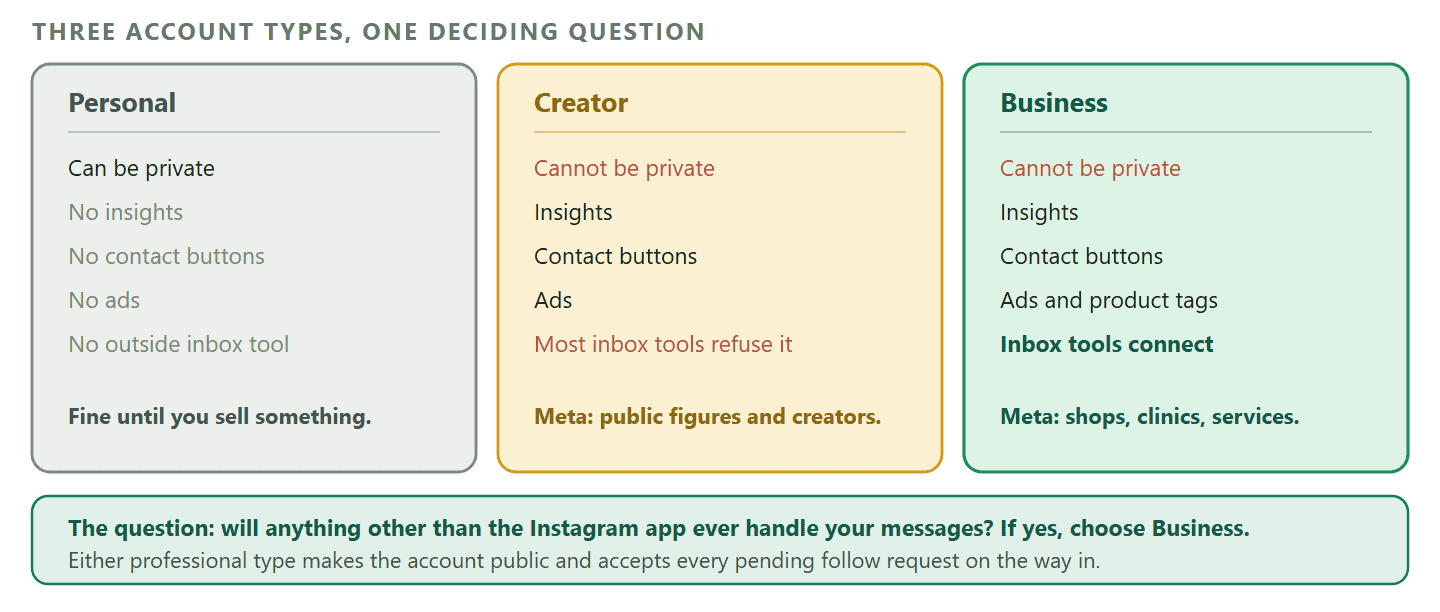
Ignore the feature lists for a moment and answer one question: is anything other than the Instagram app ever going to touch your messages? If the answer is yes, the answer to the account type question is Business, and you can stop comparing.
That is not a marketing preference. Many inbox tools still connect Business accounts only, and that is the reason so many owners set up a creator account, work happily for two months, and then have to convert again. DMly is more relaxed: it connects Creator accounts too, through Instagram Login, though its Facebook Page route takes Business accounts only. Business remains the choice that keeps every tool open to you.
Meta’s own descriptions are a good tiebreaker for everyone else. It says business accounts are “best for retailers, local businesses, brands, organisations and service providers”, and creator accounts “best for public figures, content producers, artists and influencers”. If your Instagram sells your time or your stock, you are the first list. If it sells you, you are the second.
How to create an Instagram business account on your phone
This is Meta’s current path, with Meta’s current labels, in Meta’s current order. Instagram moves these screens more often than it announces, so if a label has changed under you, the shape below is still right: find the professional section in settings, switch, choose, and fill in the contact details.
Step 1: Decide which account you are converting
You have two honest options and one bad habit to avoid.
Convert the account you already use for the business. If you have been posting your work from an account with a personal handle and a few hundred followers who actually know you, that audience is worth more than a clean start. Converting keeps every follower and every post.
Or create a new one at instagram.com or in the app, with an email address rather than a phone number, so the recovery route stays with the business rather than with whoever’s phone it was. Choose the username you want to keep, because changing it later breaks every link and every printed card that points at it.
The bad habit: standing in one place creating several accounts in a row on the same phone. It looks like exactly what a spam operation looks like, and Instagram treats it accordingly. Do one, finish it, and let it sit.
Step 2: Find the professional settings
Tap Profile or your profile picture in the bottom right. Tap More to open Settings and activity. Scroll to the heading For professionals and tap Account type and tools. Then Switch to professional account.
Step 3: Choose your category first, then Business
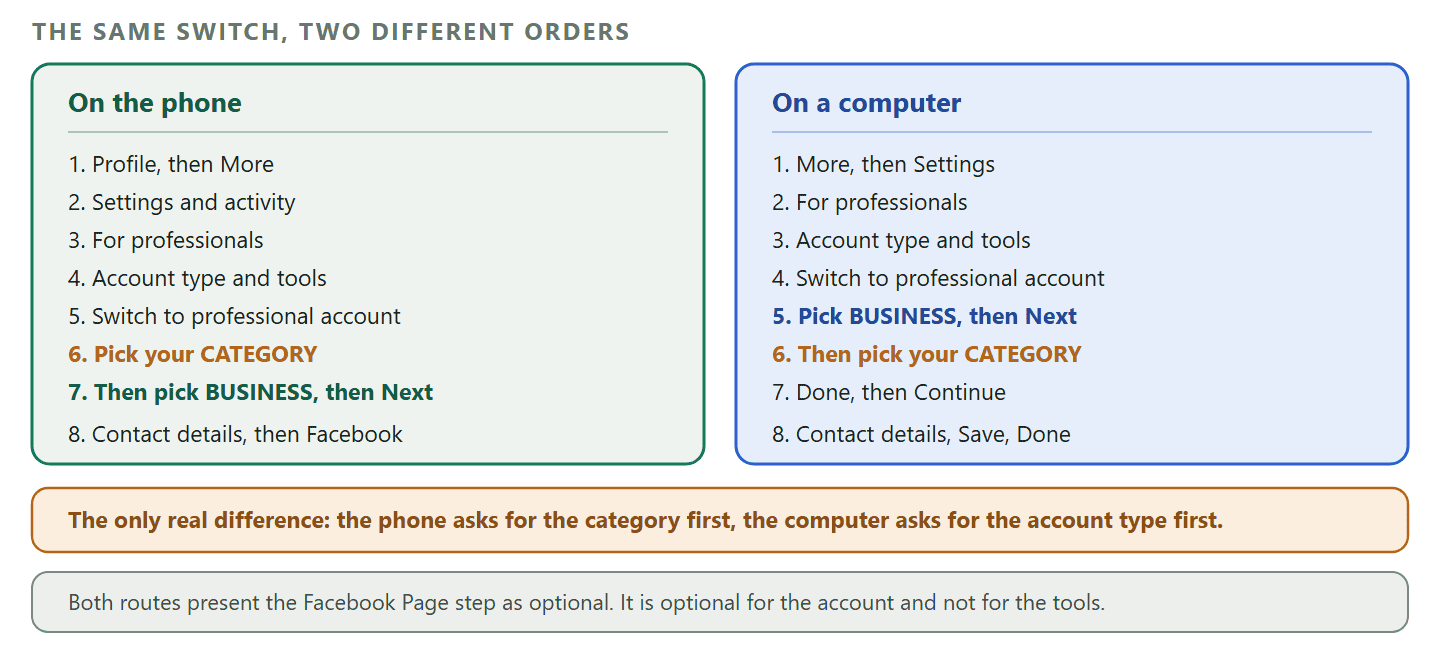
This is where most written guides get the order wrong. On the phone, Instagram asks for your category before it asks whether you are a Business or a Creator. You pick the category that describes what you do, tap Switch to professional account a second time, and only then choose Business or Creator. Tap Next.
On the category itself: pick the plainest accurate one. It shows publicly under your name unless you hide it, and it is the phrase a stranger uses to decide in half a second whether you are the sort of place they were looking for. “Hair Salon” beats “Beauty, Cosmetic and Personal Care” for a hair salon.
Step 4: Contact details, or none
Add the business email, phone and address you are happy to publish, and tap Next. If you are not ready, Instagram gives you Don’t use my contact info and you can add them later from Edit profile.
Publish the ones you will actually answer. A phone number on the profile of a business that never picks up the phone converts worse than no number at all, because the customer has already decided you are unreachable before they try the DM.
Step 5: The Facebook Page screen
Instagram offers Log in to Facebook to connect an existing Page, and calls it optional. It is optional. Skip it if you want to finish today. The next section is about why you will come back to this screen.
Step 6: Set what shows on the profile
Go to your profile, tap Edit profile, and look for Profile display under the public business information. That is where you decide whether the category label and the contact info appear. Everything else on that screen is the ordinary profile work, and there is a twenty minute version of it near the end of this guide.
How to do it on a computer
The desktop route works, and the order is genuinely different, which is why following a phone guide at a laptop is confusing. On instagram.com you choose the account type first and the category second. On the phone it is the other way round.
Click More, then Settings. Under For professionals, select Account type and tools, then Switch to professional account. Choose Creator or Business and click Next. Select your category, click Done, and confirm with Continue. Add your contact details and click Save, or take Don’t use my contact info. Click Done to land back on your profile.
What the desktop is genuinely better for: writing the bio without typos, uploading a properly cropped profile picture, and doing the Facebook Page work in Meta Business Suite. What it is worse for: everything involving Stories, and answering messages at any volume.
The Facebook Page advice, retracted
Here is the retraction promised at the top. Connecting a Facebook Page is optional for the account and effectively required for the tools.
Meta’s own developer documentation for the Instagram platform describes two ways an outside application can reach your messages. One of them, the route built on Instagram login, does not require your account to be linked to a Facebook Page. The other, the route built on Facebook login for business, does: it states plainly that the professional account must be linked to a Page. Both routes need a professional account rather than a personal one.
Which route a given tool uses is the tool’s decision, not yours, and you inherit its requirements. DMly supports both: the Instagram tile connects with Instagram Login and needs no Page, and the Instagram via Facebook tile connects through a Page you administer. So with DMly the Page is optional, as Instagram says; other tools may still insist on it, so check before you choose one.
The cost of skipping it is small and specific. If a tool you pick later needs the Page route, you create a Page then, link it to the Instagram account in Meta Business Suite, and connect. Whichever route you use, the mistake that costs more is declining the messaging permission while connecting: the account looks connected, and nothing ever arrives.
The five minute version: If you plan to run Meta ads, or use a tool that only connects through a Page, create a Facebook Page for the business now, even an empty one, and link it in Meta Business Suite. If not, you can skip it: DMly connects without one.
The Page also unlocks the things people expect a business account to do: running ads through Meta Ads Manager, and scheduling and reading results in Meta Business Suite. If ads are on your list at all, you will also meet Meta’s business verification process, which is a separate hurdle with its own document requirements.
What your new Instagram business account can and cannot measure
Insights are the best free reason to switch, and they have two limits that change how you use them.
The window is short. Meta’s Insights documentation describes selecting a preset or custom timeframe within the past 90 days. Anything older than that is not there to select. If you want to compare this December against last December, you have to have written the numbers down in December.
Follower trends have a floor. Meta states that the total followers metric lets you see trends across your followers when you have at least 100 followers. Below that you are reading content performance, not audience performance.
Reach and impressions are different numbers and people mix them up constantly. Meta defines reach as the number of unique accounts that have seen a post or story at least once, as distinct from impressions, which can include the same account viewing several times. A post with high impressions and flat reach was seen repeatedly by people who already follow you. That is not a failure, but it is not discovery either.
The metrics worth actually watching in the first three months are narrower than the dashboard suggests: accounts reached, accounts engaged, and how many of your Requests folder conversations turn into a booking or an order. The last one is not in Instagram’s numbers at all, which is the honest limit of what a social platform will ever tell you about your business.
| What you want to know | Where it lives | The catch |
| How many different people saw this | Accounts reached, in Insights | Only within the past 90 days |
| Whether the audience is growing | Total followers trend | Needs at least 100 followers |
| Which post did the work | Content you shared, in Insights | Same 90 day window |
| Whether a post broke a rule | Account Status | Tells you after the fact |
| Whether any of it made money | Nowhere on Instagram | Has to be tracked on your side |
Selling from an Instagram business account: where this actually works
Before you follow anyone’s instructions for setting up Instagram Shopping, check whether it exists where you are. This is the part of the old advice that has aged worst, and it is the reason a lot of owners spend an evening looking for a menu that is not there.
Meta publishes a supported countries page for Shops on Facebook and Instagram. The full experience is listed for the United States only. An open beta covers Canada, Mexico, France, Germany, Italy, Spain, the United Kingdom, Australia, India, Japan, Korea, Taiwan and Thailand. Limited functionality covers Brazil, Denmark, the Netherlands, Norway, Sweden, Switzerland, Ukraine and Indonesia. That is the whole list. The same page notes that “Some features related to Shops and checkout on Facebook and Instagram are no longer supported”, and that travelling temporarily outside a supported country can cost you the ability to tag products.
If your business is in Nigeria, Kenya, the Gulf, most of South East Asia or most of Latin America, that is your answer, and it is not a setting you have missed.
Where tagging does work, understand what it does now. A product tag is a route to a product, and for most sellers the purchase itself finishes on their own website rather than inside Instagram. Treat the tag as the shortest path from a Reel to a checkout you control, not as a checkout of its own.
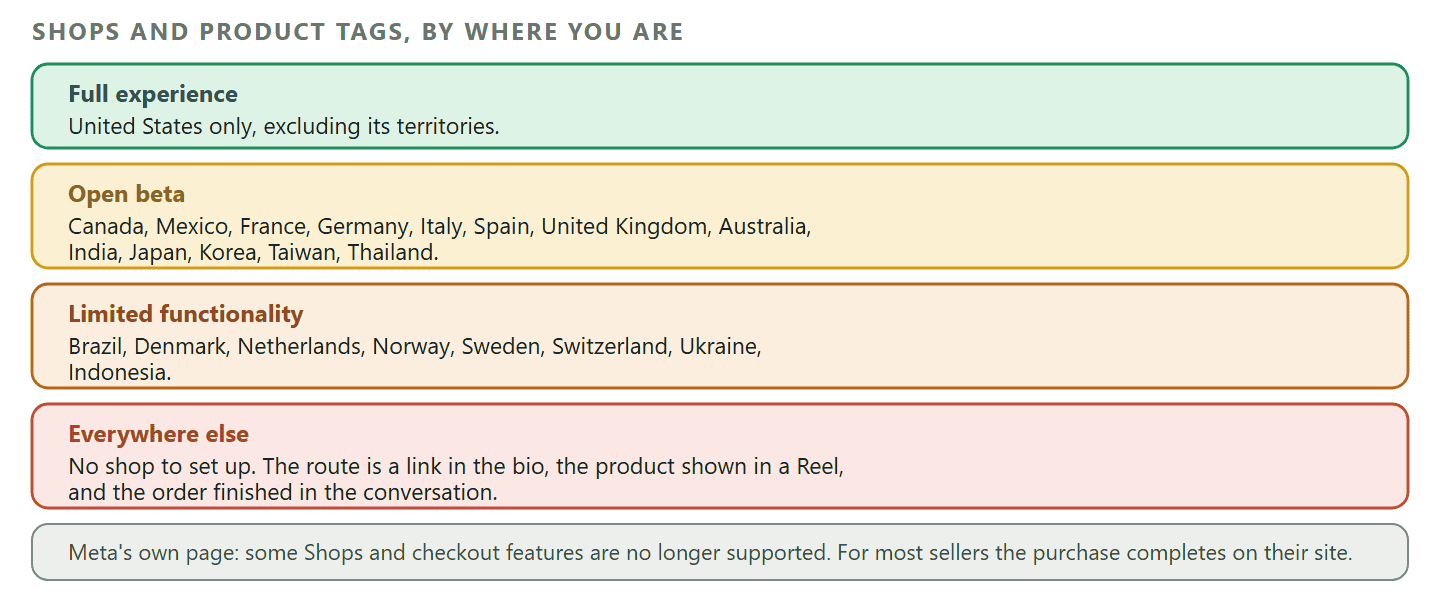
If you are outside the list, the workable version is the one plenty of businesses in those markets already run: show the product, answer the questions, and take the order in the conversation. That is the same pattern as selling directly through a chat rather than a checkout page, and it converts perfectly well without a Shop tab, because the friction it removes is the form, not the platform.
The first two weeks, honestly
New Instagram business accounts do get restricted, and the usual advice about “warming up” is folk wisdom rather than a published rule. It is worth saying that out loud, because plenty of guides present a posting schedule as though Instagram had issued it.
What Instagram actually publishes is Community Guidelines and an Account Status page, which is where you check whether your posts have been found in breach and what that has cost you. Look at it in your first fortnight even if nothing seems wrong. It is the only place the platform tells you it has quietly stopped showing your content to people who do not follow you.
What genuinely gets new accounts into trouble is more boring than a schedule:
- Bulk following and unfollowing. The fastest way to look automated.
- Several accounts created back to back on one device or one connection. The pattern, not the number, is what gets noticed.
- Identical comments posted at speed. Including the ones a growth service posts on your behalf.
- Reposting content you did not make without permission, which is a rules problem rather than a spam one.
- A profile with nothing on it messaging a lot of strangers on day one.
The sensible pattern is not a magic ramp. Fill the profile in properly, put up enough posts that the grid looks like a real business, reply to people who talk to you, and let the first week be quiet. Then start doing the things you actually built the account for.
When the messages start arriving
The account is the easy part. The messages are the part that decides whether Instagram is worth having. A shop that answers in four minutes and a shop that answers on Tuesday are selling to two different sets of people, and the difference between them is not effort, it is arrangement.
Instagram has rules about when a business is allowed to send, and they are stricter than WhatsApp’s in one specific way that catches people out.
You get a 24 hour window for anything automatic. DMly’s documentation is precise about this: flows, sequences and broadcasts can only reach a contact within 24 hours of that contact’s last message to you.
A human gets seven days. A teammate replying by hand in the inbox has until seven days after the contact’s last message. So the automated follow-up and the personal follow-up have different deadlines, and a business that thinks it has a week actually has a day for anything scheduled.
There are no templates. On WhatsApp you can pay to send an approved template to someone outside the window. DMly’s documentation puts it plainly: “Instagram has nothing like WhatsApp’s approved message templates.” If the window closes, it is closed. You cannot buy your way back in, which means every Instagram conversation is a thing you either continue now or lose.
The one legitimate opener is a comment. When someone comments on your post or Reel, a private reply can open a DM with them even though they have never messaged you, outside the 24 hour window. It is limited on purpose: one per comment, only the first message of the run uses it, and it carries plain text only. DMly’s documentation adds a trap worth knowing, which is that if that first step contains an image or a card it silently stops being a private reply and goes out as a normal DM, which may never arrive. This is the mechanism behind every “comment BOOK and I will send you the link” post you have seen, and it is covered properly in the guide to turning comments into private replies without breaking the rules.
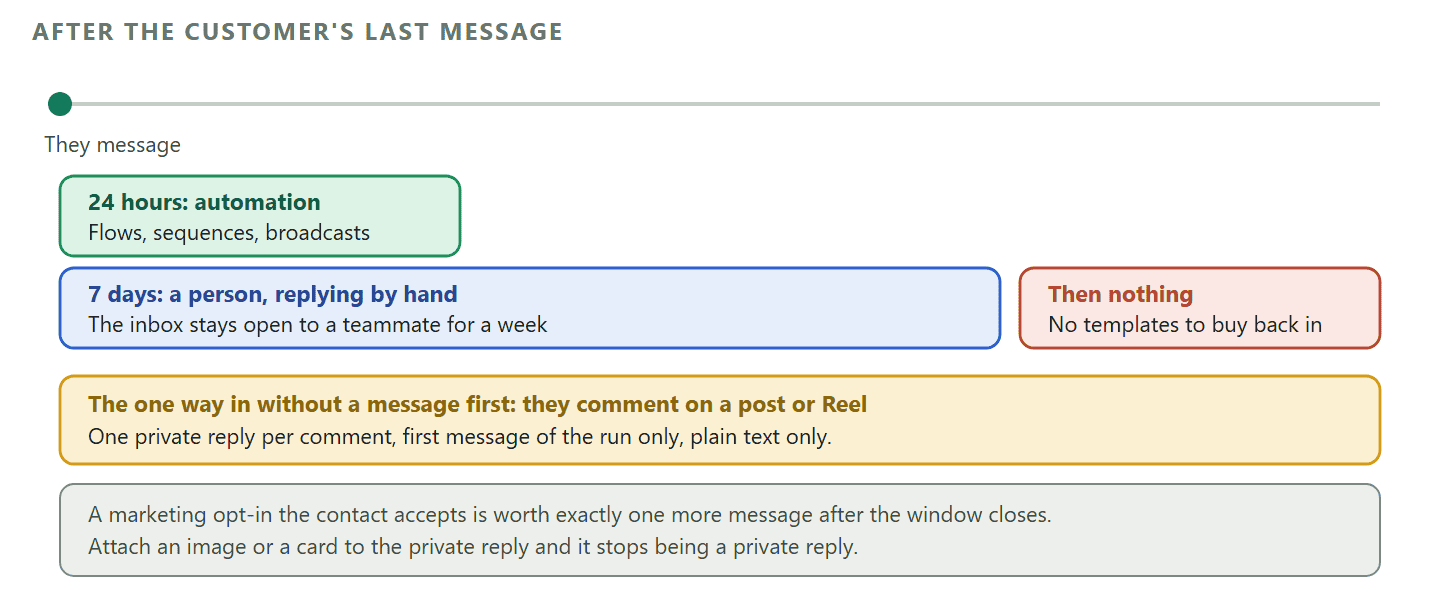
There is one more small door. If a contact accepts a marketing opt-in, DMly’s documentation says you get exactly one more message after the window closes. One. It is for the thing you would genuinely regret not sending, not for a newsletter.
Within those rules there is more room than it sounds. Ice breakers put up to four suggested questions in front of someone before they have typed anything, so the first message is one you can answer instantly. A persistent menu gives up to three items per level across up to three levels, which is enough to hold opening hours, prices and a booking link without a person touching it. Both are documented DMly features on the Instagram channel, and both work inside the window because they are answers, not outreach.
Worth knowing, as of September 2026: Worth knowing, as of September 2026 DMly’s comment automation documentation notes that the Specific post selection is not enforced yet, so an automation you save against three chosen posts will still fire on comments across every post on the account. The documented way round it is to scope by keyword instead, which is the better design anyway: “comment PRICE” is a clearer instruction to your audience than a silent rule they cannot see. Expect this one to be fixed.
If your business already answers people on WhatsApp, Messenger or a website widget, the practical question stops being “how do I handle Instagram” and becomes “how do I stop having five inboxes”. That is what an omnichannel inbox is for, and why it matters more than any individual channel’s features. And when you are ready to make Instagram answer for itself overnight, the full treatment is in the guide to Instagram DM automation, from a first auto reply through to a working flow, with the step by step build in setting up Instagram automation from scratch.
One current development worth having on your radar rather than acting on today: Meta announced on 3 June 2026 that its Business Agent, already used by more than a million businesses on WhatsApp and Messenger, is expanding to Instagram, free to activate now and moving to paid subscription tiers in the coming months. If you are choosing how to answer messages this quarter, that is a reason to keep your setup portable rather than a reason to wait.
Twenty minutes of profile work that pays for itself
The account is now technically an Instagram business account. This is the part that makes it read like one. None of it is difficult and all of it is skipped.
- Username: your business name, as short as it can be while still being recognisable. Nobody types an underscore correctly the first time.
- Name field: not the same as the username. It is searchable, so “Ada’s Hair Studio Lekki” does work a username cannot.
- Profile photo: a logo that survives being 40 pixels wide, or a clean photo of the place. Test it at thumbnail size before you commit.
- Bio: what you do, who for, where. Three lines. The temptation is to be clever; the customer is deciding whether they are in the right place.
- Link: one destination that does the job you most want done. Booking beats homepage for anyone selling appointments.
- Contact buttons: only the routes you answer.
- Category label: show it if it helps a stranger place you, hide it if it makes you sound like something you are not.
- Story highlights: four covers, named for the four questions you answer most. This is the cheapest customer-service improvement on the platform.
- Nine posts before you promote anything. An empty grid tells a visitor the business might not exist any more.
Instagram words you will meet, in plain English
You do not need the vocabulary to run the account, but you do need it to follow anyone’s instructions, including these.
- Professional account: the umbrella term. Business and creator are its two types.
- Professional dashboard: the screen your insights, tools and eligibility notices live behind.
- Insights: the free analytics that come with any professional account.
- Reach: how many different accounts saw it. Impressions: how many times it was seen, including repeats.
- Requests: the inbox folder where messages from people you do not follow arrive. Check it weekly.
- Reels: short video, and currently the format most likely to reach people who do not follow you.
- Stories: posts that disappear after 24 hours. Highlights: the ones you pin to the profile so they do not.
- Product tag: a label on a post that links to a product, where Meta supports it in your country.
- Account Status: where Instagram tells you whether your content has broken a rule and what it cost you.
- Meta Business Suite: Meta’s own console for a Page and its connected Instagram account.
- Comment-to-DM: the pattern where a public comment triggers a private reply.
Frequently asked questions
Is an Instagram business account free?
Yes. Creating one, using it and reading its insights costs nothing. You pay only if you choose to run ads or promote a post.
How long does it take to create an Instagram business account?
The switch itself is a few minutes. Filling in the profile so it reads like a real business is the twenty minute job above, and it is the part that changes whether anyone contacts you.
Can I create an Instagram business account without a Facebook Page?
Yes, and Instagram will let you finish the setup without one. DMly can connect it without a Page too, through Instagram Login. Some tools are built only on the Facebook login route, which requires the account to be linked to a Page, and ads through Meta Ads Manager need a Page as well.
Can I keep my account private after switching?
No. Meta states that professional accounts cannot be set to private, and converting accepts any pending follow requests automatically. If that matters to you, the answer is a separate business account rather than converting the one you have.
Do I need a registered company?
No. Instagram does not ask for registration documents to switch account type. A freelancer, a market trader or someone testing an idea can all use a business account. Registration only becomes relevant for things like ads verification and payments.
Can I switch back to a personal account?
Yes, from Account type and tools. Meta’s note is that you lose access to some Meta business tools including Meta Business Suite and Meta Ads Manager. Posts and followers stay where they are.
Why did my new account get restricted straight away?
Usually a pattern rather than a single act: several accounts made in quick succession from one device, fast bulk following, or repeated identical comments. Check Account Status to see what Instagram says happened, fix the behaviour, and give it time. There is no published warm-up schedule, whatever you may have read.
Business or creator, if I am genuinely both?
Choose business. It is the type outside inbox tools connect to, it is the one product tagging runs on where that is available, and you can change your mind later. A creator account that has to be converted six weeks in costs you a reconnection and some confusion; a business account that turns out to be slightly the wrong label costs you nothing.
What is the single most common setup mistake?
Never opening the Requests folder. Every business account has one, most enquiries from strangers land in it, and it does not always announce itself the way a normal message does.
Get the account right first: business type, a Facebook Page only if your tools or ads need one, a profile a stranger can read in five seconds, and the Requests folder in your daily routine. When the messages outgrow the app, DMly connects your Instagram business account alongside WhatsApp, Messenger and your website chat in one inbox, answers the repeat questions inside the window automatically, and turns comments into conversations you can actually follow up.
Writing about WhatsApp automation, bookings and growth for local business.
Turn WhatsApp into your busiest channel.
Start free and run message, bookings, payments and reviews in one place.
