
How to Sell Products on WhatsApp: Complete WhatsApp Shopping Guide

70.22%.
That’s the average share of online shopping carts that get abandoned before checkout, averaged across 50 separate studies by the Baymard Institute. Seven out of ten people who wanted something enough to put it in a cart walked away at the till, mostly because the till itself got in the way: the account it demanded, the forms it repeated, the shipping surprise on the last screen.
Now run the same purchase as a conversation. “Do you have the shea butter in stock?” “We do, it’s $18. Want me to send the link?” “Yes please.” Tap, pay, done. No account, no forms, no last screen. The customer never left the chat, and the chat is on the one app they open forty times a day. That is what WhatsApp shopping means once you strip the phrase back, and the machinery for it (a catalogue in the chat, a cart, a payment link, a stock ledger behind it all) is what this guide is about.
In this guide, we’ll look at what WhatsApp shopping actually involves (and the two catalogues behind it), how a sale runs from browse to receipt, why the numbers favour the chat, the cart pipeline in detail, how orders and stock stay honest, how you get paid, where coupons, gift cards and packages fit, what AI can and can’t do here yet, what it looks like across six businesses, and how to set the whole thing up with DMly.
What WhatsApp Shopping Actually Involves
Three pieces make WhatsApp shopping work, and it’s worth being precise about where each one lives, because the biggest confusions in this topic come from assuming it’s all one thing.
The shop front is Meta’s. WhatsApp has a native product catalogue: the customer taps it open inside the chat, browses items with photos and prices, and adds them to a cart. That catalogue is built and maintained in Meta’s Commerce Manager and connected to your WhatsApp Business Account (Meta reviews every item you add automatically, and flags anything that breaks its commerce policy). It is not a website, and you don’t need one.
The conversation is where the selling happens. Questions, recommendations, the cart arriving, the payment link going back: all of it runs through your inbox and your automations, which is the layer DMly provides, along with the switches that turn the catalogue and cart on for your number in the first place.
The money moves on a payment gateway. There is no card form inside WhatsApp. The customer taps a Pay now link and lands on your gateway’s own hosted checkout page (Stripe, PayPal, Paystack, Razorpay, MyFatoorah or Mercado Pago), pays, and the gateway’s webhook tells DMly the money arrived. One page, already built, already secure.
What it isn’t: a clone of your web checkout inside a chat bubble, a marketplace that takes a commission on your sales, or a broadcast cannon for your product list. It’s closer to what a good shopkeeper has always done (answer, recommend, take the money at the counter), with the counter now inside the thread. The nearest thing to a prerequisite is the catalogue itself, and getting a WhatsApp catalogue through Meta’s review has enough traps of its own to deserve its own guide.
How a WhatsApp Sale Works, Step by Step
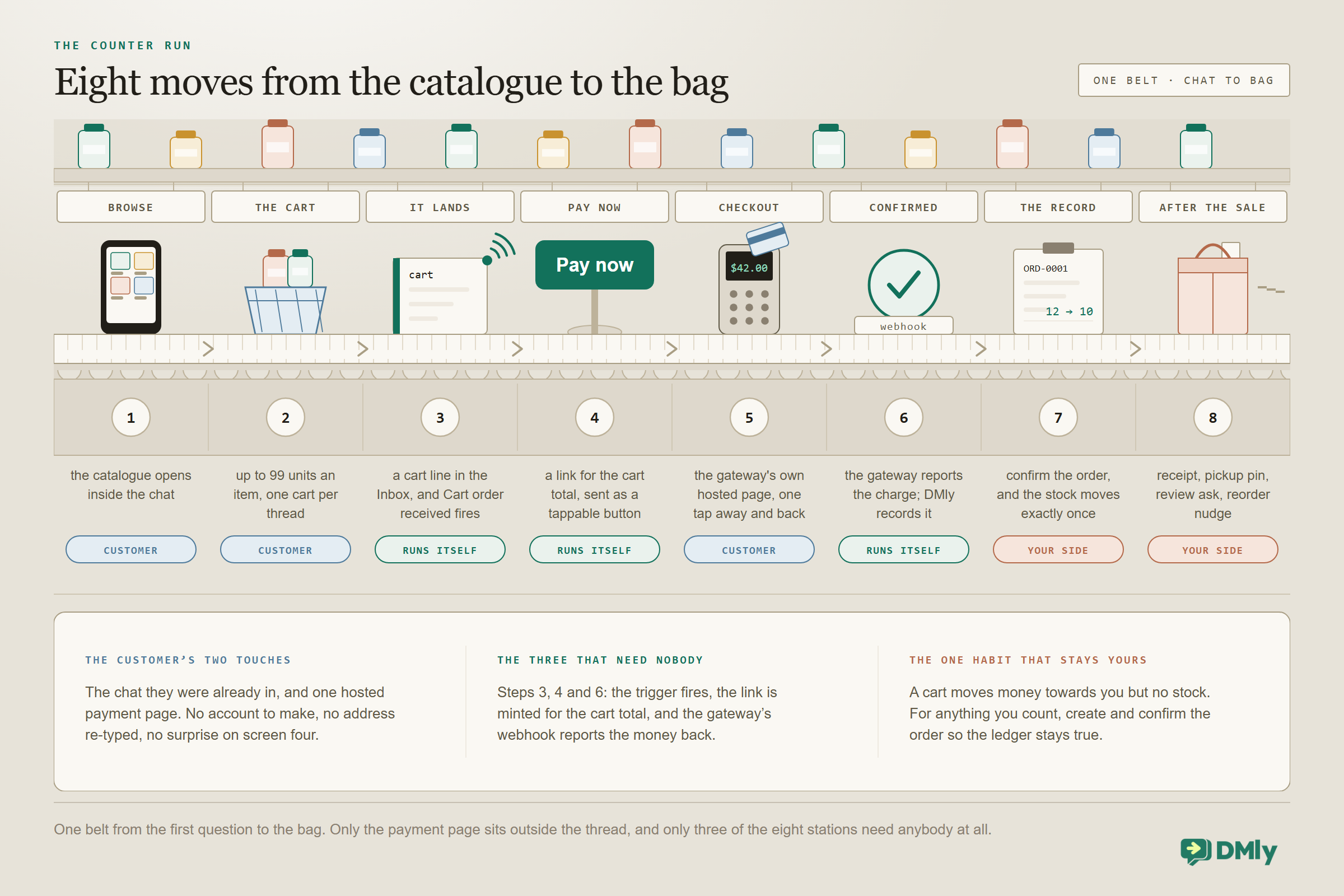
- The customer browses in the chat. They open your catalogue themselves, or your flow sends it: the whole shop, a single product, or a titled list of a few relevant items.
- They build a cart and send it. WhatsApp’s cart is theirs to fill (up to 99 units of any item), and sending it is the moment of intent: the contents arrive with you as a structured order message, not a screenshot.
- The cart lands and a trigger fires. In DMly it shows in the Inbox as a cart line, and the Cart order received trigger starts your flow with the cart’s contents available as variables.
- The flow answers with a Pay now button. A thank-you built from the cart summary, then a payment link minted for the cart total, sent as a tappable button. Seconds, not minutes.
- The customer pays on the gateway’s page. The one step outside WhatsApp, and it’s one tap away and back.
- The webhook confirms it. The provider reports the charge, DMly records the payment, and the Payment succeeded trigger is your hook for the confirmation message.
- The record is written. For stock-tracked products, an order is created and confirmed, which commits the stock exactly once in a ledger that keeps its history.
- The after-sale runs. The receipt, a map pin for pickup, the review request a few days later, the refill nudge a month on. This is where a sale becomes a customer.
Hold onto the shape: the customer touches the chat and one payment page, and everything else is plumbing you set up once. The rest of this guide walks each piece.
Why Selling in the Chat Works (With the Numbers)
- 70.22% average online cart abandonment rate, averaged across 50 separate studies of web checkouts. Baymard Institute, checked September 2026
- $1bn in a single quarter, up 73% year over year, for the Meta revenue line that paid business messaging sits in. It crossed a billion for the first time in Q2 2026, and Meta names WhatsApp paid messaging as the main reason. Meta Q2 2026 earnings call
- 1m+ businesses already using Meta’s business agents on WhatsApp and Messenger every week to talk to customers or complete sales. Meta Q2 2026 earnings call
- 73.3% of consumers prefer messaging when they deal with a business, and 72.4% say they are more likely to buy from a brand that offers it. Meta commissioned it and Kantar ran it, across 11,056 consumers in 22 markets. Meta and Kantar, 2025
Two threads run through those numbers. The first is friction: the web checkout loses most of the people who enter it, and the chat removes the steps where they leak (no account, no re-typed address, no surprise on screen four; the questions that would have become abandonment get answered in the same thread). The second is presence: the conversations are already happening at enormous scale, and the preference figures above are Meta’s own commissioned research, so read them as a company describing its own market rather than as neutral survey work. What is harder to argue with is the revenue line: businesses are now paying Meta a billion dollars a quarter for messaging, which is what a channel looks like when it has stopped being an experiment.
One case study worth knowing because it’s published with real figures rather than folklore: Hong Kong retailer Optical 88 reported a 97% open rate on coupons sent through WhatsApp and a clickthrough rate 43 times its email rate over the same period, published by Meta in February 2025. It’s a self-reported Meta success story, so treat it as a best case, but the direction is consistent with everything else here: the chat gets read, and email mostly doesn’t. (You may have seen “WhatsApp has a 98% open rate” quoted as a universal fact; nobody has ever published a methodology for it, which is why we cite the case study instead.)
The Two Catalogues Behind WhatsApp Shopping (and Why the SKU Is the Bridge)
Here’s the piece of architecture that makes the rest of WhatsApp shopping make sense: there are two catalogues in a WhatsApp shop, and they have different jobs.
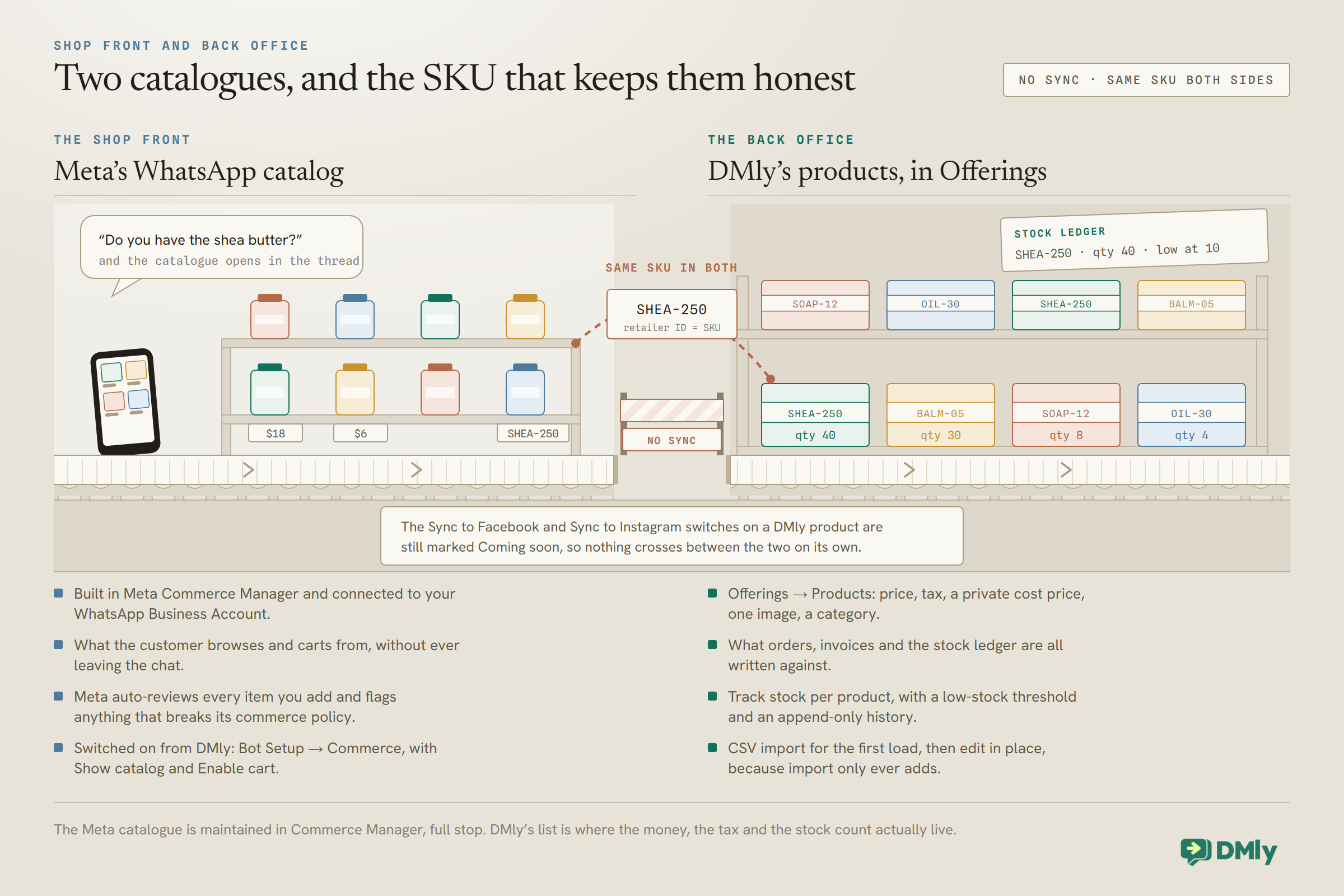
Meta’s catalogue is what customers see. You build it in Commerce Manager (name, photo, price, a retailer ID per item), connect it to your WhatsApp Business Account, and DMly switches it on for your number under Bot Setup → Commerce: Show catalog lets customers browse it, Enable cart lets them send you an order from it. Those two switches are written straight to Meta; they’re your number’s own commerce settings, managed from inside DMly.
DMly’s catalogue is what your business runs on. Offerings → Products holds each product with its price, its tax rate (falling back to your workspace default, with a “price includes tax” toggle), a private cost price your customers never see, one image, a category, and optionally a tracked stock count. This is the record your orders, invoices, stock ledger and reports are written against, and Products is the one catalogue tab with bulk tools: CSV import, a sample file, and export. One import quirk to respect: import only ever adds, it never matches existing rows, so re-importing a file duplicates every product in it. Import once, then edit in place.
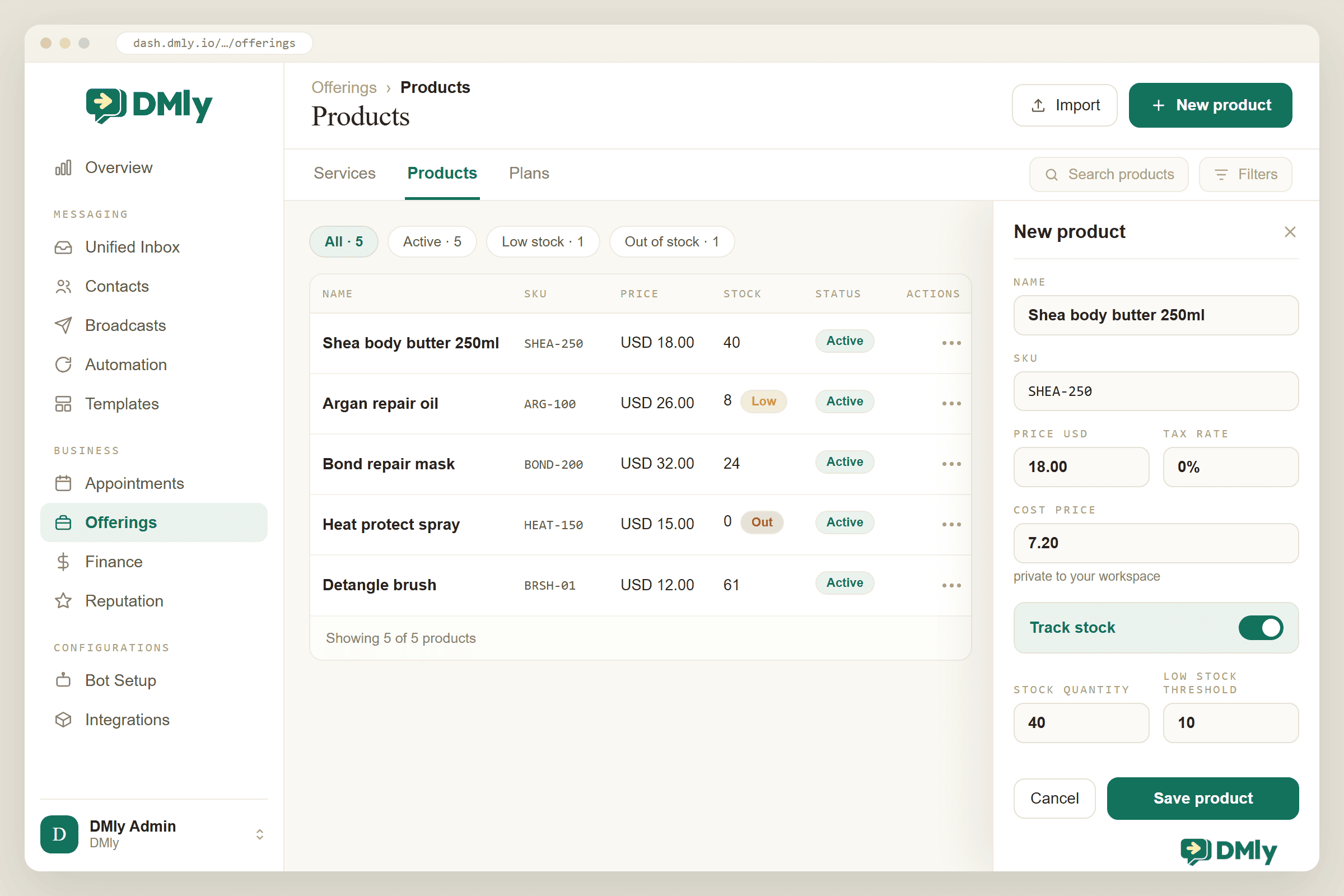
Nothing syncs between the two catalogues yet: the Sync to Facebook and Sync to Instagram switches on a DMly product sit under a “Meta catalogue” heading marked Coming soon, and they do nothing today. The bridge is discipline: give the same item the same SKU in both places (the Meta catalogue’s retailer ID and the DMly product’s SKU), keep the prices matched, and every later step (the cart, the order, the stock movement) will be talking about the same jar of body butter. It’s five minutes of care at setup that saves hours of reconciliation later.
From Cart to Cash: The Pipeline
The cart is where browsing becomes buying, so this is the flow to get right first. Meta’s side has rules worth knowing: a customer’s cart belongs to them (you can’t send someone a cart, and they can’t edit one after sending it), it holds up to 99 units per item, and there’s one cart per chat thread. When they tap send, the contents arrive with you as a structured order message.
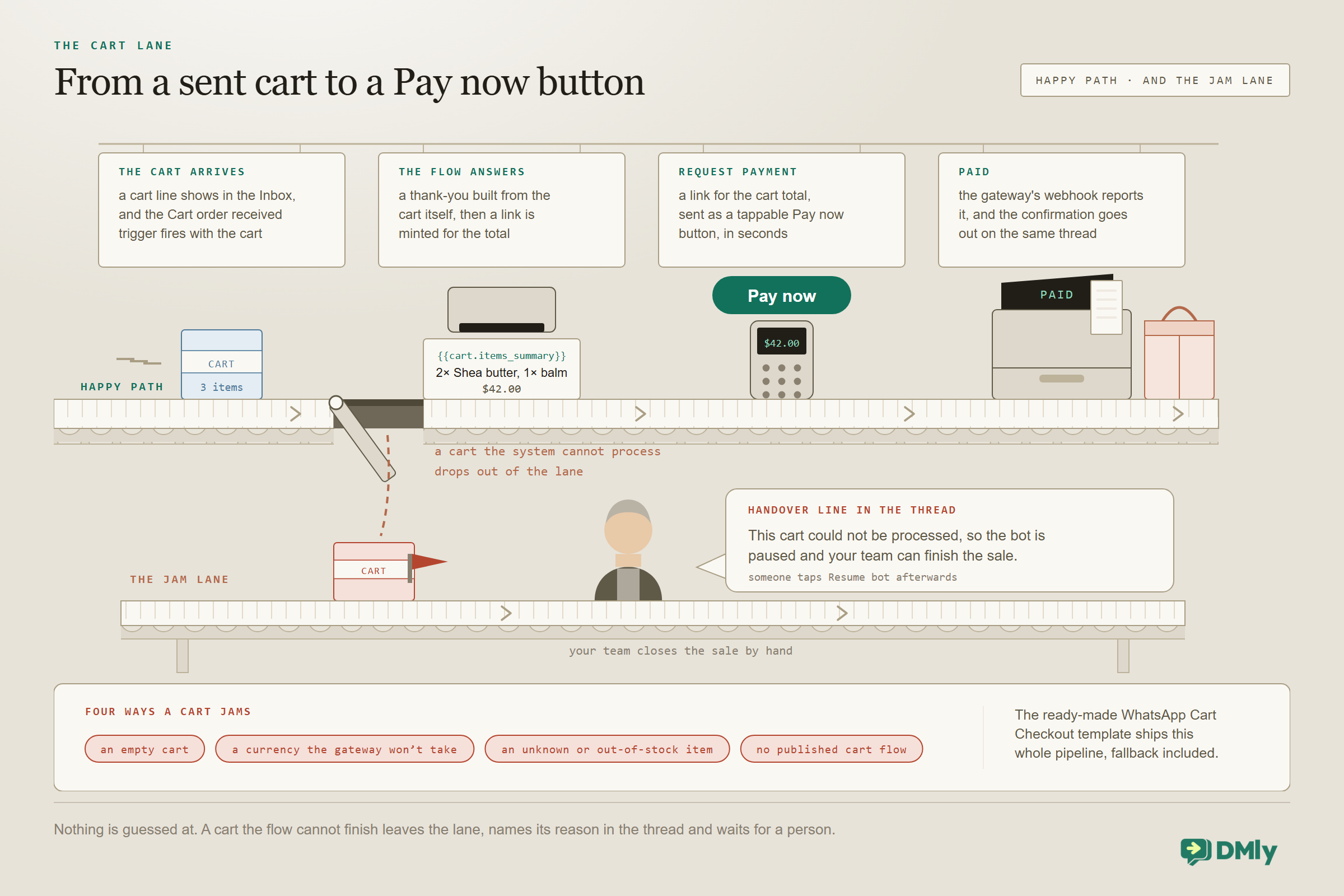
In DMly the arrival does two things at once: the Inbox shows a cart line in the thread, and the Cart order received trigger fires. Your flow then has the cart as data: {{cart.items_summary}} reads like “2× Blue Shirt, 1× Hat”, and {{cart.total}}, {{cart.currency}}, {{cart.item_count}} and {{cart.note}} carry the rest. The flow thanks the customer with the summary, then a Request Payment step mints a link for the total and sends it as a tappable Pay now button. There’s a ready-made template called WhatsApp Cart Checkout that wires exactly this, so the practical setup is installing it and reading it, not building from a blank canvas. Build it in the flow builder and nowhere else: a quick automation on the cart trigger does fire, but the cart tokens don’t resolve inside one, so the customer gets a thank-you with holes where the items and the total should be. It is a quiet failure, because as far as the automation is concerned it sent the message.
Just as important is what happens when a cart can’t be processed: an empty cart, a currency your gateway doesn’t take, a product DMly doesn’t recognise or knows is out of stock, or simply no published cart flow. DMly doesn’t guess. It pauses the bot and posts a handover line in the thread naming the reason, your team finishes the sale by hand, and someone taps Resume bot afterwards. The Request Payment step has its own failure output for a link that can’t be minted; wire that to a person too, rather than leaving a customer holding a dead end. A sale that falls out of automation falls into a person, never into silence.
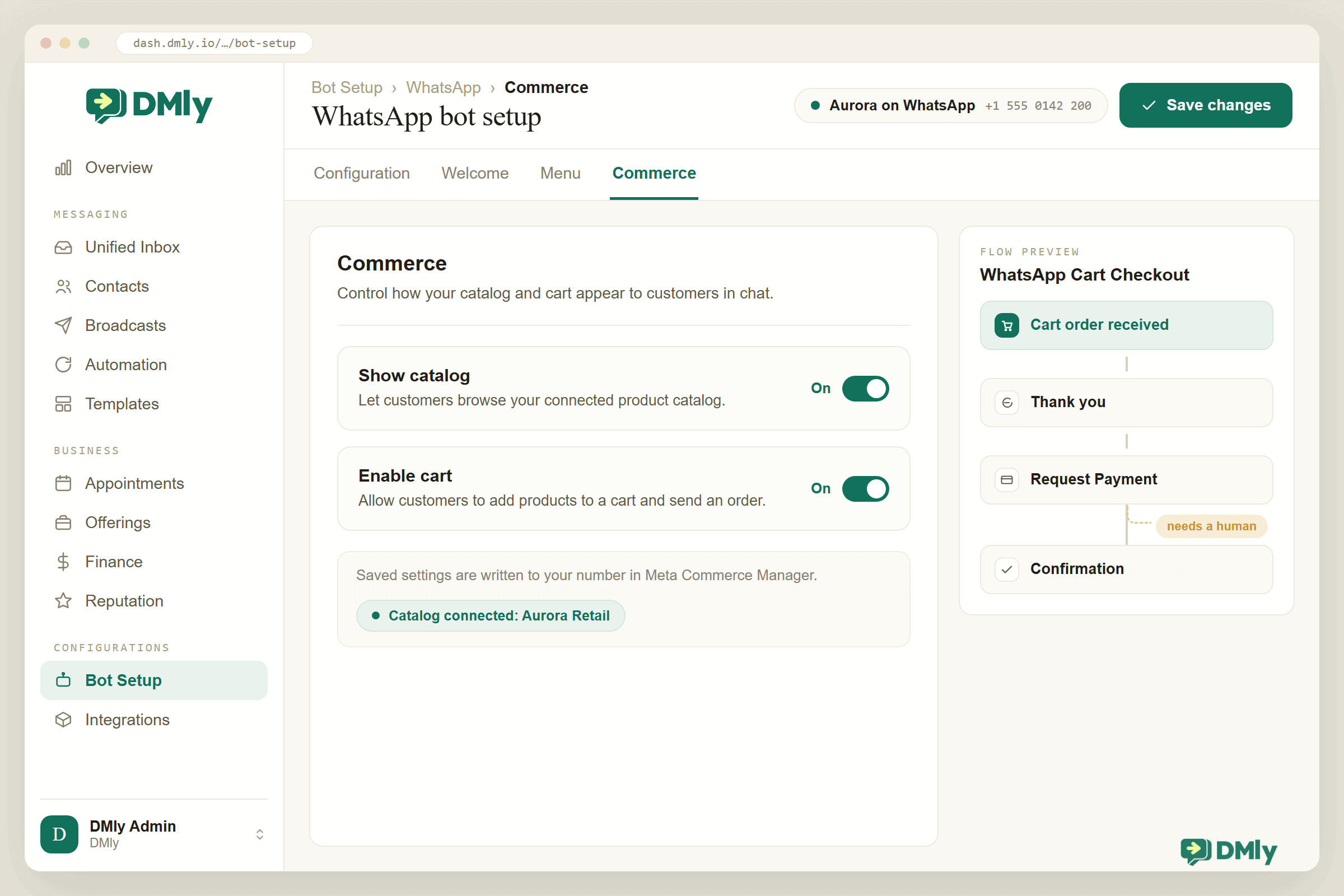
Sending the shop the other way (you to them) is a flow step rather than a broadcast: the Catalog / Product step drops the catalogue into the conversation in three shapes: the full catalogue, a single product by its retailer ID, or a titled list of a few IDs (“Weekend specials”). Meta’s multi-product message holds up to 30 products, and there is a scrollable product carousel as well, which is more room than you want: the craft is sending three relevant things, not thirty.
Orders, Stock and the Ledger
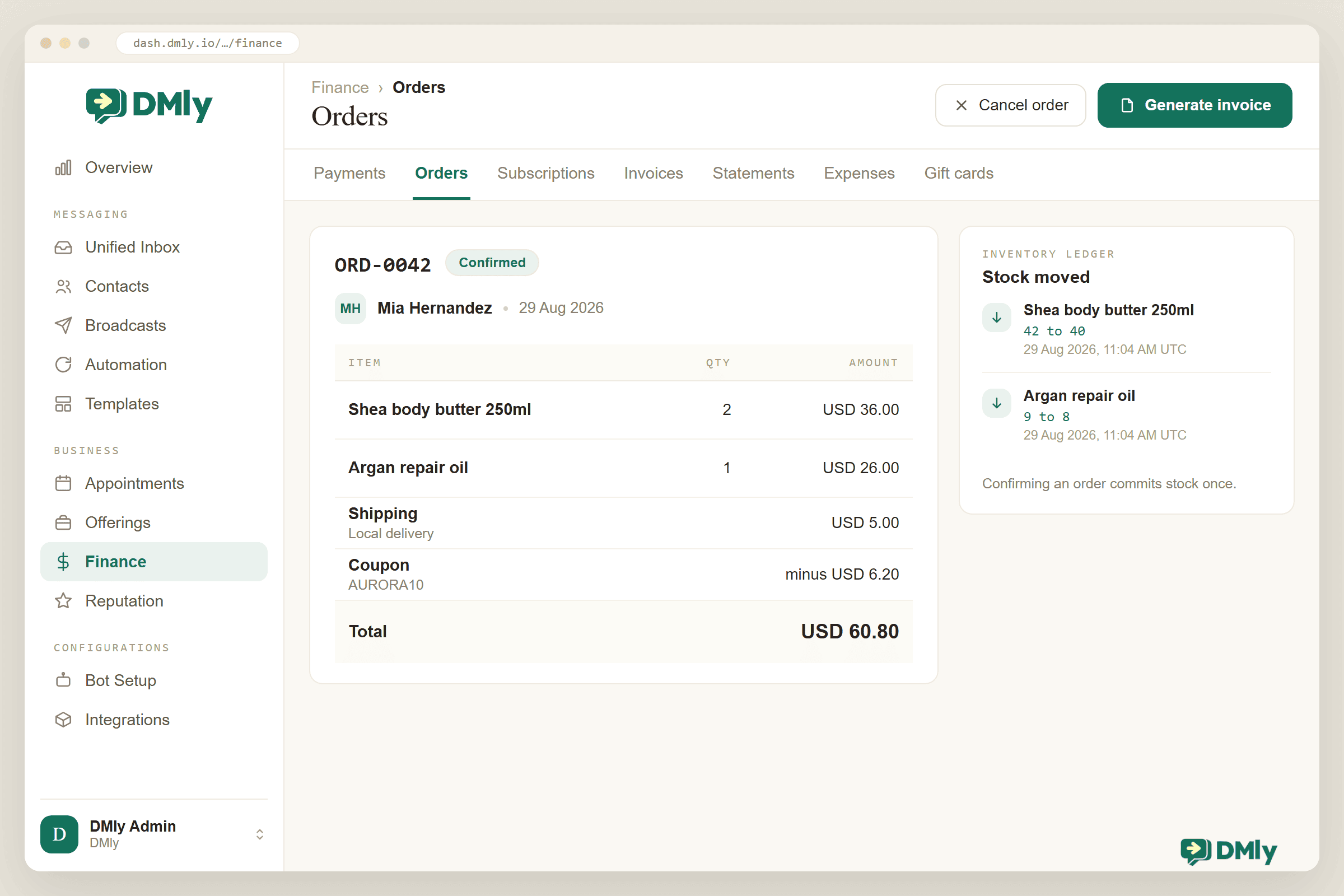
Behind the conversation, DMly keeps two records with two different jobs, and the cleanest sentence in its documentation is the one to memorise: an order moves stock, an invoice moves money.
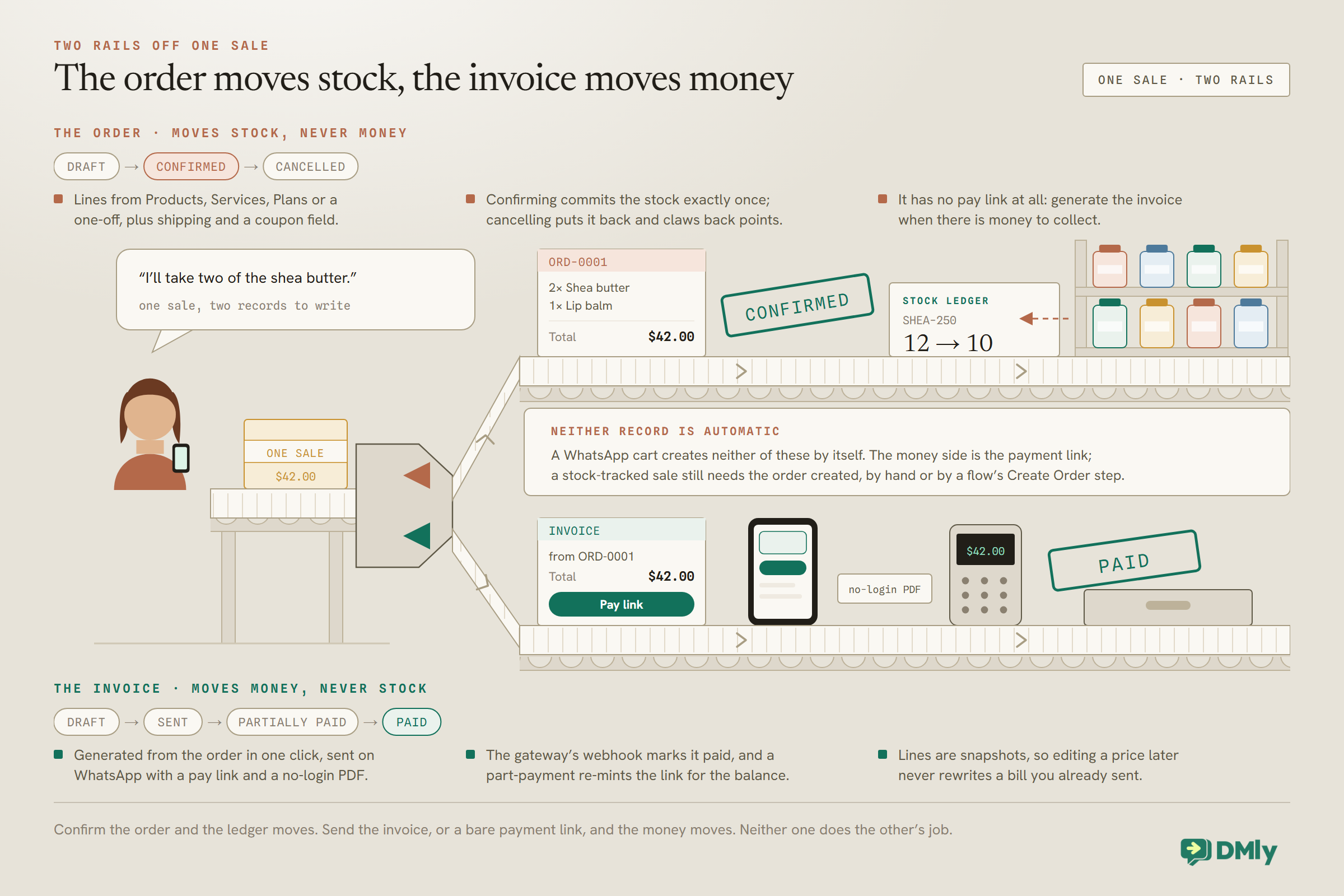
Orders live under Finance → Orders, numbered ORD-0001 onwards, built from your catalogue (products, services, plans or a custom line), with an optional shipping charge (flat, or free over a threshold) and a coupon field. An order’s life is short and deliberate: Draft, then Confirmed, then maybe Cancelled. Confirming is the act that commits stock, exactly once, however many times someone looks at it; cancelling puts the stock back and claws back any loyalty points the sale earned. Cancelling is also a one-way door: a cancelled order can never be confirmed again, so a sale that comes back to life needs a new order rather than the old one reopened. An order never collects money and has no pay link: when there’s money to collect, you generate an invoice from the order in one click, and the invoice does what invoices do (our guide to invoicing through WhatsApp covers that half in full).
Stock is opt-in per product. Switch on Track stock and the product gets a quantity, a low-stock threshold, a Low badge on the list when it crosses, and a ledger behind the number, so every sale, correction and manual edit has a history. Two automation hooks ride on it, and they fire on the crossing, not the state: Product stock low fires once as the count reaches the threshold (4 to 3 with a threshold of 3 fires; 3 to 2 doesn’t fire again), and Product back in stock fires when the count rises from nothing. Stock triggers have no customer attached, so the flow runs for contacts holding a tag you name, capped at 500 per run: exactly the shape of a “tell me when it’s back” list, where a flow tags whoever asks and the back-in-stock trigger messages them.
Now the honest seam in the middle of the system, because it’s the thing most likely to bite a busy shop: a WhatsApp cart does not create an order. The cart’s money side is the payment link; no stock is committed and no ORD record appears by itself. If you track stock, create the order for what sold (a few taps from the conversation, or a flow’s Create Order step with confirm switched on) so the ledger stays true. It’s one habit, and it’s the difference between a stock count you trust and one you audit every month.
Getting Paid (Links, Invoices and the Webhook That Matters)
Every payment in this system is a link to your gateway’s own hosted checkout, which is why setup starts there. Connect one of the six (Stripe, PayPal, Paystack, Razorpay, MyFatoorah, Mercado Pago) and then do the step everyone skips: register DMly’s webhook endpoint in the provider’s dashboard yourself, because DMly can’t do it for you, and without it charges succeed at the provider while every record on your side stays unpaid. Everything downstream (the invoice flipping to Paid, the confirmation message, the receipt) hangs off that webhook.
The links themselves come from three places. In a conversation, the Inbox composer’s Request a payment mints and sends one in place. In automations, the Request Payment step does it with an amount and currency (the cart flow’s version). And for anything with paperwork attached, an invoice carries its own pay link, always matching the current balance due, re-minted automatically after a part-payment, shareable as a QR code, and delivered on WhatsApp with DMly’s approved dmly_invoice_sent template plus a public no-login PDF. One detail with multiple gateways connected: links follow the Default payment gateway card at Finance, then Settings, then Gateways, which ships on First connected gateway, so set Charge through to your preferred provider or pick one explicitly in flows.
Receipts and the other money messages (payment received, payment failed, gift card delivery, renewal reminders) ride DMly’s managed dmly_ templates, submitted to Meta when your number connects. The rule outside WhatsApp’s 24-hour window is the same as everywhere else: an approved template goes out, an unapproved one means the message is dropped rather than sent as plain text, so check the templates show Approved before your first paid weekend. And refunds: the Refund button in DMly is bookkeeping (admin-gated, and it never touches the gateway), so the actual money goes back from the provider’s dashboard, and the provider’s webhook reports it back into your records.
Coupons, Gift Cards and Packages
Three tools sit on top of the basic sale, and they share one design decision worth knowing up front: all of them are redeemed on your side of the counter. The gateway’s checkout page has no code field, so a discount or a balance is applied by you or by a flow, not typed by the customer.
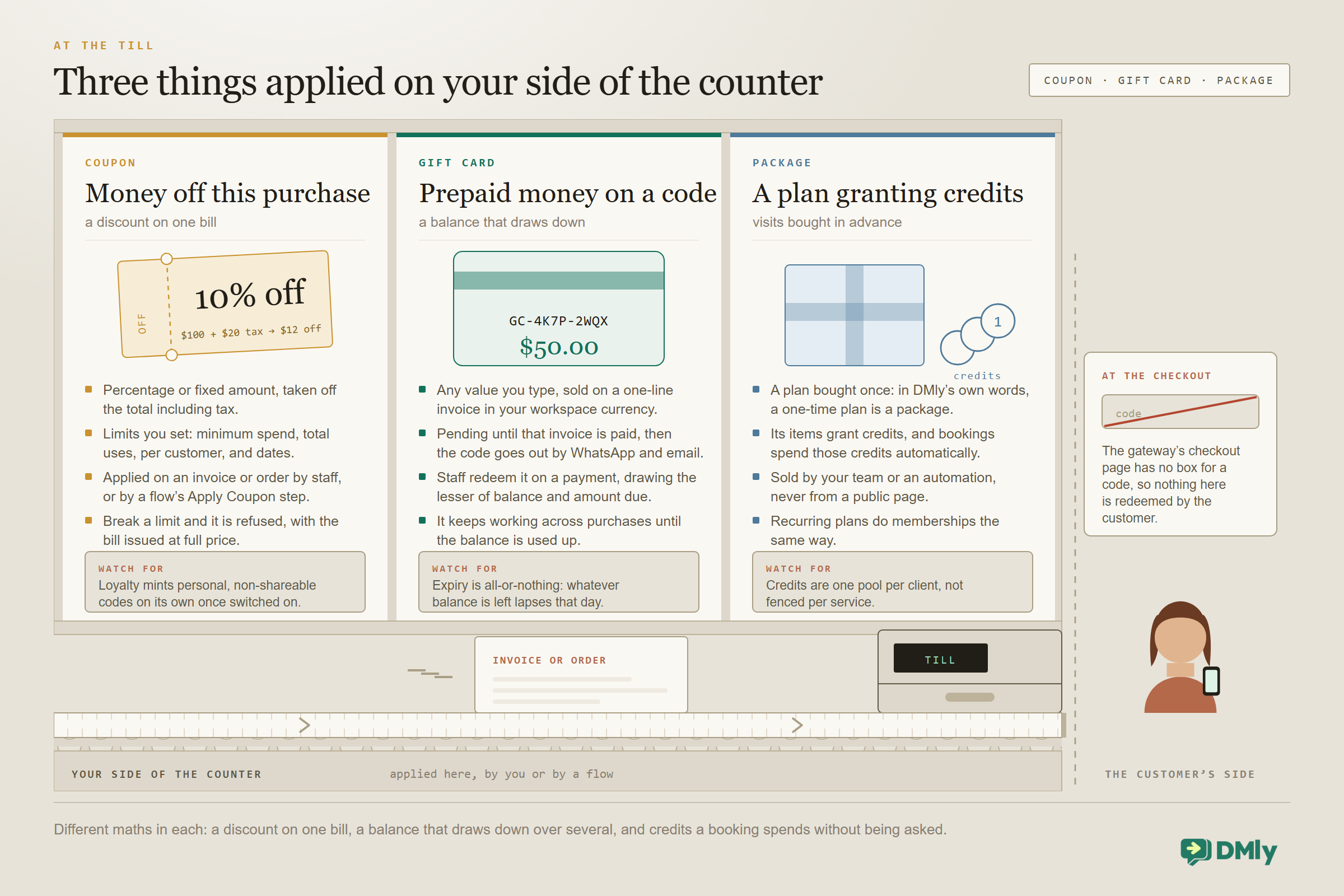
Coupons take a percentage or a fixed amount off an invoice or an order, and they discount the gross total, tax included (10% off 100 plus 20 tax takes off 12). The guardrails are yours to set: a minimum spend, a total usage cap, a per-customer cap and a validity window, and a coupon that violates any of them is refused with the bill issued at full price. In a flow, the Apply Coupon step can put a code on an invoice, and if you run loyalty, DMly mints personal, non-shareable reward codes on its own when a customer crosses your points threshold and messages them the code. The craft for WhatsApp selling is pairing a coupon with a product list message to a properly opted-in audience, which is a campaign question as much as a commerce one; our upsell and cross-sell guide covers the campaign half.
Gift cards are prepaid money on a code. You sell one from Finance → Gift cards at any value (free entry, in your workspace currency): DMly mints a GC-XXXX-XXXX code, raises a one-line purchase invoice, and the card sits Pending until that invoice is paid, at which point the code goes out by WhatsApp and email. Redemption is a staff action while recording a payment: DMly draws down whichever is smallest of the amount you asked for, the card’s remaining balance and the balance still owed on the invoice, and the card keeps working across purchases until it’s used up. Expiry, if you set one, is swept daily and is all-or-nothing (whatever balance remains lapses that day), and there’s a comp option that skips the sale entirely for goodwill cards. Two things it deliberately doesn’t do: sell itself on a public page, and refund a redemption (issue a fresh comp card instead).
Packages are DMly’s plans wearing their one-time hat: a bundle bought once (the docs’ own framing is that a one-time plan is a package) whose items grant credits, which bookings then spend automatically. They shine for service-plus-product businesses: the “six blowouts” package, the “starter kit plus two refills” bundle sold as a plan with a product item. The full mechanics (credits as one pool, selling by staff or automation, recurring plans as memberships) are in our guide to building a class booking system, where credits do most of the work; here the point is that the same catalogue that sells your products can bundle them.
Where AI Fits in WhatsApp Shopping
The AI agent can now take orders as well as answer questions. Turn on AI ordering in Finance → AI Ordering Settings and its Commerce tools can search your products, check what’s available, build the order as the customer talks and quote the total from your own prices and taxes; the AI Shopping Assistant template comes set up to use them. Out of the box every finished order goes to your team to confirm. If you allow it, the AI can also confirm an order the customer has approved and send a payment link from your connected provider. Two limits matter here: it sells from your DMly Products, not from a connected Shopify or WooCommerce store, and an order only counts as paid once the payment is recorded in Finance. So here’s the division of labour.
What AI does well now: product questions. Feed the agent your product pages, ingredient lists, sizing notes and policies as knowledge, and it answers “is the shea butter okay for sensitive skin?” and “how long does delivery take?” at 11pm, which is most of what stands between a browser and a cart. It can also hand over to a person the moment a conversation needs one.
What flows still do best: the fixed, step-by-step route. The catalogue step, reply buttons, the cart trigger, Request Payment, the stock check (a two-path branch that fails safe: a product it can’t find goes down the out-of-stock path, and tracking-off products always count as in stock), tags for the back-in-stock list. Deterministic, inspectable, and they never invent a price.
The bridge, if you need it: custom functions, where a developer exposes an HTTP endpoint (the docs’ own worked example is a check-stock lookup against an external warehouse) and the agent calls it mid-conversation. That’s the route when your stock figure lives outside DMly; budget for a developer afternoon rather than a toggle. For products you sell from DMly Products, the built-in Check availability tool checks what’s available against the quantities you set on each product.
What Selling Through WhatsApp Looks Like in Six Businesses
Restaurants and cafés
The menu as the catalogue, the cart as the pre-order, a Pay now link before the kitchen starts, and a map pin (the Send Location step is a real pin, not a typed address) when it’s ready for pickup.
Salons selling retail
The aftercare shelf, sold in the thread that already booked the appointment: a product list message after the visit, stock tracked so the ledger knows what walked out, and the refill nudge six weeks on.
D2C and skincare brands
Click-to-WhatsApp ads land the enquiry, the AI answers the ingredient questions, the catalogue closes, and the post-purchase thread becomes the repeat-sales channel. Our WhatsApp Ads guide covers the front half.
Bakers and food producers
Weekly product-list messages to regulars (“this week’s bakes”), carts as pre-orders with a cutoff, stock as batch counts so Saturday’s sourdough can’t oversell, and a standing pickup pin.
Boutiques and small retail
Drops as a 10-card carousel, “tell me when it’s back” as a tag plus the back-in-stock trigger, gift cards for the customer who can’t choose, and coupons with a per-customer cap so the discount stays a nudge.
Pharmacies and local shops
The repeat basket: a saved cart pattern the customer re-sends monthly, a payment link back in seconds, delivery arranged in the same thread, and the reorder reminder timed to the pack size.
Why DMly for Selling Through WhatsApp
Most tools sold for WhatsApp shopping do one layer of it: a catalogue bot, or a payment-link generator, or an inbox. DMly’s case is that the layers are one product on one contact record. The commerce switches for your number live next to the inbox that receives the cart; the cart trigger, the Pay now step and the human fallback are the same flow builder that runs your reminders; the product catalogue, stock ledger, orders, invoices, coupons, gift cards and plans are one Finance and Offerings stack; and every sale lands on the contact that asked the question, so the follow-up, the review request and the reorder nudge have something to stand on. The cart-to-payment pipeline ships as a one-click template, commerce is included on every plan ($29, $65 and $149 a month billed yearly, checked in September 2026). The sales money never passes through DMly at all: it lands in your own gateway account, and DMly only mints the link and reads the webhook, so there is nothing for it to take a cut of. WhatsApp’s own per-message rates you pay Meta directly, with no markup added, and there’s a 7-day trial with no card.
How to Set Up WhatsApp Shopping With DMly
The order below takes a business from “we answer product questions on WhatsApp” to WhatsApp shopping running end to end. Steps 1 to 5 are an afternoon plus Meta’s review time.
- Connect WhatsApp on the official API. The catalogue and cart are Business Platform features; the free app can’t run this. Our guide to the three types of WhatsApp accounts explains the difference.
- Build the Meta catalogue. In Commerce Manager: items, photos, prices, and a retailer ID per item you’ll reuse as the SKU everywhere else. Connect it to your WhatsApp Business Account and let the auto-review clear.
- Mirror it in DMly. Offerings → Products, same SKUs, same prices, cost price for your margins, Track stock on for anything you count. CSV import for the first load, then edit in place (import only adds).
- Connect the gateway, then its webhook. One of the six under Integrations, then register DMly’s endpoint in the provider’s dashboard. Test with a real small payment before anything else depends on it.
- Switch on commerce and install the cart flow. Bot Setup → Commerce: Show catalog, Enable cart. Then install the WhatsApp Cart Checkout template, read every step, and publish it. Send yourself a cart from a personal phone and pay it.
- Wire the records. Decide who creates the order for stock-tracked sales (a person from the thread, or the flow’s Create Order step), and check the money templates show Approved so receipts survive the 24-hour window.
- Add the extras that fit. A coupon with sane limits, gift cards if people ask, a package if you bundle. Tag-based back-in-stock flows for the things that sell out.
- Point traffic at the chat and watch the numbers. Catalogue link in the bio and the Google profile, click-to-chat links on the site, ads if you run them. Then watch orders, payments and stock in Finance, and let the reorder data tell you what to promote.
How to Promote Your WhatsApp Store and Drive More Sales
WhatsApp shopping won’t do much for you while the catalogue sits quietly inside your business profile. Once it’s ready, give customers several easy routes into the shopping conversation.
1. Promote Products Across Social Media
Turn your existing social audience into WhatsApp shoppers.
Add your WhatsApp link to places such as your Instagram bio, Facebook Page, and other relevant social profiles. When posting products, give interested shoppers a direct route to message you rather than expecting them to search for your number.
For example, a fashion retailer promoting a new collection could use:
“Need help finding your size? Message us on WhatsApp to shop the collection.”
Product posts, short videos and customer reviews can all lead back to the same conversation.
2. Run Click-to-WhatsApp Ads
Meta’s click-to-message ads can take someone from an ad on Facebook or Instagram directly into a WhatsApp conversation with your business.
This works particularly well when the ad focuses on a specific product or offer. Someone clicking an advert for running shoes shouldn’t arrive to a generic “How can we help?” with no context.
Instead, the conversation can pick up where the ad stopped:
“Hi! Interested in the Cruise Runner? I can help you find the right size.”
With DMly, automation and AI can handle that first interaction immediately, qualify what the shopper wants and keep the conversation moving.
3. Put Your WhatsApp Store Offline Too
For local businesses, some of your best WhatsApp customers may first encounter you in person.
Add a WhatsApp QR code to receipts, packaging, shopping bags, flyers, menus or displays near the checkout. Scanning it can open a conversation or take customers towards your WhatsApp shopping experience.
A customer who buys skincare in-store today could scan the code on the packaging and use WhatsApp when they want to reorder next month.
4. Use WhatsApp Status to Feature Products
One caveat first, because it cuts against everything above. Status is posted by hand from the WhatsApp Business app on a phone. It is not something the Business Platform can post, schedule or automate, and the catalogue and cart in this guide need the Business Platform. So Status is only on the table if you are still posting from the app on that number, either because you have not moved to the Platform or because you run both at once. That second arrangement is coexistence, and it is worth reading what coexistence turns off the day you turn it on before you count on it. If the app is still in your hands, Status is another place to put products in front of existing contacts.
Use it for new arrivals, restocks, limited offers, best sellers, and behind-the-scenes product content. Rather than posting catalogue-style images every day, mix things up.
A bakery could show tomorrow’s fresh pastry selection. A fashion store might preview a new collection arriving on Friday. A furniture business could show how a particular table looks inside a finished room.
Interested customers can then start a conversation.
Best Practices for Selling in the Chat
- Send three products, not thirty. The multi-product message holds 30; a good shopkeeper hands you two things and a reason. Curation is the advantage the chat has over the shelf.
- Answer the question before the catalogue. The product message that follows “yes, it’s safe for colour-treated hair” converts; the one that replaces the answer reads as a vending machine.
- Keep the SKUs identical in both catalogues. Five minutes of discipline at setup; hours of reconciliation saved every month after.
- Make the payment link immediate. The cart is the moment of highest intent you will ever get. The template answers in seconds; a human answering at 6pm is the old problem wearing new clothes.
- Create the order while the kettle boils. If you track stock, the ORD record is the habit that keeps the ledger honest. Confirm it once; the ledger does the rest.
- Sell to opted-in people only. A cart is consent to finish a sale, not to join a broadcast list. The promotion goes through a proper opted-in broadcast with a coupon, never to “everyone who ever bought”.
Mistakes to Avoid
- Skipping the gateway webhook. The single most expensive omission: charges succeed at the provider and nothing on your side ever learns. Register it on day one.
- Assuming the cart moved your stock. It didn’t. The cart moves money towards you; only a confirmed order moves stock. Build the habit or the flow.
- Expecting your DMly products to appear in the WhatsApp catalogue. The sync switches are “Coming soon”. Today the Meta catalogue is maintained in Commerce Manager, full stop.
- Promising variants you can’t model. A product is one price, one SKU, one image. “Small / Medium / Large” is three products; name them so the cart summary reads cleanly.
- Waiting for the customer to type a discount code. There’s nowhere to type it. Coupons are applied on your side; say “I’ve applied your 10%” in the thread and let the link reflect it.
- Confusing the two abandonment features. Checkout abandoned is a Shopify and WooCommerce store event; the WhatsApp cart’s failure mode is the human handover. If you run a web store too, our Shopify automation guide covers that side.
- Letting the bot bluff on stock. The AI only knows what its tools tell it. Turn on AI ordering and keep each product’s available quantity current, or leave stock answers to the flow’s check-stock branch.
Final Thoughts
WhatsApp shopping isn’t a new channel bolted onto your shop; for the businesses it fits, it’s the shop’s oldest instinct given plumbing. Somebody asks, you answer, you hand them the thing and take the money, and the whole exchange happens where the asking already happens. The machinery in this guide (two catalogues bridged by a SKU, a cart that fires a flow, a link that gets paid on a page you never had to build, an order that keeps the ledger honest) exists so that the instinct scales past the hours you can hold a phone.
Start smaller than feels ambitious: ten products, one gateway, the cart template, and your own phone as the first customer. The first real cart that pays itself while you’re serving someone else will tell you more than any guide can.
Add your catalogue
Switch on the WhatsApp catalog and cart, install the cart-to-payment flow, track your stock and take payments through your own gateway, with every sale on the contact record. Start the 7-day free trial, no card needed.
Frequently Asked Questions
Do customers pay inside WhatsApp itself?
No. The customer taps a Pay now link in the chat and pays on your payment gateway’s own hosted checkout page, then returns to the conversation. There’s no card entry inside WhatsApp and DMly never handles card details; the gateway’s webhook reports the payment back so your records update themselves.
Do I need a website for WhatsApp shopping?
No. The catalogue lives in Meta’s Commerce Manager and shows inside the chat, and the checkout is the gateway’s hosted page. A website helps with discovery and click-to-chat links, but nothing in the selling loop requires one.
How does the product catalogue get into WhatsApp?
You build it in Meta Commerce Manager and connect it to your WhatsApp Business Account (Meta auto-reviews the items you add and flags anything against its commerce policy). DMly then switches it on for your number with Show catalog and Enable cart, and its Catalog / Product flow step can send the whole shop, one product or a titled list into any conversation.
What happens when a customer sends a cart?
It lands in your DMly Inbox as a cart line and fires the Cart order received trigger. The ready-made WhatsApp Cart Checkout flow thanks them with the cart summary and sends a payment link for the total as a Pay now button. Anything the system can’t process (unknown product, wrong currency, no published flow) pauses the bot and hands the thread to a person instead.
Does my stock update automatically when someone buys?
Stock moves when an order is confirmed, exactly once, into a ledger that keeps its history. A WhatsApp cart doesn’t create that order by itself, so for stock-tracked products you (or a flow step) create and confirm the order for what sold. Low-stock and back-in-stock triggers can then run notify lists off a tag.
Can customers use a discount code or gift card at checkout?
Not by typing it: the gateway’s checkout page has no code field. Coupons are applied to the invoice or order on your side (or by a flow’s Apply Coupon step), within limits you set, and gift cards are redeemed by your team against an invoice, drawing down the card’s balance until it’s used up.
Can I sell packages or bundles?
Yes, as plans. A one-time plan is DMly’s package object: bundle products, services or credits into it, sell it once, and let bookings spend the credits automatically. Recurring plans do memberships the same way; our class booking guide covers the credit mechanics in depth.
I also run a Shopify or WooCommerce store. Is that the same thing?
It’s a separate, complementary layer. Synced stores get their own ten store-event triggers (order placed, shipped, checkout abandoned and so on) and their own steps like Find Order and order-status replies, and store orders never appear in Finance → Orders. This guide covers selling natively in the chat; our Shopify automation guide covers the store side.
Writing about WhatsApp automation, bookings and growth for local business.
Turn WhatsApp into your busiest channel.
Start free and run message, bookings, payments and reviews in one place.
