
How to Set Up Instagram Automation in 2026: Step-by-Step Guide for Businesses
Instagram automation exists because Instagram DMs have quietly become one of the busiest places for businesses online. Customers ask questions there, request prices, book appointments, enquire about products, and sometimes even make buying decisions without ever leaving the chat.
The problem is that managing all those conversations manually gets overwhelming fast. That’s why more businesses are turning to Instagram automation.
Done properly, it helps you respond faster, capture leads automatically, answer common questions, and keep conversations moving even when your team is offline.
In this guide, we’ll break down exactly how Instagram automation works in 2026, how to set it up the right way, and how to make it feel helpful instead of robotic. Two things get their own pages because they are campaigns rather than settings: turning comments into DMs, and running Instagram DMs as a sales channel. Everything else about the channel is here.
What Is Instagram Automation and What Does It Do?
Instagram automation involves the use of software tools to handle repetitive tasks on Instagram automatically instead of doing everything manually yourself.
Think of it as a system running quietly in the background. It watches for certain actions on your account and responds based on rules you’ve already set up.
For example, you post a Reel and ask people to comment “GUIDE” if they want more information. The moment someone comments that keyword, they automatically receive a DM with the link or details you prepared earlier. You don’t have to stop what you’re doing to reply manually every single time.
That is the whole point of it. Automation helps a business stay responsive even when nobody is actively online.
Some automation tools focus on scheduling content. Others help with engagement, analytics, or DM conversations. But in 2026, most businesses are paying the most attention to DM automation because that’s where a lot of customer interaction now happens.
The most common things businesses automate include:
- Welcome messages, sent as the reply to someone’s first message
- Replies to Story interactions
- Keyword-triggered DMs
- Responses to comments on posts or Reels
- Lead capture and enquiry handling
- Follow-up messages
What Instagram Automation Doesn’t Do
It is powerful, but there is also a lot of hype around it. Some people expect it to magically grow their account or handle every customer conversation automatically.
That’s not how it works.
Here is what it does not do.
It Doesn’t Automatically Grow Your Followers
No legitimate automation tool can magically generate followers for you.
If a tool promises thousands of followers overnight through auto-following or mass engagement tricks, that’s usually a red flag. Those kinds of browser bots violate Instagram’s rules and can put your account at risk.
Good automation supports growth. It doesn’t replace good content.
It Doesn’t Spam Random People with DMs
Modern automation works within Meta’s official rules.
That means automation can only respond to people who interacted with your account first, such as commenting on a post, replying to a Story, or sending you a message. You can’t upload random usernames and blast unsolicited DMs to strangers.
It Doesn’t Replace Real Human Conversations
Automation handles the repetitive first layer. It can send welcome messages, answer common questions, or deliver links automatically. But once a conversation becomes more specific or emotional, a real person still needs to step in.
The best automation systems help humans work faster. They don’t replace them entirely.
It Doesn’t Send Unlimited Messages Without Limits
Instagram closely monitors messaging behavior. Good automation tools intentionally pace messages to avoid spam-like activity. This keeps your account safer and prevents the system from looking unnatural to Meta’s algorithms.
It Doesn’t Fix Poor Strategy
This part matters more than most people realize.
If your content, offer, or messaging isn’t connecting with people, automation won’t suddenly solve the problem. It simply helps you manage and scale interactions more efficiently once the foundation is already working.
Why Instagram Automation Matters for Businesses
Enhanced Efficiency
One of the biggest benefits is speed.
Without automation, your team ends up answering the same questions repeatedly. Pricing. Availability. Booking links. Delivery timelines. It quickly becomes exhausting as conversations grow.
Automation handles those repetitive first-touch interactions instantly, which frees your team to focus on more valuable conversations instead of constantly repeating themselves.
Improved Customer Engagement
People expect fast responses on Instagram.
If someone comments on your Reel or sends a DM, they usually expect a reply within minutes, not hours later when your team is finally available. Automation helps businesses stay responsive even outside working hours.
That immediate response often keeps potential customers engaged instead of losing them to competitors.
Better Lead Capture and Sales Flow
A lot of businesses lose leads simply because conversations aren’t organized properly.
Automation helps guide people into a structured flow. Someone comments on a post, receives a DM automatically, clicks a link, answers a question, or gets routed to the right team member. The process feels smoother for both the business and the customer.
For sales teams especially, this reduces missed opportunities significantly.
Data-Driven Decisions
Automation also gives businesses visibility they normally wouldn’t have.
You can track:
- Which keywords trigger the most conversations
- Which campaigns generate the most DMs
- Response times
- Conversion patterns
- Customer behavior inside conversations
This helps businesses improve messaging based on real interaction data instead of guesswork.
Intelligent AI-Powered Replies
In 2026, automation is becoming smarter thanks to AI.
Modern platforms like DMly can now combine automation with AI-powered responses that understand intent better and guide conversations more naturally.
Instead of rigid scripted replies, businesses can create experiences that feel much more conversational while still scaling efficiently.
Is Instagram Automation Safe?
Short answer: yes, if you use the right tools properly.
Safety mostly comes down to how the tool connects to Instagram. Good platforms connect through Meta’s official API, which is the approved way for businesses to automate certain actions. That’s very different from risky browser bots that imitate human behavior behind the scenes and violate Instagram’s rules.
The second part is how you use the automation itself.
Safe automation is permission-based. That means the system only responds to people who already interacted with you, like commenting on a post, replying to a Story, or sending a keyword. Random mass messaging is what usually gets accounts flagged.
When businesses stick to API-based tools and natural conversation flows, the risk of problems becomes very low.
Before You Connect: the Two Instagram Tiles
This is the part that costs people an afternoon, and it is not in any of the eight steps below because it happens in the half-second before step four.
Instagram does not connect on its own. It connects through a Facebook Page, which means three things have to be true before you start: the Instagram account is a Business account, it is linked to a Facebook Page, and you are an admin of that Page. An account with no Page link never appears in the picker at all, which is confusing in its own right, because nothing tells you why it is missing.
Then the tile itself. Your workspace can show two Instagram tiles side by side, with the same icon and the same subtitle underneath: Connect a new Business Instagram account. Only one of them gives you messaging.
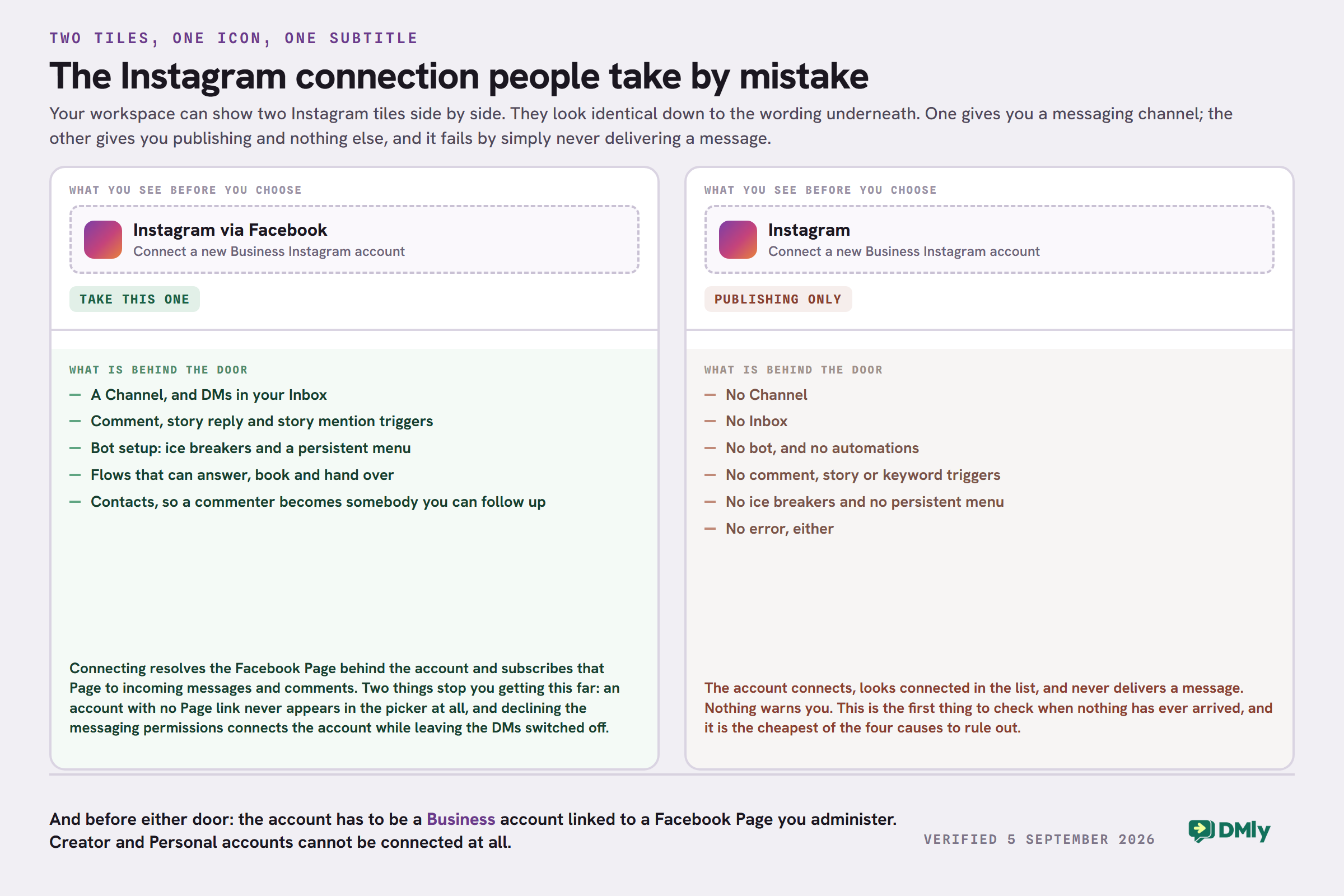
Take the one that reads Instagram via Facebook. The other one connects the account for publishing only: no Channel, no Inbox, no bot, and no error message to tell you so. It is the first thing to check when nothing has ever arrived, and the cheapest thing to rule out.
One more trap in the same minute: if you decline the messaging permissions on Meta’s approval screen, the account connects anyway and the DMs never flow. Approve everything it asks for, or you will be debugging a connection that looks perfect.
How to Set Up Instagram Automation
Setting it up is much easier than most people expect today. You don’t need coding knowledge or a technical team. With the right platform, most businesses can get their first automation running in less than an hour.
Here’s the step-by-step process.
Step 1: Switch to a Professional Instagram Account
Instagram automation only works with a Business account.
Open Instagram and go to: Settings → Account → Switch to Professional Account
You’ll then choose between Business account and Creator account.
Only the Business account works. This is the correction most guides get wrong, ours included until today: a Creator account cannot be connected for messaging at all, and neither can a Personal one. If you are on Creator and you like it, you still have to switch before any of this runs.
Step 2: Connect Your Instagram to a Facebook Page
It runs through Meta’s system, so your Instagram account needs to be linked to a Facebook Page.
To do this:
- Open your Instagram profile
- Tap Edit Profile
- Go to Page
- Connect an existing Facebook Page or create a new one
Without this connection, most automation tools won’t work properly.
Step 3: Enable Access to Instagram Messages
Now you need to allow third-party platforms to access your Instagram DMs.
Go to: Settings → Messages and Story Replies → Message Controls → Connected Tools
Then enable: Allow Access to Messages
This permission allows automation platforms to send and receive messages through Meta’s official API.
Step 4: Connect Your Automation Platform
Next, choose an Instagram automation platform.
Platforms like DMly allow businesses to automate Instagram conversations alongside WhatsApp, Messenger, Telegram, and web chat from one dashboard.
Once you sign up:
- Click Connect Instagram
- Log in through Meta’s secure authorization screen
- Approve the requested permissions
The connection process usually takes less than a minute.
Step 5: Choose Your Automation Trigger
This is where you decide what action should start the automated conversation.
Common triggers include:
- Someone comments a keyword on your post
- Someone replies to your Story
- Someone sends a specific DM keyword
- Someone taps an ice breaker or an item on your persistent menu
For example, you could ask users to comment “GUIDE” on a Reel, and the automation instantly sends them the download link through DM.
Step 6: Write Your Automated Message
Now create the message your audience will receive.
The best automated messages feel short, conversational, and helpful. Avoid making them sound robotic or overly salesy.
A simple example: “Hey! Thanks for reaching out. Here’s the guide you requested. Let me know if you have any questions.”
Keep the first message focused on one clear action or response.
Step 7: Test Everything Before Going Live
Before activating the automation publicly, test it yourself. Use another account or ask someone on your team to, trigger the keyword, reply to the Story, or send the DM trigger.
Then confirm if the message sends correctly, links work properly, and follow-up flows behave as expected.
Step 8: Activate and Monitor Your Automation
Once everything works properly, turn the automation live. But don’t completely forget about it afterward.
Spend the first day monitoring:
- Delivery rates
- Customer replies
- Engagement patterns
- Unexpected conversation scenarios
Automation works best when it’s regularly adjusted based on how real people respond.
Can You Automate DMs On Instagram?
Yes, absolutely.
Instagram DM automation has become one of the most effective ways for businesses to manage conversations at scale without needing someone online every minute of the day.
Thanks to Meta’s official API, businesses can now automate replies, send information instantly, and guide conversations automatically in a way that’s both fast and compliant with Instagram’s rules.
The setup is fairly simple.
You connect your Instagram Business or Creator account to an approved automation platform, define the triggers you want, and the system responds automatically whenever those triggers happen.
There are three major types of Instagram DM automation businesses use today.
Rule-Based Automation
This is the most common starting point.
Here, the system follows predefined rules and sends specific responses when certain actions happen. For example, if someone comments “PRICE,” they automatically receive a detailed breakdown of your pricing through DM.
It’s simple, reliable, and works very well for repetitive interactions.
AI-Powered Automation
This is where things get more advanced.
Instead of relying only on exact keywords, AI-powered systems understand intent and respond more naturally. They can answer questions, guide users through conversations, and provide more flexible replies without feeling heavily scripted.
Platforms like DMly are increasingly combining automation with AI features to make Instagram conversations feel smarter and more human.
Hybrid Automation
This combines both approaches.
Simple tasks are handled through rule-based automation, while more complex conversations are passed to AI or a human team member. This is usually the best setup for growing businesses because it balances efficiency with personalization.
What Actually Starts an Instagram Automation
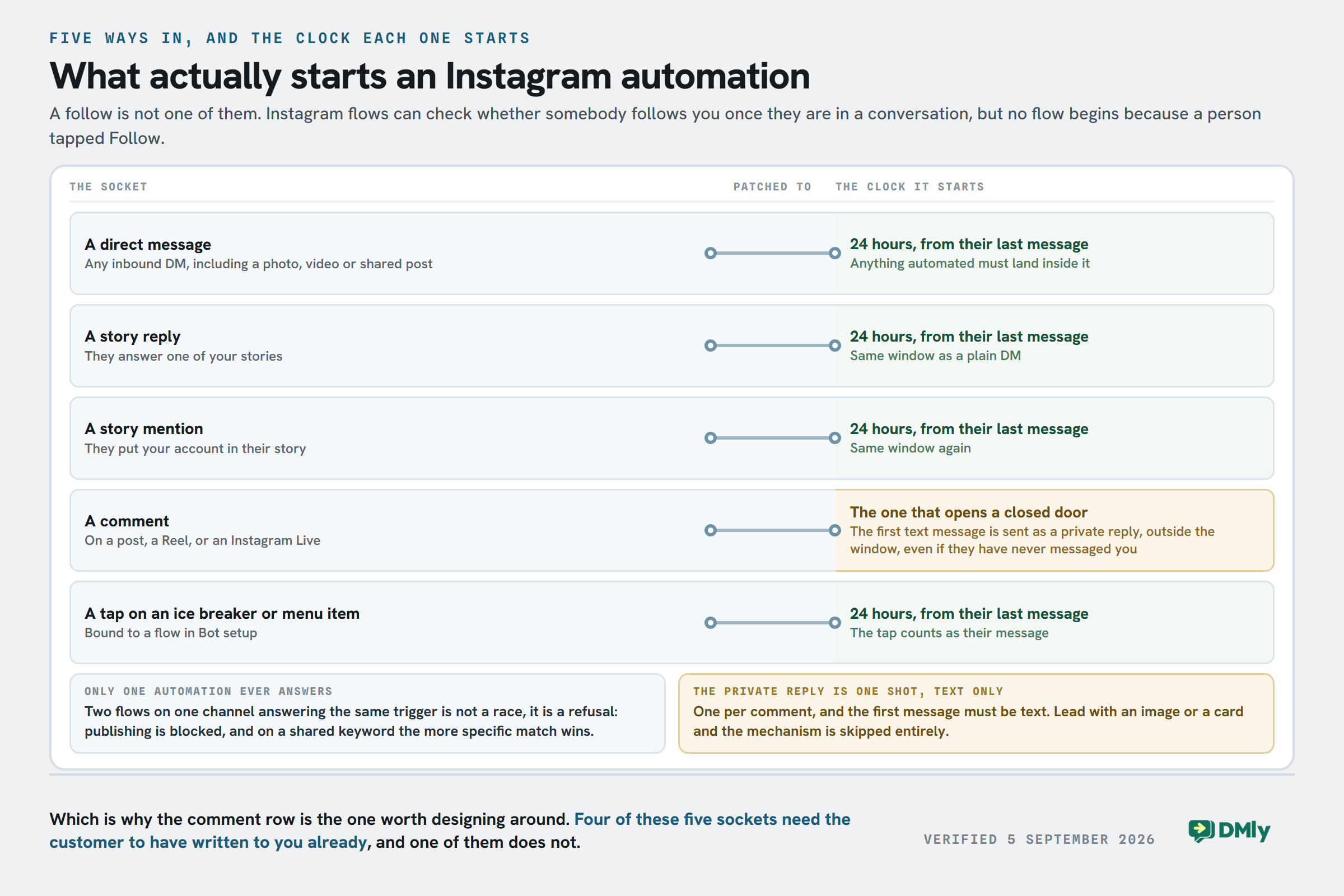
Five things start a flow on Instagram, and one thing that everybody expects to be on the list is not on it.
- A direct message. Any inbound DM, including a photo, a video, a shared post or a sticker.
- A story reply. Somebody answers one of your stories.
- A story mention. Somebody puts your account in their story.
- A comment on a post, a Reel, or an Instagram Live.
- A tap on an ice breaker or a persistent-menu item that you have bound to a flow.
A new follower is not a trigger. A flow can check whether the contact follows your account, which Facebook has no equivalent for, but that is a condition inside a conversation rather than an event that starts one. Nothing happens when somebody taps Follow, and any guide promising a welcome DM to every new follower is describing a mechanic Meta does not offer.
How the keyword is matched
Every inbound trigger offers four matching modes: any message with no keyword filter at all, contains a keyword, an exact match, and starts with a keyword. Matching is case-insensitive, so Price, PRICE and price all land on the same rule. Leave the keyword list empty and the automation fires on everything, which is the single most common cause of a bot that misbehaves.
There is also Only respond once per contact, which is what you want for anything giveaway-shaped: one response per person however many times they comment.
Only one automation ever answers a message
This one is worth knowing before you build the second flow rather than after. Two active automations on the same channel answering the same trigger is not a race, it is a refusal. Publishing the second one is blocked, with a message naming the flow it collides with. Where they merely share a keyword, the more specific match wins that keyword, and the older automation wins a tie. The fix is to give one a specific keyword or pause the other, not to publish again and hope.

The Clock on Every Instagram Conversation
Meta only lets you message somebody who messaged you first, and only for a while. Three numbers cover it, and the third one is the reason so much Instagram advice quietly does not work.
- 24 hours for anything automated. Flows, sequences and broadcasts can only reach a contact within 24 hours of that contact’s last message to you. Outside it, the send is blocked and recorded as failed rather than silently dropped, so it shows up in your logs.
- 7 days for a reply a person types. A teammate answering by hand in the inbox gets a week, sent under Meta’s human agent allowance automatically.
- No templates. Ever. Instagram has nothing like WhatsApp’s approved message templates, so there is no way at all to open a conversation with somebody who has not written to you first. If you need to reach people cold, that is a WhatsApp job.
Two things bend the 24 hours without breaking it. The marketing opt-in step asks permission while the contact is still inside the window, and if they accept you get exactly one more message after it closes. And a comment gets you the private reply described below, which opens a thread that was never open.
The private reply, and its four hard edges
In a comment-triggered flow, the first text message step of the run is delivered as a private reply to that comment. It opens a DM with somebody who has never messaged you, outside the normal window. That single mechanism is what every “comment PRICE and I’ll send it over” campaign is built on, and it has limits worth designing around rather than discovering:
- One per comment. Only the first message of the run uses it, and each comment is processed exactly once. There is no second bite.
- Text only. If your first message step is an image or a card, the private-reply mechanism is skipped entirely and the message is sent as an ordinary DM, which may never reach a commenter who has not messaged you. Put the link in a plain text message and the media after it.
- Later messages are ordinary DMs. The comment opens a 24-hour window, so follow-up steps are attempted normally, but Meta decides delivery at send time. Front-load the message that matters.
- Pair it with a public reply, or do not. Reply to Comment only posts publicly; it is not required for the DM to work. Most people pair them so everybody else scrolling the comments can see the mechanic is real.
The full campaign version of this, including keyword design and what to do when a comment gets a reply but no DM, is in our guide to Instagram comment-to-DM automation. If you also run TikTok, be careful about assuming the same plan carries across: it does not, and the comparison is here.
Choosing the Right Platform
Not all Instagram automation tools are built the same.
Some are designed for simple creator workflows. Others focus heavily on sales funnels, customer support, or AI conversations. And unfortunately, some tools still rely on risky automation methods that can create problems for your account later.
That’s why choosing the right platform matters just as much as the automation strategy itself.
A good tool should make conversations feel smoother and easier to manage, not more robotic or complicated.
Here are the main things businesses should look at before choosing a platform.
Integration with Your Existing Tools
Automation works best when it fits into your existing workflow.
If your team already uses CRMs, email marketing software, e-commerce platforms, or customer support tools, your automation platform should connect easily with them. Otherwise, conversations and customer data become scattered everywhere.
Platforms like DMly are becoming popular partly because they combine Instagram, WhatsApp, Messenger, Telegram, and web chat conversations in one place instead of forcing businesses to manage multiple disconnected systems.
Customization and Personalization
Nobody likes robotic messages. Your automation should sound like your brand, not like a generic template copied from the internet. Good platforms let you customize:
- Message flows
- Tone of voice
- Keywords
- AI responses
- Follow-up sequences
The more natural the conversation feels, the better your engagement usually becomes.
Scalability as Your Business Grows
A setup that works for 20 conversations a day may completely break down at 500 conversations a day. That’s why scalability matters.
As your business grows, your automation platform should be able to handle:
- Higher message volume
- Multiple team members
- Advanced workflows
- Shared inbox management
- AI support
- Customer segmentation
Without forcing you to rebuild everything later.
Analytics and Performance Tracking
Automation without tracking is guesswork. A good platform should help you understand:
- Which triggers perform best
- Response rates
- DM conversion rates
- Engagement patterns
- Lead quality
- Customer response times
This data helps you improve your messaging and automation strategy over time instead of just “hoping it works.”
Safety and Compliance
This is a big one.
Always choose tools that connect through Meta’s official API instead of browser-based automation tricks. API-approved platforms are much safer and align with Instagram’s policies, which helps reduce account risks significantly.
Ease of Use
Some automation platforms are surprisingly complicated.
If setting up a simple DM workflow feels like building software, your team probably won’t use it consistently. The best platforms balance powerful features with a clean, manageable interface that non-technical teams can actually work with daily.
Where This Guide Stops and a Comparison Starts
This page used to carry a league table of Instagram automation tools, with a tick or a cross against each competitor for things like “AI support” and “ease of use”. It has been taken out, and it is worth saying why rather than quietly dropping it.
We could not check most of it. Grading somebody else’s product as “basic” or “limited” means having used it recently, on a current plan, for the thing being graded. We had not, the entries were months old, and a table like that ages badly in a market where every one of these tools ships something new most months. A comparison you cannot stand behind is worse than no comparison, because the reader cannot tell which rows were checked.
Manychat, and why there is no number next to it
Manychat is the name most people arrive with, and it deserves a straight answer. Manychat publishes its pricing openly on its own site. We still do not put a Manychat figure on our pages, and that is a limitation on us rather than a criticism of them: reading it reliably from an automated tool means going around a check on their site, which we do not do, and the alternative is copying a number out of a software directory, which we have caught being wrong before. Their pricing page takes ten seconds to open and is worth more than any number we could copy.
What survives without a figure is the structural part, which is the useful part anyway. Manychat meters active contacts a month rather than seats or channels, it has a genuinely free tier, and it is built around Instagram and Messenger comment-to-DM rather than WhatsApp-first support. If those three things describe your business, it is a reasonable place to start and you should go and look. Where we do maintain a side-by-side, it is on its own page and it is kept current: DMly compared with Manychat.
What to do instead of reading a table
Open two of them and connect one Instagram account to each. Every tool in this category has a free trial, the connection takes minutes once your Page link is right, and an hour of your own hands on the builder will tell you more than any grid. The section above on what to look for is the part worth taking with you while you do it.
How to Make It Feel Natural, Not Robotic
The biggest mistake businesses make here is sounding like a machine.
People can instantly tell when a message feels cold, generic, or obviously automated. And once that happens, engagement usually drops fast. Good automation should feel fast and helpful, not fake.
The goal is not to trick people into thinking a bot is human. The goal is to make conversations feel smooth, relevant, and useful.
Here’s how businesses do that successfully.
1. Build A Strong Welcome Sequence
First impressions matter a lot in DMs. When someone follows your page or triggers an automation, the first message sets the tone for everything that follows. Instead of immediately pushing a sale, focus on being welcoming and helpful first.
For example:
- Offer a useful guide
- Share a discount code
- Ask a simple question
- Point them toward the right resource
A good welcome flow feels like a helpful assistant, not an aggressive salesperson.
2. Use Follow-Up Messages Carefully
Follow-ups are powerful when done properly.
A well-timed follow-up can remind someone about:
- A product they showed interest in
- A booking they didn’t complete
- A resource they requested
- A special offer they viewed
But timing matters. Too many messages quickly become annoying. The best automation flows guide conversations gently instead of constantly pushing.
3. Personalize Wherever Possible
People respond better when messages feel relevant to them specifically. Use names, interests, keywords, or previous interactions to make replies feel more personal.
For example, if someone requested pricing information, your next message should continue that context instead of restarting the conversation awkwardly.
Modern platforms like DMly help businesses build more personalized flows using customer data, segmentation, and AI-powered responses.
4. Segment Your Audience
Not every follower wants the same thing. Someone asking about pricing should not receive the same automation flow as someone asking for support or downloading a free guide. Segmenting users based on actions or interests makes conversations feel far more relevant.
This also improves conversion rates because people receive information that actually matches what they care about.
5. Keep Your Brand Voice Consistent
Your automated messages should still sound like your business.
If your brand is playful, your automation should feel playful. If your business is more professional and direct, the messages should reflect that too.
The best automation sequences feel like a natural extension of the brand instead of a completely different personality suddenly appearing in DMs.
6. Know When Humans Should Step In
Automation is excellent for repetitive conversations, but not every interaction should stay automated forever.
When conversations become emotional, highly specific, or sales-heavy, human interaction becomes important. The best systems know when to hand the conversation over to a real person.
That balance is what makes automation actually work long term.
7. Avoid Over-Automating Everything
Not every single interaction needs a workflow attached to it. Sometimes businesses become so obsessed with automation that every comment, Story interaction, and DM triggers multiple sequences at once. That quickly becomes overwhelming for users.
Good automation feels intentional and lightweight, not noisy.
What AI Changes About Automated Replies
AI is changing it from simple scripted replies into something far more intelligent and personalized.
A few years ago, most automation systems could only respond to exact keywords. If someone typed something slightly different, the flow often broke. But AI-powered automation is making conversations feel much more natural now.
Instead of just matching keywords, AI can understand intent, context, and even customer behavior.
That creates a much better experience for both businesses and customers.
Smarter Personalized Conversations
One of AI’s biggest strengths is personalization at scale. Instead of sending the exact same message to everyone, AI can tailor replies based on:
- Previous interactions
- Customer interests
- Purchase history
- Conversation behavior
- Engagement patterns
This makes automated conversations feel much more relevant instead of generic.
Sentiment Analysis and Emotional Context
AI can also help businesses understand the tone behind messages. For example:
- A frustrated customer may be routed to support faster
- A highly interested lead may trigger a sales-focused follow-up
- A confused customer may receive additional explanation automatically
This helps businesses respond more appropriately instead of treating every conversation the same way.
Behavioral Triggers That Feel More Natural
Modern automation doesn’t just react to keywords anymore. AI-powered systems can respond based on behavior too.
For example:
- Someone repeatedly viewing a product link
- Someone asking similar questions multiple times
- Someone engaging heavily with Stories or Reels
These behaviors can trigger more relevant follow-up conversations automatically.
Dynamic Responses Instead of Rigid Scripts
Traditional automation often feels repetitive because every response is pre-written exactly the same way.
AI changes that.
Instead of relying purely on fixed scripts, AI can generate responses dynamically while still following your business guidelines. That makes conversations feel less robotic and more conversational.
Better Lead Qualification
AI can also help businesses identify stronger leads automatically. Instead of sending every enquiry directly to a sales rep, the system can ask qualifying questions, understand customer intent, collect important details, or prioritize higher-intent conversations. This helps sales teams spend more time on the leads most likely to convert.
What Bot Setup Gives Instagram, and What It Cannot
Bot setup has four sections, and on Instagram they do not all work the way the interface implies. Instagram has no Get Started button, so there is no stored greeting to push at Meta the way there is on a Facebook Page.
- Ice breakers and the persistent menu are pushed to Instagram when you save. Up to four ice breakers, shown on mobile only. Up to three menu items per level, up to three levels deep. Bind them with Start flow or Open URL, because a postback item’s payload is never acted on and the tap does nothing.
- The welcome message is not pushed anywhere. It is sent as the reply to a contact’s first-ever DM, when that first message matches no flow and no keyword. That is why it never appears in Instagram’s own settings.
- The default reply fires when a message matches no flow and no keyword, honouring whichever you chose of once per 24 hours per contact or every time. It never fires for somebody who has opted out or paused the bot.
Both the welcome and the default reply can carry up to three tappable buttons, which is worth using: on a channel with no templates, the first message is the only one you are guaranteed to get.
Four Instagram Quirks That Look Like Faults
Every one of these gets reported as a bug at least once per team. Three of them are Instagram working correctly and one is a real thing to fix, so it is worth knowing which is which before somebody spends a morning on it.
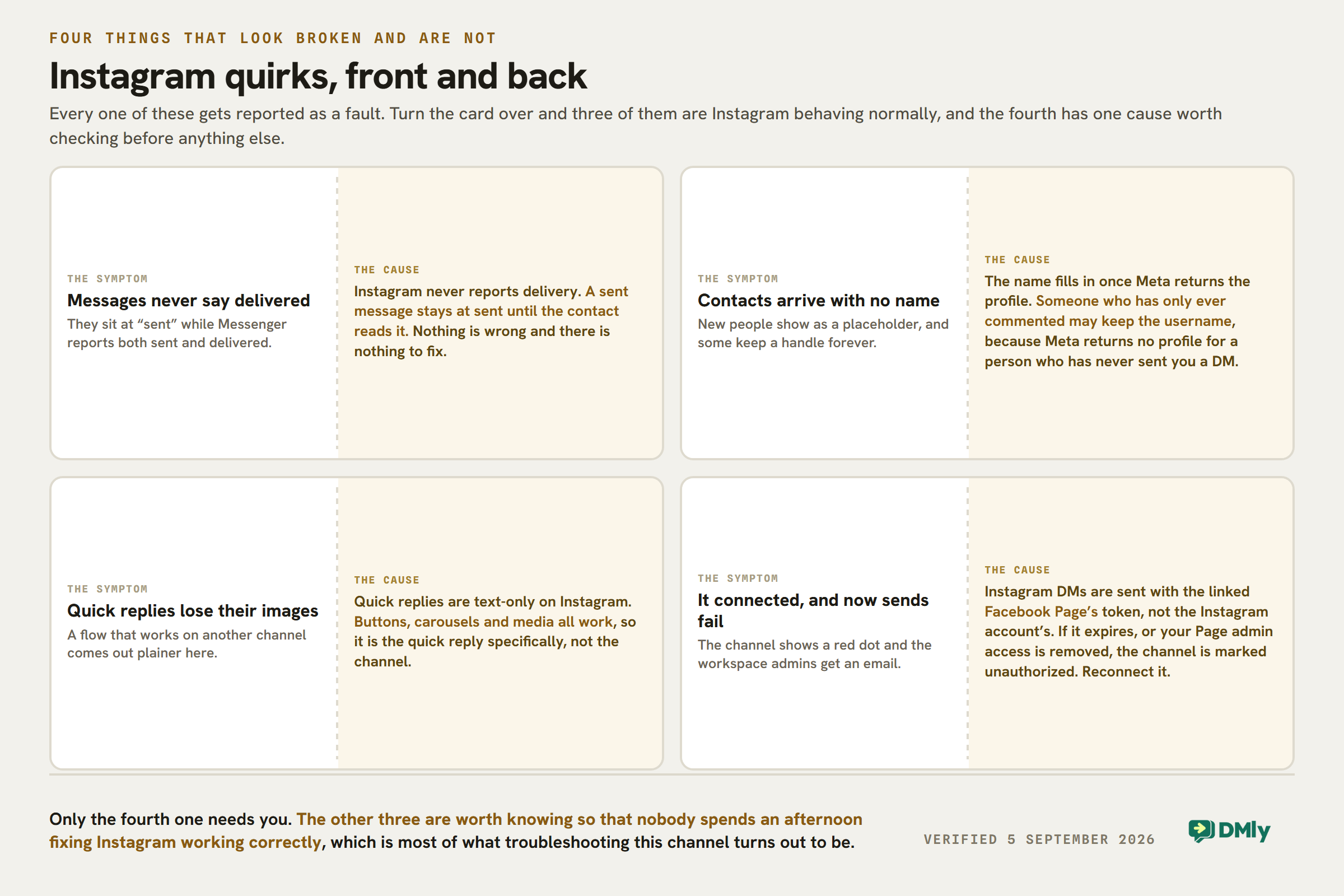
The one that does need you is the last. Instagram DMs are sent with the linked Facebook Page’s access token, not the Instagram account’s. If that token expires, or somebody removes your admin access to the Page, the channel is marked unauthorized, a red dot appears on it and the workspace admins get an email. Reconnecting the account fixes it, and nothing else will.
Measuring What Matters in Your Instagram DM Automation Strategy
Setting it up is only half the job. The real value comes from understanding what’s actually working and improving it over time.
A lot of businesses launch automation flows and never look at the data afterward. But the best-performing automation strategies are constantly adjusted based on customer behavior and performance metrics.
So, let’s talk about the numbers that matter most.
Response Time
Speed matters a lot on Instagram. One of the biggest advantages of automation is instant replies. Tracking response time helps you understand whether your system is delivering messages quickly enough to meet customer expectations.
Engagement Rate
This tells you how people interact with your automated messages. For example:
- Are users replying?
- Clicking links?
- Continuing conversations?
- Ignoring the messages entirely?
High engagement often means your automation feels relevant and useful instead of robotic or spammy.
Conversion Rate
This is one of the most important metrics for businesses. It measures how many conversations actually lead to meaningful outcomes like sales, bookings, email signups, demo requests, or product enquiries. Good automation should not just create conversations. It should move people closer to action.
Customer Satisfaction
Automation should improve the customer experience, not frustrate people. That’s why businesses should pay attention to customer satisfaction signals, including, positive replies, feedback surveys, conversation quality, and support resolution rates.
If people constantly become confused or annoyed during automated flows, something needs adjustment.
Drop-Off Points
Tracking where users stop responding inside automation flows helps identify weak spots. Maybe the message is too long. Maybe the call-to-action is unclear. Maybe the conversation becomes too sales-heavy too quickly.
Lead Quality
Not all leads are equal. Some automation campaigns generate lots of conversations but very few serious buyers. Others may generate fewer conversations but much stronger leads.
Tracking lead quality helps businesses focus on the workflows that actually create revenue instead of vanity metrics.
AI Performance Insights
If you’re using AI-powered automation, it’s also important to monitor:
- AI response accuracy
- Escalation rates to human agents
- Customer sentiment
- Conversation completion rates
This helps you understand where AI performs well and where human intervention is still needed.
Final Note
Instagram automation is no longer a nice extra for a business. In 2026, it has become one of the most practical ways to manage growing conversations, respond faster, and turn engagement into real business opportunities without overwhelming your team.
The key is using automation the right way. The best systems don’t try to replace human interaction completely. They simply remove repetitive tasks, improve response speed, and create smoother customer experiences at scale.
And when paired with AI and the right platform, it can become a powerful extension of your marketing, support, and sales process.
We have shown you all you need to know about this, including the tools to leverage to enjoy the best from it. Now, it’s time to put all that you’ve learned here to practice.
Frequently Asked Questions
Will Instagram DM automation get my account banned?
Not if you use it properly.
Safe automation uses Meta’s official API and follows Instagram’s rules. Problems usually happen when businesses use browser bots, spam-like behavior, or unauthorized tools.
Platforms like DMly use official integrations, which makes automation much safer.
Is DMly Meta-approved?
DMly uses Meta-approved integrations for messaging automation, which helps businesses automate Instagram and WhatsApp conversations safely through official APIs instead of risky browser automation methods.
Can you automate Instagram DMs for free?
Yes, to a point. Some platforms offer free plans or limited free automation features. However, businesses usually move to paid plans once they need advanced workflows, AI features, team collaboration, or higher message volumes.
How many Instagram DMs can I automate per day?
There isn’t a single public number that applies to every account. Meta monitors messaging behavior dynamically based on account health, engagement quality, and automation practices. Good automation platforms pace messages naturally to reduce spam risks and keep accounts safe.
What is the best Instagram DM automation tool for small businesses?
It depends on what the business needs most, and the honest version of this answer names the trade-off rather than the winner. Manychat meters active contacts a month and is built around Instagram and Messenger, which suits a creator or a marketer running keyword campaigns. DMly prices by plan rather than by contact and puts Instagram in the same inbox as WhatsApp, Messenger, TikTok, Telegram, live chat and SMS, which suits a business whose customers do not all arrive on one app. Try both: the side-by-side is here.
Does Instagram DM automation work with Instagram Reels?
Yes. One of the most popular automation strategies today involves triggering DMs from Reel comments. For example, someone comments a keyword on your Reel and automatically receives a message with a link, guide, or offer.
Can I automate Instagram DMs for appointment booking?
Absolutely. Many businesses use it to handle bookings automatically by:
- Sending scheduling links
- Collecting customer details
- Answering booking questions
- Confirming appointments
This works especially well for salons, clinics, coaches, consultants, and service businesses.
Can I use Instagram automation for affiliate links?
Yes, as long as you follow Instagram’s policies and disclose affiliate relationships where necessary.
Many creators use DM automation to deliver affiliate links automatically when followers request product recommendations or resources through keywords or Story replies.
Writing about WhatsApp automation, bookings and growth for local business.
Turn WhatsApp into your busiest channel.
Start free and run message, bookings, payments and reviews in one place.
