
BotSailor Review (2026): The $10.99 Is a Slider, Not a Plan Price
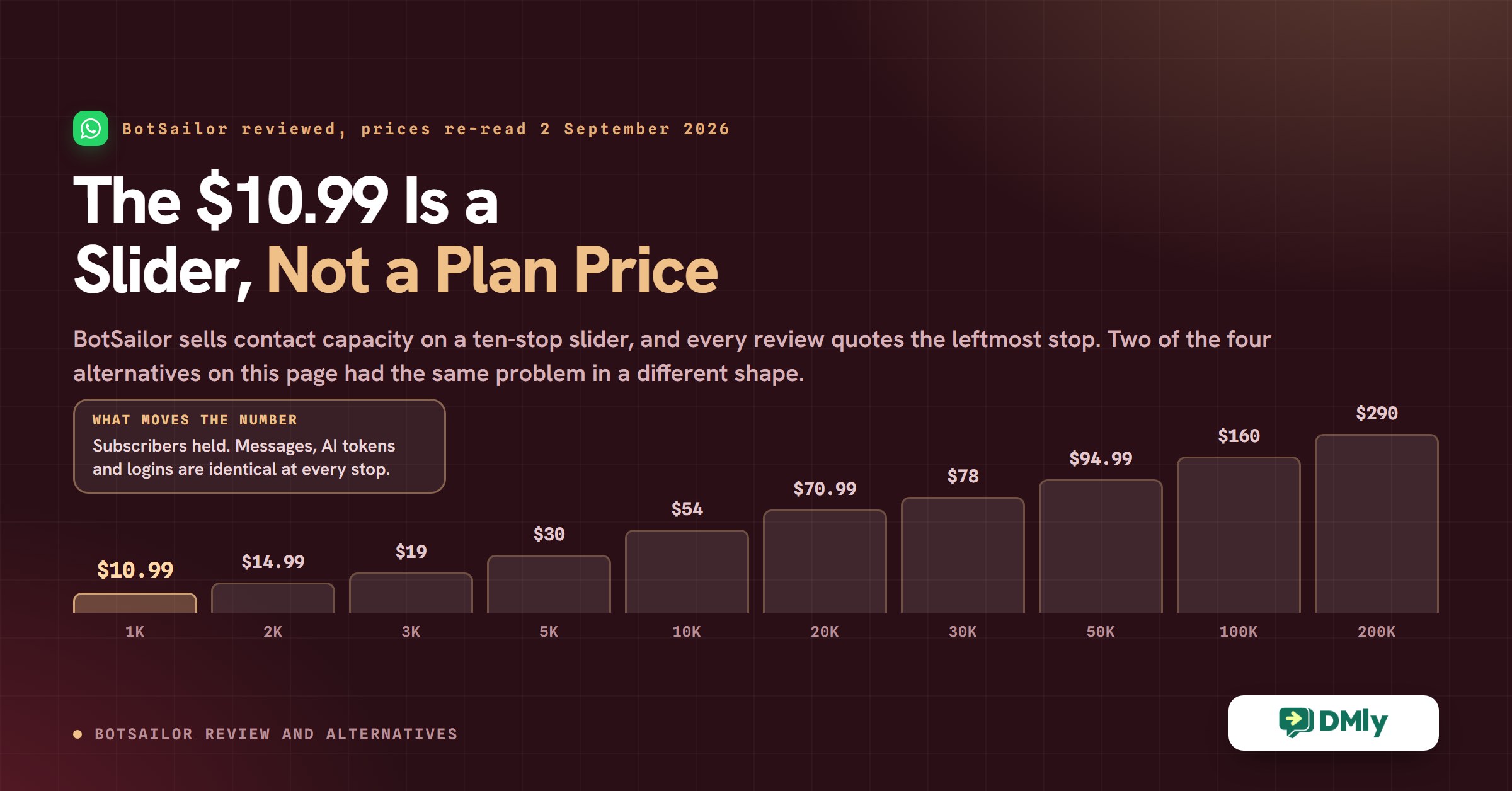
Every BotSailor review, including the one that used to sit on this page, says the same thing: the Premium plan costs $10.99 a month. Open BotSailor’s own pricing page and that number is there, in large type, exactly as quoted.
It is not the price of the plan. It is the price at one end of a slider.
Above the figure sits a control labelled Choose Subscribers, and the price underneath it moves when you drag it. The $10.99 you have read everywhere is what Premium costs at the smallest setting on that slider. Move it one notch and the number changes. Every BotSailor review we could find has quoted a slider position and called it a plan price, and so did ours.
That is worth more than a correction, because it turns out to be the normal condition of this whole category. When we went back and re-verified the four alternatives this page recommends, two of them had the same problem in a different shape: the number our page quoted was real, published, and taken from the wrong row. This BotSailor review is therefore about two things. What BotSailor actually is and who it suits, and how to read a WhatsApp platform’s pricing page so that the figure you plan around is the one you will be billed.
BotSailor Review: What the Product Actually Is
BotSailor is a chatbot and broadcast platform for five channels, sold by the number of contacts you hold. You build conversation flows in a drag-and-drop editor, connect them to WhatsApp, Facebook Messenger, Instagram, Telegram or a website chat widget, and run campaigns and automated replies from one dashboard. It is operated by Xerone IT and its terms are governed by the law of Bangladesh, which is stated on its own policy pages and is worth knowing before you sign anything.
The five channels are the whole list. BotSailor’s own site says so: “chatbots for WhatsApp, Instagram, Facebook Messenger, Telegram, and websites.” SMS and email are not channels here in the way WhatsApp is; they are outbound sends you wire up through a third party such as Twilio, Plivo, Clickatell or your own SMTP server.
Who it suits is easier to answer than most products in this category. If you are technical enough to enjoy a webhook, and your contact list is small, BotSailor is one of the cheapest serious automation platforms you can buy. If neither of those is true, the rest of this review is about the things that will cost you money or time later.
BotSailor Pricing: the Number Is a Slider Position
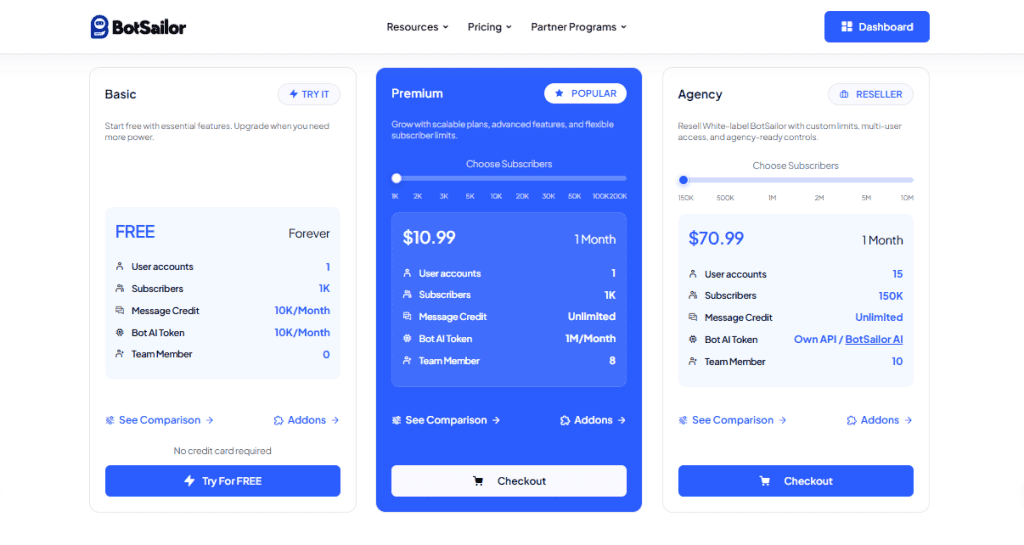
BotSailor sells contact capacity, and everything else is roughly constant. Premium has ten price points and Agency has five, and moving between them changes almost nothing except how many people you are allowed to keep on file. Unlimited message credits, a million AI tokens a month and one user account are the same at $10.99 and at $289.99.
The Ten Premium Prices, Read Off BotSailor’s Own Page
These come from the structured BotSailor pricing data published in the pricing page’s own markup, checked on 2 September 2026. There are three billing terms: monthly, quarterly at ten per cent off, and yearly at twenty per cent off.
| Premium tier | Subscribers | Monthly | Quarterly | Yearly | Team members |
|---|---|---|---|---|---|
| Premium 1K | 1,000 | $10.99 | $29.70 | $104.00 | 8 |
| Premium 2K | 2,000 | $14.99 | $38.70 | $138.40 | 8 |
| Premium 3K | 3,000 | $19.00 | $52.20 | $184.00 | 10 |
| Premium 5K | 5,000 | $30.00 | $81.00 | $288.00 | 12 |
| Premium 10K | 10,000 | $54.00 | $145.80 | $518.40 | 14 |
| Premium 20K | 20,000 | $70.99 | $190.80 | $679.20 | 14 |
| Premium 30K | 30,000 | $78.00 | $210.60 | $748.80 | 16 |
| Premium 50K | 50,000 | $94.99 | $255.60 | $910.40 | 20 |
| Premium 100K | 100,000 | $159.99 | $431.10 | $1,535.20 | 30 |
| Premium 200K | 200,000 | $289.99 | $783.00 | $2,783.20 | 50 |
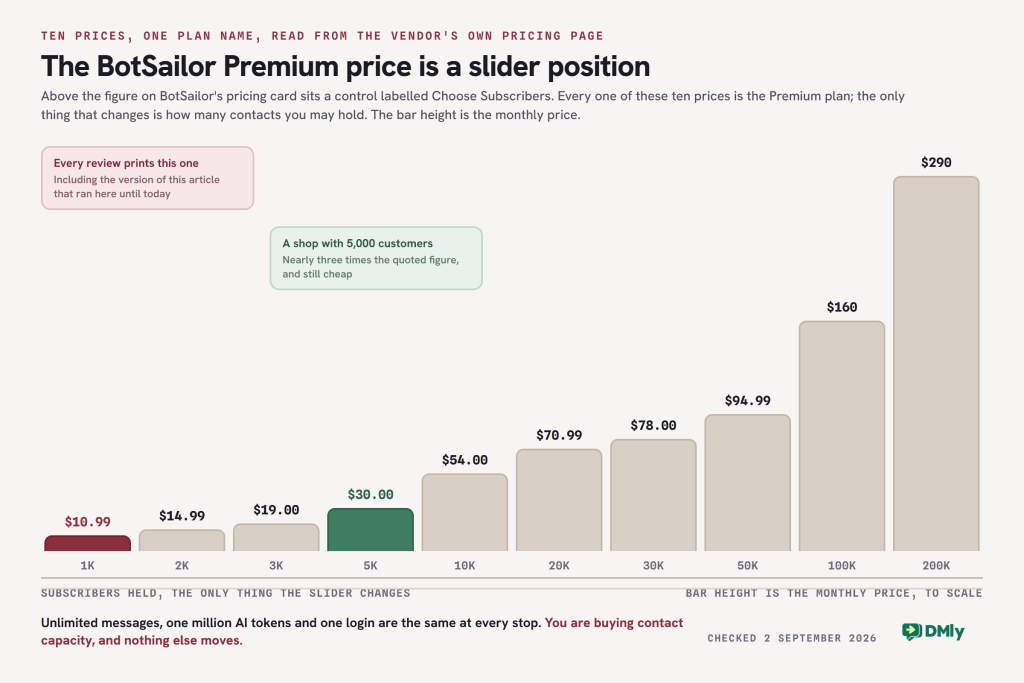
The practical reading: a shop with 5,000 customers on file is looking at $30 a month, not $10.99. That is still cheap. It is nearly three times the number a BotSailor review normally prints, including the one that used to be on this page.
The $70.99 We Called an Agency Plan Is a Premium Plan
This is the part of the old page that was flatly wrong, so here is the correction in full. The previous version of this BotSailor review said: “Agency Plan, $70.99/month”, with 15 user accounts, 150,000 subscribers and white-label reseller functionality.
$70.99 is Premium 20K. It is a single-user plan for 20,000 subscribers with no white-label anything. The cheapest Agency plan is $130.99 a month, and it comes with 500,000 subscribers and 50 user accounts.
| Agency tier | Subscribers | User accounts | Monthly | Quarterly | Yearly |
|---|---|---|---|---|---|
| Agency 50 | 500,000 | 50 | $130.99 | $352.80 | $1,255.20 |
| Agency 100 | 1 million | 100 | $166.99 | $450.00 | $1,620.00 |
| Agency 200 | 2 million | 200 | $286.99 | $774.00 | $2,560.00 |
| Agency 500 | 5 million | 500 | $558.00 | $1,506.60 | $5,356.80 |
| Agency 1000 | 10 million | 1,000 | $718.99 | $1,940.40 | $6,900.00 |
Two BotSailor Pages Disagree About the Agency Price
We can show where our $70.99 came from, because it is still published. BotSailor’s reseller page and BotSailor’s pricing page describe two different entry plans.
“Our White Label Agency subscription starts at $70/month and goes up to $718.99/month … The starting Agency package includes: Subscribers: Up to 150,000. User Accounts: Up to 15.”
botsailor.com/reseller, read 2 September 2026
The pricing page has no such tier. Its cheapest Agency plan is $130.99 for 500,000 subscribers and 50 user accounts, and its ceiling of $718.99 matches the reseller page exactly, so the two pages agree on the top of the ladder and disagree on the bottom of it.
We are not going to tell you which one is right, because we cannot know. The likely explanation is that the reseller page describes a retired tier and was never updated when the ladder changed, since the ceiling matches and only the entry differs. That is an inference, not a finding.
What to do about it: if you are buying BotSailor to resell, send them both URLs and ask which price and which allowance applies to a new account today, in writing, before you pay. Their refund policy makes that question worth asking twice, for reasons in the next section.
What a “Subscriber” Counts, and Why You Cannot Prune Your Way Out
Since the slider is the price, the definition of the thing it counts is the most important sentence on BotSailor’s site. Two of its published rules matter.
- The allowance is shared, not per channel. BotSailor’s fair usage policy says “subscriber, user, and message-credit allowances are shared across your connected bots, phone numbers, pages, channels, workspaces, and team seats under the same account.” A contact who reaches you on Instagram and again on WhatsApp is capacity on the same meter.
- You cannot delete recent contacts to get back under the cap. Their words: “Recent active subscribers from the current billing cycle may not be deleted until the billing cycle renews.” So the tier you outgrow in week two is the tier you are on until the cycle ends.
That combination is what turns the slider from a pricing quirk into a planning problem. Run one successful comment-to-message campaign on Instagram and you can add several thousand subscribers in a week, on a meter you cannot wind back.
The Free Plan Is Real, and More Generous Than We Said
BotSailor’s Basic plan is free forever with no card, and it is the trial: there is no separate time-limited trial of the paid tiers. It carries 1 user account, 1,000 subscribers, 10,000 message credits a month, 3 connected accounts, 2 sequence campaigns, 10 social posts a month, 1 webchat bot, 1 WhatsApp appointment and 1 WhatsApp flow.
The old version of this page said the free plan included “10,000 AI bot tokens per month”. It is 200,000 a month. That correction runs in BotSailor’s favour and it is a big multiple, so it is worth stating rather than quietly fixing.
Two Costs That Sit Outside Every Plan
Add-ons are billed on top. BotSailor publishes a separate add-on page: WhatsApp Appointment runs $15 to $79 a month, the webchat product $12 to $89 a month, unlimited HTTP API calls $30 a month and unlimited team members $30 a month, with AI token packs sold one-off from $15. If a feature you are counting on is one of those, it is not in the slider price.
“Unlimited messages” is a BotSailor limit, not a WhatsApp one. Their own policy is explicit that unlimited credits “does not mean unrestricted or guaranteed message delivery”, and that Meta’s conversation charges, template fees and messaging tier limits remain yours. Nobody in this category can sell you unlimited WhatsApp, because nobody in this category owns WhatsApp.
The Same Mistake, Three Vendors Deep
Having found one wrong number, we re-checked the other four platforms on this page against their own pricing pages, and two of them were wrong in exactly the same way. Not wrong because the vendor moved the price. Wrong because a real, published number had been lifted out of the wrong row.
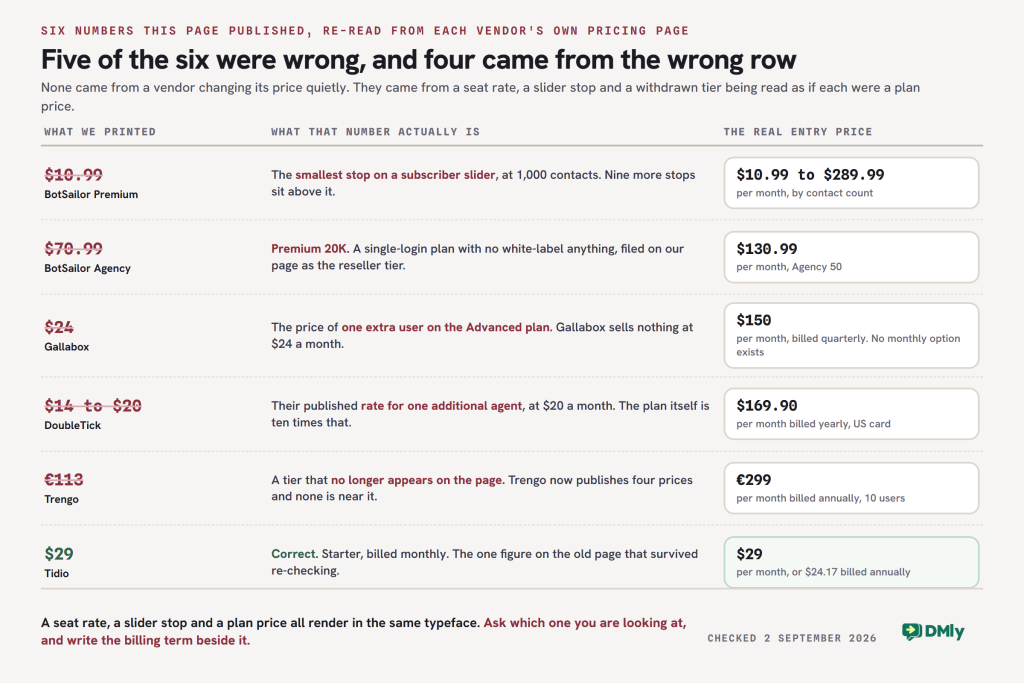
| What this page used to say | What that number actually is | The real entry price |
|---|---|---|
| BotSailor Premium: $10.99/month | The Premium slider at its smallest stop, 1,000 subscribers | $10.99 at 1K, rising to $289.99 at 200K |
| BotSailor Agency: $70.99/month | Premium 20K, a single-user plan with no white label | $130.99/month for Agency 50 |
| Gallabox: “around $24/month” | The price of one extra user on Gallabox’s Advanced plan | $150/month billed quarterly, or $112 billed annually |
| DoubleTick: “around $14 to $20/month” | “USD 20 per additional agent/month”, a seat rate | $169.90/month billed annually on the US card |
| Trengo: “around €113/month” | A tier that no longer appears on Trengo’s pricing page | €299/month billed annually |
| Tidio: “around $29/month” | Correct. Starter, billed monthly | $29/month, or $24.17 billed annually |
There is a lesson in that pattern and it is more useful than any comparison table. Pricing pages in this category are built out of several different kinds of number, and only one of them is the price of the plan. A seat rate, a slider stop, an add-on, a per-conversation surcharge and a plan price all render in the same typeface at the same size. If you read a review that gives you one number per vendor and no billing term attached, it was written by someone scanning rather than buying.
Four questions that would have caught every error on this page:
- Is that per month, per quarter or per year? Gallabox has no monthly option at all. Trengo’s €299 is the annual commitment and month-to-month is €349.
- Is anything on this card a control I can move? BotSailor’s is a slider. Tidio’s Growth tier is a volume dropdown running from $59 to $349.
- How many people does that include, and what does the next one cost? Gallabox Basic stops at three and will not sell you a fourth. DoubleTick includes five agents and charges $20 for the sixth.
- What is metered separately from the subscription? Tidio meters AI and website flows on their own. Trengo charges €0.25 to €0.30 for any conversation carrying an AI surcharge, plus €15 to €18 per hundred extra conversations.
Ask those four and you will get a usable number out of any vendor on this list, including us. If you would rather have the WhatsApp side of the arithmetic done for you, the WhatsApp pricing calculator works out Meta’s per-conversation charges for your own country and volume, which is the part of the bill no subscription covers.
What BotSailor Genuinely Does Well
The pricing correction above is not an argument against the product, and a BotSailor review that stopped there would be a bad one. At $30 a month for 5,000 contacts with unlimited sends, BotSailor is still among the cheapest ways to run real automation on WhatsApp, and it does several things that platforms charging ten times as much do not.
Multiple Connected Bots Instead of One Giant Flow
This is the feature people actually stay for. Most chatbot builders push you towards one enormous flow with every branch in it, which becomes unmaintainable at about the fifth department. BotSailor lets you build separate bots and connect them, so a booking bot, an order-status bot and an out-of-hours bot can be three things you can edit and switch off independently.
If you have ever tried to change one branch of a large flow and been afraid of what else you would break, that is the problem this solves.
A Drag-and-Drop Builder That Does Not Hide the Plumbing
The visual builder is conventional and works the way you expect. What distinguishes BotSailor is that the webhook and HTTP API layer sits right next to it rather than behind an enterprise upgrade. You can have a flow post to your own endpoint and act on the reply, on a plan costing less than lunch.
That cuts both ways, and the cut is the honest summary of this product: the same openness that makes BotSailor powerful is what makes it a poor fit for a team with nobody who enjoys reading an API response.
WhatsApp Catalogue Inside the Conversation
Products, images, prices and variants can be browsed inside the chat rather than on a link out to a website. For a business selling a small, visual range, that removes the step where most of the sale is lost. If you want the general version of that argument rather than the BotSailor-specific one, our guide to selling through a WhatsApp catalogue covers what the format can and cannot do.
Flow Logs You Can Export
BotSailor records what happened inside a flow, per contact, and lets you take it out as CSV. This is unglamorous and genuinely rare at this price. When a customer says the bot did something odd, being able to read the run rather than guess at it is worth more than most dashboards.
Store Automation for WooCommerce and Shopify
Order confirmations, delivery updates and abandoned-checkout nudges can be triggered from store events rather than typed by a person. Both integrations are named on BotSailor’s home page and are supported by their knowledge base, which is more than can be said for some of the other logos on that grid.
Where BotSailor Is Weak, Stated Precisely
The old version of this BotSailor review listed four weaknesses. Re-checking them found that three were overstated and one was understated, so here they are again with the sharper version of each. A vague complaint you cannot verify is worth less to you than a narrow one you can.
Mobile: No Native App, but There Is a Web App You Can Install
This page used to say “no mobile apps”, and that is too blunt. BotSailor publishes a live chat mobile app for Android, iOS and desktop, and it is a progressive web app rather than a native one. Their own instruction is “Install with one click, no app store needed”, and “Installation is only supported via Safari on iOS devices.” There is no BotSailor listing on the App Store or Google Play.
In practice that means it works, it goes on your home screen, and it will not behave like a native app for background push on iPhone. Whether that matters depends entirely on whether anyone on your team needs to answer messages while away from a desk. If they do, it is the single biggest practical difference between BotSailor and most of the alternatives here.
Integrations: Four Claims, and We Had Two of Them Wrong
The old page said BotSailor “lacks many direct integrations with tools like Zapier, Make, HubSpot, and Google Sheets.” That is four separate claims in one sentence, and checking them one at a time gives four different answers.
- Google Sheets: we were wrong. It is a genuine native integration with several knowledge base guides covering importing contacts from a sheet and pushing flow data and catalogue purchases back into one.
- Zapier: half wrong. BotSailor connects to Zapier, but through the generic Catch Hook trigger rather than a BotSailor app in Zapier’s directory. Their own documentation describes it as “Connect BotSailor with 5000+ apps using Zapier Webhook Integration”. It works; it is a webhook, not a one-click connector.
- HubSpot: unproven either way. HubSpot is named on BotSailor’s home page integration grid. There is no documentation for it anywhere on their site, so we can neither confirm nor deny how deep it goes. Ask before you buy on the strength of it.
- Make: the claim stands. Make is not mentioned anywhere on BotSailor’s site. n8n and Pabbly are supported instead.
Writing those four as one sentence is how a review ends up wrong in a way that is hard to spot. Three names in one denial is three claims, not one, and each of them has to be checked separately in both directions.
One thing to note while you are checking: BotSailor has removed its entire integrations documentation section. Every URL under its old integrations path now fails, including ones its own machine-readable site index still links to. The logos on the home page are the only public description of what connects to what.
The Refund Policy Is Unusually Firm, and It Is Published
This was not on the old page at all and it should have been, because it is the sort of thing you want to read before you pay rather than after. BotSailor’s published refund policy says, in its own words, that “we do not provide standard refunds for any subscription, AI token purchase or reseller license purchase”, that “all purchases are final”, and that “accidental purchases are not eligible for refunds”.
Two further clauses are worth knowing. “White label reseller licenses and onboarding fees are final and cannot be refunded under any circumstance.” And auto-renewal is not self-service: “Auto renewal cannot be disabled manually. Users must contact support at least three business days before renewal.”
None of that is hidden and none of it is unusual for a small software vendor. It is simply a firmer set of terms than most readers will assume, and it is the reason the pricing discrepancy on the reseller page is worth resolving in writing before you buy rather than afterwards.
Five Channels, Not Omnichannel
BotSailor covers WhatsApp, Facebook Messenger, Instagram, Telegram and a website widget. It does not cover SMS as a first-class channel, and it does not touch TikTok or Google Business Profile at all. If your customers message you on a channel outside that five, BotSailor is not the shortlist.
This is a real limit rather than a complaint. Five channels well covered beats eight badly covered, and BotSailor’s five are the five that matter to most businesses. It is only a problem if you are one of the businesses where it is a problem, which is why where your customers actually message you is the first thing to check and the last thing most comparisons ask about.
BotSailor Review Summary: the Product at a Glance
| What you are buying | What BotSailor publishes |
|---|---|
| Product type | Chatbot, broadcast and automation platform, operated by Xerone IT |
| Channels | WhatsApp, Facebook Messenger, Instagram, Telegram, website chat. Five, and that is the list |
| SMS and email | Outbound only, through your own Twilio, Plivo, Clickatell, SMTP or similar |
| What the price is set by | Subscribers held, on a slider. Ten Premium stops, five Agency stops |
| Entry price | $0 forever on Basic, $10.99/month for Premium at 1,000 subscribers |
| Realistic small-business price | $30/month at 5,000 subscribers, $54 at 10,000 |
| White label | Agency from $130.99/month, or a one-off $499 lifetime reseller licence |
| Message credits | Unlimited on every paid tier, subject to Meta’s own limits and charges |
| AI | 1 million tokens a month on Premium; bring your own provider key on Agency |
| Mobile | Installable web app for Android, iOS and desktop. No native app on either store |
| Automation style | Multiple connected bots, drag-and-drop builder, webhooks and HTTP API on every paid plan |
| Free plan | Yes, forever. 1,000 subscribers, 10,000 message credits and 200,000 AI tokens a month |
| Refunds | None as standard, on any purchase. Auto-renewal cannot be switched off without contacting support |
| Best for | Technical operators and small agencies with modest contact lists |
The Five BotSailor Alternatives, and What Each One Really Costs
Every price below was read off the vendor’s own pricing page on 2 September 2026, and every one is stated with its billing term attached. That second part matters more than it sounds. Three of the five publish a headline figure that is only available if you commit for a quarter or a year, and one of them publishes no monthly option at all.
Where the previous version of this page had a figure wrong, the correction is stated plainly rather than quietly swapped. You should be able to see what changed and check it yourself.
1. DMly: Fixed Price, Eight Channels, and We Make It
Disclosure first, because this is our blog: DMly is our product. Read this section as an argument rather than a verdict, and check every figure in it against our own pricing page, which is where all of them came from.
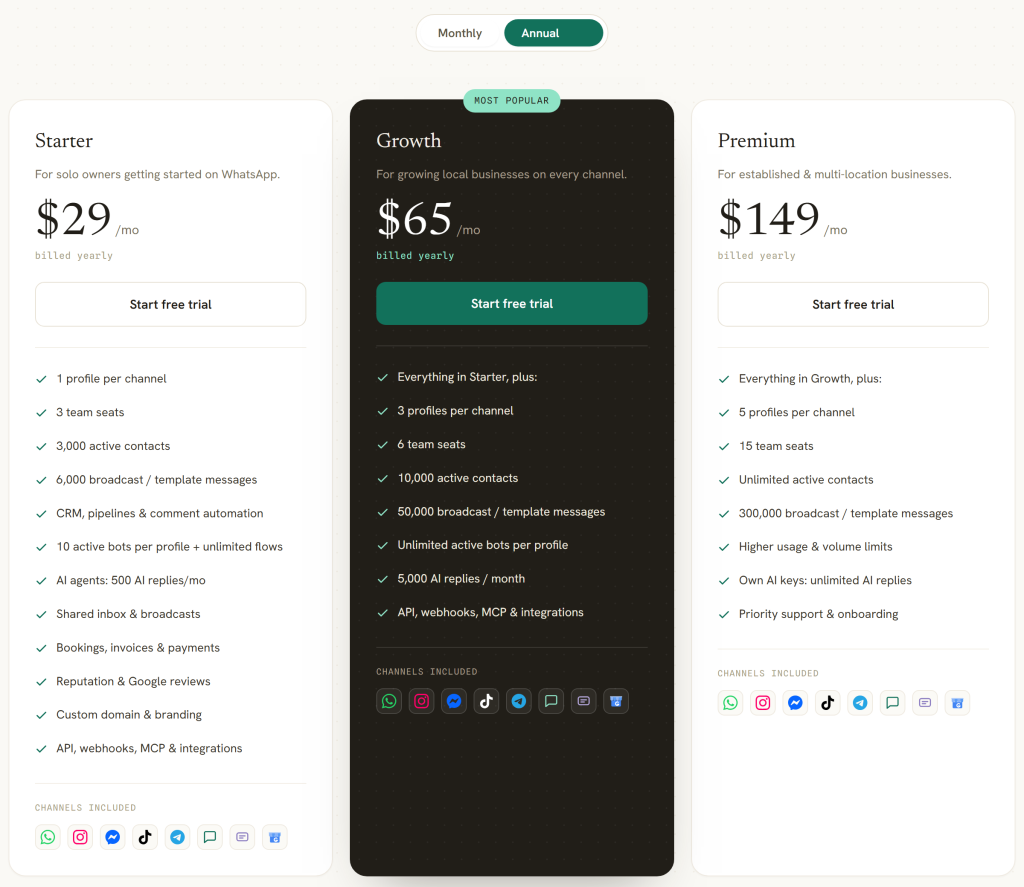
The structural difference is that DMly has three prices and BotSailor has fifteen. Starter is $29 a month billed yearly, Growth $65 and Premium $149. Billed monthly they are $39, $79 and $199. There is no control on the card to move and no plan called anything other than those three.
| DMly plan | Billed yearly | Billed monthly | Seats | Active contacts | Broadcast or template messages | AI replies |
|---|---|---|---|---|---|---|
| Starter | $29/mo | $39/mo | 3 | 3,000 | 10,000/mo | 500/mo |
| Growth | $65/mo | $79/mo | 6 | 10,000 | 50,000/mo | 5,000/mo |
| Premium | $149/mo | $199/mo | 15 | Unlimited | 300,000/mo | Unlimited on your own keys |
The Eight Channels, Named
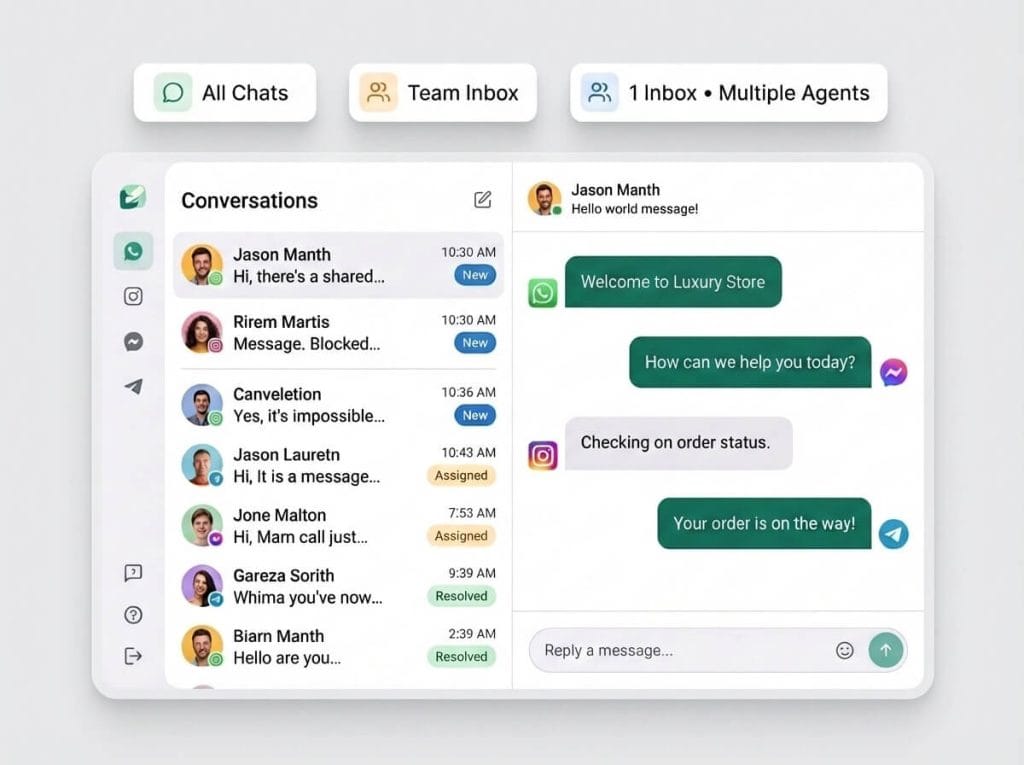
DMly connects WhatsApp, Facebook Messenger, Instagram, Telegram, a live chat widget, SMS, TikTok and Google Business Profile. Our own navigation counts them as “7 channels and SMS”, which comes to the same eight.
Two of those are the reason a business picks DMly over BotSailor rather than the price. TikTok comments and direct messages land in the same inbox as everything else, which almost nothing in this category does. And Google Business Profile brings messages, questions and reviews from your Google listing into the same place, which matters for any business that people find by searching for it near them.
One honest qualification: channels are plan-gated. A plan can restrict which of the eight you may connect, and the restriction is enforced when you try to connect rather than being hidden. Check the plan panel before assuming all eight are on the tier you are pricing.
Automation, and What the Steps Are Really Called
The flow builder is drag-and-drop, and the same comparison with BotSailor applies in reverse: DMly hides less plumbing than most tools and more than BotSailor. Flows are unlimited on every plan, including Starter. What Starter caps is active bots, at ten per profile, and bots can always be built; only switching one on beyond the cap is refused, so hitting the limit never breaks something already running.
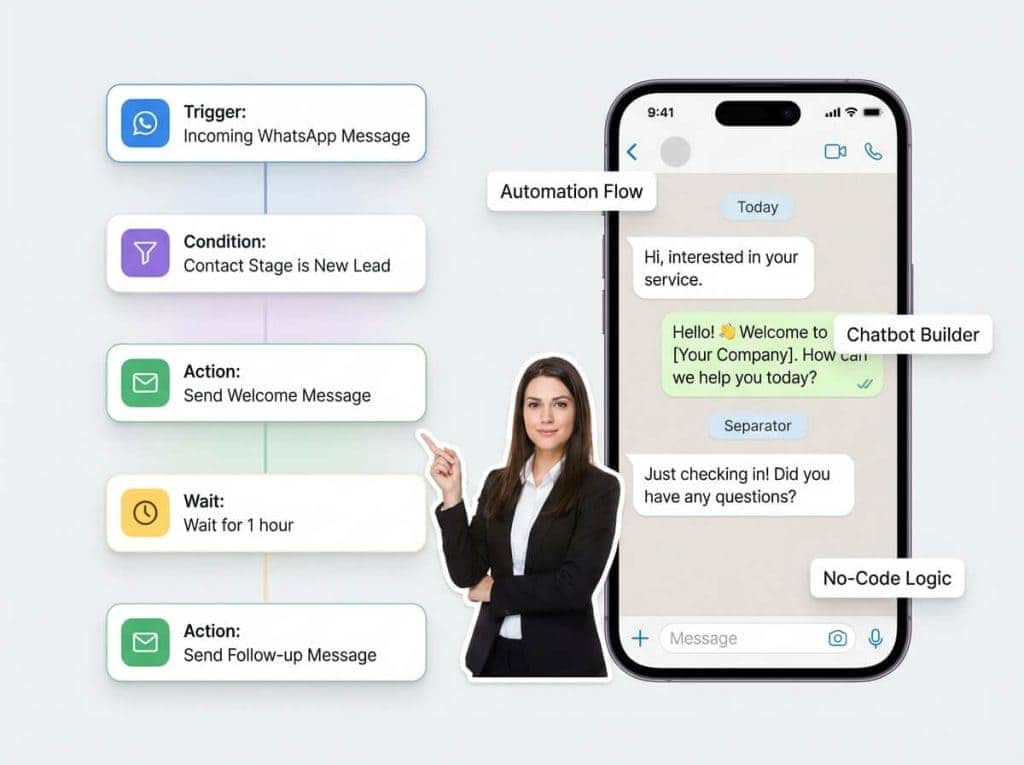
The AI agent can act, not only answer. Switched on per node, it can read the contact, add and remove tags, write a note, set custom fields, move someone along your pipeline, put a chat in the unassigned queue, assign it round-robin, and hand over to a human. On the booking side it can list services and staff, check real open slots, and book, reschedule or cancel an appointment or a class.
Handover is the one worth switching on even if you switch on nothing else, because it pauses the bot and stops the turn rather than letting the assistant talk over whoever just took the chat. What the AI agents do covers the rest.
The CRM, and the Segment Fields That Actually Exist
The old version of this page said DMly could “segment contacts by behavior and engagement” and send campaigns segmented on “engagement activity” and “workflow interactions”. Those are not fields. They do not exist and we should not have written them. Here is the real list, because a specific list is more useful than an adjective.
Four basic filters: contact stage, contact tags (all selected tags must match), excluded tags, and days since last activity.
Twelve condition fields, grouped as the app groups them. Contact: lifecycle stage, source, custom field, birthday month, tag. Engagement: reachable on a given channel, marketing opt-in. Commerce: total spend, last purchase, order count, loyalty points, credit balance. Conditions can be combined with ALL or ANY inside a group, and the groups are ANDed with the basic filters above them.
That is a real segment builder and it is stronger than the old vague sentence made it sound. It is also narrower in one specific way, covered in the honest limits section below.
Integrations, Named Rather Than Implied
The old page said DMly integrates with “CRM platforms”, which is the kind of phrase that means nothing and is impossible to check. The actual tiles, by category:
- Sales and CRM: HubSpot and Mailchimp. There is no native Salesforce connector and no native Zoho connector. If either is your system of record, plan on the API or a middleware step.
- Commerce: Shopify and WooCommerce.
- Developer: webhooks, Zapier and a REST API. Zapier here is a real subscription handshake rather than a raw webhook: a Zap registers itself and appears in the panel as a connected hook.
- Productivity: Google Sheets, Google Calendar, Zoom and Slack.
- AI: OpenAI, Claude, Google Gemini and DeepSeek, on your own key where the plan allows it.
- Payments: Stripe, PayPal, Paystack, Razorpay, MyFatoorah and Mercado Pago.
- SMS: Twilio, Plivo or a custom HTTP gateway.
There is also an MCP server, so an AI assistant such as Claude, Cursor or n8n can connect to a workspace directly. The integrations page lists the current set.
There Are Native Mobile Apps, and Here Is What They Cannot Do
DMly publishes a native app on both the App Store and Google Play, which is the sharp version of the mobile difference with BotSailor’s installable web app. It carries the inbox, the day’s bookings, the money coming in and push notifications, with two-factor sign-in and workspace switching.
Three things it deliberately does not do, so you know before you download it. There is no template picker, so re-opening a closed WhatsApp window is a dashboard job; the app tells you plainly that “the 24-hour window is closed” rather than failing silently. Notes are read-only in the app. And setup work, meaning channels, automations and broadcasts, stays on the dashboard by design. The app’s inbox covers WhatsApp, Instagram, Facebook, live chat, Telegram and SMS, so two of the eight channels are dashboard-only there.
No Markup on Meta’s Fees, in Our Own Words
Our pricing page says it like this: “You pay Meta’s standard per-message rates directly, DMly never adds a fee on top.” We are printing it here because one of the four alternatives on this page publishes the opposite policy, and a subscription comparison that ignores the message bill is comparing the smaller number.
Pick DMly if your customers reach you on more than the five channels BotSailor covers, if somebody needs to answer from a phone, or if you would rather have one price than a slider. Look elsewhere if you want a free forever tier, since ours is a seven-day trial, or if what you actually need is a single very cheap WhatsApp bot and nothing else.
2. Gallabox: Strong on WhatsApp, and It Marks Up Meta’s Fees
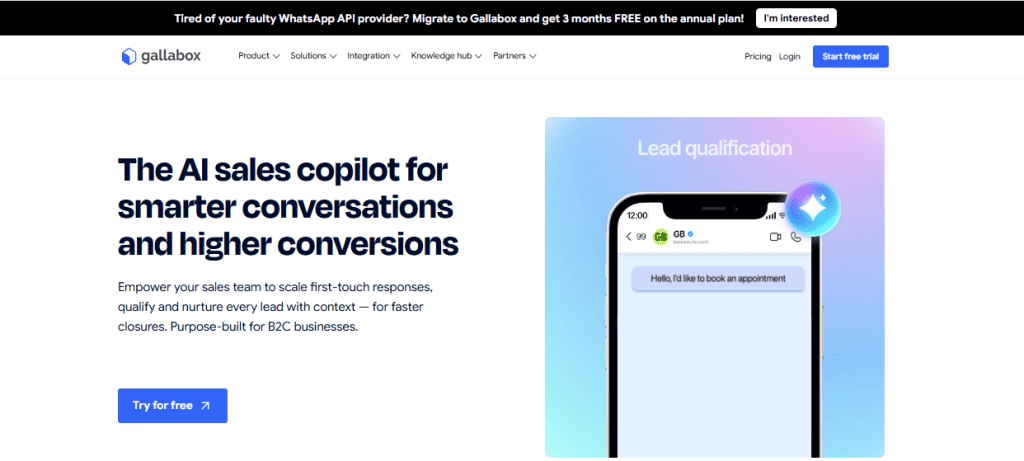
Gallabox is the closest thing here to a straight WhatsApp platform for a sales team, and its pricing needs two corrections at once. This page used to say Gallabox “starts around $24/month”. Both halves of that are wrong, and it is worth saying where the $24 came from, because it is the same mistake as the BotSailor slider in a different costume.
$24 does appear on Gallabox’s pricing page. It is the price of one additional user on the Advanced plan. It is not a plan price, and there is nothing on Gallabox costing $24 a month.
The second correction is the billing term. Gallabox has no monthly plan. The billing toggle offers Quarterly and Yearly and nothing else, and every price on the page is a per-month figure attached to one of those two commitments.
| Gallabox plan | Billed quarterly | Billed annually | Users | Extra user | AI credits |
|---|---|---|---|---|---|
| Basic | $150/mo | $112/mo | 3, hard cap | Upgrade required | 500/mo |
| Essential | $331/mo | $248/mo | 6 | $18 | 2,000/mo |
| Advanced | $632/mo | $474/mo | 10 | $24 | 8,000/mo |
| Enterprise | Quote only | Custom | Negotiable | Custom | |
The three-user cap on Basic is a hard stop, not a nudge. Gallabox says so three times on the same page: “3 users (hard cap)”, “3 user accounts (hard cap)”, and in the comparison table the additional-users row for Basic reads “Upgrade required”. If a fourth person needs to answer messages, the next plan is $331 a month billed quarterly, not an extra seat fee.
The part that will not show up in any comparison table: Gallabox adds a markup to Meta’s per-message charges. Their own pricing FAQ says it, in a sentence that argues with itself: “These are pass-through usage charges, billed separately from your platform fee. WhatsApp conversation fees are charged by Meta and reflected on your invoice with our markup.” The comparison table on the same page reinforces it, showing “Conversation pricing” on the three published tiers and “Discounted markup” on Enterprise, which reads as a markup on every tier that is merely smaller at the top.
The size of that markup is not published anywhere we could find. We are not going to tell you it is unfair, because a platform is entitled to price how it likes and plenty of businesses will never notice. We will tell you what to do about it: ask Gallabox what percentage sits on top of Meta’s rate before you sign a quarterly commitment, and compare that against your own expected volume rather than against the subscription.
Trial: seven days, no card, with 500 AI credits and conversation credits worth about $2 included. There is no free forever plan, and Gallabox says so.
Pick Gallabox if you are a B2C sales team living almost entirely inside WhatsApp, you have three people or fewer, and you can commit for a quarter. Look elsewhere if you need a fourth seat, if you want channels beyond WhatsApp, Instagram and a website widget, or if your message volume is large enough that a percentage on top of Meta’s rate would outweigh the subscription.
3. Tidio: The One Price on This Page That Was Right, and It Still Understates the Bill
Tidio was quoted here at “around $29/month” and that figure is correct, which makes it the one number on the old page that survived re-verification. Starter is $29 billed monthly, or $24.17 a month billed annually. Tidio’s pricing page opens on the annual toggle, so a quick glance returns $24.17 rather than $29. Both are real; they are just different commitments.
What “starts around $29” hides is the shape above it. Tidio publishes five tiers and the top two have hard published floors: Plus starts at $300 a month and Premium at $2,999 a month, both before usage. “Starts around $29” is true and tells you almost nothing about what this product costs a business that grows into it.
| Tidio plan | Billed monthly | Billed annually | Billable conversations | Seats |
|---|---|---|---|---|
| Free | $0 | $0 | 50/mo | 10 |
| Starter | $29 | $24.17/mo | 100/mo | 10 |
| Growth | from $59 | from $49.17/mo | from 250/mo | 10 |
| Plus | from $300 plus usage | Quote | 5,000, custom | Unlimited |
| Premium | from $2,999 | Quote | 10,000, custom | Custom |
The thing to understand about Tidio is that the plan price is one of three meters, not the bill. Tidio says so itself: “each of our three core products, Lyro AI Agent, Customer Service and Flows, can be purchased individually or as part of a bundled plan.” The AI agent is metered separately, from $39 a month for 50 Lyro conversations up to $700 for 1,000. Flows, the rule-based automation product, is metered on visitors: 100 a month free, then $29 for 2,000 rising to $299 for 100,000.
One detail catches people out. The 50 Lyro conversations every account starts with are a one-off, not a monthly allowance. Tidio’s own wording: “Every Tidio account starts with 50 Lyro conversations, but you need to upgrade to the Lyro AI Agent plan to refresh it monthly.” If you tested the AI, liked it, and budgeted $29 a month, the AI is not inside that number.
Tidio counts a billable conversation only when a human replies: “Unanswered messages initiated by visitors or customers are not counted.” That is a genuinely fair definition and it works in your favour. It also means the meter follows your team’s workload rather than your traffic, which is the right thing to plan against.
WhatsApp is included on every Tidio plan, including the free one. That is worth stating because Tidio is usually filed as a website live chat product and this page previously called it “less WhatsApp-focused”. Tidio publishes nothing about how Meta’s own conversation charges reach you, so ask before assuming either way.
Pick Tidio if your customers arrive on your website first and in a messaging app second, and what you want is a help desk rather than a broadcast tool. Look elsewhere if outbound campaigns are the job, because campaigns are the one thing Tidio is not built around.
4. DoubleTick: The Biggest Correction on This Page

This page used to say DoubleTick “starts around $14 to $20 a month”. It does not, under any rate card DoubleTick publishes, anywhere in the world. The cheapest figure on their own pricing endpoint is $69 a month, on the United Kingdom card paid a year in advance. The default international card starts at $210 a month billed monthly, or $169.90 a month billed annually.
The “$20” has the same origin as Gallabox’s $24. DoubleTick’s pricing page publishes “USD 20 per additional agent/month”. It is a seat rate. Somewhere upstream of this article a seat rate became a plan price, and it stayed there because nobody re-opened the page.
| DoubleTick, US and default card | Billed monthly | Billed annually | Agents |
|---|---|---|---|
| Starter | $210/mo | $169.90/mo, $2,038.80 a year | 5 |
| Pro | $324/mo | $217.81/mo, $2,613.66 a year | 10 |
| Pro plus the AI Agents add-on | $414/mo | $307.81/mo, $3,693.66 a year | 10 |
| Enterprise | Quote only | Custom | |
DoubleTick prices are geographic, which is unusual enough to plan around. The page carries no prices in its markup at all; it asks its own service for a rate card based on the country you are in, and there are separate cards in rupees, US dollars, UK dollars, dirhams, riyals and Qatari riyals. Two people opening the same URL on the same day are quoted different money. If you are comparing DoubleTick with anything, screenshot the card you were shown, because a reader in another country cannot check your figure.
There is no free trial, and DoubleTick says so plainly: “We don’t offer a free trial, but you can book a demo with our team to see the platform in action and understand which plan is right for your business.” It is the only product on this page you cannot try before paying.
The Starter plan is also thinner than its price suggests. DoubleTick’s own comparison table marks Bot Studio and Shopify as unavailable on Starter, and AI agents as an add-on from Pro at $90 a month. Chat assignment, automatic agent assignment, conversation search, broadcast retargeting and dynamic segments are off Starter too. If the reason you are looking at DoubleTick is the chatbot, the entry plan is not the plan you want.
Pick DoubleTick if you run a WhatsApp-first sales floor with five or more agents and you want the pipeline and the inbox in one place. Look elsewhere if you are a small team, because the entry price on most cards is higher than everything else here and there is no way to try it first. Our full DoubleTick review goes through the plan gates in detail.
5. Trengo: The Cheap Tier We Quoted No Longer Exists
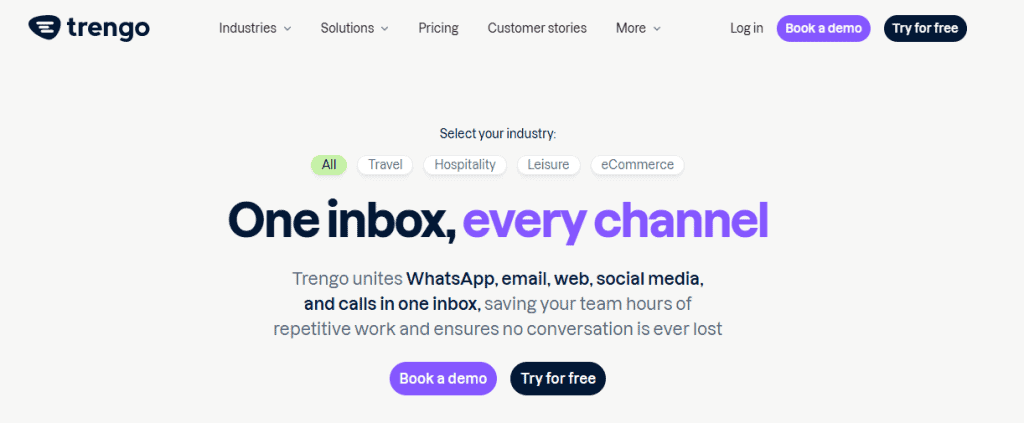
Trengo was listed on this page at “around €113 a month”. There is nothing at that price on Trengo’s pricing page today. The page publishes exactly four numbers: 299, 349, 499 and 599. Boost is €299 a month billed annually, or €349 month to month, and it is now the entry tier.
| Trengo plan | Billed annually | Month to month | Users included | Conversations |
|---|---|---|---|---|
| Boost | €299/mo | €349/mo | 10 | 6,000 a year |
| Pro | €499/mo | €599/mo | 20 | 18,000 a year |
| Enterprise | Quote only | Custom | Custom | |
Trengo’s own pricing FAQ puts it in one sentence: “Trengo’s Boost price plan starts at €299 per month when billed annually (€349 month-to-month) for 10 users with a fixed conversation allowance, while the more feature-rich Pro price plan costs €499 per month on an annual contract (€599 month-to-month) for 20 users.”
Trengo is the only platform here that meters conversations and AI separately on top of the subscription, and publishes both rates. Extra conversations are €18 per hundred month to month, or €15 per hundred on an annual contract. Any conversation carrying an AI surcharge costs €0.30 month to month, or €0.25 annually, on top of the plan. Extra users on Boost are €30 a month, or €25 on the annual contract.
Two things worth knowing before you shortlist it. Broadcasting is an add-on on every tier, including Pro, so a Trengo subscription is not a campaign tool out of the box. And Trengo notes on its own pricing page that AI Journeys “is currently in a Beta phase. Final pricing and packaging may look different once the feature is publicly available”, which is honest of them and is also a reason not to budget around it yet.
There is a free trial and it is not on the pricing page. Every plan button there reads “Book a demo”. The seven-day trial, no card required, sits behind the “Try for free” link in the top navigation. If you looked at the pricing page and concluded there was no trial, that is the page’s fault rather than yours.
Pick Trengo if you have ten or more people handling a genuinely mixed load of email, voice, live chat and messaging, and the problem you are solving is collaboration. Look elsewhere if you are under about ten seats, because €299 a month buys ten of them whether you use them or not. Our fuller Trengo review covers the feature gates per tier.
The Six Side by Side
Prices are the real entry price with the billing term attached, not the smallest number on the card.
| BotSailor | DMly | Gallabox | Tidio | DoubleTick | Trengo | |
|---|---|---|---|---|---|---|
| Entry price | $10.99/mo at 1,000 subscribers | $29/mo billed yearly | $150/mo billed quarterly | $29/mo, free tier available | $169.90/mo billed yearly, US card | €299/mo billed annually |
| Monthly billing? | Yes | Yes, $39 | No, quarterly or yearly only | Yes | Yes, $210 | Yes, €349 |
| What sets the price | Subscribers, on a slider | Fixed tier | Fixed tier | Conversations, plus separate AI and Flows meters | Fixed tier, varies by country | Fixed tier, plus conversation and AI meters |
| Seats included | 1 account, 8 to 50 team members by tier | 3, 6 or 15 | 3, hard cap on Basic | 10 | 5 | 10 |
| Extra seat | $30/mo for unlimited, as an add-on | $10/mo | Upgrade required on Basic | Included | $20/mo | €25 to €30/mo |
| Channels | 5: WhatsApp, Messenger, Instagram, Telegram, web chat | 8: those four plus live chat, SMS, TikTok, Google Business Profile | WhatsApp, Instagram, website widget | Website chat, WhatsApp, email, social | WhatsApp, email, voice, live chat, social | |
| Native mobile app | No, installable web app | Yes, App Store and Google Play | Yes | Yes | Yes | Yes |
| Free tier | Yes, forever | No, 7-day trial, no card | No, 7-day trial | Yes | No trial at all | 7-day trial, not linked from pricing |
| Run it under your own brand | Yes. Agency from $130.99/mo, or $499 once | Yes, quoted | No. Reseller commission programme instead | No. Agency and affiliate programmes instead | No. Channel partner commissions instead | No. Agency and affiliate programmes instead |
| Markup on Meta’s fees | Not stated | None, stated | Yes, stated. Amount not published | Not stated | Not stated | Service conversations free; AI surcharge applies |
Two rows deserve a second look before you use this table. The entry-price row is not a ranking, because the five products are not the same size: BotSailor at $10.99 gives you one login and a thousand contacts, while Trengo at €299 gives you ten seats and a voice channel. And the own-brand row is not the same question as “do they have a partner programme”, because all six do. Gallabox, Tidio, DoubleTick and Trengo each publish a partner or affiliate programme paying a commission on customers you bring, and Gallabox advertises “150+ Global resellers” with “30% recurring commission for the first 24 months” rising to 60 per cent at milestones, while Tidio and DoubleTick publish commission programmes of their own. What none of those four publishes is the ability to put your logo on the product and sell it as yours. We checked by reading each vendor’s navigation and footer, following every partner, affiliate and reseller link, and searching each page for the phrase; the words “white label” appear on none of the four. A private arrangement would not show up that way, so ask if it matters to you.
Nine Things DMly Does Not Do, or Does Worse Than BotSailor
A comparison written by one of the vendors is only worth reading if it says where that vendor loses. These are from our own documentation, and every one of them is something you would otherwise find out in week three.
- There is no free forever plan. BotSailor has one and we do not. Ours is a seven-day trial with no card, and then you pay. For a business testing whether messaging automation is worth anything at all, that is a genuine reason to start on BotSailor.
- Every plan caps broadcast volume; BotSailor’s paid plans do not. Starter allows 10,000 broadcast or template messages a month, Growth 50,000, Premium 300,000. The allowance counts every recipient of a broadcast plus every template sent anywhere else, including from a flow, a reminder or an invoice. Replies inside an open conversation are not counted.
- Broadcast replies are counted. Replies appear as a stat card and as the last step of the conversion funnel, on every channel. Per-template performance, on its own screen, adds a lifetime Replied count.
- Delivered and Opened stay at zero on Messenger and Instagram. Meta does send those confirmations and DMly records them against the individual message in the inbox, but does not roll them up onto the broadcast. Telegram sends no delivery confirmations at all. SMS reports Delivered but never Opened.
- There is no store-order browser. Orders synced from Shopify or WooCommerce do not appear under Finance, Orders, and there is no list screen for store customers or products either. The synced data exists to drive automations, not to be browsed.
- The commerce segment filters read DMly’s own orders. Order count counts confirmed orders in DMly, so a Shopify customer’s purchase history is not what those conditions are looking at. Shopify’s initial sync also covers 90 days and never fires automations, and the Payment failed trigger never fires from Shopify at all, because Shopify does not report a failed checkout payment as an event. It does work on WooCommerce.
- The inbox has no routing rules. There is round-robin assignment, there are flow nodes that assign, and the AI agent can assign or hand over. There is no rules engine that routes by keyword, by department or by working hours. If you were promised department routing by any comparison table on this site, that was wrong and it has been removed.
- Two AI providers cannot read your documents. Claude and DeepSeek cannot search uploaded knowledge, and the knowledge selector is still offered on the node, so a step running on either one searches nothing whatever you select. Use OpenAI or Gemini if the agent needs to read your material. Knowledge is also off by default on a new AI node.
Two smaller ones that catch people. Pending invitations use a seat, so an invitation nobody accepted still counts against your team limit. And the stored-contacts cap blocks where the active-contacts cap does not: crossing your active-contact figure never stops a message or an import, but hitting the stored total refuses a new contact or a CSV import outright.
The Bill No Subscription on This Page Covers
Every platform here sits on top of WhatsApp, and WhatsApp bills separately. Meta charges for the messages, per conversation and per country, and that charge reaches you either straight from Meta or through the platform’s invoice. On a business sending real volume it is usually larger than the subscription, which is why comparing subscriptions alone is comparing the smaller number.
What differs between these five is not whether you pay Meta. It is whether anyone adds a percentage on the way, and only two of the five publish an answer.
| Platform | What it publishes about Meta’s per-message fees |
|---|---|
| DMly | “You pay Meta’s standard per-message rates directly, DMly never adds a fee on top.” |
| Gallabox | “WhatsApp conversation fees are charged by Meta and reflected on your invoice with our markup.” The markup percentage is not published |
| BotSailor | Says unlimited credits do not cover Meta’s charges, and that conversation and template fees remain yours. Silent on whether anything is added |
| DoubleTick | Nothing published on the pricing page either way |
| Tidio | Nothing published on the pricing page either way. Tidio meters its own conversations instead |
| Trengo | WhatsApp service conversations listed as free; conversations carrying an AI surcharge are €0.25 to €0.30 on top of the plan |
There is one question that settles it for any vendor on the list, including us: ask for a sample invoice showing the WhatsApp line and the platform line separately. A vendor passing Meta’s rate through can produce that in a minute. If the two are merged into one figure, that is the answer.
To size the number for your own case, the country-by-country WhatsApp rate card gives Meta’s published rates per market, and the chatbot cost breakdown works through what a real month looks like once the messages, the subscription and the setup are all counted.
What Changes on 1 October 2026, and Why It Matters Here
This affects the WhatsApp Business Platform, which is what every platform on this page uses. It does not affect the free WhatsApp Business app. If you are answering customers on the green app on your phone, none of this reaches you.
Two categories of message start being charged, not one. Most coverage reports the first and misses the second. Meta’s own wording:
- “Effective October 1, 2026, Meta will charge on a per-message basis for service messages, consistent with how Meta charges for template messages.” Service messages are the free-form replies you send inside the 24-hour window, and they have been free since November 2024.
- “Effective October 1, 2026, Meta will charge on a per-message basis for utility messages sent in response to users within an open 24-hour customer service window.” For a business sending order confirmations and appointment reminders, this second one is usually the bigger bill.
The two now scale differently, and that is the detail almost nobody prints. Meta says: “Meta does not offer volume tiers for service messages. Meta continues to offer volume tiers for utility and authentication messages.” Service cost therefore rises in a straight line with conversation length, so a chatbot that takes eight turns to answer a question now costs roughly twice one that takes four.
There is a hard deadline before that, on 30 September 2026. Every account on the WhatsApp Business Platform needs a payment method on file. From 1 October, accounts without one stop having their service messages delivered. This catches businesses whose replies have always been free and who therefore never added billing details. It is set in WhatsApp Manager, under the business portfolio’s billing settings, and it takes about two minutes.
One thing you can check yourself, and it is worth checking. Meta’s own page commits to “announce and publish the rates that take effect October 1, 2026, including rates for service messages, by September 1, 2026.” We looked again on 2 September, on both pages where such rates would appear. The upcoming-pricing page still carries the commitment and no rates, and the public WhatsApp Business pricing page still describes service messages as not charged. Meta’s own publication date has passed and the rates are not up. Until they are, treat any per-message figure you are quoted for October as an estimate, whoever is quoting it. Our running write-up of the October change is updated as Meta publishes.
Which One to Pick
Rather than a winner, here is the question that separates them, because the six products on this page are not really competing for the same business.
- Stay on BotSailor if you have a small contact list, somebody comfortable with a webhook, and no need to answer messages from a phone. Nothing else here comes close on price at that size, and the connected-bots model is genuinely better than most.
- Move to DMly if your customers reach you outside BotSailor’s five channels, if the person answering is not at a desk, or if you want one price rather than fifteen. Disclosure again: we make it.
- Look at Gallabox if you are a WhatsApp-first sales team of three or fewer, you can commit for a quarter, and you have asked them what their markup on Meta’s rate is.
- Look at Tidio if your customers land on your website before they land in a messaging app, and what you want is a help desk rather than a broadcast tool.
- Look at DoubleTick if you run five or more agents on WhatsApp and want the pipeline and the inbox in one place, and you are prepared to buy without trying it.
- Look at Trengo if you have ten or more people handling email, voice, live chat and messaging together, and collaboration is the problem rather than campaigns.
The one thing to take from this BotSailor review, whichever you choose: before you commit, open the vendor’s pricing page yourself, find the number for the size you actually are, and write down the billing term next to it. That single habit would have caught every error this review has just corrected in itself.
If you want to see how this list compares against a wider field, our roundup of twenty WhatsApp messaging automation tools covers the rest of the market with the same price discipline, and the DMly against Gallabox and DMly against DoubleTick pages go feature by feature on those two in particular.
BotSailor Review FAQs
How does BotSailor pricing actually work?
It depends on how many contacts you hold, because the price is a slider. Premium runs from $10.99 a month at 1,000 subscribers to $289.99 at 200,000, with ten stops in between. A business with 5,000 contacts pays $30 a month and one with 10,000 pays $54. The free Basic plan covers 1,000 subscribers and 10,000 message credits a month at no cost, forever.
Is the BotSailor Agency plan really $70.99 a month?
No. $70.99 is Premium 20K, a single-user plan for 20,000 subscribers with no white-label functionality. The cheapest Agency plan on BotSailor’s pricing page is $130.99 a month for 500,000 subscribers and 50 user accounts. BotSailor’s own reseller page still says the Agency subscription “starts at $70/month”, so the two pages disagree; ask them in writing which applies before you buy.
Does BotSailor have a mobile app?
It has an installable web app for Android, iOS and desktop, described by BotSailor as needing no app store. There is no native BotSailor app on the App Store or on Google Play, and on iPhone the install works only through Safari. If someone on your team needs to answer messages away from a computer, try it before you commit rather than assuming it behaves like a normal app.
Which channels does BotSailor support?
Five: WhatsApp, Facebook Messenger, Instagram, Telegram and a website chat widget. SMS and email are not channels in the same sense; they are outbound sends wired through a third party such as Twilio, Plivo or your own mail server. TikTok and Google Business Profile are not supported.
Can I get a refund from BotSailor?
Their published policy says no as standard, on any subscription, AI token purchase or reseller licence, and that “accidental purchases are not eligible for refunds”. Reseller licences and onboarding fees are stated to be non-refundable “under any circumstance”. Auto-renewal also cannot be switched off from inside the account; their policy asks you to contact support at least three business days before a renewal date.
Does the BotSailor price include WhatsApp message costs?
No, and no platform’s price does. BotSailor’s unlimited message credits are a BotSailor allowance, and their own policy says it “does not mean unrestricted or guaranteed message delivery” and that Meta’s conversation charges, template fees and messaging tier limits remain yours. Budget the subscription and Meta’s per-conversation charges as two separate numbers, for every vendor on this page.
What is the best BotSailor alternative?
It depends on why you are leaving, and the BotSailor alternatives above divide cleanly on that question. If it is channels or mobile, DMly covers eight channels and publishes native apps on both stores, from $29 a month billed yearly. If it is that you want a simpler WhatsApp sales tool, Gallabox from $150 a month billed quarterly. If your customers arrive on your website, Tidio from $29 a month. If you have a large support team across email and voice as well as messaging, Trengo from €299 a month billed annually.
Is BotSailor good for beginners?
The visual builder is approachable and the free plan means you can find out at no cost, which is the honest answer. Where beginners hit trouble is one step past the builder: several of BotSailor’s integrations run through raw webhooks rather than one-click connectors, and its integrations documentation section has been taken down, so the logos on the home page are now the only public description of what connects to what.
Writing about WhatsApp automation, bookings and growth for local business.
Turn WhatsApp into your busiest channel.
Start free and run message, bookings, payments and reviews in one place.
