
Telegram Bot Automation: Setup, Flows, and Broadcasts (2026)
Here is the one sentence that explains Telegram for business better than any feature list: a Telegram bot cannot send the first message.
Not “shouldn’t”. Can’t. Until a person opens your bot and taps Start, it has no way to reach them. There is no template to get approved, no opt-in checkbox to collect, no fee to pay, because there is nothing to send. The customer speaks first, every time, or the conversation doesn’t exist.
Almost everything else about Telegram bot automation follows from that. Because your customer always opens the door, Telegram doesn’t need the machinery WhatsApp built to stop businesses abusing theirs: no message templates reviewed by a platform, no 24-hour reply window, no per-message billing. You write what you like and send it when you like, for nothing. In exchange, you give up the one thing WhatsApp sells: the right to start.
That trade makes Telegram a strange and useful channel for you. Strange, because the instincts you bring from WhatsApp or email are mostly backwards here. Useful, because if you already have people’s attention, it’s the cheapest and least bureaucratic way to message them that exists. This guide walks through how Telegram bot automation actually works, how the rules compare with WhatsApp line by line, who uses Telegram and where, how to get the Start tap, what to automate once you have it, and how to run the whole thing alongside your other channels in DMly.
How Telegram Bot Automation Actually Works for a Business
You get a second front door that answers customers day and night, and setting it up takes about a minute. A Telegram bot is simply an account that a program controls instead of a person. You create one by messaging Telegram’s own bot, @BotFather: pick a name, pick a username ending in bot, and BotFather hands you a token, which is a long password that lets software act as that bot. You paste the token into a platform like DMly, and from then on, every message anyone sends your bot arrives in your inbox, and every reply your team or your automations write goes back out through it. Telegram says its bot platform hosts more than ten million bots, which tells you how low that barrier is.
From the customer’s side, your bot looks like any other Telegram chat, with a name, a profile photo and a description, found by searching its username or tapping a t.me/yourbot link. The first thing they see is a Start button. That tap is the whole consent model: it tells Telegram this person has chosen to talk to you, and only then can you reply. If they later block the bot, you’re out again.
Two more things make bots different from ordinary accounts, and both save your customer from typing. A bot can show buttons: tappable choices sitting under a message (Telegram calls these inline keyboards) or a custom keyboard that replaces the typing area, so menus and quick answers work with a tap. And a bot has commands: slash-words like /start, /book or /prices that Telegram lists in a menu for the customer to tap. Between links, buttons and commands, a well-built bot can be navigated without typing a single word, which matters more than it sounds for a customer on a bus.
Now the part that catches people out. A bot is not a personal account, it can’t join anyone’s contacts list, and it doesn’t get their phone number. A Telegram contact arrives as a Telegram identity (an account id and, if they have one, a username), not a number. Unless your customer chooses to share their number, which they can do in one tap, you won’t have it. Keep that in mind if you are picturing Telegram leads dropping neatly into the rest of your customer records; we’ll come back to it.
Two scope notes before we go on. Since 2024 Telegram also offers Telegram Business, which lets a personal account add opening hours, greetings and a connected chatbot; that’s a different beast from a standalone bot, and this guide is about the bot. And the bot route, as DMly runs it, is about direct chats between your bot and a customer; Telegram groups and public channels are a separate world of community tooling that we leave alone here.
Telegram vs WhatsApp: Same Inbox, Opposite Rulebooks
If you already run WhatsApp, the fastest way to understand Telegram is to see where it does the opposite. Six rules, side by side.
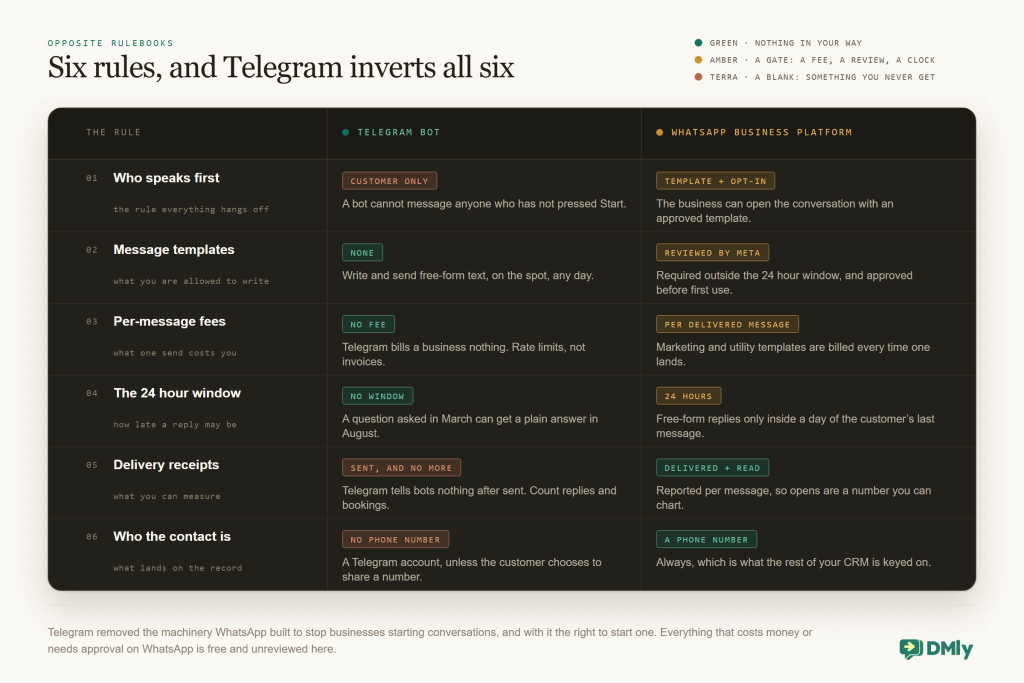
Who speaks first. On the WhatsApp Business Platform a business can open a conversation with anyone who opted in, using an approved template. On Telegram, never. The customer presses Start or nothing happens. This is the rule everything else hangs off.
Templates and the window. WhatsApp restricts free-form replies to 24 hours after the customer’s last message; anything later must be a reviewed template. Telegram has neither. A customer who messaged you in March can get a plain-text reply in August, written on the spot, no review, no category.
Fees. Meta bills WhatsApp templates per delivered message. Telegram charges a business nothing to send bot messages. There are technical rate limits rather than bills: roughly one message a second to any one chat, and about 30 a second across a bulk send before Telegram starts returning errors and asking you to wait. Past that, Telegram sells extra broadcast capacity in its Stars currency, which a local business will never need. For everyone else, there is no invoice.
Receipts. WhatsApp tells you when a message was delivered and read. Telegram tells bots nothing after “sent”. Your broadcast reports will show how many went out and that’s all, which changes how you measure campaigns: you count replies and actions, not opens.
Identity. A WhatsApp contact is a phone number; a Telegram contact is a Telegram account. That affects matching customers across channels, reminders that depend on a number, and anything that assumes you can call the person.
If your instinct is “so Telegram is WhatsApp with the hard parts removed,” hold that thought until the next section. The hard part moved; it didn’t vanish. Telegram takes away the fees, the templates and the clock, and takes away your ability to be the one who starts the conversation, which is a bigger deal than it sounds.
Who Actually Uses Telegram (and Where)
Telegram is enormous, and for most local businesses it is still the wrong channel to start with. Both of those are true at once. It passed a billion monthly users in March 2025, and those users are unusually attached: by Telegram’s own figures, the average person opens the app 21 times a day and spends 41 minutes in it. What decides whether it is right for you is not the size of the app, it is where those people live.
Telegram’s users aren’t spread evenly. In Uzbekistan more than 70% of the population is on it, and by the founder’s account every business in the country runs a bot or a channel. India counts around 150 million users. In Russia and Iran it remains a daily habit for tens of millions even where it’s officially blocked. Across Central Asia, Eastern Europe and much of the Middle East it’s often the default messenger, and it’s strong in pockets everywhere else: technology and crypto communities, university students, diaspora groups keeping in touch across borders, and anyone who joined a big public channel and stayed. In most of Western Europe, North America and much of Africa, WhatsApp still owns the everyday chat, and Telegram is the second app, installed but quieter.
So the honest way to decide is not a market-share chart; it’s your own customers. Ask ten regulars which app they’d rather message you on. Check which links in your bio get tapped. Look at where your website visitors come from. If Telegram comes up unprompted from a meaningful slice, the channel earns its place. If it doesn’t, it’s a free second front door you can add in ten minutes and forget about until someone walks through it, which is a perfectly fine way to run it.
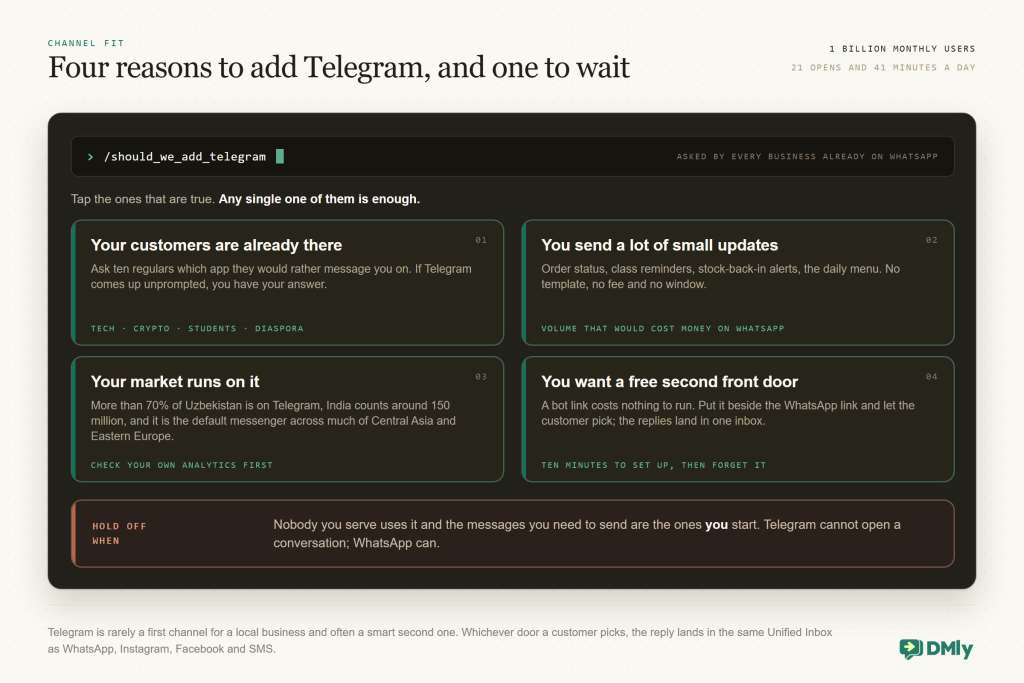
There’s a second, quieter reason businesses add Telegram even where it isn’t the main app: volume that would cost money elsewhere. Order status pings, class reminders, stock-back-in alerts, a daily menu, a tutoring school’s homework nudges. On WhatsApp each of those is a template with a per-message charge, and from 1 October 2026 that charge applies to utility templates sent inside the 24-hour window too, so the window stops being the place where those updates are free. On Telegram they’re free, unreviewed and unlimited in practice. If you send a lot of small, useful updates to people who asked for them, Telegram can be the cheaper lane for exactly that traffic, while WhatsApp stays the lane for starting conversations.
Getting the Start Tap
On Telegram there is only one thing to market, and it is a button. On WhatsApp the work is earning permission to send. Here the work is getting the tap. Everything you’d normally put into an opt-in form goes into making Start easy to find and obvious to press.
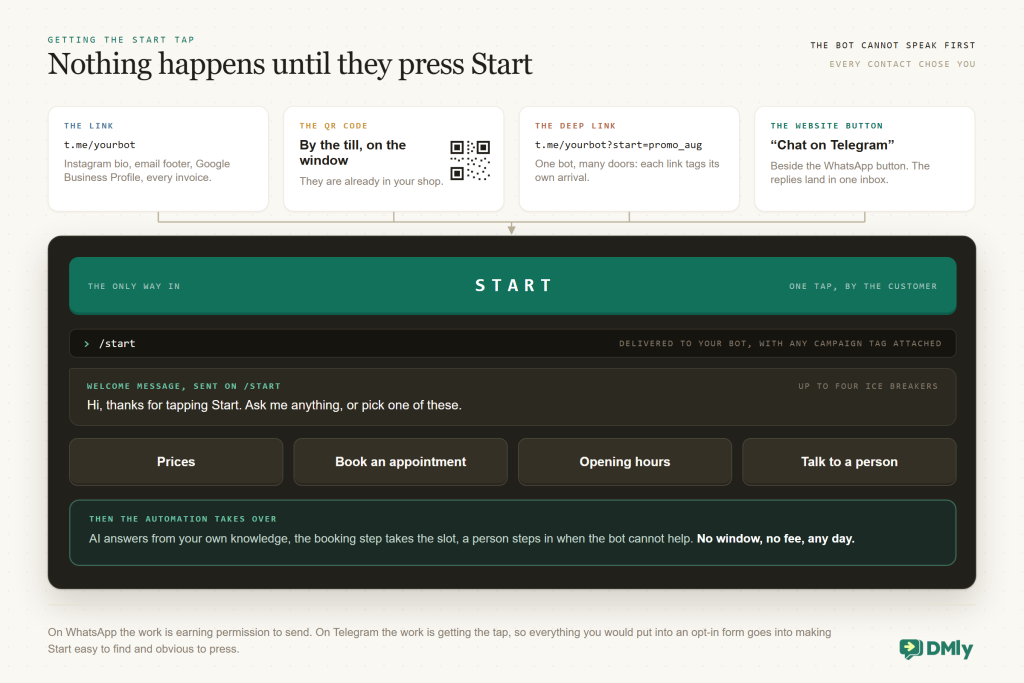
The link. Every bot has a t.me/yourbot address. Put it where the WhatsApp link already lives: Instagram bio, email footer, Google Business Profile, the bottom of every invoice. “Message us on Telegram” with the link does the same job as the WhatsApp button, for the customers who’d rather use it.
The QR code. A bot link as a QR code by the till, on the window, on the flyer. Telegram opens straight to your bot with Start waiting. For walk-in businesses this is the highest-yield placement there is, because the customer is already standing in your shop when they scan.
The deep link. This is Telegram’s quiet superpower, and it costs you nothing: add a tag to the end of the link, t.me/yourbot?start=promo_aug, and your bot is told which tag the person arrived with when they tap Start. One bot, many doors: the flyer link, the Instagram link and the email link can each carry a different tag, so you know which one brought the customer and can greet them accordingly. It’s campaign attribution built into the channel, for free. DMly’s Growth Tools build these for you: a Telegram Ref link is a t.me/yourbot?start=… address that tags the contact with its source on arrival and can start a chosen flow the moment they tap Start, so the flyer’s link can open with the flyer’s offer.
The website button. A “Chat on Telegram” button beside the WhatsApp one on your site. Let the customer choose; the reply lands in the same inbox either way.
One principle ties these together. Because the customer always opens the door, every Telegram contact you will ever message chose you. That’s a list quality no purchased WhatsApp database can match, and it’s why the small numbers Telegram produces tend to convert unusually well. Don’t measure the channel by how many people you can reach. Measure it by what the people who came in do next.
What Your Telegram Bot Automation Should Do Once They’re In
The Start tap is a customer saying “go on, then,” and what your bot does in the next ten seconds decides whether they stay. The same three-layer system we teach for FAQ and auto-response applies here, with Telegram-shaped details.
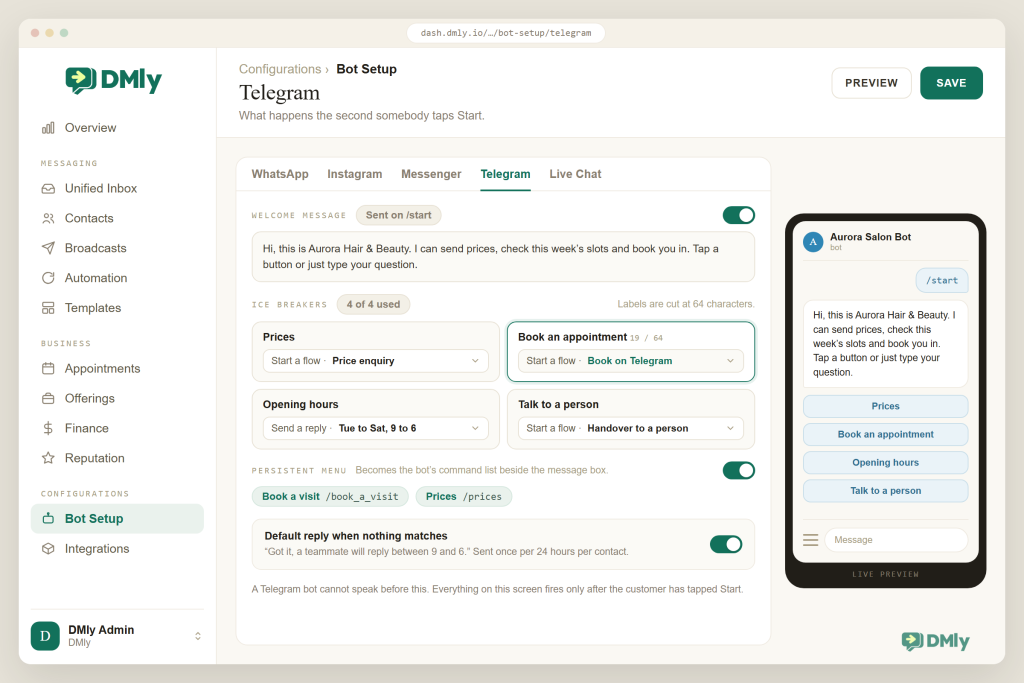
Greet, then offer a menu. DMly sends your welcome message the moment someone taps Start, and you can add up to four ice breakers, suggested questions the customer can tap instead of typing: “Prices”, “Book an appointment”, “Opening hours”, “Talk to a person”. On Telegram, tapping an ice breaker can send the text reply or start a whole flow, which makes them the menu of your bot. Keep them to the four things people actually come for. For a menu that stays available after the welcome scrolls away, DMly’s Persistent menu becomes the bot’s ☰ command list beside the message box: a label like “Book a visit” turns into a /book_a_visit command that starts the flow you choose.
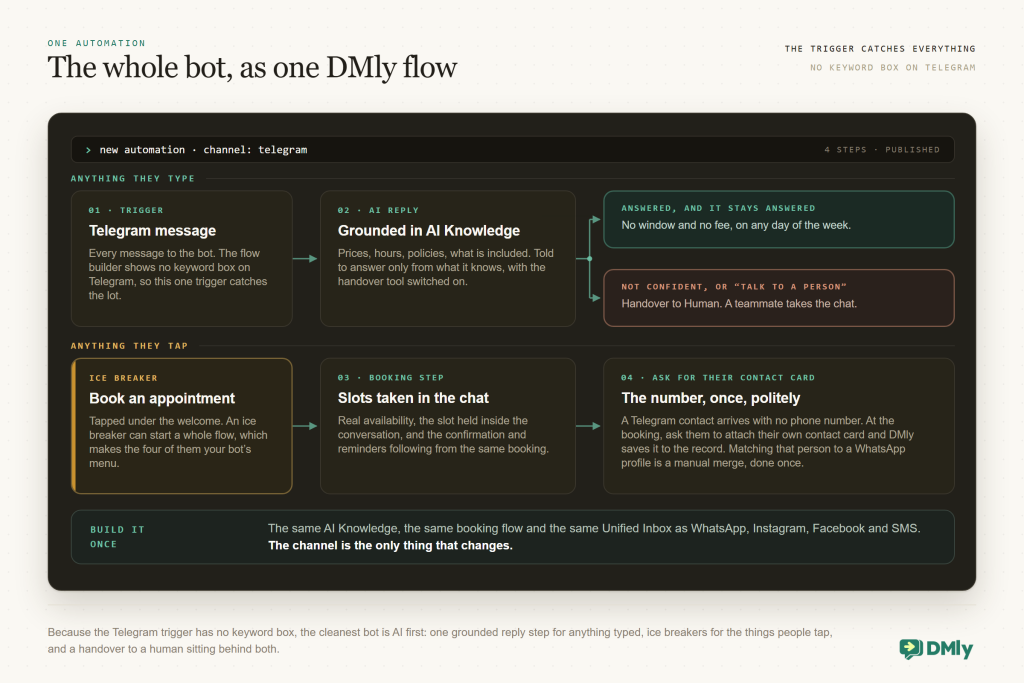
Answer anything else with AI, from your own facts. In DMly’s flow builder, the Telegram message trigger has no keyword box: a flow built on it answers every message to the bot, which is a hint about how to build it. Rather than a forest of keyword rules, point the trigger at an AI Reply step grounded in your AI Knowledge (prices, policies, hours, what’s included), with instructions to answer only from what it knows and hand over to a person when it doesn’t. Because Telegram has no window and no fee, the AI can carry a conversation across days without any of the machinery WhatsApp would need; a customer who comes back on Thursday to the question they asked on Monday simply gets an answer. We cover building the AI side of a bot end to end in its own guide.
Book the appointment in the chat. The single most valuable thing a business bot does is turn “do you have Saturday?” into a booking. DMly’s booking steps show real availability and take the slot inside the conversation, on Telegram as on any other channel, with confirmations and reminders following from the same booking. (One detail worth knowing: if you hold the person’s phone number and have WhatsApp connected, DMly sends those automated reminders WhatsApp-first; otherwise they go out on the channel the customer came in on.) Payments work the same way: a payment link sent in the chat, paid in the customer’s browser, recorded against the booking.
Ask for the number, once, politely. Because Telegram contacts arrive without a phone number, the moment a conversation turns into a booking or an order is the right moment to ask for one. On Telegram the customer shares it by sending their own contact card (attach, then Contact), and DMly saves the number onto their record, provided it’s their card and the record has no number yet. Ask once, say why (“so we can send your reminder”), and don’t nag. One thing DMly does not do is guess that this Telegram person and that WhatsApp number are the same human; if they are, you merge the two profiles by hand, and from then on they have one history.
Hand over without friction. “Talk to a person” as an ice breaker, a handover step when the AI isn’t confident, and a teammate watching the Unified Inbox. Telegram users are often more technical than average; they forgive a bot that says “let me get a human” and punish one that loops.
Set a default reply for the gaps. On Telegram, DMly can send a default reply when a message matches no flow, once per 24 hours per contact or every time. Use it sparingly and honestly: “Got it, a teammate will reply between 9 and 6” is better than silence and far better than a fake-cheerful loop.
Building Your Telegram Bot Automation in DMly, Step by Step
Set aside an afternoon, and expect most of it to go on writing down what your business actually charges and when it opens. The technical part is eight steps and none of them is hard.
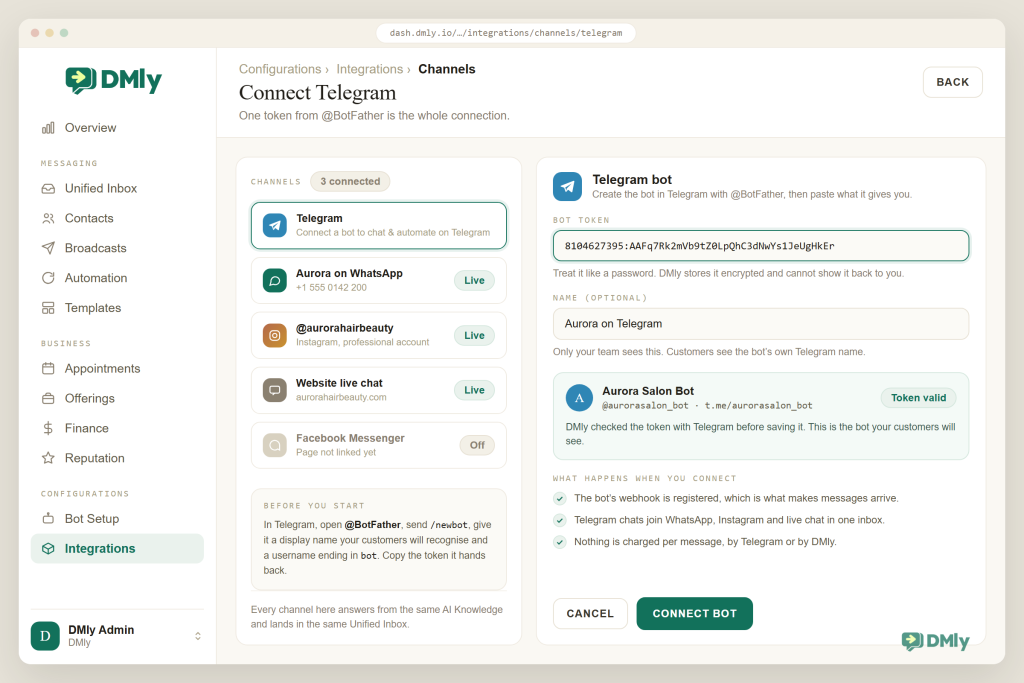
- Create the bot with BotFather. In Telegram, open @BotFather, send
/newbot, give it a display name your customers will recognise and a username ending inbot. Copy the token it returns and treat it like a password. - Connect it to DMly. Integrations → Channels → Telegram, paste the token into the Bot token field, Connect. DMly checks the token with Telegram before saving and registers the bot’s webhook, which is the standing instruction telling Telegram where to deliver each new message. The token is stored encrypted and can’t be read back out; if it ever leaks, revoke it in BotFather and paste the new one, and the channel reconnects with its history intact.
- Dress the bot. Back in BotFather, set a profile photo, a short description (what the bot does) and the about text. Customers read these before tapping Start, and a blank bot looks abandoned.
- Set up the welcome. In Bot Setup with Telegram selected, switch on the welcome sent when someone taps Start, write it, and add up to four ice breakers (labels get cut at 64 characters, so keep them short). Add a Persistent menu item or two as Start flow actions; they become the bot’s slash commands. This is the front door; make it warm and make the buttons verbs.
- Load your knowledge. Put prices, hours, policies and your most-asked questions into AI Knowledge as short, factual entries. Exact numbers, not “from”.
- Build the main flow. New automation on the Telegram channel. Trigger: Telegram message (it catches every message). First step: AI Reply, grounded in your knowledge, with the handover tool on. Build a second, small flow for booking and point the “Book” ice breaker at it; ask for the customer’s contact card at the point of booking; and add Handover to Human wherever the AI gives up. Remember the WhatsApp-only palette (buttons, lists, templates, the phone-number request) won’t appear on a Telegram flow, and that’s fine: text, media, AI, booking and payment links all will.
- Publish and poke it. Publish, then use Preview (it hands you a t.me link and a QR code for the bot), tap Start from a second Telegram account, and behave like an awkward customer: misspell things, ask two questions at once, type “human”. Fix the knowledge, not the phrasing, when an answer is wrong. If nothing answers at all, look in Configurations → Logs: a line per inbound message but nothing in the inbox means a flow problem; no lines at all means Telegram isn’t reaching DMly, which re-pasting the token fixes.
- Open the doors. Put the
t.melink in your bio and email footer, print the QR code, and give each placement its own?start=parameter so you can see which door works.
Broadcasting on Telegram (and the Discipline It Needs)
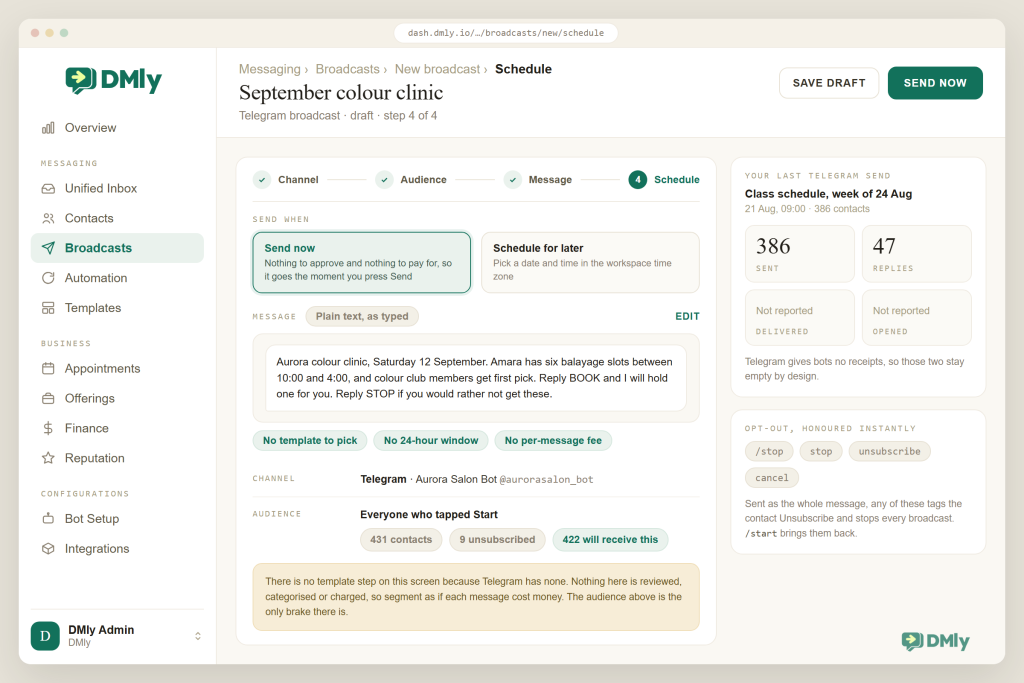
Sending to your whole Telegram list costs nothing and needs nobody’s permission, which is the best and the most dangerous thing about this channel. A broadcast in DMly is refreshingly plain: pick an audience, type a message, send. No template, no category, no 24-hour rule, no per-message charge, no waiting for approval. Every contact who has started your bot and not opted out can receive it, whenever you like.
That is exactly the problem. WhatsApp’s fees and approvals are an external brake on over-messaging; Telegram has none, so the brake has to be yours. Two habits keep the channel healthy. First, segment as if each message cost money: the class reminder goes to people in that class, the restock alert to people who asked about that product, the monthly offer to everyone at most monthly. Second, make the exit obvious and honour it instantly. On Telegram, DMly treats /stop, stop, unsubscribe or cancel as the whole message as an opt-out: the contact gets the Unsubscribe tag and no further broadcasts or automated messages, and /start brings them back.
Measure broadcasts the Telegram way. You’ll see how many were sent; Telegram gives bots no delivery or read receipts, so the Delivered and Opened columns stay empty by design. Count what happens next instead: replies in the inbox, bookings, orders. (If you retarget a Telegram broadcast, pick All Sent or All Replied; the delivered and read filters select nobody on this channel.) For the messages Telegram is best at, updates people asked for, that’s the only measurement that ever mattered anyway.
Running Telegram Beside WhatsApp
You are not choosing between them; you are deciding which messages belong to which app. Nobody should run Telegram instead of WhatsApp, and the real question is how to run both without doubling your work. Three rules make that easy.
One inbox, one knowledge base. Your Telegram bot automation is not a separate system to look after: conversations sit in the same Unified Inbox as WhatsApp, Instagram, Facebook, SMS and your website chat, and the AI answers from the same AI Knowledge. Update a price once and every channel’s bot knows. Your team learns one screen.
Route by what the channel is good at. WhatsApp for anything you need to start: appointment reminders to people who booked by phone, win-back offers, the big seasonal campaign. Telegram for everything the customer already asked for: the order updates, the class schedule, the support conversation that runs over a week. Let the economics choose the lane.
Match the person, not the handle. A Telegram account and a WhatsApp number might be the same customer, and DMly won’t assume so. Ask for the number at the natural moment (the booking, the order), then merge the two profiles into one, so they have one history, one set of tags and one record of what they’ve paid for. It’s a small chore that saves a lot of “as I said on the other app”. Opt-outs, usefully, already work at the person level: a STOP on WhatsApp opts them out on Telegram too.
Why DMly for Telegram
Plenty of tools will build you a Telegram bot, and if you are a developer you have excellent options. The developer community around Telegram is one of the channel’s strengths. The case for DMly is narrower and, if you run a business rather than write code, more useful: Telegram bot automation is one channel of many in a system that already runs your inbox, your AI, your bookings and your payments.
Connecting is a token paste. The welcome, ice breakers and default reply live in Bot Setup beside the same settings for WhatsApp and Instagram. The flow builder’s steps work across channels, so the booking flow you built for WhatsApp is the booking flow on Telegram, and the AI agent reads the same knowledge everywhere. Broadcasts are free-form on Telegram and templated on WhatsApp, from the same screen, with the opt-out machinery handled for you. And every reply lands in one inbox for one team.
Commercially, Telegram bot automation costs you nothing extra: it’s included as a channel on every DMly plan (Starter $29, Growth $65, Premium $149 a month billed yearly), with no per-message fees from Telegram or from DMly, and a 7-day trial with no card. For a business whose customers are on Telegram, it’s the cheapest front door you will ever open.
Questions Businesses Ask About Telegram Bot Automation
Can my Telegram bot message customers first?
No. A bot can only reply to people who have opened it and tapped Start, and it loses that ability if they block it or delete the chat. That’s the channel’s consent model. Getting the Start tap, through links, QR codes and deep links, is the marketing work on Telegram.
Does Telegram charge businesses per message?
No. Telegram charges nothing for bot messages, and DMly adds no per-message fee either. There are technical rate limits on how fast a bot can send, but no invoice. This is the single biggest economic difference from WhatsApp’s per-delivered-message template pricing.
Do I need a phone number or a business account for Telegram bot automation?
You need a Telegram account to talk to BotFather and create the bot, but the bot itself is not tied to a phone number and customers never see yours. The bot is its own identity with its own username and profile.
Will I get my customers’ phone numbers?
Not automatically. Telegram contacts arrive without one. Ask at the natural moment, when a conversation becomes a booking or an order, and the customer shares it by sending their own contact card; DMly saves it to their record. Matching that person to their WhatsApp profile is a manual merge, done once.
Can I see whether a Telegram message was read?
No. Telegram doesn’t send bots delivery or read receipts, so broadcast reports show only what was sent. Measure replies, bookings and button taps instead.
Should I build a Telegram bot or a WhatsApp bot first?
Whichever app your customers already use to message you; for most local businesses that’s WhatsApp, with Telegram as a free second door. If your customers are in a market or community where Telegram is the default, flip that order. Either way, build it once in a platform that runs both from one inbox.
The Door Only Opens From Their Side
Telegram will never be the channel where you reach people who didn’t ask to hear from you. That’s not a limitation to work around; it’s the design, and it’s exactly why the people who do come through are worth more to you. Build Telegram bot automation that greets well, answers honestly from your own facts, books the appointment without fuss, and knows when to fetch a human. Then put the link everywhere and let your customers decide which door to use.
Add Telegram to your inbox. Create the bot with BotFather, paste the token into DMly, and your Telegram conversations join WhatsApp, Instagram and the rest in one place, with the same AI, bookings and payments. Start the 7-day trial, no card, no per-message fees.
Writing about WhatsApp automation, bookings and growth for local business.
Turn WhatsApp into your busiest channel.
Start free and run message, bookings, payments and reviews in one place.
