
Somewhere on your website there is a page called FAQ. You wrote it carefully. It answers eleven good questions. And your customers have never read it.
You know they haven’t, because they keep asking you those eleven questions, one at a time, in WhatsApp and Instagram and the chat bubble on your site, at lunchtime and at 9:40pm. “What are your hours?” “How much is a full set?” “Do you take cards?” The FAQ page didn’t fail because the answers were bad. It failed because it sits where your customers aren’t, and waits for them to come to it.
An FAQ and auto-response system is the opposite idea: the answers live inside the conversation, and they come to the customer. Someone asks about parking at 10pm and gets the parking answer at 10pm, in the same chat window, in three seconds. Nobody searches. Nobody waits for morning. And your team stops typing the same sentence for the four-hundredth time.
The speed matters more than most owners think. In HubSpot’s research, 90% of customers rate an immediate response as important or very important when they have a support question, and most of them define “immediate” as ten minutes or less. Your competitors are not beating you with better answers. They’re beating you with faster ones.
In this guide, we’ll look at how to find out what your customers actually ask, how to sort those questions into three buckets that each need a different kind of answer, the three layers every good auto-response system is built from, how to write answers that work in a chat window, and how to set the whole thing up with DMly, step by step.
Start With the Questions, Not the Tools
The biggest mistake in FAQ automation is starting in the software. You open a bot builder, invent ten questions you imagine customers ask, write tidy answers, and launch. Then real customers arrive and ask different things, in different words, and the bot shrugs.
So before you build anything, spend thirty minutes mining what you already have. Open your WhatsApp chats, your Instagram DMs, your email, your call log if you keep one, and read the last hundred conversations. Write down every question, in the customer’s own words, exactly as they typed it. Don’t tidy the phrasing; the phrasing is data. “How much for gel?” and “wetin be your price for gel nails” are the same question, and your system needs to catch both.
Two things will happen. First, you’ll be bored by repetition, which is the point: most owners find that a small set of questions covers the bulk of their inbox. Second, you’ll notice your FAQ page answers questions nobody asked, and misses ones everybody asks. The list you just made, ranked by how often each question appears, is the honest spec for your system. Ten to fifteen questions is plenty to start.
Keep the exact wordings you collected. They become your keyword lists, your test script, and later, your proof that the system works: you’ll paste those real messages into a preview chat and watch what comes back.
Sort Every Question Into Three Buckets
Now sort the list. Every question your business gets falls into one of three buckets, and the bucket, not the question, decides which part of the system should answer it.
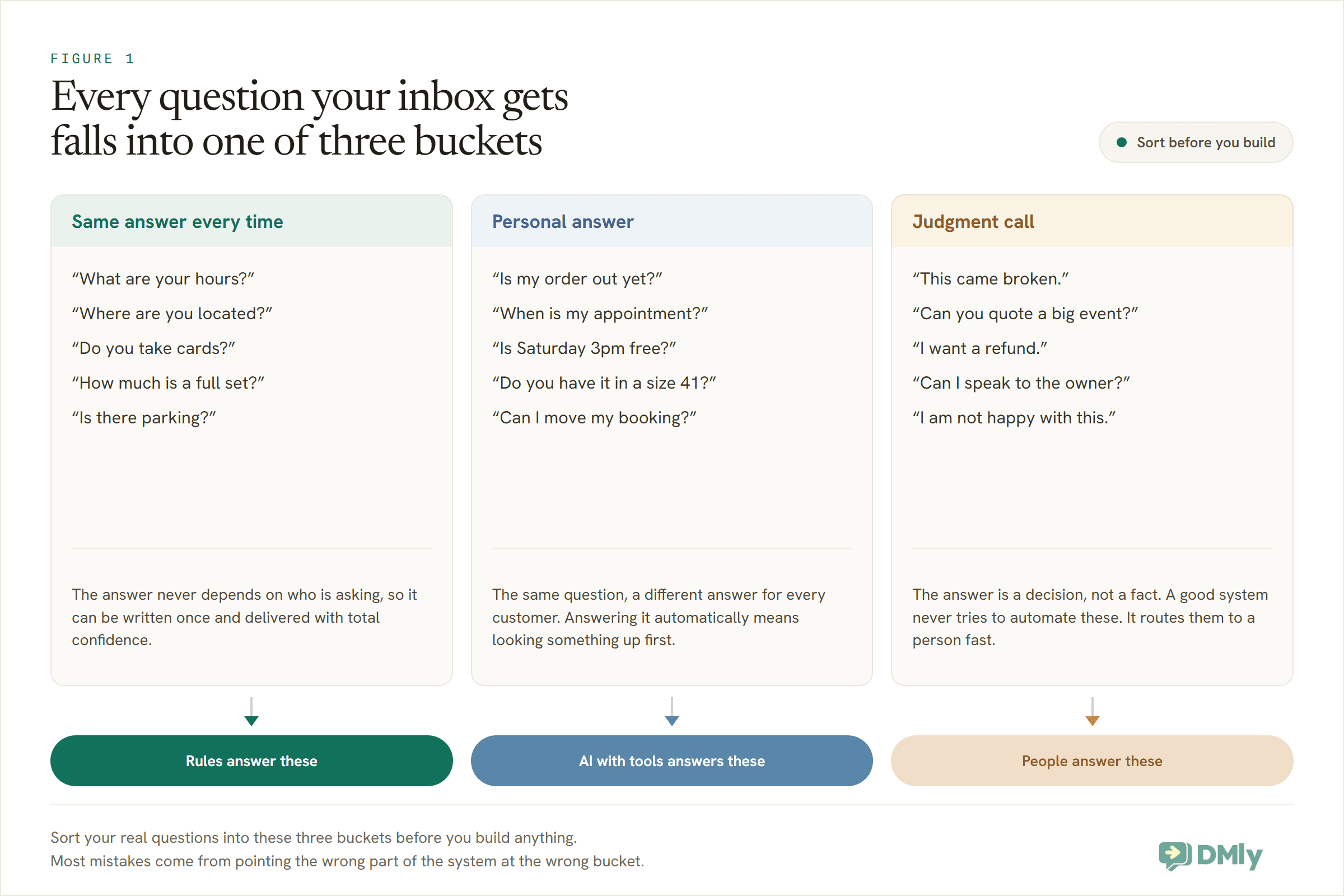
Bucket one: same answer every time. Hours, location, parking, price list, payment methods, cancellation policy. The answer doesn’t depend on who’s asking, so it can be written once and delivered by a machine with total confidence. This bucket is usually the biggest, and it’s where automation pays for itself first.
Bucket two: personal answer. “Is my order out yet?” “When is my appointment again?” “Do you have Saturday 3pm free?” The question is common but the answer is different for every customer, so a scripted reply can’t help. Answering these automatically needs a system that can look something up: a booking calendar, an order record, a customer file.
Bucket three: judgment calls. Complaints, refunds, custom quotes, anything where the answer is a decision rather than a fact. These should never be automated, and a good system doesn’t try. Its job for bucket three is speed of a different kind: recognising the message and getting it in front of a person fast, with context attached.
The sorting takes ten minutes and prevents the two classic failures. Point a scripted bot at bucket two and it confidently tells everyone “we usually have Saturday slots” while this Saturday is fully booked. Point automation at bucket three and you get the reply nobody forgives: a cheerful canned answer to “this came broken.”
Three Layers, in the Right Order
An effective auto-response system is three layers stacked in a deliberate order. Each layer catches what the one above it can’t, and each is slower and more expensive than the last, which is exactly why the order matters. Gartner measured that slope: a live service contact costs businesses an average of $8.01, while a self-service interaction costs around ten cents.
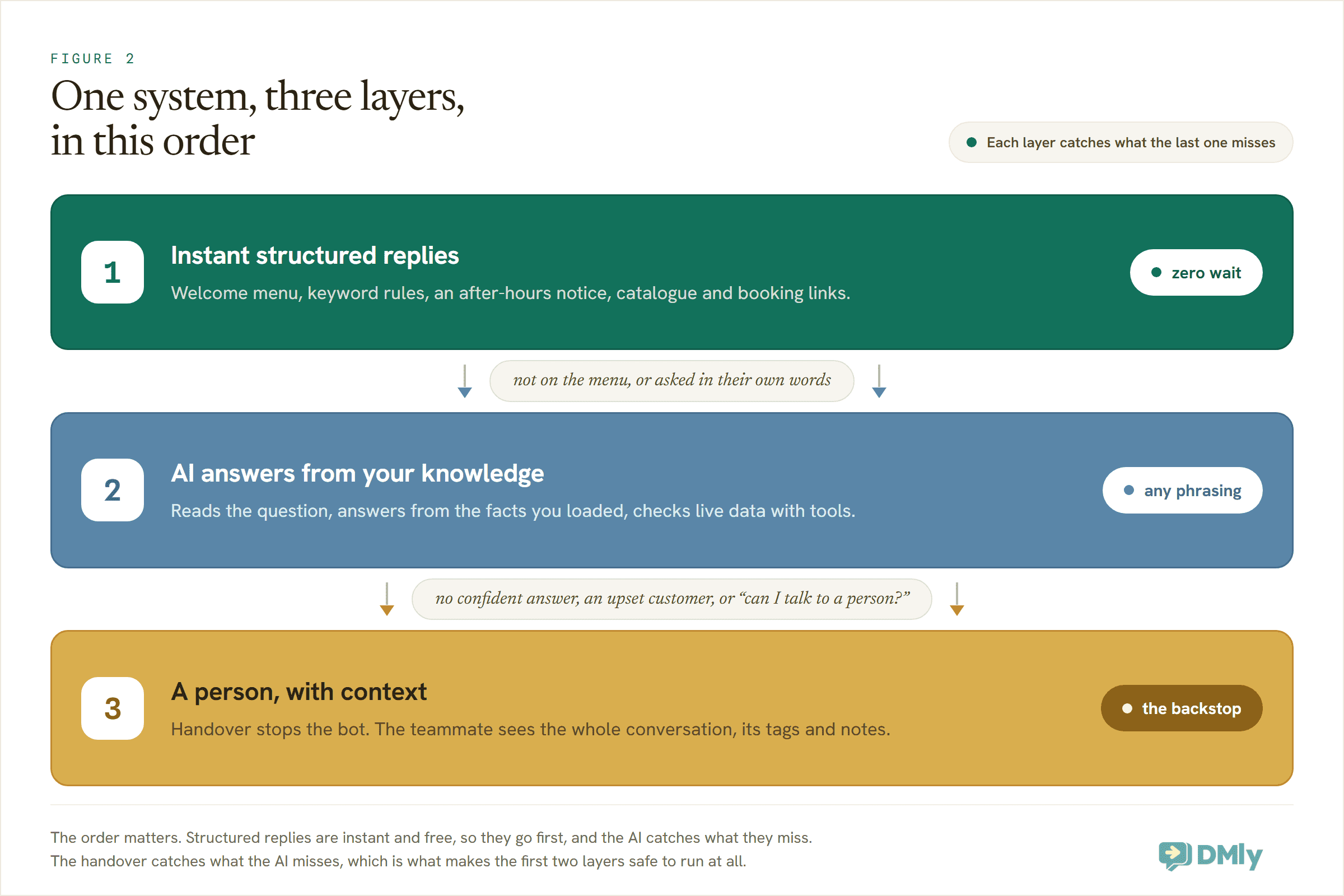
Layer one is instant, structured replies: a welcome menu, keyword-triggered answers, an after-hours notice. It costs you nothing per use in DMly, answers in under a second, and never gets a fact wrong, because you wrote the words yourself. Its weakness is rigidity: it only catches what you predicted.
One thing to know if this runs on WhatsApp. Every reply your system sends inside the 24-hour window a customer opens is a service message (Meta calls it the customer service window). From 1 October 2026 Meta gives every business phone number 1,000 service messages free each month and charges from the 1,001st, with no rollover. Utility templates get no free allowance at all from the same date, even inside that same window. So a business that mostly answers questions is affected less by this change than one that mostly sends notifications, and an FAQ system sits squarely on the answering side.
Layer two is an AI that answers from your facts. When the question doesn’t match a button or a keyword, a language model reads it, finds the answer in the knowledge you loaded (your prices, policies, services), and replies in natural language. It handles the hundred phrasings you didn’t predict, and with the right tools it can handle bucket two by actually checking your calendar or a customer’s record before it answers. The short version: the AI answers from what you gave it, not from imagination, and that distinction is the whole game.
Layer three is a person, with context. Every path that the first two layers can’t finish must end at a human being, and the customer should never feel the seams. The handover carries the conversation history, the contact’s details and a note about what was tried, so nobody types “as I already said” at your team.
Businesses tend to build one layer and stop. A menu bot alone frustrates anyone whose question isn’t on the menu. An AI alone burns replies on “what time do you open?” that a scripted answer handles better, and cheaper. Humans alone is where you are now. The system is the three together, in that order.
Layer One: Instant Answers You Script Once
Layer one is built from pieces most platforms already give you; the craft is in how you combine them. In DMly these live in the automation builder and in each channel’s Bot Setup.
The welcome menu. Greet a new conversation with a short line and a menu of the things people actually come for. On WhatsApp that’s a Buttons Message (up to three buttons, each title 20 characters or fewer) or a List Message (up to ten rows) when three isn’t enough. Your bucket-one ranking tells you exactly which options earn a spot: if a third of your questions are about prices, “Price list” is a button, not a paragraph.
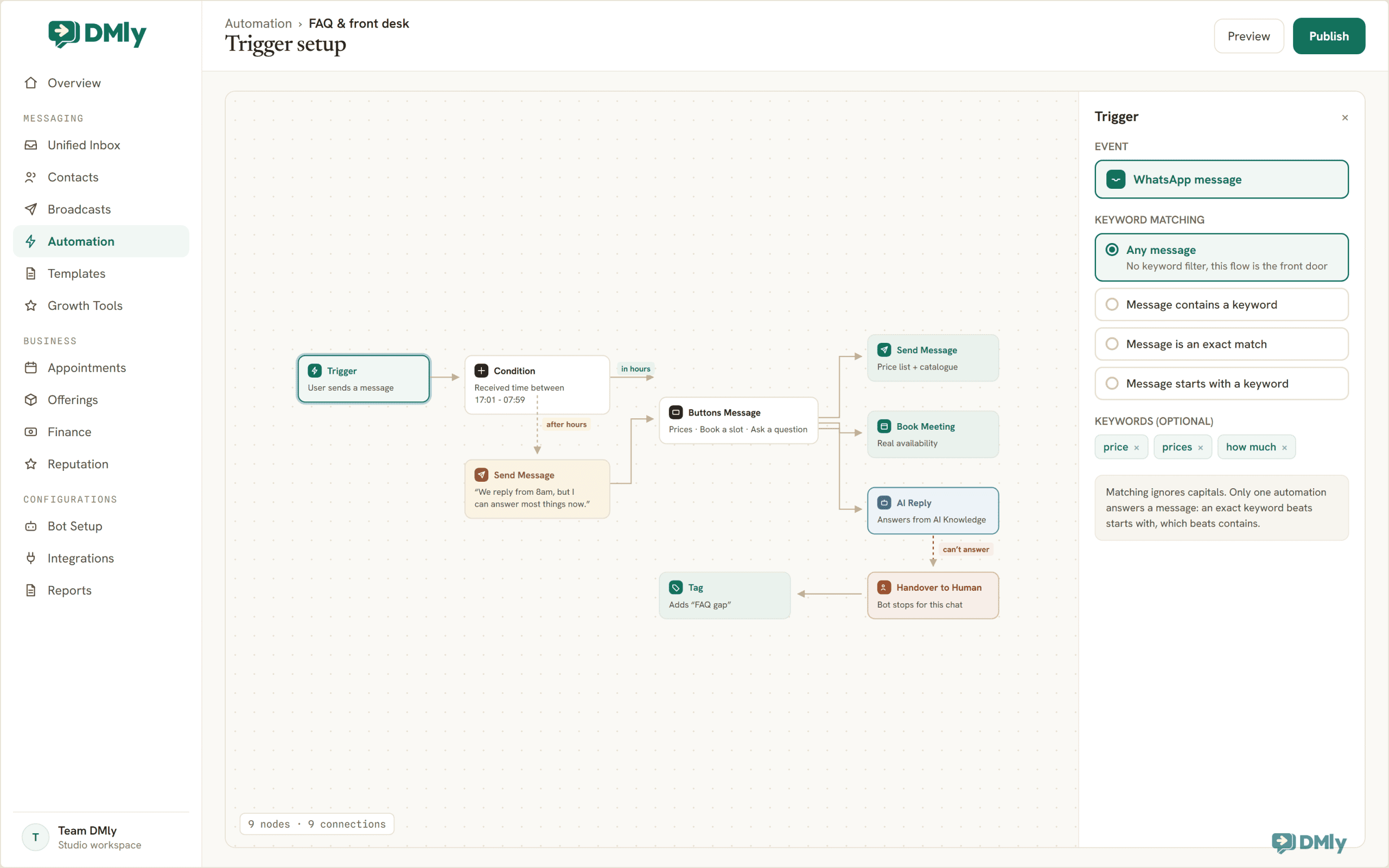
Keyword rules. A keyword-triggered automation watches incoming messages and replies when one matches. DMly gives each message trigger four matching modes: any message, contains a keyword, exact match, or starts with a keyword, and matching ignores capitals, so “PRICES”, “prices” and “Prices pls” can all land the same rule. When several automations could match one message, only one answers, and the most specific wins: an exact match beats starts-with, which beats contains. That precedence is useful design space: a broad contains rule for “price” can coexist with an exact rule for “book” without fighting.
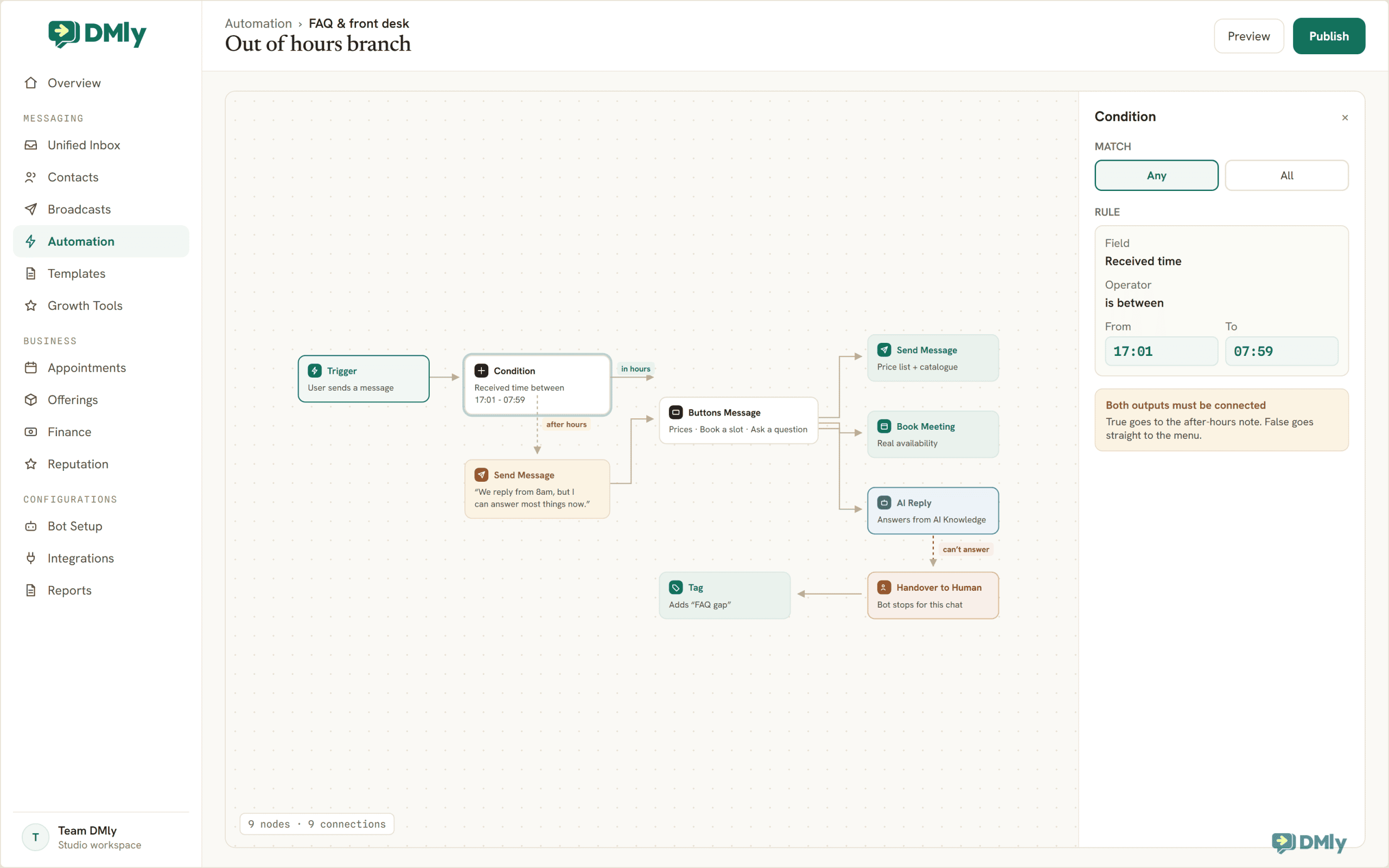
The after-hours branch. Being closed is the original frequently-asked situation, and the flow builder handles it with a Condition step on the time a message was received: set the rule to your closed hours (received time between 17:01 and 07:59, say) and the flow forks. In working hours it goes straight to the menu; after hours it leads with a one-line expectation-setter first. The trick is in the wording, because the menu and the AI don’t keep office hours. “We’re closed” is a dead end; “a teammate replies from 8am, but I can answer most questions right now” keeps the conversation, and the customer, moving. For follow-ups that should wait for a working day, the Smart Delay step’s “wait until” mode holds the next step for a window you choose, and on your website the live chat widget shows an offline notice whenever the team toggles away.
Ice breakers. First-time visitors often don’t know what to ask, so DMly can show up to four suggested questions before the conversation starts. On Facebook, Instagram and Telegram a tapped ice breaker can start a flow directly; on WhatsApp the tapped question arrives as an ordinary message, so pair each ice breaker with a matching keyword rule to catch it. The live chat widget has its own version: up to six tappable quick-reply chips a visitor sees before their first message.
One honest caveat, straight from DMly’s own troubleshooting docs: a message that doesn’t match any keyword is skipped silently, with nothing logged. A pure keyword bot therefore fails quietly, and you’ll never see the questions it missed. That’s not a reason to skip layer one. It’s the reason layer two exists.
Layer Two: An AI That Answers From Your Facts, Not the Internet
Layer two is one step in the flow: AI Reply. But the step is only as good as what you feed it, and feeding it is where owners either build trust or torch it.
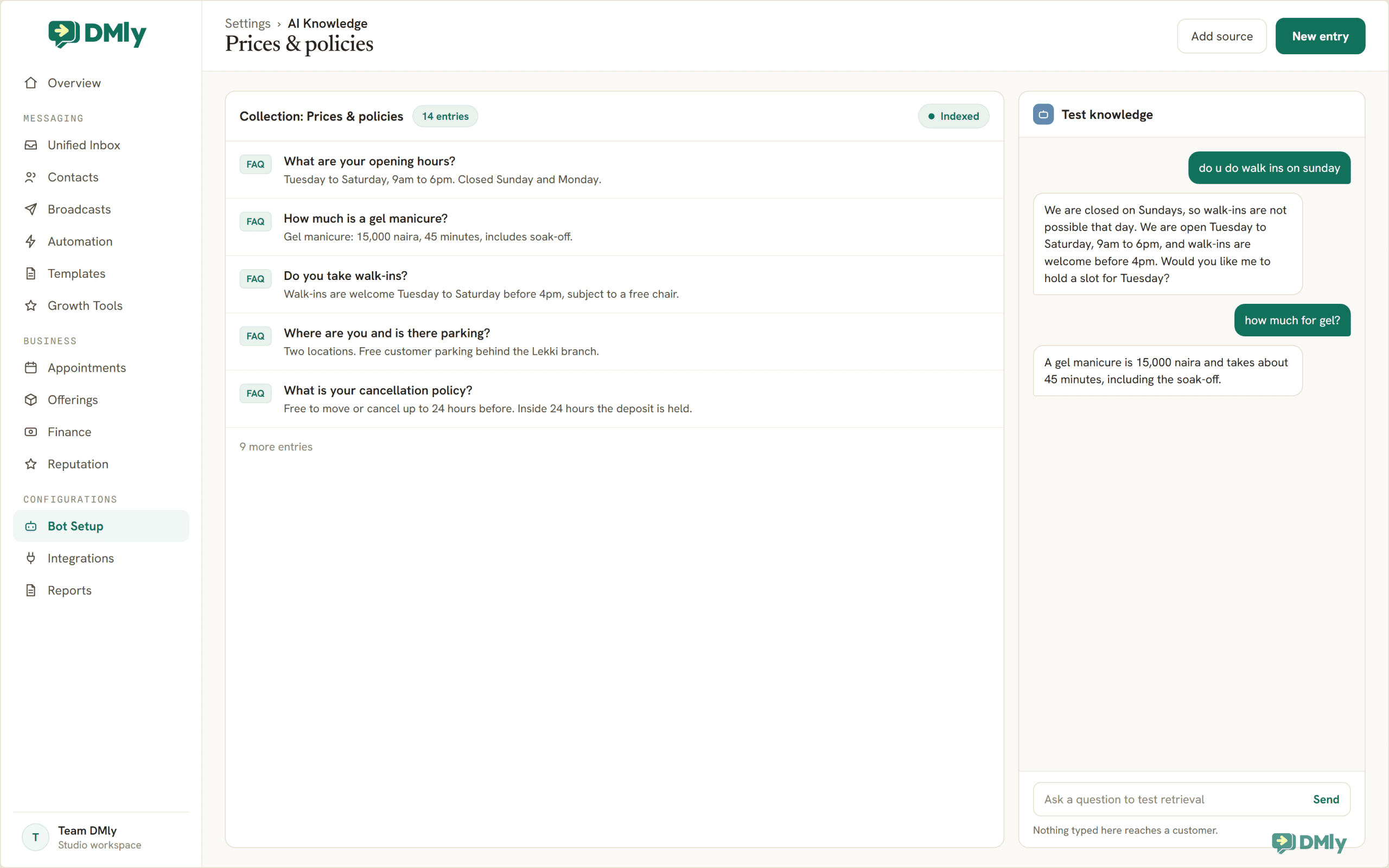
The feeding happens in AI Knowledge. It takes your facts in four shapes: pasted text, uploaded files, web page addresses, and, fittingly for this article, an entry type literally called FAQ, a question box paired with an answer box. You load the facts of your business once: your services and prices, your policies, your address and parking situation, the answers from your question audit, one FAQ entry per question. DMly lets the AI search that knowledge when it replies, so “do u do walk-ins on sundays??” gets answered from your actual Sunday policy, in a normal sentence, whatever words the customer used. This is the difference between an AI chatbot and the chatbots of five years ago: you’re not scripting replies to predicted questions, you’re publishing facts and letting the model do the phrasing.
Three rules make this layer safe rather than scary.
Write the knowledge like answers, not marketing. The AI can only be as precise as the facts. “Affordable prices for every budget” gives it nothing; “Gel manicure: 15,000 naira, 45 minutes. Walk-ins accepted Tuesday to Saturday before 4pm” gives it everything. Short declarative facts, one topic per chunk, prices with currencies, times with days.
Tell it what to do when it doesn’t know. The AI’s instructions should say, in plain words: answer only from what you know about this business; never invent a price, a time or a promise; if you’re not sure, hand the conversation to the team. An AI that says “let me get a teammate to confirm that” keeps trust. An AI that guesses a price loses a customer and starts an argument on the day they arrive.
Test it with real questions before customers do. AI Knowledge has a Test knowledge panel for exactly this; nothing you type there ever reaches a customer. Paste in the actual messages from your audit, misspellings and all, and read what comes back. Fix the knowledge, not the phrasing, when an answer is wrong: if the AI fumbled your refund policy, the policy text was probably fuzzy for humans too.
This is also the layer that handles bucket two. DMly’s AI agent can use tools: it can look up the contact’s record, check real appointment availability, and book the slot before it replies. That turns “is Saturday 3pm free?” from a question no script can answer into one the system answers correctly every time, because it looked. Flow steps cover the retail version of the same trick: a flow can find an order and send its status without a human touching the chat. We cover the full toolbox on the AI agents page; for an FAQ system, the point is simply that personal questions stop needing a person.
Layer Three: The Handover That Makes the First Two Safe
Every auto-response system is judged on its worst moment: the moment it can’t help. Handle that moment well and customers forgive the occasional miss. Handle it badly, with a loop of “sorry, I didn’t understand that”, and one bad exchange undoes a hundred instant answers. Zendesk’s CX research puts a number on how little patience exists here: 63% of customers say they would switch to a competitor after just one bad experience.
So build the exit before you polish the entrance. In DMly the exit is the Handover to Human step: the bot stops replying for that conversation and a teammate takes over in the shared inbox, with the full history in front of them. Pair it with an Assign step to route the chat to the right person, a Tag step so handed-over chats are findable later, and a note about what the customer wanted. By default the bot then stays out of that conversation until someone resumes it, though you can set it to come back when the conversation is closed or after a quiet period.
Wire the handover into three places. First, the explicit ask: “agent”, “human”, “talk to someone” should reach a person immediately, no questions asked, because by the time someone types “HUMAN” in capitals they are not enjoying the bot. Second, the AI’s own uncertainty: its instructions should route any question it can’t answer confidently, and any complaint, refund or safety issue, straight to the team. Third, the menu itself: an “Ask something else” or “Talk to us” option on the welcome menu tells customers from the first second that a person is reachable, which, paradoxically, makes them happier to try the bot first.
And after hours? The handover still works; it just needs honest wording. The chat gets assigned to the team queue, the customer hears “a teammate will pick this up first thing tomorrow”, and because the promise was explicit, tomorrow morning’s reply feels like a kept promise instead of a delay.
Write Answers for a Chat Window, Not a Webpage
The same answer that reads fine on your FAQ page reads like a wall in WhatsApp. Chat has its own writing rules, and following them is half of what makes the system feel effective rather than robotic.
- One question, one message. Answer what was asked, then stop. If the answer truly has parts, three short lines beat one paragraph. Nobody scrolls up in a chat to re-find the middle of a wall of text.
- Put the answer in the first line. “We’re open till 7pm today.” first, “Full hours: …” after. Customers read the first line on their lock screen; make it the one that answers.
- Write like you type. Contractions, plain words, the occasional emoji if that’s your brand. The moment a reply sounds like terms and conditions, people assume no one is listening and ask again.
- Make buttons verbs and nouns, not sentences. You have 20 characters per WhatsApp button title: “Price list”, “Book a slot”, “Talk to us”. Save the sentences for the message above the buttons.
- End the important answers with the next step. The price answer links the catalogue; the hours answer offers to book; the location answer sends the map pin. An FAQ system that only informs is leaving money in the chat.
- Date-stamp what changes. Holiday hours, promo prices, seasonal policies. Stale automated answers are worse than none, because they’re delivered with total confidence.
One more craft note: keep your channel differences in mind. An SMS flow is plain text, no buttons, no images, so your menu becomes “Reply 1 for prices, 2 to book”. On channels that show it, switching on the typing indicator before an automated reply is a small humanising touch. A saved reply your team inserts by hand can be warmer and longer than an automated one. Write once, then trim per channel, not the other way round.
The Build: A Complete System in DMly, Step by Step
Here’s the whole assembly, in the order that works. With your question audit done, the build itself is an afternoon.
- Connect your channels. WhatsApp, Instagram, Facebook, TikTok, Telegram, SMS, Live Chat and Google Business Profile all land in DMly’s shared inbox. Automations are per channel, so start with the channel that carries most of your questions; you can duplicate the flow for the others once it’s proven.
- Load your knowledge. Put your audit’s answers into AI Knowledge as short, factual entries: services, prices, hours, address, policies. This is the layer-two fuel, and it’s also a useful edit of your own thinking; if you can’t write the refund policy in two clear sentences, neither can the AI.
- Set up the channel basics in Bot Setup. Switch on the welcome message for new conversations, add up to four ice breakers for the questions everyone asks, and on Facebook, Instagram and Telegram, set the default reply that answers when a message matches no flow and no keyword.
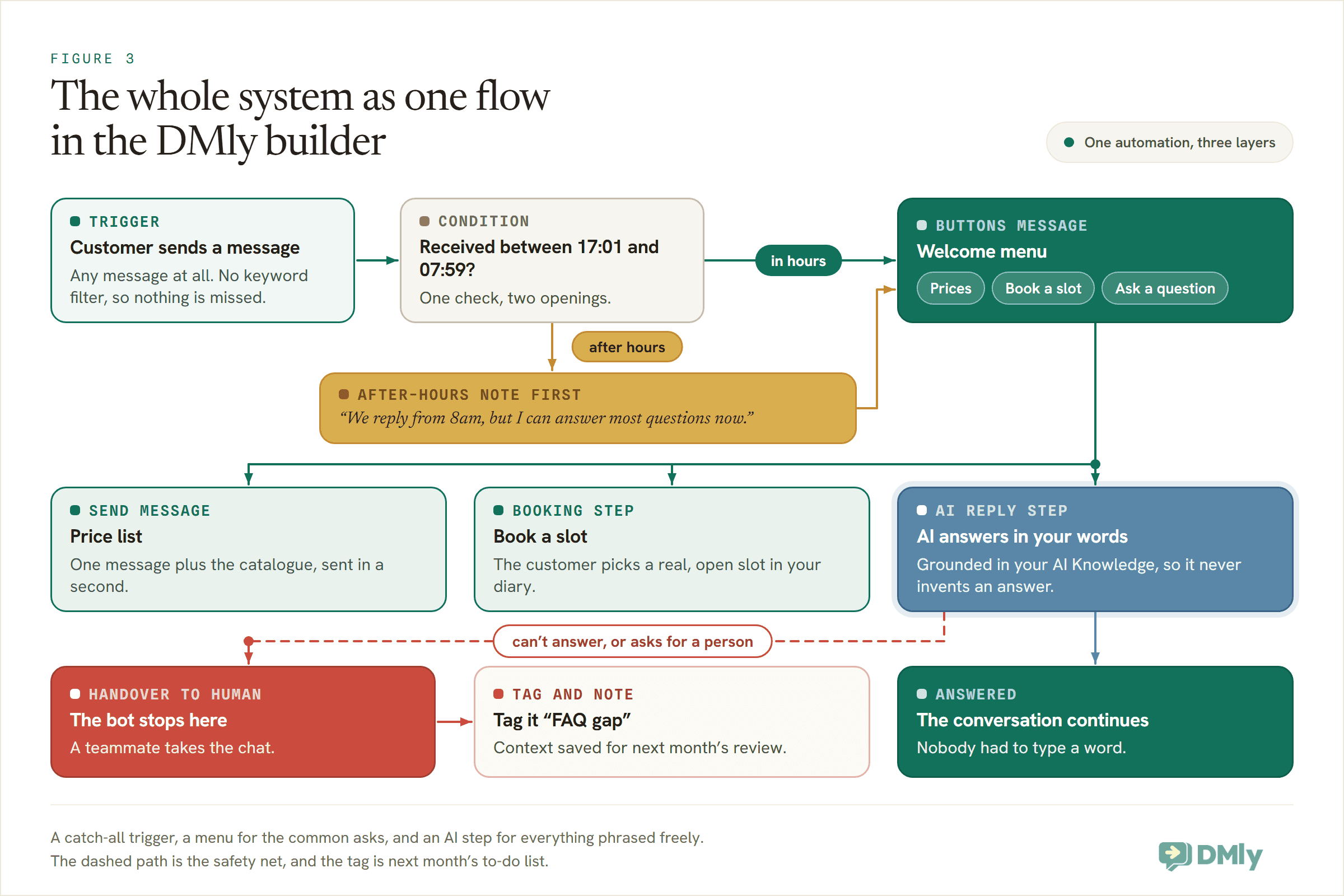
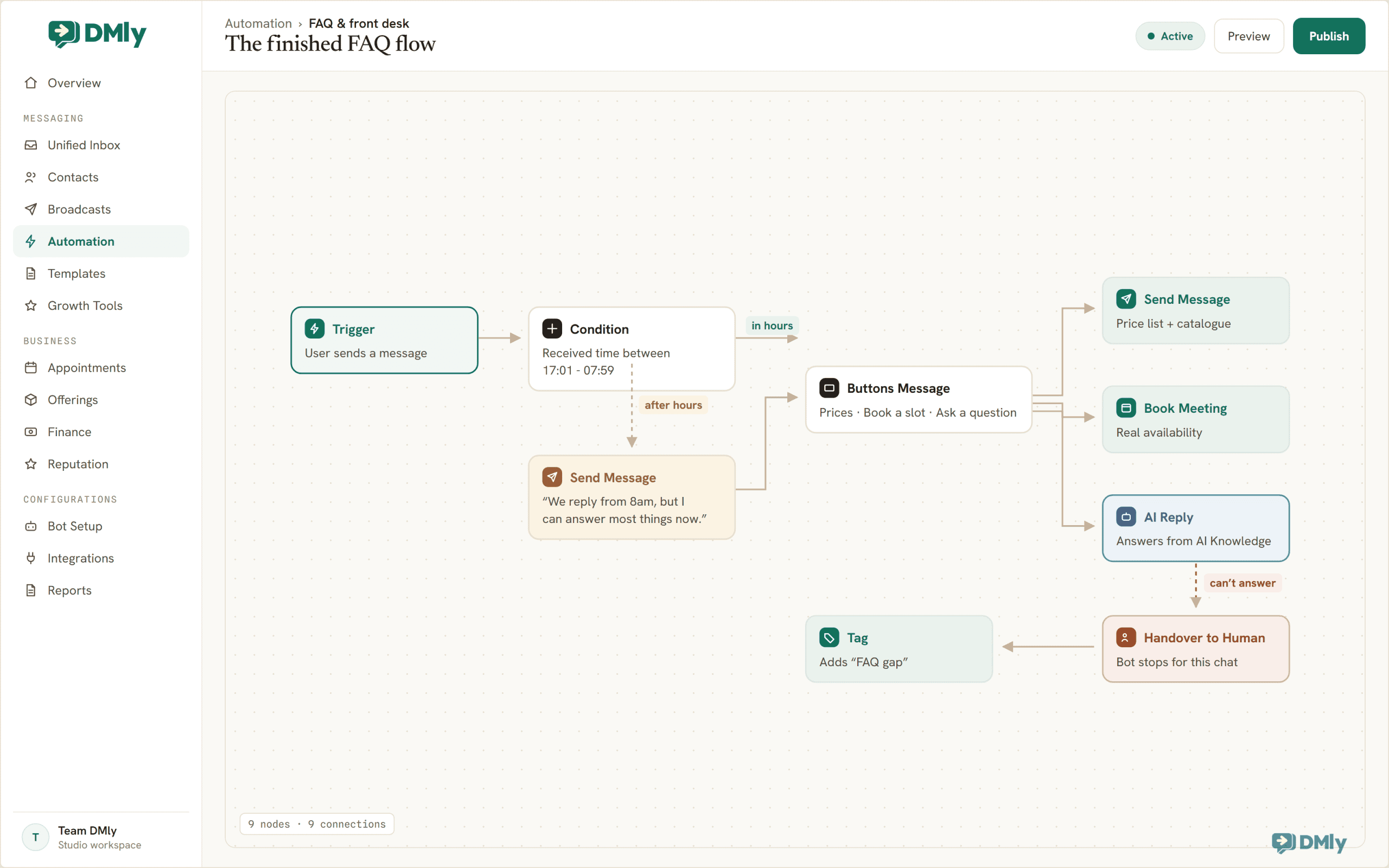
- Build the main flow. New automation → Flow builder. Trigger: the channel’s message trigger with no keyword filter, so it catches everything. First step after the trigger: a Condition on the time the message was received, set to your closed hours, so after-hours chats get the expectation-setter from layer one before the menu. Keep in mind that only one automation answers any given message, so this catch-all becomes the front door for the whole channel; anything more specific you add later (an exact-match keyword rule, say) automatically wins over it.
- Add the welcome menu. A Buttons Message with your top options: Price list, Book a slot, Ask a question. Each button connects to its own branch: the price branch sends the list and the catalogue link; the booking branch runs your booking step so customers pick from real availability; and “Ask a question” leads to the AI Reply step.
- Configure the AI Reply step. Point it at your knowledge and pick OpenAI or Gemini as the provider; replies generated on Claude or DeepSeek don’t search AI Knowledge, which defeats the whole layer. Give it the three safety rules from layer two (answer only from what you know, never invent, hand over when unsure); the handover tool comes pre-enabled on new AI steps, so it can escalate on its own. Set the fallback message for the rare moment the step itself fails.
- Wire the exits. Handover to Human wherever the AI gives up or the customer asks for a person, plus a Tag (“FAQ gap”) and an Assign to the right teammate. This is the difference between a system that fails gracefully and one that fails silently.
- Publish, then attack it. DMly runs four checks at publish: plan eligibility, flow structure (every branch connected), keyword conflicts with other active automations, and your plan’s automation limit. Once it’s live, test like your rudest customer: paste in the real messages from your audit, misspell things, ask two questions in one message, type “HUMAN”. Fix what breaks. Then, for the first week, watch the inbox with the bot running; you’ll catch tone problems no test script finds.
Measure It, Then Feed It
A launched FAQ system is a draft. What makes it effective is a small monthly habit, and the habit has a shape.
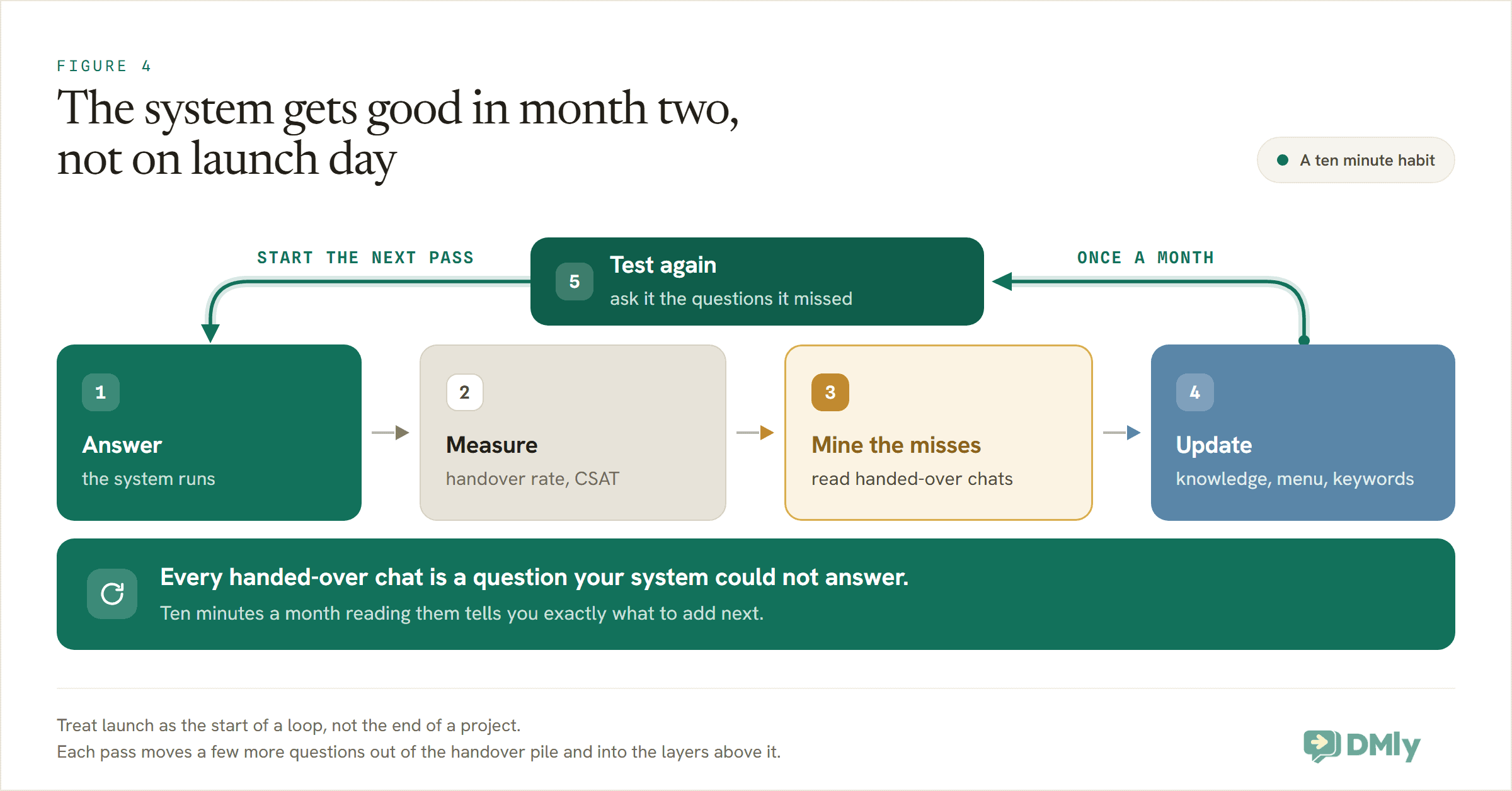
Watch two numbers. The handover rate, the share of conversations that end up with a human, is your coverage score; if it isn’t drifting down month over month, the system isn’t learning. And the customer’s own verdict: on WhatsApp, DMly’s CSAT Survey step can ask for a quick rating right in the chat after a conversation wraps, which turns “I think the bot is fine” into a number you can track.
Then do the ten-minute review that most businesses skip: read the handed-over chats. Every one of them is a question your system couldn’t answer, tagged and waiting for you. Most months you’ll find three kinds of misses: a fact missing from your knowledge (add it), a popular ask missing from your menu (promote it to a button), and phrasings your keywords didn’t catch (add them to the list, minding that another automation isn’t already using the same trigger words on that channel). Feed the misses back in, re-run your test questions, done.
The compounding is quiet but real. A system that answers 60% of questions at launch and gains a few points a month is answering the overwhelming majority by the end of the quarter, and every point is a conversation your team didn’t have to type and a customer who didn’t wait.
Where DMly Fits in All This
You can assemble an FAQ system from parts: a WhatsApp bot tool here, a live chat widget there, a spreadsheet of saved replies. It works until the day a customer starts on Instagram, follows up on WhatsApp, and gets two different answers from two disconnected bots.
DMly’s case is that the whole system lives in one place. The same flow builder and the same AI knowledge serve every connected channel, and every conversation, answered or handed over, lands in one shared inbox (the Unified Inbox), so layer three is a real inbox your team already works in rather than a separate tool. The builder gives you both speeds: a Quick automation when one keyword needs one reply, and the visual flow builder when you’re wiring the full menu-plus-AI system from this guide. AI replies are included on every plan (per the pricing page: 500 a month on Starter, 5,000 on Growth and 20,000 on Premium, at $29, $65 and $149 a month billed yearly, with your own AI provider keys unlocking unlimited replies on Premium), and DMly adds no markup on WhatsApp’s own message pricing. There’s a 7-day trial, and the preview chat means you can build and test the whole system from this article before a single customer ever talks to it.
If your questions live mostly on Instagram or TikTok rather than WhatsApp, the same architecture applies; we’ve written channel-specific walkthroughs for Instagram automation and TikTok DMs.
Questions Owners Ask About Auto-Response Systems
Will customers be annoyed that a bot answers them?
Customers are annoyed by waiting and by dead ends, not by automation. An instant, correct answer to “what are your hours?” annoys nobody; in Zendesk’s benchmark research, 51% of consumers say they actually prefer a bot when they want immediate service. What annoys people is a bot that can’t say “let me get you a person”. Build the handover first and the rest of the system earns goodwill.
Do I need the AI layer, or are keyword replies enough?
Start with keywords if you like; they’re instant and cost nothing to run. But keyword systems miss silently: a message that matches nothing gets no reply and leaves no log. The AI layer exists to catch the phrasings you didn’t predict, which in a real inbox is a large share of messages. Most businesses end up wanting both, in the order this guide stacks them.
How many questions should my welcome menu have?
Three, if you’re on WhatsApp buttons; up to ten with a list message, but resist filling it. The menu is for your most common asks, not your whole catalogue. Everything else is what the “Ask a question” option and the AI are for.
What happens when someone messages at 2am?
The system answers at 2am; that’s rather the point. Scripted answers and the AI work around the clock, and a Condition on the time the message arrived lets the flow set expectations honestly for anything that needs a person: “a teammate will pick this up first thing tomorrow.” The 2am enquiry that books itself a Saturday slot is this system’s best trick.
Can one system cover WhatsApp, Instagram and my website chat?
Yes, and it should, so answers stay consistent. In DMly the knowledge is shared, while each channel gets its own automation tuned to what that channel supports (buttons on WhatsApp, plain text on SMS, a greeting on live chat). Build the system once on your busiest channel, then duplicate and trim.
A Month From Now
Here’s what actually changes, four weeks after an afternoon of building. The eleven questions from your old FAQ page now answer themselves, inside the conversation, in seconds, at any hour. Your team’s typing is reserved for the conversations that deserve a human: the complaints, the custom quotes, the judgment calls, each arriving pre-tagged with its history attached. And once a month, over a coffee, you read the short list of questions the system missed and make it a little smarter.
The FAQ page can stay on your website; it’s good for search engines. But the answers have moved to where your customers already are. That’s the whole system: not a smarter page, but a faster conversation.
Build your FAQ system this week. Connect your channels to DMly, load your ten most-asked questions into AI Knowledge, and launch the three-layer flow from this guide. Start the 7-day trial, no code needed.
Writing about WhatsApp automation, bookings and growth for local business.
Turn WhatsApp into your busiest channel.
Start free and run message, bookings, payments and reviews in one place.
