
100+ WhatsApp Business Message Templates and Examples for Small Businesses (Copy and Paste)
Good writers borrow, and a small business owner at 11pm with a blinking cursor copies and pastes. This page takes no offence: every one of the WhatsApp business message templates below is written to be lifted as it stands, or adapted in thirty seconds. They are organised by job (welcome, remind, collect, request, revive, sell), numbered so your team can say “use T41”, and badged with the label that actually governs cost and approval on WhatsApp: session reply, utility template or marketing template.
Swap the [bracketed placeholders] for your details, keep the tone yours (these lean warm and plain, because that is what gets replies), and read the two-minute briefing first so none of your WhatsApp business message templates get rejected, miscategorised, or sent to someone who never opted in. Everything here works whether you send by hand from a shared inbox or wire the messages into automations; if you want them firing on triggers (booking made, payment due, five weeks since last visit), that machinery is our no-code automation guide.
Before You Paste: The Two-Minute Compliance Briefing
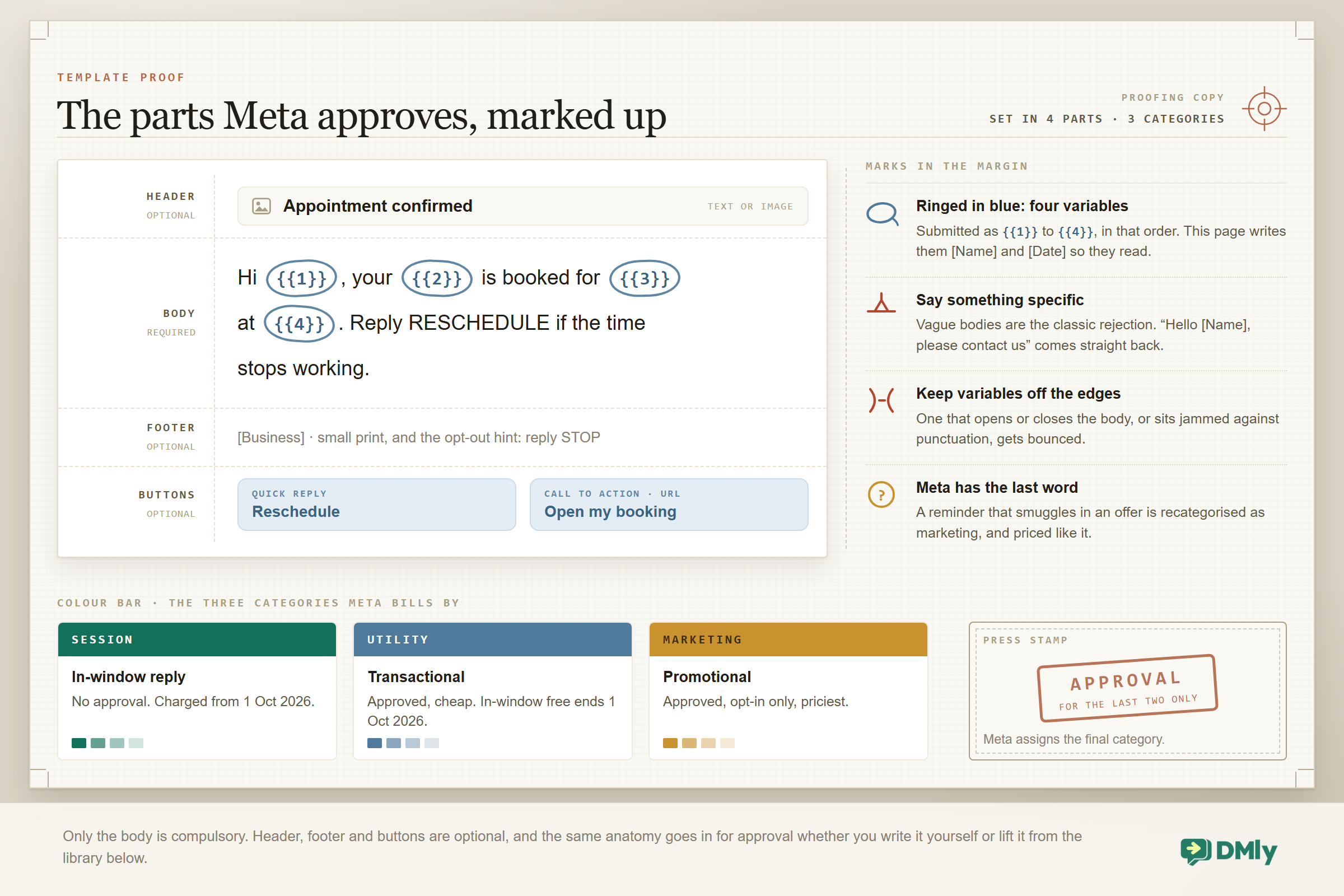
WhatsApp splits business messages into three kinds, and every one of the WhatsApp business message templates below carries one of these three badges. The badge is what governs both the approval and the cost.
- Session reply (no approval needed). Anything you send inside the 24-hour window after your customer’s last message. Written in your own words, sent instantly, no approval queue. These were also free of charge until 1 October 2026; from that date Meta charges for them, at the same rate as that market’s utility messages. Welcomes and FAQ answers live here.
- Utility template (approval needed). Messages you start about a transaction your customer already has with you: confirmations, reminders, order and payment updates. Cheap per delivered message. Until 1 October 2026 they were free when delivered while a service window was open; from that date those in-window utility templates are charged too.
- Marketing template (approval needed). Promotion of any kind that you start: offers, launches, win-backs, seasonal pushes. The priciest category, and the one that both the law and your reputation require a real opt-in for.
Four rules keep the library safe in practice. First, Meta has the final word on categories: our badges follow Meta’s published category logic, but approval can reclassify a template (a “reminder” that smuggles in an offer becomes marketing, and is priced like it). Second, templates use numbered variables: where this page writes [Name] or [Date] for readability, your platform submits {{1}}, {{2}} in order; a good composer maps them for you. Third, rejections are almost always self-inflicted: vague bodies (“Hello [Name], please contact us”), variables jammed against punctuation at the start or end of the body, or promotional copy filed as utility. Fourth, marketing goes only to people who said yes, and STOP must always work; the fastest way to lose the channel is to treat this as decoration. Deeper dives: template mechanics in the API guide, opt-in machinery in the broadcast guide. One dated caveat before you read Figure 1: the colour bar along the bottom of it shows the position up to 30 September 2026, so read its “no charge” and “free in window” notes as the old rule. From 1 October 2026 both a session reply and a utility template sent inside an open window carry that market’s utility rate.
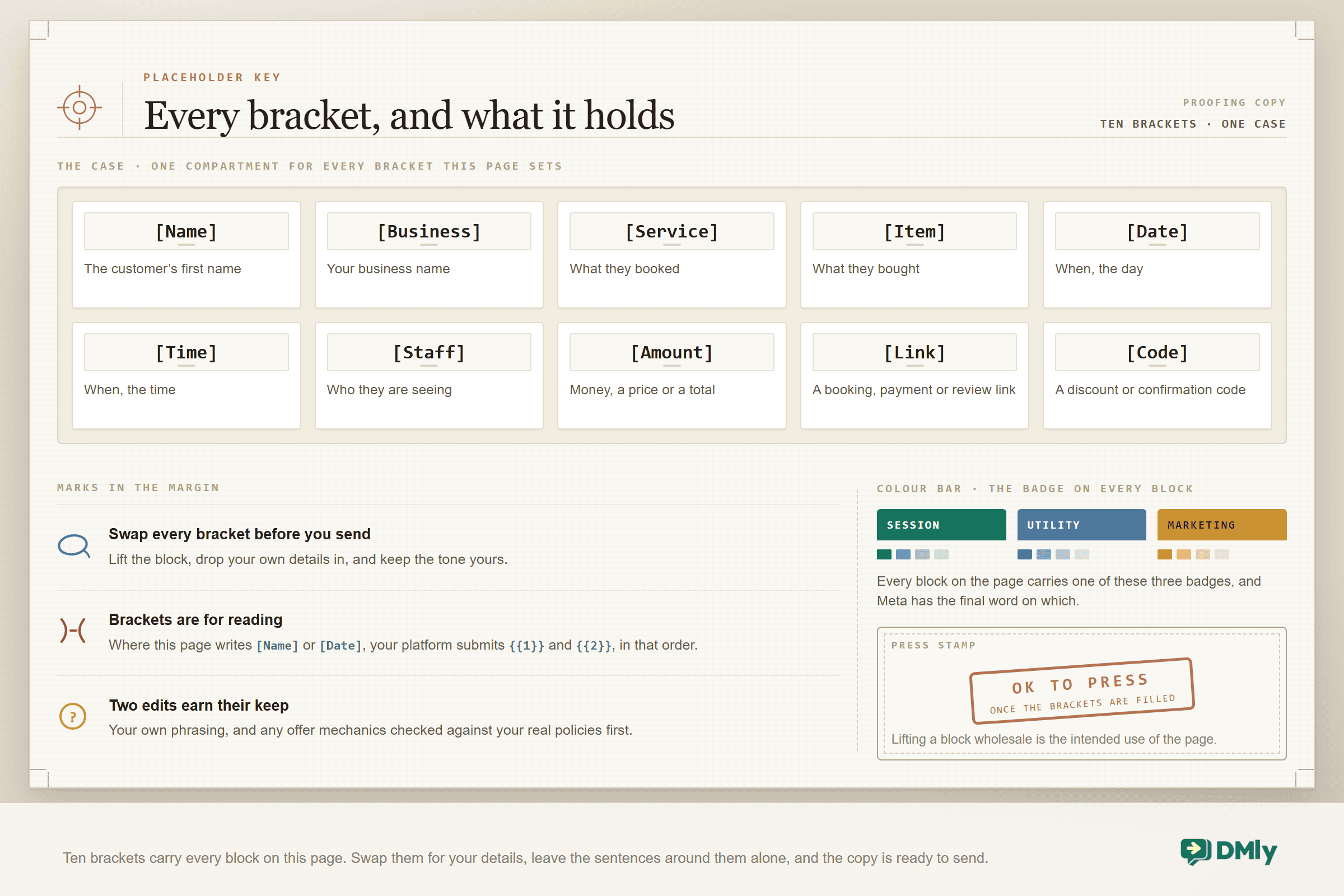
Placeholder key used throughout: [Name] customer’s first name · [Business] your business name · [Service] / [Item] what they bought or booked · [Date] [Time] when · [Staff] who · [Amount] money · [Link] booking, payment or review link · [Code] a discount or confirmation code.
Welcome and First-Response Messages
Your first reply decides whether the conversation lives at all. Every one of these answers the question, sets an expectation and offers a next step. All are session replies: they go out inside the window your customer just opened, so nothing needs approving, and from 1 October 2026 they cost that market’s utility rate rather than nothing.
Hi [Name], welcome to [Business]! You can book, see prices or ask us anything right here in this chat. What can we do for you today?
Session The all-purpose welcome: answer, orient, invite.
Hi! Great to hear from you. Quick answer: [Service] is [Amount] and takes about [Time]. Want to grab a slot, or is there anything else you would like to know?
Session Price question, answered first, booking offered second.
Thanks for reaching out to [Business]! We are with a customer right now but a real person will reply within [Time]. If it is urgent, tap the call button on our profile.
Session The honest hold message: a promise with a number in it.
Hi [Name]! We are closed at the moment (open [Time]), but leave your question here and it will be the first thing we answer in the morning.
Session After-hours reply that stops the customer shopping elsewhere.
Welcome back, [Name]! Lovely to see you again. Same as last time, or something new today?
Session Returning-customer welcome; the memory is the message.
Hi [Name], thanks for scanning the code! As promised: [Link] gets you [Code] for [Amount] off your first visit. Want to book it in now?
Session QR-code welcome that pays off the scan immediately.
Hello! You are through to [Business]. To help you fastest: reply 1 for bookings, 2 for prices, 3 for opening hours, or just type your question.
Session Menu welcome for high-volume inboxes; keep the “just type” escape.
Hi [Name], saw you came from our [Item] ad. Yes, the offer is real and yes, it is available this week. Want the details or shall we book you straight in?
Session Click-to-WhatsApp ad response: confirm the offer before anything else.
Appointment Booking and Confirmation Messages
Confirmations are utility templates when you start them after the window closes; sent in the moment, they ride the open session instead, which from 1 October 2026 carries that market’s utility rate rather than nothing. Either way the job is the same: repeat the details, name the human, make changing easy.
You are booked, [Name]: [Service] on [Date] at [Time] with [Staff]. We will send a reminder the day before. Reply RESCHEDULE if the week stops cooperating.
Utility The standard confirmation; the reschedule word prevents silent no-shows.
Confirmed! [Service], [Date], [Time]. Find us at [Link]. Anything we should know before you arrive (allergies, preferences, a dog in tow)?
Utility Confirmation that collects the useful detail early.
Hi [Name], your booking request for [Date] at [Time] is in. We will confirm within [Time]. If that slot goes, we will offer the two nearest ones.
Utility For request-then-confirm workflows; sets the wait expectation.
Your booking is updated: [Service] now on [Date] at [Time]. Old slot released. Thanks for telling us instead of ghosting us, [Name], you are the good kind.
Utility Reschedule confirmation that rewards the behaviour you want.
Hi [Name], we have had to move your [Time] appointment on [Date]. Nearest options: [Time] or [Time]. Tap one and it is yours, with our apologies.
Utility Business-side change: apologise once, offer twice.
Booking received and held for [Time], [Name]. To lock it in, complete the payment here: [Link]. If it lapses, the slot goes back on sale.
Utility Prepayment hold: the deadline does the persuading.
Good news, [Name]: a spot opened on the [Service] waitlist for [Date] at [Time]. It is held for you for [Time]. Reply YES to take it.
Utility Waitlist offer; scarcity is real, so say it plainly.
Cancellation confirmed for [Date], [Name], no charge. Sorry it did not work out this time. When you are ready, the calendar is here: [Link].
Utility Cancellation with the door left open and no guilt attached.
Appointment Reminder Messages
These are the highest-payback templates in the library. They sit in the utility category, they cost pennies, and each one saves a slot that would otherwise cost you real money. One day before and a few hours before is the pattern that works, and both are here.
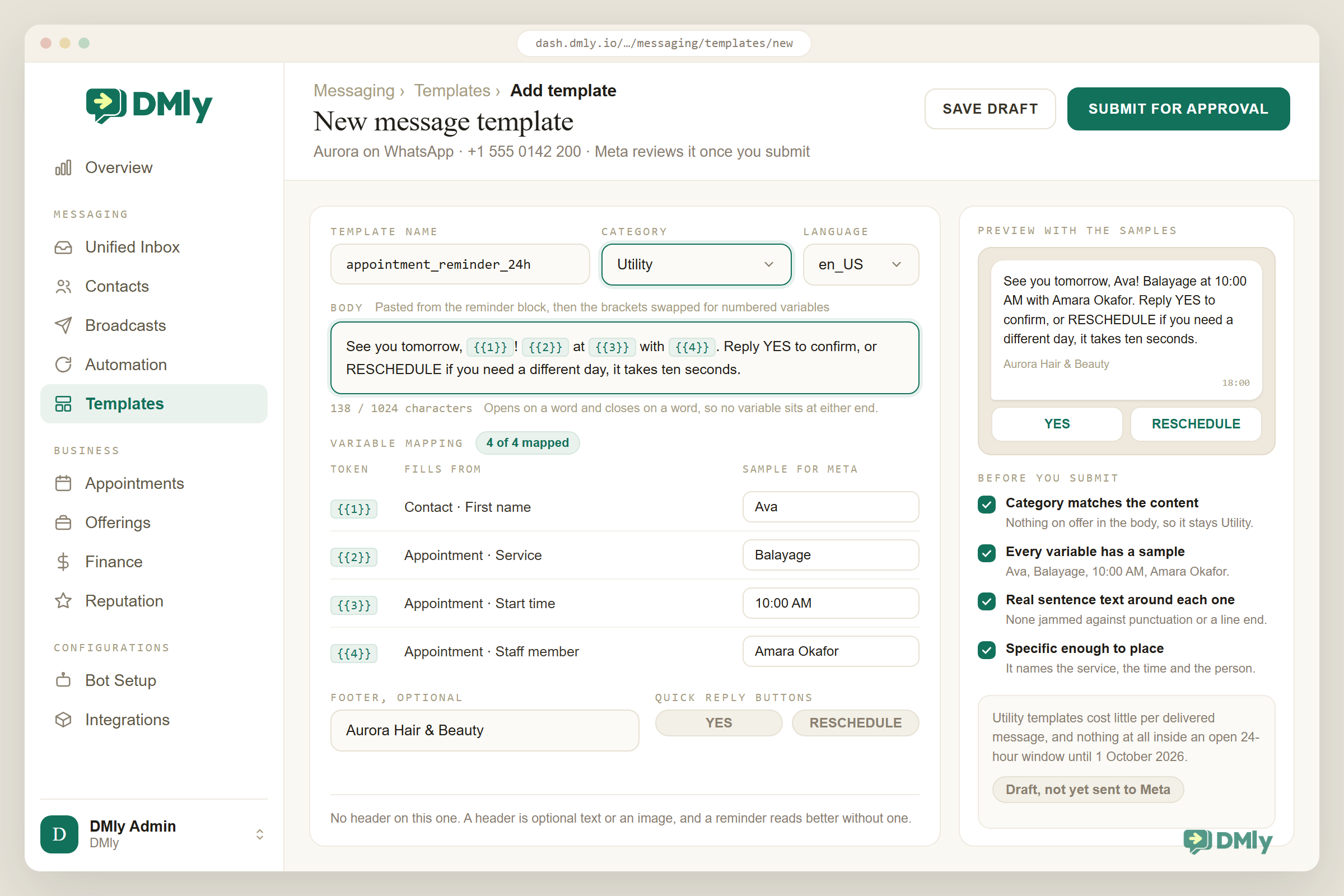
See you tomorrow, [Name]! [Service] at [Time] with [Staff]. Reply YES to confirm, or RESCHEDULE if you need a different day, it takes ten seconds.
Utility Day-before reminder with the two words that prevent no-shows.
Today is the day, [Name]: [Service] at [Time]. We are at [Link]. Running late? Just tell us here and we will do our best to shuffle.
Utility Morning-of reminder; the lateness line converts panics into messages.
Reminder from [Business]: [Name] is booked for [Service] on [Date] at [Time]. A quick note before you come: [Item]. See you then!
Utility Reminder with prep instructions (fasting, parking, what to bring).
Hi [Name], your [Time] slot tomorrow is confirmed. If anything has come up, reschedule free of charge before [Time] today: [Link]. After that our cancellation policy applies.
Utility Policy-carrying reminder; the deadline is a courtesy, so phrase it as one.
Class reminder: [Service] on [Date] at [Time]. Spots are tight, so if you cannot make it, free your place for the waitlist with one tap: [Link]. Karma counts attendance.
Utility Class/group reminder that recruits the customer into filling their own gap.
Hi [Name], it has been [Time] since your last [Service], which is when [Staff] recommends the next one. Want this week or next?
Utility Recall reminder: clinical or maintenance cycles, framed as care.
We missed you today, [Name]. No drama, it happens. Want to rebook [Service]? The next open slots are [Time] and [Time].
Utility The no-show follow-up: zero guilt, immediate path back.
Final reminder, [Name]: your [Service] consultation expires on [Date]. One tap keeps it alive: [Link]. After that we will assume the timing was wrong and leave you in peace.
Utility Expiring-offer reminder; the leave-you-in-peace promise earns the tap.
Order, Delivery and Pickup Messages
The backbone of commerce on WhatsApp: utility templates that replace “where is my order?” with a conversation that already answered. Send them at the moments customers actually wonder.
Order confirmed, [Name]! [Item] for [Amount]. We will message you the moment it ships. Your order number is [Code], but you will never need it here: just reply to this chat.
Utility Order confirmation that makes the chat the tracking page.
Good news: your [Item] has shipped! Expected arrival [Date]. Track it here: [Link]. We will check in once it lands.
Utility Shipping notice with the promise of a follow-up.
Out for delivery today, [Name]! Keep your phone close. If nobody is home, the driver will [Item].
Utility Day-of-delivery notice; the fallback line kills the anxiety.
Delivered! Hope the [Item] is everything you wanted, [Name]. If anything is off (size, colour, damage), reply here within [Time] and we will fix it, no forms.
Utility Delivery confirmation that opens the returns door before they ask.
Hi [Name], your order [Code] is delayed, and we would rather tell you than hope you would not notice. New expected date: [Date]. Want to wait, swap, or refund? Your call.
Utility The delay message; honesty plus options keeps the customer.
Ready for pickup! Your [Item] is waiting at [Business] until [Time]. Show this message at the counter, no printout needed.
Utility Pickup notice; the show-this-message trick delights people.
Your table/order for [Time] is confirmed, [Name]. Pre-order and skip the queue? Menu is here: [Link], reply with what you fancy and it will be ready when you are.
Utility Restaurant confirmation with a revenue-raising second job.
Refund processed, [Name]: [Amount] back to your original payment method, usually within [Time]. Receipt: [Link]. Sorry it did not work out; the next one is on us to get right.
Utility Refund notice; grace in the goodbye brings people back.
Heads up, [Name]: [Item] from your order is out of stock. We can send the rest now and the missing piece on [Date], or swap it for [Item], or refund it. Reply 1, 2 or 3.
Utility Stock-problem message; numbered options end the back-and-forth.
One week with your [Item], [Name]! Quick tip most people miss: [Item]. Questions? This chat never closes.
Utility Post-purchase check-in; utility framing, service intent, retention effect.
Payment, Invoice and Billing Messages
Money messages work when they are specific, polite and paired with a link that works on the first tap. Of all the WhatsApp business message templates here, these are the ones worth reading aloud before you submit them. Requests and receipts are utility; anything dressed as a discount belongs in marketing.
Hi [Name], here is your invoice from [Business]: [Amount] for [Service]. Pay securely here: [Link]. Reply here with any questions, a human reads this inbox.
Utility The standard invoice message; the human line reduces stalls.
Payment received, [Name]: [Amount] for [Service]. Receipt: [Link]. Thank you for settling so quickly, it genuinely helps a small business breathe.
Utility The receipt with gratitude; costs pennies, gets remembered.
Gentle nudge, [Name]: invoice [Code] for [Amount] was due on [Date]. Pay in two taps: [Link]. If something is wrong with the invoice, tell us here and we will sort it today.
Utility First reminder; assumes forgetfulness, not refusal.
Hi [Name], invoice [Code] ([Amount]) is now [Time] overdue. We know things get busy. If paying this week is hard, reply and we will work something out; otherwise here is the link: [Link].
Utility Second reminder; the flexibility offer collects more than threats do.
Hi [Name], your deposit of [Amount] secures the [Date] booking. Pay here: [Link]. The balance of [Amount] is due on the day, any way you like.
Utility Deposit request; splitting the ask lowers the barrier.
Your payment plan is set, [Name]: [Amount] today, then [Amount] on [Date] and [Date]. We will send each link the morning it is due, no surprises.
Utility Instalment confirmation; the no-surprises promise is the product.
Hi [Name], the card payment for [Service] did not go through (it happens to everyone). Try again here: [Link], or reply if you would rather pay another way.
Utility Failed-payment recovery; normalise, then offer the alternative.
Quote for [Service], as promised: [Amount], valid until [Date]. Everything included, nothing hidden: [Link]. Reply YES and we will get you scheduled.
Utility The quote message; the validity date creates a decision moment.
Review Request Messages
Ask at the peak (job done, product loved), make it one tap, and route unhappiness to a private reply instead of a public star. Timed right, these ride the open session at the cheapest rate available to you; templated, they sit next door to utility, so expect Meta to judge the wording.
Hope you love the result, [Name]! If we earned it, a quick Google review helps neighbours find us: [Link]. If anything is less than perfect, reply here instead, the boss reads these personally.
Session The standard ask with the complaint valve built in.
[Name], you have been coming to us for [Time] now, and it occurred to us we have never asked: would you write a line about why you keep choosing [Business]? [Link]. It matters more than you would think.
Session The loyal-customer ask; specificity earns the favour.
Thanks for being one of the first to try [Service]! Two questions, thirty seconds: what worked, and what should we fix? Reply here, brutally honest welcome.
Session Feedback-first ask for new offerings; reviews follow naturally.
A five-star week for the team here, and your visit was part of it, [Name]. If you have got one tap in you: [Link]. And if not, see you next time anyway.
Session The low-pressure ask; the shrug is the charm.
Thank you for the kind words, [Name]! Would you mind if we shared your message (first name only) on our page? Reply YES and we will treasure it, NO and it stays between us.
Session Testimonial permission; consent is the whole message.
[Name], thank you for telling us instead of just leaving. You are right about [Item], we have fixed it, and your next [Service] is on us. Can we make it right this week?
Session Complaint recovery; the fix, the ownership and the invitation in three sentences.
Loyalty and Reward Messages
Loyalty messages carry good news, which buys them attention; spend it carefully. Reward notifications about an existing programme lean utility; anything recruiting or upselling is marketing.
Ding! That visit took you to [Amount] points, [Name]. You are one visit away from [Item]. See your card anytime: [Link].
Utility Points update; the one-away line is the engine of the whole programme.
You did it, [Name]: [Item] unlocked! Your reward code is [Code], valid until [Date]. Book your redemption here: [Link]. Enjoy it, you earned it visit by visit.
Utility Reward unlocked; the deadline turns delight into a booking.
Happy birthday, [Name]! No hard sell today, just a small gift from [Business]: [Code] for [Item], valid all month. Have a good one.
Marketing The birthday message; modesty is what makes it work.
One year since your first visit, [Name]! You have been in [Amount] times (we counted). This one is on us: [Code]. Thanks for keeping a local business busy.
Marketing Anniversary message; the count is the compliment.
Members hear it first, [Name]: [Item] opens for booking on [Date], and this list gets [Time] head start before we post it anywhere. Early door: [Link].
Marketing VIP early access; the privilege must be real to keep working.
Bring a friend, both win: give [Code] to anyone who has not tried [Business] yet, they get [Item], you get [Item] when they visit. No limits this month.
Marketing The referral engine in one message.
Win-Back and Re-Engagement Messages
All marketing, all opt-in, and all best sent to a segment (days since last visit) rather than a mood. Specific beats sentimental: name the service, the gap and the next step, never “we miss you” alone.
It has been about [Time] since your last [Service], [Name], which is usually when it is due again. This week we have [Time] and [Time] open. One tap: [Link].
Marketing The cycle win-back; the interval does the persuading.
[Name], your usual [Staff] has openings this week, and asked us to check in on you. Fancy your regular [Service]? Reply with a day and consider it handled.
Marketing The personal win-back; the named staff member is the hook.
We will keep this short, [Name]: it has been [Time], we would love you back, and here is [Code] for [Amount] off to make the decision easy. Valid till [Date].
Marketing The incentive win-back; brevity signals respect.
Since you were last in, [Business] has changed a bit: [Item], [Item] and [Item] are new. Same [Service] you liked, better everything else. Curious? [Link].
Marketing The what’s-new win-back for long absences.
Honest question, [Name] (one tap, no essay): what kept you away? 1 Price 2 Time 3 Moved away 4 Something we did. Whatever the answer, thank you, it makes us better.
Marketing The exit-survey win-back; answers segment your next move.
Your cart is still holding [Item], [Name], and stock is doing what stock does. Checkout takes one minute: [Link]. If you changed your mind, ignore this and we will take the hint.
Marketing Cart nudge crossover; the take-the-hint line keeps it likeable.
Last one from us for a while, [Name]. If WhatsApp is not where you want to hear from [Business], no hard feelings: reply STOP and we will leave you be. If you are just busy, your [Code] waits till [Date].
Marketing The graceful goodbye; protects your quality rating and your dignity.
Plot twist, [Name]: the [Service] you asked about in [Date] finally has space. Still interested, months later? No is a fine answer; YES gets you first pick of times.
Marketing The old-enquiry revival; acknowledging the delay is the charm.
Promotion and Offer Messages
The marketing category proper: pay-per-message, opt-in only, and worth every cent when the offer is specific, dated and easy. Send fewer than you want to; your quality rating is the business asset here.
This week only at [Business]: [Item] for [Amount] (usually [Amount]). We have [Amount] slots before it ends [Date]. First taps first: [Link].
Marketing The classic offer: number, deadline, scarcity, link.
New at [Business], [Name]: [Item]. You have been in for [Service] before, so we think this one is your kind of thing. Introductory price [Amount] until [Date]: [Link].
Marketing New-service launch, targeted by history, reasoned honestly.
Quiet-day special: book any [Service] for a [Date] and take [Amount] off with [Code]. Same team, same quality, smaller queue. [Link].
Marketing The midweek filler; sells your empty hours without cheapening peak ones.
Flash offer, [Name], today only: [Item] at [Amount]. When the day ends, so does the price. One tap and it is yours: [Link].
Marketing The 24-hour flash; use rarely or it becomes wallpaper.
Bundle logic, [Name]: [Item] + [Item] together for [Amount], which is [Amount] less than separately. Built for people who were getting both anyway. [Link].
Marketing The bundle; show the maths, respect the intelligence.
Back in stock: [Item]. It sold out in [Time] last time, so this message is going to our list before the shelves. [Link].
Marketing Restock alert; being on the list must mean something.
[Name], your [Item] is probably running low about now. Reorder in one tap, same as last time: [Link]. Want it monthly without thinking? Reply SUBSCRIBE.
Marketing Replenishment nudge with the subscription upsell riding along.
Payday treat sorted: [Service] this weekend, [Code] takes [Amount] off if you book before [Date]. You have earned it, we have space, the maths works. [Link].
Marketing Payday timing; land it the day the money does.
Gift-shopping panic, meet your exit: [Business] gift cards from [Amount], delivered instantly to any WhatsApp number with a note from you. Two minutes, done: [Link].
Marketing Gift card push; sell the relief, not the card.
We do not message you often, [Name], so when we do, it is worth opening: [Item]. Details and the small print that is not actually small: [Link].
Marketing The rare-sender flex; only usable if it is true, so make it true.
Seasonal and Festive Messages
Season templates get written in the quiet weeks and approved before the rush, because template approval queues do not care about your calendar. Localise the greetings your customers actually celebrate; our 2026 WhatsApp marketing calendar maps the dates.
The [Item] season books out first at [Business], every year without fail. Calendar for [Date] is open now, [Name], and this list gets it before anyone: [Link].
Marketing Pre-season open; works for December, Eid, Diwali, wedding season, exam season.
Happy [Item], [Name]! From all of us at [Business], thank you for a year of visits, chats and trust. We reopen [Date]; the calendar is already live if you plan ahead: [Link].
Marketing The festive greeting with the reopening date doing quiet work.
Last orders for [Item] delivery before [Date]: place yours by [Date] and it arrives in time, guaranteed. After that we will be honest rather than hopeful. [Link].
Marketing The deadline message; the honesty clause builds trust for next year.
New year, same good habits: [Service] slots for January are open, [Name], and the resolutions crowd takes the best ones by the 5th. Beat them to it: [Link].
Marketing January energy, applied to bookings.
Ramadan hours at [Business]: [Time], from [Date]. Iftar-friendly slots go fastest, so book early: [Link]. Ramadan Kareem, [Name].
Marketing Adjusted-hours notice wrapped in the greeting; utility-adjacent but promotional framing keeps it marketing.
Mother’s Day is [Date], which is closer than it feels. [Item] sorted in two minutes, wrapped and ready: [Link]. Future you says thanks.
Marketing Occasion countdown; sell the foresight.
Back-to-school week at [Business]: [Item] for the small people, [Item] for the adults who survived the holidays. Both here: [Link].
Marketing Seasonal humour template; adjust the joke to your trade.
It is officially [Item] season, [Name]. You know what that means for [Service] appointments: everyone at once. Skip the scramble: [Link].
Marketing The generic season-opener; fill in monsoon, summer, harmattan, tax.
Cart and Checkout Recovery Messages
Recovery messages work because the intent was real; your job is removing the obstacle, not repeating the pitch. Escalate gently across attempts and always leave an exit.
Still thinking it over, [Name]? Your [Item] is saved right here: [Link]. If a question is in the way, ask it in this chat, that is what we are for.
Marketing First nudge, an hour or so in; the question invite finds the real blocker.
Quick heads up: [Item] in your cart is down to the last [Amount] in stock. No pressure from us, just information from the shelf: [Link].
Marketing Scarcity nudge; only send when the number is true.
Your cart misses you slightly less dramatically than this message suggests, [Name]. [Item], one tap from done: [Link]. This is our last note about it, promise.
Marketing Final nudge with humour and a real endpoint.
Checkout hiccup? It happens. Your order is saved and the payment link is fresh: [Link]. If the card is being difficult, reply and we will find another way.
Marketing Failed-checkout recovery; assume friction, not flight.
Before you go, [Name]: was it the delivery cost? For carts over [Amount] this week, shipping is on us with [Code]. Cart intact here: [Link].
Marketing The objection-guess; deploy your most common abandonment reason.
The [Item] you eyed on [Date] just dropped to [Amount], [Name]. Price alerts are the one good kind of stalking. [Link].
Marketing Price-drop alert for the wishlist crowd.
FAQ and Support Replies
Session replies for the questions that fill every small-business inbox. Save them as quick replies your team, or your bot, can fire in seconds. Speed inside the window costs you almost nothing either way, so the real price of a slow answer is the customer who stops waiting.
We are open [Time] on weekdays and [Time] weekends, at [Link]. Walk-ins welcome when there is space; booking guarantees it: [Link].
Session Hours-and-location, with the booking upsell tucked in.
Full price list, always current: [Link]. Headline answers: [Service] from [Amount], [Service] from [Amount]. Anything specific you are weighing up?
Session The price answer: link plus the two numbers everyone asks about.
Yes, we can do that! For [Item] the honest answer depends on [Item], so two quick questions: [Item]? And [Item]? Then I can give you a real price, not a range.
Session The it-depends answer that still moves forward.
Parking: [Item]. Card and transfers: yes. Kids: welcome. Wifi: yes, ask at the desk. Anything else, fire away.
Session The logistics volley; answers four questions before they are asked.
Good question, and I want to get it exactly right rather than fast: [Staff] handles [Item] and will reply here by [Time]. You will not have to chase us.
Session The handover message; the deadline is the trust.
Sorry that happened, [Name], and thank you for telling us here. To fix it fast I need [Item] and a photo if you have one. The moment they arrive, this becomes our problem, not yours.
Session Complaint intake; the last sentence is the whole philosophy.
Our cancellation policy, in human words: free changes up to [Time] before, after that [Amount] because the slot cannot be resold. Reschedule anytime here: [Link].
Session Policy explainer; translating legalese is a competitive feature.
Yes, gift vouchers exist and people love them: any amount from [Amount], delivered to their WhatsApp or printed pretty. Which would you like? [Link].
Session The voucher answer; both formats, one tap.
Survey and Feedback Messages
Short surveys inside chat outperform emailed forms for one reason: replying is typing, not clicking through. Keep it to one question per message and honour every answer with a human follow-up where it counts.
One question, [Name], scale of 0 to 10: how likely are you to recommend [Business] to a friend? Just the number, that is the whole survey.
Session NPS in chat; follow up 9s and 10s with the review ask, 6 and below with a human.
Two-tap feedback on today’s [Service]: 1 Loved it 2 Fine 3 Not great. Whatever you tap, it goes straight to [Staff], names and all.
Session The traffic-light survey; the routing promise makes taps honest.
We are deciding something and you are exactly who we should ask: would you use [Item] if we offered it? YES / NO / DEPENDS (tell us on what). Two minutes of your opinion steers a real decision.
Session The product-decision poll; customers who shape things stay.
You said [Item] last month and we listened: it is fixed. Thank you for the push, [Name]. Anything else we are getting wrong? This channel is always open for that.
Session The feedback loop closer; proof that answering surveys does something.
Class, Event and Waitlist Messages
Group things run on capacity, which makes the messaging sharper: numbers, deadlines and waitlists are the plot. All-utility when tied to an existing booking or list.
You are in, [Name]! [Service] on [Date] at [Time], [Amount] spots total. Bring [Item]; everything else is on us. Add it to your calendar: [Link].
Utility Class confirmation; the bring-list prevents day-of messages.
Tomorrow’s [Service] at [Time] is nearly full, so if your plans changed, one tap frees your spot for the waitlist: [Link]. If you are coming, ignore this and bring energy.
Utility Class reminder tuned for attendance honesty.
Change of plan for [Date]: [Service] moves to [Time] / [Item]. Same class, new [Item]. Cannot make the new time? Reply and we will move you free.
Utility Event change notice; the free move keeps the goodwill.
Waitlist update, [Name]: you are number [Amount] for [Service] on [Date]. Spots open more often than people expect; we will message the second one does.
Utility The waitlist position message; transparency stops the churn.
A spot just opened for [Service] on [Date] at [Time] and you are first in line. It holds for [Time], then goes to the next person. YES takes it.
Utility The waitlist offer; the visible clock is the kindness.
That was a great session today. Homework, as promised: [Item]. Next [Service] is [Date] at [Time], already in your bookings. Questions before then live in this chat.
Utility Post-class follow-up; the homework makes the next session stickier.
Subscription and Renewal Messages
Recurring revenue lives and dies on unremarkable messages sent at exactly the right time. Renewal notices are utility; upgrade pitches are marketing, and mixing them into one message is how utility templates get reclassified.
Heads up, [Name]: your [Service] plan renews on [Date] for [Amount]. Nothing to do if that is fine. To change or pause, tap here before then: [Link].
Utility The pre-renewal notice; sent 3 days out, it prevents both churn and chargebacks.
Renewed! Your [Service] plan is active until [Date], [Name]. Receipt: [Link]. Everything included this cycle: [Item]. Use it well.
Utility Renewal receipt with the inclusion list as a value reminder.
Your payment for [Service] did not go through, [Name], so the plan is paused, not cancelled. Fix it in one tap and everything resumes exactly where it was: [Link].
Utility Dunning message; “paused, not cancelled” rescues most of them.
Your credits update, [Name]: [Amount] left of your [Service] plan this cycle, which resets on [Date]. Book while the good slots last: [Link].
Utility Usage nudge; unspent plans are unrenewed plans.
You have booked [Service] [Amount] times in [Time], [Name]. The membership would have saved you [Amount] over that stretch. Same habit, smaller bill: [Link].
Marketing The membership pitch built on their own numbers.
Before you cancel, [Name], one honest option: pause for [Time] instead, keep your rate and your history, restart with one tap. If it is still goodbye, no tricks: [Link] cancels cleanly.
Marketing The save offer; the clean-exit promise is what makes the pause acceptable.
How to Use These WhatsApp Business Message Templates Without Getting Blocked
Three habits separate the businesses that thrive on these templates from the ones that burn a number in a quarter. Send marketing only to people who opted in, keep the promise the opt-in made (frequency, topic), and honour STOP instantly; blocks and reports feed your quality rating, and a falling rating throttles how many people you can message at all. Match the category to the content honestly: Meta approves templates faster and keeps them approved when reminders read like reminders and offers admit they are offers. Personalise past the name: the templates above earn replies because they reference the service, the gap, the staff member, the actual history; a platform that fills those variables from a live customer record (bookings, payments, visits, points) is what turns this page from copy into a system, and wiring the sends to triggers so each fires at its natural moment is a one-afternoon job in a no-code flow builder.
Questions About WhatsApp Business Message Templates
Are WhatsApp business message templates free?
Getting one approved is free. What you pay to send depends on the category and the destination country. Marketing templates carry the highest per-message rates, and utility templates are cheap per delivered message. The part that changed: until 1 October 2026 a session reply inside the 24-hour window cost nothing, and a utility template delivered inside an open window was free as well. From that date Meta charges for both, at that market’s utility rate. The full country table is in our WhatsApp API pricing rate card.
How do I get a WhatsApp template approved?
Submit it through your platform with a name, a category and the body using numbered variables, then wait for Meta’s review, which is usually quick but never instant. Approval odds go up when the body is specific, the variables are surrounded by real sentence text, and the category matches the content; they go down for vague bodies, link-only messages and offers dressed as reminders.
What is the difference between utility and marketing templates?
Utility templates serve a transaction the customer already has (confirmations, reminders, order and billing updates) and are priced low; marketing templates promote anything (offers, win-backs, launches) and are priced highest, with opt-in required. The wording decides: add a promotional line to a reminder and Meta will treat, and price, the whole template as marketing.
Can I copy these templates exactly?
Yes, that is the point of the page: lift them, swap the [bracketed placeholders] for your details, and submit. Two edits earn their keep: put your business’s natural phrasing in (customers can hear a borrowed voice), and adjust any offer mechanics to your real policies before promising them in writing.
Why was my template rejected?
The usual suspects, in order: a body too vague for the reviewer to see the use case, variables at the very start or end of the body or jammed against punctuation, promotional content submitted as utility, or content in a restricted category. Fix the specificity, resubmit with the honest category, and it usually clears on the second pass.
Turn the copy into a system
Every one of these WhatsApp business message templates can fire itself: on a booking, a payment, a quiet fifth week. Map the variables to a live customer record and the library becomes an employee.
Wire these templates into DMly flows
Steal Well
A hundred and ten WhatsApp business message templates, three categories, and one rule underneath all of them: every template here treats the reader like a person the business is glad to hear from, because on WhatsApp that is not a nicety, it is the algorithm, the quality rating and the brand all at once.
Copy generously, edit these WhatsApp business message templates into your own voice, send less than you could and better than you did, and let the reminders quietly out-earn everything else on the page. When you are ready for the messages to send themselves at the right moments, our no-code automation guide is the next read.
Writing about WhatsApp automation, bookings and growth for local business.
Turn WhatsApp into your busiest channel.
Start free and run message, bookings, payments and reviews in one place.
