
WhatsApp CRM: What It Is and How Small Businesses Can Use It

Open your business WhatsApp and scroll. That’s your CRM.
It’s a surprisingly good one, in a way, and better than most software you could buy. Every customer you have is in there, in the order they last spoke to you, with a complete record of everything they ever asked, bought, complained about or rebooked. No form was filled in to create it. Nobody had to remember to update it. It built itself, one message at a time, which is exactly what a customer database is supposed to do and what most of them never manage.
It’s also useless for anything except scrolling, and that is the gap a WhatsApp CRM fills. Try to answer “which customers haven’t visited in two months?” or “who asked about the new treatment?” or “what did Ada spend with us last year?” and the chat list goes quiet. The memory is all there; it’s just trapped in threads, in the order of the last message, on one phone. The moment a second person needs it, or a campaign needs it, or you need it next March, it might as well not exist.
A WhatsApp CRM is a smaller idea than the name suggests: a record beside each conversation, filled by the conversation. Who this is, what they’ve done, what they’re worth, what stage they’re at, and what to do next, all sitting next to the chat and written mostly by the chat itself. In this guide we’ll look at what that record should remember, the two tools that turn memory into action (tags and segments), how the record fills itself, how leads move along a pipeline, what an AI agent does with all of it, how to set it up in DMly, and how to keep it honest once it exists.
Your Chat List Is Already a WhatsApp CRM. That’s the Problem.
Most small businesses run customer memory in one of four ways, and knowing which one you’re on tells you how short the upgrade is. It’s also a far more common situation than the software ads suggest: in Capterra’s 2026 survey of CRM buyers, 23% had no particular system for managing customer relationships at all, and another 14% ran on spreadsheets and email. More than a third of people shopping for a CRM were starting from a chat list and a hunch.
The WhatsApp Business app on its own. Labels, a catalogue, quick replies, and the chat list. It remembers everything and can retrieve nothing. There’s no way to ask it a question about your customers, no way to act on a group of them, and it lives on one phone.
The app plus a spreadsheet. The most common setup and the most fragile. The spreadsheet is right on the day it’s updated and wrong every day after, because the conversations keep happening in the app and nobody copies them across. Two sources of truth, both partial.
A traditional CRM with a WhatsApp plugin. The record is excellent and the conversation is bolted on: a window inside a tool built for email and sales calls, usually with a per-seat price and a learning curve designed for a sales team rather than for a salon.
A WhatsApp-native CRM. The conversation and the record on one screen, in the same product, where a first message creates the contact, a booking updates it, and a reply from a teammate reads the history first. This is what the term means when it’s used well, and it’s the kind we’ll build.
The test that separates the fourth from the other three is simple, and you can apply it to any product you’re shown: can you ask the system a question about your customers and act on the answer, from the same place the customers talk to you? If the answer lives in a different tab, you have a database next to a chat app. If it lives beside the chat, you have a CRM.
Five Things a Record Should Remember
Strip any CRM down and a contact record holds five kinds of memory, and knowing them keeps your setup small. Most businesses need a handful of each, not a form with forty fields on it.
Who they are, and where. A name and the identity each channel gives you: a phone number on WhatsApp and SMS, a Telegram account, an Instagram handle, a browser on the website widget. One person, several doors. The record should hold all of them, and you’ll see below why that takes a human decision now and then.
What you’ve decided about them. Tags: VIP, Colour client, Allergy on file, Do not discount. Facts a person or an automation stuck on the record, that stay there until someone takes them off.
What’s specific to them. Custom fields: preferred stylist, next recall date, membership number, consent source and date. These are structured facts with a type (text, number, email, phone or date), so they can be filled by a form, read by an automation, and dropped straight into a message as {{custom.preferred_stylist}}. Name them once and spell them the same way everywhere; in DMly field names are case-sensitive, so allergy and Allergy are two different fields.
Where they are with you. Two answers, and it pays to keep them apart. The lifecycle is the system’s view: in DMly a contact is a Lead until the first invoice, order, payment or subscription, at which point they become a Client automatically. The pipeline stage is your view: enquiry, quote sent, booked, regular, lapsed, whatever your business actually does, set by you, your team or a flow. The lifecycle tells you whether money has changed hands; the stage tells you what should happen next.
What’s happened. The history: every conversation across every channel, every booking, every invoice and payment, the internal notes your team left, and the totals those add up to, such as lifetime spend. This is the part your chat list already had; the WhatsApp CRM just lines it up beside everything else.
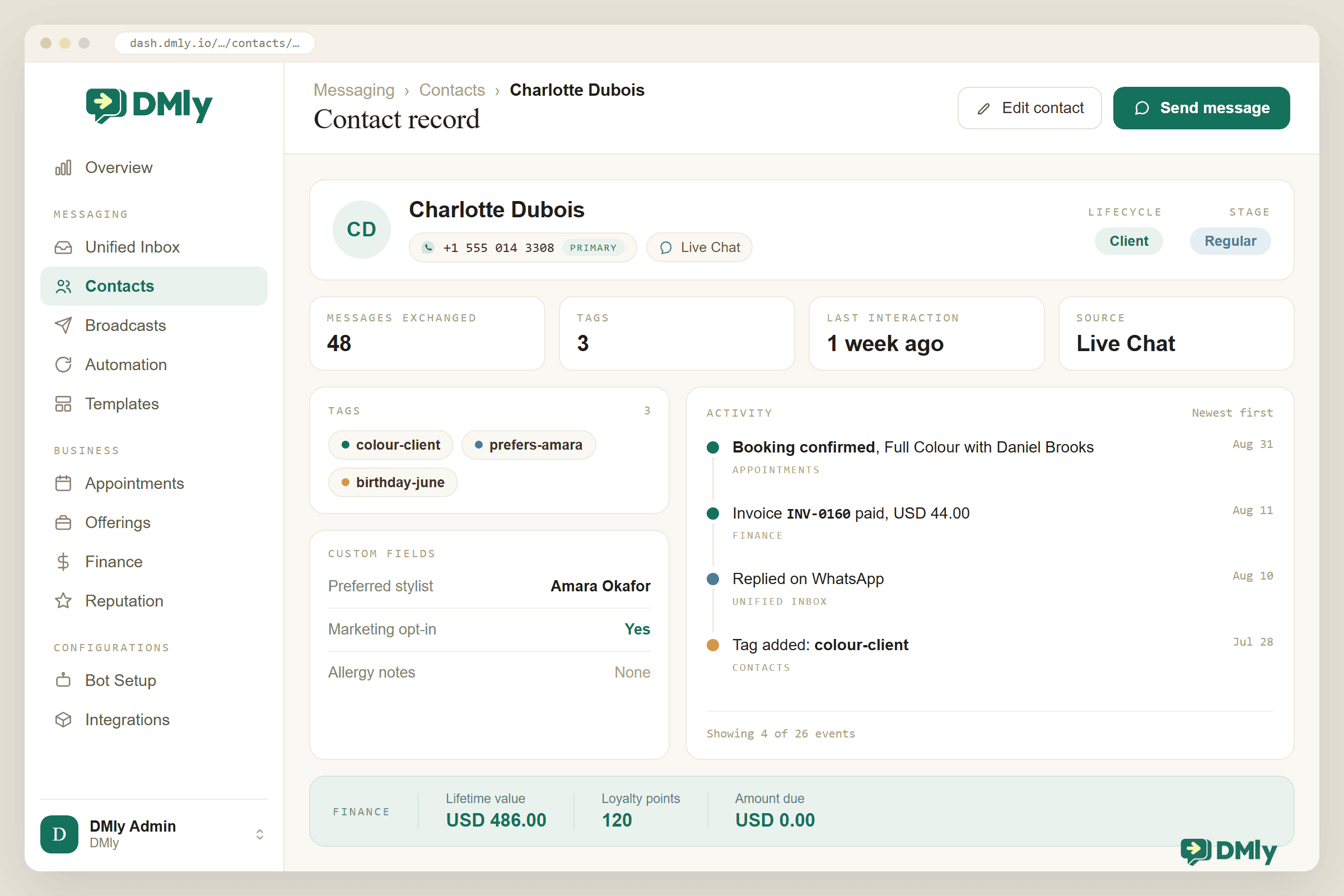
In DMly that record is the profile behind View details: name, handle and lifecycle badge in the header with four tiles (messages exchanged, tags applied, last interaction, source), then Overview (email, phone, birthday, timezone, how they opted in, every channel identity with the primary one marked), Activity, Notes, Files and a Linked tab for relatives, so a parent and child at a clinic stay two people without merging their records. Once someone is a client, a Finance tab adds the money: lifetime value, amount due, credits and loyalty points, with their invoices, payments, appointments and classes listed underneath. It’s the screen your teammate reads in the five seconds before replying, which is the whole point of having it.
Tags Are Facts. Segments Are Rules.
This is the single most useful distinction in any CRM, and the one most businesses get wrong for a year before they get it right.
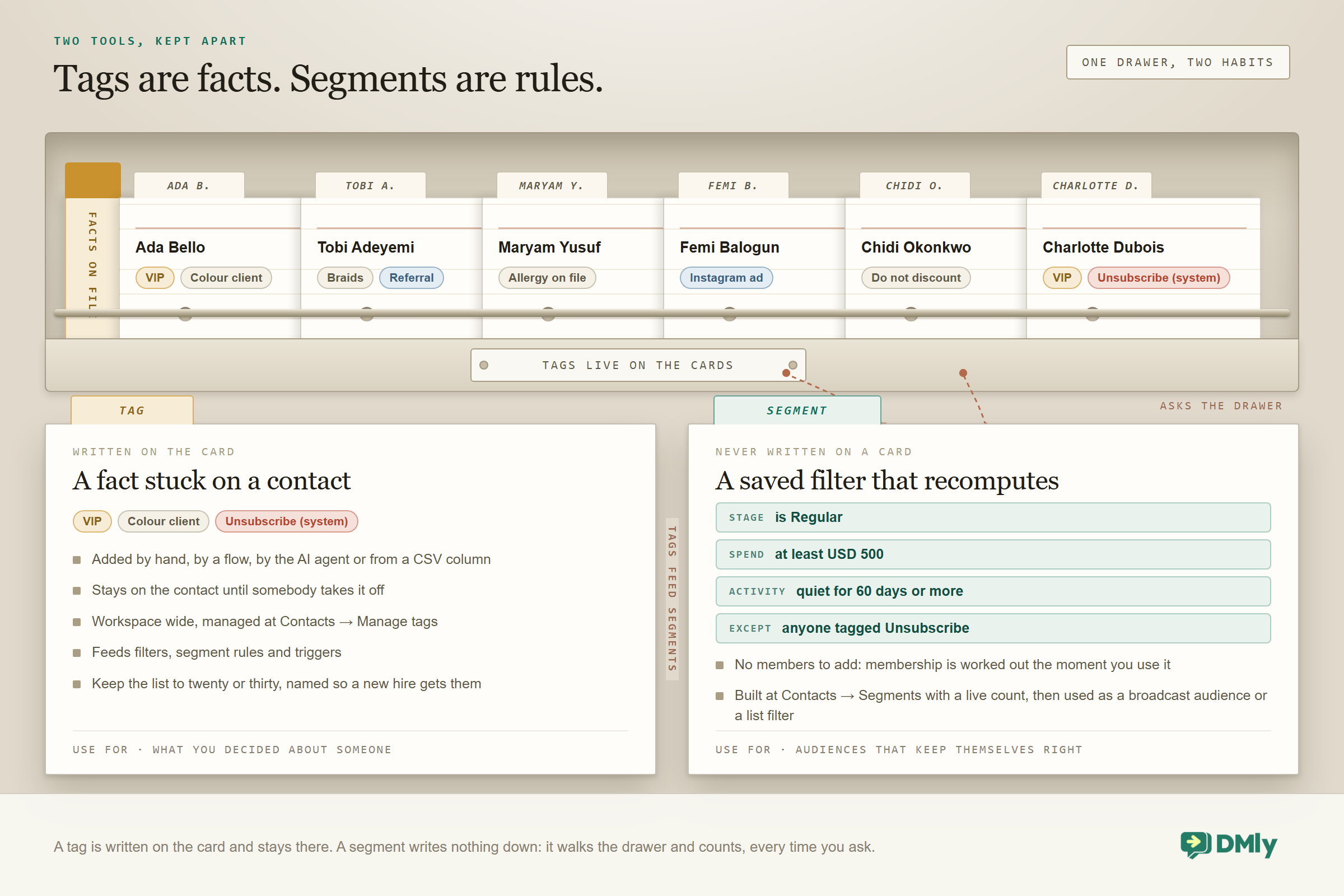
A tag is a fact stuck on a contact. You, or one of your team, or some flow, decided it, and it stays until somebody removes it. VIP is a tag. Colour client is a tag. In DMly tags are workspace-wide, so the same tag means the same thing on every channel and to every teammate, and they can be applied from the profile, the inbox side panel, a CSV column, a flow’s Tag step or the AI agent’s Add tags tool, and are managed at Contacts → Manage tags. Keep the list short. Twenty to thirty is plenty, and name them so a new hire understands them on day one.
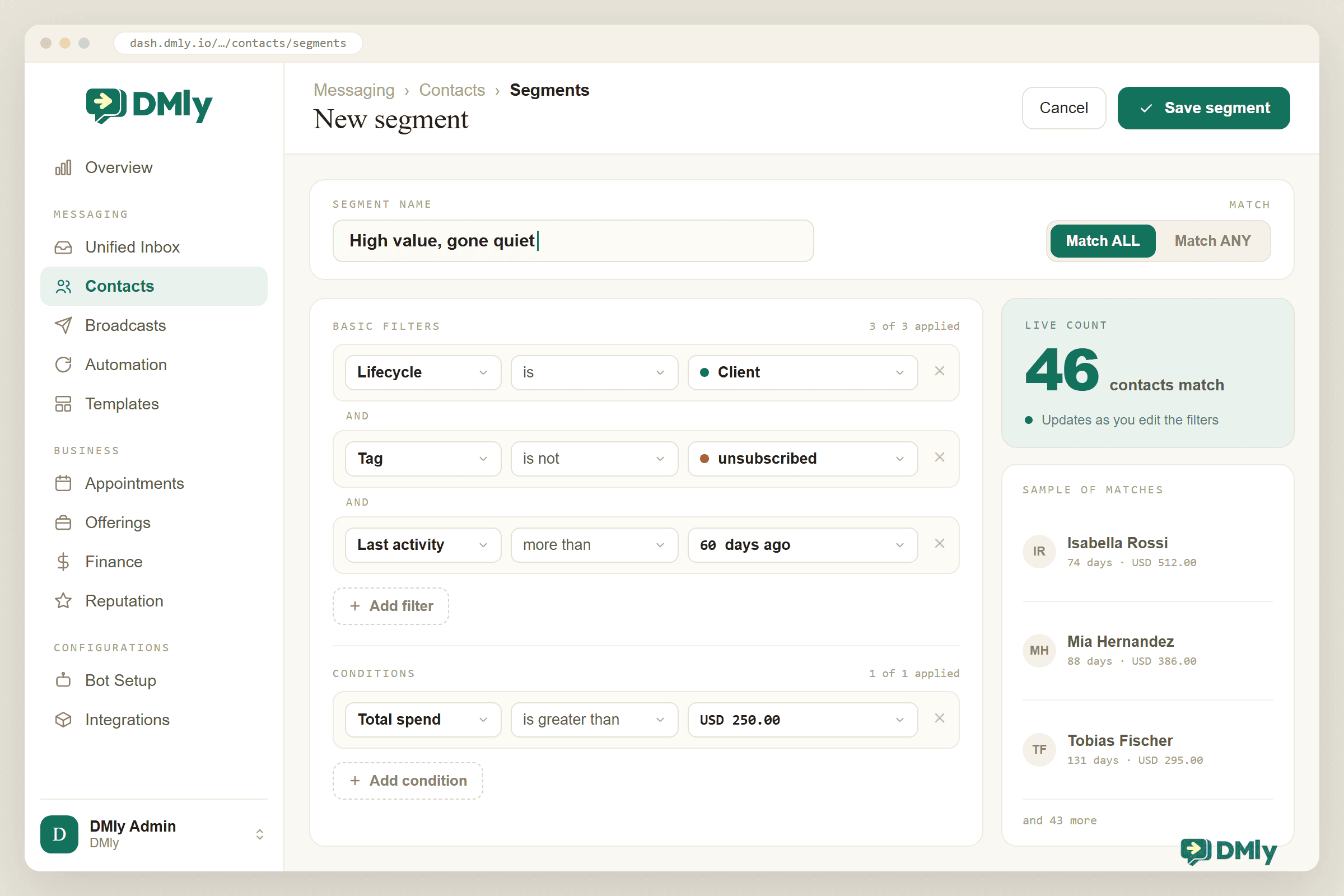
A segment is a rule that gets worked out at the moment you use it. It has no members. “No activity in 60 days” is a segment: a contact drops out of it the second they reply and drops back in two months later, with nobody touching anything. “Spend over 500” is a segment that gains a member the moment an invoice is paid. In DMly the segment builder starts with four basic filters (contact stage, tags to include, tags to exclude, days since last activity) and adds an optional conditions layer: contact fields such as lifecycle stage, source, a custom field or birthday month; engagement such as reachable on a channel or marketing opt-in; and commerce such as total spend, last purchase, order count, loyalty points and credit balance, grouped with ALL or ANY logic, with a live count of who matches as you build it.
Here’s the rule that saves you a year: use tags for things that change when a person decides, and segments for things that change on their own. “Booked this month” is a terrible tag, because someone has to remember to remove it in April, and a perfect segment. “Allergy on file” is a perfect tag and a nonsensical segment. Tags feed segments, segments feed your broadcasts and your contact list, and the audience for your win-back campaign keeps itself right without a spreadsheet. We go deeper on each of them, and on the difference between them, in their own guides. The point here is just to decide which of the two you are reaching for before you create anything.
A WhatsApp CRM That Fills Itself
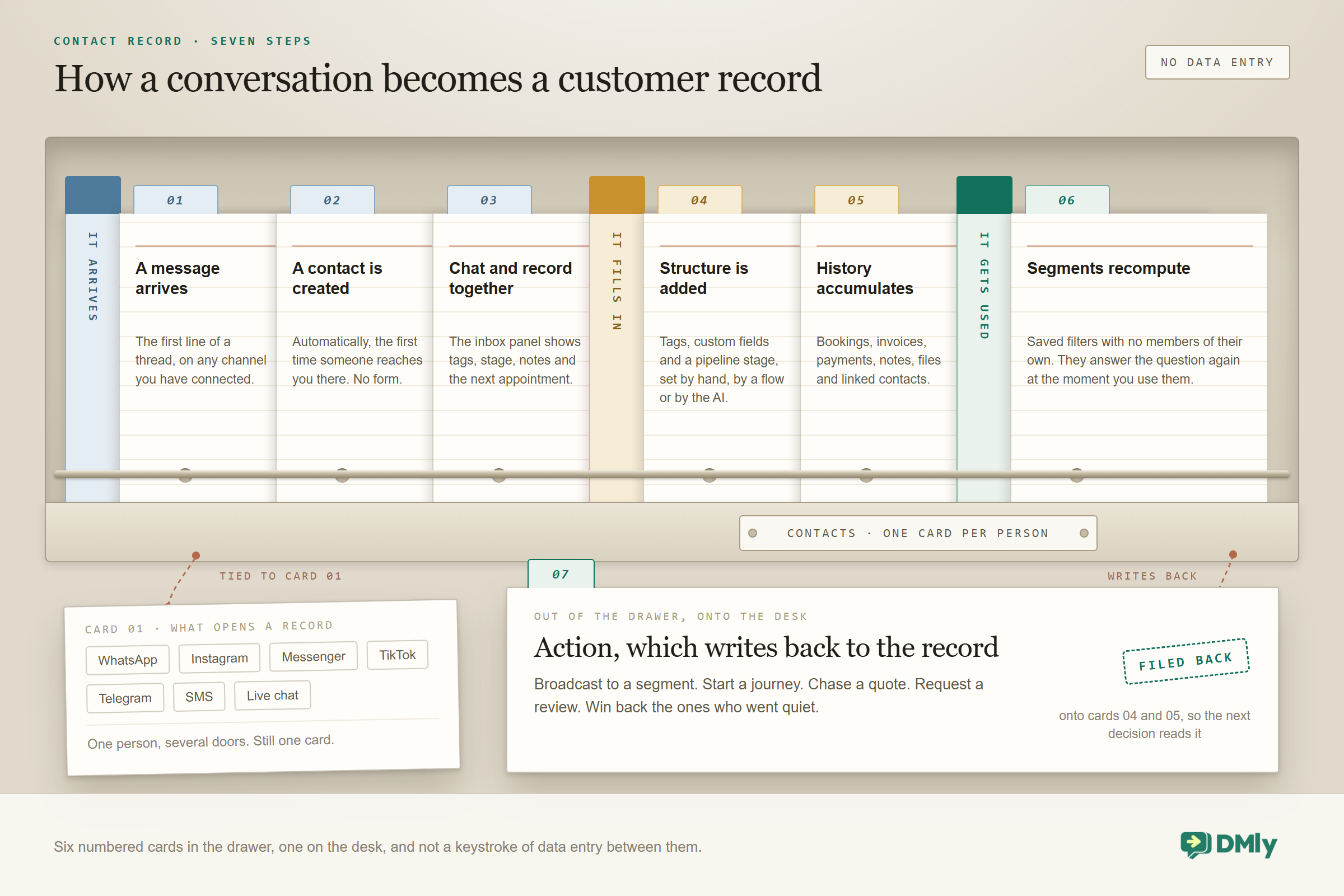
The reason spreadsheets die is that someone has to type into them, and the reason a WhatsApp CRM lives is that the conversation does the typing. Here’s where a record’s contents actually come from, roughly in the order they arrive.
The first message. Someone messages you on any connected channel and a contact exists, with whatever identity that channel provides and a timestamp. No form, no import, no decision from you. In DMly this also fires a New contact trigger, so the welcome flow, the source tag and the first stage can all be set before a human has even seen the message.
The conversation itself. A flow that asks “which service are you interested in?” writes the answer to a field. A booking made in the chat lands on the timeline. A payment link paid in the chat updates the spend total. An AI agent with CRM tools logs a note, adds a tag, moves the stage and sets a field, all as a side effect of answering your customer.
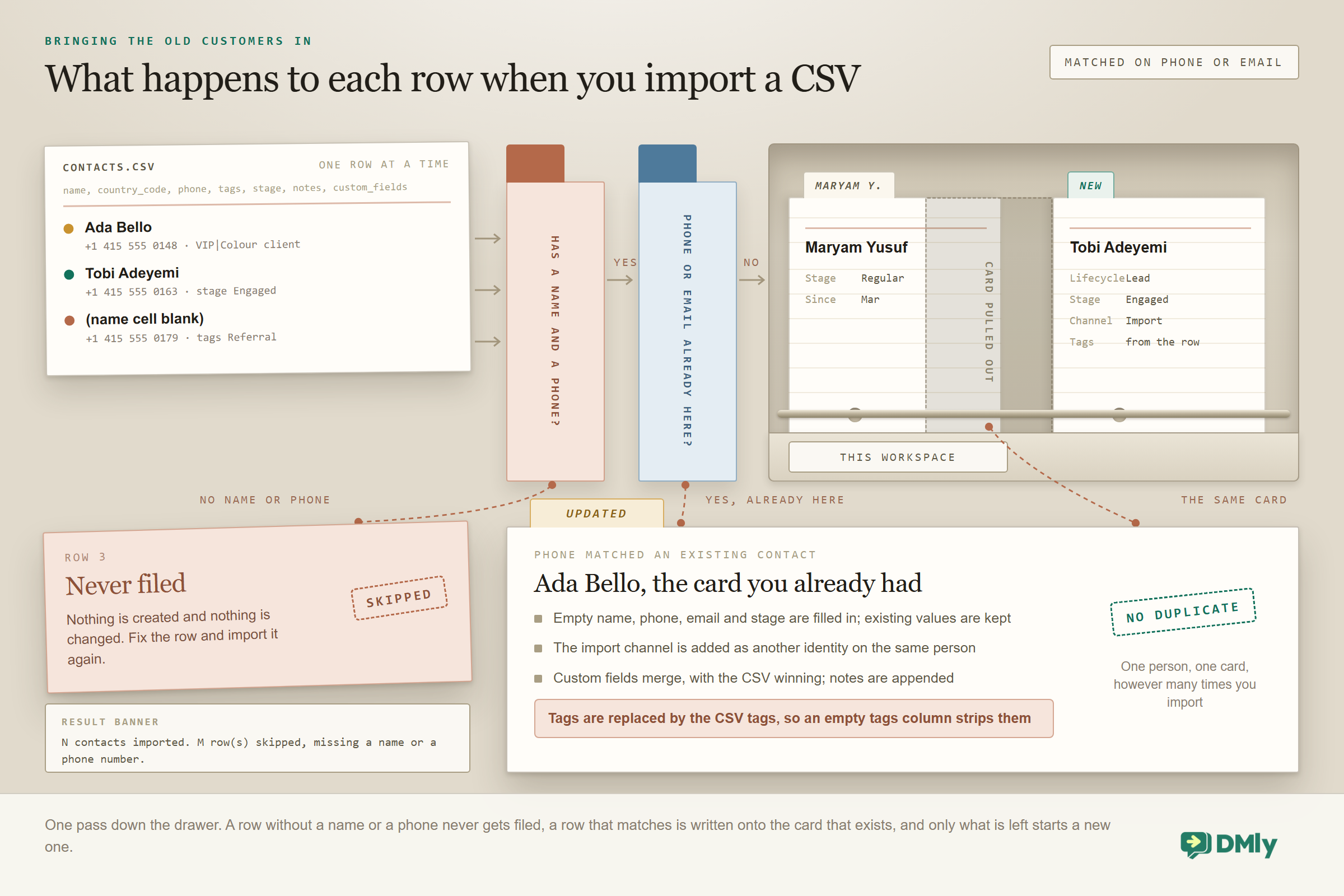
The things you already have. A CSV import brings in the customers from before the CRM existed, with their tags, stage, notes and custom fields, and updates existing records rather than duplicating them when a phone or email already matches. Your booking form, your website widget’s pre-chat form and your sign-up QR code feed new ones in as they arrive.
The rest of your stack. A connected Shopify or WooCommerce store syncs its customers and recent orders so that flows can greet a buyer by name, quote their order status and know their lifetime store spend. That data powers automations rather than appearing as an order list on the profile. A flow can write a row to Google Sheets or look one up, call any API with an HTTP Request step, or push to HubSpot or Mailchimp through their connector steps. And everything that happens to a contact (created, tagged, stage changed, became a client, booked, paid) is a webhook event, which is how Zapier, n8n and your own code hear about it. The CRM doesn’t have to be your only system; it has to be the one the conversation updates first.
Notice what’s missing from that list: a person typing customer details into a form. That’s the test to apply to any CRM you’re considering. If keeping it current needs someone to remember, it won’t be current by March. And the record has to be current at the moment your reply goes out, not the following morning: the classic lead-response study (InsideSales with MIT’s James Oldroyd, across 15,000 leads) found the odds of qualifying a lead fell 21-fold when the reply slipped from five minutes to thirty. A CRM the conversation writes is the only kind that’s ready that fast.
From Enquiry to Regular: The Pipeline
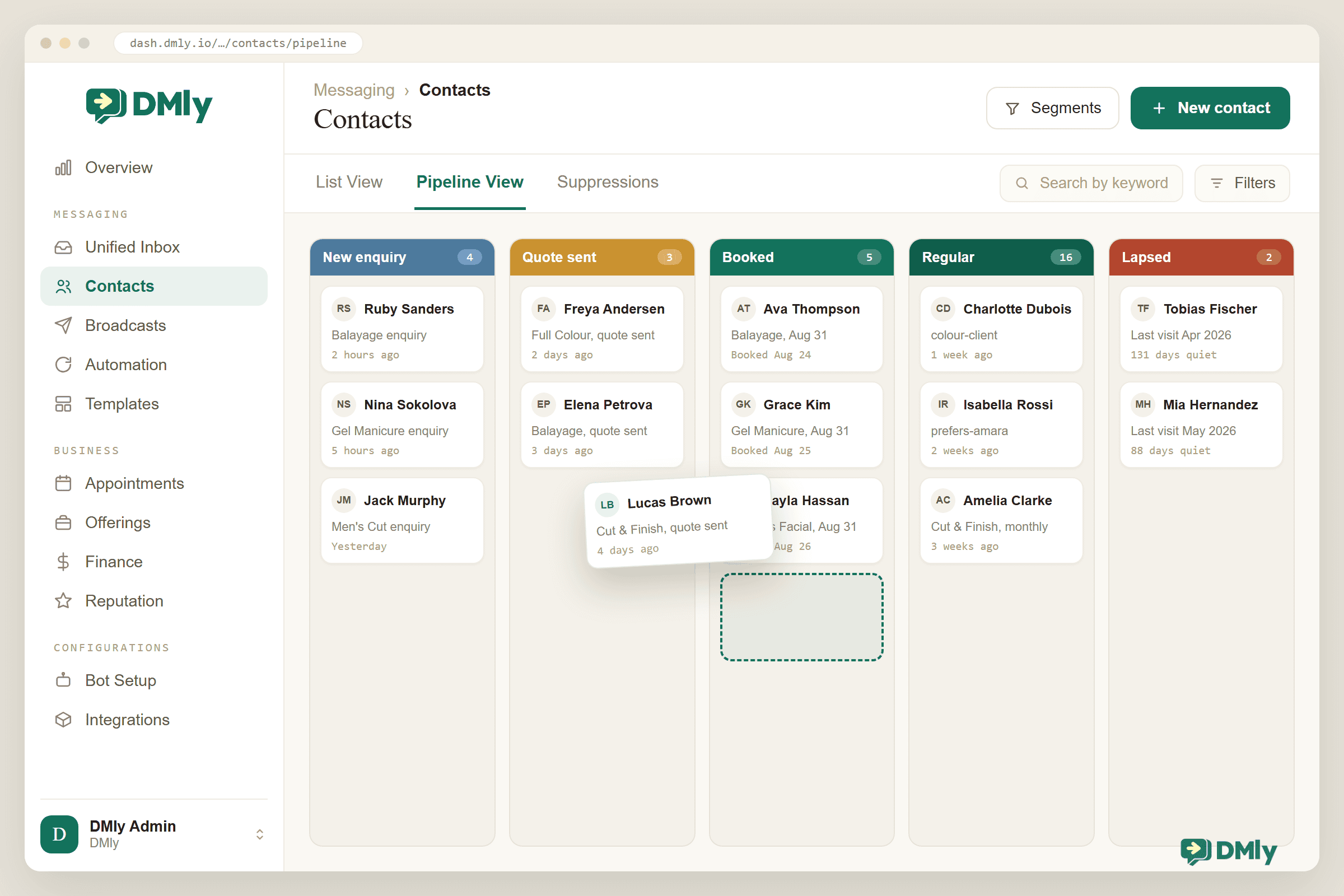
A stage is the one field that answers “what happens next?”, and a pipeline is just your stages in order with the contacts laid out on them. It lets you see the shape of your business at a glance instead of guessing at it.
Keep it short. Four or five stages cover almost every local business: Enquiry (they asked), Engaged (they replied, they’re deciding), Customer (they booked or bought), Regular (they came back), and Lapsed (they stopped). DMly’s Pipeline View starts you with three (Lead, Engaged, Customer) that you rename, recolour and reorder, add to, and drag contacts between. There’s one pipeline per workspace, the board shows your 300 most recently active contacts, and deleting a stage sends its contacts to “No stage” rather than out of the CRM. Stages can also be set from the profile, a CSV column, the Update Contact Stage step in a flow, or the API.
The value isn’t the board itself. It’s that the moments behind the stages are events your automations can hear. A contact becoming a client, meaning their first invoice or payment, fires the Contact converted to client trigger: a thank-you now, a review request in a week. A tag applied or a field changed fires a trigger too. The pipeline stage itself is the one move that doesn’t start a flow, so drive it the other way round: let your flows set the stage with the Update Contact Stage step as the real events happen, and let the lapsed segment (days since activity) be the audience for a monthly win-back broadcast. Build it so each real moment has one automation waiting for it, and the CRM stops being a filing cabinet and starts being a colleague. Building the pipeline and moving contacts along it automatically each get their own guide.
This is where the money is, incidentally, and it’s worth knowing before you dismiss the whole exercise as admin. Bain’s loyalty research is old enough to be a classic and still the cleanest statement of it: retaining just 5% more customers lifts profits by somewhere between 25% and 95%. A pipeline with a Regular stage and a Lapsed segment is the cheapest retention programme a small business will ever run.
One habit makes all of this work: the stage must be true. A pipeline where stages are set by automations (a booking moves someone to Customer, 60 quiet days move them to Lapsed) stays true on its own. A pipeline where somebody is supposed to drag cards on a Friday afternoon is a spreadsheet with colours.
What the AI Does With the Record
A WhatsApp CRM is what makes an AI agent genuinely useful rather than merely fluent, and the relationship runs both ways. The record makes the agent smarter, and the agent keeps the record filled.
The AI reads the record before it answers. With the contact’s details, tags, stage and history in front of it, “hi, can I book again?” becomes “Hi Ada, same as last time with Tobi? He has Saturday at 2”. Custom fields become the variables in a message, and the stage decides whether the bot is welcoming a stranger or greeting a regular.
The AI writes the record as it works. In DMly the AI agent has ten CRM tools: Get contact info, Add tags, Remove tags, Add a note, Set custom fields, Move CRM stage, Update phone number, Move to unassigned queue, Auto-assign to an agent, and Hand over to a human. So a lead-qualification conversation ends with the lead qualified in the data: source tagged, budget in a field, stage set to Engaged, and a note waiting for whoever picks it up. Nobody transcribes anything.
The record keeps the AI honest. Grounding the agent in your knowledge stops it inventing prices; grounding it in the contact record stops it inventing history. “You booked with us in March” is only a good sentence if March is actually on the timeline. The better your record, the more the agent can be trusted to personalise, which is the difference between a bot that sounds helpful and one that is.
Setting Up a WhatsApp CRM in DMly
Here’s the order that works, and most of it is an afternoon. The import is the longest step, and only because spreadsheets are messy.
- Connect your channels. WhatsApp through the official API first, then Instagram, Messenger, Telegram, SMS and the website widget as you start using them. From that point on, every first message creates a contact for you.
- Decide your tags before you import. Ten to twenty, written down: services (Colour, Braids), decisions (VIP, Do not discount), sources (Instagram ad, Referral). Anything that changes on its own is a segment, not a tag. Create them at Contacts → Manage tags or on the way in.
- Define three to five custom fields. Each with a type:
preferred_stylist(text),next_recall_date(date),consent_source(text, for how and when they agreed to marketing). Note the exact names down, because you’ll be typing them into flows and CSVs later. - Shape the pipeline. Contacts → Pipeline View: rename the defaults to the stages you actually use, add Regular and Lapsed, then colour and order them.
- Import your existing customers. Contacts → Import, download the sample file for the header row (name, country code, phone, tags, stage, notes, custom fields), fill it, preview the first rows, import. Every row needs a name and a phone; tags are pipe-separated; stage names have to match your board exactly or they’re silently ignored. Rows whose phone or email already exist update the contact instead of duplicating it, with three rules worth knowing: name, email, phone and stage only fill in blanks; custom fields merge with the CSV winning; and tags are replaced wholesale, so a blank tags column strips every tag the contact had. Fill the tags column or leave it out entirely.
- Clean as you go. Act on the Possible duplicates prompts (DMly matches on an exact email or the last ten digits of a phone among recent contacts), merge the pairs that really are one person, and use the bulk actions on the list (add tag, remove tag, set stage) to tidy up whatever the spreadsheet got wrong.
- Build three segments. “Imported, not yet messaged” for a gentle hello, “Lapsed 60 days, exclude Unsubscribe” for the win-back, and “Top spenders” for total spend over your threshold. Watch the live count as you build; it’s the first real picture of your customer base you’ll have seen.
- Give each moment its automation. New contact: welcome and source tag. Converted to client: thank-you, then a review request in a week. Tag applied (say,
Quote sent): a follow-up in three days if nothing’s booked. And once a month, a win-back broadcast to the lapsed segment. Now the CRM maintains itself, and so does the relationship.
Keeping It Honest
A CRM decays the way a garden does, not from one disaster but from neglect, and four habits keep yours true. None of them takes more than a few minutes a week.
Merge the duplicates, deliberately. The same person on WhatsApp and the website widget, or on two phone numbers, arrives as two contacts, and DMly won’t guess they’re one: a typed number is a claim, not proof. It flags the likely pairs and you confirm. Merges are permanent, so look at both records first, then merge when the booking lands and you’re sure.
Respect the opt-out everywhere. A contact who sends a stop word on any channel is opted out on all of them, tagged Unsubscribe, and excluded from every broadcast, sequence and reminder. They appear under Contacts → Suppressions. Your team can still reply by hand. Blocking someone from the inbox is a separate, stronger switch that stops manual replies too, and pausing the bot for one contact is a third thing again. Never remove the Unsubscribe tag to “fix” a campaign count.
Record consent where you can see it. DMly logs opt-outs but not how you got permission in the first place, so the consent_source field from the setup carries the proof: the date and the form, the keyword, the desk. Your marketing segment filters on it. When a regulator or a customer asks, the answer is right there on the record.
Own the data, and be able to leave with it. Contacts export as a seven-column CSV (name, country code, phone, tags, stage, notes, custom fields), which is the shape you’d import into anything else. It isn’t a full history export, so don’t promise one. Deleting a contact is immediate, permanent and cascades through their conversations, invoices and bookings, which is what a deletion request requires and why there’s a confirmation. You’re the controller of this data and the platform is the processor; keep it to what you need, and the honesty takes care of itself.
Why DMly as Your WhatsApp CRM
There are excellent CRMs and excellent WhatsApp tools, and the case for DMly is that the CRM sits inside the conversation tool rather than beside it. It’s also included rather than sold to you as a module.
The contact record, tags, custom fields, segments, Pipeline View and bulk actions come with every plan, including the $29 Starter, alongside the inbox, the automations, bookings and payments that fill the record. The AI agent’s CRM tools write to it as a side effect of answering. Broadcasts read from it through segments. Bookings and invoices post to the timeline and the spend total without a sync. And when you do need the wider stack, a flow step writes to Google Sheets, calls an API, or hands a contact to HubSpot or Mailchimp through their connectors, and every contact event is a webhook Zapier or n8n can catch, so the CRM that’s closest to your customer feeds the ones that aren’t.
Commercially: $29, $65 and $149 a month billed yearly, with 3,000, 10,000 and unlimited active contacts, meaning people you’ve messaged or heard from in the last 30 days. Reaching that number never blocks a reply or an import, and extra contacts cost $15 per thousand if you outgrow a tier before you’re ready to move up. For a salon with two thousand customers, that’s a CRM, an inbox and an AI agent for less than a single seat of the traditional kind.
Questions Small Businesses Ask About WhatsApp CRMs
Isn’t the WhatsApp Business app already a WhatsApp CRM?
It’s a record, not a CRM. It remembers everything and can’t answer a question about your customers or act on a group of them, and it lives on one phone. A CRM is what lets you ask “who hasn’t visited in 60 days?” and then message exactly those people.
What’s the difference between a tag and a segment?
A tag is a fact someone decided (VIP, allergy on file) that stays until it’s removed. A segment is a rule that recalculates itself (lapsed 60 days, spend over 500). Tags feed segments; segments feed your campaigns.
Do I still need HubSpot or another CRM?
For a local business, usually not: the record, the pipeline and the segments are all here. If your wider team lives in HubSpot or Mailchimp, a flow step pushes contacts across when they reach a stage, so both stay current without anyone entering anything twice.
How do I get my existing customers in?
A CSV with a name and a phone per row, plus optional tags, stage, notes and custom fields; DMly’s sample file gives you the headers. Existing phone or email matches update rather than duplicate.
How many contacts can I have?
3,000 active contacts on Starter, 10,000 on Growth and unlimited on Premium, where “active” means messaged or heard from in the last 30 days. Reaching the cap never blocks a conversation or an import; you’ll see an amber gauge at 90% and can add contacts at $15 per thousand. Most local businesses never touch it.
What about GDPR and customer data?
You’re the controller and the platform is the processor, data is encrypted in transit and at rest, contacts export as a basic CSV, and deletion is immediate and permanent. DMly records opt-outs but not how you obtained consent, so record that yourself in a custom field so you can show it.
The Record Beside the Chat
You never needed more customer data. You had all of it, in the chat list, in the order of the last message. What you needed was for it to sit beside the conversation instead of inside it, sorted by what matters instead of by when, and readable by your team and your automations as well as by you. That’s the whole of a WhatsApp CRM, and the conversation writes most of it for you. Set up the tags, the fields and the stages once, import the customers you already have, and let the next message do what the spreadsheet never could: keep itself true.
Import your customers into DMly. Connect WhatsApp, bring in your list from a CSV, and watch the record beside every conversation fill itself from then on: tags, stages, bookings, payments and an AI that reads it before it replies. Start the 7-day trial, no card needed.
Writing about WhatsApp automation, bookings and growth for local business.
Turn WhatsApp into your busiest channel.
Start free and run message, bookings, payments and reviews in one place.
