
WhatsApp Business API for Small Businesses: Access, Pricing, and Setup (2026)
The WhatsApp Business API is probably the only product your business will ever use without seeing it. There is no app to download, no icon, no screen with WhatsApp Business API written across the top. It’s a pipe: a way for software to send and receive messages on your WhatsApp number, while your customers keep using ordinary WhatsApp and notice nothing at all.
That invisibility causes most of the confusion around it. The same pipe goes by three names (WhatsApp Business API, WhatsApp Business Platform, WhatsApp Cloud API), it gets mixed up with the free app on your phone, and because it started life as a developer product, half the internet still insists it’s only for big companies with engineering teams. None of that survives contact with how it actually works in 2026: a salon owner can put her number on the API in an afternoon, without writing a line of code, and pay Meta only for the template messages she sends.
What the WhatsApp Business API really decides is who answers your WhatsApp. On the free app, that’s whoever is holding the phone. On the API, it’s a team in a shared inbox, an automation that confirms bookings while everyone’s hands are busy, and an AI agent that answers “are you open on Sunday?” at 11pm. That’s the trade, and this guide is about making it with your eyes open.
Here’s what you’ll get out of it: what the API is and why the names keep changing, what the free app genuinely can’t do, who does what between Meta and your platform, the 24-hour window and the three kinds of template, what it all costs under Meta’s 2026 per-message pricing, how messaging limits and verification work, how to pick a provider you can leave, and how to connect your number with DMly.
One Product, Three Names
The vocabulary blocks more people than any technical step, so let’s clear it in one paragraph and never think about it again.
WhatsApp Business API is the name everyone searches for. WhatsApp Business Platform is what Meta officially calls the product today. WhatsApp Cloud API is the version of it Meta hosts on its own servers, and since the older self-hosted On-Premises API stopped delivering messages on 23 October 2025, the Cloud API is the only version left. Three names, one pipe. If a provider makes that distinction sound complicated, it tells you more about the provider than the product.
Three useful things follow from “it’s a pipe, not an app”:
- It has no screen of its own. You use it through a platform that supplies the inbox, the automation and the reporting, or through code your own developers write. For a small business, “getting the API” really means “choosing a platform”.
- Your customers change nothing. They message your number from ordinary WhatsApp, and on their side the conversation looks like any other chat.
- It is not a “WhatsApp automation tool” that drives a phone. Tools that puppet the app or a browser session are unofficial, against Meta’s terms, and the usual reason a business number gets banned overnight. The API is the official, supported route.
A few terms you’ll meet along the way, in the order they’ll appear. Your business portfolio (the Meta business, formerly Business Manager) holds a WhatsApp Business Account (WABA), which holds one or more phone numbers, each with a display name. Templates are pre-approved messages for reaching people outside the 24-hour window. A Solution Partner (people still say BSP) or a Tech Provider is a company whose software connects your number. And Embedded Signup is Meta’s self-serve onboarding flow, which matters to you for one big reason: Meta’s documentation is explicit that businesses onboarded through it own all of their WhatsApp assets. The account and the number are yours, not your provider’s.
As for “the API is for enterprises”: that was true in 2018, and it is the most durable myth in this space. Meta now bills message by message, onboarding is self-serve, and platforms have absorbed the technical work. Our post on WhatsApp Business API myths takes that one apart along with fourteen others.
The Free App Is Not a Smaller WhatsApp Business API
The app and the API are not two sizes of the same thing, and treating them that way is what leads to a year of typing reminders by hand. The WhatsApp Business app is a genuinely good tool for a solo operator: business profile, catalogue, labels, greeting and away messages, quick replies, all at no cost. The mistake is thinking of it as the API’s little sibling. They are different species. The app is a phone app with business decorations; the API is infrastructure. Our guide to the three types of WhatsApp accounts compares all of them, and here’s the part that matters for your decision.
| Question | WhatsApp Business app (free) | WhatsApp Business API |
| Who can reply? | Whoever holds the phone, plus up to four linked devices | Any number of teammates in a shared inbox, with assignment, notes and roles |
| Automation | Greeting message, away message, quick replies | Full flows, keyword replies, AI agents, booking and payment automations, webhooks |
| Messaging at scale | Broadcast lists capped at 256 saved contacts who saved your number back | Approved templates to opted-in contacts, in tiers from 250 to unlimited people per day |
| Integrations | Very few | CRM, bookings, payments, ecommerce, reviews, other channels, your own systems |
| Where the chats live | On the phone | On the platform, visible to the team, with history and reporting |
| What it costs | Nothing | Meta charges per delivered template message; the platform charges a subscription |
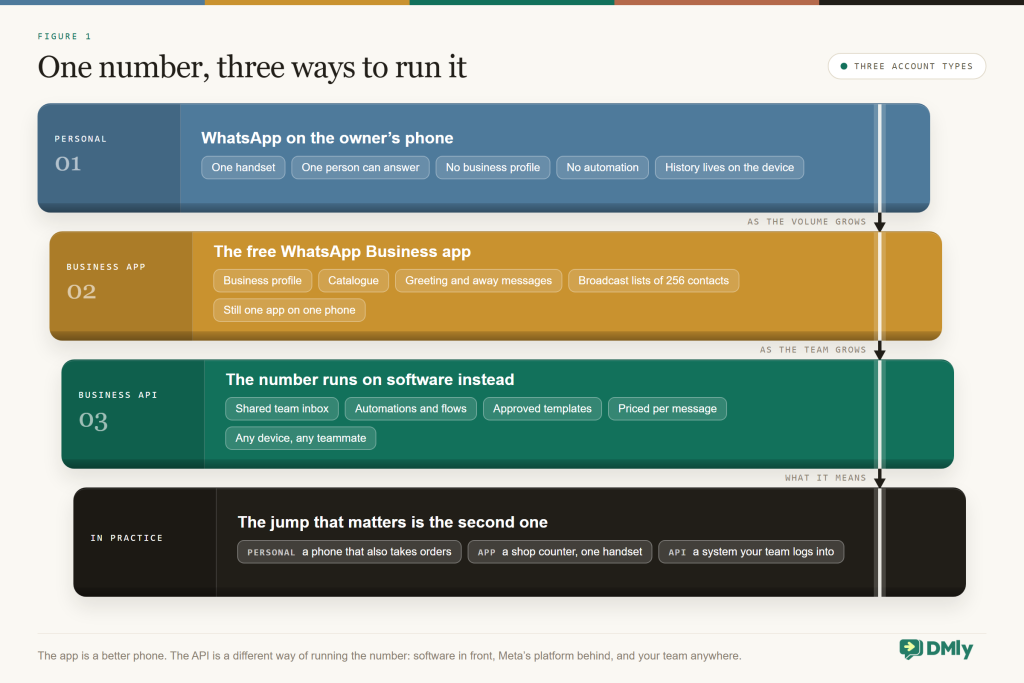
So when does the app stop being enough for you? Watch for three moments. A second person needs the inbox, and you’re passing a phone around or sharing a login. Reminders and confirmations should be sending themselves, and someone is typing them by hand instead. Or your broadcast list has outgrown 256 people who saved your number. Each of those is the app costing you time rather than saving it.
You may not have to choose: coexistence
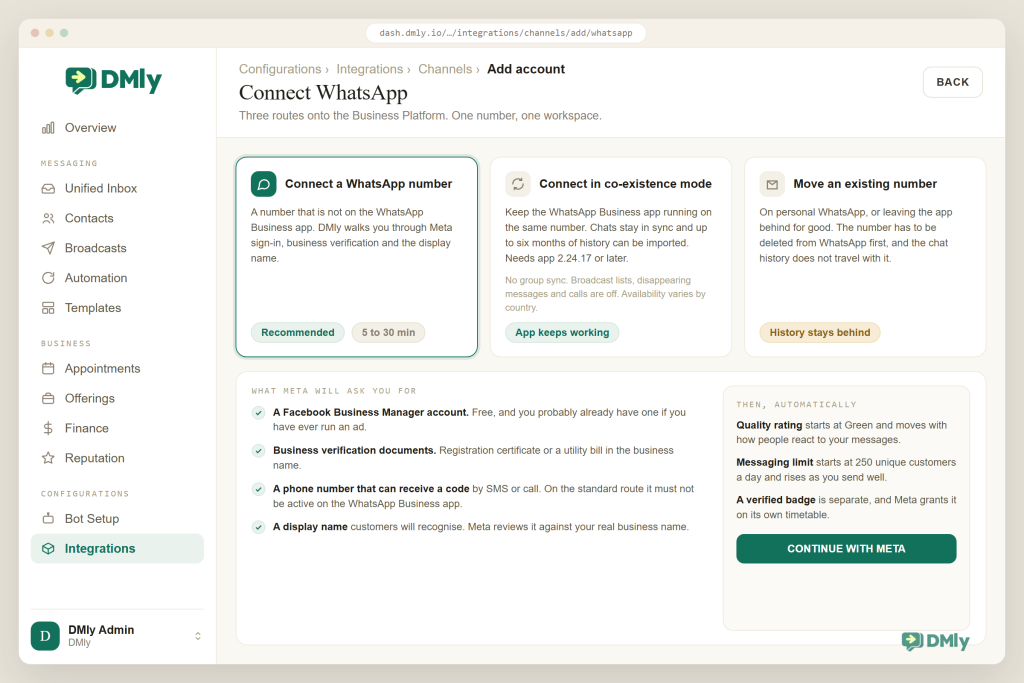
The old objection to the API was that your number left the app the day you connected it, and that is no longer automatic. Meta now lets a WhatsApp Business app number connect to the Cloud API while the app carries on working on the same number, which Meta’s docs call onboarding WhatsApp Business app users and everyone else calls coexistence. Chats stay in sync, up to six months of history can be imported, and you need app version 2.24.17 or later. Some things switch off in that mode (group chats aren’t synced, broadcast lists and disappearing messages are disabled, calls aren’t supported), and availability still varies by country, so read our WhatsApp coexistence guide before you rely on it. In DMly it’s a one-time connection choice: Connect in co-existence mode instead of the standard flow.
And no, you don’t need a new number either. Mobile, landline, toll-free and virtual numbers all work (short codes don’t). A number sitting on personal WhatsApp has to be deleted from WhatsApp first, or moved into the Business app and then connected in coexistence mode.
Who Does What: Meta, Your Platform and You
Every message on the WhatsApp Business API crosses the same four layers, and seeing them once tells you who to shout at when something goes wrong. Almost every rule in this guide lives in one specific layer, so it is worth thirty seconds.
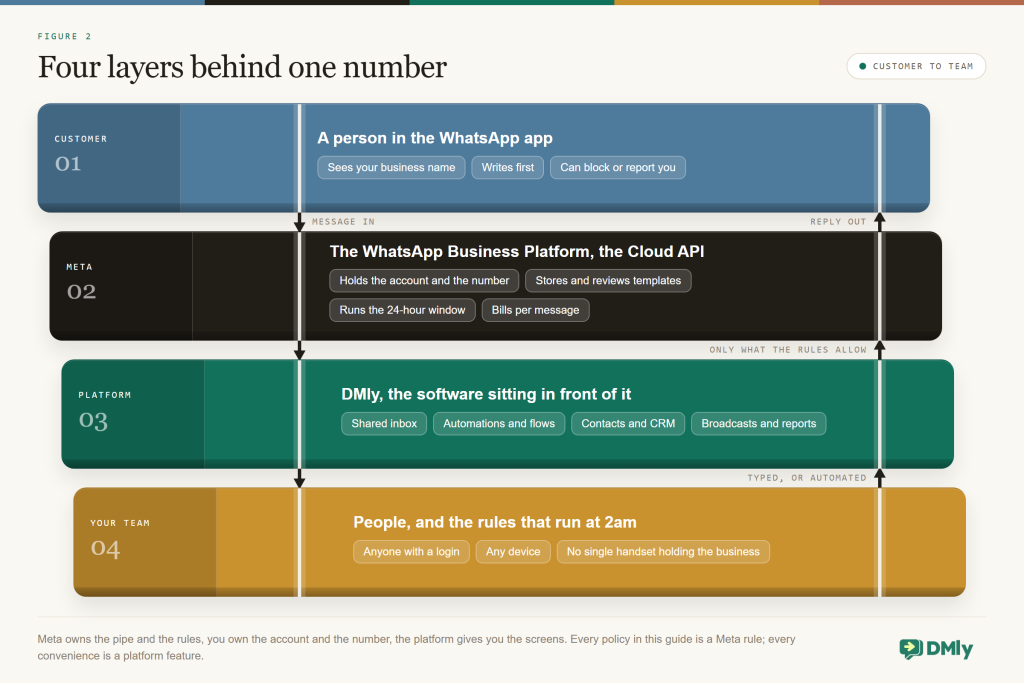
Meta’s side holds the account, the number, the templates and the bill, and hands each incoming customer message to your software through a webhook. Your side is the platform that gives the pipe a face: the inbox, the automation, the contact record, template management, broadcasts, and the connections to bookings and payments. Meta provides none of that. It provides delivery, the rules and the bill.
Customer messages your number → Meta’s Cloud API passes it to your platform by webhook → your inbox or an automation replies inside the 24-hour window → after that, an approved template is the only way to restart the chat
There are three ways to plug into Meta’s side, and you should know which one you are being sold:
- Build directly on the Cloud API. Your developers create a Meta app and write the inbox, automation and reporting themselves. Free to access, expensive to build and maintain. Realistic only if you have engineers and unusual needs.
- Go through a Solution Partner (BSP). A Meta partner that provisions numbers under its own arrangements and can bill you for messages itself, sometimes with a margin folded in, sometimes bundled into a plan.
- Use a platform that onboards you through Embedded Signup. You sign in with Meta from inside the platform, the account is created in your name, and you add your own payment method at Meta, so Meta bills you for messages directly while the platform bills only its subscription. This is how DMly connects a number.
Those differences sound bureaucratic right up until the day you want to switch providers or check what your messages really cost. Then “whose name is the account in?” and “who bills me for messages?” turn out to be the two most important questions you ever asked.
The Rulebook: One Window, Three Kinds of Template
WhatsApp is not email, and the API comes with a rulebook, but the whole thing rests on one rule plus one mechanism. Learn those two and the rest is detail.
The 24-hour customer service window
When a customer messages you, WhatsApp opens a 24-hour window for that contact. Inside it you can send anything: free-form text, photos, PDFs, buttons, list menus, AI replies. The clock runs from your customer’s last message, your own replies don’t extend it, and every new message from them restarts it. Once it closes, only an approved template will go through. There’s no grace period for human agents, unlike Instagram and Messenger, where a person can still type a reply for seven days. On WhatsApp, 24 hours is the whole story.
What those in-window messages cost you is changing, so put the date in your calendar. Free-form replies inside the window (Meta calls them service messages) carry no Meta charge until 1 October 2026. From that date Meta charges for them at the same rate as that market’s utility messages, but every business phone number gets 1,000 free service messages a month first, so most local businesses will never see that line. There are no volume discounts on service messages, so above the allowance the cost scales straight up with how long your conversations run. Our guide to the October WhatsApp pricing change works through what that does to a normal month.
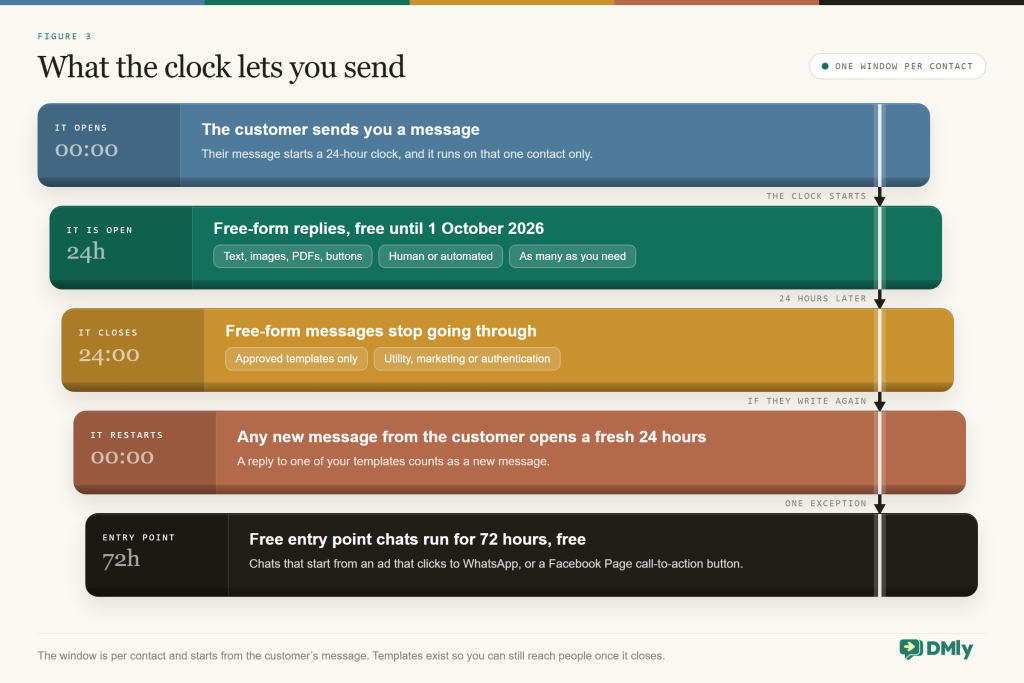
Two details make the rule friendlier than it sounds, and one of them survives October untouched. Chats that start from a Click-to-WhatsApp ad or a Facebook Page call-to-action button get a free entry point: all messages are free for 72 hours, and Meta has not changed that. The second is the one with a deadline. Until 1 October 2026 a utility template delivered while a window is open is free, so the confirmation you send right after a customer books costs nothing; from that date it is billable like any other utility message. For a booking business sending confirmations and reminders, that second change is usually the bigger one. The timeline above was drawn before the change was announced, so read its free-versus-charged rows as the position up to 30 September 2026.
Templates: marketing, utility and authentication
A template is a message you write in advance, submit to Meta, and can then send to any opted-in contact at any time, window open or closed. Meta reviews each one (often in minutes, up to 24 hours), and every template belongs to one of three categories that decide both the rules and the price.
| Category | What it’s for | Example | Charged? |
| Utility | Follows up on something the customer did or asked for: confirmations, reminders, updates, receipts. Must be non-promotional. | “Hi Ada, your balayage with Tomi is confirmed for Saturday at 3pm. Reply 1 to reschedule.” | Charged outside an open window; also charged inside one from 1 October 2026 |
| Marketing | Anything promotional: offers, launches, newsletters, win-backs, and any utility message that also carries a promotion. | “New client offer: 20% off your first facial this month.” | Charged per delivered message |
| Authentication | One-time passcodes only, with a copy-code or one-tap button. No links, media or emojis. | “123456 is your verification code.” | Charged, with volume discounts |
The utility-versus-marketing line is where small businesses trip most often, and it is worth being fussy about. “Your appointment is tomorrow at 10am” is utility. Add “and our new lash treatment is 15% off” and the whole message becomes marketing; Meta runs a recurring recategorisation process that moves mislabelled templates into the pricier category with a day’s notice. Keep the promotion out of the reminder and the reminder stays cheap.
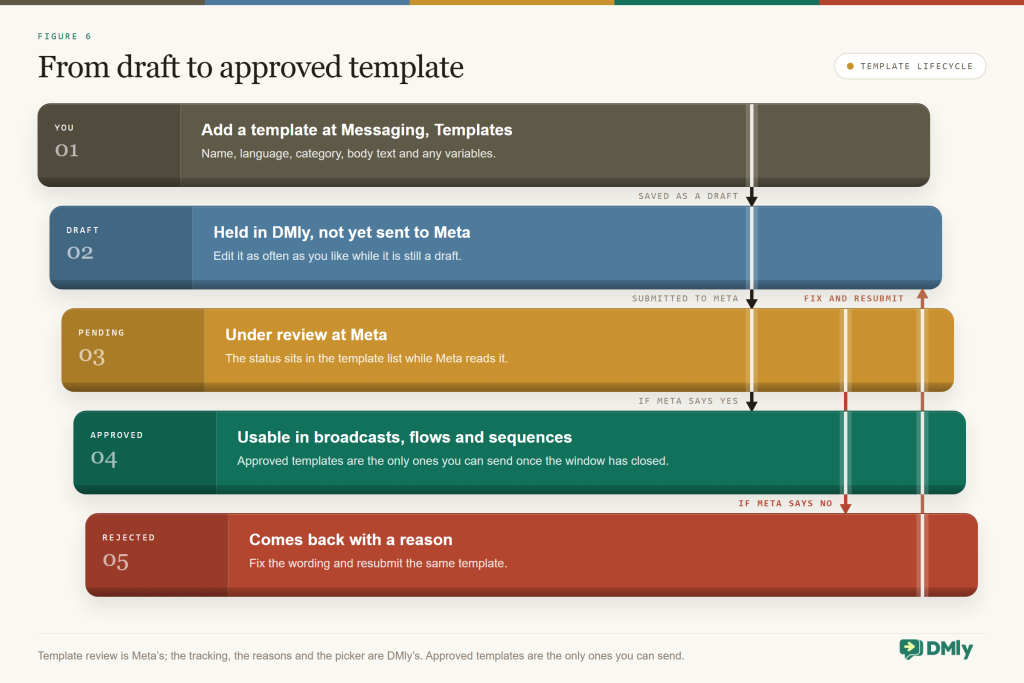
A few operational facts are worth knowing before you build a library. Statuses run Pending, Approved (the only one that sends), Rejected (with a reason you can fix and resubmit; we cover the common ones in a separate guide), and for live templates Paused and Disabled: a template whose quality drops through blocks, reports or low read rates is paused for 3 hours the first time, 6 hours the second, and disabled the third. An unverified business can hold 250 templates per account and a verified one 6,000, and no local business needs a tenth of that; a confirmation, a reminder, a review request, a payment reminder and one or two marketing templates cover most weeks. Templates aren’t plain text either: headers with images or PDFs, up to ten buttons, list menus, carousels and WhatsApp Flows for in-chat forms are all available to you.
Finally, two delivery quirks as of August 2026, both of which catch people out. Meta applies per-user marketing limits, declining to deliver a marketing template to someone it predicts won’t engage (error 131049; wait 24 hours and retry), though those limits don’t apply for businesses or users in the EEA, UK, Japan and South Korea. And Meta’s docs currently state that marketing templates are not delivered to WhatsApp users with US phone numbers at all. If your customers are in the US, build around utility templates and windows your customers open.
What the WhatsApp Business API Costs in 2026
You get two bills, not one: Meta charges for messages and your platform charges a subscription. Some providers add a third line by marking up Meta’s rates, and the simplest piece of cost advice in this guide is not to accept that.
On Meta’s side, the model changed on 1 July 2025 from per-conversation to per delivered template message. Marketing templates are always billable. Utility and authentication templates are billable outside an open window, and from 1 October 2026 utility templates are billable inside one too. Free-form replies inside the window carry no charge until that same date, after which each business number gets 1,000 free a month and the rest are billed at your market’s utility rate. The first 72 hours after a Click-to-WhatsApp ad remain free. Rates vary by template category, the recipient’s country code and, for utility and authentication, monthly volume tiers. You pay only for delivered messages, and Meta bills you directly through Meta Business Suite, which means a payment method has to be on file before templates will send. Ignore per-conversation prices in older articles; the current rate card is on Meta’s pricing page, and the dated changes live on Meta’s separate upcoming-pricing page rather than the one showing today’s rates.
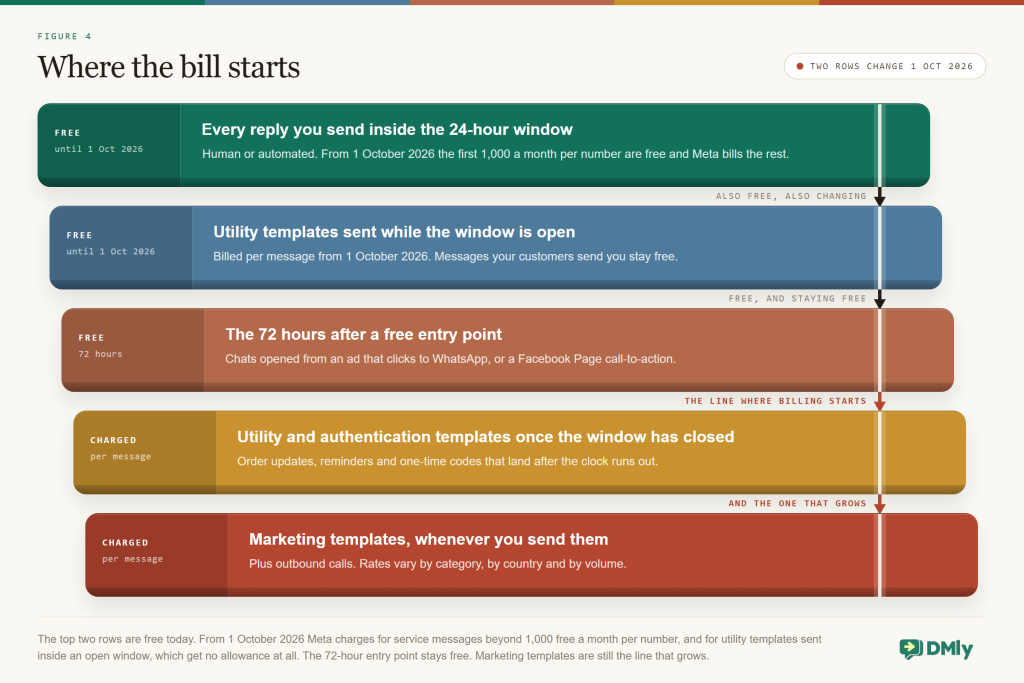
Read that diagram as the position up to 30 September 2026. Its top two “free” rows, replies inside the window and utility templates sent while the window is open, both move to the charged side on 1 October 2026, though the replies row keeps 1,000 free service messages a month per number and the utility row gets no allowance at all. The bottom rows and the free entry point row are unchanged.
On the platform side, DMly’s plans start at $29 a month billed yearly (Starter: one profile per channel, 3 seats, 3,000 active contacts, 10,000 broadcast or template messages, 500 AI replies), then $65 for Growth and $149 for Premium, with add-ons for seats, profiles and contacts. There’s no markup on WhatsApp: you add your own card in Meta Billing and pay Meta’s standard rates. That’s the arrangement to insist on anywhere, because a markup on messages grows with your success and a subscription doesn’t. One admin habit to keep: look after the Meta payment method, because when it fails, your sends stop. Our post on resolving WhatsApp Cloud API billing and payment errors covers the fixes.
For a local business sending confirmations, reminders and the occasional offer, the maths usually lands the same way: the Meta line is smaller than the platform line, and both together are smaller than one missed booking a week.
Messaging Limits, Verification and Your Number’s Health
Meta caps how many new people you can start conversations with in a rolling 24 hours, and the cap climbs a ladder you can move up deliberately. Starting a conversation means messaging outside an open window. Replies inside the window never count against it. The limit sits at the business-portfolio level and is shared by all your numbers.
| Tier (unique people per 24h) | How you get there |
| 250 | Where every new business portfolio starts |
| 2,000 | One of three paths: verify your business with Meta, have your onboarding partner verify it, or deliver 2,000 template messages to unique people outside windows within a rolling 30 days using high-quality templates |
| 10,000 → 100,000 → unlimited | Automatic: when your numbers and templates are high quality and you’ve used at least half your current limit in the last 7 days, Meta raises you a level within about 6 hours |
Alongside the limit sits a quality rating (green, yellow, red) built from the last seven days of blocks and reports. Red can flag the number, pause your templates and, if quality doesn’t recover within a week, drop your tier. Hit your daily limit and the number shows as restricted until the 24 hours roll on, though you can still reply to anyone who writes in. We unpack the whole health system, including what Flagged and Restricted mean and how recovery works, in our guide to WhatsApp quality rating, messaging limits and bans. The short version is that numbers which message people who asked to hear from them stay green without any effort at all.
Business verification is simply Meta confirming your business is real: legal name, address, a matching phone number or website. You don’t need it to connect or to start messaging, but it is the single biggest lever a new number has, taking you from 250 to 2,000 unique contacts a day without proving yourself message by message, and lifting the cap on numbers in a new portfolio from two to twenty. Do it in your first week. Our walkthrough of completing Facebook Business verification covers the documents Meta accepts, and if the paperwork has you stuck, how to get the WhatsApp API without business verification explains what you can and can’t do while you wait.
If verification is the step you are worried about, the free Meta business verification checker shows what Meta will ask for before you submit anything.
Don’t confuse verification with the verified badge (Official Business Account status; the tick was green, now blue). The badge is about recognition, you apply for it after your number is live, and it has nothing to do with your limits.
Picking a Provider You Can Leave
The best test of a WhatsApp Business API provider is how easy they make it to leave, because the answers that let you go are the same ones that keep the relationship healthy while you stay. If you have no developers, the real decision was never “API or not”, it’s which platform. Ask about these six.
- The account is created in your name Official Embedded Signup, signed in with your Meta login, with the WhatsApp Business Account and number in your business portfolio. Ask directly: if I leave, do I keep the number and the account?
- Meta bills you, not the provider Meta’s rates are public. If the platform invoices you for messages, ask what the margin is and whether you can pay Meta directly instead.
- The rulebook is enforced before the send A composer that tells you the window is closed and offers a template, template creation with rejection reasons shown, opt-outs honoured automatically, and your quality rating and tier visible in the dashboard.
- A team inbox that’s actually for teams Assignment, an unassigned queue, internal notes, saved replies, roles. If seats are sold like enterprise software, a two-person salon will feel it.
- Work happens in the chat, not around it Bookings, payments, review requests and a contact record on the same screen as the conversation, plus your other channels in the same inbox.
- Migration is documented, both directions Bringing a number in means turning off two-factor authentication at the old provider first; leaving should be described just as clearly.
And the standing warning, which is worth repeating because it is the one that ends businesses’ WhatsApp: anything that automates WhatsApp by driving the phone app, a browser session or a modified client is outside Meta’s terms, and it is the usual way a business number dies overnight. The API is rate-limited, template-reviewed and slightly boring, which is exactly what you want from the channel your customers use to reach you.
Why DMly Is the Best Home for a Small Business on the API
Plenty of tools will connect a number to the Cloud API, but a salon, clinic, gym or small brand needs the API wrapped in the things that fill its day. Bookings, reminders, payments, reviews and a team inbox, with Meta’s rulebook enforced quietly underneath. That’s the job DMly is built for, and here’s the documented version of the claim.
Connected in about ten minutes, in your name
The connection is a sign-in, not a project. DMly connects numbers through Meta’s Embedded Signup at Integrations → Channels → Add account → WhatsApp: pick the tile, click Connect a WhatsApp number, sign in with Meta, choose or create your business portfolio and WhatsApp Business Account, verify the number by SMS or call, done. The docs describe the route as about ten minutes, and the assets belong to your business at the end of it. Want to keep the phone app running on the same number? Choose Connect in co-existence mode instead, and replies you send from the phone appear in the DMly inbox on the same contact, with an optional per-contact toggle to pause the bot whenever you reply from the phone.
Templates you don’t have to write
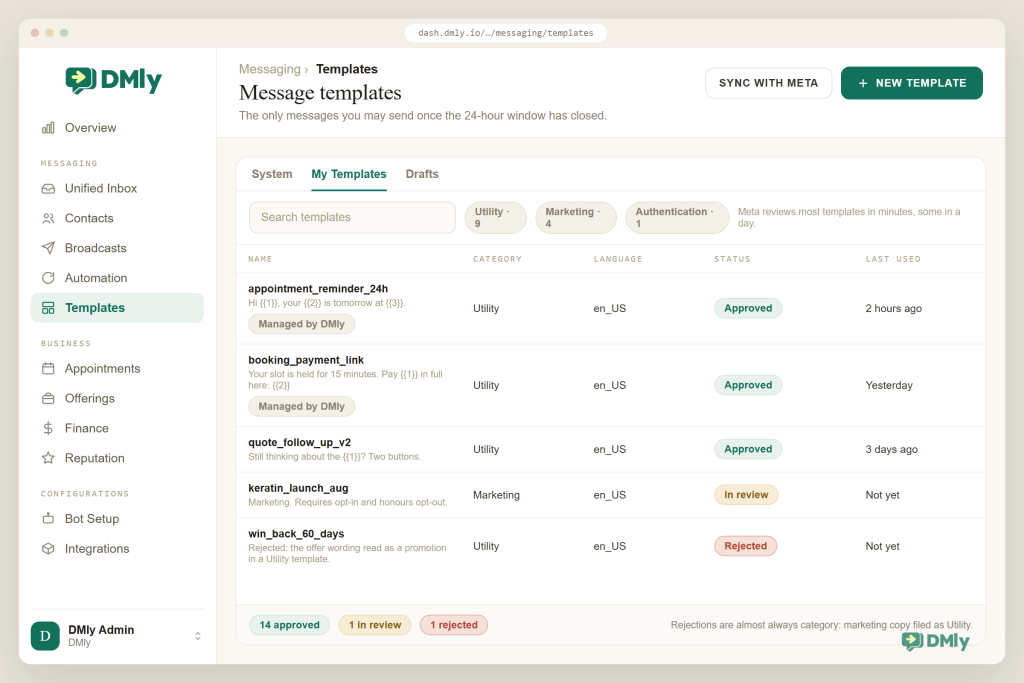
Most of your first template library is submitted for you. The moment a live number connects, DMly sends its own system templates to Meta on your behalf, marked Managed by DMly: appointment confirmations and reminders, invoices, receipts, payment reminders, review requests, login codes. Your own templates live at Messaging → Templates → My Templates: name, category, language, body with sample values, buttons if you want them, submit. DMly re-checks status with Meta about every ten minutes and shows Pending, Approved or Rejected with Meta’s reason, and only Approved templates ever appear in the broadcast picker.
One number, the whole team, the whole rulebook
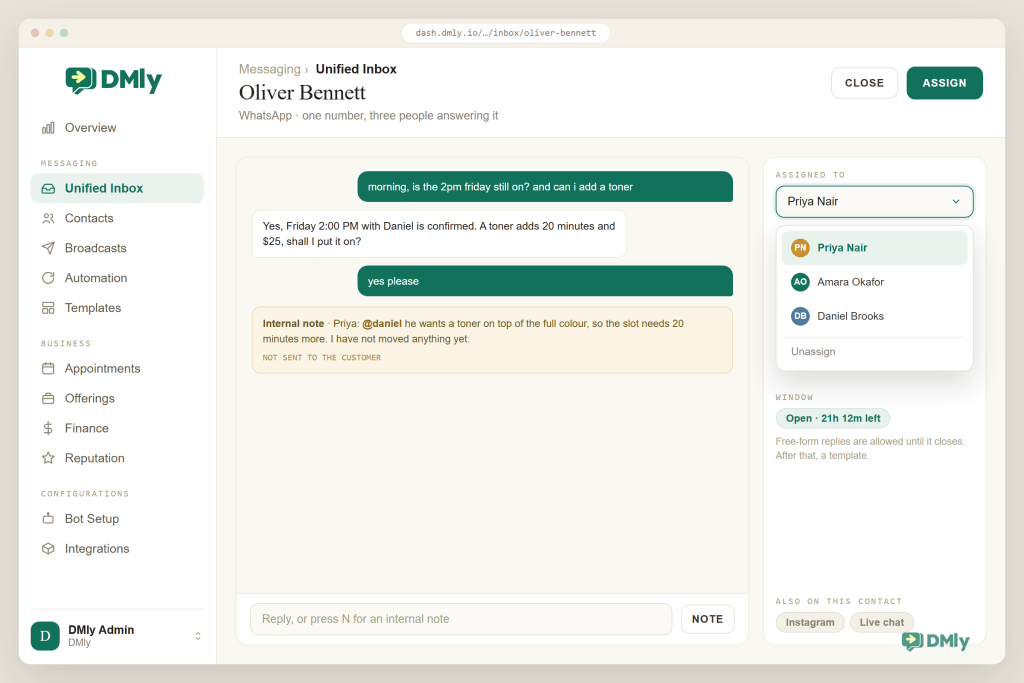
Everyone works the same shared inbox from their own login, and nobody passes a phone around. Replying assigns the conversation to you; admins can switch on round-robin (Give new conversations an owner) so new chats go to whoever has the fewest open; internal notes with @mentions keep handovers invisible to the customer; roles decide who sees the inbox and whether phone numbers are masked. The 24-hour window is enforced across the inbox, automations, broadcasts and sequences, opt-out keywords are honoured everywhere automatically, and your quality badge and messaging tier sit under Bot Setup → WhatsApp → Configuration with one-click links to Meta Billing, business verification and WhatsApp Manager. One honest caveat: DMly records when someone opts out but not how they opted in, so store consent in a custom field or a note at the moment you capture it.
And the rest of the day’s work on the same number
This is where an API tool and DMly part ways. The number that answers your questions also takes bookings (services, staff availability, deposits, group classes), sends invoices and payment links through Stripe, PayPal, Paystack, Razorpay, MyFatoorah or Mercado Pago, requests Google reviews after the visit, and keeps the CRM record next to the chat. Instagram, Messenger, TikTok, Telegram, SMS and your website’s live chat land in the same inbox, and an AI agent can answer from your own documents and then actually act: check availability, book, reschedule, add a tag, hand over to a person. WhatsApp voice calls work inside DMly too; inbound is free, outbound needs the customer’s permission and is billed per minute by Meta, and as of August 2026 outbound isn’t available from business numbers in the US, Canada, Egypt, Vietnam or Nigeria.
| What a small business needs | Typical WhatsApp API tool | DMly |
| Getting on the API | Forms, a sales call, sometimes a setup fee | Embedded Signup, about ten minutes, account in your name |
| Keeping the phone app | Often: delete the app account first | Co-existence mode on the same number |
| Templates | You write and submit every one | System templates submitted for you; yours at Messaging → Templates |
| WhatsApp costs | Sometimes marked up or bundled | No markup; you pay Meta directly |
| The 24-hour window | The send fails at Meta | Enforced before the send, template offered instead |
| Beyond messaging | Inbox and broadcasts | AI agent, bookings, payments, Google reviews, CRM, six more channels |
Put your number on the official API this week
Embedded Signup in your name, templates submitted for you, a shared inbox and an AI agent that books. Pay Meta’s rates directly, with no markup. Seven-day free trial, no credit card.
Your First Week on the WhatsApp Business API
Here’s the order we’d do it in, and most of it is one sitting. The parts that take days belong to Meta, not to you, so the trick is to start those early and carry on with the rest while they run.
- Day 1: prepare the number. Mobile, landline, toll-free or virtual all work. If it’s on personal WhatsApp, delete that account first, or move it into the Business app and plan on co-existence. Coming from another provider? Turn off two-factor authentication for the number in WhatsApp Manager before anything else. Make sure the number can receive an SMS or a call.
- Day 1: connect and register. Integrations → Channels → Add account → WhatsApp, complete Embedded Signup, then open Bot Setup → WhatsApp → Configuration and enter the 6-digit PIN to register the number for Cloud API messaging. Connected isn’t the same as registered, and an unregistered number can’t send.
- Day 1: put a card on file at Meta. From the same Configuration tab, Open Meta Billing and add a payment method to the portfolio. Templates won’t send without it.
- Day 1 to 2: templates. Check the System tab for the confirmations and reminders DMly submitted, then create the two or three of your own you’ll actually use. Approval usually lands within the day.
- Day 2: start business verification. Open Business verification from the Configuration tab and submit the documents. This is the 250 to 2,000 lever, so it goes early, not later.
- Day 3: invite the team. Seats, roles, round-robin if you want it, and saved replies for the answers you type every day.
- Day 3 to 5: first automations. The three that pay for everything: instant answers to your commonest questions, a booking flow with confirmation and reminder templates, and a review request after the visit.
- Day 5: walk through it as a customer. Message the number from your own phone, book something, cancel it, ask a weird question, reply STOP to a marketing template. Fix what feels off. Then let it run.
Number connected → registered with the PIN → card in Meta Billing → templates approved → verification submitted → team invited → first automation live → tested from your own phone
That’s the whole journey. The WhatsApp Business API stops being mysterious the moment you see what it is: Meta provides the pipe, the rules and the bill; you own the account and the number; a platform gives your team the screens. If one phone is already too few hands, if reminders should be sending themselves, and if you’d rather your WhatsApp history belonged to the business than to whoever is holding the handset, this is your next step, and it’s an afternoon’s work rather than a project.
Questions Owners Actually Ask
Is the WhatsApp Business API free?
Access to the Cloud API is free, and until 1 October 2026 replies inside a customer’s 24-hour window cost nothing. From that date Meta charges for those in-window replies at your market’s utility rate beyond the first 1,000 a month, and for utility templates delivered inside an open window with no allowance at all, which our guide to the October WhatsApp pricing change works through. Meta already charges per delivered template message: marketing always, utility and authentication outside an open window. On top of that you pay your platform; DMly starts at $29 a month billed yearly and doesn’t mark up Meta’s rates.
Do I need a developer?
Not if you use a platform. DMly connects the number through Embedded Signup, submits its system templates for you, and provides the inbox, automation and broadcasts without any code. Building directly on the Cloud API is the developer route, and it’s optional.
Can I keep my existing number, and the app?
You keep the number: mobile, landline, toll-free and virtual all work. And where coexistence is available you can keep the WhatsApp Business app running on the same number too, with chats synced to the platform. A number on personal WhatsApp has to be deleted from WhatsApp first, or moved into the Business app.
What happens after the 24-hour window closes?
Only approved templates go through, with no exception for human agents. DMly tells you the window is closed and offers a template instead of letting the send fail at Meta. Design your follow-ups as templates from day one and the rule never bites.
How many messages can I send per day?
Replies inside open windows are unlimited. Messages you start are capped by your tier: 250 unique people per 24 hours for a new portfolio, 2,000 after business verification, then automatic increases to 10,000, 100,000 and unlimited as quality and usage grow.
How many people can answer one number?
As many as your platform seats allow, each from their own login. DMly includes 3 seats on Starter, 6 on Growth and 15 on Premium, with automatic assignment on reply, optional round-robin, internal notes and role-based access.
Will my number get banned?
Not for using the official API within the rules: message people who opted in, honour STOP, and keep promotions out of utility templates. Bans overwhelmingly come from unofficial tools that puppet the phone app, and from messaging bought lists. Avoid both and the health system works in your favour.
Writing about WhatsApp automation, bookings and growth for local business.
Turn WhatsApp into your busiest channel.
Start free and run message, bookings, payments and reviews in one place.
