

An agency can lose money on a client who pays every invoice on time. It happens quietly. The monthly fee arrives, the client is happy, and nobody adds up the two hours a month spent fixing templates, the WhatsApp message charges the agency agreed to absorb, and the tenth client who pushed the agency onto a bigger platform plan. The problem is not the price itself. It is a price set before anyone worked out the cost, and it is the easiest mistake to make when you first price WhatsApp automation services.
This guide shows how to price WhatsApp automation services from the bottom up: what each client actually costs you, the pricing models that work for this kind of service, how to handle Meta’s message charges without carrying the risk yourself, and a fully worked example with every number shown. The platform examples use DMly’s white-label programme, but the method works whatever you build on.
If you are still deciding whether to resell a platform at all, start with our guide to white-label WhatsApp software for agencies, then come back here for the numbers.
What You Are Actually Selling
A WhatsApp automation service is three products in one invoice, plus a fourth cost that belongs to nobody until you decide.
- Access to the platform. The branded inbox, the automations, the CRM, bookings and reviews the client logs into every day. You pay for it monthly; so should they.
- The build. Connecting the WhatsApp number, getting the business verified with Meta, writing and submitting templates, building the flows, importing contacts, training an AI agent. Most of the work happens once, at the start.
- The running. Watching the inbox health, renewing templates, adjusting flows when the business changes, sending the monthly campaign, reporting on what happened. This is where the hours hide.
- The messages. Meta charges for certain WhatsApp messages, per delivered message, at rates that vary by category and by the customer’s country. That cost exists whatever you charge, and someone has to pay it.
Pricing goes wrong when these are blurred into one number. A single “$299 a month, all in” fee feels simple, until a client’s campaign triples their message volume or a new flow takes a week to build. Keep them visible, even if you present them as one package.
Step 1: Work Out Your Cost Floor Per Client
Your cost floor is the lowest monthly price at which a client stops costing you money. Everything you charge above it is margin.
It has four parts.
The platform cost, shared across clients
On a white-label platform you pay one partner fee and divide it among your clients. DMly’s white-label page listed four partner tiers on 25 September 2026:
| Partner tier | Price a month | Client workspaces | WhatsApp numbers | Contacts, shared |
| Launch | $97 | 10 | 10 | 50,000 |
| Scale | $249 | 25 | 25 | 200,000 |
| Growth | $399 | 50 | 50 | 500,000 |
| Agency | Custom | Unlimited | Custom | Custom |
The page describes it as “flat monthly pricing with no revenue share”, and every tier includes your own plans and Stripe billing. Two details change the arithmetic. First, DMly’s docs say your own workspace sits under your agency and “takes one of the slots”, so a 10-workspace tier holds nine paying clients plus you. Second, the profiles and contacts allowances are shared across all your workspaces, not per client. Partner pricing has changed more than once this year, so check the page before you build a model on these numbers.
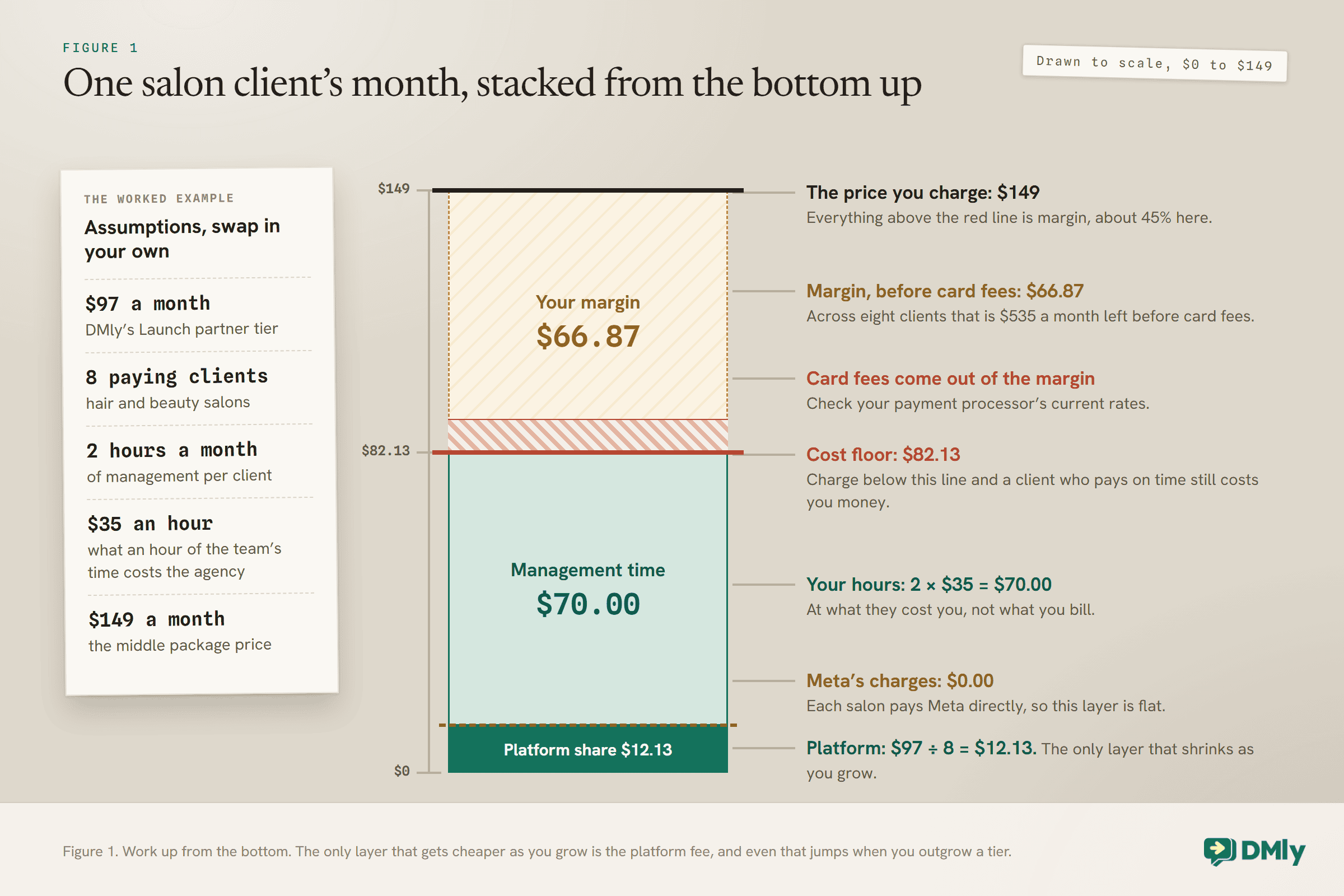
To find your platform cost per client, divide the tier price by the number of paying clients you actually have, not the number the tier allows. $97 shared by eight clients is about $12 each. Shared by three, it is over $32 each.
Your time
This is the part agencies underestimate. Keep a timesheet for your first few clients, even a rough one, and split it into build hours and monthly hours. Then cost those hours at what they cost you: your own salary target or a team member’s wage, divided by the hours they actually work. That internal cost is not the rate you charge; it is the floor under it.
Meta’s message charges
If you pay them, they are part of your cost. If the client pays Meta directly, they are not. More on this choice in Step 4, because it decides who carries the risk.
Getting paid
With DMly, clients pay you through your own Stripe account, so card processing fees come out of what you charge. Check your payment processor’s current rates and include them.
Step 2: Choose How to Price WhatsApp Automation Services
Five models suit this kind of service, and they combine well.
| Model | How it works | Works well when | Watch out for |
| Setup fee plus retainer | A one-off fee for the build, then a monthly fee for platform and management | Each client needs real build work at the start | A retainer that does not define what “management” includes |
| Tiered packages | Two or three named plans with different limits and services | You serve many similar businesses, such as salons or clinics | Tiers that differ only in limits nobody reaches |
| Per-flow builds | A price for each automation you build, on top of platform access | Clients want to start small and add later | Clients who stop at one flow and never see the value |
| Outcome-based | A fee tied to a result, such as booked appointments or recovered carts | The result is easy to count inside the platform | Disputes about what counts, and months with no results |
| Software only | Platform access with little or no service | Clients who want to run it themselves | Support time you did not price in |
A combination that suits many local-business clients is setup fee plus tiered packages: a clear one-off price for getting started, then a choice of two or three monthly plans. It is simple to explain, it pays you for the build before you do it, and the tiers give clients a natural reason to upgrade.
Outcome-based pricing is tempting because it is easy to sell, but only use it where the result is counted by the platform rather than argued about. A booking made through the WhatsApp flow is countable. “More customers” is not.
Step 3: Price the Setup and the Monthly Separately
The setup pays for the build. The monthly fee pays for the platform and the running. Mixing them is how agencies end up doing a week of work for one month’s fee.
The setup fee
List what the build includes, estimate the hours for each item, and multiply by your billable rate. A build for a local business might include:
- Connecting the client’s WhatsApp number through the official API.
- Getting the business through Meta business verification, which can take longer than the rest of the build put together.
- Writing and submitting the first message templates, and reworking any Meta rejects.
- Building the core flows: welcome message, FAQs, booking, reminders, review requests.
- Training an AI agent on the client’s services, prices and policies, if you are selling one.
- Importing contacts and installing the website chat widget.
- A handover session so the client’s team can use the inbox.
Time each of these on your first two or three clients and you will have your own numbers, which beat anyone else’s. Charge the setup up front, or at least half of it, because the work happens before the value does.
The monthly fee
The monthly fee covers the platform share and the running. Write down what the running includes, in hours or in tasks, so both sides know when a request is extra. A management retainer might include a monthly check of inbox health and template status, one campaign to opted-in customers, small flow changes, and a one-page report. Anything bigger, such as a new automation or a second WhatsApp number, is quoted separately.
If you want ideas for what to include in higher tiers, our list of no-code automation ideas for local businesses is a good place to find builds clients will pay for, and automated Google review requests are an easy one to explain in a sales call.
Step 4: Decide Who Pays Meta
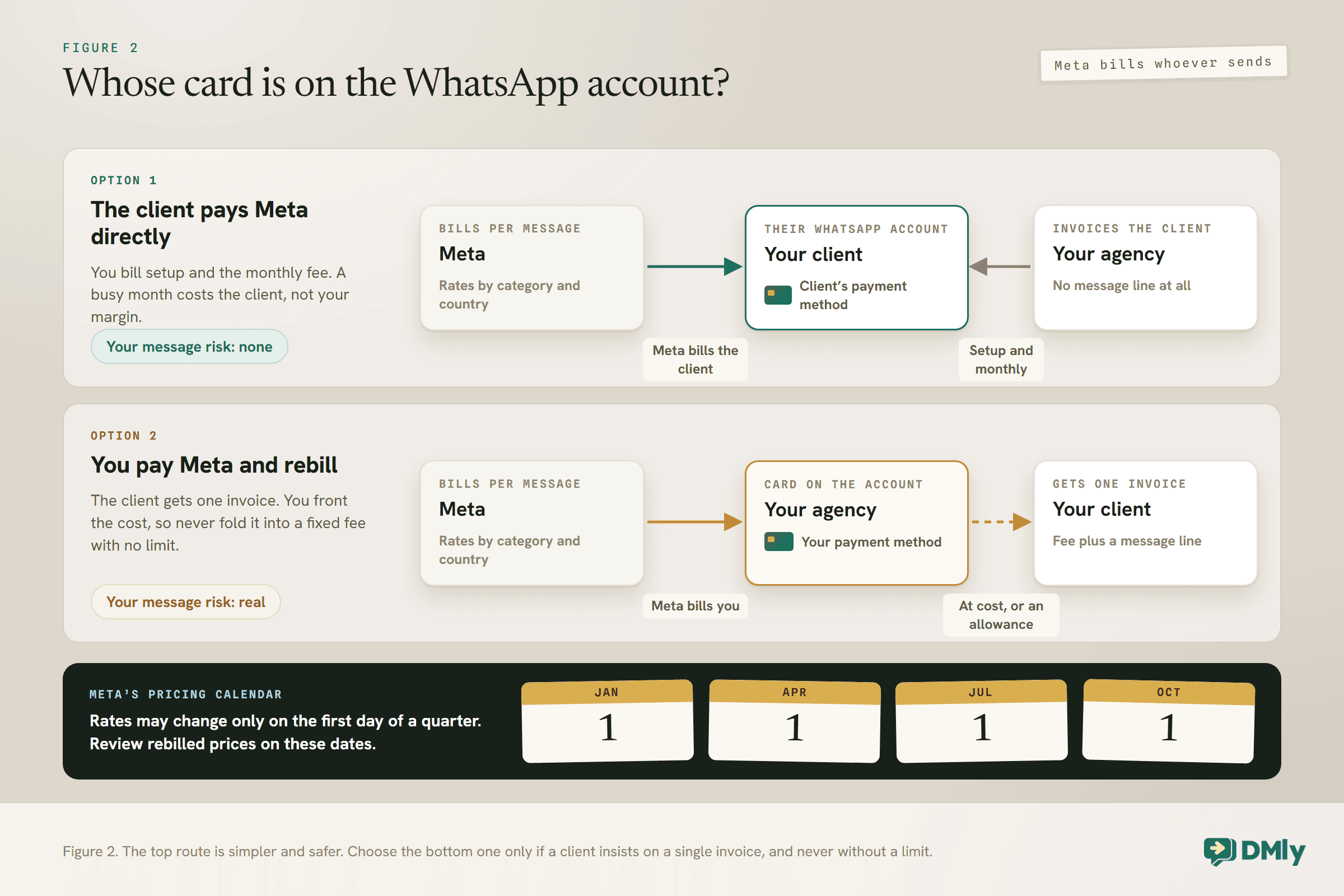
Meta bills WhatsApp messages to whichever account sends them. Decide early whose card that is, because it decides who carries the risk.
Meta charges per delivered message for template messages, at rates that depend on the template’s category (marketing, utility or authentication) and the customer’s country calling code. Meta’s pricing documentation says each WhatsApp messaging account “maintains its own billing relationship, payment method, and spend limits”, and billing is handled in Meta Business Suite. DMly adds no markup to those charges: they are Meta’s, and the bill comes from Meta.
That leaves two ways to handle them:
- The client pays Meta directly. The client’s own payment method sits on their WhatsApp account, and Meta bills them. You carry no message risk, and a busy month never eats your margin. It is the simpler option.
- You pay Meta and rebill. Some clients want one invoice. If you agree to this, bill the messages as a separate line at cost, or include a stated allowance and charge for anything above it. Never fold them into a fixed fee with no limit.
What changes on 1 October 2026
Two changes take effect on 1 October 2026, and both matter for how you quote. Meta starts charging for service messages, the free-form replies sent inside the 24-hour window, but each business phone number gets 1,000 free service messages a month, which do not roll over. And utility templates sent inside an open window, such as a booking confirmation sent just after a customer messaged, become chargeable too. Our guide to the October WhatsApp pricing change covers both in detail, and the rate card by country shows what each category costs where your clients’ customers live.
One more line from Meta’s page belongs in every agency’s diary: if a WhatsApp account has no payment method, Meta will deliver service messages within the free tier but not after it. Check that every client’s account has a payment method before October, whoever is paying.
Build Meta’s calendar into your contract
Meta’s pricing page says it “may update pricing only on the 1st day of each quarter”: 1 January, 1 April, 1 July and 1 October. That is useful. If you rebill messages, tie any price review in your contract to those dates, so a rate change from Meta never leaves you locked into last quarter’s numbers.
A Worked Example: How to Price WhatsApp Automation Services for Eight Clients
An illustration, not a price list. The assumptions are stated so you can swap in your own.
Imagine a small agency that serves hair and beauty salons. It is on DMly’s Launch partner tier at $97 a month, has eight paying salon clients, and each salon pays Meta directly for its own messages. The owner has timed the work and assumes, for this example, that each client needs two hours of management a month and that an hour of the team’s time costs the agency $35.
| Line, per client per month | Working | Amount |
| Platform share | $97 ÷ 8 paying clients | $12.13 |
| Management time | 2 hours × $35 | $70.00 |
| Meta messages | Paid by the client directly | $0.00 |
| Cost floor, before card fees | $82.13 |
Say the agency’s middle package is priced at $149 a month. Each client then leaves $66.87 before card processing fees, a gross margin of about 45%. Across eight clients, the monthly picture is:
- Revenue: 8 × $149 = $1,192.
- Platform: $97.
- Management time: 16 hours × $35 = $560.
- Left before card fees: $535.
The setup fee is priced separately. If a salon build takes the agency ten hours and it bills build work at $60 an hour, the setup fee is $600, paid before the work starts.
What happens at client number ten
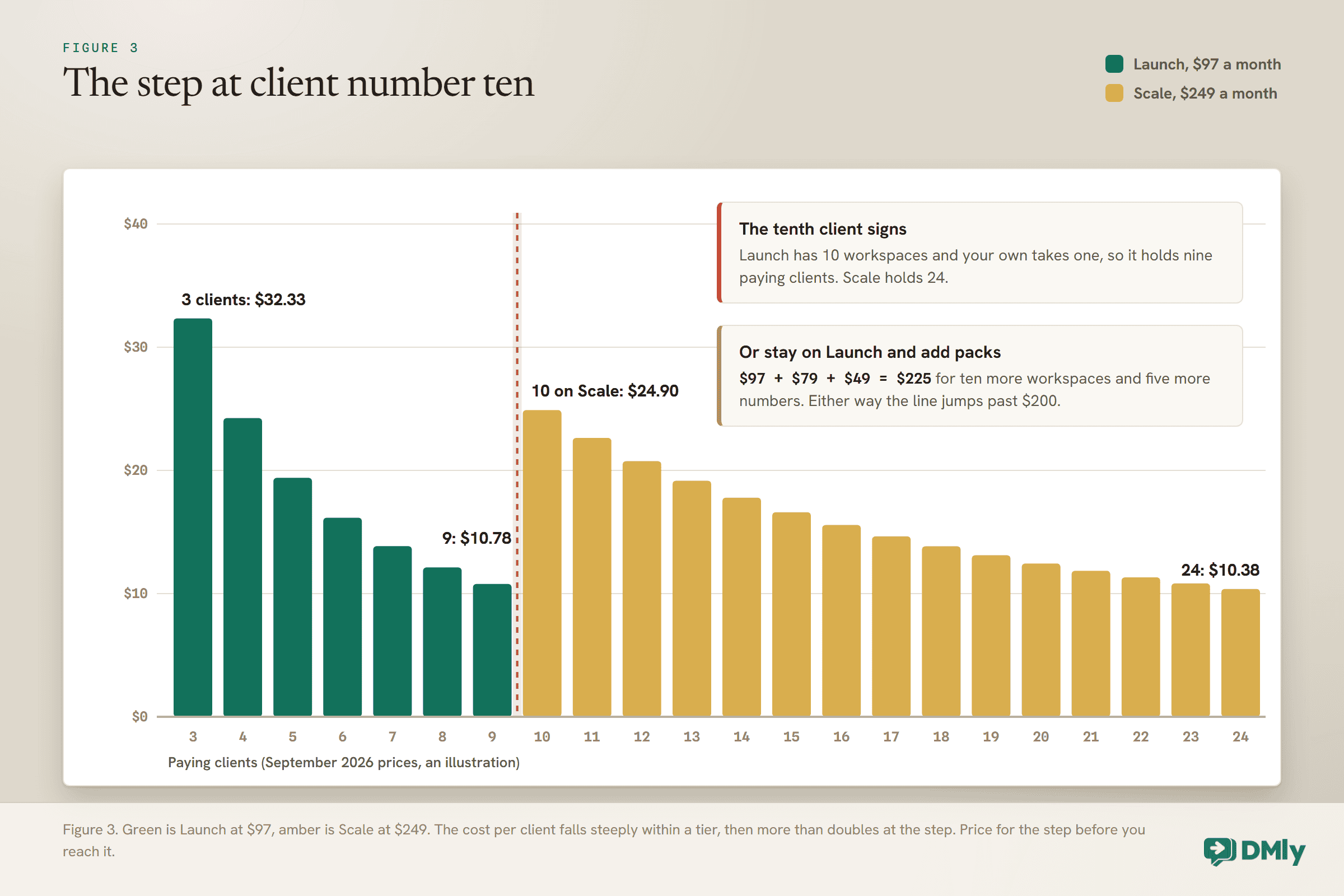
Here is the trap the example is built to show. Launch has 10 workspaces, and the agency’s own workspace uses one, so the tier holds nine paying clients. The tenth client needs more room, and the agency has two routes on DMly’s current price list:
- Stay on Launch and add a workspace pack: $97 + $79 for ten more workspaces = $176. But Launch includes 10 WhatsApp numbers, and if every client brings its own number, the agency also needs a pack of five more numbers at $49, taking it to $225.
- Move to Scale: $249 for 25 workspaces, 25 numbers and 200,000 shared contacts.
Either way, the platform line jumps from $97 to over $200 the month the tenth client signs. Spread across ten clients at the Scale price, the platform share is about $25 each, double what it was. The agency is still profitable, but only because it saw the step coming and priced with room for it. Build the next tier’s cost into your model before you reach it, and if you are close to a cap, the next client’s price should cover the step.
Step 5: Build the Packages in Your Reseller Dashboard
On DMly, the packages you design become plans your clients subscribe to themselves, through your own Stripe account.
DMly’s docs describe two money flows that “never touch each other”: you pay DMly for your partner plan, and your clients pay you, “at whatever price you set”. DMly never sees the client’s money and takes no cut of it. Your clients never see a DMly price.
- Connect your Stripe account. Nothing can be billed to a client until it is connected, under Settings, in the Stripe section for charging your customers.
- Create each package as a plan. In the reseller dashboard, go to Plans and select New plan. A plan has a monthly and a yearly price, a currency, optional trial days, and limits: contacts, social accounts, team members, AI credits and active bots per channel. Leave a limit blank for unlimited.
- Order your plans deliberately. A new client who signs up on your branded domain lands on the first enabled plan in your list. Put the plan you want new sign-ups on first.
- Create add-ons for the extras. An add-on plan grants extra contacts, an extra profile or an additional teammate, in a quantity you set.
Four details from DMly’s docs save awkward conversations later:
- Differentiate tiers with limits and services, not the AI switch. The plan form still shows an AI Agent switch, but the docs say it “no longer has any effect”: the AI agent is on for every client. Use the AI credits limit, and the services you include, to separate your tiers. The Reputation & Reviews switch does work, and turning it off stops that client managing Google reviews.
- Granted add-ons are not charged automatically. When you grant an add-on from Sub-accounts, the client gets the allowance straight away and there is no checkout step. Invoice it yourself.
- An enabled add-on plan is visible to clients. It appears on their Plans & billing page as something they can subscribe to, and a priced one starts a real Stripe checkout. Leave add-on plans disabled unless you mean that.
- Assigning a plan does not charge anyone. It changes the client’s limits immediately, but billing starts only when the client subscribes on their own billing page.
Step 6: Price In the Risks You Carry
Reselling a platform puts your name on someone else’s infrastructure. A few risks belong in your price and your contract.
- Your subscription is every client’s subscription. DMly’s docs are blunt: if your partner subscription lapses, “every one of your client workspaces is locked out immediately”, including clients who have paid you in full. Keep a card on your own account that will not expire unnoticed, and keep enough margin that a late-paying client never forces you to choose.
- The cap stops new sign-ups. When you reach your workspace limit, your branded sign-up page stops accepting new customers. The step in the worked example is a cost; the cap is a sales problem if you have not planned for it.
- Clients who stop paying you. You can suspend a client’s workspace, which locks them out while keeping their data exactly where it is, and restore it when they pay. Put that in your terms so it is never a surprise.
- Support you did not price. Software-only clients still message you when something looks wrong. Either include a support allowance in the price or say clearly what software-only includes.
Step 7: Put the Scope in Writing
A price is only as good as the scope it buys. A one-page statement of work heads off many pricing arguments.
Whatever model you choose, write down:
- What the setup includes, item by item, and what happens if Meta’s verification or template review takes longer than planned.
- What the monthly fee includes, in tasks or hours, and how extra work is quoted.
- Who pays Meta, and if you rebill, at cost or with an allowance, and when prices are reviewed.
- Whose WhatsApp account and business portfolio the number sits in. This largely decides who controls the number if the relationship ends, and it affects Meta billing too: Meta counts volume tiers at the business portfolio level, across every messaging account the portfolio owns.
- Minimum term and notice period. The setup work is front-loaded, so a minimum term protects it.
- What the client takes with them if they leave. DMly can export contacts as a CSV, and saying so up front makes the relationship easier to start.
You can even show your terms at sign-up. DMly’s sign-up settings let you add terms text beside a tick-box that the customer must tick before their account is created.
Reviewing Your Prices Once You Have Clients
Your first prices are a guess. Review them against real numbers after the first few months.
Every quarter, compare each client’s actual hours and support requests with what their package assumed. Clients who consistently use more time than their tier covers should be offered the next tier up, and the Sub-accounts list, which shows each workspace’s plan, contacts and add-ons, gives you facts to start that conversation with. If the whole book of clients is taking more hours than planned, your management assumption was wrong, and new clients should be quoted on the corrected number.
When you do raise prices, give notice, apply the change to new clients first, and pair a rise for existing clients with something they can see, such as a new automation or a quarterly report. Meta’s quarterly calendar gives you a natural moment for the conversation if you rebill messages.
Mistakes to Avoid
- Pricing from a competitor’s page instead of your own costs. You do not know their costs, their hours or their margin.
- Absorbing Meta’s charges in a flat fee. A client’s busy month becomes your loss.
- Forgetting your own workspace uses a slot. A 10-workspace tier holds nine paying clients.
- Waiting until the cap to plan the next tier. The step arrives the month the next client signs.
- Selling the AI switch as a premium feature. It does nothing; the AI agent is on for every client.
- Granting add-ons and forgetting to invoice them. There is no checkout step.
- Letting your own partner subscription lapse. Every client is locked out at once.
- Leaving scope unwritten. Every unscoped request becomes free work.
Frequently Asked Questions
How much should I charge for WhatsApp automation services?
Work up from your cost floor: your platform fee divided by paying clients, your monthly hours at what they cost you, Meta’s charges if you pay them, and card fees. Price each package above that floor with a margin you are comfortable with, and charge the setup separately.
Should I charge a setup fee?
Yes, in most cases. The build is front-loaded, often including Meta business verification, templates and flows, and a setup fee pays for it before the work happens rather than months later.
Who pays for WhatsApp messages, the agency or the client?
Either can. Meta bills the payment method on the WhatsApp account that sends the messages. Having the client pay Meta directly removes the risk from you; if you pay and rebill, bill at cost or with a stated allowance.
Does DMly take a share of what I charge my clients?
No. Clients pay you through your own Stripe account, at prices you set, and DMly’s docs say it never sees that money and takes no cut. You pay DMly a flat partner fee.
How many clients can I have on DMly’s Launch partner tier?
Launch includes 10 client workspaces, and your own workspace uses one, so nine paying clients. You can add workspaces in packs of ten or move to a larger tier.
Will the October 2026 WhatsApp pricing change affect my clients?
It may. From 1 October 2026 Meta charges for service messages beyond 1,000 free per business phone number each month, and for utility templates sent inside an open window. Clients who send many booking confirmations should expect a new line on their Meta bill.
Price the Cost Before the Client
Go back to the client from the first paragraph, the one who pays every invoice on time and still costs you money. Nothing about that client needed to change. The fix was on your side: a cost floor worked out before the price, a separate setup fee, Meta’s charges kept off your margin, and the next tier’s cost planned before the tenth client signed.
When you price WhatsApp automation services that way, each new client makes the business stronger rather than busier. Work out your floor this week, time your next build, and write the scope down before you send the next proposal.
Writing about WhatsApp automation, bookings and growth for local business.
Turn WhatsApp into your busiest channel.
Start free and run message, bookings, payments and reviews in one place.
