
How to Automatically Ask Customers for Reviews After an Appointment
Automated reviews after an appointment come down to a button in your calendar that somebody has to press, and pressing it is the least interesting thing anybody does all day. It marks the appointment as completed.
That one press is what asks for the review, what awards the loyalty point, and what makes your no-show number mean anything. Three unrelated parts of the business hang off it, and none of them announce that they are waiting.
Which would be fine, except for what DMly does if nobody presses it. Roughly a day after an appointment’s time has passed, anything still sitting at Confirmed or Pending is tidied away to Completed automatically. Your calendar looks immaculate. And that tidying is deliberately silent: it fires no trigger, sends no webhook and awards no points. So a business that never marks anything ends up with a calendar full of completed appointments, no reviews after an appointment going out at all, and nothing anywhere reporting a fault.
This guide is about building that automation properly: the trigger it runs on, the habit it depends on, how long to wait before asking and why that differs by trade, which services should ask at all, how classes behave differently, and what to do about people who did not turn up. What a review request should say, what Google permits and how the request mechanism works are all covered in our complete guide to Google review automation. This page stays on the appointment.
The Trigger Behind Reviews After an Appointment
The flow starts on Appointment completed, waits, and then asks. That is the whole architecture, and it is about four steps in the flow builder.
The node that does the asking is Request Google review, and it has two settings worth knowing. Send on defaults to the contact’s active channel, which means WhatsApp unless their active channel is SMS, and you can pin it to one or the other instead. Review template applies only when the request goes by WhatsApp, and the default one already carries the customer’s name, your business name and the review link.
Requests go out on the dmly_review_request template, which is approved by Meta and delivers outside the 24-hour window. That single fact is what makes this automation possible at all. A review request arrives days after the customer’s last message, long after a normal reply would be blocked, and this is one of the few things a small business genuinely needs a template for.
Each successful send fires a Review request sent trigger of its own, which is what you build a follow-up on if you want one, or use to tag the contact so you can leave them alone for six months.
One behaviour to design around: The node never stops the flow. Whether the request sends, is skipped or fails, the next step runs anyway. That is usually what you want, but it means a flow that sends a request and then tags the contact as asked will tag people who were never actually asked. If the tag matters to you, branch on the Review request sent trigger rather than assuming the node worked.
The Habit the Whole Thing Depends On
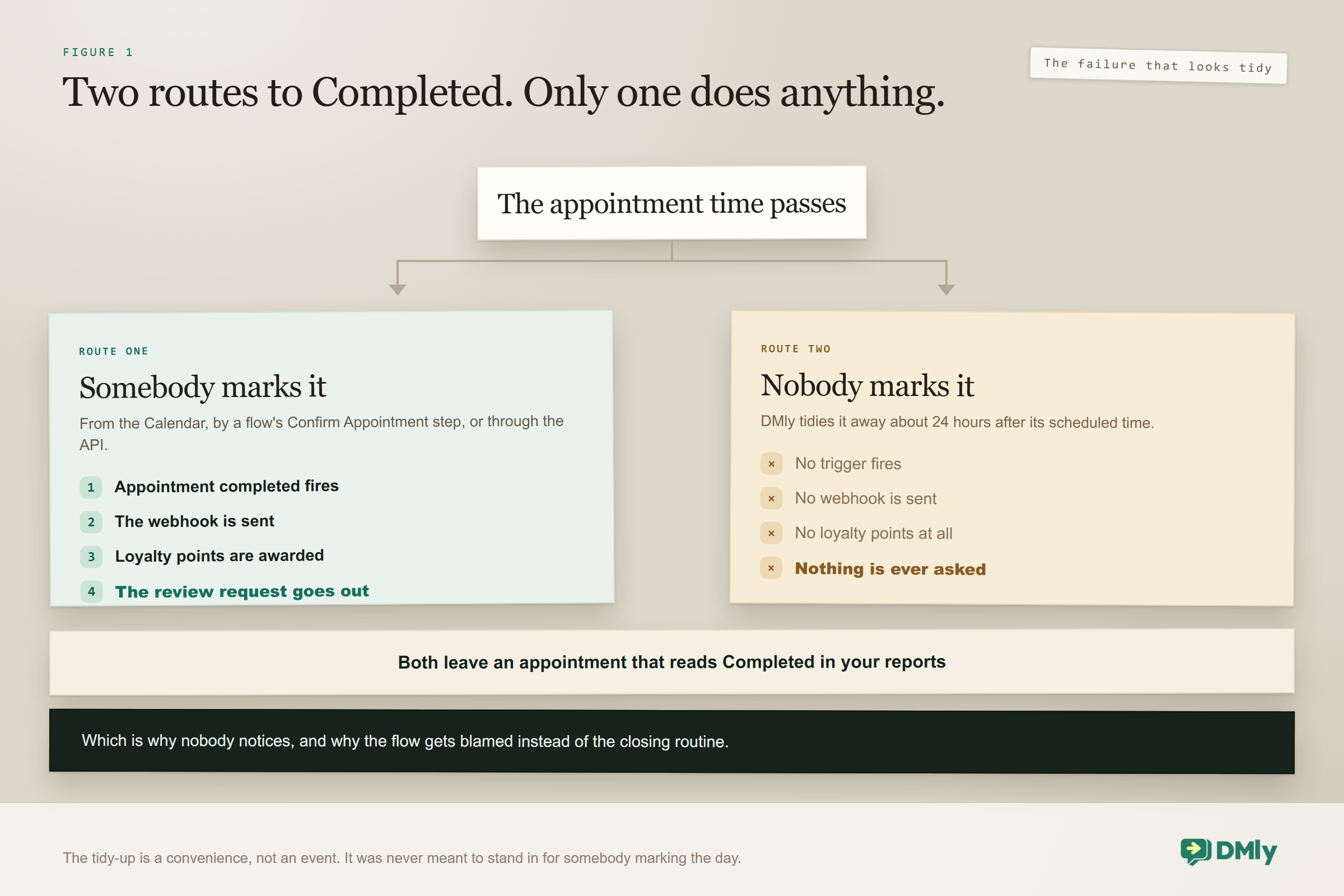
An appointment reaches Completed by two routes, and only one of them does anything.
Appointments live in one of eight states. Three of them are upcoming: Confirmed, Pending and Awaiting payment. Five are in the past: Cancelled, Completed, No-show, Expired and Payment-failed. Getting to Completed is where the difference lies.
| How it got to Completed | What happens next |
| You marked it from the Calendar, or a flow’s Confirm Appointment step did, or the API did | The Appointment completed trigger fires, the appointment.completed webhook is sent, and loyalty points are awarded |
| Nobody marked it, and DMly tidied it away about 24 hours later | Nothing. No trigger, no webhook, no points |
Both rows produce an appointment that reads Completed in your reports. Only the first one produces a review request. This is why a business can build the flow correctly, publish it, and watch nothing happen for a fortnight while everybody assumes the automation is broken.
So the fix is not in the flow builder, it is in the closing routine. Somebody goes through the day’s list and marks what happened. It takes a couple of minutes and it is the highest-leverage two minutes in the diary, because the same act feeds three different things.
- Review requests, which is this page.
- Loyalty points, which are only awarded on a marked completion. An auto-retired appointment earns the customer nothing, and they will eventually notice their balance is wrong.
- Your no-show number, which is only real if somebody is distinguishing a no-show from a completion. If everything auto-retires to Completed, your no-show rate is zero and it is a fiction.
If you take one operational change from this article, make it that closing routine rather than anything in the automation. Pin it to something that already happens, like cashing up.
How Long to Wait Before Asking for Reviews After an Appointment
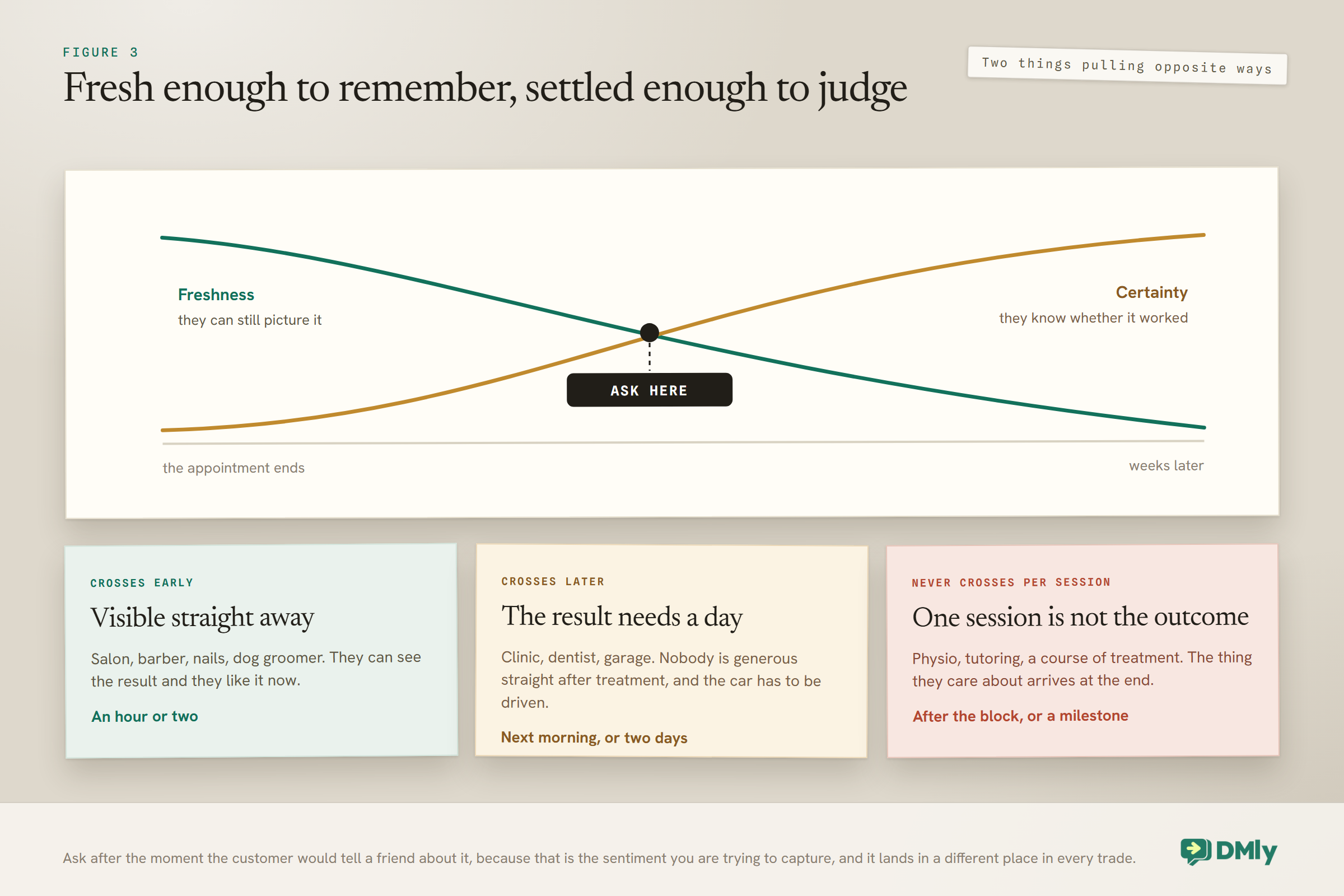
Two things have to be true at once, and they pull in opposite directions. The experience has to be fresh enough that the customer can still picture it, and the outcome has to be known well enough that they can honestly judge it. Every sensible delay is a compromise between those two.
For most appointment businesses the freshness clock runs fast and the outcome is instant, so you ask the same day. For anything where the result reveals itself later, waiting is not politeness, it is self-protection: ask a customer to rate something before they know whether it worked and you are inviting a review of your guess rather than your work.
| Trade | Sensible wait | Because |
| Salon, barber, nails | An hour or two | They can see the result immediately and they are pleased with it now |
| Dog groomer | Same evening | Same as above, but after the owner has shown somebody else the dog |
| Dentist, GP, clinic | The next morning | Nobody is at their most generous immediately after treatment |
| Physiotherapy, chiropractic | Not per session. After a block of treatment | One session is a step in a course, and asking after each one is exhausting |
| Tattoo, aesthetics | A week or more | Healing changes the verdict, and an early ask gets an early verdict |
| Garage, MOT, repairs | Two or three days | Long enough that the car has been driven, short enough to still connect it to you |
| Driving instructor, tutor | After a milestone, not a lesson | The outcome the customer cares about is the test, not the hour |
The pattern underneath the table is more useful than the table itself. Ask after the moment the customer would tell a friend about it, because that is exactly the sentiment you are trying to capture, and it lands at very different points in different trades. The salon customer tells someone in the car. The physio client tells someone after six weeks of not limping.
One practical constraint: whatever delay you set is a wait step in the flow, so it runs from the moment the appointment was marked, not from when it actually ended. If your team marks the day’s appointments at closing time, a one-hour wait means everybody gets asked at the same time in the evening, which is fine but is not what you thought you configured.
Deciding Which Services Should Ask at All
Not every appointment deserves a request, and asking after all of them is the fastest way to make the request worthless.
Three filters decide which bookings should produce reviews after an appointment, and they are worth applying deliberately rather than discovering by complaint.
- Was there enough of an experience to review? A consultation, a repeat prescription pickup or a five-minute check has not given the customer much to say. They will either not reply or write something thin, and a thin review is worth less than no review.
- Is this a first visit or a fiftieth? A regular who comes every three weeks should not be asked every three weeks. Ask once, then tag them and leave them alone for six months or a year.
- Did it go well? You often know. If the appointment ran an hour late or the outcome was awkward, that customer is better served by a phone call than an automated request, and there is usually a way to exclude them.
In practice that means building the automation on specific services rather than on every appointment, and putting a cool-down tag on anybody who has been asked. It is less impressive as a diagram and considerably better as a business.
Classes Work Differently, and Better
A class does not complete itself, and that turns out to be an advantage. Somebody has to work through the Roster, which means attendance in a class business is more reliably recorded than completion in a one-to-one business.
The Roster shows every live participant, seats first and the waitlist below them with their queue positions. Next to each seat are two buttons, Attended and No-show, and there is a Mark all attended control that applies to every seat not already marked, behind a confirmation prompt. Press the same button again on a seat and it reverts to Booked, which is a genuine undo and worth knowing before somebody panics.
The important part for this page: marking a seat Attended fires the same Appointment completed trigger as a one-to-one booking, and awards loyalty points the same way. No-show fires Appointment no-show. There are no separate class versions of either. So the review automation you built for appointments already covers your classes, with no second flow to maintain.
The cool-down matters more for classes than anywhere else: A yoga studio member attends twice a week. Without a cool-down tag, that is a hundred review requests a year to one person. Tag on the first request and gate the flow on that tag, and the request becomes an occasional, welcome thing rather than a weekly irritation. This single setting is the difference between a class business that gets reviews and one that gets muted.
Two class behaviours worth knowing while you are in there, because both affect who is on the roster to mark. A client can cancel a class seat from their booking link within the deadline you set, but they can never reschedule it; that option does not appear for a class booking at all, so they cancel and rebook, or you move them by hand. And with a waitlist enabled, a freed seat promotes the person at the front of the queue and fires a Class seat opened trigger, so the roster you mark at the end may not be the roster you started with. The wider mechanics are in our class booking system guide.
What About No-Shows
Obviously you do not ask somebody for a review of an appointment they did not attend. The reason to mention no-shows here is subtler: marking them is what protects the review flow from ever doing so.
If nobody marks anything, every booking auto-retires to Completed, and a flow built on Appointment completed will not distinguish the person who came from the person who did not. In practice the retirement fires no trigger, so nothing is sent to either of them, which is a failure that at least fails safe. But the moment somebody starts marking completions and skips the no-shows, the no-shows sit at Confirmed until they retire, and your data quietly claims a perfect attendance record.
So mark both. It costs one extra press per missed appointment and it gives you two things: a review flow that only ever reaches people who were actually there, and a real no-show figure. There is a separate Appointment no-show trigger, which is what you would build a rebooking message on. Handling missed appointments properly is a subject of its own and does not belong on this page.
When the Request Is Not Sent at All
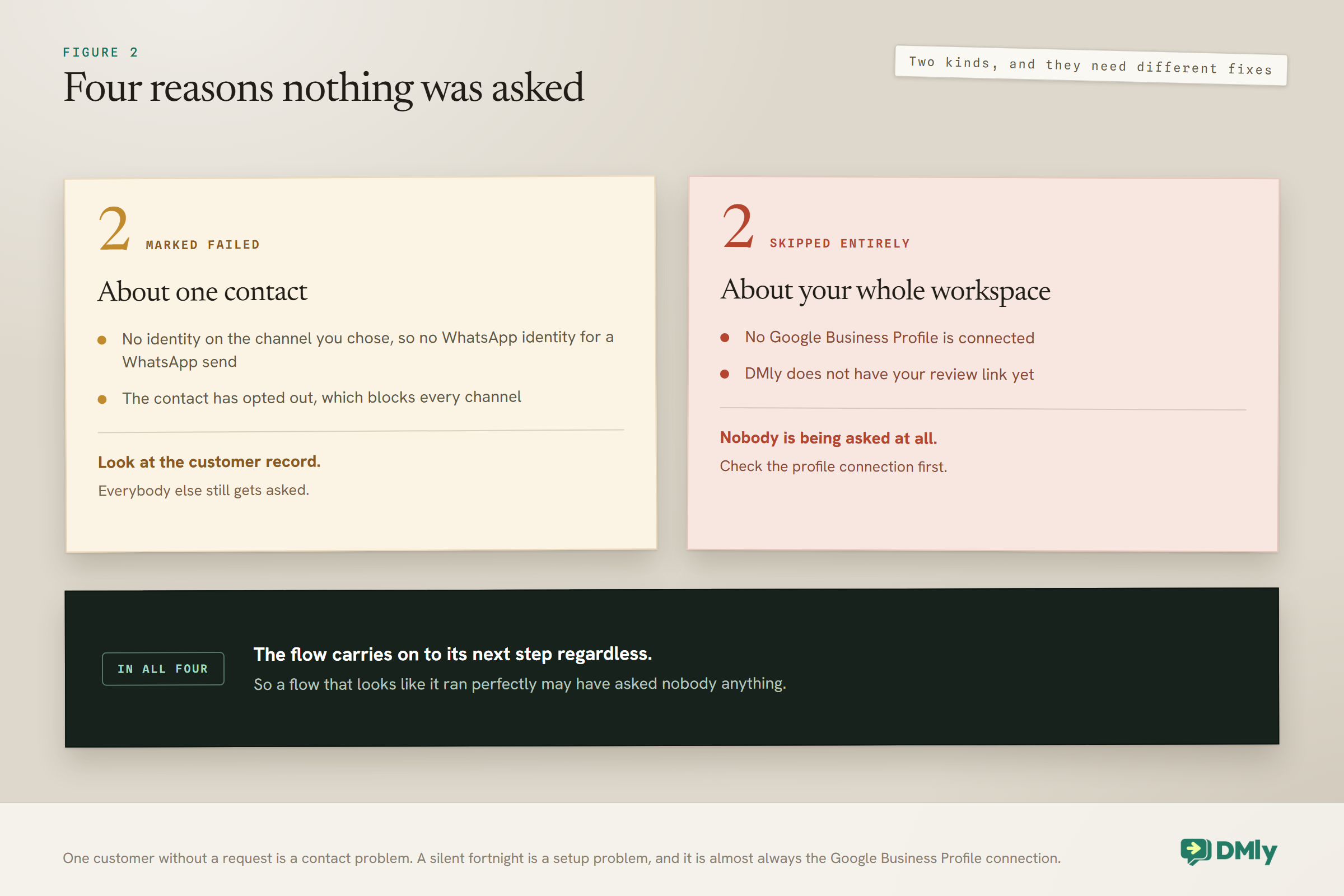
Four conditions stop a request, and none of them interrupts your flow. Two mark it Failed and two skip the node entirely, and it is worth knowing which is which when you are staring at a flow that appears to have run.
| What happened | Why |
| Marked Failed | The contact has no identity on the channel you chose, so no WhatsApp identity for a WhatsApp send |
| Marked Failed | The contact has opted out, which blocks every channel |
| Skipped entirely | No Google Business Profile is connected |
| Skipped entirely | DMly does not have your review link yet |
The two skip conditions are both setup problems, and they both produce the same experience: a flow that runs cleanly and asks nobody anything. If you have built this and no requests are going out, check those two before you check anything else, and check the Google Business Profile connection first. Connecting the profile properly is covered in our guide to automating your Google Business Profile.
One number to keep in mind if you ever catch up by hand rather than by flow: a manual send goes to up to 200 contacts at a time. That is generous for a catch-up and a hard stop for anything resembling a blast, which is the right way round.
The distinction between Failed and skipped matters more than it sounds. A Failed request is about one contact and tells you something about them: wrong channel, or they opted out. A skipped request is about your whole workspace and means nobody is being asked, today or any other day. So if you are looking at one customer who did not get a request, look at the contact. If you are looking at a silent fortnight, look at the setup.
What Reviews After an Appointment Can Honestly Tell You
Less than you would expect, and it is better to know that now. Requests carry a tracked link shaped /r/<token> which redirects to your Google review page and records the first open, so you can see that somebody followed it.
What you cannot see is whether they then wrote anything. There is no link between a request you sent and a review you received, and the Responses figure is never filled in. Your real measure is the rating and review count on the profile itself, moving over months. Why that gap exists and what to do about it is a subject of its own, and it is not this page’s.
For the purpose of this article, three things are worth watching and all three are about the trigger rather than the reviews.
- How many appointments were marked, against how many happened. If the first number is smaller, the closing routine is your problem, not the flow.
- How many requests sent, against how many appointments marked. A gap here is the failure and skip conditions above.
- How many tracked links were opened. Not reviews, but the last thing you can actually count.
Testing It Before It Meets a Customer
Book yourself in, mark it complete, and watch what happens. That is the whole test, and it catches every failure on this page.
- Create a booking against your own contact record, on the service the automation is built for. If you built it on specific services, use one of them rather than any old slot, because that is the thing most likely to be wrong.
- Mark it complete from the Calendar. Not by waiting; waiting proves nothing, because the auto-retirement will not fire anything.
- Watch the wait step actually elapse. If you set two hours, wait two hours. Shortening it for the test and forgetting to put it back is one of the most common ways a live flow ends up asking people immediately.
- Check the message that arrives, on the channel a real customer would get it on, and tap the link to confirm it lands on the right Google profile. That link is the only part of this a customer interacts with.
If nothing arrives, work down the four conditions above before touching the flow. In most cases it is the Google Business Profile connection or the review link, not anything you built.
Mistakes Worth Avoiding
- Relying on the automatic tidy-up. It fires nothing. Somebody has to mark the day.
- Asking for reviews after an appointment every single time. Regulars get asked repeatedly and stop reading anything you send.
- Building it on all services rather than the right ones. A five-minute check-up produces a thin review or none.
- Asking before the outcome is known. On anything that heals, settles or gets driven, you are asking about a guess.
- Forgetting to mark no-shows. Your attendance data becomes fiction and the flow eventually reaches the wrong person.
- Assuming the node stopped the flow when it failed. It does not. The next step runs regardless.
- Leaving the test wait step in place. Five minutes in testing becomes five minutes in production.
- Setting no cool-down for classes. A twice-weekly member is a hundred requests a year.
- Expecting the numbers to tell you about reviews. They tell you about requests and opens, and nothing further.
Frequently Asked Questions
How do I automatically ask for reviews after an appointment?
Build a flow on the Appointment completed trigger, add a wait step for however long suits your trade, and add the Request Google review node. The part that catches people out is not the flow, it is that the trigger only fires when somebody actually marks the appointment complete.
Why is my review automation not sending anything?
Usually one of two things. Either nobody is marking appointments complete, so the trigger never fires and DMly’s automatic tidy-up moves them silently instead, or the node is being skipped because no Google Business Profile is connected, or DMly does not have your review link yet.
How long should I wait before asking?
Long enough for the customer to know whether the work was good, short enough that they can still picture the visit. An hour or two for a salon, the next morning for a clinic, a couple of days for a garage, a week or more for anything that heals. For a course of treatment, ask after the block rather than after each session.
Does this work for classes as well as one-to-one appointments?
Yes, and with no extra flow. Marking a seat Attended on the class Roster fires the same Appointment completed trigger and awards loyalty points the same way. Add a cool-down tag though, because a twice-weekly member would otherwise be asked twice a week.
Will it ask someone who did not turn up?
Not if you mark them as a no-show, which fires a different trigger. The risk is a booking nobody marked at all, which sits at Confirmed until it is tidied away, so make marking both outcomes part of the closing routine.
Can I send review requests to past customers in bulk?
Yes, up to 200 contacts at a time manually. Use it for a one-off catch-up rather than as a habit, and expect it to work less well than a request sent hours after the appointment, because the whole advantage of this automation is timing.
Can I tell which reviews came from my requests?
No. Requests carry a tracked link that records the first open, but nothing connects a request to a review that follows it, and the Responses figure is never filled in. The rating and review count on your Google profile over a few months is the honest measure.
Fix the Habit, Then Build the Flow
The flow is twenty minutes of work and most people get it right first time. The reason automated reviews after an appointment so often produce nothing is upstream of it, in a two-minute closing routine that nobody thinks of as part of the marketing.
So start there. Agree who marks the day’s appointments and when, and check tomorrow that they did. Then build the flow on the services that genuinely earn a review, set the delay by when your customers actually know whether you did a good job, and tag anybody you have asked so you do not ask them again next month.
Once that is running, the rest of the subject opens up: what the request should say, what Google permits you to do, and how to answer what comes back. All of that sits in our guide to automating Google review requests, replies and reporting. If your bookings themselves need attention first, the appointment booking guide is the place to start, and salons in particular will find the same loop laid out end to end in our salon automation guide.
Writing about WhatsApp automation, bookings and growth for local business.
Turn WhatsApp into your busiest channel.
Start free and run message, bookings, payments and reviews in one place.
