
A barber and a pilates instructor can work out of the same building, charge similar prices and be booked solid every evening, and still need completely different software. The barber sells an hour to one person: if the 3pm goes unsold, the whole hour is lost, and the only question his diary ever answers is “is 3pm free?”. The instructor sells the same hour twelve times. Her 6pm doesn’t fail by being empty; it fails by running at seven seats when it could have run at twelve, and her diary has to answer a harder question: “how full is 6pm, who’s waiting for a seat, and who actually turned up?”
Most booking tools were built for the barber, which is why a class business needs an online class booking system rather than a diary. Put a studio on the barber’s software and the cracks show within a week: no seat counts, no waitlist, no register, and a Tuesday-evening cancellation that quietly becomes an empty mat because nobody rang round to refill it.
In this guide, we’ll look at what an online class booking system actually is (and what it isn’t), how one session runs from publish to follow-up, why the numbers make this worth doing properly, what to look for in a system, how capacity and waitlists keep the room full, how the money works, how recurring schedules and online classes fit, what the reminders and the register do, how AI changes class bookings, what it looks like across six kinds of business, and how to set the whole thing up with DMly in an afternoon.
What Is an Online Class Booking System?
An online class booking system lets a customer see your class schedule, pick a session, take one of a fixed number of seats and pay for it, without messaging you first; and it lets you publish sessions, cap them, waitlist them, remind the people booked in, mark who came and follow up afterwards. The schedule lives in one place, and the booking page, the chat and your front desk all sell seats from the same count.
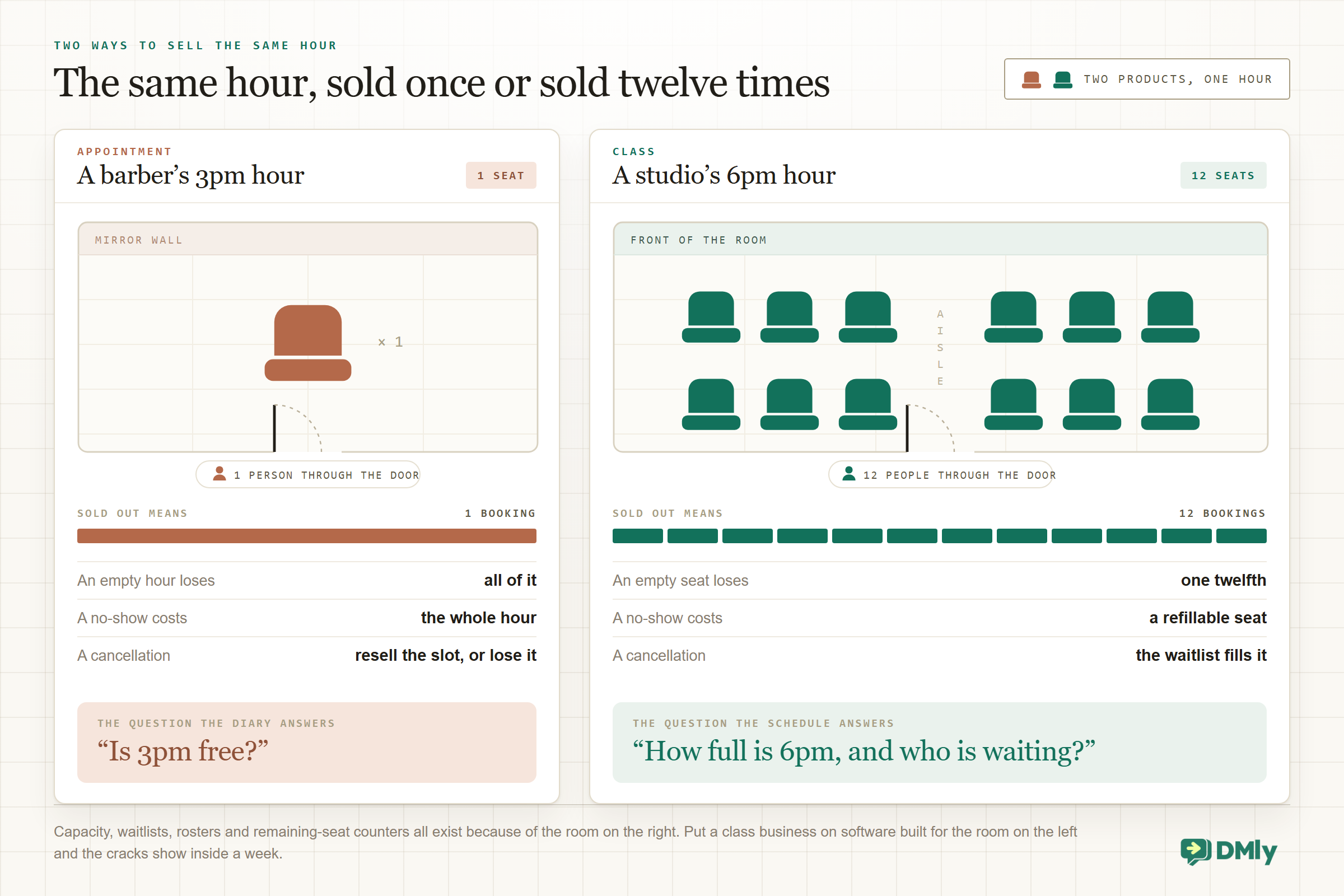
The definition matters because of what it excludes. A shared Google Calendar is not a class booking system: it holds sessions but sells nothing. A booking page without capacity is not a class booking system either: it will happily sell the thirteenth mat in a twelve-mat room. And an appointment tool with a “group” checkbox usually fails at the exact features a class business lives on, because those features only make sense once a time slot can hold more than one paying customer:
- Capacity. Every session has a seat count, the page shows how many are left, and the system stops selling at full rather than overbooking the room.
- Waitlists. A sold-out session keeps collecting demand, and a cancellation refills itself from that list instead of dying quietly.
- A roster. Twelve bookings means twelve names to greet, mark attended or no-show, and follow up individually.
- Repetition. Classes recur. Tuesday 6pm exists every week, and nobody should have to recreate it by hand fifty times a year.
One distinction to hold onto for the rest of this guide: a class is the product (Reformer Pilates, 50 minutes, twelve seats, a price), and a session is that product on a date (Tuesday at 6pm with Tolu). The class is defined once; sessions are scheduled from it. Every system that gets class booking right is built on that split, and most of the mess in spreadsheet-run studios comes from not having it. If your business sells hours to one person at a time instead, you want our WhatsApp appointment booking guide; this one is about rooms, not chairs.
How a Class Booking System Works, Step by Step
Here is the life of one session, start to finish, and every class you run is this same loop. the system’s job is to run every step without a person holding the phone.
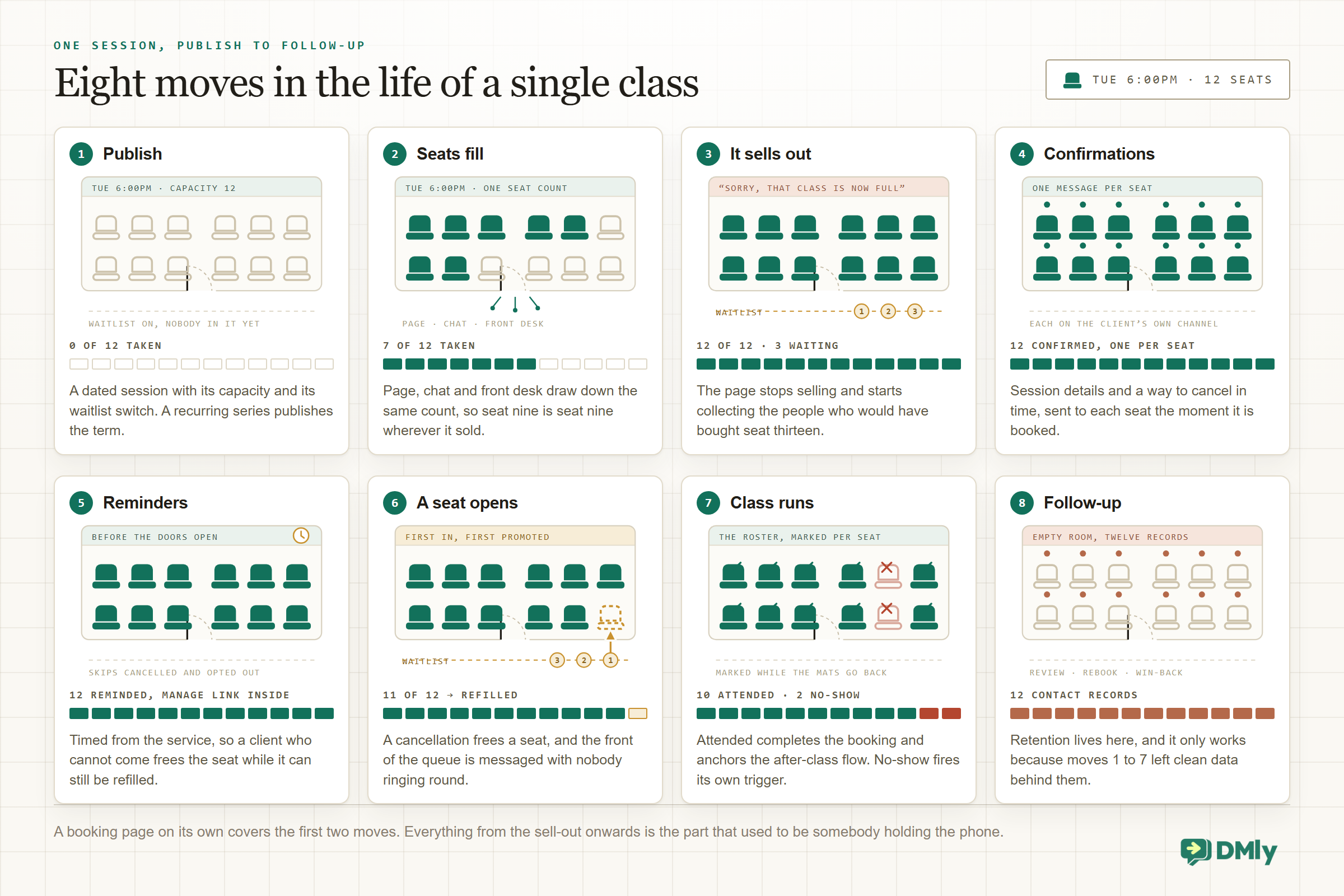
- You publish the session. The class already exists as a service, so scheduling is a date, a host, a capacity and a waitlist switch. A recurring schedule publishes the whole term in one go.
- Seats fill from every door. The booking page, a link in your Instagram bio, a share in the group chat, an AI agent answering “is there space tonight?”, and your own front desk all draw down the same seat count, so seat nine is seat nine no matter where it was bought.
- It sells out, and the waitlist takes over. The page stops selling at capacity and starts collecting the people who would have paid for seat thirteen. That list is tomorrow’s revenue; a system without it just shows “full” and wastes the demand.
- Confirmations go out per seat. Each booking gets its own confirmation on the client’s channel, with the session details and a way to cancel in time.
- Reminders go out before the session. Timed from the service, skipped for anyone who cancelled, and carrying the manage link, because a reminded client who can’t come is a seat you can still refill.
- A seat opens, and refills itself. Someone cancels in time; the waitlist promotion runs; the seat is offered, paid for and confirmed with nobody ringing round. More on this loop below, because it’s the single most valuable thing a class system does.
- The class runs, and the roster gets marked. Attended or no-show, per seat, while you can still remember faces. The register is what makes every later number honest.
- The follow-up goes out. A thank-you, a review request, a nudge towards the next session or the next course. For a class business this is where retention lives, and it only works if steps 1 to 7 produced clean data.
Notice what’s missing: at no point does anyone check a paper list, count heads against a spreadsheet, or send twelve reminders by thumb. That’s the test to hold any class booking system against.
Why It’s Worth Doing Properly (With the Numbers)
Your instructor, your room and the hour cost the same whether four people come or twelve, which is why fill rate, not price, is the number that decides whether the business works. That makes the fill rate, not the price, the number that decides whether the business works, and three findings say software moves it.
- 67.8% → 78.6% attendance without reminders vs with text-message reminders, pooled across seven trials and 5,841 people (risk ratio 1.14). Cochrane review CD007458, 2013
- 25% fewer no-shows among people who received text notifications (15% vs 21%), in a meta-analysis of 21 studies. Robotham et al., BMJ Open, 2016
- ~50% of appointments booked through Zocdoc in 2023 were made between 5pm and 9am, when the desk was closed (vendor data). Zocdoc, 2023
- 10 to 30% typical no-show range for gym classes, with trial-session no-shows running higher, at 20 to 40% (vendor data). Glofox, 2026
Read those together. A meaningful share of the people who want a seat decide in the evening, after the desk has gone home, so a schedule that can only be booked by message loses them to whoever answers first. And of the people who do book, a predictable slice forgets: the reminder evidence is from healthcare, where attendance gets measured properly, but the mechanism (people forget, a message where they look fixes it) is not medical, and the class-shaped evidence agrees: a UK field experiment that sent text reminders to adult-education students lifted attendance by seven percentage points over the trial, against a baseline where roughly a quarter of students stopped attending within ten weeks. On a twelve-seat class, two no-shows are a sixth of the room; a reminder plus a waitlist turns most of that loss back into revenue.
There’s a second-order effect too. A full class feels different to be in, gets rebooked more and photographs better than a half-empty one. Fill rate compounds.
What to Look For in a Class Booking System
Walk through this list with any tool you are considering, and make it show you each one live rather than point at a features page.
- Classes as a first-class type. Not an appointment with a group flag: a class service with its own capacity, price and payment mode, and sessions scheduled from it.
- Live seat counts everywhere. The page, the chat and the front desk sell from one count, and the customer can see how many seats are left before they commit.
- A real waitlist. Joining is one tap, the promotion is automatic when a seat opens, and paid classes handle the payment at promotion time rather than trusting people to settle up later.
- Recurring schedules. Weekly and term-length repetition, set once, with the capacity and waitlist inherited by every occurrence.
- Payments built in. Pay at booking to hold the seat, pay-after for invoiced clients, and a sane answer for packs and memberships, through a real gateway rather than “transfer and hope”.
- Reminders on the channel people read. WhatsApp first for most local businesses, with the compliance details (approved templates outside the 24-hour window) handled by the vendor, not by you.
- A roster with one-tap marking. Attended and no-show per seat, because a register you have to fight is a register that doesn’t get kept.
- Self-service cancel, within your deadlines. The client frees the seat from the confirmation or reminder, early enough for the waitlist to refill it.
- Online-class support. A meeting link created and delivered automatically for remote sessions, without pasting Zoom URLs into twelve chats.
- A contact record behind every seat. Bookings, attendance, payments and opt-outs on the person, so the follow-up, the win-back and the “you’ve missed three Tuesdays” message are possible at all.
- Reports. Fill rate by class and by host, no-show rate, revenue. You’re running a room; you need to know which hours earn.
The takeaway: judge a class system on what happens between “full” and “class starts”. Anything can sell the first eight seats. The last four, the refilled cancellation and the honest register are where the good systems separate from the pretty ones.
Capacity and Waitlists: How the Room Stays Full
Capacity looks like a limit, but it is really a promise in both directions. the customer is promised a mat, a bike or a desk that physically exists, and you’re promised the page will never sell what the room can’t hold. In DMly, capacity sits on the class and on each session, the booking page can display the remaining seats (“3 of 10 places left”), and a sold-out session never disappears from the page: it shows as “Full, join waitlist”, or as an unselectable Full row if the waitlist is off, and anyone who still tries to book is told plainly: “Sorry, that class is now full.”
That sentence is where the interesting part starts, because a full class is not a finished sale. It’s proof of demand, standing in a queue.
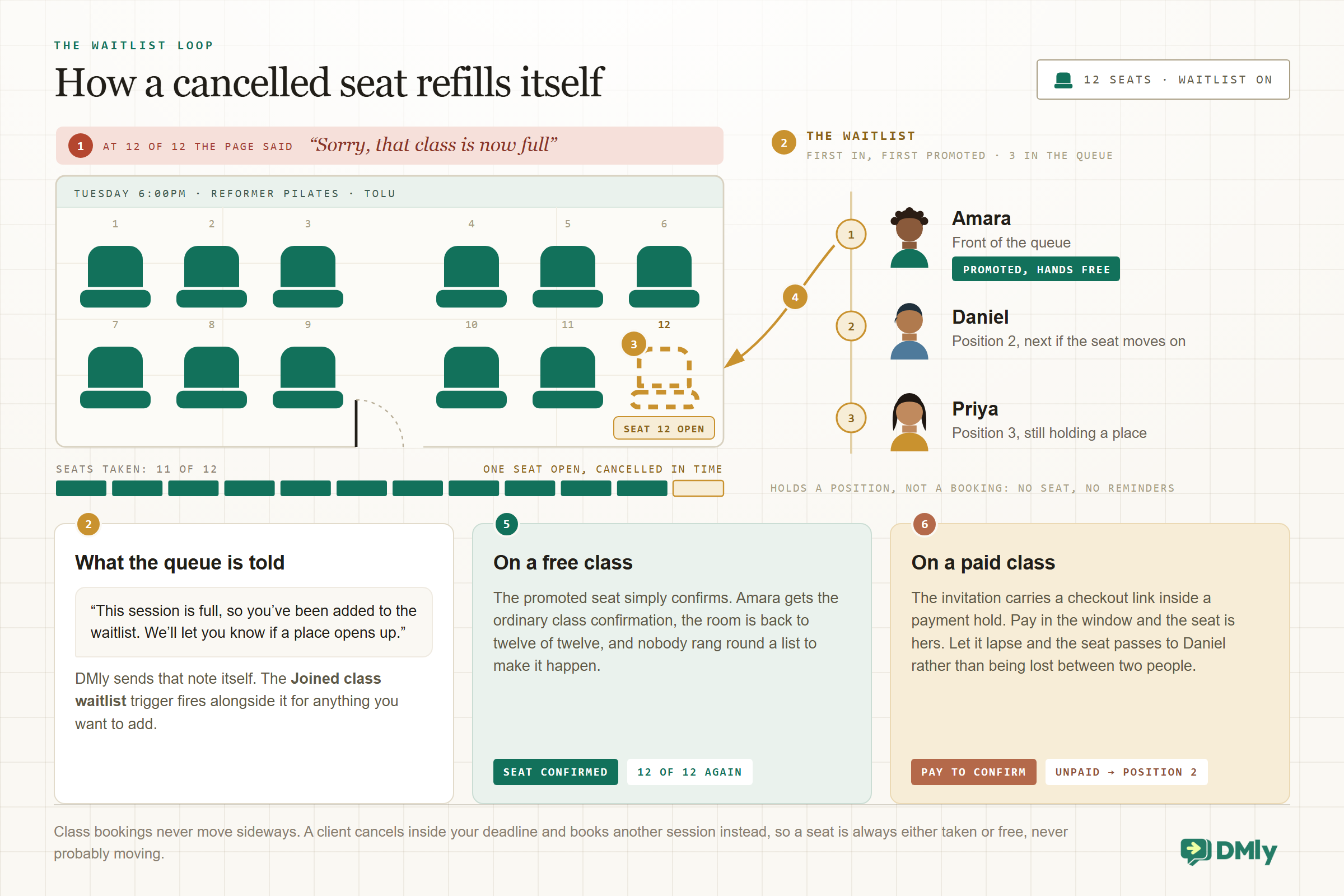
Here’s the loop in DMly’s terms. A client taps to join a full session’s waitlist and gets a built-in note straight away (“This session is full, so you’ve been added to the waitlist. We’ll let you know if a place opens up.”), while the Joined class waitlist trigger fires for anything extra you want to send. A waitlisted client holds a position, not a booking, so they get no reminders and take up no seat. When a booked client cancels in time (or a payment hold expires unpaid), the seat opens and the promotion runs on its own: first in, first promoted, with an automatic message. On a free class the promoted client’s seat simply confirms. On a paid class they get a checkout link inside a payment hold instead: pay within the window and the seat is theirs; don’t, and the seat passes to the next client in the queue rather than being lost between two people.
Two rules keep the loop fair and the register clean. First, class bookings don’t reschedule: a client can cancel within your deadlines, but moving to Thursday means cancelling Tuesday and booking Thursday, so a seat is always either taken or free, never “probably moving”. Second, classes carry their own policy, separate from your one-to-one bookings, under Settings → Class: a Cancellation deadline in hours decides how late a seat can be freed, which is a real trade (a tight deadline protects your planning, a loose one gives the waitlist more chances to refill), and a Booking window ahead stops clients booking themselves into a class that starts in minutes. For most evening classes, a cancellation deadline a few hours out catches the school-run cancellations while leaving the waitlist time to work. And a seat is one per person: a client who already holds one is told “You’re already booked for this class” instead of being sold a second.
Practical tip: Watch the waitlist itself as a number, not just as a queue. A class that’s full every week with four people waiting isn’t a scheduling success; it’s a second session you haven’t opened yet.
The Money: Per Seat, Packs and Memberships
Class businesses charge in three shapes, and a good system handles all three without a spreadsheet on the side.
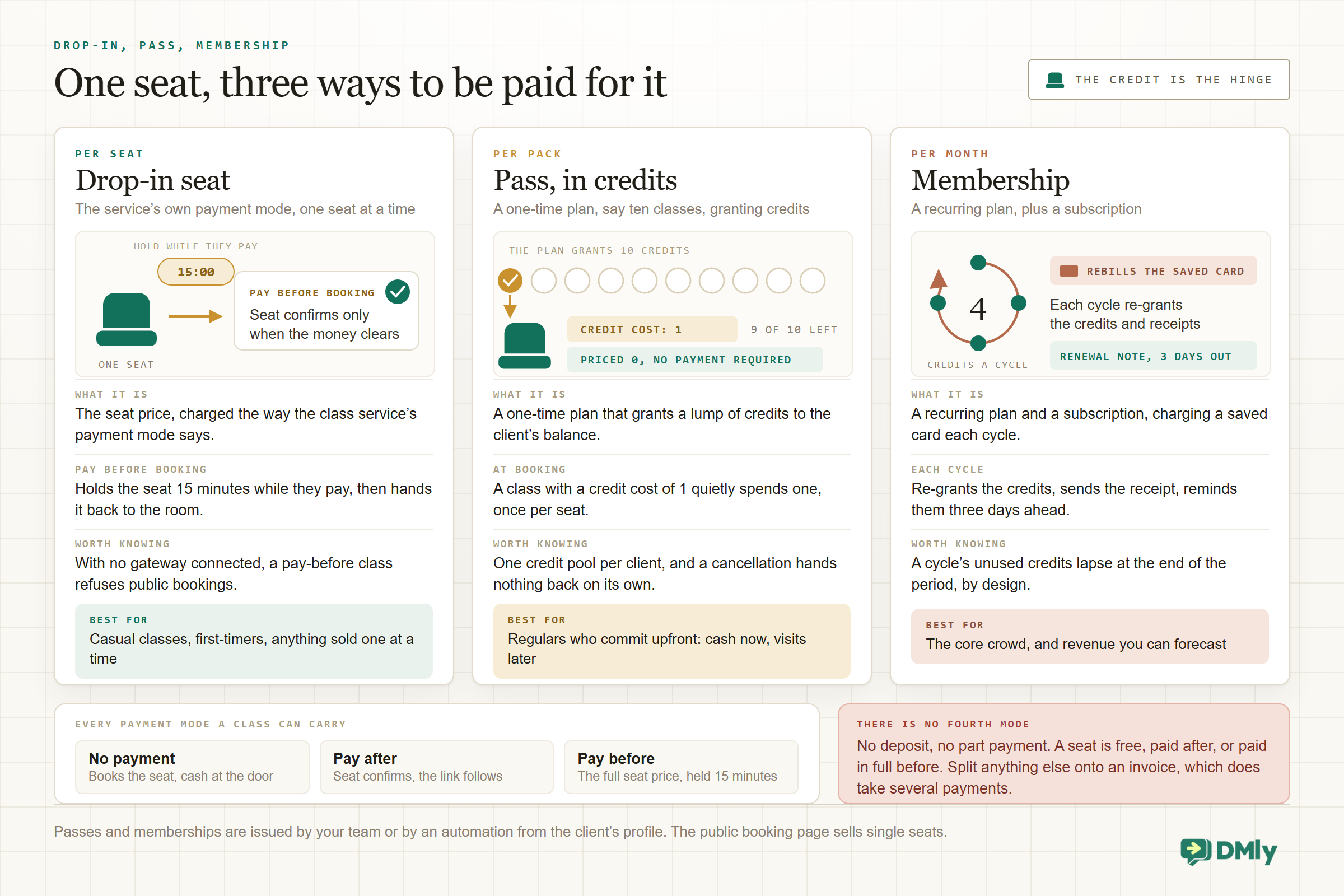
Per seat, at booking. The default for drop-ins. In DMly a class carries a price and a payment mode like any bookable service: No payment required books the seat and takes cash at the door; Pay after confirms the seat and sends a payment link, for clients you invoice; Pay before booking holds the seat for 15 minutes while the client pays and only confirms when the money clears, through whichever of the six gateways you’ve connected (Stripe, PayPal, Paystack, Razorpay, MyFatoorah or Mercado Pago). For paid drop-in classes, pay-before is the honest choice: it kills the no-show problem at the exact moment the customer is most committed, and an unpaid hold releases the seat back to the room within the minute.
One limit to know before you design your pricing: DMly has no deposit or partial-payment setting, so a “pay half now” class doesn’t exist as a switch. Price the bookable thing at what you want up front (a booking fee service, or simply the full seat price) and invoice any balance separately.
Passes and packs, built from credits. The 10-class pass every studio sells is two settings in DMly rather than a feature with that name. A plan (Offerings → Plans) is the bundle: a one-time plan that grants ten credits. A credit cost on the class service is the drain: set it to 1 and every booking quietly spends one credit from the client’s balance, once per seat, with the running total on their profile. Two design rules stop the common mistakes. Credits are drawn down in addition to whatever the payment mode does, so a pass-payable class should be priced at 0 with no payment required, or you’ll charge the card and burn a credit for the same seat. And credits are one pool per client, not fenced per service, so a “massage pack” credit will happily pay for a pilates class if both have a credit cost; keep credit costs consistent or accept the flexibility. Know the honest limits too: clients can’t buy a pass on the public booking page (your team issues it from the client’s profile, or an automation grants it after a payment), and a cancelled booking does not hand the credit back on its own; re-issuing is a decision, and a manual one. Pass design and pricing get their own guides.
Running a studio? The free studio marketing audit scores your bookings, follow-ups and reviews in a few minutes.
Memberships, on a schedule. Make the plan recurring (monthly, say, granting four credits a cycle) and start a subscription from it, and DMly becomes the billing department: with auto-charge on, each cycle charges the client’s saved card, re-grants the credits, sends the receipt, and reminds them three days before the renewal; each cycle’s unused credits lapse when the period ends, which is what makes “four classes a month” mean this month. The card is saved by the client through a link, so nobody handles card details, and a failed renewal retries twice before the subscription pauses rather than silently lapsing. Cancelling stops future billing and claws nothing back. One gateway note: auto-charge works on Stripe, PayPal, Paystack, Razorpay and MyFatoorah; Mercado Pago does pay links only, so subscriptions there are collected by link each cycle.
Whatever mix you choose, put the policy where the money is: what happens on a late cancel, what happens to a no-show’s payment, and how long a pack lasts. The system enforces deadlines; the sentence on the booking page is what stops the argument at the front desk.
Recurring Classes, the Calendar and Online Sessions
A class business doesn’t schedule sessions; it schedules patterns. Tuesday 6pm exists every week until further notice, the beginners’ course is six Thursdays, and the bootcamp is Monday-Wednesday-Friday for a month. In DMly you create the pattern once: sessions are scheduled from Appointments → Calendar, and a recurring series can repeat daily, weekly, bi-weekly or monthly, up to 52 occurrences, with each occurrence inheriting the capacity and the waitlist switch.
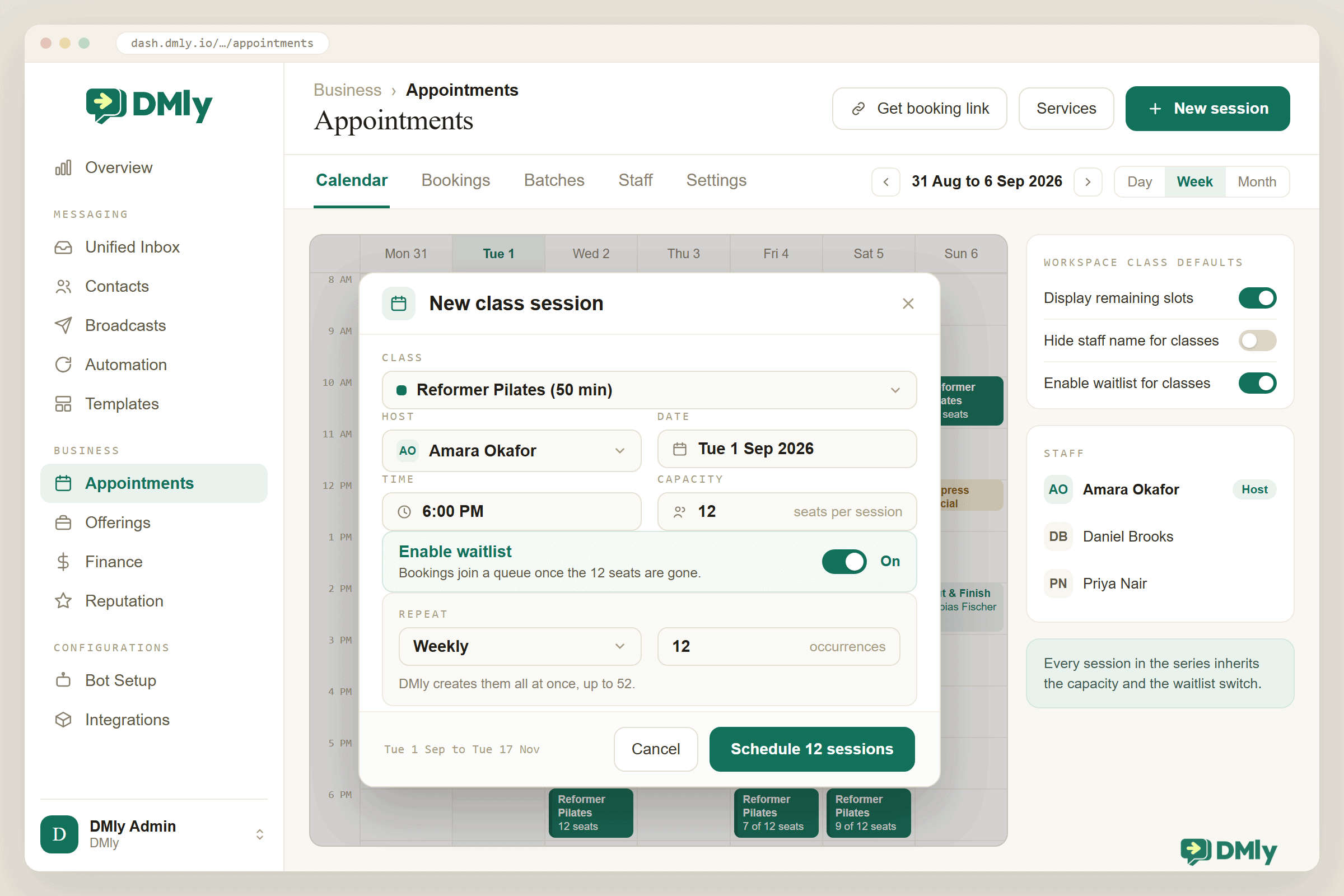
The calendar earns its keep in the collisions it prevents. A host teaching the 6pm class is blocked for one-to-one bookings at 6pm automatically, so the trainer who also does PT sessions can’t be double-sold. Pushed to Google Calendar, sessions sit alongside the rest of the business’s week, and each instructor can subscribe to the read-only calendar feed to see their own timetable on their phone.
Cohorts get their own tool. A batch (Appointments → Batches) is a named, reusable group of clients you enrol into a session, or into the whole series, in one action: the Tuesday beginners’ course becomes one enrol click a term, with already-booked members skipped rather than double-booked and a switch deciding whether the usual confirmations go out. The one hard rule: pay-before classes can’t be batch-enrolled at all, so cohort courses collect money by invoice or plan instead. And a series, once created, is edited from the API rather than the calendar, so get the term’s time and host right before you generate fifty occurrences; cancelling a single session (or a session plus everything after it) is always available from the calendar.
Online classes ride the same rails with one addition. Connect Zoom, set the class’s location to Zoom (auto link), and every session carries its join link in the messages clients receive; for webinar-style sessions there’s a per-attendee option, Zoom Webinar, which registers each booked client for a personal link rather than one shared URL (it needs Zoom’s paid Webinars add-on and an email on the contact; anyone without one falls back to the shared link). A Zoom hiccup never blocks a booking: the seat confirms, just without a link, and the {{meeting.link}} variable places whatever link exists into the confirmations and reminders. A tutor running the same Tuesday group online and in person schedules them as two sessions of two services and stops pasting links into chats forever.
Two housekeeping rules save real pain. Cancel sessions in the system, not in Google Calendar, because deleting the calendar event cancels the booking without telling anyone. And when a term genuinely changes (a new instructor, a moved time), edit the series rather than issuing verbal corrections: the confirmations, reminders and page all read from the schedule, so the schedule has to be the truth.
Reminders, Confirmations and the Rules of the Channel
Everything the system sends about a class rides on a messaging channel, and for most local class businesses that is WhatsApp, which has rules worth two minutes of your attention.
A confirmation sent right after someone books lands inside WhatsApp’s 24-hour customer service window, so it’s a free-form message. The reminder before Tuesday’s class usually falls outside that window, and outside the window only pre-approved template messages can be sent. DMly handles this with managed templates (named dmly_…) submitted to Meta when your number connects; your job is to check they show as Approved before launch, because an unapproved template means the reminder is dropped rather than sent as plain text Meta would block.
Reminders themselves are seeded from the service’s reminder times (a day before and an hour before is a sensible pair for an evening class) and are deliberately conservative: they skip anyone whose booking is no longer confirmed, anyone who has opted out, and any conversation where the bot is paused, and they never ping your team. The one thing worth adding on top is a reason to reply: a client who answers the reminder with “can’t make it tonight” has just freed a seat your waitlist can still fill, which is why the reminder should always carry the manage link and land early enough to matter. For custom versions (a different message for first-timers, a “bring a mat” note for certain classes), the Class starts soon trigger lets you build your own in the flow builder, with the same template rule applying outside the window.
The Roster: Attendance, No-Shows and What Happens After
Every class produces a list of names, and what you do with that list in the ten minutes after the session decides how useful your data ever gets. DMly gives each session a roster with two buttons per seat: Attended and No-show. Mark it while you’re stacking the mats, because everything downstream reads from it: the no-show rate in your reports, the “we missed you” message, the decision about who keeps getting the benefit of pay-at-the-door.
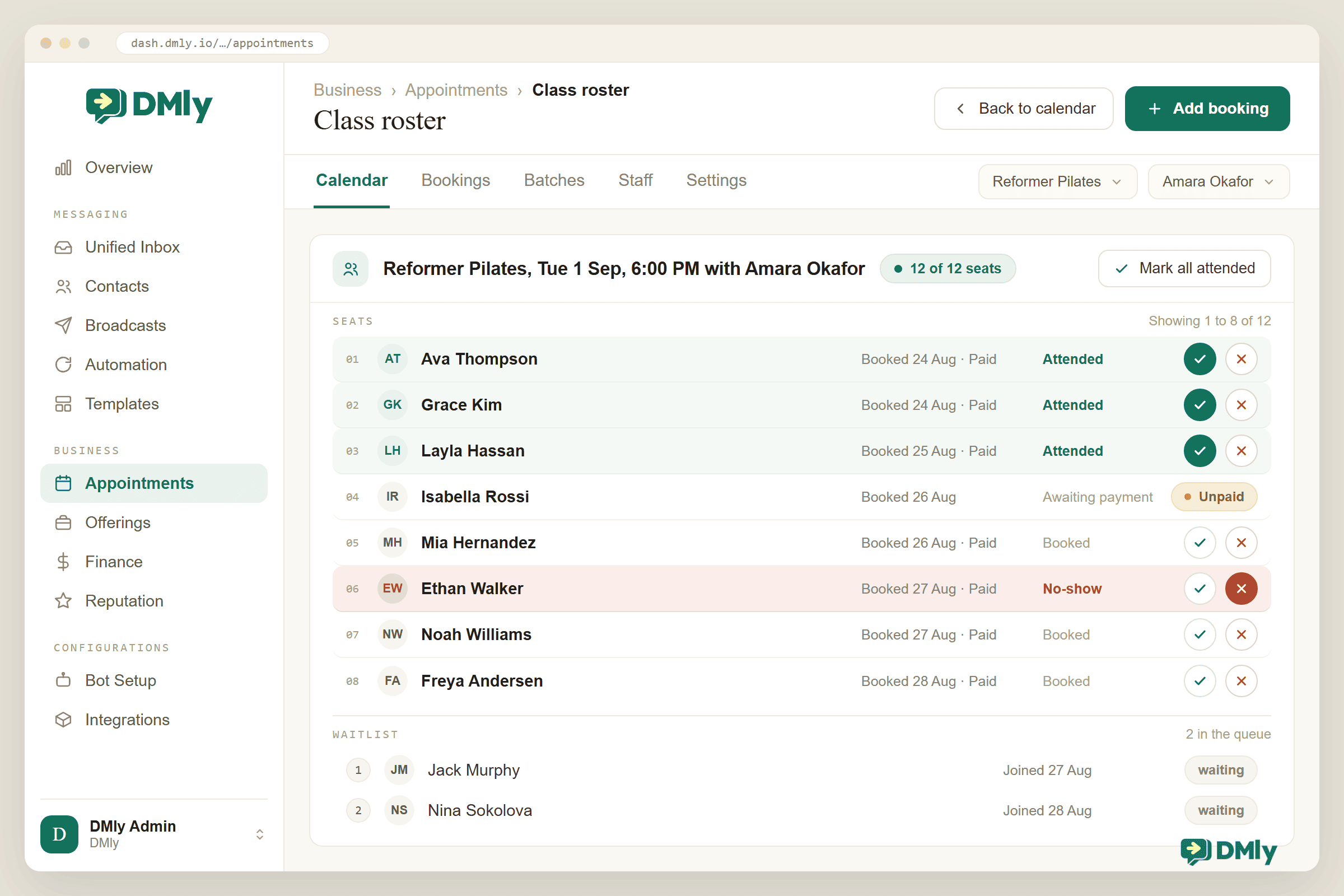
The roster earns some specifics. Seats list first and the waitlist sits below them with queue positions; a Mark all attended button clears a well-attended session in one confirmation; an unpaid pay-before seat wears an Unpaid flag and can’t be marked either way until the money lands; and marking is forgiving, since tapping the same button again reverts the seat and a roster can still be marked the day after DMly retires the session. Two useful side effects ride on the buttons: marking Attended completes the underlying booking and fires the Appointment completed trigger, which is the anchor for the after-class flow, and it’s also what awards loyalty points if your programme pays on attendance; marking No-show fires the Appointment no-show trigger the same way.
The follow-ups then write themselves. A marked no-show can trigger a gentle “everything okay? Tuesday’s class is at 6pm next week too” rather than silence or a scolding. Attendees get the review request while the endorphins are still working (our Google Business Profile automation guide covers the review side properly). And because every seat sits on a contact record, the quiet patterns finally become visible: the regular who hasn’t booked in three weeks gets a win-back message before she becomes an ex-regular, not after.
How AI Changes Class Bookings
Your schedule answers most questions before they are asked, and plenty of clients ask anyway, in the chat, at 9pm: “is there space in tomorrow’s 6am?”, “what’s on for beginners this week?”, “can I cancel Thursday and come Saturday instead?”. An AI agent with class tools handles all three properly, because it reads the same schedule everything else does.
In DMly, the AI Reply step’s built-in tools include the class set: List upcoming classes, Book a class, View booked classes and Cancel a class booking. The agent checks real sessions and real seat counts, books the seat (with the payment rules still applying, and honouring your booking window by offering a later session instead), and cancels within your deadlines, then hands to a human the moment a conversation stops being a booking. There’s a ready-made AI Class Booking bot template with the prompt and tools pre-filled, so the practical setup is closer to switching it on than building it. Give it your timetable page and your policies as knowledge and it also stops the 9pm questions that aren’t bookings at all: what to bring, where to park, whether the beginners’ class is really for beginners.
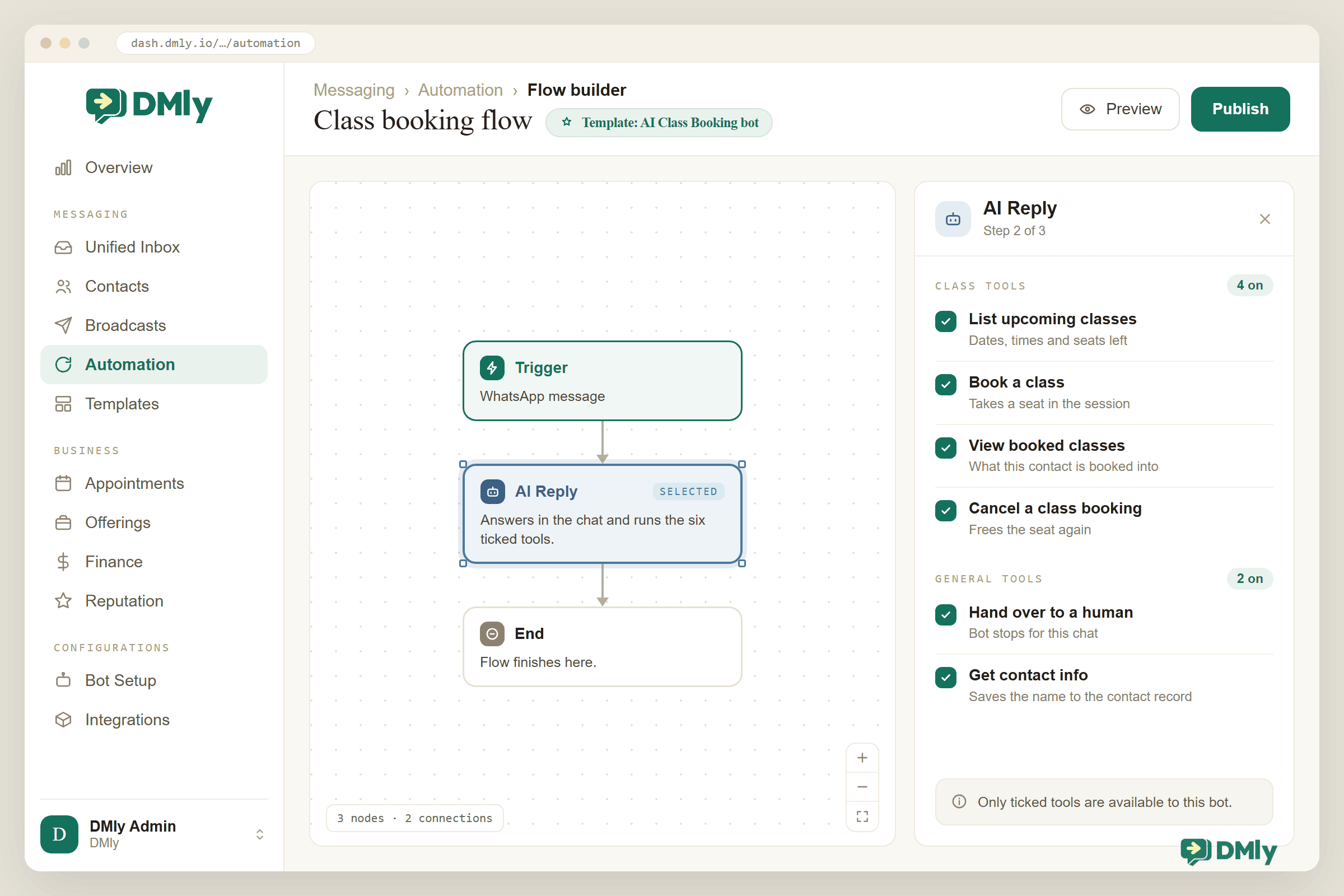
The guardrail is the same one from our appointment booking guide: the agent must read the real schedule, never improvise one. An AI that answers “is there space?” from vibes will fill seat thirteen cheerfully. Tools first, personality second.
What Class Booking Looks Like in Six Businesses
The machinery is identical everywhere; what changes is which part carries the weight for you.
Gyms and fitness studios
High-frequency schedules, hard caps on equipment (twelve bikes is twelve bikes), waitlists doing constant work, and pay-before on peak classes. The 6am crowd books the night before; the reminder goes out at 8pm, not 5am.
Yoga and pilates studios
Mixed levels and small rooms, so capacity and “is this class for me?” questions dominate. The AI answers the level questions; remaining-seat counters create honest urgency without fake scarcity.
Tutors and training centres
Term-length recurring series, parents booking for children, and courses where missing week one matters. Enrolment lists per course, reminders to the parent’s number, and online sessions with per-student links.
Dance and martial arts schools
Belt levels and age groups mean many small classes rather than a few big ones. Hide-staff-name settings help where instructors rotate; the roster doubles as the grading attendance record.
Cookery schools and workshops
High-ticket, ingredient-costed sessions where a no-show is expensive: pay-before on every seat, a tight cancellation deadline, and the waitlist treated as the primary sales channel for sold-out dates.
Community groups and NGOs
Free classes where the enemy is silent attrition: no payment, but reminders and waitlists still, because a free seat someone doesn’t use was still denied to someone who would have come.
Gyms and tutors get their own full guides; this one is the machinery they share.
Why DMly Is the Class Booking System to Build On
Plenty of software sells class scheduling; the case for DMly as your class booking system is that the schedule, the chat, the payments and the follow-up are one product on one contact record. Classes are services with capacity and sessions on a calendar; the hosted booking page (on your own domain, on every plan) and the in-chat Add to Class step sell from the same seat counts, and the step even has a WAITLISTED output so your flow knows the difference between a seat and a place in line. The waitlist promotion, the pay-before hold, the managed WhatsApp templates, the roster, the class triggers and the AI class tools are all the same system, so “the 6pm is full, the 7:30 has four seats, want one?” is a flow, not a job. Bookings and payments are included on every plan ($29, $65 and $149 a month billed yearly), with a 7-day trial and no card.
How to Set Up Your Class Booking System With DMly
The order below gets you from a paper register to a working class booking system, and steps 1 to 5 are an afternoon.
- Create your classes. Offerings → Services, type Class: name, duration, price, payment mode, capacity, location, an image the booking page can show. Start with your real weekly timetable, not every class you’ve ever imagined running.
- Set the class defaults and policy. Business → Appointments → Settings → Class: Display remaining slots on, Enable waitlist for classes on, Hide staff name if your instructors rotate, and the Class Policy pair: a cancellation deadline that gives the waitlist time to work, and a booking window if last-second sign-ups disrupt the room.
- Schedule the sessions. Appointments → Calendar: pick the class, the host, the time, the capacity, the waitlist, and the recurrence for the term. Check the host’s one-to-one availability afterwards if they also take private bookings; the class now blocks it.
- Connect the money. A gateway under Integrations (and its webhook pasted back into the provider’s dashboard, which DMly won’t do for you), then pay-before on the classes where an empty seat costs real money. Without a gateway, a pay-before class refuses public bookings outright, so this step comes before the link goes in the bio. Add plans and credit costs now if you sell passes.
- Publish the page. Brand it, put the booking link in your bio, your Google Business Profile and your website (inline, popup or lightbox embed), and switch on the client portal so regulars can see their own bookings with a code instead of an account.
- Check the messages. Confirmations and reminders as a client would see them, the
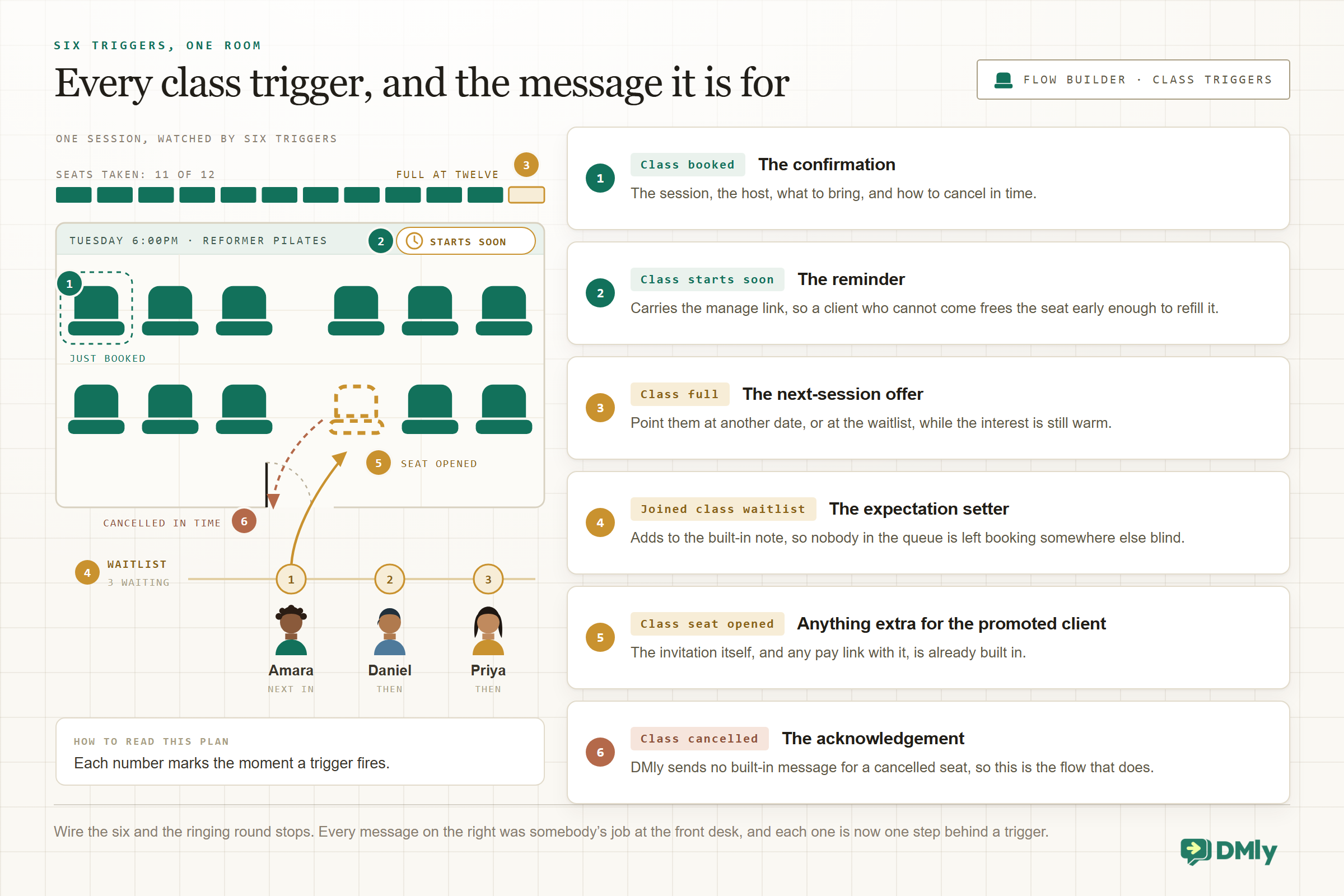
dmly_…templates showing Approved, and email or SMS ticked behind WhatsApp in Notification settings. Remember DMly sends no built-in message for a cancelled class seat, so put one on the Class cancelled trigger. - Wire the six triggers. Class booked, Class starts soon, Class full, Joined class waitlist, Class seat opened, Class cancelled: one message each, as in Figure 8. This is the step that replaces the ringing-round.
- Run a real week, then read the report. Book yourself in from a personal phone, cancel in time, watch the waitlist refill your seat, mark the roster, then check Configurations → Reports → Appointments for bookings, no-show rate and average class fill, by service and by staff, with CSV and PDF export. Fill rate tells you what to schedule more of; the no-show rate tells you which classes need pay-before.
Best Practices for Class Bookings
- Sell the remaining seats, not the class. “3 seats left tonight” outperforms “book our pilates class” every time, and the counter makes it true automatically.
- Set the cancellation deadline for the waitlist, not for punishment. The point of a deadline is to free seats early enough to refill them.
- Reminders that invite a reply. “Can’t make it? Tap here and your seat goes to someone on the waitlist” reframes cancelling as a favour, which is exactly what it is.
- Mark the roster the same hour. A register kept at the door is data; a register reconstructed on Sunday is fiction.
- Open the second session when the waitlist tells you to. Consistent overflow is the cheapest market research you will ever get.
- Keep the schedule as the single truth. If it changed in the room, change it in the system before you tell anyone, because the system is what tells everyone.
Mistakes to Avoid
- Capacity set to what the room could hold on a good day. Set it to what the class is good at. Overbooked rooms churn quietly.
- No waitlist on paid classes. That’s the highest-intent audience you have, standing in a queue you chose not to build.
- Free booking on expensive-to-run classes. If ingredients, equipment or a hard seat cap are involved, take the money at booking; the 15-minute hold exists exactly for this.
- Cancelling sessions in Google Calendar. Deleting the event cancels bookings without telling the clients. Cancel in the system, which apologises for you.
- Treating the class list as a broadcast list. People who booked a class consented to messages about that class. The promotion for your retreat goes to opted-in contacts through a proper broadcast, not to Tuesday’s roster.
- Building class flows on appointment triggers. Booking a seat fires Class booked, never Appointment booked, and the docs call this the single most common surprise when a workspace adds its first class. If your welcome flow isn’t running for class bookings, this is why.
- Ignoring the fill-rate report. A timetable is a portfolio. The Tuesday 6pm that runs at 40% for a term isn’t a scheduling fact; it’s a decision you haven’t made yet.
Final Thoughts
A class booking system isn’t really about bookings. It’s about running a room at capacity: publishing a schedule people can act on at 9pm, refusing to sell seat thirteen, refilling the cancelled seat while the demand is still warm, reminding the forgetful, and keeping a register honest enough to learn from. None of those steps is hard; what’s hard is doing all of them, every session, forever, by hand.
That’s the case for building it properly once: a class defined as a product, sessions scheduled as a pattern, capacity and waitlists doing the arithmetic, payments where the commitment is, and the follow-up running off a roster somebody actually marked. Start with your real timetable and one term, and let the fill-rate report tell you what to do next.
Set up class bookings
Classes with capacity and waitlists, a branded booking page, in-chat and AI booking, payments through your gateway, reminders on WhatsApp and a roster your reports can trust. Start the 7-day free trial, no card needed.
Frequently Asked Questions
What’s the difference between a class booking system and an appointment booking system?
An appointment sells one time slot to one person; a class sells one time slot as many seats. That one difference is why class systems need capacity, waitlists, rosters and remaining-seat displays, and why appointment tools with a “group” option usually disappoint class businesses. If you sell hours one-to-one, see our WhatsApp appointment booking guide instead.
Can customers book a class without messaging or calling us?
Yes. With DMly, classes appear on your hosted booking page (and your own domain if you set one up), with live remaining-seat counts if you enable them. Customers can also book inside the chat: the Add to Class step books seats in a flow, and an AI agent with class tools can list upcoming classes and book one in conversation, at any hour.
What happens when a class is full?
The booking page stops selling and shows “Sorry, that class is now full.” With the waitlist enabled, the customer joins the list instead; when a booked client cancels in time, the seat opens, the promotion runs automatically, and on paid classes the promoted client pays inside a 15-minute hold before the seat confirms. Nobody rings round.
Can a client move their class booking to a different session?
No, and that’s deliberate. Class bookings are cancelled (within your deadlines) and rebooked rather than rescheduled, so a seat is always cleanly either taken or free. The cancellation frees the seat for the waitlist; the client books the session that suits them.
How do reminders for classes work on WhatsApp?
Confirmations sent right after booking are free-form because they land in WhatsApp’s 24-hour window. Reminders before the session usually fall outside it, so they go out on approved utility templates that DMly submits and manages for you; check they show Approved before launch. Reminders skip cancelled bookings and opted-out contacts, and the Class starts soon trigger lets you build custom versions.
Do online classes work the same way?
Yes, with the join link handled for you. Connect Zoom and set the class location to Zoom (auto link) for a shared link per session, or use the Zoom Webinar option to give each attendee a personal link. Capacity, waitlists, reminders and the roster behave exactly as they do for in-person sessions.
Can I sell a 10-class pass or a monthly membership?
Yes, as plans and credits. A one-time plan grants a lump of credits (ten, for a 10-class pass) and the class service carries a credit cost of one, so each booking spends a credit automatically. A recurring plan plus a subscription makes it a membership: auto-charge bills the saved card each cycle and re-grants the credits, with a renewal reminder three days before. Two limits to know: passes are issued by your team or an automation rather than bought on the public booking page, and cancelling a booking doesn’t return the credit by itself.
Can I run the same class every week without recreating it?
Yes. A class is defined once as a service; sessions are scheduled from the calendar with daily, weekly, bi-weekly or monthly recurrence, up to 52 occurrences in a series, each inheriting the capacity and waitlist settings. A term is one scheduling action, not fifty.
Writing about WhatsApp automation, bookings and growth for local business.
Turn WhatsApp into your busiest channel.
Start free and run message, bookings, payments and reviews in one place.
