
How to Build a WhatsApp Sales Pipeline That Maintains Itself
Most pipelines die the same death. Somebody sets up four columns called New, Warm, Hot and Won, everybody nods, and three weeks later nobody in the building can say what separates Warm from Hot. So contacts stop moving. The board fills up with people who were warm in April, the team quietly goes back to remembering things, and the whole thing becomes a screen nobody opens.
A WhatsApp sales pipeline dies faster than most, because the deal is a conversation and conversations do not announce that they have moved. Nobody gets an email saying a lead went from interested to ready. If your columns describe how somebody feels about a lead, the only thing that can update them is a person remembering to, on a Friday, when the shop is busy.
The fix is one rule, and everything else in this guide follows from it: every stage must be entered by a specific thing that happened. An enquiry arrived. A quote was sent. A deposit was paid. Facts have timestamps, and anything with a timestamp can be automated, which means nobody has to make a judgement call at five to six.
This guide covers designing stages that survive a busy week, the six ways a contact can move between them, the one thing about the pipeline that nothing in DMly can react to, the two limits on the board that hide your most valuable leads, and how to find the ones that have quietly stopped moving. Our WhatsApp CRM guide makes the case for having a pipeline at all; this page is how to build one.
Every Stage in a WhatsApp Sales Pipeline Has to Be a Fact
If you cannot write down the sentence that moves somebody into a stage, that stage will not be maintained. Not because your team is careless, but because judgement calls are the first thing to go when the day gets busy.
Test every column you are thinking of against three questions.
- What specific thing happened to put them here? Not what you believe about them. An enquiry arrived, a quote was sent, a deposit was paid, an appointment was booked. If the answer is “it feels like they are getting closer”, it is not a stage.
- What is the one thing that should happen next? A stage with no obvious next action is a label rather than a stage, and labels belong on tags.
- Could a flow do this? If it could, it should. Every manual stage move is a step somebody will skip on the day you most need it done.
Three or four stages is right for almost every local business. Seven describes an enterprise sales cycle you do not have, and every column you add is another column somebody has to keep true. The board is a working surface, not a diagram of your process.
Pipeline Stage Is Not Lifecycle Stage
DMly holds two separate ideas about where a contact stands, they never talk to each other, and the naming makes them very easy to confuse. Sorting this out before you build anything saves an argument later, because two of the three default columns are called Lead and Customer.
| Lifecycle stage | Pipeline stage | |
| Values | Lead, Client, and two more the dashboard cannot set | Whatever columns you create |
| Means | Commercial history exists | Where they are in your own process |
| Set by | The platform, almost always automatically | You, or your automations |
| Changes when | An invoice, order, payment or subscription appears | Whenever you say it does |
| Starting value | Lead | No stage |
The consequence that catches everybody: dragging somebody into a column called Customer does not make them a client, and converting somebody to a client does not move their card. Lifecycle converts on its own the moment real money touches them, which is why it is reliable. The manual Convert to client button is the one that stops, and it asks for a phone number or an email first, on the sensible grounds that a client is somebody you can reach and invoice. See our guide to invoicing through WhatsApp for the money side of that.
Both of these are also independent of the three other switches a contact carries: blocked, opted out, and bot paused. Five switches, none of which feed each other. That independence is deliberate, and it is exactly why you should never try to make one of them carry two ideas.
A Stage Set That Works for a Messaging Business
Here is a set built to the rule above, with the entry event written out for each one. Change the names to suit your trade; keep the discipline.
| Stage | Entered when | The one next action |
| New enquiry | A first inbound message arrives | Answer it, and find out what they want |
| Qualified | You know the service and roughly the timing | Offer a slot or send a price |
| Quoted | A price or a specific time has gone out | Follow up on a schedule, not on a feeling |
| Booked | An appointment exists, or a deposit is paid | Confirm it and remind them |
| Not now | They said not yet, or went quiet past your threshold | Nothing today. Re-engage later as a segment |
Two things about that set are deliberate. Every entry event is something the platform already knows about, which means four of the five moves can be driven by a flow. And there is an explicit resting place for people who are not saying no but are not saying yes, because without a Not now those contacts sit in Quoted forever and the board stops meaning anything.
What is deliberately missing is a Won column and a Lost column. On a messaging pipeline, Won is better expressed by the lifecycle stage, which the platform sets for you when money appears. And Lost is usually a tag rather than a stage, because a lost lead in this trade is frequently a customer eighteen months later.
Setting the columns up, in ninety seconds: Every workspace starts with three stages called Lead, Engaged and Customer, and contacts sit in No stage until something places them, so a brand new workspace looks like an empty pipeline even while enquiries are arriving. Add stage takes a name and a colour. Names and colours are edited in place. Reorder the columns so they read left to right in the order your work actually happens, because a board whose columns are out of order gets misread every day. Delete stage removes the column without deleting anybody: its contacts move to No stage, where they are very easy to overlook. If you delete a column, filter for No stage straight afterwards and put those people somewhere.
The Six Ways a Contact Moves Through a WhatsApp Sales Pipeline
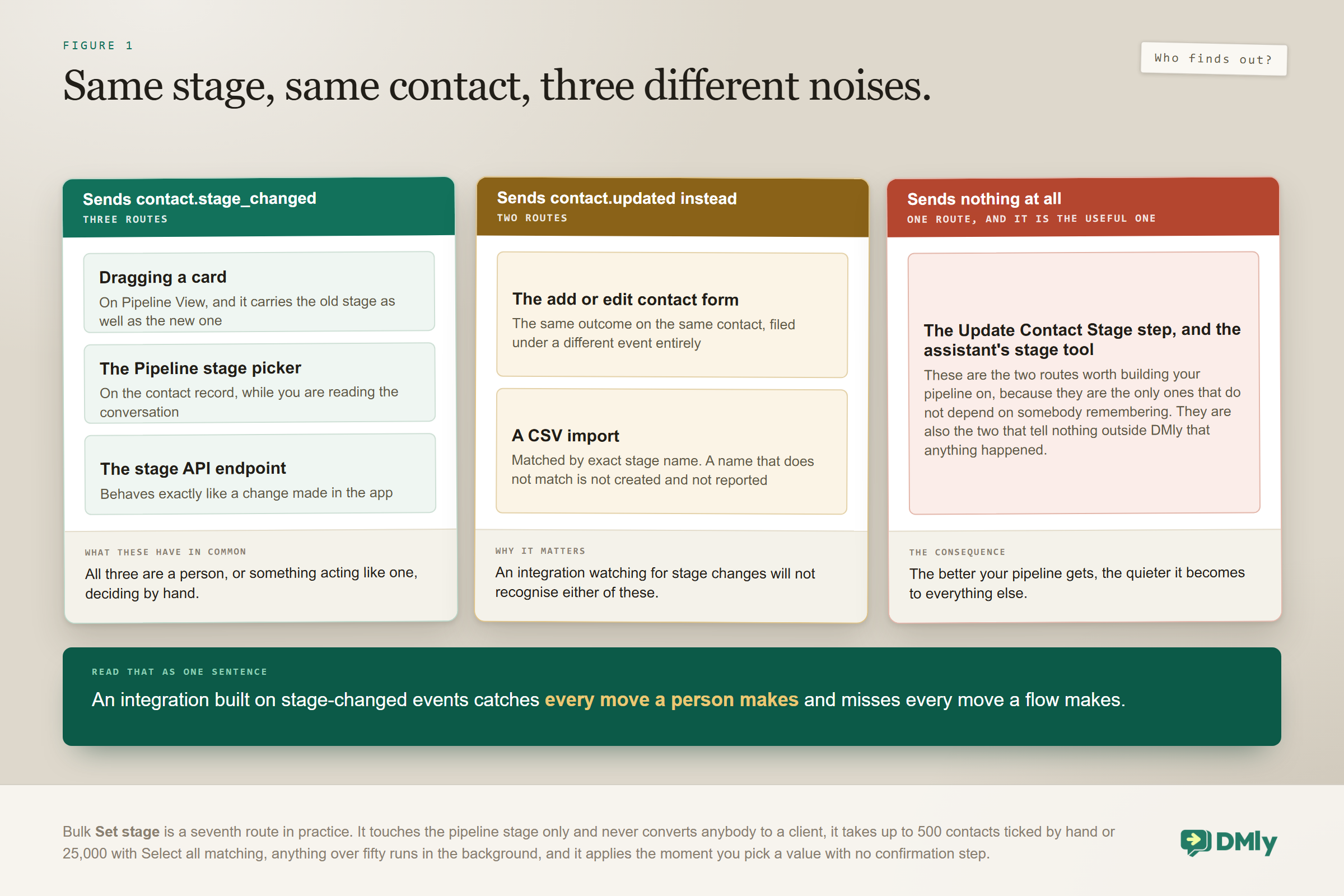
Six routes exist, they all end with the same stage on the same contact, and they do not all tell the outside world the same thing. That last part matters the moment anything else in your business is listening.
| Route | Who uses it | What it sends |
| Dragging a card on Pipeline View | A person, working the board | contact.stage_changed, carrying the old stage and the new one |
| The Pipeline stage picker on a contact | A person, reading a record | contact.stage_changed |
| The stage endpoint on the API | An integration | contact.stage_changed |
| The add or edit contact form | A person, creating or editing | contact.updated instead |
| A CSV import | A bulk load | Import behaviour, matched by exact stage name |
| The Update Contact Stage step, or the assistant | An automation | Nothing at all |
Read the last row twice if anything outside DMly depends on your pipeline. Automated stage moves send no webhook. A reporting tool or an accounting system listening for stage changes will see every move a person makes by hand and miss every move a flow makes, which is precisely the wrong way round for a pipeline you intend to automate.
Two more behaviours are worth knowing before you move anybody in bulk. The contacts list has a Set stage button that applies to the pipeline stage only and never converts anybody to a client. It takes up to 500 contacts ticked by hand, or up to 25,000 when you use Select all matching, and anything over fifty runs in the background instead of making you wait. It applies the moment you pick a value, with no confirmation step, so check the selection before you click. Your selection follows you across pages, which is convenient and occasionally alarming, and changing a filter clears it so you can never bulk-move somebody you can no longer see.
And one asymmetry catches everybody exactly once: bulk stage changes deliberately do not fire automation triggers, while a CSV import deliberately does. Bulk-moving two hundred contacts into Not now will not start two hundred re-engagement flows, which is almost always what you want and occasionally a surprise.
Your WhatsApp Sales Pipeline Is an Output, Not an Input
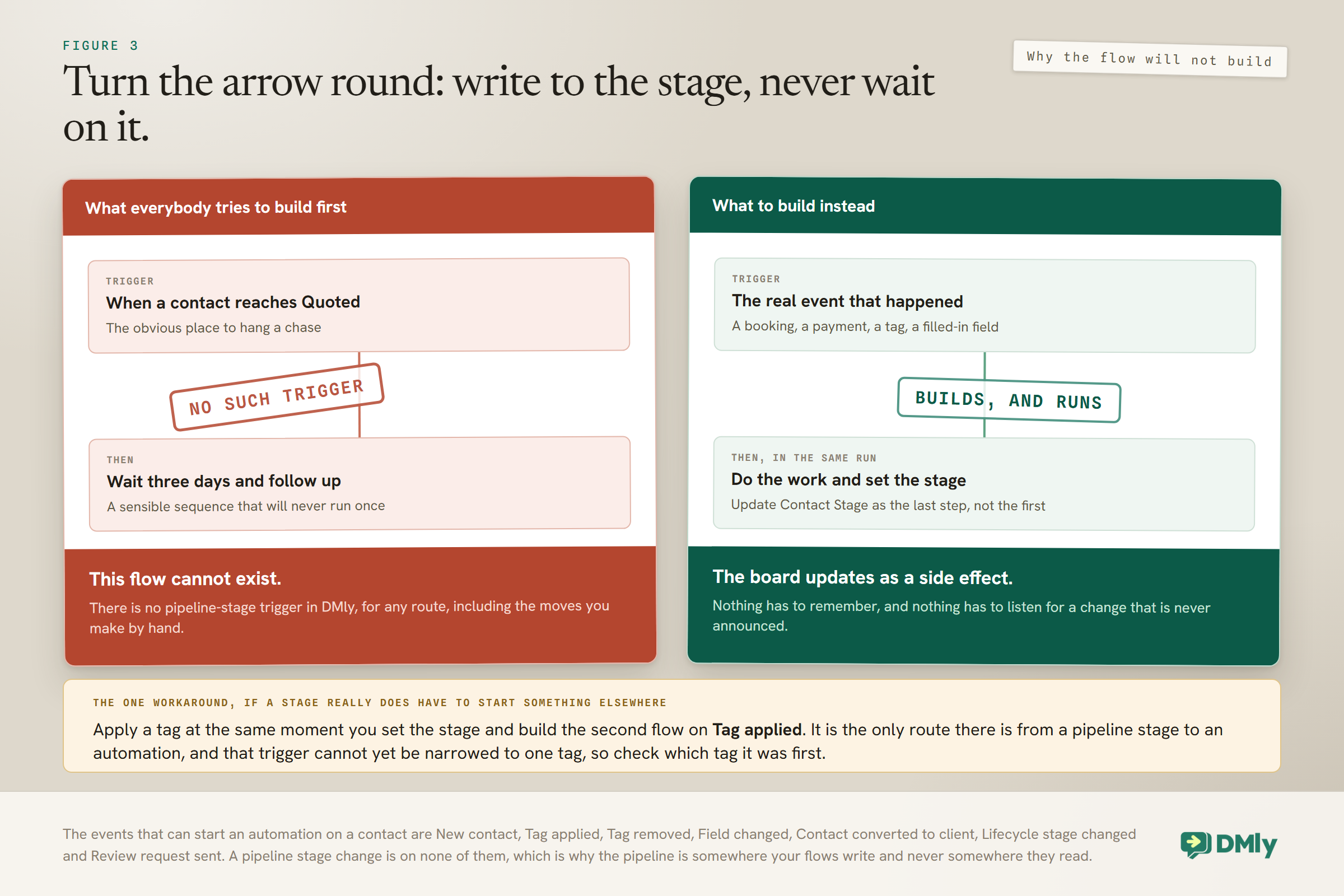
Nothing in DMly can react to a pipeline stage change. There is no trigger for it, by any route, including the ones you make by hand. This is the single most important thing to know before you design a WhatsApp sales pipeline, and it is the reason so many carefully built boards end up doing nothing.
The instinct, once the columns exist, is to build automations off them: when somebody reaches Quoted, wait three days and chase. That flow cannot be built. Look at the list of contact events that can start an automation and the pipeline is simply absent from it.
- New contact, when somebody first reaches you on any channel, or is added by hand, by the API or by an import.
- Tag applied and Tag removed, neither of which can yet be narrowed to one particular tag.
- Field changed, when a custom field’s value changes, firing once per field that changed.
- Contact converted to client, and Lifecycle stage changed, which are the two sides of the money line.
- Review request sent.
A stage change is on none of them. So turn the arrow round. Your flows should set the stage, and never wait on it. Hang each automation on the real event that would have moved the stage anyway, and let the stage move as a side effect of that same flow.
In practice that means chasing a quote from a scheduled check or a tag rather than from the Quoted column, and welcoming a new client from Contact converted to client rather than from a Customer column somebody dragged them into. If you genuinely need something to happen when a contact reaches a stage, have the flow that sets the stage do that thing too, in the same run, rather than trying to listen for it afterwards.
The one workaround worth knowing: If you need a stage change to start something in a different flow, pair the stage with a tag. Have the flow apply a tag such as stage-quoted at the same moment it sets the stage, and build the second flow on Tag applied. It costs you one extra step and a little tag hygiene, and it is the only route from a stage to an automation. Remember that Tag applied cannot be narrowed to one tag yet, so the second flow’s first step has to check which tag it was.
Automating the Movement
The Update Contact Stage step is what turns a WhatsApp sales pipeline from an admin task into something that runs itself. Every stage in the set above can be driven by an event the platform already produces, which is the whole point of choosing entry events that are facts.
- New enquiry: the New contact trigger, or the first inbound message on the channel.
- Qualified: the point in your qualification flow where the service and the timing have both been written to fields. Build it in the drag and drop flow builder as the step straight after capture.
- Quoted: immediately after the flow sends the price or the slot options, in the same run.
- Booked: the Appointment booked trigger, or Payment succeeded if you take a deposit. Our appointment booking guide covers the booking side.
- Not now: a scheduled check against days since last activity, or an explicit branch the moment a customer says later.
The assistant can move stages too, with its Move CRM stage tool, which is genuinely useful on a qualification conversation. Note that it is not among the five tools a new AI reply step arrives with, which are get contact info, add a note, add tags, hand over to a human and move to the unassigned queue. If you are expecting your assistant to keep the board current, switch that tool on deliberately, and remember it fires no webhook when it acts.
One piece of judgement about how much to automate: move contacts forward automatically and be much more careful about moving them backwards. An automation that demotes somebody for going quiet for a fortnight will eventually demote the customer your colleague spoke to on the phone yesterday, and that is the kind of error that makes a team stop trusting the board.
Two Limits on the Board, and Why They Hide Your Best Leads
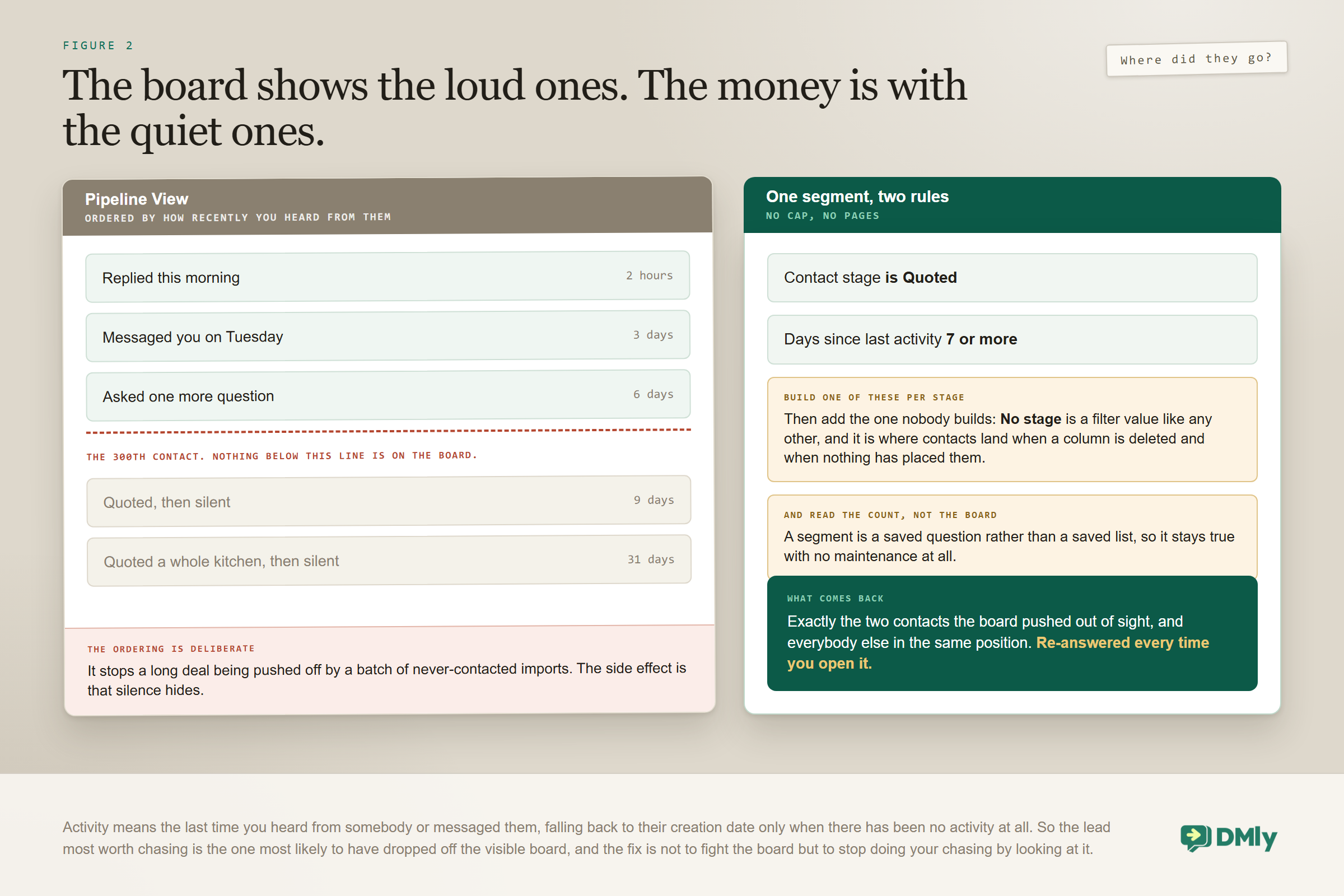
The board shows at most 300 contacts, it has no pages, and it prefers the people you have heard from recently. Neither limit is signposted while you are using it, and together they hide exactly the leads you most need to see.
The cap is the easy one. For a quiet business it will never bite. For a busy one, contacts genuinely are not on the board, and the reflex of scrolling to find somebody will not work. They have not gone anywhere: List View with a Stage filter has no such limit and reaches everybody.
The ordering is the subtle one, and it is worth reading twice. The 300 slots go to the most recently active contacts, where activity means when you last heard from them or messaged them, falling back to their creation date only when there has been no activity at all. That is a deliberate choice, so that a long-running deal is not pushed off the board by a batch of never-contacted imports. But follow it through: the lead who has gone completely silent, which is precisely the lead most worth chasing, is the one most likely to have fallen off the visible board. A pipeline that looks healthy can be hiding its own problem.
The fix is not to fight the board. It is to stop doing your chasing by looking at it.
Finding the Leads That Have Quietly Stalled
Build one segment per stage that pairs the stage with a period of silence, and work from those instead of from the board. This is the most valuable habit in this guide, and it is the part of running a WhatsApp sales pipeline that pays for the rest, because stalled leads are where money you have already spent on enquiries quietly evaporates.
The segment builder has a Contact stage filter, and Number of days since last activity sits directly beside it. Two rules, one segment, and between them they answer a question the board is structurally unable to. Because a segment is a saved question rather than a saved list, these stay current for ever with no maintenance at all.
- Enquiries nobody answered. Stage is New enquiry, quiet for more than a day. This should be empty every single morning. If it is not, you have an inbox problem rather than a pipeline problem.
- Qualified but never quoted. Stage is Qualified, quiet for more than three days. Somebody did the hard part and then stopped.
- Quoted and gone quiet. Stage is Quoted, quiet for more than a week. Commercially the most valuable list in the business, and the one almost nobody looks at.
- Booked but not confirmed. Stage is Booked, and whatever confirmation tag you use is absent.
- Not now, and now it is later. Stage is Not now, quiet for more than 90 days. A quarterly re-engagement audience that costs nothing to keep.
One extra segment is worth having and nobody builds it: No stage. It is a filter value on List View like any other, and it is where contacts land when a column is deleted and when nothing has placed them. It is the pipeline’s blind spot and a direct measure of whether your automations are actually working.
What If You Run Two Different Sales Processes?
The documentation describes one set of pipeline stages for the workspace, so two genuinely different processes have to share one WhatsApp sales pipeline. That sounds like a limitation and is usually a useful constraint, because most businesses that think they need two pipelines need one pipeline and a tag.
- Abstract the stage names. A wedding photographer and a portrait photographer both have an enquiry, a qualification, a quote and a booking. Name the columns for the shape of the process rather than for the product, then tag the contact with which line of work it is. One board, two readable filters.
- Tag the process and work from the list. A tag such as
tradeorretaillets you use List View with a Stage filter plus the tag, which gives you what looks like two pipelines without two sets of columns to maintain. - Use separate workspaces. Only when the two businesses genuinely share nothing: different customers, different staff, different numbers. It is a real cost, because contacts, tags and automations do not cross workspaces, so treat it as a last resort rather than a first instinct.
The failure to avoid is one board with nine columns serving two processes, four of which are irrelevant to whoever happens to be looking at it. That is how boards stop being read.
Bringing an Existing Pipeline In
If your leads currently live in a spreadsheet or another system, a CSV import can place them into stages on the way in, and one detail decides whether it works.
The importer matches a stage by its exact name. A spreadsheet column containing qualified against a stage named Qualified will not land where you expect, and neither will a trailing space, which is invisible and extremely common in exported data. A name that does not match is not created and is not reported: the contact simply imports with no stage at all. So create your stages first, then copy the names out of DMly into your spreadsheet rather than typing them again.
The second thing to plan for is that a CSV import fires automation triggers, one start per row, unlike a bulk action. An import of six hundred old leads fires New contact six hundred times, and if you have a welcome flow on that trigger, six hundred people who have not thought about you since March are about to hear from you. Pause the relevant automations before a large import, or accept the consequence on purpose.
Two smaller notes worth having. An exact phone or email match attaches the import channel to a contact you already have rather than creating a second copy, which makes a clean import a surprisingly good tidy-up. And the tags column replaces a contact’s tags rather than adding to them, so re-importing a file with a blank tags column strips every tag those people had.
Working It Day to Day, and Measuring It Without a Report
A WhatsApp sales pipeline is a habit with a screen attached, and the habit is smaller than people expect. Five minutes in the morning and twenty minutes a month is genuinely enough.
- Every morning: open the unanswered-enquiry segment, not the board. It should be empty.
- Then work Quoted, oldest first. This is where revenue is sitting still.
- Move anything genuinely dormant to Not now rather than leaving it in Quoted. A truthful board is worth far more than an optimistic one.
- Every week: look at No stage. It is the blind spot, and it fills up quietly.
- Every month: count each stage. One column holding most of the contacts usually means a missing stage or a broken automation immediately after it.
Those monthly counts are most of the measurement you need, and none of it requires a reporting suite. Take the count per stage for the shape of the funnel, the stalled count per stage as the number to drive down, the No stage count as a direct measure of whether your automations are placing people, and, for the two stages that matter most, how many of last month’s arrivals are further along now.
Alongside those, the Team tab of Reports gives you average first response and average resolution times, per teammate and for the team. That is worth reading next to the pipeline counts, because a Quoted column that keeps filling up is often an inbox problem wearing a pipeline costume. Two caveats on those figures: first response is measured from the moment a conversation was assigned rather than from when the customer wrote, so time spent unassigned never reaches the number, and a reply sent by a bot or an automation is never attributed to a person. Our guide to running one inbox covers the ownership side, and our metrics guide covers what else is worth counting.
Ownership matters as much as staging, incidentally. A lead sitting in Quoted that belongs to nobody will not be followed up, whatever the board says.
Using Stages Beyond the Board
A stage is a field like any other, so it is available wherever contact data is. Two uses are worth building deliberately.
In segments it appears as the Contact stage filter, which is how all the stalled-lead work above is built. In broadcasts, a stage-based segment lets you message exactly the people at one point in your process, which is better targeting than most small businesses ever achieve. A gentle nudge to everybody in Quoted who has been quiet for a week is one of the highest-return campaigns available to you, and the mechanics are in our guide to WhatsApp broadcasts.
One caution when you do that. Being in a pipeline column is not consent. Opted-out contacts are blocked at send time on every channel whatever audience you choose, so nobody unwilling will receive it, but tick Reachable contacts only in the broadcast wizard as well, because it is unticked by default and without it your failed count fills up with people who were never going to be messaged.
Mistakes Worth Avoiding
- Stages that describe feelings. Warm and Hot cannot be automated and will not be maintained.
- Waiting for a stage change to start a flow. There is no trigger for it. Set the stage from your flows and never listen for it.
- Assuming a Customer column makes somebody a client. Pipeline and lifecycle are independent, and lifecycle converts when money appears.
- Building an integration on stage-changed events. It will catch every manual move and miss every automated one.
- Managing stalled leads from the board. It caps at 300 and favours recent activity, so the silent ones fall off exactly when you need them.
- Skipping a resting stage. Without a Not now, everything piles up in Quoted and the board stops telling you anything.
- Importing stages with mismatched names. A name that does not match exactly is not created and not reported.
- Leaving the assistant’s stage tool switched off while expecting it to keep the board current.
- Seven columns. Three or four that are true beat seven that nobody trusts.
Frequently Asked Questions
How do I build a WhatsApp sales pipeline in DMly?
Create one stage per observable step in your process under Contacts, then move contacts between them with the Update Contact Stage step inside your flows so the movement is automatic. Every workspace starts with Lead, Engaged and Customer, and contacts sit in No stage until something places them.
Can I start an automation when a contact reaches a stage?
No. There is no pipeline-stage trigger, by any route, so nothing can react to a stage change. Build the flow on the real event instead, and have that same flow set the stage. If you genuinely need a stage to start something elsewhere, apply a tag at the same moment and build the second flow on Tag applied.
What is the difference between pipeline stage and lifecycle stage?
Lifecycle reflects commercial history and converts to Client on its own when an invoice, order, payment or subscription appears. Pipeline stage is your own sales process with whatever columns you create. They are independent, so moving somebody into a Customer column does not make them a client.
What happens if I delete a stage?
The column goes and the contacts in it do not. They move to No stage, where they are very easy to overlook, so filter for No stage straight afterwards and place them somewhere.
Why can I not find a contact on the pipeline board?
The board shows at most 300 contacts and has no pages, and those slots go to the most recently active people rather than the most recently added. Use List View with a Stage filter, which has no such limit.
Does an automated stage change send a webhook?
No. Dragging a card, the Pipeline stage picker and the stage API endpoint all send contact.stage_changed, the contact form sends contact.updated instead, and the flow step and the assistant send nothing at all.
Can I move a lot of contacts at once?
Yes. The contacts list has a Set stage bulk action that touches the pipeline stage only. It takes up to 500 contacts ticked by hand or up to 25,000 with Select all matching, anything over fifty runs in the background, and it applies the moment you pick a value with no confirmation. Bulk stage changes do not fire automation triggers.
Three Columns and a Rule
The WhatsApp sales pipeline that works is smaller than the one most people design. Three or four columns, each entered by something that actually happened, most of the moves set by a flow, and one honest resting place for the leads that have gone quiet.
Then remember which direction the arrow points. The pipeline is something your automations write to, never something they read from, so hang every flow on the real event and let the stage follow. And do the chasing through segments rather than by staring at the board, because the board is showing you the people who are already talking to you.
Get those two things right and the board stops being a thing you maintain and starts being a thing you read. The wider picture, including how the record underneath it fills itself in, is in our WhatsApp CRM guide.
Writing about WhatsApp automation, bookings and growth for local business.
Turn WhatsApp into your busiest channel.
Start free and run message, bookings, payments and reviews in one place.
